







Let’s be honest, document management rarely makes it to the top of a small business owner’s to-do list, since serving customers and driving revenue usually come first. The problem is that disorganized files can slow down work and even expose your company to unnecessary risks. A reliable document management system keeps your information secure and streamlines day-to-day tasks. I’ve put together this guide to help you find the best document management software that fits your budget and daily workflow.
- Zoho Work Drive: Best for collaboration
- Google Drive: Best generous free storage
- Box: Best AI-driven document workflows
- Dropbox: Best for ease of use
- M-Files: Best for Microsoft ecosystem integration
- pCloud: Best for individual use
Why you can trust Fit Small Business
- What is a document management system?
- Best document management software compared
- Which document management software is right for you?
- Zoho WorkDrive: Best for collaboration
- Google Drive: Best generous free storage
- Box: Best for AI-driven document workflows
- Dropbox: Best for ease of use
- M-Files: Best Microsoft ecosystem integration
- pCloud: Best for individual use
- What are the key features of document management solutions
- How to choose the right document management software
- Frequently asked questions (FAQs)
What is a document management system?
A document management system (DMS) is a cloud-based solution that centralizes how digital files are stored, organized, and accessed across a business. Instead of scattering documents in email threads or different cloud folders, a DMS keeps them in one secure hub where permissions and version history are easier to control.
In 2023, nearly half of employees reported struggling to find documents efficiently, while 47% stated that their company’s filing system is difficult to navigate, according to a survey by Adobe Acrobat. These findings highlight the challenges faced by small businesses in maintaining organization when relying on basic storage methods. By introducing document management system solutions, teams can keep files secure while handling routine tasks such as sharing and real-time editing.
Best document management software compared
| Free plan | Monthly starting price (per user) | Key features | My rating | |
|---|---|---|---|---|
 | ✅ | $2.50 for 1TB |
| 4.96 out of 5 |
| Visit Zoho Work Drive | ||||
 | ✅ | $7 for 30GB |
| 4.77 out of 5 |
| Visit Google Drive | ||||
 | ✅ | $5.80 for 100GB |
| 4.63 out of 5 |
| Visit Box | ||||
 | ✅ | $11.99 for 2TB |
| 4.26 out of 5 |
| Visit Dropbox | ||||
 | 30-day trial only | Custom pricing |
| 3.8 out of 5 |
| Visit M-Files | ||||
 | ✅ | $4.99 for 500GB |
| 3.56 out of 5 |
| Visit pCloud | ||||
Which document management software is right for you?
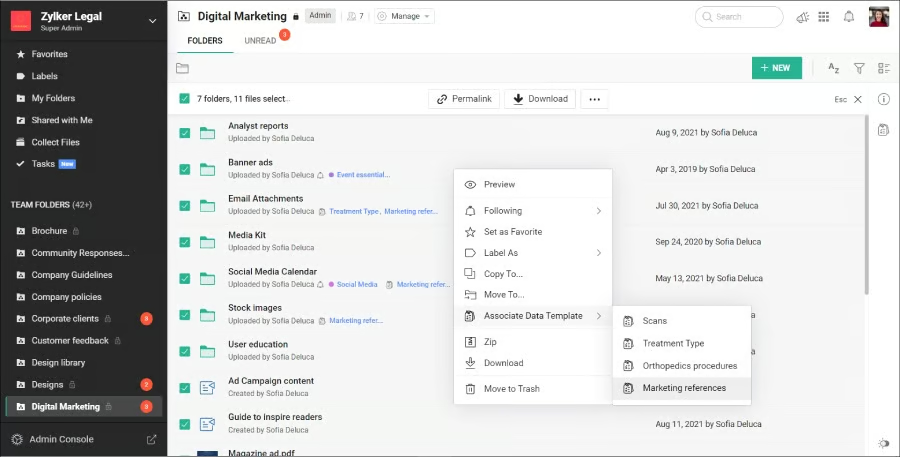
Zoho WorkDrive: Best for collaboration
My expert opinion
I find Zoho WorkDrive to be a strong choice for collaborative document management because it helps teams keep files organized and easily accessible. I like how Team Folders create a shared hub where members can upload and manage documents without getting confused about where a specific file belongs. The built-in office suite also allows you to co-edit documents, spreadsheets, or presentations in real time without worrying about version conflicts.
I also find WorkDrive Snap useful for recording quick video updates or screen shares, so I don’t always need to schedule a meeting. These features give me practical ways to reduce delays and keep projects moving forward with my team. Still, the interface can feel cluttered when handling multiple folders, and if I want a cleaner, more intuitive layout, I prefer using Dropbox.
What actual users say:
Zoho WorkDrive receives positive feedback for its clean folder structure and the ability to track edits through version history, which supports collaboration across teams. However, several users point out that the search function is limited and integrations with outside apps do not always perform as expected.
“The folder structure is neat, and syncing with my computer kinda works most of the time. Also, I like that I can see who did what – audit trail is handy.” (Source: G2)
“The search function is meh – finding stuff can be a pain. Some features are hidden or confusing, and integration with other apps is not always smooth.” (Source: G2)
“It is easy to use, and we can share files and edit them in real time with the team. It also keeps track of previous versions, which is quite helpful for me as I have to make frequent changes now and then.” (Source: G2)
Pricing & top features
| Plan | Price (per user/month) | Storage |
|---|---|---|
| Free plan | Free | 5GB for an individual user |
| Starter | $2.50 | Starts at 1TB per team |
| Team | $4.50 | Starts at 3TB per team |
| Business | $9 | Starts at 5TB per team |
A 16% discount applies if you opt for an annual prepayment.
- Edit any file stored in WorkDrive with your desktop apps and automatically sync changes back to the cloud.
- Classify files with custom fields and metadata, so it’s easier to organize and search unstructured documents.
- Securely gather documents from anyone using custom upload links, with options to control storage and versioning.
Google Drive: Best generous free storage
My expert opinion
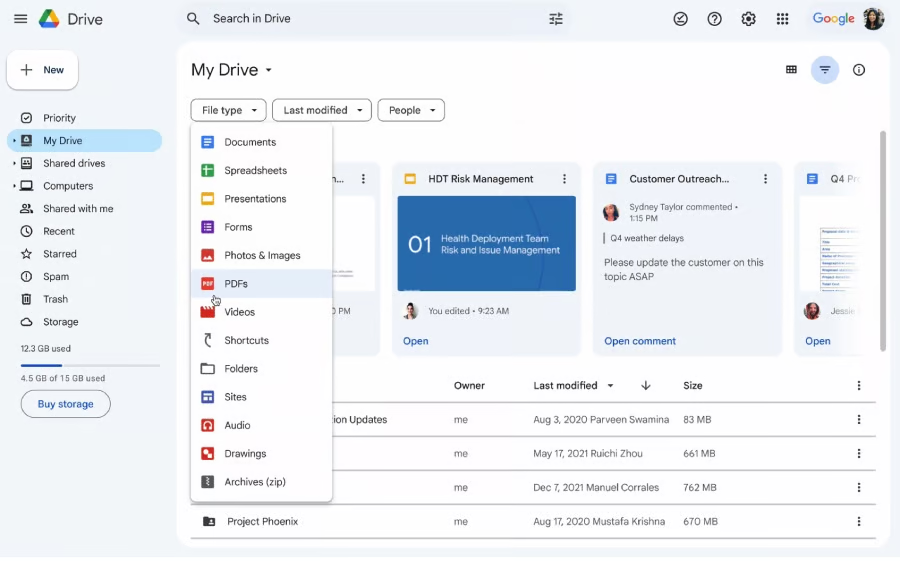
I see Google Drive as the top document management software for generous free storage since it gives me 15GB with a Google account, while many other services only start with 2GB, 5GB, or 10GB. I can store and edit documents from any device, plus storage can scale up to 5TB per user, so I don’t have to switch platforms when my storage needs grow.
I also use Gemini in Drive to summarize documents and quickly pull insights, saving time I would otherwise spend searching through files. Since it lives within Google Workspace, it comes with built-in security features like encryption in transit and at rest. Note that Drive is tightly integrated with Google apps, but if I’m a Microsoft user, I would choose M-Files for a unified solution that connects directly with Microsoft 365 and document management.
What actual users say:
Users often praise Google Drive for its ability to work offline and sync changes seamlessly in the background, making it feel like an extension of local storage. While many rely on it daily for storing documents and sharing files, administrators say the built-in management options are limited and often require third-party tools for advanced controls.
Overall, it is seen as a simple and convenient platform for everyday use, but it is less robust for businesses that require stronger admin features.
“[The] best thing I like about GDrive is that you can right-click any folder / or your entire drive (My Drive folder) and make it accessible offline. It behaves like a local disk & any changes to the files get synced to online [GDrive] smoothly in [the] background. (Source: Reddit)
“As an admin, I don’t like the built-in management options. They are very weak. You have to use 3rd-party tools like [Google Apps Manager, Google Panel], or the API.” (Source: Reddit)
“I pretty much live on Google Drive these days, everything from storing docs to quick file sharing. Keeps things way simpler than juggling attachments.” (Source: Reddit)
Pricing & top features
| Plan | Price (per user/month) | Storage |
|---|---|---|
| Free Plan | Free | 15GB |
| Starter | $7 | 30GB |
| Standard | $4 | 2TB |
| Plus | $22 | 5TB |
| Enterprise | Custom pricing | 5TB or more |
A 16% discount applies if you opt for an annual prepayment.
- Highlight text in PDFs to add or edit comments easily.
- Use the GDrive mobile app to scan documents like receipts and invoices and turn them to searchable PDFs.
- Get an overview of file activity across Workspace to respond and address unauthorized actions quickly.
Box: Best for AI-driven document workflows
My expert opinion
Box stands out as the best document management system software due to its deep focus on AI and automation, offering tools that generate contextual insights and concise summaries from unstructured files. With Box AI, I can ask natural-language questions about files, which will then instantly pull insights related to my query. Box Agents function as intelligent assistants, handling tasks such as drafting content and answering project-related questions.
On the automation side, Box Automate enables me to build workflows using a drag-and-drop interface, allowing even complex processes to run smoothly without coding. I’ve used it to set up conditional approvals and document routing, which saves time from manual follow-ups.
The drawback is cost because Box charges $5.80 for only 100GB per month. Alternatively, Zoho WorkDrive provides up to 5TB per user for a three-person team at only $2.50 per user, making it a more affordable option among top document management systems.
What actual users say:
Users point to Box’s versioning features and centralized hub for storage, comments, and documentation, which makes it helpful in managing complex projects. Still, many acknowledge that advanced functionality comes with a learning curve and requires training before the whole team becomes more familiar. Others also note that certain features feel hidden in menus, which takes them longer to complete tasks.
“There is a learning curve with some of the advanced functionality, which requires time and training to fully [adapt] across the organization.” (Source: G2)
“Document versioning at scale is great when I am handling layered campaigns. It has become a command center for file comments, storage, and team documentation.” (Source: SoftwareAdvice)
“It’s powerful, no doubt, but some features are concealed in menus which [take a] few more steps to find them than usual.” (Source: SoftwareAdvice)
Pricing & top feature
| Category | Plan | Price (per user/month) | Storage | Upload Limit |
|---|---|---|---|---|
| Individuals & Teams | Free Plan | Fre | 10GB | - |
| Starter | $5.80 | 100GB | 2GB | |
| Personal Pro | $11.50 | 100GB | 5GB | |
| Business | Business | $17.30 | Unlimited | 5GB |
| Business Plus | $28.70 | Unlimited | 15GB | |
| Enterprise | $40.30 | Unlimited | 50GB | |
| Enterprise Plus | $57.50 | Unlimited | 150GB |
A 25% discount applies if you opt for an annual prepayment.
- Get unlimited e-signatures directly within Box, so you can sign and manage documents without extra costs.
- Securely stores inactive content in a secure archive while keeping files searchable and accessible when needed.
- Create branded, no-code forms that capture data and files directly in Box, while automatically triggering workflows like approvals and e-signatures.

Dropbox: Best for ease of use
My expert opinion
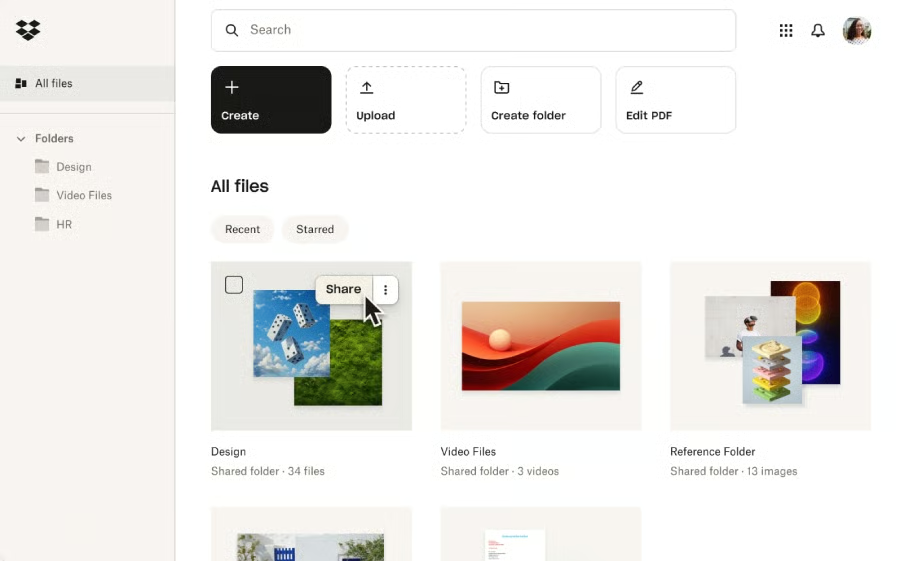
Dropbox is often praised by its users for its clean, uncluttered interface, and I’ve found that having plenty of white space makes it incredibly easy to use. Uploading and syncing feel intuitive, whether you’re accessing your files on the desktop app, mobile app, or a web browser. For small business owners with limited time for onboarding, its straightforward design makes it easy to adopt without a steep learning curve.
Integrations with productivity tools like Microsoft Teams and Zoom make it easy to sync files with apps you already use for team communication. I also appreciate that every Dropbox account includes a built-in collaboration tool, where teams can create content and organize projects with timelines, to-do lists, and tables.
On the downside, budget-conscious users get limited storage on the free plan, as Dropbox gives you only 2GB, while Google Drive includes 15GB at no extra cost with a Google account.
What actual users say:
Users appreciated Dropbox for its advanced sharing controls that let them decide who can view or edit specific files and folders. Reviewers also like the drag-and-drop uploading and synced folders, which make it easy to access content from different devices while benefiting from a secure and user-friendly interface. The main drawback raised in reviews is that syncing can be slow when working with larger files.
“The availability of advanced sharing control tools is what I like most about Dropbox Business since it controls the users who can view and edit files and folders.” (Source: SoftwareAdvice)
“Simple drag-and-drop feature is most efficient for uploading files, and having synced folders allows me to access that anywhere. High security and user-friendly interface both are best about Dropbox.” (Source: G2)
“At times, syncing can be slow when dealing with large files.” (Source: G2)
Pricing & top features
| Plan | Price (per user/month) | Storage | User Type |
|---|---|---|---|
| Free Plan | Free | 2TB | Single user |
| Plus | $11.99 | 2TB | For one user |
| Professional | $19.99 | 3TB | For one user |
| Standard | $18 | 5TB | For 3+ users |
| Advanced | $30 | 15TB | For 3+ users |
A 20% discount applies if you opt for an annual prepayment.
- Send zipped folders or large CAD files through shareable links, with no Dropbox account required for access.
- Updates to shared files are instantly visible to all recipients through automatic syncing.
- Shared folders serve as team workspaces, where members can collaborate on managing files and assigning tasks.
M-Files: Best Microsoft ecosystem integration
My expert opinion
M-Files is designed to integrate seamlessly within the Microsoft ecosystem, making it a strong choice if your team already relies on tools such as Word, Excel, PowerPoint, Outlook, and Teams. I like that I can co-author documents directly in Microsoft 365, where multiple team members can edit the same file at once without creating duplicate versions. Permissions apply across apps, so sensitive files remain secure even when shared through Teams or Outlook.
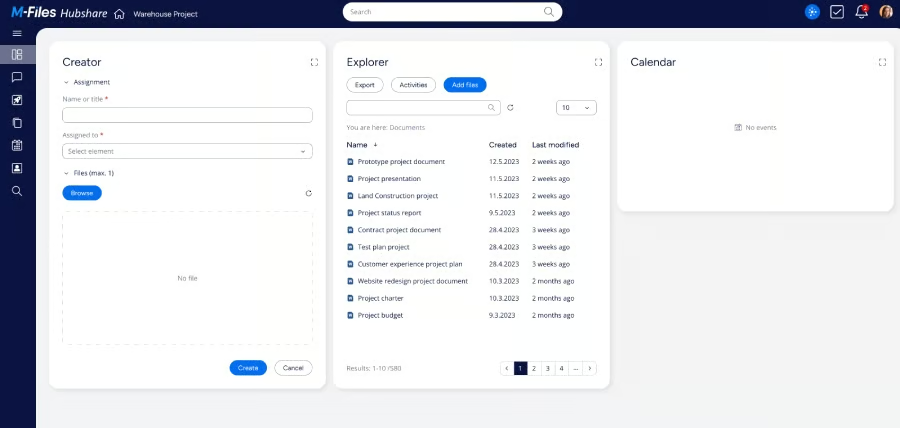
With Microsoft Copilot integration, I can pull smarter insights from documents stored in M-Files while keeping access restrictions in place. Automated workflows also run inside Microsoft 365, so approvals, compliance checks, and routine processes can operate in the background. The only drawback is that the interface feels dated, and if a modern, intuitive design is your priority, Dropbox is often preferred for its clean user experience.
What actual users say:
Reviewers often highlight M-Files’ advanced search and customizable hierarchy, which make locating content by name or within documents more efficient than many alternatives. Its integration with Microsoft SharePoint is seen as a major advantage, especially for businesses that want consistent access to files within the Microsoft platform. The main criticism is the user interface, which some feel could be more polished and easier to navigate.
“M-Files has a few features which are not available in other tools for file [management]. It is easy to find my files as it [allows] me to find [the] names and content of the files as well. The hierarchy of files can be customized according to our needs.” (Source: G2)
“There is nothing specific which I dislike about it but [the] user interface could have been better.” (Source: G2)
“The simple integration with Microsoft SharePoint Online provides businesses with quick and easy access to the software. It also works seamlessly with the SharePoint app on mobile devices. Its unique selling point remains the network drive, which other products don’t offer.” (Source: SoftwareAdvice)
Pricing & top features
Custom pricing
- Automate permissions and document routing to simplify workflows, while maintaining version control.
- Monitor document creation, client downloads, and template status with built-in tracking.
- Customize templates with an advanced style editor to match your company branding.
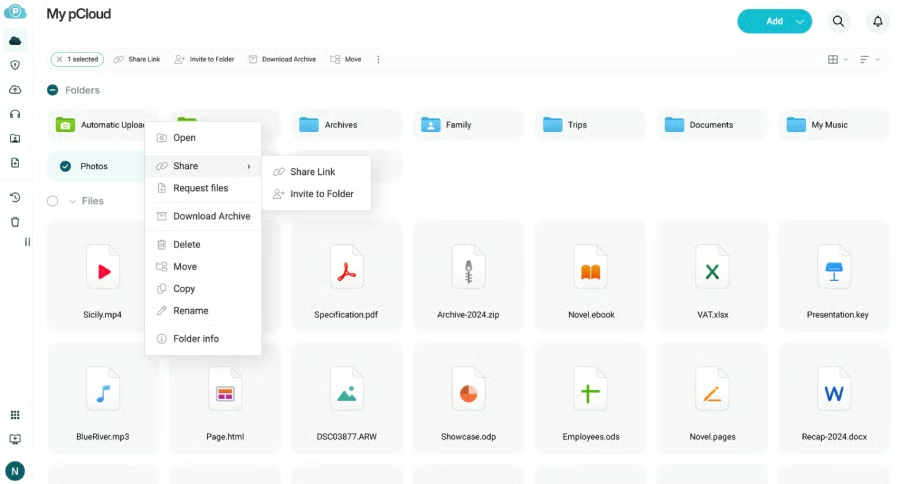
pCloud: Best for individual use
My expert opinion
pCloud works well for individual use because it combines flexible storage with affordable monthly plans. I can choose between 500GB and 2TB, depending on the amount of space I need. Both storage options include media playback tools that make it easy to stream music or videos directly from the cloud. File versioning is included, allowing me to roll back to earlier copies if I overwrite something by mistake.
On top of its individual plans, pCloud is the only document management system with a lifetime subscription, perfect for those who want to avoid paying for ongoing monthly costs. Plus, it comes with offline access, where I can mark files to use without an internet connection.
The main drawback is that zero-knowledge encryption incurs an additional $150 cost. For stronger built-in security at no extra fee, Box is a better choice, offering features such as single sign-on, multi-factor authentication, device security, and information rights management.
What actual users say:
Users value pCloud’s flexible plans, lifetime storage option, and features like client-side encryption, file versioning, and automatic backups. Many also appreciate the convenience of pCloud Drive for saving local storage and accessing media across platforms with a simple, user-friendly interface. However, reviews mention that some features are not clearly explained, and frequent upselling during sales can feel intrusive.
“I really appreciate the lifetime storage option and the flexibility pCloud provides in terms of plans and usage.” (Source: G2)
“There are many features which are great, but it is not clear how they can benefit me. Frequent upselling during sales can be annoying.” (Source: SoftwareAdvice)
“pCloud has a lifetime subscription and pCloud Drive that saves local storage, strong security features like client-side encryption, robust file sharing and media playback capabilities, cross-platform compatibility with a user-friendly interface, file versioning, and automatic backups including social media integration.” (Source: G2)
Pricing & top features
| Plan | Price (per user/month) | Storage | User type |
|---|---|---|---|
| Free plan | Free | 10GB | Single user |
| Premium 500 GB | $4.99 | 500GB | Individual plan |
| Premium Plus 2 TB | $9.99 | 2TB | Individual plan |
| Ultra 10 TB | $19.99 | 10TB | Individual plan |
| Business | $29.97 | 1TB | Per user |
| Business Pro | $44.94 | 2TB | Per user |
A 16% discount applies if you opt for an annual prepayment. One-time payment applies to lifetime subscriptions.
- Receive files securely in your pCloud account through file requests without giving recipients account access.
- Preview changes and restore older versions with file history stored for up to 30 days.
- Share large files via link, so anyone can view or download them directly from a browser, even without a pCloud account.
My methodology
What are the key features of document management solutions
The best document management solutions offer more than just a place to store files. They combine collaboration with automation so your team can stay productive while keeping documents secure. Here are some key features you should consider when evaluating document management solutions.
- File storage and organization: A document management system should enable you to upload and store files while also providing flexible options for arranging them. Features such as folder structures or tagging make content easier to find and help prevent duplication.
- File versioning: A version history allows you to revert to earlier copies of a document when mistakes occur or changes need to be reviewed. This feature is especially valuable for teams that frequently update files and want a record of their edits.
- Collaboration tools: Shared workspaces give teams a single location to manage files together. Real-time editing and commenting reduce the need for email exchanges and eliminate the need to open a separate app.
- AI-powered functionality: 51% of IT professionals view managing metadata as one of the most time-consuming tasks in data management, based on a survey by Enterprise Strategy Group. AI helps address this by summarizing documents and extracting key details so you spend less time on repetitive work and more time acting on insights.
- Security and compliance: Security features like encryption and admin controls protect sensitive files from unauthorized access. Audit trails and compliance certifications give small businesses confidence when handling regulated information.
- Integrations with business apps: Connecting your document management system with tools like Microsoft 365 or Google Workspace streamlines daily workflows. These integrations limit the need to switch platforms and keep your workflows consistent.
How to choose the right document management software
Selecting the best document management systems is not just about finding a place to store files. The right choice will shape how your team collaborates and secure files as your business grows. Unfortunately, the number of organizations juggling multiple information systems has nearly doubled every five years, rising from 3.6% in 2013 to 14.42% in 2023, which shows how easily scattered tools can create inefficiencies if you don’t have a centralized solution.
If you’re in the market for document management software, here are the top considerations to help you evaluate your options:
- Identify your business needs: Start by clarifying what matters most, whether it is for collaboration, compliance, or storage capacity. This will help you focus on providers that solve your specific problems, rather than being distracted by features you may not use.
- Compare features like AI, automation, and scalability: Look closely at tools that can speed up repetitive tasks and grow with your company. AI-powered insights and workflow automation are useful when handling large volumes of files.
- Evaluate security and compliance capabilities: Consider whether the platform offers strong encryption and access controls. If your business handles sensitive data, certifications like the Health Insurance Portability and Accountability Act (HIPAA) or the General Data Protection Regulation (GDPR) compliance should be a priority.
- Test integration with existing tools: Ideally, a document management system should connect with the apps you already use, especially if you’re handling client files from your customer relationship management (CRM) platform. Integration saves time by keeping your workflows in one place.
- Choose a provider and set up your workflow: Once you have narrowed your options, commit to a platform that aligns with your goals. Take time to configure permissions and train your team so adoption goes smoothly.
The best document management system for your business will balance affordability with the features you rely on most. While some providers stand out for collaboration or AI automation, others may be stronger on storage limits or integrations. By taking the time to evaluate your needs and compare providers, you can choose a system that supports long-term growth and makes everyday work more efficient.
Frequently asked questions (FAQs)
Which is the best document management system?
The best document management system will vary based on your company’s size and requirements. For small businesses seeking a mix of affordability and functionality, Zoho WorkDrive is a strong pick. Plans start at just $2.50 per user each month, making it the lowest-cost option among major providers, and it includes collaboration tools like version history and team folders.
Does Microsoft offer a document management system?
Yes, Microsoft SharePoint can be used as a document management platform and integrates well with other Microsoft products. However, if you want tighter connectivity with Microsoft 365 plus stronger search and metadata organization, M-Files is often the better choice.
Which tool is commonly used for document management?
Google Drive is among the most widely used document management solutions for storing and sharing files. It comes with 15GB of free storage and seamless access across devices, which makes it especially appealing to small businesses already working within the Google Workspace ecosystem.
