


Setting up an office space for small businesses starts by creating a list of your office needs with a budget in mind. With a project plan in place, look for office space options and design the floor plan accordingly. Then, set up your communications system and furnish your space with furniture and equipment. In this guide, we give you the steps on how to set up an office, along with its benefits and the key considerations.
To get you started, download our free office checklist:
1. Prepare Your Budget & Office Needs
Create an exhaustive list of everything you need—from desks and chairs to computer equipment and internet access. Your budget significantly impacts your office location and how you equip the space and your team. Identify your essentials and check which existing supplies can be reused. Here are the everyday items most any size office needs:
| Basic Office Requirements | Description | Estimated Pricing |
|---|---|---|
| Workstations | This refers to the area dedicated to a single user to carry out tasks, especially a work desk and office chair. | $300 to $2,500 (depending on the furniture) |
| Storage | This can be as simple as one or two filing cabinets and shelves or an entire stock room. | $200 to $1,500 (depending on the size) |
| Computer Equipment | Standard office gadgets include conference phones, laptops, printers, projectors, point-of-sales, copiers, and scanners. | $500 to $5,000 (depending on the component) |
| Business Software | Business solutions come in various categories, like customer relationship management (CRM), payroll, or sales software, depending on your business needs. | $5 to $50 per user, monthly |
| Internet Service | An ideal internet provider delivers adequate speed and reliability within your budget. | $35 to $500 per month |
| Office Supplies | Office supplies include all consumable essentials like copy paper, staplers, pens, toner, notepads, and folders. | $27 to $92 per month |
| Security | Corporate security systems range from alarms and video surveillance to simple smoke detection. | $60 to $3,000 (depending on the hardware) |
| Lighting | Office lighting comes in various colors and fixtures. You can choose from energy-efficient bulbs, motion-sensor lights, and fluorescent lamps. | $3.20 to $4.00 per square foot, on average |
2. Find the Right Space
Location and amenities are crucial in finding a suitable office space. Small businesses typically need to decide between purchasing an office space, finding a property for a long-term lease, and renting a full-service suite within an established locale.
Think about your current office configuration to determine how a new space will respond to the shortcomings of the existing one. Here are factors to think about:
- Access and location: An office should be accessible enough for clients to visit and offer transportation options for employees.
- Cost: Consider whether the cost, plus miscellaneous expenses, like parking or maintenance fees, are within your budget.
- Company size: Your office setup should match the size of your business and its expected growth. Avoid cramped, tiny spaces that affect productivity.
- Technology infrastructure: Assess if the space will accommodate necessary infrastructure improvements and the estimated cost.
3. Create a Floor Plan
Design your office layout for efficiency based on the amount of room you have and your team’s workflow. Central equipment should be accessible, but out of the way, and storage containers should be easy to reach. Add meeting rooms or waiting areas you may need, while work areas should be near the windows so employees have access to natural light. To give you an idea, here are some layout options for how to set up a professional office:
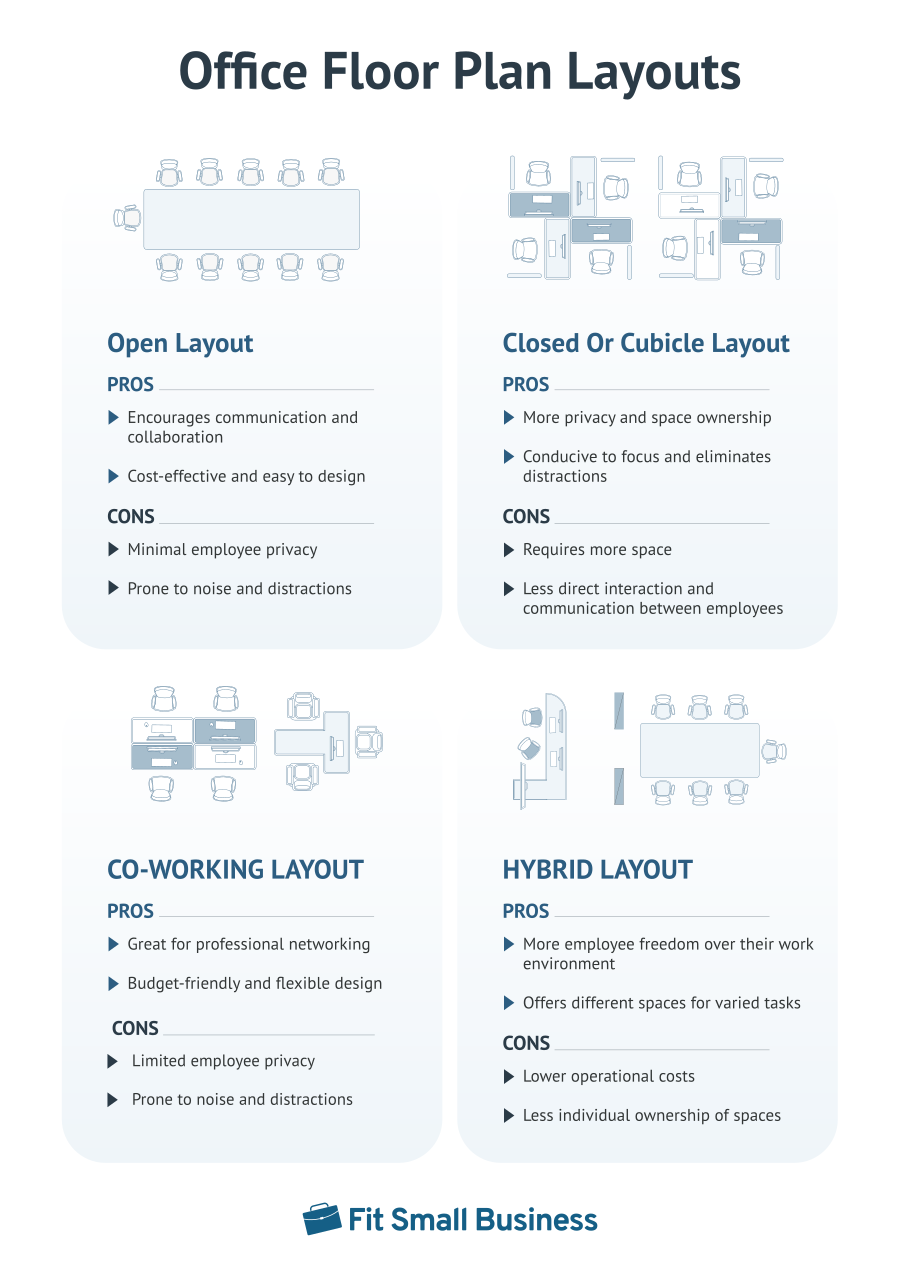
Depending on your business needs and available space, you may need to carve out functional spaces to match your business operations. Here are optional areas you may want to plan for within your overall office setting:
| Optional Office Rooms | |
|---|---|
| Formal Entrance or Reception Area | This is best for small businesses that interface with customers or expect walk-in clients. |
| Break Room or Kitchen | Serves as a dedicated space for socializing during breaks, and is equipped with a refrigerator, microwave, and coffee maker. |
| Conference or Meeting Room | If your team huddles for regular meetings, private rooms are conducive for collaborative work or one-on-one conversations. |
| Lactation Room | Depending on your company’s size and state, you may need a quiet room for new moms—and it can’t be the bathroom. |
| Exercise Room | To keep employees fit, some firms provide workout equipment and amenities like a stationary bike or treadmill. |
| Dressing Area | Service businesses have a dedicated space for field workers to change into work clothes. |
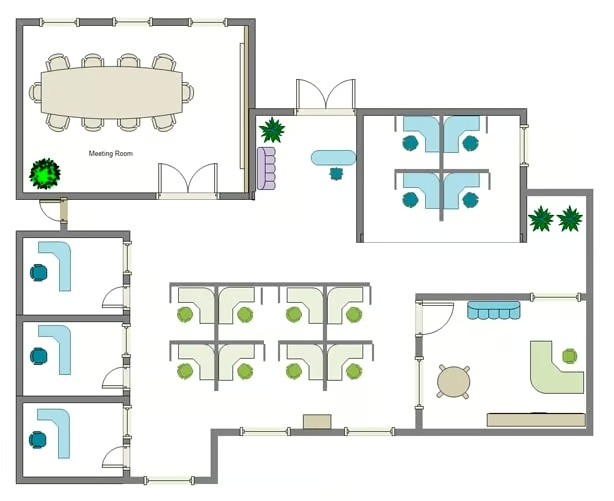
Some space-saving alternatives for office addresses make use of dividers, shelves, and different paint colors to separate specific areas. Below is an example of how office space can be used efficiently.
4. Set Up a Communications System
An office location should be serviceable by a high-speed internet provider that can service its area. If you want to set up a business phone system, you can choose from a landline or voice-over-internet protocol (VoIP) solution. Traditional landlines boast high call quality without high-speed internet, while VoIP solutions offer modern phone features like call analytics and automated call routing.
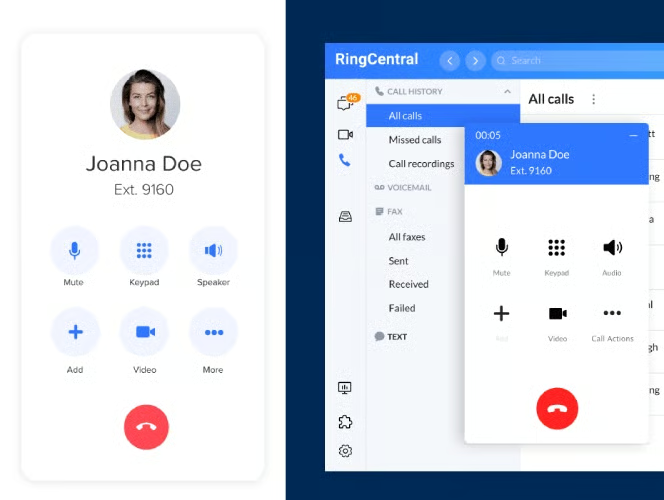
VoIP is the best option for most companies, given its quick setup, extensive features, affordability, and flexibility. When selecting a provider, compare their plans, prices, and contracts. If you’re in the market for a reliable VoIP solution, we recommend RingCentral, a leading unified communications provider with robust capabilities for calling, video conferencing, and team collaboration.
5. Buy Office Equipment, Supplies & Furniture
Choose the best office furniture and equipment for your business based on your needs and budget. This would be new office materials or an addition to your existing office, such as desks, chairs, and dividers. Below we list common business equipment and different types.
| Office Equipment | Types/Description |
|---|---|
| Office Desks |
|
| Office Chairs |
|
| Office Computers & Machines |
|
| Filing & Storage |
|
Benefits of a Good Office Space Setup
There’s a saying that the layout and quality of your office reflect how much a business values its employees. Below, we cite the advantages of how the quality of your office space directly impacts your business.
- Increases team productivity: The World Green Building Council reports overwhelming evidence linking productivity with office design. A team will be more productive in an uncluttered space, making it crucial to set up your office in a way that makes you and your colleagues feel more effective and efficient.
- Enhances employee well-being: An ergonomic approach to office design reduces the frequency of ailments like musculoskeletal disorders among employees. Air infiltration systems produce quality air for employees staying in an enclosed office space.
- Boosts staff engagement: An office design that caters to employees’ individual and collaborative work style makes them feel that their needs and comfort are being catered to. This promotes a culture of engagement, resulting in lower absenteeism and reduced employee turnover.
- Improves floor space efficiency: If you don’t have the budget to move to a bigger office space, proper floor space optimization maximizes every square inch potential by carving out additional area from your existing premises. This will save you from the hassle of relocation and unnecessary moving-out costs.
- Builds company credibility: An office space setup that represents your company’s values, mission, and culture creates a lasting impression on clients. This affects their overall branding experience by inspiring an image of hospitality and a sense of community among the staff.
Frequently Asked Questions (FAQs)
Is it expensive to set up an office?
No. It can get costly, but it does not have to be. It can start at around $150 up to $700, depending on the size, material, and features. Creating a comfortable and functional office setup is possible without breaking the bank. Save on costs by making improvements yourself, repurposing furniture, or maximizing existing supplies and equipment.
Do I need a physical office address to do business in the U.S.?
No. Business paperwork, licenses, and permits often require a physical address in the U.S. Small companies, including home-based businesses that don’t want to use their home address for safety reasons, should consider getting a P.O. Box or a virtual office service provider. They set you up with a virtual U.S. business location for between $50 and $200 monthly.
What’s the best paint color for an office?
According to experts, the top two colors that work best for an office are green and blue. Because color affects mood and behavior, these shades are calming and ideal for stimulating calm and focus for better productivity.
Bottom Line
Now that we’ve tackled how to set up an office for a small business, it’s time to get down to thinking about your new layout. Like any project, the more you plan, the less painful it will be. This is where our setting up a new office checklist comes in handy. Remember that the key is to consider your office needs and budget so you won’t be tempted to get something that’s not needed.
