







The Work Opportunity Tax Credit (WOTC) is a tax incentive offered to employers who hire disabled workers. The maximum amount of credit that you can claim is $2,400, depending on when the employee was hired and how long they worked for you during the tax year. This powerful tax savings tool is set to expire soon—you only have until Dec. 31, 2025, to claim it on your tax return.
- Step 1: Have Disabled Workers Complete IRS Questionnaire Before Interview
- Step 2: Interview the Disabled Worker & Make Your Hiring Decision
- Step 3: Apply for Certification Via State Workforce Agency
- Step 4: Calculate the Credit for Hiring a Disabled Worker
- Step 5: Report the Tax Credit on Your Tax Return
- Example of How to Claim the Tax Credit for Hiring Disabled Workers
- Frequently Asked Questions (FAQs)
- Bottom Line
Step 1: Have Disabled Workers Complete IRS Questionnaire Before Interview
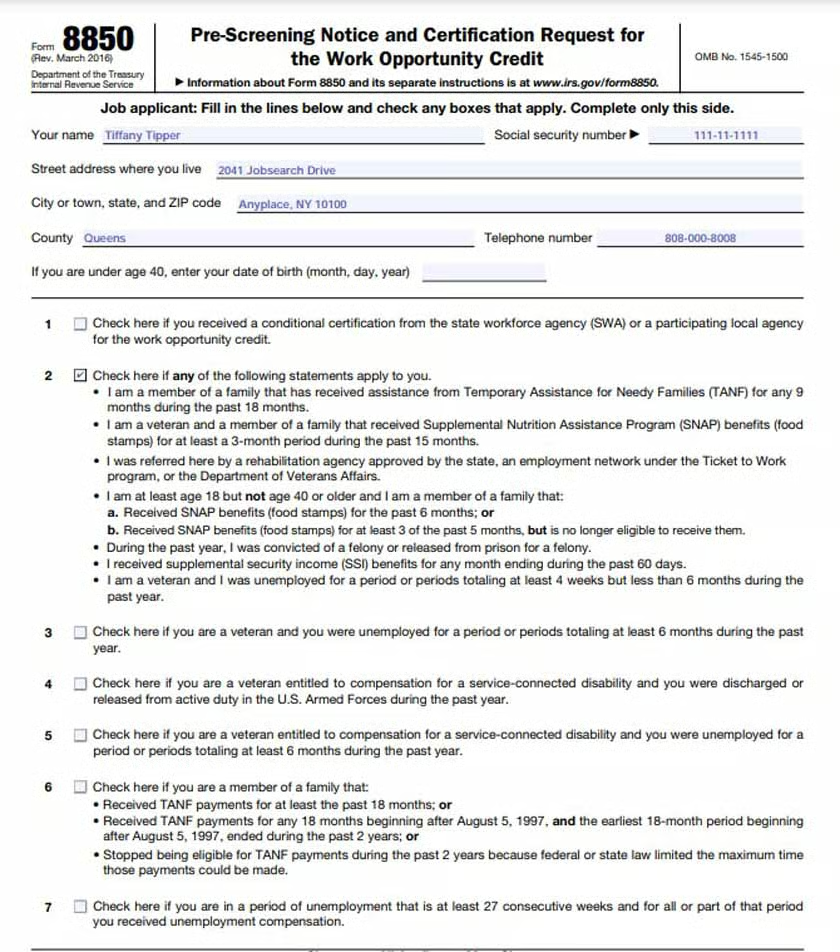
To qualify for the WOTC, your business must prescreen the disabled worker as part of the hiring process. You and your candidate will complete this step by filling out IRS Form 8850, Pre-Screening Notice and Certification Request for the Work Opportunity Credit. Your candidate will fill out Page 1, and you fill in Page 2 throughout the application process. This step typically is completed on the same day you give the job applicant an application.
Disabled workers will check the box next to Question 2, acknowledging that they were referred by a rehabilitation agency authorized by the state, an employment network under the Ticket to Work program, or the Department of Veterans Affairs (VA). They’ll also need to sign the bottom of the form under penalty of perjury.
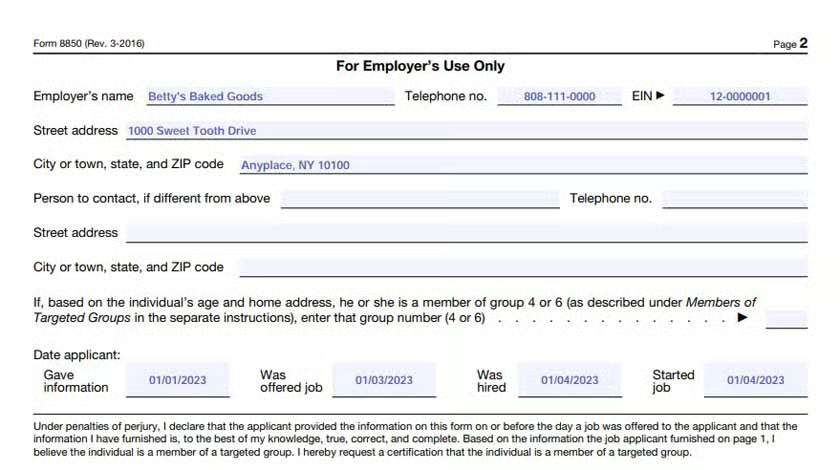
Flip over to Page 2 of Form 8850. Fill in the date that they gave you the information about being a member of the targeted group.
Step 2: Interview the Disabled Worker & Make Your Hiring Decision
Next, you’ll interview the candidate and make a hiring decision. If the candidate is qualified for the job and you offer them the job, you’ll need to fill out the rest of Form 8850.
On the second page, you‘ll need to supply the following information:
- The date you interviewed the disabled worker
- The date you hired the disabled worker
- Their start date
Step 3: Apply for Certification Via State Workforce Agency
After completing the hiring process, you’ll need to apply for certification through your state workforce agency. The certification is due within 28 days of hiring your new employee. The agency will certify that the individual through whom you are applying for this credit is indeed a vocational rehabilitation referral. To complete this step, you will need to mail the agency the following documents, along with Form 8850:
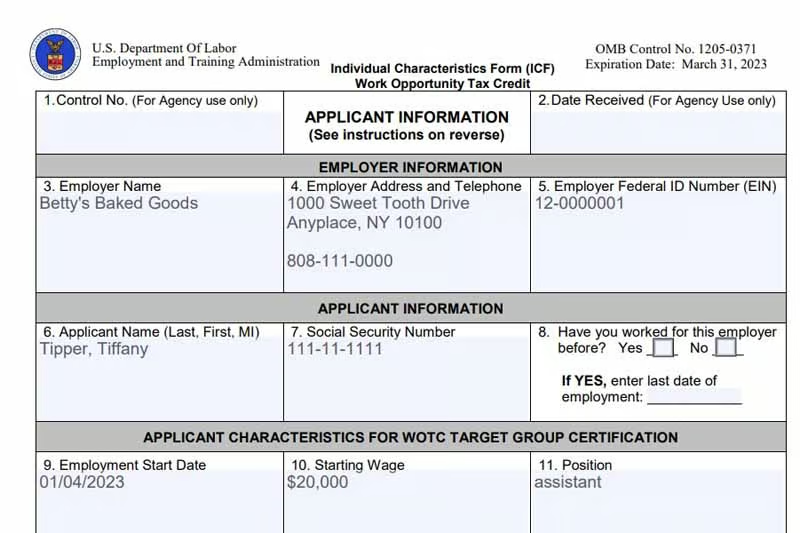
- United States Department of Labor (DoL) Form 9061, Individual Characteristics Form (ICF) Work Opportunity Tax Credit
- Any supporting documentation that needs to be attached to 9061, such as a vocational rehabilitation agency contact, signed letter of separation, or a contact from VA for Disabled Veterans)
Step 4: Calculate the Credit for Hiring a Disabled Worker
Once you’re certified, the next step is to use IRS Form 5884 to calculate and claim your credit as part of the general business credit reported on IRS Form 3800.
For disabled workers, you’ll enter the amount of qualified wages on line 1(a) or 1(b), and then calculate the amount of allowable credit on line 2. Qualified wages include only the first $6,000 of wages paid.
Let’s look at the information you’ll put on those lines:
- 1(a): Enter qualified first-year wages of the disabled worker if they worked for you at least 120 hours but fewer than 400 hours and multiply this amount by 25%.
- 1(b): Enter qualified first-year wages of the disabled worker if they worked for you for at least 400 hours and multiply this amount by 40%.
You can claim credit for multiple disabled workers on the same Form 5884 by aggregating their compensation on lines 1(a) and 1(b). However, be sure to limit each employee’s wages to $6,000.
Step 5: Report the Tax Credit on Your Tax Return
Once you have completed Form 5884, the credit will be carried to one of the following forms:
| Entity Type | Where to Report |
|---|---|
| Sole Proprietor | IRS Form 1040 or 1040 SR, Schedule 3, line 6a |
| C Corporation (C-corp) | IRS Form 1120, Schedule J, Part I, line 5c |
| S Corporation (S-corp) | IRS Form 1120-S, Schedule K, line 13g |
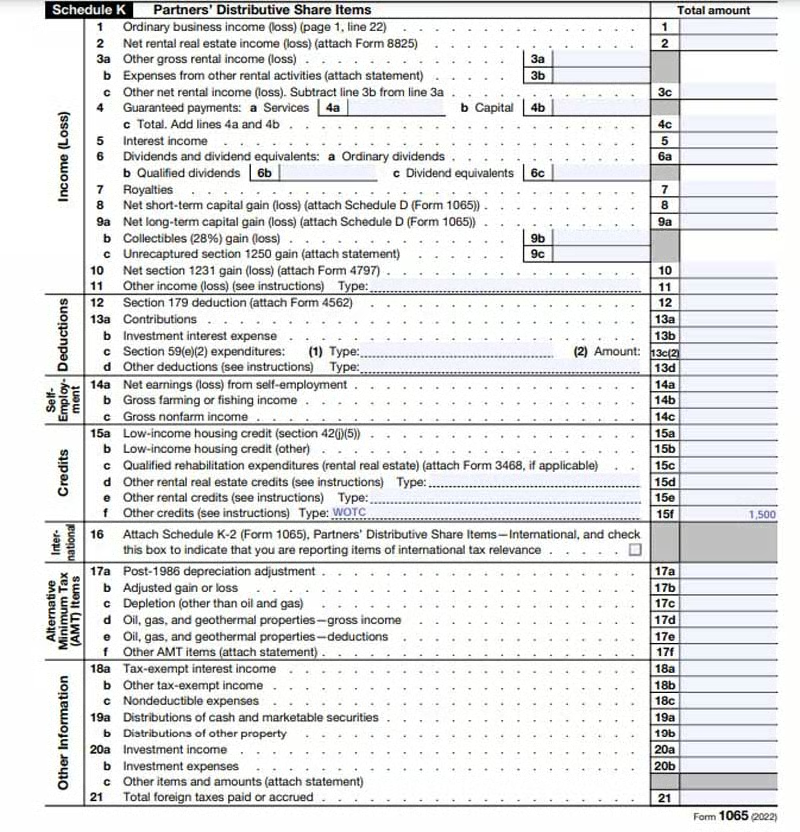
| Partnership | IRS Form 1065, Schedule K, line 15f |
Example of How to Claim the Tax Credit for Hiring Disabled Workers
Step 1: Disabled Worker Completes IRS Questionnaire Before Interview
On Jan. 1, 2023, Tiffany Tipper completed a rehabilitative program through the Ticket to Work program. Excited about her success, she and a social worker started looking for job opportunities on Indeed.
While searching, they came across a job ad that seemed like a perfect fit: a part-time assistant position at a local bakery, Betty’s Baked Goods. They immediately contacted the business and spoke to the owner, Betty. She invited them to come down immediately and fill out an application along with Form 8850.
Tiffany completed the following information, being sure to mark box 2 since she was referred by a rehabilitation agency:
Step 2: Interview & Make Your Hiring Decision
Betty reviewed Tiffany’s application and Form 8850 on Jan. 2, 2023, and after consulting with her partner, Bob Boss, she decided to invite Tiffany for an interview on Jan. 3, 2023. After the interview, Betty immediately decided to hire Tiffany the next day and gave her a start date of Jan. 4, 2023, for the assistant position, which earns $20,000 per year.
On the same day, Betty filled in the rest of the dates on Page 2 of Form 8850.
Step 3: Apply for Certification
On the same day Tiffany began working, Betty completed Form 9061, Individual Characteristics Form (ICF), Work Opportunity Tax Credit, and gathered Justice’s supporting documents.
Example of a filled-out IRS Form 9061
Since Tiffany was referred to this position through the Ticket to Work program, the box next to question 15 was checked on Form 9601.
Since Tiffany was referred to this position through the Ticket to Work program, the box next to question 15 was checked on Form 9601.

Step 4: Calculate the Credit for Hiring a Disabled Worker
Next, Betty can calculate her credit using IRS Form 5884 to prepare for the coming tax season. Since she hired Tiffany based on the vocational rehabilitation referral classification, she will use $6,000 of Tiffany’s qualified wages when she completes her 2023 tax return. Let’s see her tax projection.
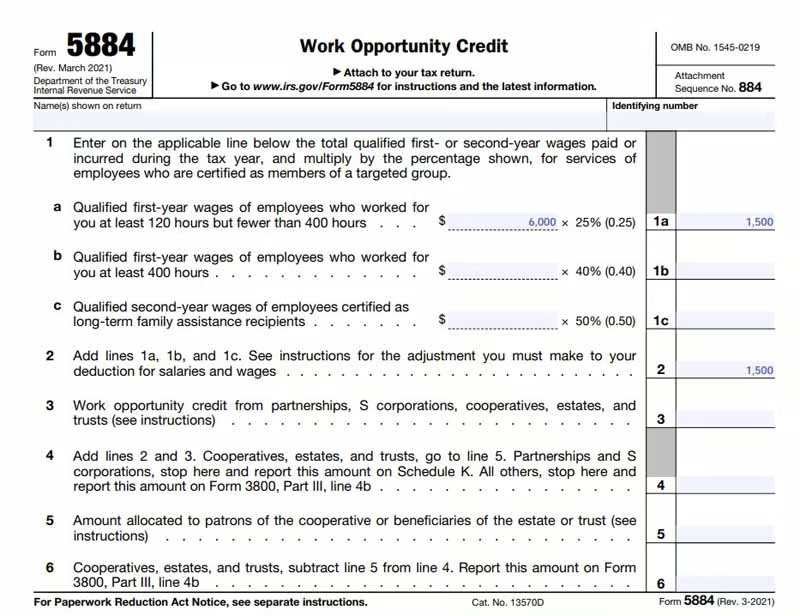
Since Tiffany will only work part-time, Betty anticipates that she will work at least 120 hours, but less than 400 hours.
Step 5: Report the Tax Credit on Your Tax Return
As Betty operates a partnership with Bob Boss, when she files her taxes, she’ll claim the credit on IRS Form 1065, Schedule K, line 15(f). Let’s take a look at the form.
Frequently Asked Questions (FAQs)
How can I locate a disabled worker?
You can check out the site EARN when locating a disabled worker. The site has a job board that can help you find qualified workers with disabilities.
What happens if I have unused credits?
If you have any unused credit, you can carry your current year’s unused WOTC back one year and then forward up to 20 years.
What if my employee never shows up for the job?
If your new employee never shows up for work, then unfortunately, the credit will not be applicable because it is based on wages paid.
Bottom Line
Bringing on a worker with a disability can be a major asset to your business. If you are hiring a member of a targeted group, you’ll need to take several steps to claim the tax credit during the tax season.
