







Bookkeeping errors can build up over time, from unreconciled accounts and duplicate transactions to incorrect balances and misclassified income or expenses. A bookkeeping cleanup helps identify and correct these issues so that your financial records accurately reflect your business.
In this guide, I’ll walk you through a practical bookkeeping cleanup checklist, from reviewing transactions and reconciling accounts to checking your final financial statements. You can also access our free checklist to track your progress and make sure you don’t miss an important step.
Cleanup phase | Where to look |
| ☐ Gather source documents | Bank, credit card, and loan statements (outside your software) |
| ☐ Save pre-cleanup reports | P&L, Balance Sheet, Trial Balance, General Ledger, A/R and A/P aging reports |
| ☐ Reconcile cash and credit cards | Reconciliation tool and account statements |
| ☐ Clear duplicates and unclassified items | Bank feeds, registers, and uncategorized or suspense accounts |
| ☐ Review subledgers and specialized accounts | A/R, A/P, payroll, loans, payment clearing accounts, inventory, sales tax, fixed assets, and equity |
| ☐ Clean up the chart of accounts | Chart of accounts |
| ☐ Scan reports for anomalies | P&L and Balance Sheet |
| ☐ Save final reports and close the books | Financial reports and company/account settings |
Bookkeeping cleanup checklist free template
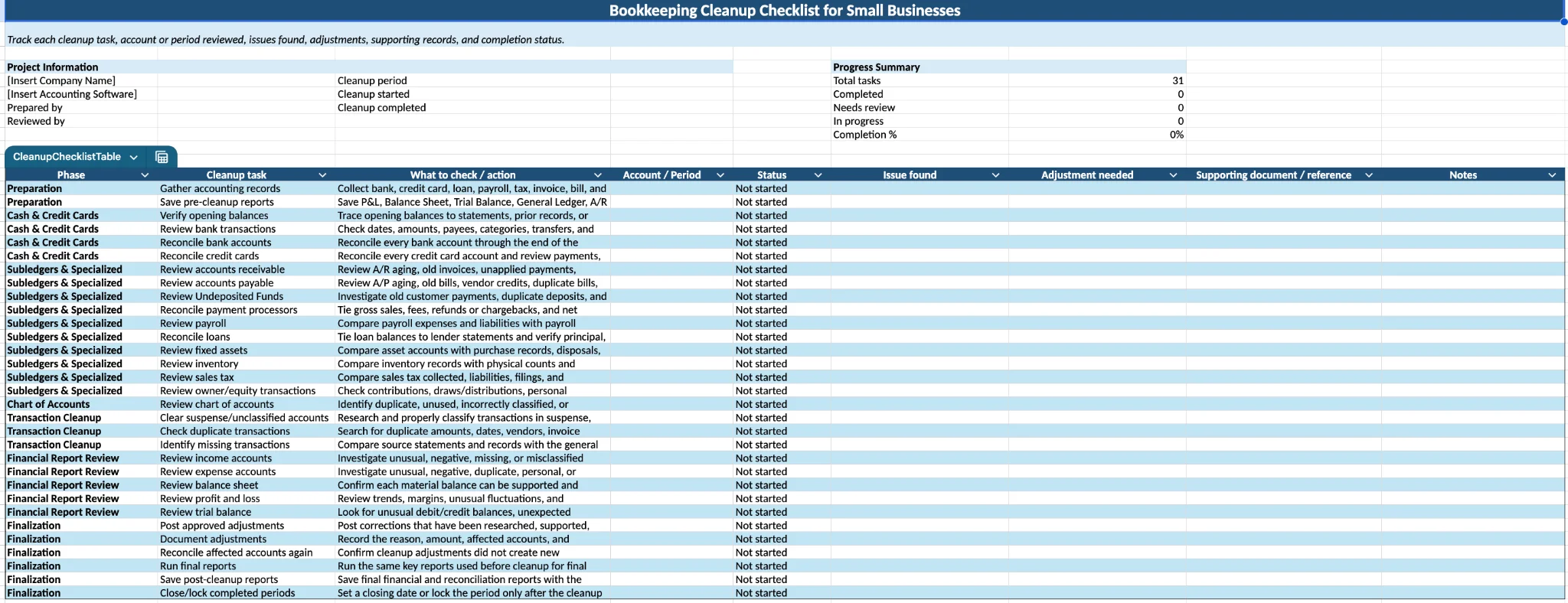
Free Bookkeeping Cleanup Checklist
If you use QuickBooks Online, read our QuickBooks Online cleanup checklist article for a platform-specific walkthrough of the cleanup process.
What is a bookkeeping cleanup?
Bookkeeping cleanup is the process of reviewing and correcting existing accounting records so that account balances and financial reports accurately reflect the business’ transactions. It can involve fixing transaction classifications, removing duplicates, reconciling accounts, correcting A/R and A/P, and resolving unexplained balances.
This process differs from catch-up bookkeeping, which focuses primarily on recording transactions for periods that haven’t been completed. However, the two often overlap. For example, while catching up several months of transactions, you may discover duplicate entries, incorrect balances, or unreconciled accounts that also need to be cleaned up.
Bookkeeping cleanup vs catch-up bookkeeping
While both involve working on prior-period records, they serve different purposes:
| Cleanup bookkeeping | Catch-up bookkeeping |
| Corrects existing records | Records missing historical activity |
| Fixes errors and inconsistencies | Brings books up to date |
| May involve already-recorded periods | Usually focuses on unrecorded months |
| Includes reconciliation and account review | Focuses heavily on transaction entry |
Signs your books need a cleanup
Before diving into the process, it helps to confirm whether your books actually need a cleanup or just a routine review. Here are the warning signs I look for, regardless of which platform the books are in.
- Your bank or credit card accounts haven't been reconciled in months. If the balance in your software doesn't match your actual statement, you can't trust the numbers built on top of it.
- You have a large balance sitting in an uncategorized or suspense-type account. Most accounting platforms have some version of this, whether it's called Uncategorized Expense, Ask My Accountant, or an unassigned holding account. A growing balance there means transactions were imported but never properly reviewed.
- Your Accounts Receivable doesn't reflect what customers actually owe. Old invoices, unapplied payments, or duplicate entries can make your outstanding balance look higher or lower than it really is.
- Your Accounts Payable doesn't match what you owe vendors. Duplicate bills, unapplied credits, or bills that should have already closed out can overstate your liabilities.
- You keep seeing duplicate transactions. This usually happens when a transaction gets entered manually and then imported again from a bank feed, or when an account gets reconnected and re-syncs data that was already there.
- Your accountant or bookkeeper keeps asking for corrections before they can finish anything. Repeated back-and-forth over reclassifications or unexplained balances is usually a sign the file needs more than a quick fix.
- Your financial reports don't make sense. If your Profit and Loss or Balance Sheet shows numbers that don't line up with how the business is actually performing, there's likely an underlying issue that needs to be traced and corrected.
The more of these you recognize, the more a full cleanup is worth prioritizing over trying to patch individual issues as you find them.
Bookkeeping cleanup checklist: a step-by-step process
If you've identified signs that your books need attention, the next step is to work through the cleanup systematically. I recommend working through the checklist in order because an issue found in one account can affect other areas of your financial statements.
Phase 1: Gather source documents
Before touching a single transaction, pull together everything you'll need to verify against. This includes bank statements, credit card statements, loan documents, payroll reports, prior tax returns, and any physical inventory counts if the business carries stock.
Things to look for
- Statements covering the full period you're cleaning up, not just the most recent month
- Loan agreements showing current balances and terms
- Payroll summaries and tax filings if payroll is involved
- Prior financial statements to compare against once the cleanup is done
Having these on hand before you start means you're correcting entries against real records instead of guessing what the balance should be.
Phase 2: Save your pre-cleanup reports
Before making corrections, save a copy of your current financial reports. These give you a snapshot of the books before cleanup and provide a useful reference when reviewing how your adjustments affected the financial statements.
Reports to save
- Profit and Loss
- Balance Sheet
- Trial Balance
- General Ledger
- Accounts Receivable aging
- Accounts Payable aging
- Bank and credit card reconciliation reports, if available
Save the reports using the same ending date as your cleanup period. Once the cleanup is complete, you can run them again for the same period and compare the before-and-after results.
Phase 3: Reconcile cash and credit cards
This is where I start reviewing the actual books. If your bank and credit card balances don't tie out to the actual statements, nothing built on top of those numbers can be trusted.
Things to look for
- Missing or duplicate downloaded transactions
- Transactions cleared in your software but not on the statement, or vice versa
- Incorrect amounts, dates, or payees
- Old outstanding checks or deposits that never cleared
- Opening balances that don't match the starting point on your oldest available statement
How to check
Run the reconciliation tool for each account (Reconcile in QuickBooks Online and Xero, Reconcile in QuickBooks Desktop under the Banking menu) and compare the ending balance and date against your statement. Go line by line rather than accepting the software's auto-match suggestions without review.
Phase 4: Clear duplicates and unclassified items
Once cash is reconciled, move to transactions that were imported but never properly assigned, along with anything duplicated during that import.
Things to look for
- Transactions sitting in an uncategorized or suspense-type account (Uncategorized Expense/Income in QBO, similar holding accounts in Desktop and Xero)
- Bank feed transactions imported more than once
- Manually entered transactions later duplicated by a bank feed sync
- Personal expenses mixed into business accounts
How to check it
Pull a Profit and Loss report and look for uncategorized balances, then open each transaction and assign the correct account. For duplicates, sort your bank register or transaction list by amount and date to spot repeats, and confirm which entry is correctly matched before deleting the other.
Phase 5: Review subledgers and specialized accounts
This phase covers the areas most likely to distort your financial statements if left unchecked: receivables, payables, payroll, loans, payment clearing accounts, inventory, sales tax, fixed assets, and owner transactions.
- Accounts Receivable: Run an AR aging report and look for old unpaid invoices, unapplied customer payments, or duplicate invoices. A payment that was received but never linked to the original invoice will make it look like a customer still owes money they've already paid.
- Accounts Payable: Run an AP aging report and check for bills that were already paid but still show as outstanding, duplicate bills, or vendor credits that were never applied. These issues overstate what the business still owes.
- Payroll: Compare payroll expense and liability accounts against your payroll summaries and tax filings. Watch for net pay recorded as the full payroll expense, missing employer tax entries, or old payroll liabilities that should have cleared already.
- Loans: Compare each loan balance with the lender statement and confirm that payments are properly divided between principal, interest, and fees. Recording the entire loan payment as an expense can understate the liability and overstate expenses.
- Undeposited Funds or payment clearing accounts: Review old balances for customer payments or deposits that have already cleared the bank but remain in the clearing account. These balances can indicate that payments weren't properly matched to their corresponding deposits.
- Payment processors: If you accept payments through a third-party processor, reconcile its activity against your books and bank deposits. Check that gross sales, processing fees, refunds or chargebacks, and net deposits are recorded correctly.
- Inventory (if applicable): Compare your inventory valuation report against a recent physical count. Negative quantities, unusually high or low values, and mismatched costs are the most common issues.
- Sales tax: Review your sales tax filings against what's recorded in your software. Look for incorrect tax rates, taxable sales marked as non-taxable, or outstanding liabilities that were already paid.
- Fixed assets: Compare your fixed asset accounts against your purchase records and depreciation schedule. Equipment sometimes gets expensed instead of capitalized, or stays on the books after it's been sold or disposed of.
- Owner's contributions and draws: Review your equity accounts to confirm personal expenses paid from the business, and business expenses paid personally, were recorded appropriately rather than as business income or operating expenses.
Phase 6: Clean up the chart of accounts
With transactions corrected, turn to the structure itself. A cluttered chart of accounts makes every future report harder to read, even after the underlying numbers are accurate.
Things to look for
- Duplicate accounts created by accident, often with slightly different names
- Accounts no longer in use that are still active
- Balances sitting in Retained Earnings or Opening Balance Equity that don't match what should be there
- Miscellaneous or "Ask My Accountant" type accounts holding transactions that belong elsewhere
How to check it
Review the full chart of accounts and merge duplicates where your software allows it. Archive accounts you no longer use instead of deleting them if they have transaction history. For Retained Earnings or Opening Balance Equity, trace any remaining balance back to the entry that caused it rather than clearing it with a journal entry that just makes the number disappear.
If you need a refresher on how accounts should be organized, see our guide to creating a [chart of accounts]
Phase 7: Scan financial reports for anomalies
Once every account has been reviewed individually, step back and look at the reports as a whole. This catches issues that are easy to miss when you're deep in individual transactions.
Things to look for
- Income or expense balances that spike or drop without an obvious explanation
- Negative balances that don't make sense for the account type
- Accounts that should be at zero but aren't
- Numbers that don't match the story you know about the business
How to check
Run the Profit and Loss, Balance Sheet, Trial Balance, and Statement of Cash Flows for the period, and compare them against prior periods, budgets, or tax filings if available. If something looks off, drill into the transactions behind it before considering the cleanup finished.
Final step: Save final reports and close the books
Once you've completed the cleanup and resolved any remaining issues, run the same financial reports you saved before the cleanup. Review them one last time and save copies as your final record of the cleaned-up books.
Final checks
- Confirm all approved cleanup adjustments have been posted and documented.
- Reconcile any bank, credit card, loan, or other accounts affected by cleanup adjustments one final time.
- Run and save the final Profit and Loss, Balance Sheet, and Trial Balance.
- Review the final A/R and A/P aging reports.
- Confirm unusual or material balances can be explained.
- Save supporting records with your cleanup documentation.
Once you're satisfied with the results, set a closing date in your accounting software to help prevent accidental changes to the cleaned-up period. If available, use a closing date password or similar restriction so that prior-period transactions can only be changed deliberately.
Common bookkeeping cleanup mistakes
A cleanup can go wrong even when every individual correction looks right, usually because of how the project itself was approached. Here's what I see most often.
Mistake | Why it costs you | What to do instead |
| Correcting balances from memory instead of source documents | You end up guessing at what a number should be instead of verifying it | Reconcile every change against the actual bank, credit card, or loan statement |
| Closing the books before the cleanup is finished | A closing date can create unnecessary restrictions while you're still correcting prior-period transactions | Complete and review the cleanup first, then set a closing date to protect the corrected period |
| Jumping between phases instead of working in order | Later steps, like the final report review, depend on reconciliations and subledgers already being accurate | Work through reconciliation, then subledgers, then reporting, in that sequence |
| Treating every messy file as a catch-up problem, or vice versa | Missing entries and incorrect entries need different fixes, so misdiagnosing the scope leads to wasted hours or an incomplete cleanup | Confirm whether you're dealing with missing transactions, existing errors, or both, before quoting time or starting work |
| Accepting a software's suggested category without checking it | The same miscoding repeats every time that vendor or transaction type shows up again | Verify the category manually the first time, especially for new vendors |
| Not saving a copy of key reports before making changes | There's no way to compare before and after, or undo a correction that turns out to be wrong | Export the P&L, Balance Sheet, and trial balance before starting |
Tips to keep your books clean year-round
A cleanup shouldn't be something you repeat every year. These are the habits I recommend to clients once their books are corrected, so the next cleanup doesn't become necessary.
- Assign one person as the source of truth for categorization. When multiple people enter transactions without a shared standard, the same vendor ends up coded three different ways across a year.
- Build bank rules carefully, then check them periodically. Automated categorization rules save time, but a wrong rule applies the same mistake to every future transaction it matches. Review them every few months.
- Set a closing date after every completed period, not just at year-end. Lock each month once it's reviewed to prevent old, finalized numbers from shifting later.
- Reconcile at the same point in your workflow every time, whether that's the first week of the month or right after statements arrive. Consistency matters more than the exact timing.
- Keep source documents attached to transactions as you go. Linking a receipt or invoice at the time of entry is far faster than tracking it down months later during a review.
- Review your chart of accounts at least once a year. Accounts get added for one-off situations and never get cleaned up, which quietly recreates the clutter a cleanup just removed.
- Separate business and personal accounts entirely, even for a very small or newly formed business. This alone prevents one of the most common reasons cleanups happen in the first place.
- Schedule a mid-year check-in, not just a year-end one. Catching an issue in June is far less work than untangling six additional months of it in December.
For more ways to prevent bookkeeping issues from building up again, see our bookkeeping and accounting tips for small business owners.
Frequently asked questions (FAQs)
How is bookkeeping cleanup different from catch-up bookkeeping?
Cleanup corrects entries that already exist in your books, like a miscategorized expense or an account that hasn't reconciled properly. Catch-up bookkeeping records transactions that were never entered at all, usually after a business fell behind for a stretch of time. Some projects need both if a business has missing months and existing errors.
Can I clean up my own books, or should I hire someone?
It depends on what's wrong. If the issues are limited to reconciliations, duplicate transactions, or basic recategorization, a business owner comfortable with their accounting software can usually handle it. Once payroll, sales tax, inventory, or multiple years of unreviewed entries are involved, the risk of making things worse without accounting knowledge goes up, and that's usually when it's worth bringing in a bookkeeper.
How long does a bookkeeping cleanup take?
Cleanup time depends on the period involved, transaction volume, number of accounts, and severity of the errors. A relatively clean file covering a few months may take several hours, while years of unreconciled activity, payroll issues, or inventory problems can take considerably longer.
When should I bring in a professional instead of doing it myself?
Bring in a professional once you're dealing with payroll liabilities, sales tax filings, inventory valuation, or prior-year adjustments that could affect a filed tax return. These areas carry compliance risk if corrected incorrectly, and errors there are harder to unwind than a simple miscategorized expense.
Will a bookkeeping cleanup fix everything before tax season?
A cleanup gets your records accurate and organized, which makes tax preparation faster and reduces the chance of errors on the return. It doesn't replace the tax filing itself, and any tax strategy or planning decisions should still go through your accountant or tax preparer.
Bottom line
A bookkeeping cleanup works best as a one-time correction, not a recurring fix, so the real goal is getting your records accurate enough that consistent monthly bookkeeping is all you need going forward. Once the phases in this guide are complete, the harder part is usually resisting the habits that caused the mess in the first place. If your books need more correction than you're comfortable handling on your own, especially anything touching payroll, sales tax, or prior-year returns, it's worth bringing in a professional bookkeeper who can verify the work against your actual records rather than patch numbers to make them balance.
