







Launched in September 2023, Intuit Assist marked Intuit’s entry into AI. With AI agents having been rolled out on July 1, 2025, the company is doubling down by creating virtual teams for businesses, streamlining workflows from financial analysis to customer management, and freeing up valuable time for strategic work. This latest move ensures your company gets powerful AI tools directly within its existing Intuit platform, eliminating the need for separate subscriptions.
For QuickBooks users, Intuit Assist can generate invoices, bills, and expense entries using the Autofill feature. It can also match payments and bills across QuickBooks, which reduces manual data entry, and send invoice reminders. What’s more, it can propose action plans to help you meet financial goals and even connect you with live experts when needed.
What is Intuit Assist?

Intuit Assist, powered by generative AI
It is embedded across Intuit’s products, including QuickBooks, TurboTax, Credit Karma, and Mailchimp, creating a seamless experience that connects all aspects of your financial management. What sets it apart is its ability to provide actionable insights while keeping you in complete control.
- Helps convert prospects faster
- Streamlines getting paid
- Gives you the confidence to make smart financial decisions.
The result is less time spent on administrative tasks and more time focused on growing your business.
Intuit Assist in QuickBooks
AI tools are popping up everywhere, but most are highly specialized point solutions that create more complexity than they solve. With Intuit Assist, you don’t need to juggle multiple third-party AI tools or worry about integrations. Let’s look at how Intuit AI changes the way you work with QuickBooks Online.
Generative AI capabilities
Intuit Assist can help streamline how you generate and interpret data. QuickBooks Online users can get more value from financial data without the added workload.
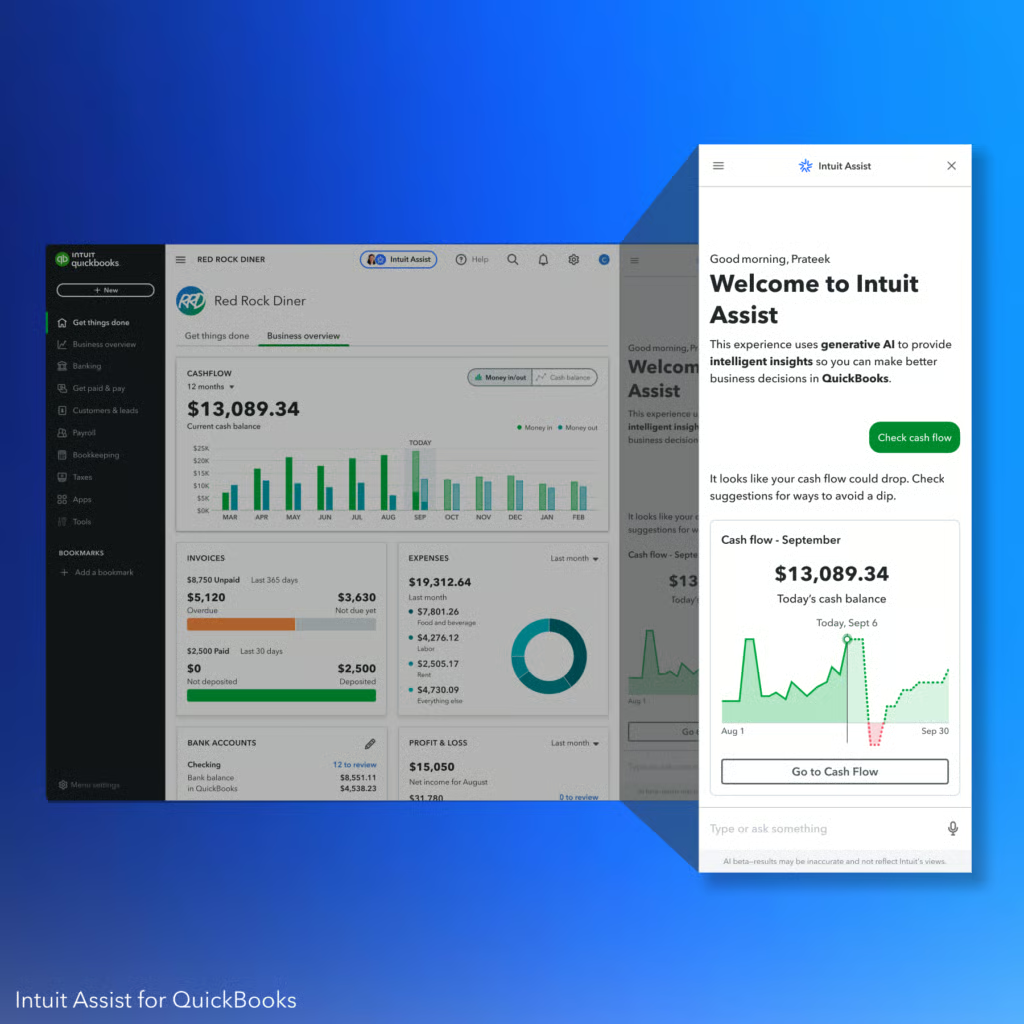
With generative AI capabilities, you can utilize Intuit Assist in the following ways:
- Natural language reporting: Ask Intuit Assist to show you useful insights that can help you in decision-making using the chat-based function. For example, just say, “Show me my top-selling products in July,” and Intuit Assist will display the information without you having to create a custom report for it.
- Predictive follow-up questions: Enjoy a tool that anticipates what you might ask next and responds in clear, natural language. For instance, after showing you monthly revenue trends, it might suggest “Would you like to see which products drove this growth?” without you having to think of the next logical question.
- Proactive insight surfacing: Rest assured that even if you don’t know what to ask, Intuit Assist surfaces valuable insights automatically, such as cash flow hotspots, areas for improving cash flow, spending anomalies, and business wins worth celebrating. It’s like having a financial advisor constantly monitoring your business and highlighting what matters most.
- Daily summary dashboard: Get a daily, personalized briefing of business insights and recommended next steps when you log in. Instead of digging through reports to understand your business performance, you get a clear snapshot of what’s happening and what you should focus on today.
Agentic AI capabilities
On July 1, 2025, Intuit released its AI agents to supercharge your use of QuickBooks Online. Agentic AI
- Daily summaries: Get a curated overview of what matters most to your business performance instead of manually reviewing reports to spot trends. The system automatically surfaces cash flow hotspots, spending anomalies, opportunities to improve cash flow, and celebratory business wins.
- Personalized briefings: Receive personalized daily briefings where generative AI creates clear narratives and agentic AI determines which insights are most relevant based on your behavior patterns and business priorities. It’s like having a financial advisor who knows your business intimately.
- Connection to human experts with full contextual data: Enjoy a system that ensures minimal friction by automatically sharing your business context with human experts. You won’t need to repeat information or explain your situation from scratch, as they already have everything they need to help you effectively. Whether you need quick clarification or deep consultation, the transition feels natural and informed, not like starting over with a new person.
- AI-supercharged tools: Get accurate, relevant advice from human experts with access to virtual platforms powered by real-time data from your business. The experts who will assist you will also have access to
- Transformation of spreadsheets or website data: Take advantage of the system that intelligently converts raw data into actionable profiles and insights. While generative AI handles the language and formatting, agentic AI determines what to extract, infer, and prioritize based on your specific business needs.
Intuit Assist in other Intuit products
Intuit Assist isn’t built for QuickBooks only. It also exists in TurboTax, Mailchimp, and Credit Karma. If you’re using these Intuit products, check out how Intuit Assist can help you make work easier.
Streamlining tax prep in TurboTax
Intuit Assist helps you feel in control by answering tricky questions instantly, preparing forms for you, and ensuring nothing important slips through. Instead of you hunting for documents or second-guessing deductions, you get proactive help and expert backup when you need it.
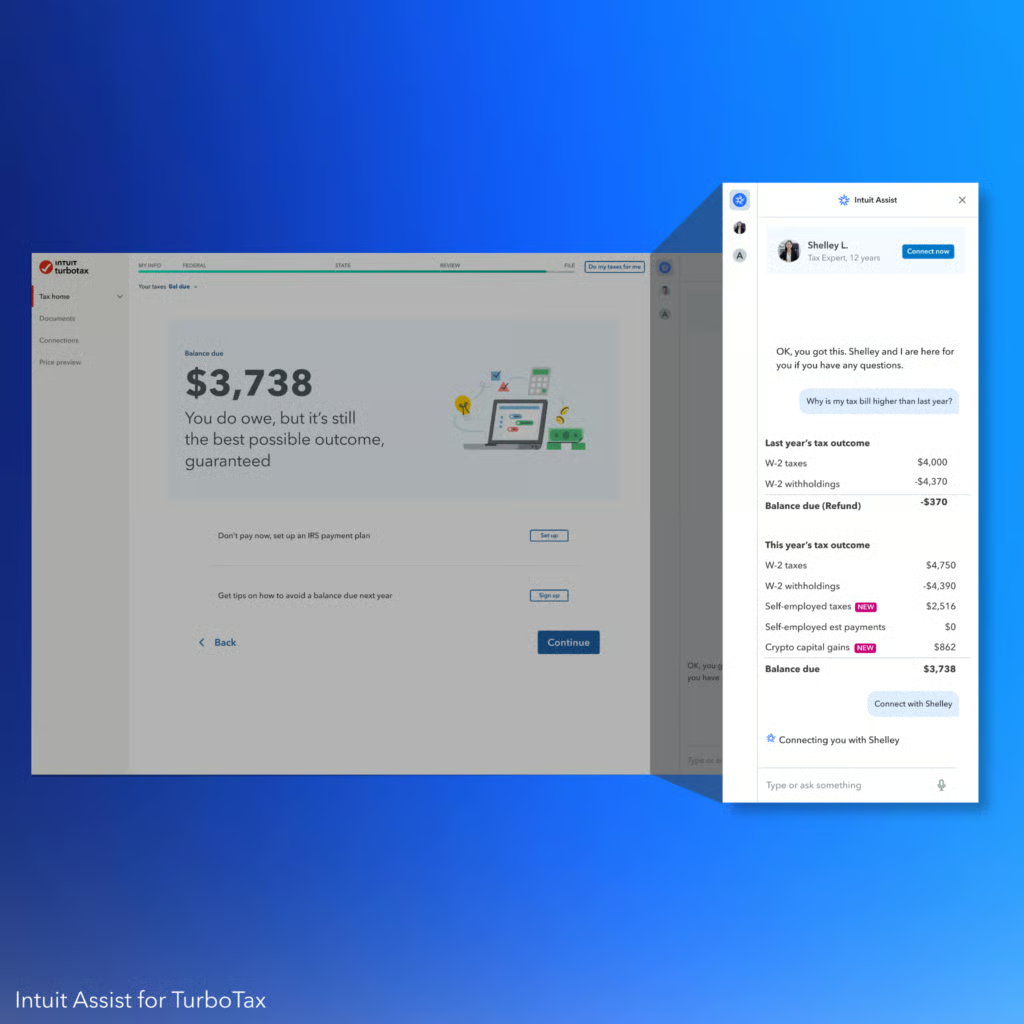
- Smart form recognition and guidance: Upload a tax form, and Intuit Assist reads, extracts, and applies the data. It creates a personalized checklist based on what you’ve uploaded and even detects special cases like stock sales, prompting you to upload the correct 1099-B and telling you where to find it.
- Automatic expert connection: Enjoy an automated system that notices when you need expert support and starts that process for you. A tax expert will explain your return, answer your questions in plain English, and file everything when you’re ready.
- Intelligent return summary: See a smart, simple snapshot of your return before filing. Intuit Assist recaps the most important parts, like income changes, tax breaks, state situations, and refund status.
- Proactive tax savings detection: See the math behind your refund or amount owed, with clear answers to follow-up questions. Intuit Assist searches hundreds of possible deductions and credits based on your information.
- Personalized workflow optimization: Get a dashboard that updates based on what you’ve submitted, skipping irrelevant steps. Intuit Assist flags missed entries or possible errors as you go, helping you fix them on the spot instead of at the end.
Automating marketing and lead follow-up in Mailchimp
Email marketing becomes effortless when AI takes over the heavy lifting of campaign creation and lead nurturing. Instead of spending hours crafting campaigns and manually following up with prospects, you can focus on strategy while Intuit Assist handles the labor-intensive execution.

- Campaign creation with complete automation: Simply tell Intuit Assist your goal, like “I want to announce a new product launch,” and it will generate hundreds of personalized layout options, write the entire email with your brand style, create images, and populate all content. You will just have to review and approve rather than start from scratch.
- Smart audience targeting and customization: Describe your target audience in plain language, like “loyal customers” or “first-time buyers,” and the system will translate that into precise segments. After the initial draft, you can easily edit text and images with AI support for tone adjustments, rewrites, or completely new content generation.
- Intelligent content optimization: Get data-driven suggestions on what might work best for engagement. The system also automatically integrates campaigns into your marketing calendar and triggers follow-up action recommendations to maintain momentum after sending.
- Performance tracking and improvement: Ask “How did my last campaign perform?”, and you will get comprehensive summaries across all marketing touchpoints, plus actionable recommendations to improve metrics like open rates and click-throughs for future campaigns.
- Automated lead management: Enjoy a solution to the challenge of constant follow-up. The platform automatically drafts responses to inbound leads using product and service data from QuickBooks, continuing to refine responses until leads are fully qualified. It also automatically updates your Mailchimp sales pipeline to track customer lifecycle progression.
Managing cash flow in Credit Karma
Credit Karma’s AI transforms your financial management by turning complex credit and cash flow decisions into simple, personalized recommendations. Instead of manually tracking spending patterns and researching credit options, you get tailored insights that help you maximize rewards and maintain healthy cash flow.
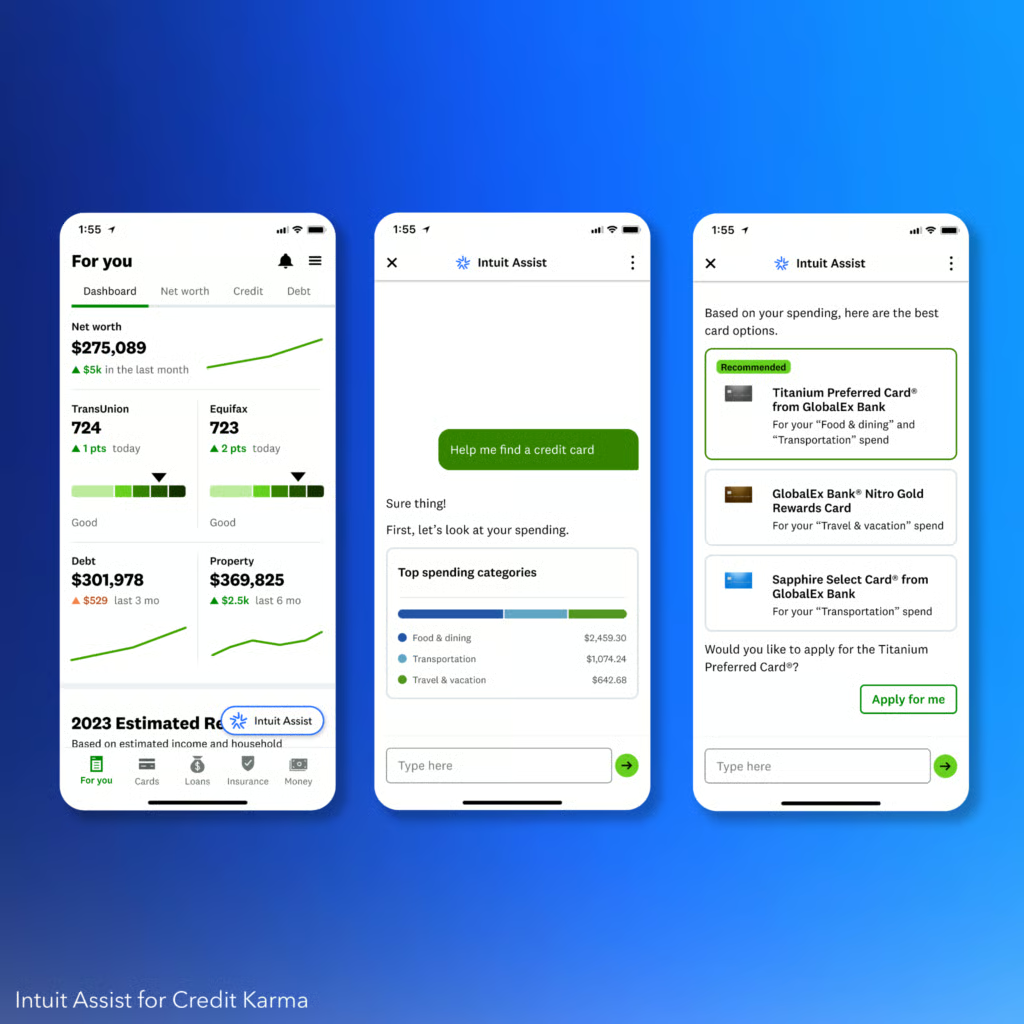
- Personalized rewards optimization: See AI-generated insights about reward opportunities, complete with calculations comparing your current average rewards to potential rewards from better cards, when checking your net worth or credit usage. The system analyzes your spending by category and identifies missed reward opportunities based on your top spending areas.
- Smart card recommendations and applications: Get custom card options optimized for your spending patterns with side-by-side comparisons, then apply seamlessly with pre-filled applications without leaving Credit Karma. After approval, receive immediate suggestions to maximize card perks like “Use your new card’s gym credit for your monthly membership,” plus reminders to switch payment methods.
- Travel rewards maximization: Ask in-chat how to maximize travel rewards, and get personalized advice on hotel credits, rideshare cashback, and expedited airport services based on the cards in your wallet. The system notices when you book flights and sends reminders about earning more points while traveling.
- Proactive cash flow management: Get notified when you’re running low on cash, see how transactions affect your monthly expenses, and receive personalized financing recommendations with credit or loan options based on your real data. Compare personal loan options and apply using the same streamlined pre-filled experience.
- Intelligent spending insights and budgeting: View spending breakdowns between essentials and non-essentials, get alerts about rising spending trends in categories like entertainment, and receive recommendations for setting spending caps. The system offers to alert you when you’re near your limits and provides guidance to avoid future cash crunches.
How Intuit Assist can help you
After reading about all those features, you might be wondering how they actually work in real life. Here are four fictional scenarios that show exactly when Intuit Assist becomes your business lifeline.
Emma, pet boutique owner
Emma sees her bank balance dropping but doesn’t know why. She’s busy running the store, fulfilling orders, and restocking pet toys. She is unsure what’s eating into her margins and doesn’t know where to look in QuickBooks to figure it out.
When Emma logs into QuickBooks, Intuit Assist gives her a personalized summary: her wholesale expenses spiked last week, and her grooming services dipped 40%. It highlights a cash flow hotspot, surfaces the trends in her daily dashboard, and suggests small pricing adjustments. Emma didn’t have to ask the right question. Intuit Assist just told her what was going on and what to do.
Anton, Etsy seller
Anton knows he sold more this year than last year and even hired a freelance photographer. However, he doesn’t know which forms he’s supposed to report or how to find them.
TurboTax with Intuit Assist detects his 1099-K from Etsy and his W-2 from a part-time job. It notices stock compensation and asks him to confirm, then prompts him to upload a 1099-B. It even tells him where to find it. As he uploads forms, Intuit Assist builds a custom checklist and applies the data to his return. No tax background needed.
Mateo, custom furniture builder
Mateo sends email campaigns but has no idea if they’re working. He’s too busy managing custom orders and supplier delays to track open rates or performance metrics.
He asks, “How did my last email campaign do?” Intuit Assist pulls up campaign metrics: open rates, click-throughs, and which products got the most attention. It also recommends a next step and targeting high-intent shoppers with a time-limited offer. Mateo doesn’t need a marketer, as he’s got one baked into Mailchimp.
Lena, freelance designer
Lena’s client payment is late, but her software subscriptions and rent are due. She’s dangerously close to overdrafting again.
Intuit Assist in Credit Karma notices her cash is low and starts a chat. It shows how a recent hardware purchase threw off her balance and offers a list of short-term loan options with side-by-side comparisons. After she applies, it recommends setting a spending limit on software and alerts her whenever she gets close to the cap. She avoids the crunch and plans better next time.
Frequently asked questions (FAQs)
What technology powers Intuit Assist?
Intuit Assist is powered by generative AI built on Intuit’s proprietary GenOS operating system. The system uses large language models fine-tuned for financial, tax, accounting, and marketing domains. It leverages Intuit’s vast contextual data sets to deliver personalized insights across QuickBooks, TurboTax, Mailchimp, and Credit Karma.
Can Intuit Assist connect me with a human expert?
Yes, Intuit Assist can connect you to human experts through Intuit’s Live Platform. When situations require advanced guidance, the system routes users to accountants, bookkeepers, or other financial professionals for personalized human assistance.
Is Intuit Assist available to all users?
Availability varies by product and region. Intuit Assist is embedded in QuickBooks, TurboTax, Mailchimp, and Credit Karma. As of 2025, it’s widely available to QuickBooks Online customers in the US, with ongoing rollouts and beta programs in other regions, like the UK. Some features may still be in beta or limited release.
Does using Intuit Assist incur additional costs?
The cost structure depends on your specific Intuit product and plan. Intuit Assist is included in all QuickBooks Online plans, but some advanced features or access to human experts may incur additional fees. Check the latest pricing details for your specific Intuit product.
