







Popular for being a great note-taking app, Notion is a reliable project management platform that allows you to view projects on a Kanban board or a timeline. Users can assign tasks to team members with deadlines and automate manual tasks to streamline workflows. In this Notion review, the platform earned a perfect score on general features, as it offers a comprehensive suite of project planning and task management capabilities.
However, Notion lost a few points in the customer service category. While its help center offers easy-to-understand documentation, it only provides email as the direct customer support channel. Read on to see how the software solution fared in other categories.
Notion Review: At a Glance
When to Use Notion
- Needing an affordable project management app: Notion’s entry-level plan is priced at $10 per user, monthly, making the platform highly accessible to small businesses.
- Requiring a beginner-friendly software solution: The software solution features a simple, visually appealing interface that makes navigation effortless. Those who are new to project management will find it easy to use.
- Handling different types of work: Notion supports various kinds of work, including note-taking, task management, and knowledge management.
- Creating content: At its core, Notion is a writing tool similar to a word processor. The pages in the platform let you create and modify various types of content. Its content blocks enable you to add to-do lists, calendars, quotes, and different kinds of media like images, videos, audio, and codes.
When to Use an Alternative
- Messaging team members within the project management app: While Notion allows users to tag team members for collaboration, it doesn’t have an instant messaging tool that lets you discuss matters with colleagues directly. If your team needs this feature, consider Basecamp, which has a built-in team chat called Campfire.
- Needing unlimited activity logs: Notion features unlimited page history in its most expensive plan. Other alternatives like Asana let you track all team activities in the free version.
- Managing leads and deals: Although Notion offers customer relationship management (CRM) templates, it’s better to explore alternatives like Bitrix24 to access a native CRM tool that facilitates seamless sales pipeline monitoring.
Notion Deciding Factors
Notion is built on blocks or pieces of content on a page, including texts, images, tables, boards, and lists. Given the design of the software solution, it’s ideal for teams handling content creation. Marketing teams running various campaigns will benefit from the built-in document commenting features. Startups drafting their vision and mission statements or product documentation can use Wiki, the software solution’s knowledge base creation tool.
An affordable project management app, Notion offers an entry-level plan that costs $10 per user, per month. This already includes unlimited blocks, pages, and file uploads, a custom notion.site domain with a public homepage, and advanced automations. Here are the most important things you need to know about Notion:
| Best For | Small businesses engaged in content creation that prefer an easy-to-use, budget-friendly project management app |
|---|---|
| Standout Features |
|
| Pricing Plans |
|
| Annual or Volume Discounts Available | Annual discounts are available, with the entry-level and second-tier plans costing $8 and $15 per user, per month, respectively |
| Key Integrations |
|
| Customer Service |
|
Notion Alternatives
In this Notion review, we found that while the platform is ideal for handling projects involving content creation, businesses must consider alternatives when they need deep team collaboration tools. Its collaboration features are limited to comments and mentions. In contrast, Basecamp has native instant messaging, allowing users to communicate within the app directly and eliminating the need for a third-party solution.
While page history is available in every Notion plan, unlimited history is only available in the most expensive plan, which has custom pricing. When you choose the project management software Asana, you’ll access unlimited activity logs in all plans, including the free version. Notion doesn’t have a built-in customer relationship manager (CRM) either. If your work heavily involves monitoring sales pipelines, use Bitrix24 instead to track leads and deals more efficiently.
Here’s a summary of Notion alternatives:
 |  |  | |
|---|---|---|---|
| Best For | Businesses needing built-in instant messaging tools | Organizations requiring unlimited activity logs | Sales teams wanting a native CRM tool within a project management app |
| Monthly Starting Price | $15 per user | $13.49 per user | $61 for five users |
| Learn More |
Notion Pricing
4.5 / 5
Notion earned a high pricing rating since it features a free plan and affordable subscription rates. Its entry-level plan is priced at $10 per user, monthly, while the second-tier plan is $18 per user, monthly. These rates are reduced to $8 and $15 per user, monthly, respectively, when you choose the annual billing arrangement.
While it caters to small businesses’ budgets, Notion also accommodates large organizations, offering an Enterprise plan with custom pricing and features that provide extra layers of data security and granular controls. Here’s an overview of Notion pricing plans:
| Notion Plans | Free | Plus | Business | Enterprise |
|---|---|---|---|---|
| Best For | Solopreneurs managing simple tasks | Small teams wanting to streamline workflows with custom automations | Businesses requiring advanced project analytics | Organizations needing advanced controls on the project management app |
| Monthly Pricing ($/User/Month) | $0 | $10 | $18 | Customized quote |
| Annual Pricing ($/User/Month) | $0 | $8 | $15 | Customized quote |
| Pages & Blocks | Unlimited for individuals; limited block trial for more than two members | Unlimited | Unlimited | Unlimited |
| File Uploads | Up to 5MB | Unlimited | Unlimited | Unlimited |
| Page History | 7 days | 30 days | 90 days | Unlimited |
| Project Views (Timeline, Boards & Calendar) | ✓ | ✓ | ✓ | ✓ |
| Automations | Basic | Custom | Custom | Custom |
| Third-party Integrations | ✓ | ✓ | ✓ | ✓ |
| Health Insurance Portability & Accountability Act (HIPAA) Compliance | ✕ | ✕ | ✕ | ✓ |
Notion General Features
5 / 5
In this Notion review, the platform received a perfect score on general features thanks to its excellent tools for project organization and individual tasks. Its most basic element is the block, which refers to pieces of content added to a page. With a block, you can write texts, make to-do lists, create project boards, and upload images, videos, and other types of media. These customizable elements enable you to accurately portray your workflow in the project management app.
Aside from content blocks, here are the essential project planning tools Notion offers:
- Kanban board: The platform has an intuitive Kanban board that features the familiar To-do, Doing, and Done columns. Use this to keep track of assignments and quickly spot delayed tasks.
- Docs: Create different types of content, from project plans and proposals to meeting minutes and product strategy documentation. Use the formatting toolbar to include headings, break up content, and put items on a bulleted or numbered list.
- Database: This is a collection of Notion pages that offers an overview of your projects or tasks. The projects or tasks are displayed in a table with columns representing key details, such as the people assigned, the level of priority, and the due date.
- Templates: Use templates to quickly plan and organize your projects. Edit the templates according to your team’s workflow.
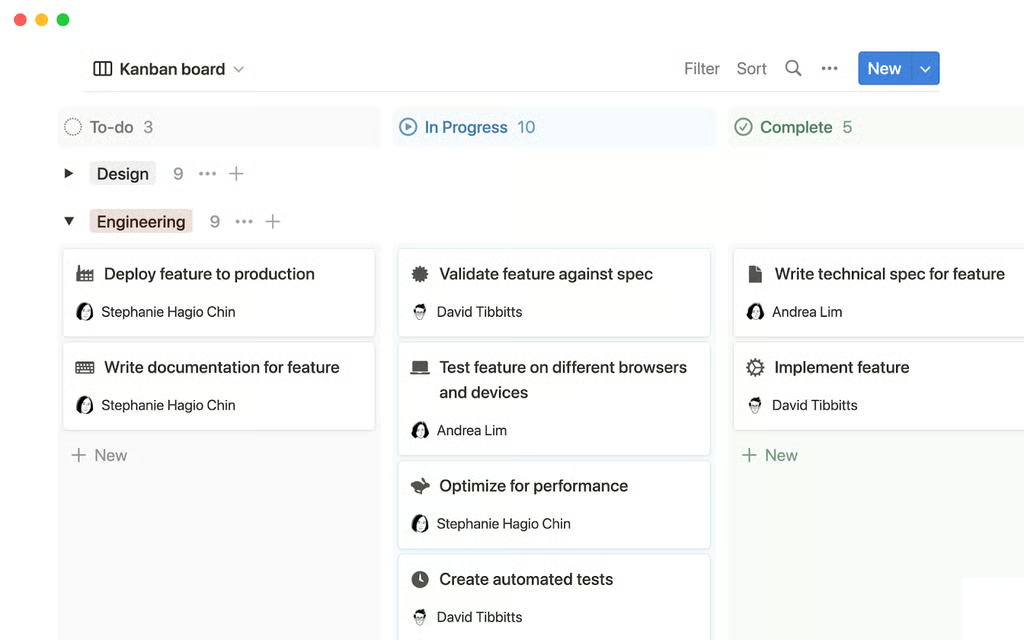
Track project progress via Notion’s Kanban board (Source: Notion) 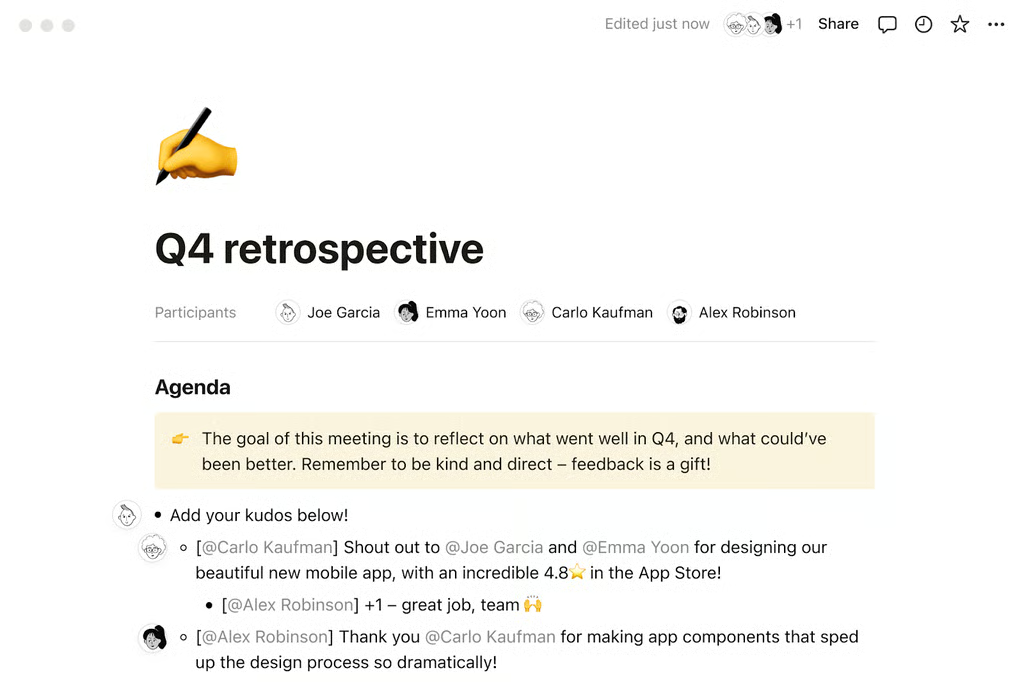
Write meeting minutes on Notion (Source: Notion) 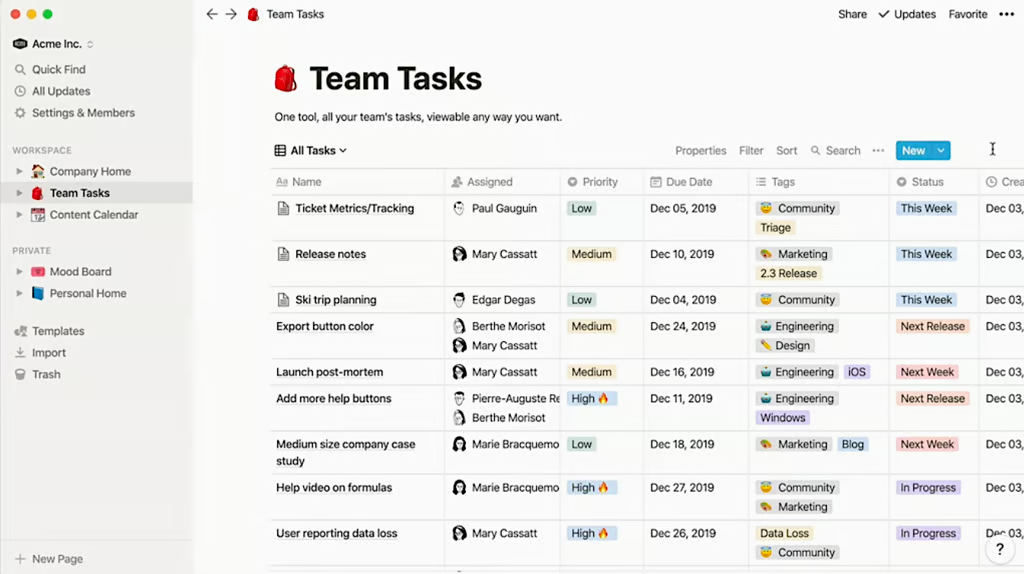
Get an overview of the progress of all team tasks by creating a Notion database (Source: Notion) 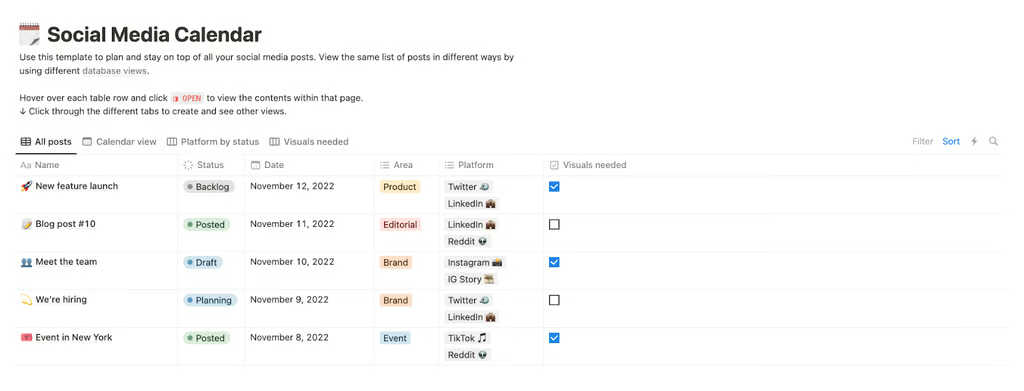
Use Notion’s social media calendar template to monitor marketing efforts (Source: Notion)


Notion Niche Features
3.5 / 5
Our Notion app review produced a fair rating on niche features because while it has automations and multiple project views, it doesn’t have native resource management tools. Moreover, most of the valuable security features are locked behind its highest-tier plan, including HIPAA compliance.
Nevertheless, Notion has various notable tools promoting streamlined project management and collaboration, including the following:
Wiki
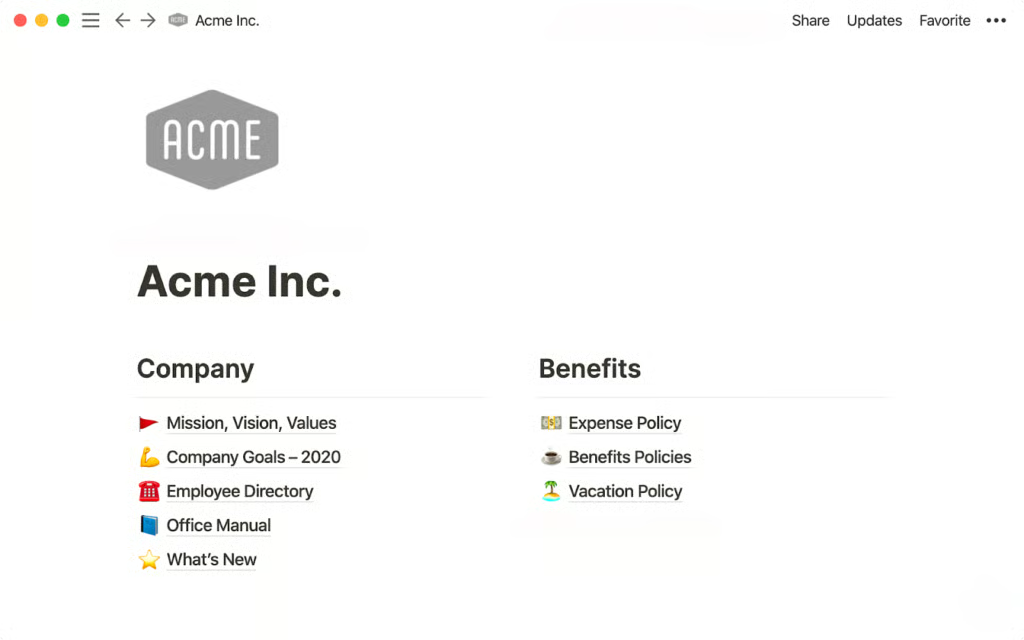
Notion allows you to build a wiki and keep all key information about different projects in one place. Maximize this tool by creating a company home page and enabling employees to access various resources like the company mission and vision, office directory, employee handbook, and brand guidelines. If you’re drafting documentation for a new product, organize the step-by-step article guides into categories and consolidate them in a wiki.
Formulas
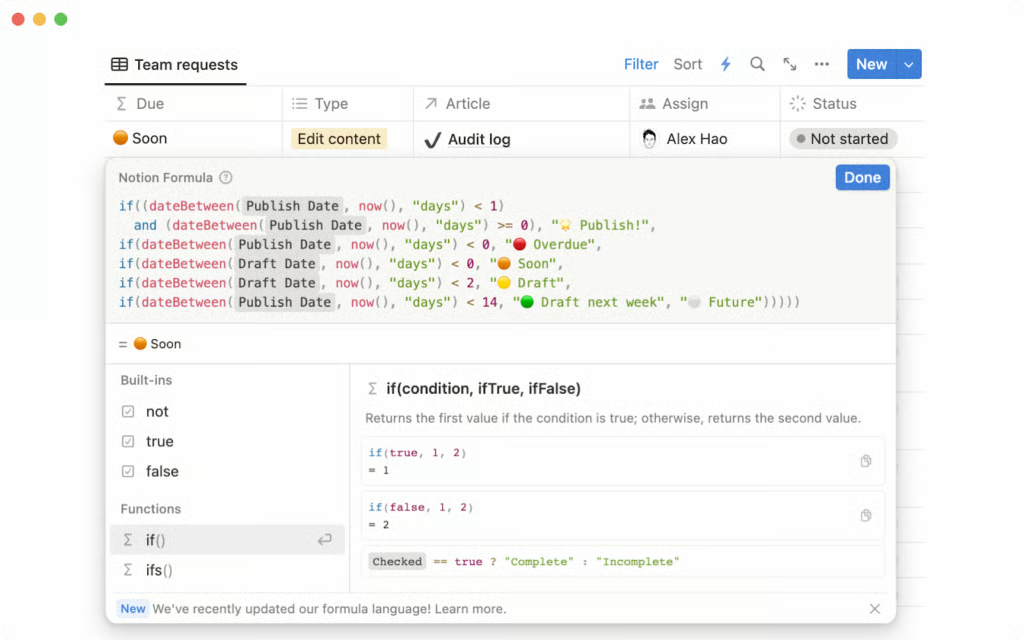
This database property lets you perform calculations based on existing variables. The formula syntax is similar to programming if-then statements. Specify the function (the task to be performed), inputs (the data to manipulate), and output (the result). Take advantage of Notion’s formula editor and choose from the function, input, and output recommendations.
Public Pages
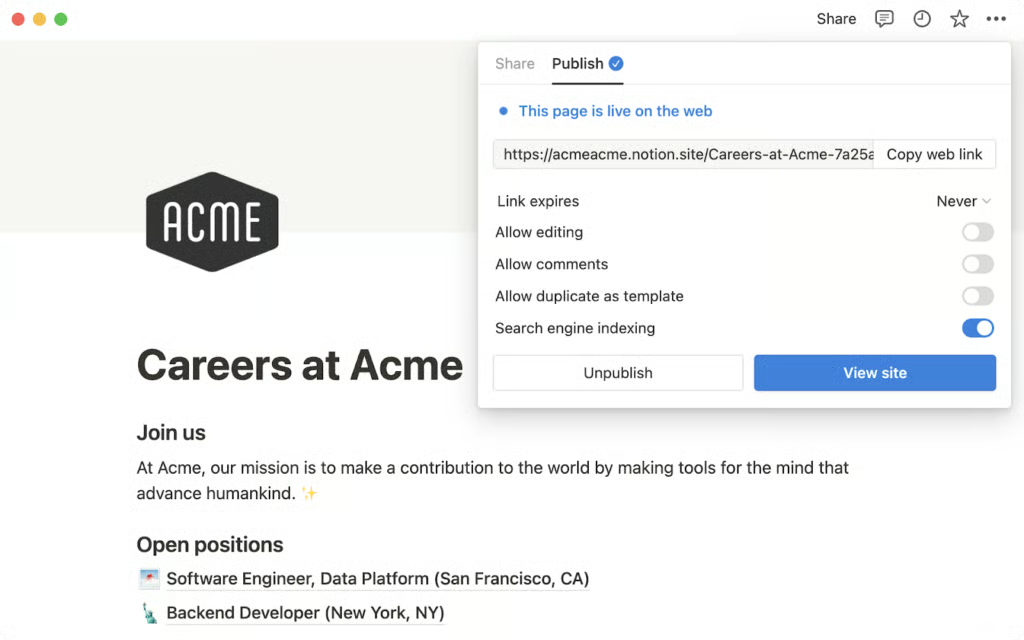
The pages you create on Notion can be made public and published on a website. This makes sharing content with external stakeholders easier. Through Notion pages, you can publicize job openings, announce important product news, and discuss market research findings.
You won’t need web development expertise to put up a site. Publishing a page is as simple as clicking the “Share” option at the top right-hand corner of the Notion interface, going to the “Publish” tab, and clicking the “Publish to web” option. Configure the link expiration if your content is time-sensitive.
Notion AI
Notion’s artificial intelligence (AI) tool removes the burden of administrative tasks. After analyzing documents, it automatically populates tables and generates meeting notes and action items.
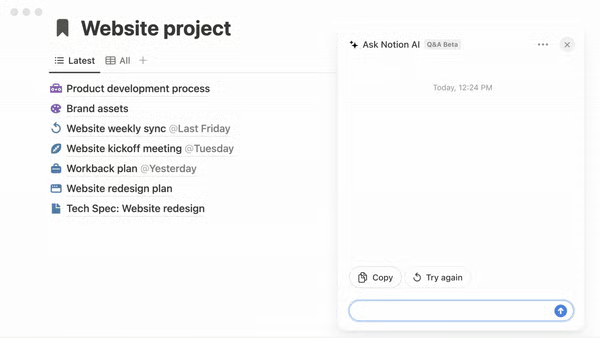
When you need to write a proposal or a blog, ask AI to draft one. If you’ve already written one yourself, AI can improve it by editing the voice and tone. Notion features Ask Notion AI, wherein you can ask any question on the chat dialog box and AI will provide insights using data from wikis, docs, and projects.
Notion’s Customer Service
3.44 / 5
In this Notion software review, customer service earned a fair rating since the majority of support channels are for self-service. Direct lines of communication to the provider, like live chat, aren’t available, and users can only send an email. You have the option to receive personalized coaching from certified Notion consultants, but you must hire these professionals.
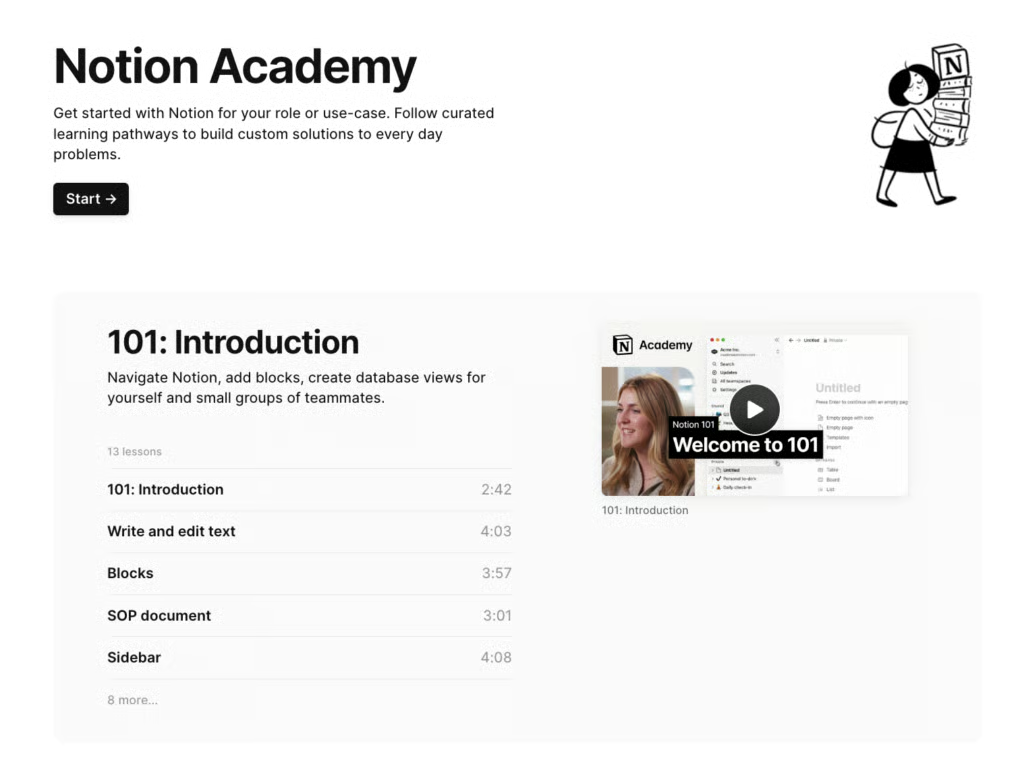
The self-service options include the help center and the Notion Academy. These platforms allow users to access comprehensive, easy-to-understand how-to guides in text and video formats. The resources are well-organized and categorized into different topics, from navigating the basics of adding blocks and creating databases to getting started with Notion AI.
Notion’s Ease of Use
4.25 / 5
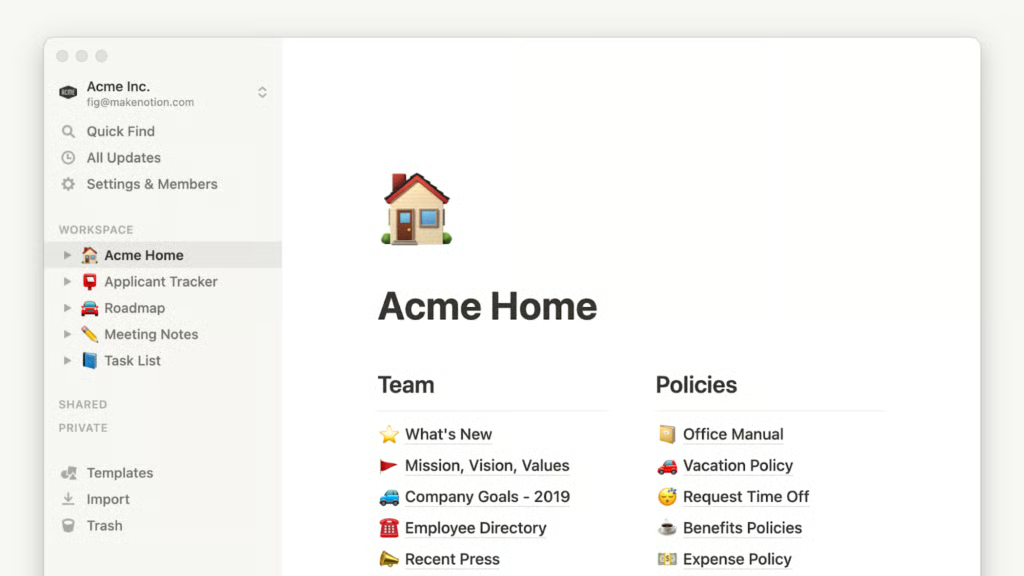
Our Notion project management review recorded a high score on ease of use since the platform has a neat interface with plenty of white space, which makes features highly recognizable and accessible. The left side panel holds all the navigational tools you need: Search, Updates, (inbox and notifications), and Settings & Members.
Below these tools, you’ll find the list of the individual workspaces. Favorite workspaces are displayed at the top. The bottom part of the side panel contains the templates gallery, the option to import files, and trash items. In addition to Notion’s clean interface, its comprehensive documentation allows new users to quickly familiarize themselves with the platform’s features.
Expert Score
4.13 / 5
We gave a high expert score for Notion for offering affordable subscription plans and an easily navigable interface. Its entry-level plan, priced at $10 per user, monthly, packs the essential project management features: unlimited blocks and pages, unlimited file uploads, multiple project views, custom notion.site domain for public pages, and automations. Notion pricing offers excellent value for money, especially for small businesses.
Moreover, we liked its simple, familiar interface. We believe that those trying project management software solutions for the first time will have little to no learning curve using the platform.
Real-life users on third-party websites also commended its clean layout. Some noted how functional Notion AI is in organizing projects, proofreading documents, and summarizing content. As of this writing, these are the user ratings from Notion reviews on third-party websites:
- G2: 4.7 out of 5 based on 5,226 reviews
- GetApp: 4.7 out of 5 based on 2,122 reviews
- TrustRadius: 8.8 out of 10 based on 609 reviews
How We Evaluated Notion
To objectively assess Notion, we drafted a scoring rubric with the following criteria points: pricing, general and niche features, customer service, and ease of use. We believe that these factors are among the top priorities of small businesses when deciding which project management software solution to use. We included our expert score, which covers our assessment of the platform’s value for money and popularity. Learn more about how we evaluated Notion by clicking on the tabs below:
To see if the platform accommodates small teams’ budget requirements, we checked whether its subscription rates for entry-level and second-tier plans are less than the typical fees we see on the market. We gave the provider extra points for having a free plan and annual discounts. We also considered whether some features require extra fees.
The tools we evaluated were features dedicated to project planning and scheduling, task management, and customization. We assigned more points to the provider as it offers robust third-party integrations.
Multiple project views were part of our assessment of niche capabilities since businesses require different formats when tracking projects. We checked if the provider offers time tracking, resource management, and built-in automations. Similarly, we assessed how secure the platform is.
Small businesses need fast responses to queries, which is why customer service hours were part of our evaluation. We looked into the available support channels, namely phone, email, and live chat.
When transitioning to a new project management software solution, businesses want to know how fast they could adopt and maximize its features. For this reason, we included in our assessment the level of expertise one needs to set up and navigate Notion. We checked how intuitive its interface is.
This includes our evaluation of the provider’s user-friendliness and standout features. We determined the level of its popularity among professionals and considered the capabilities it offers per subscription plan to gauge its value for money.
Frequently Asked Questions (FAQs)
Is Asana better than Notion?
It depends on the use case. Notion is better for handling projects that largely involve content creation. Since it allows users to publish pages, it’s also ideal for sharing content with external stakeholders.
On the other hand, Asana is better for teams needing to connect existing business tools to their project management app since it offers over 300 third-party integrations. It’s an excellent choice for projects with strict timelines and budget requirements, as it features various resource management tools, like workload views and time tracking.
Is Notion Free good enough?
It’s good enough for individuals since it offers unlimited pages and blocks for one user, multiple project views, and basic automations. If you’re using Notion to list and track your own tasks, the features in the Free version should be adequate.
What are the limitations of Notion Free?
These are the limitations of Notion’s Free version:
- Limited blocks for more than two users
- Up to 5MB of file uploads
- Up to seven days of page history
- Up to 10 guest collaborators
- Doesn’t have a custom notion.site domain, private teamspaces, or custom database automations
Bottom Line
Notion is an intuitive, affordable project management app suitable for businesses managing content creation projects. It allows users to access unlimited blocks and pages, public pages with custom domains, knowledge bases, and generative AI, all valuable tools for producing high-quality content. Its entry-level plan is priced at $10 per user, monthly, accommodating small businesses’ budgets. Try its free version to know whether it suits your project needs.
