







ClickUp is an all-in-one platform for project management software, designed to help individuals, small companies, and enterprises plan, allocate, and track projects. It acts as a customizable team hub where teams can collaborate on projects of any type and size. Our ClickUp review shows the platform offers affordable pricing, starting at $10 per member, monthly, and robust niche features like unlimited custom roles and advanced time tracking.
As a project management software, ClickUp is versatile because its pricing varies based on the number of spaces, team usage, permissions, and view options. The system also has productivity tools like calendar viewing and customizable dashboards.
ClickUp Review: At a Glance
When to Use ClickUp
- Remote teams constantly on the go: ClickUp is one of our top recommendations for best project management software for individuals because of its offline mode, which gives users complete functionality even when they’re not connected to the internet.
- Managers wanting a high-level task management solution: This provider is part of our list of best project management software thanks to its robust organizational features like multiple views, custom fields, and time tracking.
- Project management solution for freelancers and solopreneurs: All paid plans have Gantt charts, and guest users have Gantt view access. This allows freelancers to balance multiple projects and manage complex information. Read about ClickUp in our list of best Gantt chart solutions.
- Businesses requiring native time tracking: ClickUp made time tracking a universal feature on all ClickUp plans, which is why it’s on our list of top resource scheduling software.
When to Use an Alternative
- When you need plenty of storage: ClickUp’s free plan only comes with 100MB of storage. Check out Trello’s free plan for unlimited storage (10MB per file).
- When you want robust integrations: ClickUp only integrates with 50-plus third-party apps, while Wrike has over 150 native integrations. Opt for the Wrike Integrate paid add-on and unlock 400-plus custom integrations.
- When you want a basic project management solution: ClickUp is a complete solution with extensive features. Consider Wrike because it’s a multipurpose project tracking software with a familiar, spreadsheet-like interface.
ClickUp Deciding Factors
ClickUp is a team collaboration and project management platform that allows users to customize workflows, keep track of time and progress, and interconnect with colleagues and clients. Our ClickUp review found that one of its main advantages lies in its top-notch custom capabilities, including the custom fields feature for adding different types of information.
While the software has robust applications, ClickUp has a steep learning curve, which can be overwhelming for non-techy teams, especially during initial setup.
| Best For | Teams looking for a customizable project management solution |
|---|---|
| Standout Features |
|
| Pricing Plans |
|
| Annual or Volume Discounts Available | Annual billing is available, starting at $7 per user, monthly |
| Data Security | European Union (EU), the United States (US), and Australia or Singapore (APAC) data residency |
| Customer Service |
|
ClickUp Alternatives
The platform offers a wide range of small business needs, including whiteboards, automations, in-app video recording, and Gantt charts. While it’s great for resource and workload management, ClickUp has a steeper learning curve for new beginners and only has basic artificial intelligence (AI) features. If you’re considering ClickUp and noting its strengths and weaknesses, consider the three providers below or read our complete list of the best ClickUp alternatives.
 |  |  | |
|---|---|---|---|
| Best For | Teams looking for a visually appealing, easy-to-use solution with customizable workflows | Companies focused on the Kanban method and looking for extensive power-ups | Businesses handling multiple clients and projects requiring large storage spaces and enterprise-grade tools |
| Monthly Starting Price (per User) | $12 | $6 | $10.00 |
| Learn More |
ClickUp Pricing
4.50 / 5
ClickUp’s has four packages to choose from, with pricing and subscription plans geared toward different team sizes. It scored high marks because its free-forever plan is a great starter package for personal use or startup teams thanks to its real-time chat, collaborative Docs, unlimited tasks, and calendar view.
If you have a lean team or manage a growing small business, the Unlimited plan has many upgraded features like native time tracking, agile reporting, and unlimited Gantt charts. If you’re managing a larger team, opt for the Business or Enterprise packages and gain access to comprehensive features like white labeling. Here’s a detailed breakdown of ClickUp’s pricing options.
| ClickUp Plans | Free Forever | Unlimited | Business | Enterprise |
|---|---|---|---|---|
| Best For | Personal use | Small teams | Midsize companies | Large enterprises |
| Monthly Pricing($/Member/Month) | Free | $10 | $19 | Contact sales |
| Annual Pricing($/Member/Month) | ✕ | $7 | $12 | Contact sales |
| Unlimited Tasks | ✓ | ✓ | ✓ | ✓ |
| Lists & Folders per Space | 100 | 200 | 400 | Unlimited |
| AI Compatible | ✕ | ✓ | ✓ | ✓ |
| File Storage | 100MB | Unlimited | Unlimited | Unlimited |
| Automations | 50 active rules, 100 automation executions, multiple actions and conditions | 500 active rules, 1,000 automation executions, multiple actions and conditions | Unlimited active rules, 10,000 automation executions, multiple actions and conditions | Unlimited active rules, 250,000 automation executions, multiple actions and conditions |
| Time Tracking | 60 uses | ✓ | ✓ | ✓ |
| Pulse: Live Overview | 100 uses | ✓ | +View historical data | +View historical data |
Add ClickUpAI, an optional paid feature priced at $5 per member, monthly, which comes with 100-plus prompts and inputs tailored for different situations. Use it to generate ideas, action items, and summaries in seconds.
ClickUp offers annual-based billing, which provides small businesses with more significant savings. Best of all, the solution has a 100% satisfaction guarantee. Users unsatisfied with their purchase are eligible for a full refund within 30 days of subscription.
ClickUp General Features
4.80 / 5
ClickUp scored nearly perfect in this area because its collaboration and shared-task functions deliver great visibility across multiple projects with tools like universal search, team and board views, and workload management. This platform suits businesses looking to combine task management and document collaboration in a single platform.
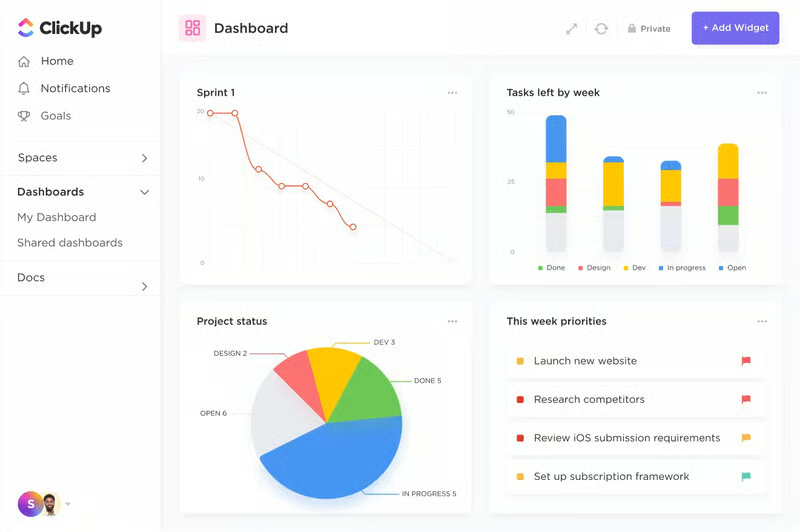
Some of ClickUp’s core capabilities are:
- Whiteboards: Use this as your team’s go-to place for meaningful collaboration and collective brainstorming. It’s designed as a blank slate—users can add elements like lists, images, drawings, shapes, and notes. ClickUp has ready-made whiteboard templates like project roadmaps, which are ideal for defining milestones, responsibilities, and due dates.
- To-do lists: Create a list for every task or activity and see what you want and how you want to see it. You can format your list with your preferred colors, add links, and access it from anywhere using a desktop, mobile phone, or browser tab.
- Calendar function: Stay on top of everything and use ClickUp’s Calendar view to plan your tasks, activities, milestones, and due dates monthly. Use this centralized calendar for scheduling and use features like drag-and-drop tasks and custom categories to tailor the calendar to your needs.
- Resource management: Manage your workload and resources using the Team view. ClickUp consolidates your company assets, forms, and time tracking, making allocating and monitoring your resources easier. Manage productivity with some of ClickUp’s tools, like setting time estimates and creating custom forms.
- Real-time chat: Streamline the way your team communities with real-time chat channels where people can share updates, upload files, and make announcements. Post comments, mention people, and format messages with command shortcuts easily.
- Dashboards: These act as the visual representation of your team’s work. Users can create one from scratch or use one of ClickUp’s ready-made templates. Use dashboards to get a high-level view of ongoing projects and spot bottlenecks for performance improvement.
ClickUp Niche Features
5.00 / 5
ClickUp received a perfect score for its niche features, such as white labeling, enterprise application programming interface (API), custom roles, and artificial intelligence (AI) compatibility. All these tools help enhance company credibility and team efficiency. ClickUp is so versatile that it offers over 15 ways to view and manage tasks and projects, such as lists, boards, activities, and Gantt views.
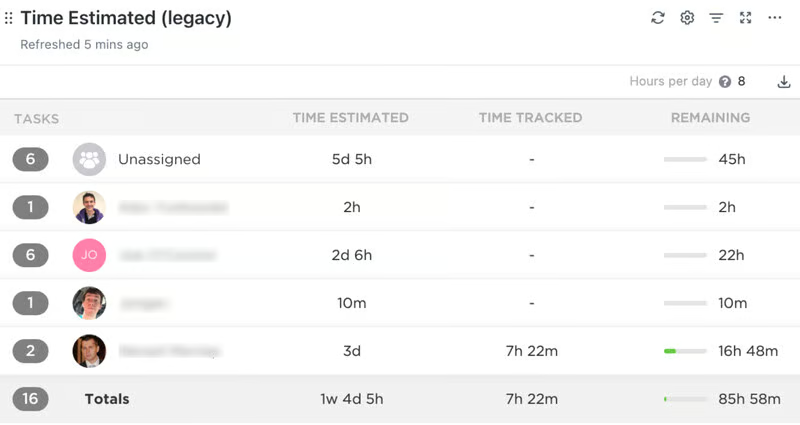
Read through each feature below to learn more about ClickUp’s top niche offerings:
- Time tracking: ClickUp makes it easy to track time, set estimates, add notes, and view reports. Subscribe to the unlimited plan for advanced features like time estimates, tracked time summaries, and detailed time reports. Opt for the Business and Enterprise tiers for more comprehensive options like billing and timesheet reports.
- In-app video recording: This is a unique feature of ClickUp that all users can access regardless of their plan. Use the native video recording tool to send screen recordings to colleagues without emailing or calling for a meeting. Use this feature to convey instructions clearly.
- White labeling: Opt for a custom branded experience with ClickUp’s enterprise feature, white labeling. This allows owners and administrators to customize their workspace logo, colors, and URLs.
- Budgeting: Use ClickUp’s fully customizable personal budget template to organize your personal or business finances. Use custom fields to create spending categories and assign allowances, and opt for the calendar view to visualize payment due dates.
- Mind mapping: Get a bird’s-eye view, visualize your project layouts, and create tasks for every part of your project. This feature is available in all plans, but there is a 60- and 100-use limit for free and unlimited plan subscribers, respectively. Upgrade to ClickUp’s Business or Enterprise plan to gain unlimited access to mind map creation.
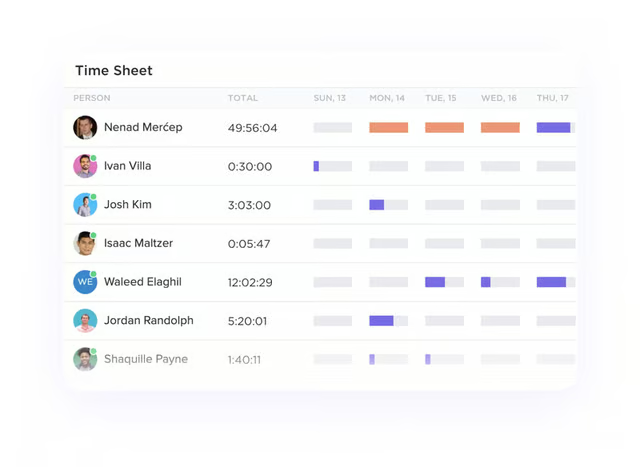
Track time and see detailed time sheets that get a better understanding of how time is spent by team members. (Source: ClickUp) 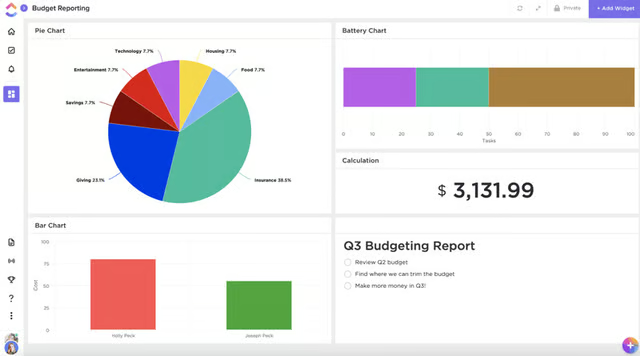
Create custom dashboards to track budget expenditure and income generated. (Source: ClickUp) 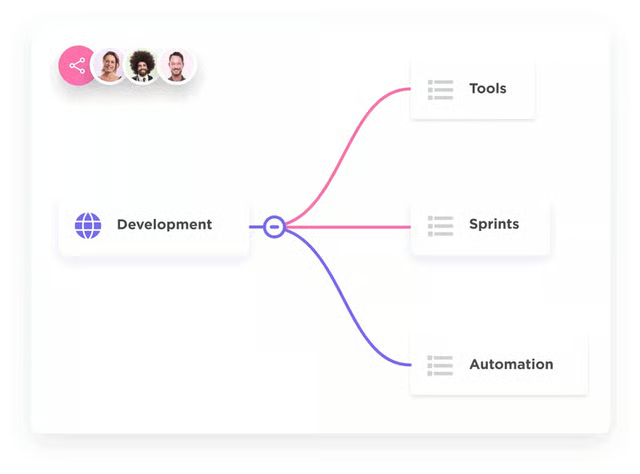
ClickUp lets users link their mind maps to tasks, Docs, and comments. (Source: ClickUp)


ClickUp Customer Service
3.80 / 5
ClickUp lost a few points in this area because free plan users need more access to customer service channels. It offers 24/7 access to its help center, which includes ClickUp University, API documents, and template and webinar resources. However, other customer service features like priority support, customer success managers, onboarding training workshops, and admin training webinars are only accessible to enterprise plan subscribers.
ClickUp’s Ease of Use
3.40 / 5
Unfortunately, ClickUp’s range of features coupled with its customizable interface means it takes some time to gain familiarity. Even though the solution has a clean and modern interface, new users often have navigation issues and encounter difficulties when it comes to finding certain features. However, it must be noted that once you get the hang of the platform, ClickUp offers a great deal of functionality.
To maximize the platform’s potential and versatility, users need to consider allocating additional time to sort out how best to configure the solution to meet their team’s needs. Access ClickUp’s onboarding resources (e.g., ClickUp University, YouTube video tutorials, and on-demand demonstrations) to understand how the platform works and how to use it.
ClickUp’s Expert Score
4.40 / 5
ClickUp scored highly in our export score but missed getting full marks because of usability. This task management software enables teams to organize tasks and coordinate daily activities. ClickUp has garnered excellent feedback from verified users across several reputable review sites. Reviewers noted templates’ usefulness and adaptability to different projects and situations.
Generally, users found it’s a decent tool for productivity and scheduling tasks. The different views it offers, like Kanban, Gantt charts, and lists, are an advantage compared to other providers. Overall, customers reported that ClickUp is a great product with lots of functionality—it just takes some time to learn and use. At the time of publication, ClickUp has earned the following scores on popular user review sites:
- Software Advice: 4.6 out of 5 based on 4,020 ClickUp reviews
- G2: 4.7 out of 5 based on 9,403 ClickUp reviews
- TrustRadius: 8.5 out of 10 based on 1,192 ClickUp reviews
- Gartner: 4.3 out of 5 based on 139 ClickUp reviews
How We Evaluated ClickUp
As we evaluated ClickUp’s capabilities and value for money, we balanced our evaluation by focusing on more than just the price. We considered its general and niche features, range of customer service options, user-friendliness, and customer experience and feedback. Learn how we evaluated ClickUp by clicking on the tabs below:
When it comes to small business operations, cost is essential as most teams have a limited budget. With that in mind, we examined whether ClickUp offers a free plan or trial and the price points of its entry-level plan. We checked if there are annual discounts and if there are extra fees for certain features.
To evaluate the functionality and usability of a project management platform, we looked at the availability of essential features like project planning and task management tools. We also looked at its collaboration features and whether ClickUp offers customization and dashboards for project monitoring.
We didn’t just focus on general features—our evaluation also considered the advanced features that set ClickUp apart from other providers. Our point of focus was on features like time and budget tracking. On this item, we noted whether ClickUp comes with built-in automations and multiple project views.
We checked ClickUp’s customer support channels. We looked into typical client communication services: 24/7 operational hours, live chat, voice channel, and email support.
To gauge ClickUp’s ease of use, we referred to feedback about the technical skill required to set it up and operate. We also analyzed the system’s interface, menu options, general navigation, and whether it’s intuitive enough for new users to pick it up quickly.
When we calculated ClickUp’s expert score, we evaluated user reviews, specifically customer feedback on third-party websites. We also considered how popular it is among users, their thoughts about the platform, and our own experiences using the software.
Bottom Line
In our comprehensive ClickUp review, we found that it’s an excellent platform for planning, organizing, budgeting, and tracking the progress of any project. Its free plan, competitive pricing for paid plans, and many versatile features make it an excellent option for small businesses. However, it does have limited storage on its free plan and has a steeper learning curve than its competitors.
This project management tool is a complete business solution you can use for any and every project. To get started with ClickUp, sign up for its free plan and find out if it’s the right solution for you.
