







The best AI task managers use machine learning to schedule tasks based on urgency, reshuffle priorities when deadlines change, and pull relevant data across platforms. If you’re a project manager looking to reduce the time spent on task planning and prioritization, these tools are worth a closer look.
| AI task managers | Best for | Monthly starting price | My rating |
|---|---|---|---|
| ClickUp | Best all-in-one AI productivity too | $7/user | 4.85/5 |
| monday work management | Best AI project templates | $10/user | 4.83/5 |
| Wrike | Best for mobile productivity | $10/user | 4.82/5 |
| Jira | Best cross-platform research | $9.05/user | 4.80/5 |
| Asana | Best AI status reporting | $10.99/user | 4.77/5 |
| Taskade | Best agent-based task management | $4 for 3 users | 4.74/5 |
| Todoist | Best for AI-driven task breakdown | $5/user | 4.65/5 |
| Motion | Best scheduling assistant | $19/user | 4.57/5 |
| Notion | Best for content generation | $10/user | 4/5 |
Which AI task manager is right for you?
Take the quiz to find out which AI task manager suits your business needs.
Question 1 of 3
How many people typically join your meetings?
- ClickUp: Best all-in-one AI productivity tool
- monday.com: Best prebuilt AI templates
- Wrike: Best for intelligent mobile productivity
- Jira: Best for cross-platform deep research
- Asana: Best for AI-powered status reporting
- Taskade: Best for agent-based task management
- Todoist: Best for AI-driven task breakdown
- Motion: Best for scheduling assistance
- Notion: Best for content generation
- How I evaluated the best AI task managers
- What are AI task managers?
- How AI task managers differ from traditional task management software
- Key AI task manager features to look for in 2026
- Frequently asked questions (FAQs)
ClickUp: Best all-in-one AI productivity tool
My expert opinion
ClickUp is one of the highest-rated AI project management tools I’ve used, and a lot of that comes down to ClickUp Brain. It works as a built-in AI engine that creates agents to carry out specific tasks based on instructions I set.
Beyond automation, I also use ClickUp Brain for automation and work management. I can dictate updates through Talk to Text, generate summaries of workspace activity before a standup, or pull insights from project data.
The AI Notetaker is another premium feature I find useful, which captures meeting discussions automatically. I can also turn comments, chat messages, or voice clips into tasks in seconds, and draft AI-generated content so I don’t have to spend too much time on research.
Pricing
- Free Forever: Includes unlimited users and tasks, 60MB storage
- Unlimited ($7/user/month): Adds integrations, Gantt charts, and time tracking
- Business ($12/user/month): Adds timelines, workload, and reporting
- Enterprise (Custom): Adds SSO and custom roles
Standout features
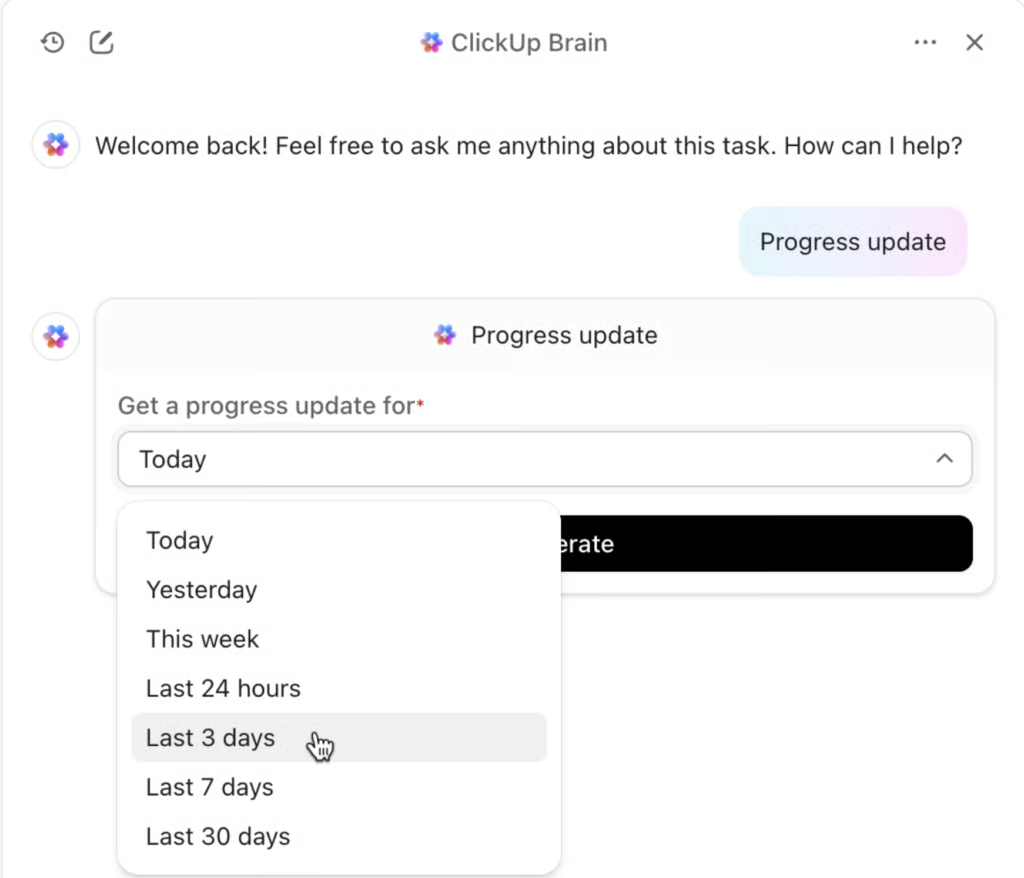
- Talk to Text: Converts spoken words into text within the workspace, enabling hands-free creation of tasks, notes, or documents.
- Personal vocabulary: Trains ClickUp to recognise and adapt to your unique terminology and tone so your content reflects your style naturally.
- Auto-tracking progress: Uses AI agents to monitor tasks and goals in real-time so you get automatic updates without the need for follow-ups.
monday.com: Best prebuilt AI templates
My expert opinion
I find monday.com particularly useful for non-technical teams that want AI-powered workflows without building them from scratch. Project templates come with preconfigured AI columns, cutting down setup time significantly.
The Creative Processes template, for example, includes AI blocks that generate a project brief from initial input. Other templates like the Feedback Digest and Support/IT Processing templates come with AI columns that handle translation, sentiment detection, summarization, request categorization, and reply drafting.
I can modify any template to match my team’s language, workflows, or column structure. If none of the existing templates fit, I can use AI Blocks and AI Automations to build a custom board
Pricing
- Free plan: Includes two users, templates, and three boards
- Standard ($12/user/mo): Adds Gantt views and automations
- Pro ($19/user/mo): Adds time tracking and formula column
- Enterprise (Custom): Adds portfolio management and reporting
Standout features
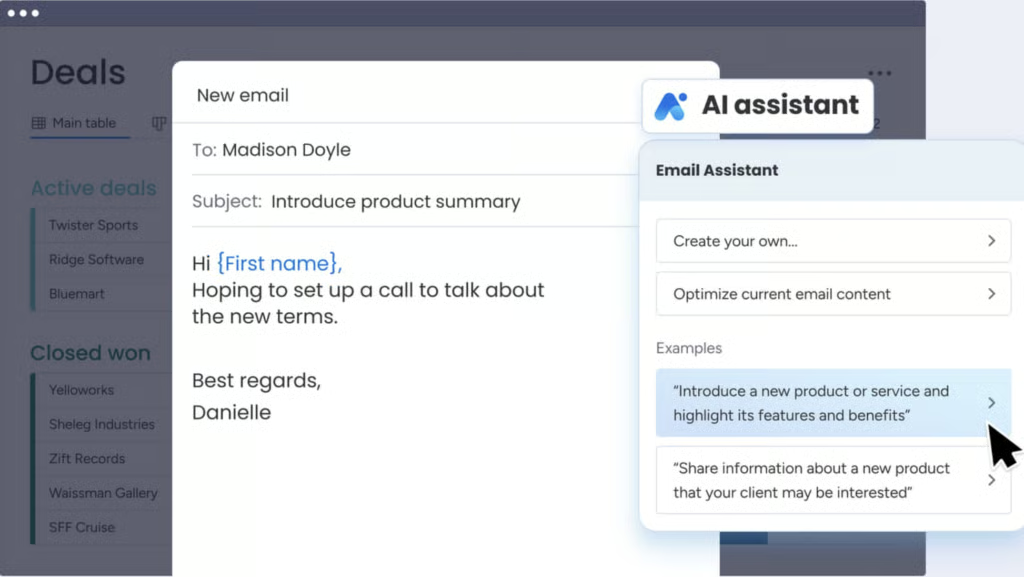
- I blocks: Enable automatic AI actions into your workflows, such as text summaries, translations, and sentiment detection.
- monday sidekick: Configure your AI assistant to perform basic tasks, such as organizing boards, drafting content, and surfacing follow-ups.
- Agent factory digital workforce: Design custom AI agents that integrate with your tools to execute complex workflows and scale your capacity without increasing headcount.
Wrike: Best for intelligent mobile productivity
My expert opinion
Wrike is my go-to for managers who spend time away from their desks. The mobile app integrates with Siri and Google Assistant, so I can create tasks using voice commands like “Create a high-priority task for John to review the budget by Friday.” From there, Wrike’s natural language processing sets the assignee, deadline, and priority automatically.
The AI Priority Inbox filters low-priority notifications and surfaces the critical updates, which allows me to spend less time scrolling through alerts.
Wrike can identify projects that are at risk based on past performance and current progress. If a project begins falling behind schedule, the mobile app alerts me so I can review the issue and make adjustments.
Pricing
- Free: Unlimited users, basic task management
- Team ($10/user/mo): Adds unlimited tasks, cross-tagging, and Gantt charts
- Business ($24.80/user/mo): Adds request forms, approvals, and resource planning
- Enterprise (Custom): Adds admin permissions
- Pinnacle (Custom): Adds advanced reporting and capacity planning
Standout features
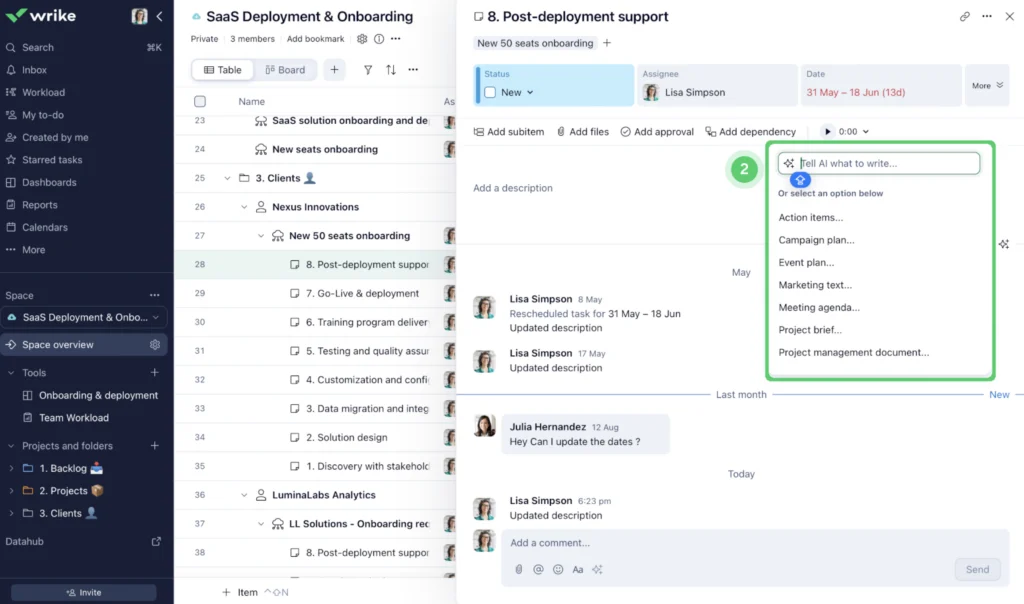
- Voice commands: Dictate actions through mobile voice input to create tasks or check progress without opening the app.
- Subtask creation: Generate a parent task and its subtasks automatically as AI interprets your project plan or meeting notes.
- Smart editing: Refine content with AI that corrects errors, adjusts tone, or provides translations for consistent communication.
Jira: Best for cross-platform deep research
My expert opinion
Atlassian has integrated Rovo, its AI work assistant, into Jira’s agile project management platform to help teams search for information across connected tools from a single interface.
For example, if I ask Rovo about a software bug, it reviews the related Jira issue, check linked Slack conversations, and examine pull requests to explain what occurred. Because the response is based on information from my organization’s tools, it reflects the project’s history, discussions, and development work.
I also use Rovo to gather information from Atlassian products and connected third-party apps. This helps me research issues and review project context, while maintaining full traceability and compliance across multiple platforms.
Pricing
- Free: For 10 users, reports, 2GB storage, and timeline view
- Standard ($9.05/user/mo): Adds AI agents and user roles
- Premium ($18.30/user/mo): Adds approval processes and dependency management
- Enterprise (Custom): Adds advanced admin controls and cross-product insights
Standout features
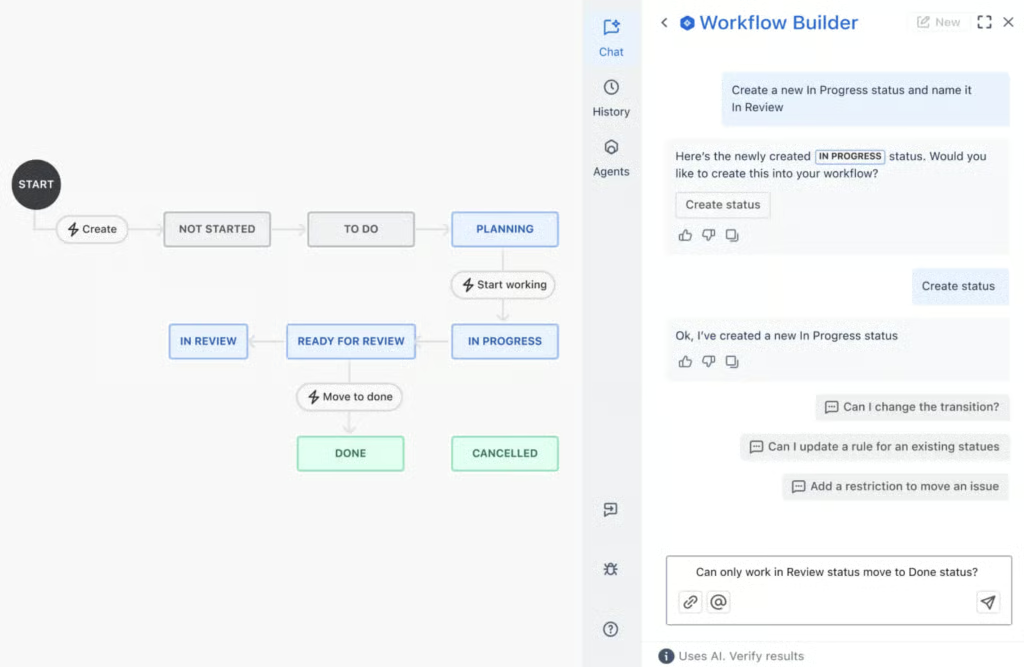
- Workflow Builder Agent: Create new workflows in Jira using natural language to add statuses, transitions, and rules.
- Work Readiness Checker Agent: Assess whether tickets are clear and complete so teams can plan and prioritize more effectively.
- Work Create: Capture work items from Confluence, Slack, email, or images and turn them into Jira issues automatically.
Asana: Best for AI-powered status reporting
My expert opinion
Asana automates the time-consuming process of tracking updates and summarizing progress across projects. The Smart Summaries feature reviews task descriptions, comments, and updates to extract the key takeaways and action items.
Instead of navigating multiple threads, I get an overview of the critical decisions and the tasks that need follow-up. Within the portfolio’s Progress tab, I can also review recent activity across all linked projects, such as discussions and completed milestones.
The Overview tab gives me a quick snapshot of active and completed projects. When I need a status update, Asana’s Smart Status generates a summary of recent activity, potential risks, and outstanding questions. This helps me review project progress and identify issues without digging through individual tasks.
Pricing
- Personal (Free): For two users and unlimited tasks
- Starter ($10.99/user/mo): For AI Studio, Gantt view, and workflow builder
- Advanced ($24.99/user/mo): For portfolio workload, time tracking, and approvals
- Enterprise (Custom): Workflow bundles and resource allocation management
Standout features
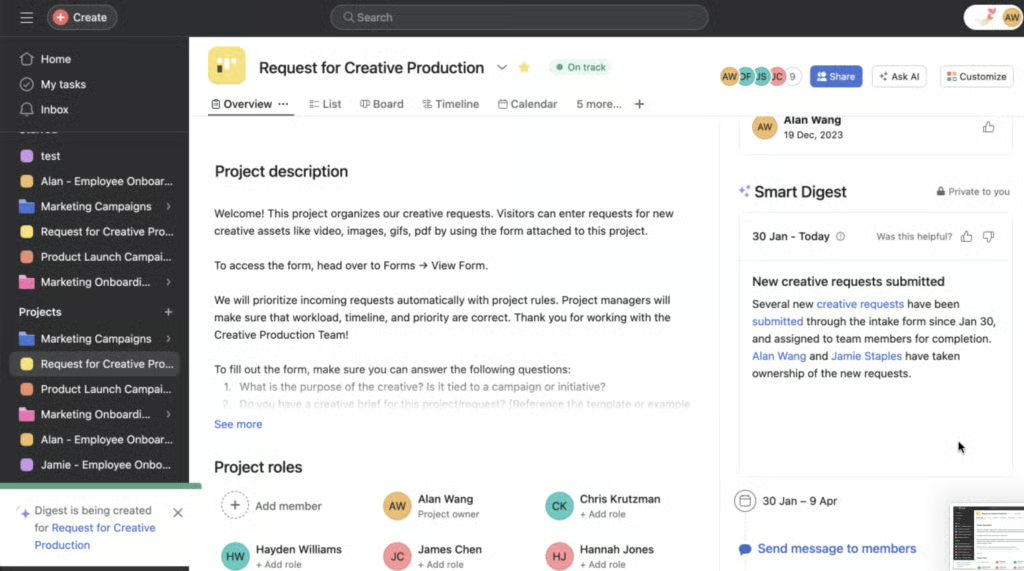
- Smart goals: Use AI to craft clearer goals, link them to related work, and monitor progress automatically.
- AI teammates: Deploy collaborative AI agents that understand your team’s context, partner in strategic tasks, and operate with human-in-loop checkpoints.
- Smart workflow gallery: Access a library of prebuilt, AI-powered workflows to standardize processes and scale human-AI collaboration.
Taskade: Best for agent-based task management
My expert opinion
Taskade has a core AI feature called Genesis that I find useful for setting up workflows. I describe what I need in plain language, and it builds a workspace with databases, automation, and AI agents automatically. It saves time I would otherwise spend configuring boards and automation from scratch.
The AI agents handle tasks like research, data analysis, and content generation. They work from the context of my project data, so the output is relevant to what I’m actually working on.
What I find most useful is the multi-agent functionality. I can run several agents on parallel tasks at the same time. One agent can gather market data while another drafts a report or updates a project tracker. For interconnected work streams, this gives me a way to build AI support around a project instead of relying on one general assistant.
Pricing
- Free: Includes one user, basic AI models, and one workspace
- Starter: $6/user/month — Adds three users and unlimited workspaces
- Pro: $16/user/month — Adds AI agents and integrations
- Ultra: $40/user/month — Adds advanced analytics and custom domains
Standout features
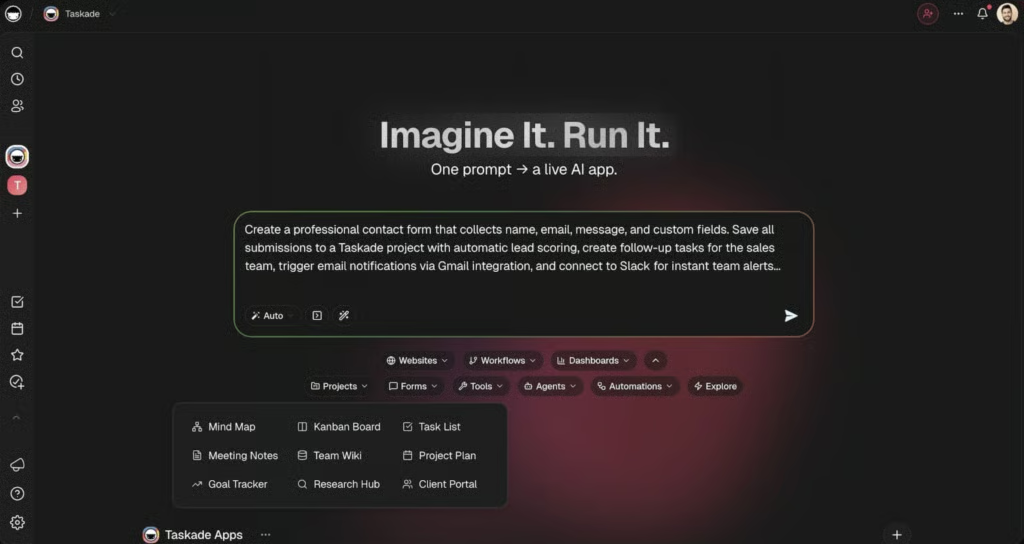
- Genesis: Transform a plain-English prompt into a full working app, complete with data structure, UI, AI agents, and automation.
- Projects as memory: Let your projects serve as the app’s core memory, storing project data and context that power AI-driven workflows.
- Model selection: Choose which AI model (e.g., ChatGPT or Claude) drives your task management or app logic so the system aligns with your project needs.
Todoist: Best for AI-driven task breakdown
My expert opinion
Todoist’s AI features are more limited compared to other tools on this list, but that’s not necessarily a drawback. For individual users who need help organizing daily tasks and building goal-based checklists, it does the job without overcomplicating things.
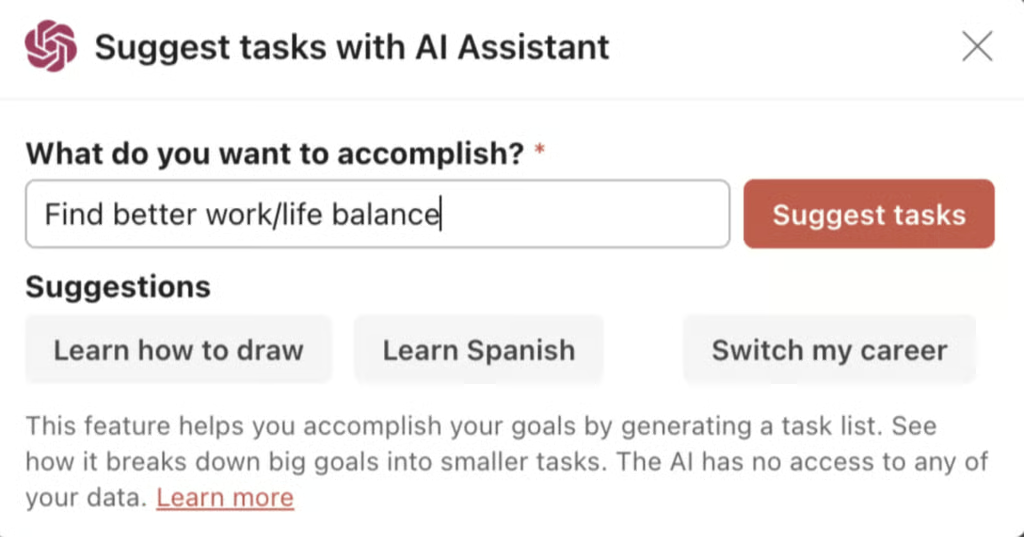
For example, Task Assist generates subtasks from a single objective. If I add a task like “Plan the company holiday party,” it breaks it down into smaller items like “Set a budget,” “Book a venue,” and “Send out RSVPs” without me having to think through each step.
The Email Assist feature turns forwarded emails into tasks with due dates and notes already filled in. Filter Assist, on the other hand, lets me create filters by typing what I need in plain language instead of memorizing query syntax.
Pricing
- Beginner: Includes five projects and list & boards layouts
- Pro: $5 user/month — Adds calendar layout and task duration
- Business: $8 user/month — Adds team workspace, folders, and activity logs
Standout features
- Project folders: Organize your workspace by grouping related projects into collapsible folders that store large task lists.
- Quick add: Capture tasks instantly with natural language input that sets dates or priorities as you type.
- Daily digest: Review a curated summary of upcoming tasks and activity so you can plan the day and prepare for what’s ahead.
Motion: Best for scheduling assistance
My expert opinion
Motion schedules my day automatically based on current priorities. It looks at my deadlines, dependencies, and workload, then places tasks in my calendar in the order I should work on them. When a meeting runs long or something urgent comes up, Motion reshuffles my remaining tasks and adjusts deadlines on its own.
It also sends alerts when my workload exceeds my available time, and flags tasks that are at risk before they become missed deadlines. For days when priorities shift constantly, that kind of automatic adjustment saves me a significant amount of time.
While Motion is priced higher than most competitors, it is the only AI task manager in this list with auto-scheduling built into its platform.
Pricing
- Pro AI – For AI task planner and workflow generator
- Individuals ($29/mo)
- Teams ($19/user/mo)
- Business AI – For Gantt charts, time tracking, and team capacity planning
- Individuals ($39/mo)
- Teams ($29/user/mo)
- Enterprise – For priority support and white-glove onboarding
- Individuals (Custom)
- Teams (Custom)
Standout features
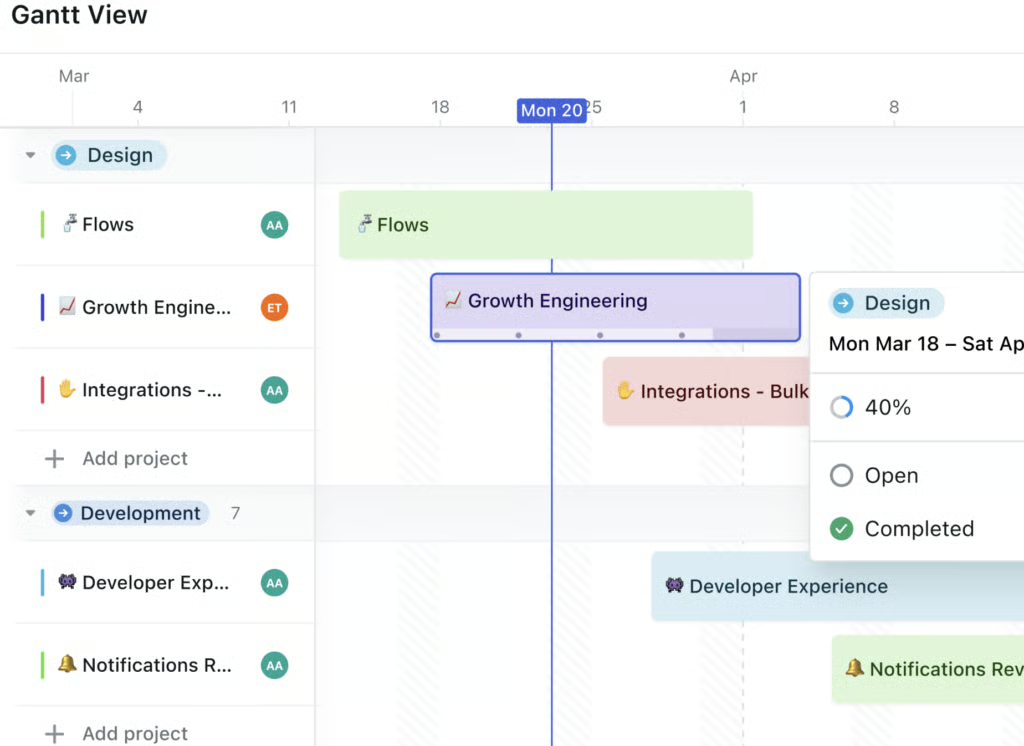
- AI calendar: Build a dynamic schedule that updates itself as AI prioritizes tasks, appointments, and deadlines in real time.
- AI sheets: Import spreadsheet-style data and let AI transform each row into actual workflows and tasks.
- AI Gantt chart: Generate a timeline view with clear dependencies to get a real-time view of project progress.
Notion: Best for content generation
My expert opinion
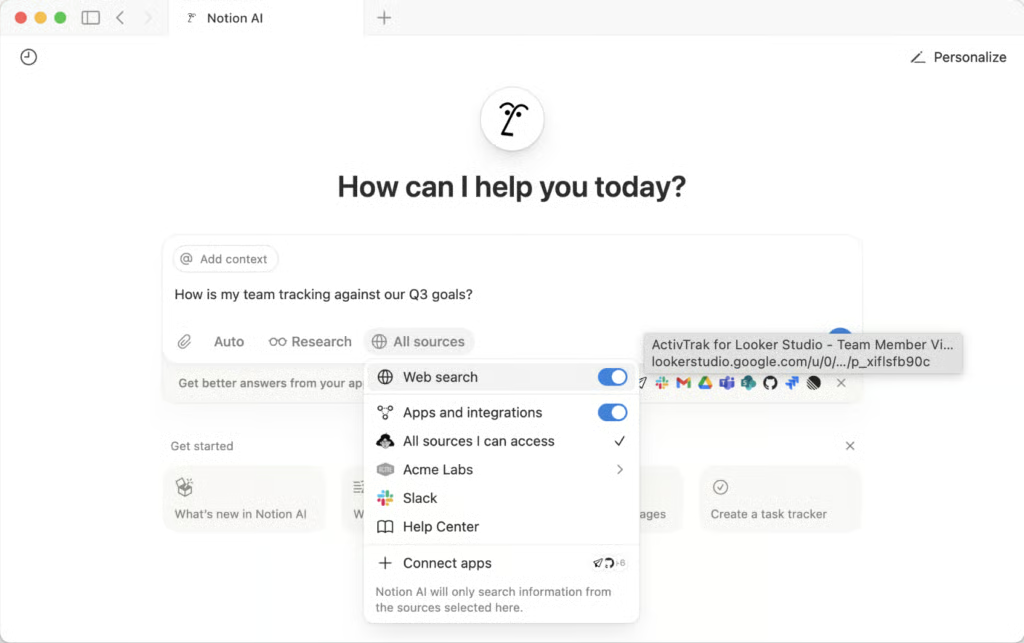
Notion AI generates first drafts, outlines, and reports by referencing my workspace and connected sources. I can start from existing content rather than writing from a blank page.
For instance, when preparing a company report, I direct Notion AI to scan my Google Drive files, review existing notes, and assemble an outline.
I also use it to ensure consistent documentation. If I have a style guide saved in my workspace, I reference it when requesting revisions so tone and format remains standard across materials. For recurring document types like meeting notes or project briefs, I ask Notion AI to apply the same structure each time instead of setting it up again.
Pricing
- Free: Includes basic forms, sites, Notion Calendar & Mail, and databases
- Plus: $10/user/month – Adds unlimited file updates, custom sites, and integrations
- Business: $20/user/month – Adds database permissions and conditional forms logic
- Enterprise: Custom – Adds advanced security and controls
Standout features
- AI meeting notes: Generate summaries and action items from team conversations so your team can review decisions without manual note-taking.
- Enterprise search: Pull answers from in-app sources and connected tools through a unified, AI-powered search that understands context across your workspace.
- Notion calendar: Manage schedules and tasks in a flexible calendar that syncs with Notion databases and surfaces relevant context from your workspace.
How I evaluated the best AI task managers
To provide a balanced comparison that reflects what small business teams actually need, I designed a scoring rubric that assesses pricing, capabilities, usability, and real customer sentiment.
Pricing (20%): I assessed how well each provider’s pricing tiers fit within a typical small-business budget and whether core AI features are locked behind higher-priced plans. I also checked for free trials, add-on fees, and hidden costs that could affect long-term value.
General features (25%): I reviewed the essential tools that help teams manage workload with artificial intelligence by looking at how well each platform supports automation, collaboration, time blocking, and calendar integrations. I scored platforms higher when these features were built in rather than offered as paid-ons.
Advanced or niche features (20%): I evaluated advanced AI-driven capabilities, such as task prioritization, natural-language task creation, domain-specific modules, and custom scripting. I awarded higher points when these features were available without requiring the most expensive plans.
Support (10%): I assessed the quality and availability of customer support channels, onboarding materials, and community resources. I also checked for uptime guarantees and response expectations, since reliability matters for daily operations.
Ease of use (10%): I examined how intuitive each tool feels during setup, task creation, and everyday navigation. I favored platforms that minimize onboarding friction and maintain a consistent experience across devices.
Expert score (15%): I factored in my professional assessment of features, value, and usability to give a realistic view of what each tool delivers. I also included third-party review data to ensure the final scores reflect real customer experiences.
What are AI task managers?
An AI task manager is a productivity tool that uses machine learning algorithms to schedule tasks and surface priorities automatically. These platforms rely on data from your calendar, work patterns, and past activity to suggest a prioritization order. The system then analyzes deadlines alongside workload to adjust your schedule whenever new tasks arrive or priorities shift.
Many project management tools now include AI task managers as core features, equipping static boards or timelines with automated, context-aware planning. Nearly 97% of project and portfolio management professionals already use AI to support their work, which reinforces how essential these capabilities have become for modern teams.
How AI task managers differ from traditional task management software
AI task managers transform project management software from a passive tracker into an active planner. Traditional tools store tasks, due dates, and assignees, so you still decide what to work on and when to do it. AI task managers, on the other hand, use your deadlines and priorities to create a living schedule that updates itself as work shifts.
| Dimension | AI task managers | Traditional task management software |
|---|---|---|
| Scheduling | Automatically optimizes the work schedule by reshuffling tasks based on priorities and deadlines. | Uses static due dates and relies on the user to reschedule work when plans change. |
| Prioritization | Scores or ranks tasks using urgency and impact signals, then surfaces what to do next. | Requires manual prioritization and frequent list reviews to decide the next task. |
| Workload management | Monitors workload and flags overloaded team members so you can rebalance work quickly. | Shows task assignments but leaves capacity analysis and rebalancing to the manager. |
| Automation | Converts natural-language requests into tasks, subtasks, and follow-up steps. | Depends on manual task creation with fixed fields and limited shortcuts. |
| Risk visibility | Identifies at-risk tasks or projects based on patterns such as slippage and dependency issues. | Provides basic status tracking, so risk spotting depends on manual reviews. |
Key AI task manager features to look for in 2026
If you’re ready to move beyond manual planning and want a system that can manage shifting priorities with less oversight, here are the features to consider as AI task managers continue to evolve in 2026.
- Predictive scheduling: Automatically reorganizes your day by weighing deadlines against workload or new requests.
- Focus time: Automatically blocks dedicated work periods based on task priority and calendar availability, reducing interruptions during high-effort tasks.
- AI-assisted note-taking: Captures meeting notes, decisions, and action items and links them directly to related tasks or projects.
- Priority scoring: Uses an AI ranking model to identify what you should work on next based on urgency and impact.
- Context-aware task creation: Converts plain-language input to create detailed tasks and subtasks, complete with deadlines and owners.
- Workload forecasting: Ensures fair distribution of work by monitoring exactly how much bandwidth each team member has left.
- Risk detection: Analyzes historical data to identify potential threats to a project’s schedule.
- Integrated search: Scans projects, documents, and connected apps to find context-specific answers.
- Cross-tool automation: Connects calendars and third-party apps to create workflows that trigger project updates.
- AI reporting: Generates progress summaries or status updates that remove repetitive, end-of-week reporting tasks.
- Intelligent reminders: Times notifications based on past behavior instead of fixed intervals, so alerts arrive when you’re most likely to act on them.
Frequently asked questions (FAQs)
Can I turn off an AI assistant?
Yes, most AI task managers let you disable AI features in the user settings, so you keep the core task tools but remove AI suggestions. You can usually control this per user or per project, which helps if some team members want automation while others prefer more control.
Which AI task manager is best for solopreneurs?
Todoist is the best AI task manager for solopreneurs because its AI assistant helps break goals into manageable tasks while keeping the interface simple enough for a single person to manage. You get AI support for planning without the overhead of configuring complex multiuser workflows.
Can AI task managers integrate with my email inbox?
Yes, many AI task managers can convert emails into tasks, attach message threads for context, and summarize long conversations into action items so you avoid re-reading message chains. Some tools, such as Wrike, offer mobile inbox prioritization to help you triage email-driven work directly from your phone.
