







ClickUp and monday.com are project management and team collaboration platforms designed to boost productivity and streamline workflows. While both platforms have niche features, our head-to-head comparison ended with monday.com being slightly above ClickUp. monday.com is great for automations, ease of use, and customer support. On the other hand, ClickUp is a highly customizable, feature-rich solution with time tracking and unlimited storage.
Based on our comparison, the best use cases for monday vs ClickUp are as follows:
- monday.com: Better for teams looking for advanced workflow capabilities
- ClickUp: Better for those needing a tailored workflow management tool
ClickUp and monday.com are leading project management tools used to supercharge team productivity and streamline business processes. However, they are advanced solutions that may not be suitable for teams looking for a simple system for task management. Trello is an excellent option for those needing an affordable task management solution.
- Trello: Better for teams looking for a basic platform for visualizing workflow and task progress
- monday vs ClickUp Compared
- Best Alternatives
- Best for Pricing: ClickUp
- Best for Team Collaboration Features: ClickUp
- Best for Automation: monday.com
- Best for Ease of Use: monday.com
- Best for Security: Tie
- Best for Customer Service: monday.com
- How We Evaluated monday vs ClickUp
- Frequently Asked Questions (FAQs)
- Bottom Line
monday vs ClickUp Compared
 |  | |
|---|---|---|
| Monthly Starting Price | $10 per user | $10 per user |
| Annual Billing Starting Price | $8 per user | $7 per user |
| Free Plan | ✓ | ✓ |
| Time Tracking | ✓(Pro & Enterprise plans) | ✓(All paid plans) |
| Free Plan Storage | 500MB | 100MB |
| Unlimited Storage | ✕ | ✓ |
| Dashboards | Up to 50 boards | Unlimited dashboards on paid plans |
| Templates | 200-plus | 1,000-plus |
| Unlimited Users | ✓(All paid plans) | ✓(All plans) |
| Key Features |
|
|
| For More Information | Visit monday.com | Visit ClickUp |
Best Alternatives
Aside from ClickUp and monday.com, several other project management tools on the market respond to different situations and needs. These two options are great for growing teams looking to automate project management, maximize spreadsheets, or handle multiprojects. Here are three alternatives to consider.
- Wrike: Wrike is powered by generative artificial intelligence (AI), useful for constructing project briefs and plans. It can also help with translations and work as an AI writing assistant that checks drafts for mistakes and summarizes long discussions.
- Asana: Freelancers and small teams with simultaneous projects can use Asana as a centralized workspace for all project-related information. Use the project overview feature to get a bird’s eye view of project details, such as updates, milestones, and resources.
- Smartsheet: Smartsheet is a resource planning software primarily using spreadsheets to organize projects. It shows task status using Kanban boards for better visualization and individual focus.
Best for Pricing: ClickUp
| |
|---|---|
ClickUp Monthly Pricing:
| monday.com Monthly Pricing:
|
When comparing monday vs ClickUp for pricing, ClickUp wins because of its generous free plan offerings. At first glance, monday.com and ClickUp are similar, thanks to their free plans, per-user pricing, and similar entry-level price tag. However, ClickUp’s free plan comes with unlimited plan members and tasks, ideal for budget-conscious teams. It offers more view options than monday.com, although most of these are only available to paid subscribers.
ClickUp also has a 100% satisfaction guarantee. Customers who aren’t satisfied with their purchase can inform ClickUp within 30 days and will get a full refund. It’s important to note that monday.com offers more storage on its free plan at 500MB, compared to ClickUp’s 100MB. However, all ClickUp’s paid plans come with unlimited storage, which monday.com does not offer.
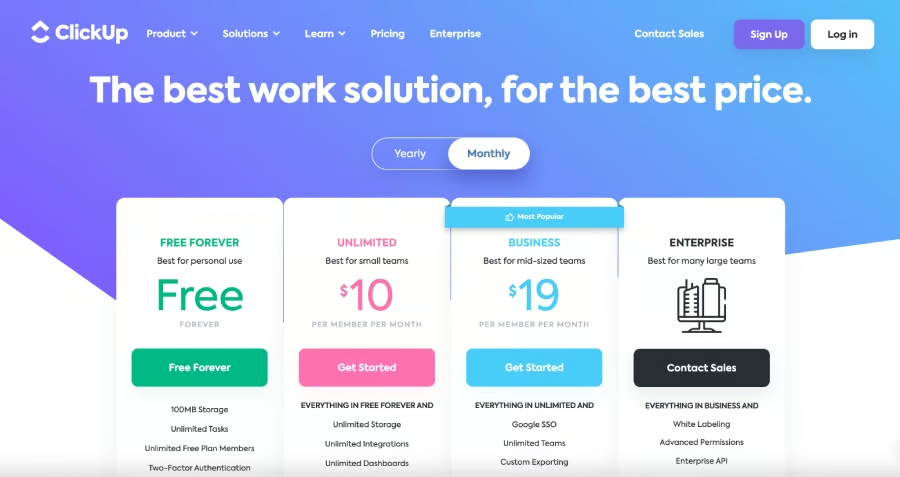
ClickUp’s pricing plans start at $10 per user, paid monthly. (Source: ClickUp) 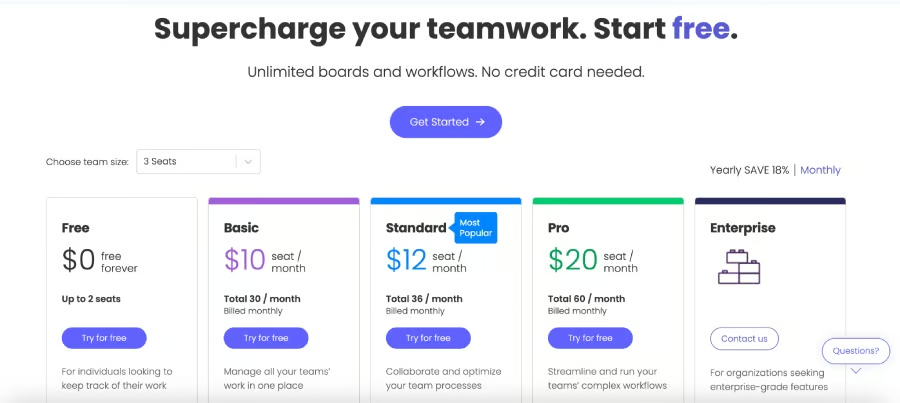
monday.com’s pricing plans start at $10 per seat, paid monthly. (Source: monday.com)


Best for Team Collaboration Features: ClickUp
| |
|---|---|
|
|
This monday vs ClickUp head-to-head comparison of team collaboration features found that ClickUp has a slight edge over monday.com because of its usability and extensive productivity tools. The platform offers customizable workspaces, views, and dashboards and facilitates seamless communication through comments, task assignments, and mentions. Its critical path and slack time feature differentiates between crucial and more flexible tasks.
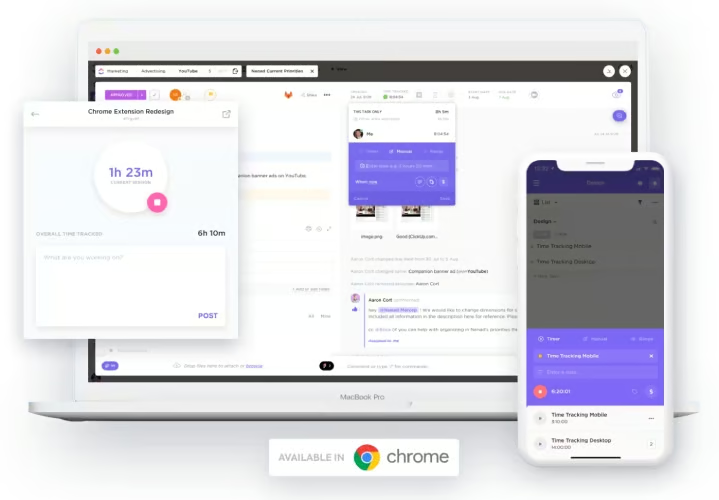
With ClickUp, users get a personalized approach to project management by designing their workflow based on their preferences. It’s a flexible solution with a custom fields feature that lets users add different information to their views and tailored dashboards with over 50 widget variations for detailed reporting and work overview.
ClickUp offers built-in time tracking and reporting features in all paid plans, but monday.com only offers time tracking to Pro and Enterprise customers. ClickUp also comes with timesheets, granular time estimates, and time in status. Comparatively, all monday.com plans have unlimited docs and whiteboard collaboration for real-time coordination and brainstorming. Use monday.com’s custom notifications to lessen distractions and prioritize more urgent tasks.
Best for Automation: monday.com
| |
|---|---|
monday AI
| ClickUp AI
|
When we compared monday vs ClickUp in terms of automation, monday.com won because its AI assistant operates more intuitively and holistically. The AI assistant appears on the screen, invites users to ask questions, and suggests actions. While ClickUp is great for basic prompts and generic texts, it requires more prompting; it’s better for specific roles like drafting emails within an office setting. On the other hand, monday AI’s results were more comprehensive.
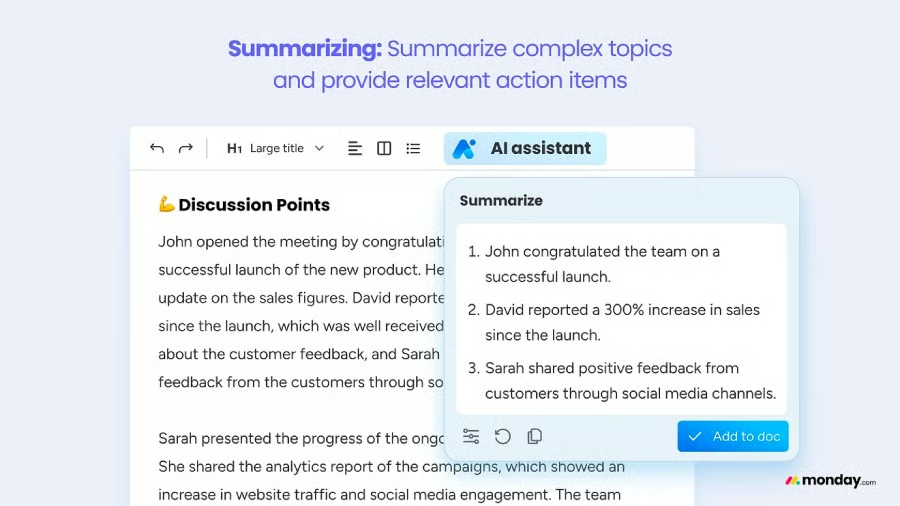
When asked to do tasks like generate a list of topics for a meeting, monday.com users will receive detailed recommendations, including suggested steps and a detailed board for tasks and due dates. While the software is still in the beta testing phase, the potential for streamlining workflow is high and likely to continue improving over time. For more information on monday.com, check out our in-depth monday.com review.
Best for Ease of Use: monday.com
| |
|---|---|
|
|
When we compared monday vs ClickUp for ease of use, monday.com is the better option because even with all its features, it’s an intuitive project management tool. Users can share boards with non-monday.com users using a view-only link. Best of all, programming automation saves time, streamlines project processes, and keeps teams organized. Save different filtered views to quickly find frequently used data or information.
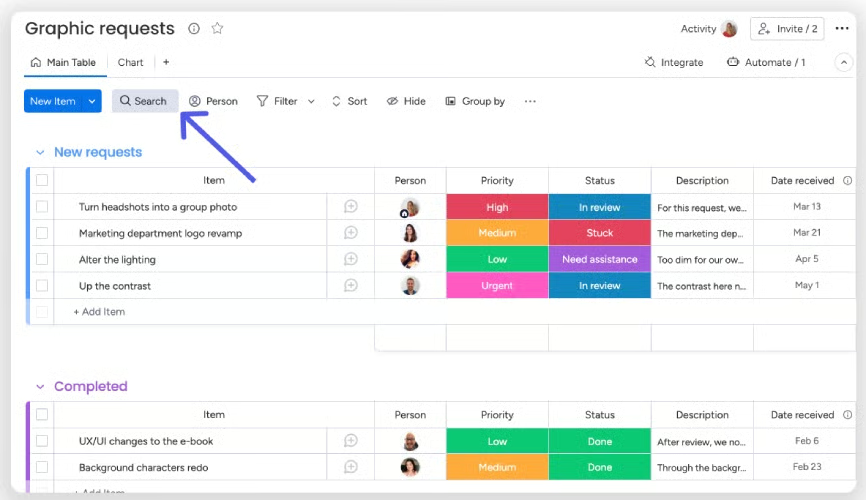
We found that the ClickUp customizable interface requires a steeper learning curve, especially during initial setup. Other observations include ClickUp’s design using smaller text size and limited color contrast, making monday.com a cleaner, more visually appealing platform. However, with ClickUp’s high level of functionality and custom fields, resource management tools, and time-tracking features, it’s a great platform once users get the hang of the tool.
Best for Security: Tie
| |
|---|---|
|
|
When we evaluated monday vs ClickUp’s security features, we found that both platforms offer robust security and privacy measures, including 2FA and 256-bit encryption across all plans. Other similar features both platforms provide include single sign-on (SSO), custom roles, private spaces and boards, and guest access restrictions.
Unfortunately, most advanced security features on both platforms unlock at the enterprise level, so small businesses on lower-tier plans only get basic security protections. However, transport layer security (TLS)1.2, standard encryption, and 2FA are often enough for a small team, startup, or solopreneur.
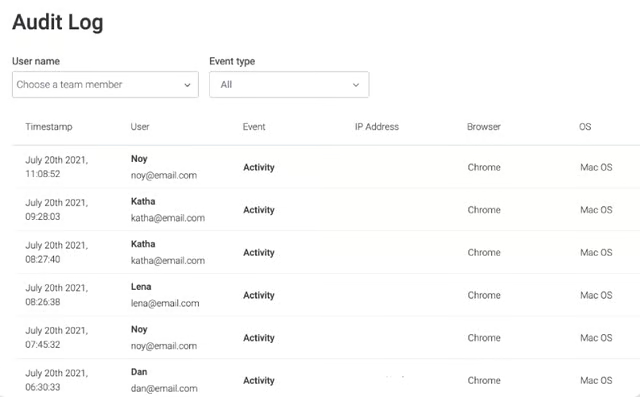
Get a detailed report on all security-related activities within your account. (Source: monday.com) 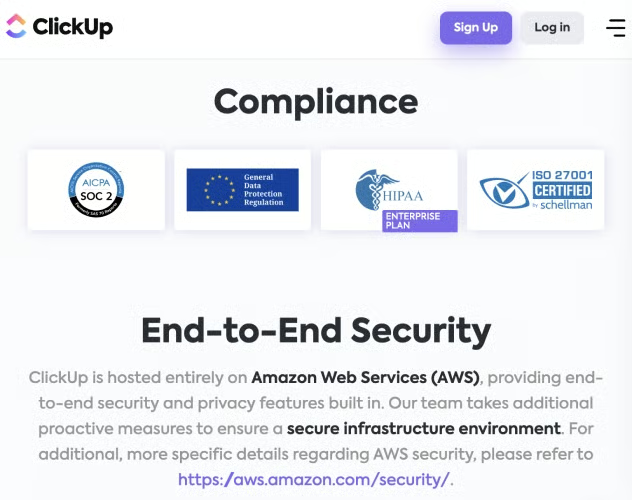
Benefit from Amazon’s end-to-end enterprise-grade security features. (Source: ClickUp)


ClickUp offers U.S., EU, and APAC data residency, allowing customers to choose where their workspace is hosted. ClickUp is also hosted on Amazon, giving its customers access to Amazon’s enterprise-grade security. Comparatively, monday.com offers security protections, including SOC 2 compliance and different ISO certificates.
Best for Customer Service: monday.com
| |
|---|---|
|
|
If you’re looking for a project management platform with excellent customer support, you can’t go wrong with either monday.com or ClickUp. However, monday.com has a slight advantage because its Enterprise plan has premium support. Larger businesses will appreciate this feature if they struggle with complex, enterprise-level features. monday.com also offers onboarding assistance to help teams get set up.
Based on our review, both providers offer 24/7 support, webinars, knowledge bases, community pages, 99.9% SLA and multi-channel support. ClickUp and monday.com have help centers providing access to its university or academy and video webinars and tutorials.

All ClickUp paid plan users have access to live support chat, and enterprise accounts have a dedicated business manager and access to priority client services. monday.com also offers dedicated customer success managers for its enterprise users. We also found that monday.com and ClickUp offer 99.9% uptime guarantees.

How We Evaluated monday vs ClickUp
We compared monday vs ClickUp as project management solutions to find out what sets each provider apart from the other. We focused on finding the advantages and disadvantages of each platform, including their unique functionalities and pricing, weighed against user feedback. From there, we scored each provider based on critical factors like pricing and integrations, which matter the most to small businesses.
Here’s a complete breakdown of these factors:
- Pricing: When doing this ClickUp vs monday comparison, we evaluated both platforms in terms of pricing. We reviewed each solution’s entry-level and second-tier plans to determine which offers the best value for money. We checked if free versions are available and whether there are options for greater savings like annual and volume discounts.
- General features: This ClickUp vs monday comparison focused on essential productivity and team collaboration features, such as time tracking, whiteboard, and viewing options. Our review also took into account each platform’s level of customization.
- Security: Recognizing that security and privacy play a big role in remote work and digital communications, we assessed the level of security built into both project management software. We favored the provider that offers 2FA, end-to-end encryption, and guest management.
- Expert score: During our monday.com vs ClickUp comparison, our expert score refers to our evaluation of the providers’ standout features, popularity, and ease of use. We also considered their value for money.
Frequently Asked Questions (FAQs)
What problems does project management software solve?
Project management software, like monday.com and ClickUp, is used for project planning, tracking or monitoring, and resource allocation to achieve project-related goals. It helps teams and organizations improve workflow and processes for greater efficiency, accountability, cost management, and timeliness.
Does monday.com integrate with Google?
Yes, monday.com integrates with Gmail, Google Docs, and Google Calendar. monday.com allows you to automate your work and schedule notifications, automate emails sent through Gmail, and sync your meetings for increased productivity.
Does ClickUp have mobile applications for download?
Yes, access ClickUp using any device—mobile, desktop, voice assistants, and tablets. ClickUp is compatible with Mac, Linux, Windows, and voice assistants. Utilize voice commands, create tasks using Siri, and connect your system with Alexa via Zapier.
Bottom Line
Project management solutions like monday.com and ClickUp help businesses improve productivity and increase team collaboration and accountability. Our ClickUp vs monday.com comparison ended with monday.com on top because it’s the more user-friendly option and comes with advanced automation capabilities and robust customer support. ClickUp leads in terms of pricing, robust functionality, and customization.
The choice of which solution is better depends on your needs and how your business operates. The two platforms are different solutions with distinct approaches to project management. If you want to know more about these options, sign up for ClickUp or monday.com’s free plan to see if it works well with your day-to-day operations.
