








A mobile customer relationship management (CRM) app is an indispensable tool for on-the-go sales teams. The best mobile CRM apps are equipped with easy-to-use contact, deal management, and collaboration tools for real-time data access and seamless sales, marketing, and service operations.
With a mobile CRM app’s functionalities nearly equivalent to its desktop version, you won’t miss tracking every customer interaction and sales activity anytime and anywhere—gaining more control over your business. After a thorough evaluation of several platforms in terms of pricing, features, support, and ease of use, we chose our best mobile CRM apps for 2024.
- HubSpot CRM: Best overall for an intuitive interface
- Bitrix24: Best for robust mobile chat features
- Zoho CRM: Best for a mobile CRM powered by artificial intelligence (AI)
- Salesforce: Best for complete mobile CRM features
- Capsule CRM: Best for mobile calendar tracking
- Pipedrive: Best for calling and logging calls
- ClickUp: Best for general mobile task management
- monday CRM: Best for sales enablement
- Insightly CRM: Best for business card scanning
- EngageBay: Best for team collaboration
- Best Mobile CRM Apps Compared
- HubSpot CRM: Best for a Mobile Interface With Intuitive Navigation
- Bitrix24: Best Mobile CRM App With Robust Chat Features
- Zoho CRM: Best for an AI-powered Mobile CRM
- Salesforce: Best for a Mobile CRM With Complete Features
- Salesforce Cloud
- Capsule CRM: Best for Calendar Tracking
- Pipedrive: Best Mobile CRM App for Calling & Call Logging
- ClickUp: Best CRM App for Task Management
- monday CRM: Best for Sales Enablement
- monday Sales CRM
- Insightly CRM: Best for Lead Capture via Business Card Scanner
- EngageBay: Best for Team Collaboration
- Frequently Asked Questions (FAQs)
- Bottom Line
Best Mobile CRM Apps Compared
| Provider | Free Plan | Free Trial (Days) | Starting Monthly Price | Our Rating out of 5 |
|---|---|---|---|---|
 | ✓5 users | ✕Free demo | $15 per user | 4.76 |
| Visit HubSpot CRM | ||||
 | ✓Unlimited users | 15 | $49 for 5 users | 4.61 |
| Visit Bitrix24 | ||||
 | ✓3 users | 15 | $14 per user | 4.57 |
| Visit Zoho CRM | ||||
 | ✕ | 30 | $25 per user | 4.49 |
| Visit Salesforce | ||||
 | ✓2 users | 14 | $18 per user | 4.46 |
| Visit Capsule CRM | ||||
 | ✕ | 14 | $14 per user | 4.43 |
| Visit Pipedrive | ||||
 | ✓Unlimited users | 14 | $7 per user | 4.25 |
| Visit ClickUp | ||||
 | ✕ | 14 | $12 per user | 4.23 |
| Visit monday CRM | ||||
 | ✕ | 14 | $29 per user | 4.20 |
| Visit Insightly CRM | ||||
 | ✓15 users | 14 | $13.79 per user | 4.18 |
| Visit EngageBay CRM | ||||
HubSpot CRM: Best for a Mobile Interface With Intuitive Navigation
When to Use HubSpot CRM
- You need an intuitive mobile app: Like HubSpot CRM’s web application, the mobile interface is clean and modern, using a simple navigation system of minimal buttons for users to move between modules. While on a phone or tablet, users can access their CRM system to manage records, tasks, deals, and service tickets, as well as engage customers via email, phone, and chat (via Breeze Copilot) and schedule meetings.
- You want to manage marketing campaigns on the go: One of the unique aspects of HubSpot mobile CRM software is its marketing capabilities. Teams can publish and monitor social media posts and deploy mass email campaigns all on the go. Users can conveniently run campaigns from their mobile phones and evaluate activity and engagement metrics to see how their campaigns are performing.
When to Use an Alternative
- You want to manage projects in your mobile CRM: Unfortunately, HubSpot’s project management capabilities are limited to just tracking tasks in a list view. This downside affects construction, marketing, field service project managers, and business owners who need to track project completion time within budget.
- You need scalable paid plans: Though HubSpot CRM has excellent free tools, such as record management and business card scanning on the mobile app, the packages aren’t scalable. From $15 per user monthly for the Starter plan, there’s a huge price increase to the succeeding tiers. The Professional plan is $1,170 for five users monthly, which is not cost-effective for tight-budget small businesses and startups.
- Alternatives: Zoho CRM offers easy-to-use mobile CRM features in cost-friendly, scalable plans (from $14 to $52 per user monthly). Capsule CRM and Pipedrive are also excellent options for scalable paid plans, as they offer affordable basic plans at $18 and $14 per user respectively, with high-tier plans that don’t exceed $100 per user.
HubSpot CRM Pricing Plans*
Cost: $0 for five users
Key Features:
- Mobile CRM for record management and business card scanning
- Mobile inbox for supporting customers and engaging leads on the go through chat and email
- Contact and company management
- Deal tracking on one pipeline with ability to update status on mobile CRM software
- Task management with mobile task tracking and customer service ticketing for one pipeline
- Mobile marketing performance tracking for email campaigns
- App marketplace access for third-party integrations
- Built-in appointment scheduler, quote generation, and document storage within CRM records
- Mass email marketing with email templates and automated campaign deployment
- Website landing page design tools, blog hosting, and custom web forms
Cost: $15 per user
Key Features:
- Everything in the Free
- Telephone usage from the CRM
- Two deal pipelines per account
- 500 calling minutes and live chat engagement
- Up to one million products and up to 5,000 documents per account
- 10 deal tags per account for creating rules for specific pipelines
- Built-in payment processing via automated clearing house (ACH) and Stripe integration
- Sales automation for task creation, data management, and notifications based on deal changes
- Conversation routing to other sales reps
- Sales content analytics for templates, sales documents, and automated sequences
Cost: $1,170 for five users
Key Features:
- Everything in the Starter
- Up to 15 sales pipelines per account and up to 15 million products
- 3,000 calling minutes
- Sequences for automating outreach, follow-up, and time-consuming tasks
- Prospecting workspace for managing leads in one place
- Call transcription and coaching
- Account-based management (ABM) tools like scoring, properties, and templates
- Playbooks for automatically building a library of resources for sales
- Forecasting or creating detailed and customized forecasts based on contact database
- Coaching playlists or saving exemplary call recordings into playlists for rep upskilling
*Pricing is based on annual billing on a per-user monthly breakdown of HubSpot Customer Platform. Monthly billing and enterprise-level options are also available for a higher cost. We update pricing information regularly but encourage readers to check current pricing.
**Customer Platform includes sales, marketing, customer service, content management system (CMS), and operations software. Individual modules can be purchased for lower monthly costs.
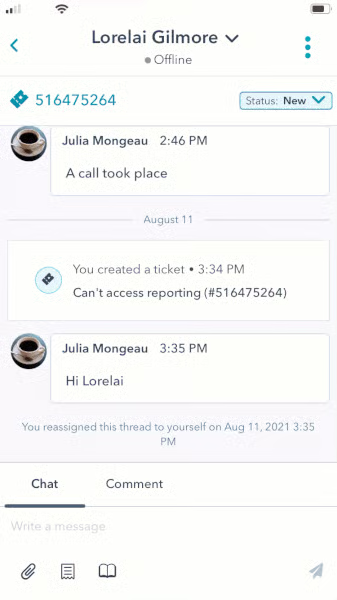
HubSpot CRM lets you update a ticket’s property on its mobile app for efficient sales support and customer service management.
(Source: HubSpot)
Our Expert Opinion
If you’re looking for free plans, solid features, and an excellent user experience in one mobile app, HubSpot CRM is for you. While we could’ve focused on its solid email outreach and mobile marketing tools, the HubSpot mobile interface is too clean to overlook. Just like its web app, users can easily navigate to their modules and use features on the go, thanks to the intuitive and modern interface design.
Bitrix24: Best Mobile CRM App With Robust Chat Features
When to Use Bitrix24
- You need advanced mobile chat capabilities: Bitrix24’s mobile chat M1 is equipped with robust capabilities. Sales managers can initiate a direct chat with reps via group chat or through an audio or video call. Users can send voice messages and use emojis as reactions to the messages, giving that social-app feel. The mobile app has an option for dark mode and message status indicators for seamless usage.
- You need mobile project management tools: Bitrix24 lets users monitor project progress, set deadlines, make video calls, share files, and obtain work reports. Sales teams won’t miss meetings and other activities by updating and organizing them on the mobile app. Sales managers can invite team members for collaboration. On the other hand, sales reps can plan their days with appointment scheduling.
- You want to monitor sales team efficiency: Monitor your sales team efficiency with Bitrix24’s intelligent task reporting on your mobile device. This will provide you an on-the-go, 360-degree view of completed, in-progress, or expired for every team member.
When to Use Bitrix24 Alternatives
- You need a simpler mobile app CRM: Bitrix24 has robust and advanced mobile features that help sales teams win new clients. But, at first glance, the mobile app interface looks clunky and has too many visual elements that may overwhelm new users. For example, you will see several menu icons on both sides of the dashboard or workspace where other providers only have one on either side or across the top.
- Alternatives: HubSpot CRM and monday CRM are excellent alternatives to Bitrix24 because they’re easy to set up, have intuitive mobile features, and use a simple user interface.
- You want to scan business cards using a CRM’s mobile app: If your sales team always meets with prospects face-to-face, a business scanner is a great tool to ensure you save relevant lead details even if you lose the card. Bitrix24 does not have a built-in business card scanner. You need to integrate it with a third-party app, such as Bitrix24 Business Card Scanner by MagneticOne MobileWorks to activate this feature.
- Alternatives: Insightly CRM is best for its capability to scan business cards by taking a photo. Insightly subsequently creates a contact or lead with the data presented on the business card. HubSpot CRM and Pipedrive CRM have built-in business card scanners, too.
Bitrix24 Pricing Plans*
Cost: $0 for unlimited users
Key Features:
- Bitrix24 tasks accessible on Android and iOS devices
- QR code authorization via mobile app
- Shared team calendar and project management module
- Unlimited contact storage and deals with sales pipeline and timeline activity tracking
- Google Maps address and location monitoring in CRM records
- Custom data fields and automated duplicate detection
- Bitrix24.Sign tool for creating, sending, and getting signatures for sales documents
- Client profile storage with activity planning and tracking plus task reminders
- Inventory management, product catalog, and live chat engagement with web visitors
- Automatic web visitor contact information request and customer journey tracking
Cost: $49 per organization (includes five users)
Key Features:
- Everything in Free
- Built-in telephone with client call recordings and video conferencing
- Premade templates for projects and document viewing and storage
- Rule-based automation for sales and marketing tasks and email integration
- Delegation and user assignment for tasks
- Unlimited invoices with convert deal-to-invoice
- Multiple sales pipelines and analytics tools for CRM data
- Integration with Google Docs and Office365
- Bitrix stores process unlimited orders and create a CRM deal from an email
- Protect data from deletion, restore from recycle bin
Cost: $99 per organization (includes 50 users)
Key Features:
- Everything in Basic
- Video Zoom calls directly from client profiles
- Bulk text and email with prebuilt email template storage
- Recurring task management
- Unlimited stored leads and built-in company cloud storage drive
- Unlimited quotes and recurring invoices
- Collaborative editing on files from the CRM
- Event planner tools
- 100GB online storage, 17 data sources, and online store export
- Automation rules for order processing inside Bitrix stores
Cost: $199 per organization (includes 100 users)
Key Features:
- Everything in Standard
- Workflows in mobile app and call tracking
- Smart Process Automation (SPA) in mobile app
- Custom traffic sources and analytical reports
- Custom data fields for tasks
- Unlimited searchable data records for contacts, quotes, deals, leads, invoices, etc.
- Automated ad management and offline ad tracking
- File sharing between teams and 1024GB online storage
- Unlimited knowledge base resource storage for internal employees to access
- Smart process automations for setting routine automated workflows
*Pricing is based on annual billing on a per-month breakdown. Monthly billing and enterprise-level options are available for a higher cost. Bitrix24 offers a free 15-day trial period for its paid plans. While we update pricing information regularly, we encourage our readers to check current pricing.
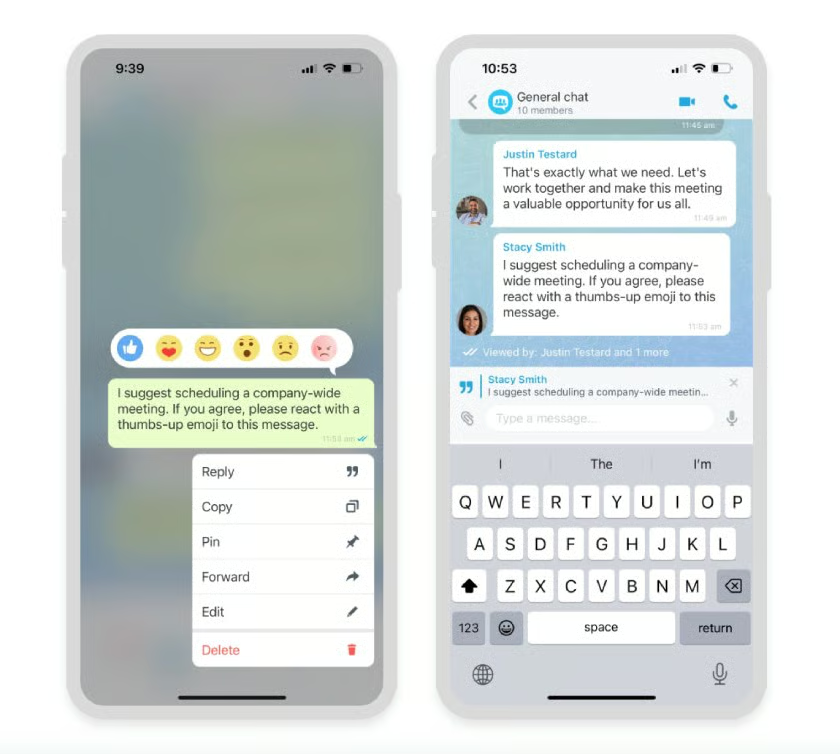
Bitrix24’s mobile chat M1 lets you add reactions or emoji replies to messages. (Source: Bitrix24) 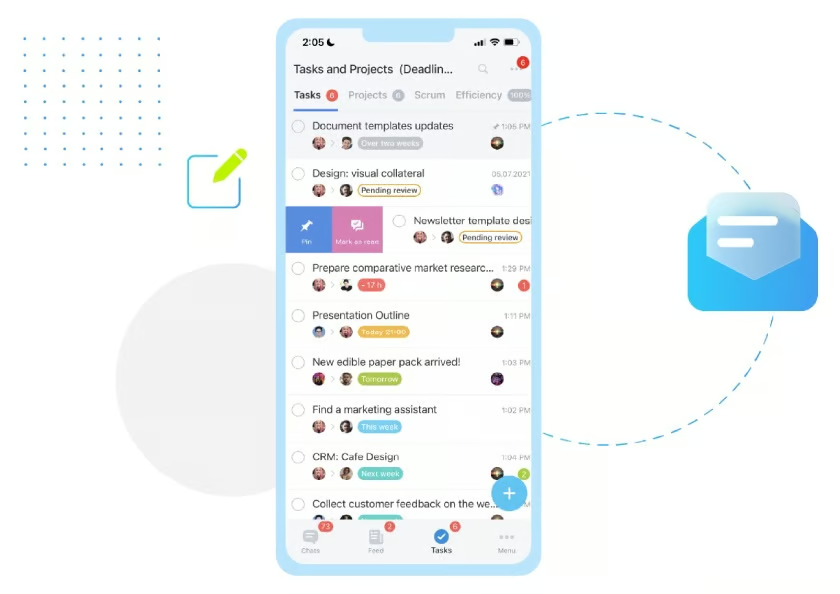
Bitrix24’s mobile app can be used by sales teams to manage tasks and projects. (Source: Bitrix24)


Our Expert Opinion
Bitrix24 is the best mobile chat CRM because of its mobile chat feature. We like how reps can become more productive and effective in their roles with this time-saving feature. Provide personalized customer experiences with emoji replies, and plan the next best action based on the message indicator’s status to close deals faster. We love how users can track projects, make video calls, and more using this mobile CRM.
Zoho CRM: Best for an AI-powered Mobile CRM
When to Use Zoho CRM
- You want AI in your mobile app: Zoho is already known as one of the best AI CRM systems available because of its broad capabilities. Zia, the AI tool built into Zoho, comes with the mobile CRM. Users can make voice and text commands to quickly fetch records, create meetings, and pull data reports, minimizing data entry. You can add notes, assign tasks, and change deal statuses, closing more sales while on the go.
- You need solid reporting and analytics on mobile: Starting on Zoho’s Standard plan, you can access the mobile edition of Zoho CRM analytics for in-depth, on-the-go reporting and insights. Sales managers can create custom charts and monitor dashboard data pipeline and funnel conversions. With real-time insights, teams can easily evaluate the effectiveness and adjust their sales and coaching strategies.
When to Use Zoho CRM Alternatives
- You need email included in your mobile CRM: One issue with Zoho CRM mobile is that it does not include email features to send emails on its mobile app. Users must subscribe to the Zoho Mail native software and download that app separately on an iOS or Android device.
- Alternatives: HubSpot CRM and Pipedrive are all popular alternatives that include communication capabilities, including email, on their CRM for mobile apps equivalent.
- You want a less clunky mobile interface: Zoho CRM brings many tools, including lead management, contact management, the integrated calendar, and notification feeds, into its mobile app. That said, the interface appears clunky on the home page and on certain modules.
- Alternatives: HubSpot CRM and Capsule CRM are two of the best mobile apps for user-friendly system navigation. With HubSpot CRM, you can easily view contact activity feeds and sales forecasts, and the interface is clean and modern with minimal buttons. Meanwhile, Capsule CRM lets you see contact information during poor internet connectivity with its offline mobile app access.
Zoho CRM Pricing Plans*
Cost: $0 for three users
Key Features:
- Lead, account, contact, and deal tracking for one sales pipeline with mobile app view
- Marketing automation for campaigns and email opt-out
- Automation for workflow rules
- Automation for tasks
- Automation for email notifications
- Tasks, meetings, and calls
- 10 custom email templates and document library
- Standard reports
- 1GB file storage per organization and 10MB data storage (5,000 records)
- Customized home page components, tabs, list views, and search layout
Cost: $14 per user
Key Features:
- Everything in Free
- Additional automation (scheduled actions and reminders for workflow tasks)
- 100 custom email templates and 250 daily mass emails per organization
Customizable group tabs, email address duplication check, unique fields, and layout - 200MB data storage (100,000 records)
- Two free data backups monthly
- Sales forecasting and calendar booking
- 100 custom reports and 10 custom dashboards
- Google Sites web forms and Google Workspace integration
- 1GB file storage per organization plus 512MB per user license
Cost: $23 per user
Key Features:
- Everything in Standard
- Automations for creating records, assigning record owners, and webhooks
- Workflow rules
- Customer support module with case management tools like web-to-case form
- 10GB data storage (approximately 5M contact records)
- SalesSignals (real-time activity notifications on lead and customer interactions)
- Zoho Motivator, one of the best sales gamification tools
- Unlimited custom reports, CRM dashboards, and email templates
- 500 daily mass emails per organization
- Inventory management
Cost: $40 per user
Key Features:
- Everything in Professional
- Advanced automations
- Workflow rules
- 1GB file storage per organization plus 1GB per user license
- Zia AI-powered conversational sales assistant
- Territory-based sales forecasting
- Anomaly detector and cohort analysis
- 1,000 daily bulk emails per organization with email scheduling
- Three autoresponders
- Web form analytics and A/B testing
Cost: $52 per user
Key Features:
- Everything in Enterprise
- Workflow rules
- Data storytelling and higher-level data administration
- Enhanced feature limits
- Extended AI capabilities
- Advanced customization
- Data preparation
- Augmented analytics
- Unified business insights
*Pricing is based on annual billing on a per-month breakdown of the plans. Monthly billing is also available for a higher cost. While we update pricing information regularly, we encourage our readers to check current pricing.
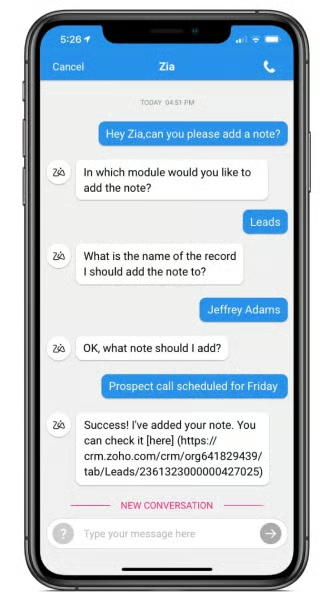
The Zoho CRM mobile app, powered by AI assistant Zi, can help sales reps add a note via chat for activity tracking. (Source: Zoho CRM)
Our Expert Opinion
Zoho is the best AI-powered mobile CRM that can autocomplete tasks on smartphones and tablets. With the time saved on manual tasks, we like how sales reps become more effective in their roles, so they can focus on selling and engaging with customers. We love how managers can easily track goal progress, monitor sales performance, and stay updated on all user activity with Zoho CRM’s mobile reporting and analytics tools.
Salesforce: Best for a Mobile CRM With Complete Features
When to Use Salesforce
- You want a mobile CRM software with complete features: Salesforce has sales automation, profile enrichment, and deal management features in the app. Sales teams can access all of Salesforce’s features (like view real-time forecasting) and add menu favorites using their mobile devices. You can customize the app to complement your branding by deploying prebuilt, mobile-ready components without coding.
- You want to use a personalized mobile CRM: Salesforce’s mobile version is fully customizable to users’ needs. You can customize navigation, branding, and add favorites on the app. For instance, you can modify the loading page logo and background color, as well as the land header background color to match your company’s branding.
When to Use Salesforce Alternatives
- You want a free plan or monthly subscription for a mobile CRM: Salesforce doesn’t have a free plan and doesn’t offer a monthly payment scheme. Also, the full offline mobile functionality is not available on the starting plan. Therefore, some startup teams might find Salesforce expensive.
- Alternatives: Zoho CRM and HubSpot CRM are our top recommendations for a free plan. HubSpot CRM and Capsule CRM have monthly billing available for a higher cost than their annual rates.
- You need more marketing and project management mobile features: Salesforce’s majority of features are sales-focused. It has limited marketing tools, like campaign management to track campaigns across all channels, which aims to see sales pipeline impact. Some small businesses, like retail and field service businesses, need more marketing and project management tools in a mobile CRM.
- Alternatives: monday CRM is an excellent project management system itself with sales enablement tools. Plus, CRM integrations connect monday CRM to apps like Slack, Zoom, and Mailchimp, so your team can handle tasks and customer projects seamlessly.
HubSpot CRM and Bitrix24 are also excellent platforms for email and social media marketing campaigns. Plus, these CRM providers have marketing tools for mass email and social media campaigns in their freemium plans.
Salesforce Pricing Plans*
Cost: $25 per user
Key Features:
- Simplified setup and onboarding
- Lead, account, contact, and opportunity management
- Email integration and automated activity capture
- Salesforce mobile app
- Customizable sales process
- Task management, activity feed
- Salesforce meetings
- Case management
- Lightning app builder
- Mass email and file sharing
Cost: $100 per user
Key Features:
- Everything in Starter Suite
- Forecasting mobile app
- Customizable reports and dashboards
- Quoting and contracting
- Full offline mobile functionality
- Sales Cloud everywhere
- Create and track quotes and orders
Cost: $165 per user
Key Features:
- Everything in Pro Suite
- Advanced pipeline management and deal insights
- Territory management and planning
- Workflow and approvals
- Sales teams
Cost: $330 per user
Key Features:
- Everything in Enterprise
- Advanced automation and sales engagement
- Predictive and generative AI
- Premier success plan and full sandbox
Cost: $500 per user
Key Features:
- Everything in Unlimited
- Performance management, enablement tools, and team collaboration with Slack
- Connect Salesforce and external data with data cloud and revenue intelligence
*Pricing is based on annual billing on a monthly breakdown of Salesforce Sales Cloud edition. Salesforce Sales Cloud does not offer a monthly payment plan, except for the Starter Suite. Salesforce offers a 30-day free trial. We update pricing information regularly but encourage readers to check current pricing.
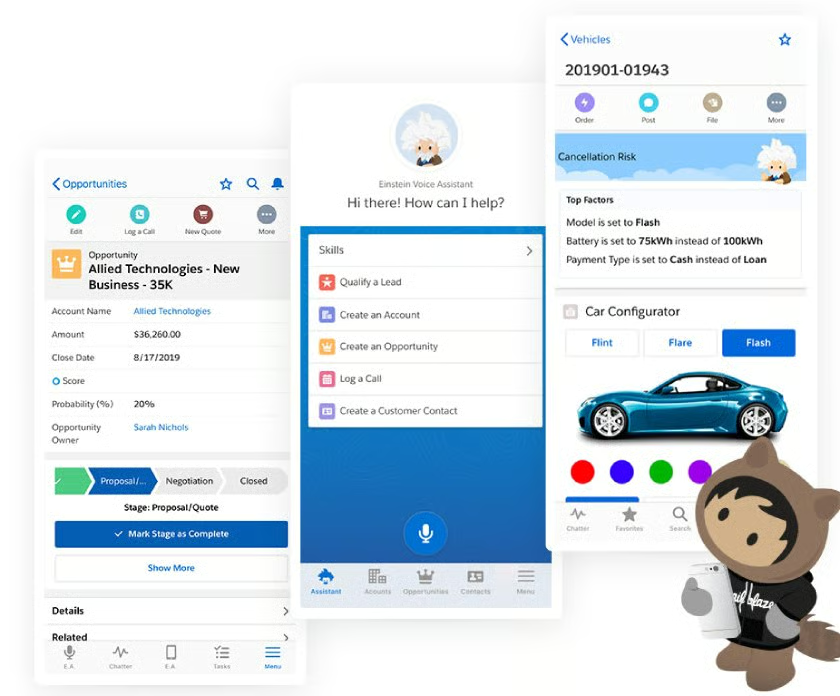
Salesforce Sales Cloud mobile views show different features for on-the-go customer relationship management. (Source: Salesforce)
Our Expert Opinion
The Salesforce mobile app has the most number of CRM tools found on the web or desktop version. This gives sales reps more control over leads and sales data for smarter decision-making and strategy creation while on the go. We also love how this provider powered its mobile app with AI, automation, built-in predictive analytics, and other advanced capabilities—a game-changer for growing small businesses.
Capsule CRM: Best for Calendar Tracking
When to Use Capsule CRM
- You want to manage your sales calendar on mobile devices: The aspect of Capsule CRM that stuck out the most was its mobile calendar features. It comes with a super-clean interface and a dedicated module in the mobile app for monitoring a schedule. Reps spending most of their day on the road can get value with a calendar that stores events, tasks, and sales meetings and translates them into a task list.
- You need a simple mobile communications tool: Capsule CRM’s desktop platform is one of the best simple CRM systems. For its mobile version, the provider makes it easy for users to quickly engage leads. Once integrated with the third-party tools, users can email text or place calls directly from phone contact records. AI Content Assistant generates emails and summarizes the minutes of the meeting or call for rep efficiency.
When to Use Capsule CRM Alternatives
- You are a Google user and need a mobile CRM with two-way data sync: Integrate Capsule CRM with Google Contacts to manage contacts easily for lead generation and sales management. However, users can only sync contacts from Capsule CRM to Google. If you need a CRM with two-way data sync capability, there are other options.
- Alternatives: Zoho CRM’s Standard plan ($14 per user monthly) has a two-way data sync option with Google. Pipedrive’s Advanced plan ($29 per user monthly) also offers two-way email sync when you use Gmail in the CRM.
- You want a more robust free plan: While Capsule CRM has a free-forever option, it is by no means the best free mobile CRM. Users are capped at just 250 stored contacts and primarily can only do task management and email engagement activity on mobile. You can send emails but can’t track them or access email templates in the freemium plan.
- Alternatives: HubSpot CRM includes an advanced mobile app on its freemium plan with email, campaign management, and deal tracking tools. Bitrix24 is an excellent option if you need robust project management features. And ClickUp’s free-forever tools for unlimited users let you easily oversee business operations, such as sales, marketing, and human resources.
Capsule CRM Pricing Plans*
Cost: $0 for two users
Key Features:
- Mobile app (for iOS and Android) with offline support
- Tablet and caller ID support
- Up to 250 contacts and unlimited customization to contact data
- 10 AI content assists
- Gmail add-on
- Sales dashboards with activity reports
- Unlimited bespoke workflows for opportunities or projects
- Data segmentation tools such as lists, filters, and tags
- Basic project management tools with projects, tasks, and calendar
- Google Workspace and Mailchimp integrations
Cost: $18 per user
Key Features:
- Everything in Free
- 30,000 contacts
- 50 custom fields
- Five email templates
- One shared mailbox
- Activity reporting
- Key integrations
Cost: $36 per user
Key Features:
- Everything in Starter
- Three shared mailboxes
- 1,000 AI content assists
- Workflow automation
- Advanced sales reporting
- User roles and permissions
- 60,000 contacts
- 150 custom fields
- 50 email templates
- Five sales pipelines and five project boards
Cost: $54 per user
Key Features:
- Everything in Growth
- 120,000 contacts
- 50 sales pipelines
- 50 project boards
- 300 custom fields
- 500 email templates
- Five shared mailboxes
Cost: $72 per user
Key Features:
- Everything in Advanced
- 240,000 contacts
- Implementation support
- Import assistance
- Custom training
- Dedicated account manager
- Ongoing priority support
- Unlimited custom fields
- 100 sales pipelines and 100 project boards
- 1,000 email templates and 10 shared mailboxes
*Pricing is based on annual billing on a monthly, per-user breakdown. Monthly billing is available for a higher cost. Capsule CRM offers a 14-day free trial for its paid plans. While we update pricing information regularly, we encourage our readers to check current pricing.
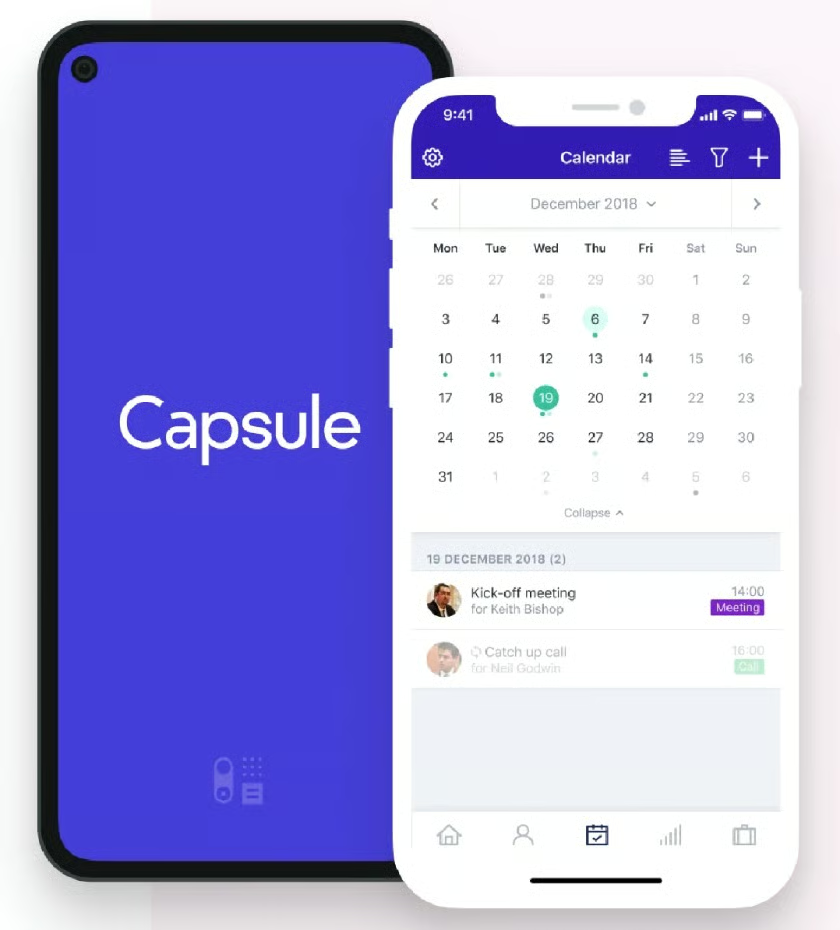
Capsule CRM’s mobile app calendar for scheduling meetings and events seamlessly (Source: Capsule CRM)
Our Expert Opinion
Capsule CRM wins as the best mobile CRM for tracking calendar tasks and activities because of its dedicated module for schedule monitoring. Its AI Content Assistant helps reps summarize a meeting or call minutes for lead scoring and adding a personal touch to email correspondence. Capsule CRM helps on-the-go teams ensure that no meeting or sales activity slips through the cracks.
Pipedrive: Best Mobile CRM App for Calling & Call Logging
When to Use Pipedrive
- You need to make and log calls on mobile CRM software: Users can easily call a lead from the mobile app of Pipedrive. When you are a sales rep and have a deal’s page open, simply click on the green phone icon at the bottom of the screen. To enable the call logging feature, go to the preferences. Every call will be logged as a deal activity to avoid missing sales opportunities to meet your quota.
- You need robust mobile deal monitoring: Pipedrive is already well-known for its sales proposal and deal management capabilities. These features, especially deal tracking, expand to mobile users, where you can view opportunities on a pipeline and get insights on deal history and timelines remotely. There’s even a mobile search bar to find deals or contacts based on the data record name or notes within the record.
- You want to track quotas anytime, anywhere: Pipedrive’s sales quota management enables managers and reps to see their activity input, total deal and revenue production, and progress toward their goals on mobile. Additionally, Pipedrive has a newly launched business card scanner for Android users to capture leads seamlessly.
When to Use Pipedrive Alternatives
- You need free mobile emailing: Pipedrive has no free-forever plan. Additionally, the emailing tools to send and track emails in the CRM and mobile app require the Advanced plan for $34 per user monthly.
- Alternatives: HubSpot CRM is a great alternative with free mobile emailing. Zoho CRM offers free access to basic CRM functions, including mobile emailing for up to 50 emails per user.
- You want to track projects on your phone: While Pipedrive now offers project management tools to track client deliverables and tasks on a Kanban board, this capability does not extend to the mobile app.
- Alternatives: monday CRM is one of our top recommendations for mobile CRM with project management features. Bitrix24 lets you manage projects and client profiles, as well as track activities and interaction on its mobile version for free.
Pipedrive Pricing Plans*
Cost: $14 per user
Key Features:
- Lead and contact management with activity tracking (calls and emails) on mobile app
- Web-to-mobile phone calling and apps marketplace for third-party integrations
- Contact location discovery using mobile app maps to spot contacts and deals
- Deal management with rotting indicator and mobile tracking
- CRM mobile search bar to find contact and deal records on your phone or tablet
- Mobile collaboration through comments and user mentions on CRM records
- Activity reporting to set up sales goals for tracking on CRM mobile app
- Document attachments in CRM records and data duplicate detection
- Custom data fields and pipelines and product catalog
- AI sales assistant
Cost: $39 per user
Key Features:
- Everything in Essential
- Meeting, email, and video call scheduling
- Full email sync with templates, open and click tracking, and group emailing
- Automations builder, including email sequences
- Live chat support
Cost: $49 per user
Key Features:
- Everything in Advanced
- AI-powered sales assistant and emailing tools
- Contract and proposal management with electronic signatures
- Streamlined lead routing and team management
- Extra data entry and data quality settings
- Revenue forecasting and custom field reporting
Cost: $64 per user
Key Features:
- Everything in Professional
- Project planning, tracking, and delivery
- Increased control of account permissions and visibilities
- 24/7 live chat support
- Phone support
Cost: $99 per user
Key Features:
- Everything in Power
- Maximize the number of automations and email syncs per seat
- Enhanced security preferences
- Complete access to all features
- Unlimited reports and customizations
*Pricing is based on annual billing on a per-month breakdown. Monthly billing is available for a higher cost. Pipedrive offers a 14-day free trial. While we update pricing information regularly, we encourage our readers to check current pricing.

Pipedrive’s enabled call logging feature automatically converts calls to deal activity for seamless lead generation. (Source: Pipedrive)
Our Expert Opinion
Pipedrive’s mobile CRM calling and call logging features enable salespeople to quickly convert calls to deal records for seamless lead generation. We love how sales reps can use its mobile business card scanner and search bar to manage their day-to-day tasks more efficiently. We also find the activity and goal tracking tools very useful in having a 360-degree overview of sales performance and opportunities.
ClickUp: Best CRM App for Task Management
When to Use ClickUp
- You need a versatile mobile app for various business needs: ClickUp is one of the top CRM alternatives. The platform uses a system of boards and items to organize data records, like project tasks, leads, and customers. You can use this customizable mobile app to view records and manage tasks for your business needs anywhere, anytime.
- You need a solid free mobile CRM: ClickUp is not only robust in that you can tailor it for any business need, but also very cost-friendly. This CRM app offers a free plan for unlimited users and up to five different workspaces to oversee sales, marketing, logistics, finance, human resources, and any other function you need to manage. Additionally, the mobile app is included for free for task tracking and record viewing.
When to Use ClickUp Alternatives
- You prefer a traditional mobile CRM: Some users may not like the idea of using a nontraditional CRM and mobile app because it requires lots of customization before being able to use the features.
- Alternatives: HubSpot CRM and Pipedrive are traditional CRM systems with modules already created for users. The same is true for Zoho CRM, helping small businesses handle customer data and their sales cycle.
- You need a mobile CRM with sales analytics and reporting features: Some businesses want a mobile CRM with work management and sales analytics and reporting features in one platform. Retail, ecommerce, and creative agencies need these capabilities.
- Alternatives: With EngageBay, sales managers can access daily sales reports and performance reports on the CRM app. Salesforce offers automated activity capture and case management that automatically recommends agent’s next best actions based on customer’s sales data and online activities to win more deals. Moreover, monday CRM offers sales forecasting in its basic plan.
ClickUp Pricing Plans*
Cost: $0 for unlimited users
Key Features:
- Custom workspaces for data storage, workflow management, and task collaboration
- Unlimited tasks and custom views
- List, board, calendar, Gantt, activity, timeline, workload, table, and mind map views for workspace
- Workspace templates
- In-app video recording
- Email integration and 100MB file storage
- Whiteboard collaboration and custom data fields
- Workflow automation on boards and task management
- Reporting and dashboards for goals, milestones, time tracking, scheduling, and workload profiles
- 24/7 support via help center and ticket submission
Cost: $7 per user
Key Features:
- Everything in Free Forever
- Unlimited file storage and workspaces
- ClickUp AI
- Guest access
- Box and form views for workspaces
- Future recurring tasks on the calendar
- User groups
- Time-tracking widgets
- Live chat support
Cost: $12 per user
Key Features:
- Everything in Unlimited
- Branded and customized forms
- Custom task IDs
- Publicly shared workspaces
- Time tracking widgets with billable reports and timesheets
*Pricing is based on annual billing on a per-month basis. Monthly billing is available for a higher cost. An enterprise plan is also available for larger teams. While we update pricing information regularly, we encourage our readers to check current pricing.
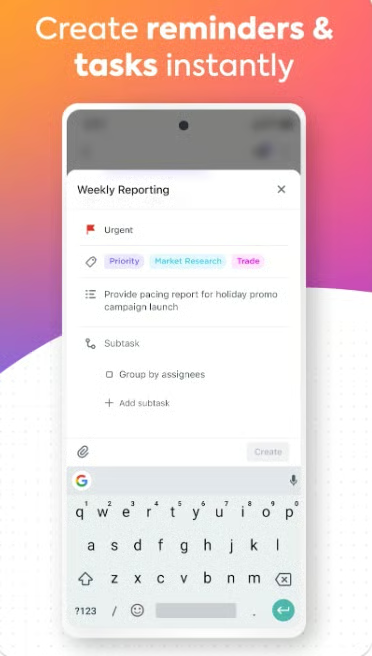
The ClickUp mobile app lets you create reminders instantly to ensure you’re on track with appointments, sales follow-ups, and other business-related activities. (Source: Google Play)
Our Expert Opinion
ClickUp is a work management tool with sales and marketing features that can help sales teams organize data records. Because of its high customizability, sales reps can use the mobile app to access customer data and manage tasks quickly. ClickUp offers a free-forever plan for unlimited users, best for startup teams. Plus, time tracking is available in all plans, letting you switch between desktop apps and mobile devices seamlessly. This helps you stay efficient and focused on your tasks regardless of the device you’re using.
monday CRM: Best for Sales Enablement
When to Use monday CRM
- You need a CRM app with sales enablement tools: With monday CRM, users can access the four core boards: the contacts, leads, deals, and account boards to track sales performance. Also, the mobile version of emails and activities enables users to send emails, add a note, schedule a meeting, take calls, and include a call summary, which helps nurture leads, identify sales opportunities, and close more deals.
- You need a CRM with project management: monday CRM has communication, collaboration, lead management, and task assignment tools. This CRM with mobile app has a web version that gives you access to customer feedback management, reporting, workflow automation tools, and file storage—all important in managing projects. Plus, it easily integrates with apps you need to handle projects seamlessly.
When to Use monday CRM Alternatives
- You need sales analytics on mobile CRM: Sales teams miss engagement and sales opportunities in the absence of analytics, reporting, pipelines, and profile enrichment on monday CRM mobile apps. Users can’t view the key metrics on a mobile CRM app to know the latest contacts assigned to them or newly generated leads and track their performance.
- Alternative: With HubSpot CRM’s mobile app, you can manage leads, visualize your sales pipeline, and collaborate with your team anytime, anywhere. Zoho CRM’s mobile version is equipped with robust reporting and analytics capabilities. You can access the Zoho CRM analytics module on its basic plan, offering in-depth reporting and insights to help improve sales performance.
- You need collaboration tools on the app: Collaboration tools, like document sharing and reporting, are not available on the monday CRM app. This feature and other work management tools are important for distributed or remote sales team members. You need to share documents directly from monday.com.
- Alternative: EngageBay mobile app allows sales team members to communicate across verticals. They can share documents, reports, and other relevant information about contacts and deals using the app. ClickUp’s mobile version offers coediting, tagging, Gantt charts, task assignments, and real-time chat to collaborate on project tasks without switching between apps.
monday CRM Pricing Plans*
Cost: $12 per user
Key Features:
- Mobile app compatible with iOS and Android devices
- Unlimited contacts and companies stored in the CRM database
- Unlimited boards, custom pipelines, and free viewers
- Premade CRM templates for storing lead, contact, account, and deal data
- Document attachments in CRM items
- Six view styles, including Kanban boards, calendar views, and timeline views
- Web-to-lead capture
- Custom notifications and collaboration features
- Create a dashboard based on one board
Cost: $17 per user
Key Features:
- Everything in Basic
- Multiple dashboards and extended board views like timeline and calendar views
- Lead, account, contact, and deal management with activity tracking
- One of the best CRMs for Outlook and Gmail with two-way integration
- Use Aircall integration to handle calls and Zoom integration to manage meetings
- PandaDoc and DocuSign integrations for obtaining signatures on sales documents
- Custom CRM automations and integrations (250 actions per month)
- AI email generator for writing and editing emails
- Create and share unlimited quotes and invoices and merge duplicate contact data
- Workflow automation with low-code design and custom activity logging
Cost: $28 per user
Key Features:
- Everything in Standard
- Create a dashboard that combines 10 boards
- Extended board viewing options like chart view and workload tracker
- Custom CRM automations and integrations (25,000 actions per month)
- Custom email templates and email signatures
- Mass email tracking and automations
- Calendar data sync to Google Calendar
- Integration with marketing tools like Mailchimp, HubSpot, and Facebook Ads
- Time tracking on CRM tasks
- Sales analytics and forecasting (not available on mobile view)
Cost: Custom pricing (contact provider)
Key Features:
- Everything in Pro
- Enterprise-scale automations and integrations
- Advanced account management with onboarding and renewal tracking
- Revenue collection tracking for CRM account records
- Client project management on service deliverables
- Lead scoring and data duplication management
- Teams can set sales goals and track them using advanced analytics
- Sales-operations management tools
- Legal request management for sales contracts
- Advanced security
*Pricing is based on annual billing on a monthly breakdown. Monthly billing is available for a higher cost. There is a 14-day free trial for the plans. While we update pricing information regularly, we encourage our readers to check current pricing.
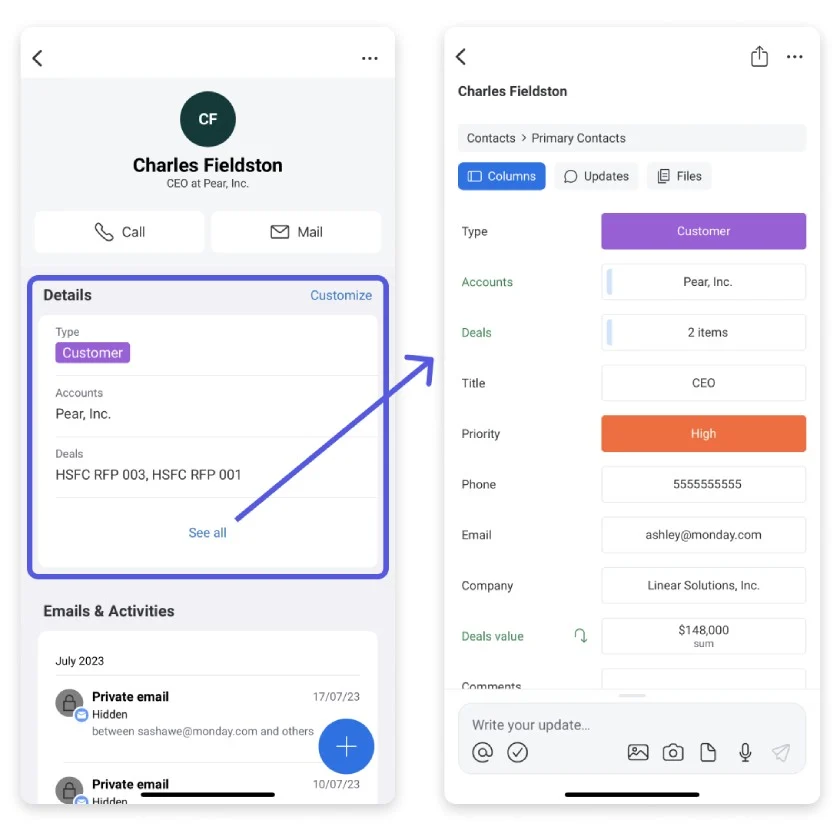
monday CRM mobile app helps sales teams manage emails, activities, deals, and accounts. (Source: monday CRM)
Our Expert Opinion
monday CRM is the best mobile sales enablement tool. You can use the mobile version to track sales performance, send emails, add a note for contact reference, schedule a meeting, take calls, and include a call summary to help you close more sales. Sales teams can also integrate this sales CRM for phones with other apps and tools you use for better project management and sales enablement.
Insightly CRM: Best for Lead Capture via Business Card Scanner
When to Use Insightly CRM
- You need a reliable business card scanner to capture leads quickly: Sales reps can quickly generate a new lead record using Insightly CRM’s business card scanner in the mobile app. Or they can easily update existing contact information by scanning a new or updated business card. With this feature, sales reps can save time and focus more on lead nurturing and selling.
- You need to record audio notes for a more efficient sales operation: Sales teams no longer need to juggle between written notes. Sales reps and managers can record audio notes using Insightly CRM’s mobile app to summarize key points from meetings, reminders, and past conversations. This time-saving tool helps reps streamline their workflows, understand customers better, and create more effective sales strategies.
When to Use an Alternative
- You need a mobile app feature for alternative communication: Mobile chat enables sales and support teams to collaborate and connect with customers conveniently and quickly. Unfortunately, Insightly CRM does not have a mobile chat option yet.
- Alternatives: We highly recommend Bitrix24 as the best for CRM with mobile chat on this list. Meanwhile, HubSpot CRM’s mobile app allows users to view and reply to messages from its live chat widget or bot in the conversations inbox.
- You want to try AI-powered CRM tools on a mobile app: Insightly will soon infuse AI into the mobile app’s built-in business card scanner to recognize contact titles more accurately. While the provider is still working on its AI features, Insightly CRM users can wait and integrate with third-party apps (like Amazon Lex) for added AI functionality. Moreover, you can consider checking other options.
- Alternatives: Zoho CRM is the best AI-powered mobile app on this list. Users can initiate voice and text commands to the Zia AI assistant to create meetings and pull data reports. Meanwhile, HubSpot CRM’s mobile chat and email functions are powered by the AI solution Breeze Copilot to reduce manual tasks such as writing a compelling email greeting or welcome email content.
Insightly CRM Pricing Plans*
Cost: $29 per user
Key Features:
- Mobile app with real-time data sync and integration with Google Workspace
- Lead, opportunity, contact, and organization management
- Web-to-lead capture, Kanban view, and other project management features
- Batch update records and attach files from the cloud
- Built-in business intelligence dashboards with customizable reports
- 2,500 daily mass emails with automated deployments and stored email templates
- Project and task management and relationship linking of contacts and organizations
- Automated CRM workflows convert won opportunities to projects
- 100,000 record limit, 10GB file storage, and 25,000 records per import
- 50 custom fields, two role-based permissions, and two configurable page layouts
Cost: $49 per user
Key Features:
- Everything in Plus
- Unlimited custom profiles or page layouts
- Lead and assignment routing
- Scheduled outbound emails
- Custom queues that autogenerate processes and to-do lists for new tasks
- Complete workflow automation
- 250,000 record limit and 100GB file storage
- 50,000 records per import and 5,000 daily mass emails
- 100 customizable real-time insight cards and 100 custom fields
- Unlimited role-based permissions
Cost: $99 per user
Key Features:
- Everything in Professional
- 10,000 daily mass emails
- Unlimited customizable real-time insight cards
- Product, price book, and quote management
- Field-based permissions
- 500,000 record limit
- 250GB file storage
- 50,000 records per import
- 200 custom fields
*Pricing is based on annual billing on a per-month basis. Monthly billing is available for a higher cost. Insightly CRM offers a 14-day free trial. While we update pricing information regularly, we encourage our readers to check current pricing.
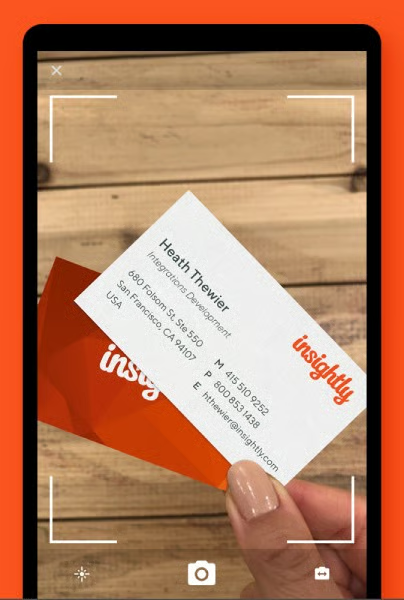
Insightly CRM’s business card scanner captures contact details on the card and converts it to a lead record. (Source: Google Play)
Our Expert Opinion
Insightly CRM’s business card scanner is a winner. We like how salespeople can easily capture leads just by scanning business cards. With audio notes, reps can eliminate data entry and focus more on engaging with prospects. We love how the Insightly Calendar can help seamlessly manage tasks to ensure no one misses an important event. Plus, you can personalize your CRM on the go with custom objects.
EngageBay: Best for Team Collaboration
When to Use EngageBay
- You need a CRM with excellent collaboration tools: EngageBay allows sales reps, most especially in remote teams, to share documents and view reports and tags via the app. They can use this CRM’s call broadcast feature to eliminate manual dialing because it automatically dials the selected contacts’ phone numbers on behalf of the agents. This capability avoids misdialing, call drops, and excessive wait times.
- You need a CRM with robust sales analytics and reporting features: EngageBay keeps sales reps connected with the team through a cloud-enabled system. You can access daily sales reports and performance reports on the CRM app.
When to Use EngageBay Alternatives
- You need a less expensive plan with marketing automation: Some teams need marketing automation with comprehensive analytics and reporting features in a mobile CRM. However, startups and bootstrapping businesses may not be able to afford EngageBay’s Growth plan at $59.79 per user that includes this feature.
- Alternatives: HubSpot CRM and Zoho CRM are great options if you’re a startup business owner. HubSpot CRM offers automated campaign deployment on its free plan. On the other hand, Zoho CRM offers mobile-accessible activity tracking, custom email templates, and workflow automation to launch email marketing and other campaigns smoothly.
- You need a mobile CRM with more AI capabilities: While EngageBay provides tools to manage sales, customer support, and marketing, this CRM app doesn’t have a lot of AI-powered features—only chatbots and those for email marketing.
- Alternatives: You can go with Zoho CRM or Salesforce if you’re looking for an AI-powered mobile solution for your business. Zoho CRM’s AI, Zia, lets you assign tasks, create meetings, add notes, and change deal statuses while on the go. Salesforce’s app is equipped with Einstein Voice Assistant, helping sales reps generate leads and spot sales opportunities faster.
EngageBay CRM Pricing Plans*
Cost: $0 for 15 users
Key Features:
- 360-degree contact view and appointment scheduling
- 250 contacts, five web forms, five web pop-ups, and 1,000 branded emails
- Email sequences, tracking, and email broadcast
- Autoresponders and tag management
- Reports dashboards, custom fields, segmentation, and basic predictive lead scoring
- Video marketing, sending newsletters, and Facebooks ads
- Social suite supports Twitter, Facebook, and Instagram
- File repository, 500MB file storage, and integrations (Gmail, Outlook, and Office 365)
- Landing pages and landing page builder
- Ticketing views and management and email and chat support
Cost: $13.79 per user
Key Features:
- Everything in Free
- 500 contacts, 10 web forms, 10 web pop-ups, and 3,000 branded emails
- Short messaging service (SMS) marketing
- Calling minutes with 15 credits
- Tag manager and custom deal milestones
- Group management (10 maximum groups)
- Customer 360-degree view
- Personal note and canned responses (10 maximum)
- Desktop notifications and 1GB file storage
Cost: $59.79 per user
Key Features:
- Everything in Basic
- 5000 contacts, call records, and call reports
- Triggers, automation or workflows, and time zone-based email delivery
- Email broadcast and landing page A/B testing
- Multicurrency, products, and proposals
- Web rules and site messaging (maximum of 10 each)
- Custom domain and code your own landing page
- Custom deal tracks, leaderboard, push notifications, and site messages
- Single sign-on (SSO)
- Free onboarding sessions and a dedicated account manager
Cost: $110.39 per user
Key Features:
- Everything in Growth
- Unlimited contacts and 50,000 branded emails
- Conversational inbox
- Custom reporting and proposal and web analytics
- Call scripts and call recordings
- Custom reports, goals, and role management
- Account-based marketing (ABM)
- Application programming interface (API)
- Teams and team hierarchy
- Phone support
*Pricing is based on annual billing on a monthly breakdown. Biennial billing is available at a lower cost and monthly billing scheme for a higher cost. Pricing is reflected at the time of this publication. We update pricing information regularly but encourage readers to check current pricing.
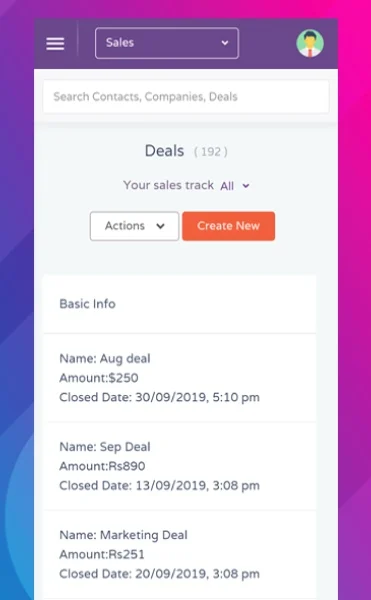
Use the EngageBay mobile app to access, track, and manage deals to close more sales. (Source: Google Play)
Our Expert Opinion
EngageBay mobile CRM is a cloud-enabled system with excellent work management capabilities, such as document sharing and call broadcast for autodialing. It is a cloud-enabled system that lets you access sales reports and performance reports on the mobile app. Remote sales teams or small businesses with multiple local branches can greatly benefit from the collaboration mobile tools of this CRM.
How We Evaluated the Best Mobile CRM Apps
To determine the best mobile CRM applications, we evaluated the specific features useful for sales and marketing teams while on the go. For instance, communication tools on a mobile CRM let you place calls, send emails, or deliver texts even if you’re away from your desk.
We also looked at other critical product attributes of the best CRM for mobile apps, including product price, ease of use, customer support, and user experience per the intuitiveness of the mobile interface. The tabs below offer insight into our evaluation process of the best mobile CRMs:
Pricing considered free plan availability and the affordability of the paid CRM plans. When we evaluated the best CRM apps, we looked at the overall value in terms of mobile capabilities included on the lower-tiered subscriptions. We assessed the billing flexibility that allows subscribers to either pay monthly or save by paying annually.
We looked at overall features crucial to any CRM system, whether it be used on a computer or mobile devices like a phone or tablet. We first wanted to see the product offer solid third-party integration options and a range of system customization that allows teams to tailor their mobile app to meet their pipeline and informational needs. We also looked at reporting and analytics tools that can give users insights on key decisions.
We evaluated niche features specifically for the CRM on mobile. For example, being able to track leads and deals, manage projects, and deploy marketing campaigns on the go allows teams to continue operations even if they’re out of the office. We also looked at other modules, such as mobile customer support and the range of communication capabilities (e.g., phone, email, chat, and text) available in the mobile CRM apps.
Customer support evaluated the provider’s availability to assist users with product or billing issues. We evaluated this in terms of hours of availability, such as offering 24/7 support, as well as the number of service channels offered. Channels like phone, live chat, email, and knowledge base resources offer flexibility for each user.
In addition to firsthand experience with these top CRM apps, we evaluated what actual users say about each product according to online reviews. This looked at how users felt about the specific mobile features of each CRM and the perceived value for the price paid. We also strongly considered product ease of use in terms of mobile interface navigability and whether there’s a steep learning curve needed to operate the tools.
Frequently Asked Questions (FAQs)
What are the benefits of a mobile CRM?
A mobile CRM app enables users to update lead records, follow up with customers, and assign task assignments on the go. For instance, field-deployed sales team members can quickly schedule appointments, track lead activities, and interact with customers using mobile devices. Mobile CRM app functionality improves client communication, team collaboration, and customer relationships.
Are CRM apps free to use?
Yes. Many CRM providers offer a free trial period or free-forever account for basic features. Most general features of a mobile CRM, including reporting and analytics, customizable pipelines, integrations, and mobile app availability, are free. The difference lies in advanced capabilities, such as mobile dashboard, sales automation, profile enrichment, and deal management, found in premium plans.
How should I evaluate the best mobile CRM for my business?
As you would with a regular CRM, evaluate mobile CRM applications based on affordability, features, and user experience requirements. For example, some apps are available for free, while others are more expensive. Alternatively, some are better for on-the-go deal tracking, while some include special tools like mobile project management. Finally, certain mobile interfaces are much cleaner than others and, therefore, easier to operate.
Bottom Line
The best mobile CRM apps are equipped with helpful features that sales teams can use to save time, effort, and resources managing contacts, leads, and deals while on the go. Sales managers and reps can easily update contacts, generate leads, monitor sales pipelines, and complete other tasks without waiting to arrive in the office. While HubSpot CRM is our top pick because of its free mobile app features, like marketing and record management, other options like Bitrix24 could be a better fit for your small business.
