





.jpg?w=288)

Artificial intelligence (AI) technology has gained popularity for generating content, automating tasks, and generating data insights quickly in business systems (e.g., customer relationship management software). The best AI CRM systems combine traditional CRM tools with features like predictive analytics, chatbots, workflow automation, AI-generated emails, call summaries, and customizable reporting dashboards.
I evaluated nine AI CRM platforms based on automation, AI insights, reporting, workflow customization, customer communication tools, ease of use, and overall value for small businesses.
| Provider | Best for | Starting monthly price, billed annually |
|---|---|---|
| HubSpot CRM | Scalable AI-powered customer data management | $45/user |
| Pipedrive | Smart app recommendations | $14/user |
| Bitrix24 | AI-powered call processing | Free or $49/organization |
| Zoho CRM | Broad AI CRM functionality | Free or $14/user |
| Freshdesk | AI-assisted customer service | Free or $19/agent |
| Capsule CRM | AI-generated sales emails | Free or $18/user |
| ClickUp | AI-assisted content management | Free or $7/user |
| monday CRM | No-code AI workflow automation | $12/user (3-user minimum) |
| Apollo.io | AI-powered outbound prospecting | Free or $49/user |
HubSpot CRM stood out for scalable AI-powered customer data management through its Smart CRM, which unifies customer data, teams, and tech stacks, while the other providers on this list are better suited for app recommendations, call processing, broad AI use cases, customer service, autogenerated emails, content management, no-code workflows, and outbound prospecting.
Why you can trust Fit Small Business
Methodology: How did I evaluate the best AI CRM systems?
To evaluate the best AI CRM systems, I reviewed platforms based on both their core CRM functionality and the practical value of their AI features. I gave higher scores to providers that use AI for more than content generation, such as lead scoring, forecasting, workflow automation, call processing, chatbot support, task recommendations, and sales productivity.
I also considered pricing, ease of use, customer support, and how accessible each platform’s AI tools are for small businesses. Review my evaluation criteria below.
Our Scoring Methodology
How we weighted each factor in this evaluation.
I evaluated core CRM functionality, including contact and pipeline management, customizable modules, mobile access, integrations, analytics, reporting, and dashboards.
I reviewed AI-specific capabilities such as AI-assisted lead scoring, forecasting, workflow automation, chatbot building, content generation, call processing, task assignment, and sales recommendations.
I assessed the cost of accessing each CRM’s AI features, free plan availability, scalable paid plans, monthly and annual billing options, and overall value for small businesses.
I looked at setup, onboarding, templates, automation builders, navigation, scalability, and how easy it is for users to apply AI tools in real CRM workflows.
I evaluated support channels, including phone, email, live chat, hours of availability, and self-service resources like knowledge bases, forums, product guides, and tutorials.
I factored in firsthand testing, verified user reviews, feature quality, AI usefulness, ease of navigation, setup experience, and overall value for the price.
- Best AI CRM software compared
- What makes HubSpot CRM the best scalable AI CRM for customer data management?
- HubSpot CRM
- What makes Pipedrive the best for smart app recommendations?
- Pipedrive
- What makes Bitrix24 the best for AI-powered call processing?
- Bitrix24
- What makes Zoho CRM the best for broad AI CRM functionality?
- Zoho CRM
- What makes Freshdesk the best for AI-assisted customer service?
- Freshdesk
- What makes Capsule CRM the best for AI-generated sales emails?
- Capsule
- What makes ClickUp the best for AI-assisted content management?
- ClickUp
- What makes monday CRM the best for no-code AI workflow automation?
- monday CRM
- What makes Apollo.io the best for AI-powered outbound prospecting?
- Apollo.io
- Frequently asked questions (FAQs)
- Bottom line
Best AI CRM software compared
| Provider | AI call processing | AI lead scoring/prioritization | No-code workflow automation | My expert rating out of 5 |
|---|---|---|---|---|
| HubSpot CRM | ✓ | ✓ | ✓ | 4.59 |
| Pipedrive | ✕ | ✕ | ✓ | 4.57 |
| Bitrix24 | ✓ | ✕ | ✓ | 4.52 |
| Zoho CRM | ✕ | ✓ | ✓ | 4.49 |
| Freshdesk | ✕ | ✕ | ✓ | 4.43 |
| Capsule CRM | ✕ | ✕ | ✕ | 4.39 |
| ClickUp | ✕ | ✕ | ✓ | 4.38 |
| monday CRM | ✕ | ✕ | ✓ | 4.37 |
| Apollo.io | ✕ | ✓ | ✓ | 4.25 |
Legend: ✓ = available or strongly supported; ✕ = not a core native feature.
What makes HubSpot CRM the best scalable AI CRM for customer data management?
Why I chose HubSpot CRM
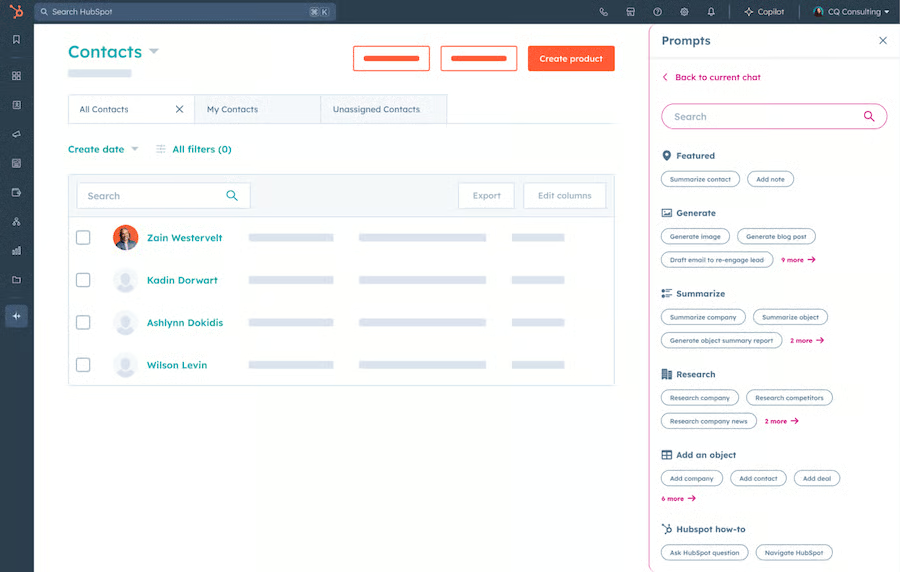
HubSpot CRM is my recommendation for scalable AI-powered customer data management because its Smart CRM helps businesses unify customer records, automate repetitive work, and generate AI-driven insights across sales, marketing, and service workflows.
In my evaluation, HubSpot delivered one of the strongest combinations of AI functionality, usability, automation, and scalability among the platforms I reviewed. Features like Breeze Copilot, AI-powered workflow automation, and centralized customer profiles make it easier for teams to manage customer relationships and improve productivity without relying on disconnected tools.
While some of its more advanced AI capabilities require higher-tier plans, HubSpot remains one of the most well-rounded AI CRM platforms for businesses looking to scale customer management, reporting, and automation within a connected ecosystem.
Key features
- Breeze Copilot: AI assistant that helps users summarize records, generate content, and surface CRM insights.
- Breeze Intelligence: Enriches customer records and improves data quality using AI-powered insights.
- AI-powered workflow automation: Automates follow-ups, task creation, and customer management processes.
- Custom reporting dashboards: Tracks pipeline activity, customer engagement, and business performance.
- Smart CRM customer profiles: Centralizes customer interactions, communication history, and relationship data in one workspace.
HubSpot CRM pricing
| HubSpot Smart CRM plans | Professional | Enterprise |
|---|---|---|
| Monthly price, billed annually | $45/user | $75/user |
| Monthly price, billed monthly | $50/user | N/A |
What makes Pipedrive the best for smart app recommendations?
Why I chose Pipedrive
Pipedrive is one of my preferred AI CRM platforms for balancing simplicity with practical sales support. In my evaluation, its AI features felt more actionable and workflow-focused than overly technical, making the platform easier for sales teams to adopt and use consistently.
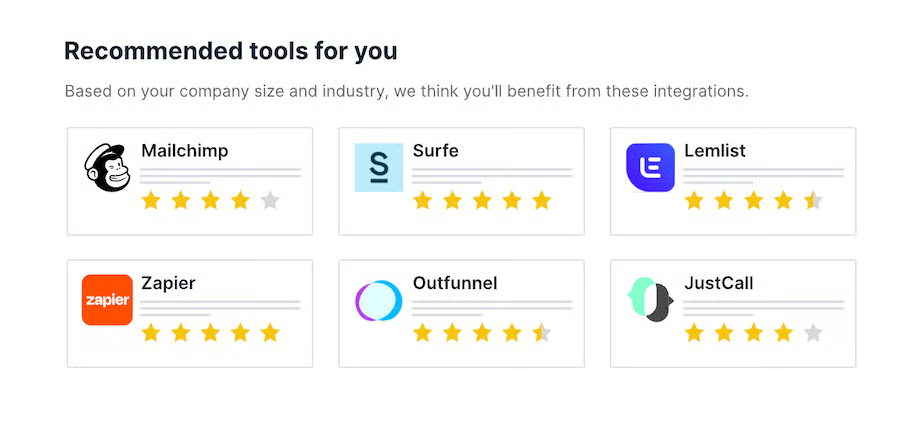
Its AI Sales Assistant provides smart app recommendations, automation suggestions, deal updates, and productivity insights tailored to how a business operates. I especially like that Pipedrive focuses on improving day-to-day sales workflows rather than overwhelming users with unnecessary complexity or heavy configuration requirements.
For businesses that want an approachable CRM with AI-driven recommendations and built-in sales guidance, Pipedrive delivers one of the more intuitive user experiences I tested.
Key features
- AI Sales Assistant: Provides timely suggestions, tips, and notifications across your sales pipeline
- Smart app recommendations: Uses AI to recommend third-party apps from Pipedrive’s Marketplace based on your CRM usage patterns
- Deal monitoring insights: Tracks deal activity and suggests automation opportunities to speed up the sales cycle
Pipedrive pricing
| Lite | Growth | Premium | Ultimate | |
|---|---|---|---|---|
| Monthly price, billed annually | $14/user | $24/user | $49/user | $69/user |
| Monthly price, billed monthly | $19/user | $34/user | $64/user | $89/user |
Free trial: 14 days
What makes Bitrix24 the best for AI-powered call processing?
Why I chose Bitrix24
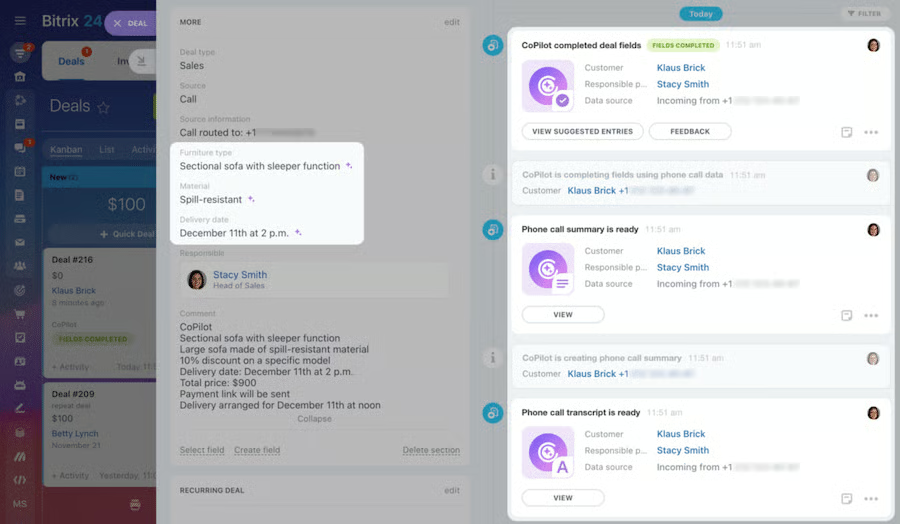
Bitrix24 is one of the stronger AI CRM options I evaluated for businesses managing high volumes of customer calls and conversations. Its AI-powered CoPilot tools help reduce manual administrative work by automatically transcribing calls, summarizing conversations, and populating CRM records with important details like payment information, delivery addresses, and customer notes.
What impressed me most was how effectively the platform streamlines post-call workflows that would otherwise require repetitive manual data entry from sales or support teams. For businesses handling frequent inbound or outbound calls, automation can significantly improve efficiency and reduce time spent reviewing recordings or updating CRM records manually.
Another major advantage is that Bitrix24 includes AI assistance within its free plan. Users can access AI tools for drafting emails, generating chat responses, refining ideas, and creating CRM-related content without immediately upgrading to a paid tier. For small businesses looking to improve operational efficiency through AI-powered call processing and workflow automation, Bitrix24 delivers one of the more practical feature sets I tested.
Key features
- AI call transcription: Generates ideas, writes texts, checks grammar, and automatically translates chats, feeds, and tasks
- CRM field autocompletion: Pulls key info like payments or delivery details from calls and inserts them into CRM records
- Free AI CoPilot Assistant: Supports call summaries and data automation
Bitrix24 pricing
| Free | Basic | Standard | Professional | |
|---|---|---|---|---|
| Monthly price, billed annually | $0 for up to 2 users | $49 for 5 users | $99 for 50 users | $199 for 100 users |
| Monthly price, billed monthly | $0 for up to 2 users | $69 for 5 users | $144 for 50 users | $289 for 100 users |
Free trial: 15 days
What makes Zoho CRM the best for broad AI CRM functionality?
Why I chose Zoho CRM
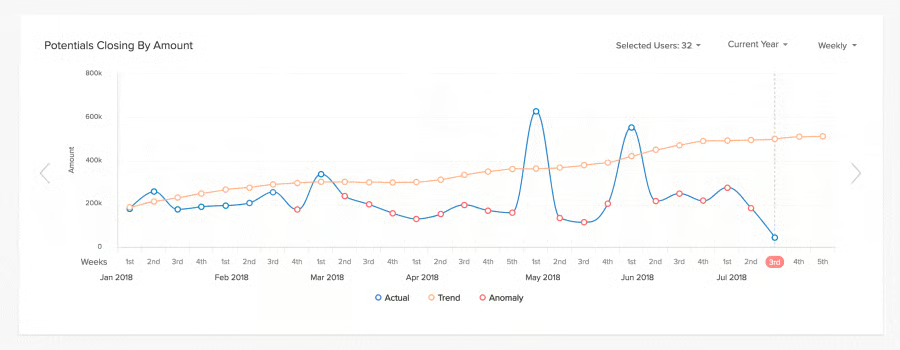
Zoho CRM is one of the most versatile AI CRM platforms I evaluated for small businesses that want AI functionality extending beyond basic automation. Its AI assistant, Zia, supports a broad range of use cases, including lead conversion predictions, sales anomaly detection, CRM data enrichment, competitor mention tracking, and email intent analysis.
One feature I especially like is the ability to interact directly with Zia through conversational prompts inside the CRM. That makes it easier to retrieve insights, generate recommendations, and complete actions without constantly navigating through menus or reports.
Compared with many AI CRM platforms that focus on only one or two AI functions, Zoho CRM applies AI more comprehensively across sales, communication, reporting, and workflow management. For small businesses looking for a flexible CRM with AI integrated into everyday operations, Zoho CRM delivers one of the more complete and practical AI CRM experiences I tested.
Key features
- Zia AI Assistant: Offers predictions, anomaly detection, workflow suggestions, and performance insights
- Data enrichment: Zia enhances contact records using public web data and CRM behavior
- Email sentiment and intent analysis: Analyzes customer emails to detect tone and buying signals
Zoho CRM pricing
| Free | Standard | Professional | Enterprise | Ultimate | |
|---|---|---|---|---|---|
| Monthly price, billed annually | $0 for 3 users | $14/user | $23/user | $40/user | $52/user |
| Monthly price, billed monthly | $0 for 3 users | $20/user | $35/user | $50/user | $65/user |
Free trial: 15 days
What makes Freshdesk the best for AI-assisted customer service?
Why I chose Freshdesk
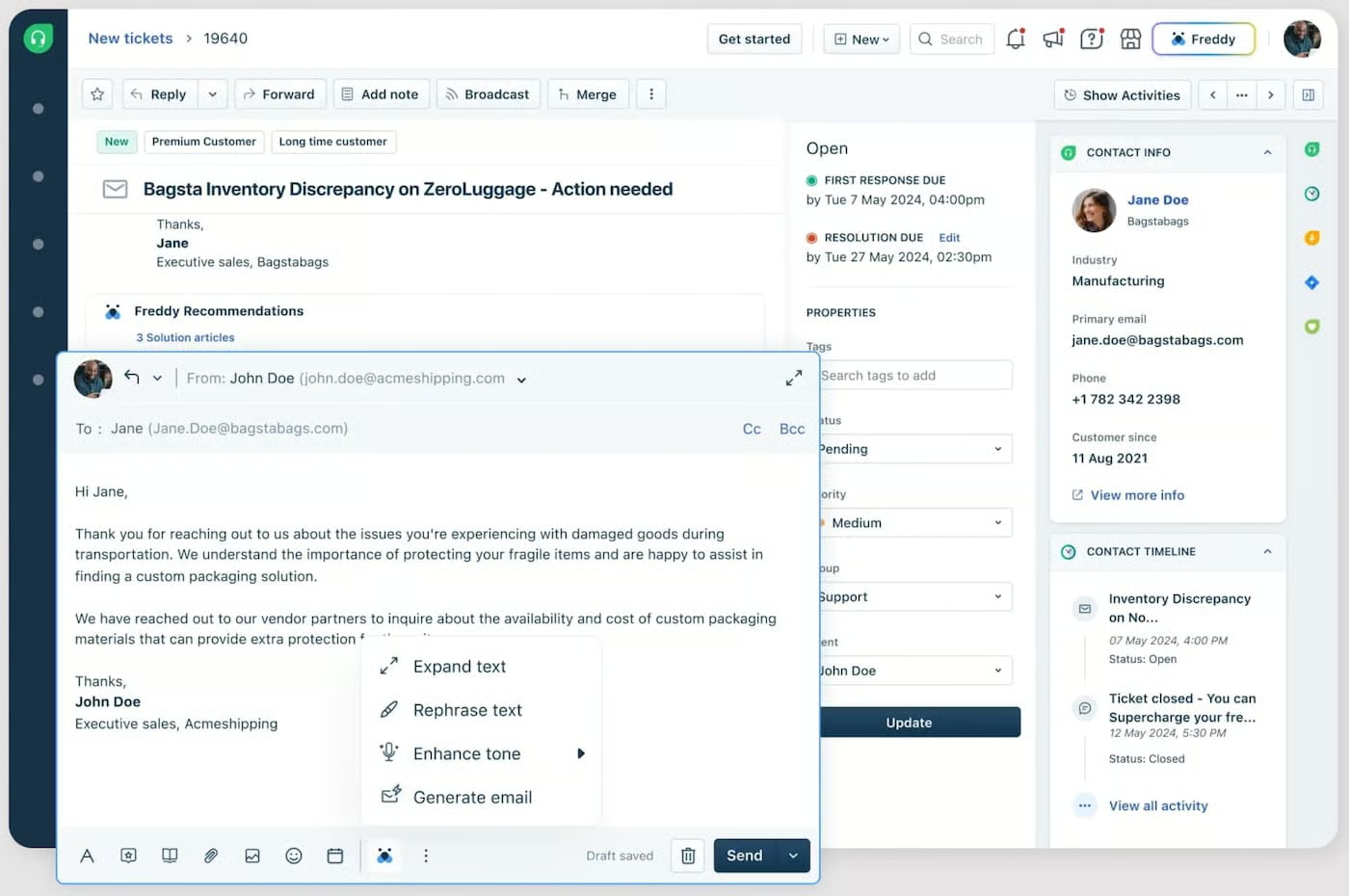
Freshdesk is one of the strongest AI-powered customer service platforms I evaluated. It works best for small business support teams that need CRM-connected service tools without excessive complexity. Its Freddy AI assistant helps automate ticket prioritization, generate intelligent responses, and surface actionable insights through analytics, allowing teams to handle higher support volumes more efficiently.
I especially love how approachable the platform feels despite its advanced AI capabilities. The interface is clean, intuitive, and easy to navigate, which makes onboarding faster and helps smaller support teams get productive without a steep learning curve or complicated setup.
I also like how Freshdesk combines AI automation with practical customer service workflows. Features like AI-assisted ticket management, automated responses, and CRM integration help teams improve response times, maintain service quality, and reduce repetitive manual work. For businesses prioritizing AI-driven customer support and operational efficiency, Freshdesk delivers one of the most user-friendly experiences I tested.
Key features
- Freddy AI ticket triage: Prioritizes incoming tickets based on urgency and context
- Automated responses: Generates AI replies to common queries to reduce agent workload
- Customer analytics: Offers insights on support performance and customer satisfaction trends
Freshdesk pricing
| Free | Growth | Pro | Enterprise | |
|---|---|---|---|---|
| Monthly price, billed annually | $0 for up to 2 against for 6 months | $19/agent | $55/user | $89/user |
| Monthly price, billed monthly | $0 for up to 2 against for 6 months | $23/user | $66/user | $107/user |
Free trial: 14 days
What makes Capsule CRM the best for AI-generated sales emails?
Why I chose Capsule CRM
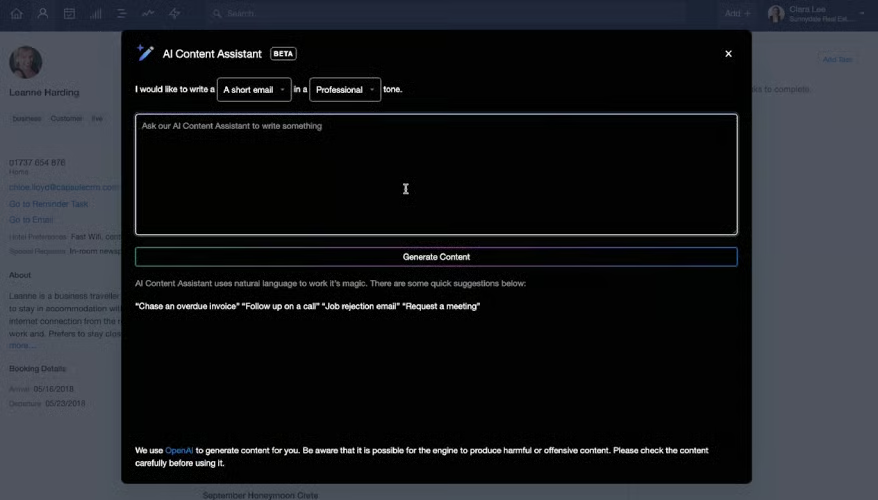
Capsule CRM is a practical option for small businesses that want an easy-to-use AI CRM with built-in smart email automation. In my evaluation, its AI content assistant made email drafting noticeably faster by helping users generate professional messages based on prompts for tone, length, and focus.
What I found especially convenient is that the AI assistant works directly within the email composer tied to each contact record. That workflow makes it easier for sales reps to create personalized communication without switching between multiple tools or relying on separate AI writing platforms.
Capsule CRM also scored well for usability and deal tracking. Its pipeline management tools are clean, straightforward, and easy to navigate, making the platform especially appealing for smaller teams that want lightweight CRM functionality paired with practical AI assistance rather than a more complex enterprise system.
Key features
- AI content assistant: Helps users compose, refine, and format emails using tone, length, and topic prompts. It also allows users to directly embed AI-generated content into email drafts
- Sales pipeline management: Provides a clean, visual pipeline to track deals and opportunities through customizable sales stages
- Project management: Allows users to manage projects with task lists, deadlines, and milestones to keep post-sale work organized
Capsule CRM pricing
| Starter | Growth | Advanced | |
|---|---|---|---|
| Monthly price, billed annually | $18/user | $36/user | $54/user |
| Monthly price, billed monthly | $21/user | $38/user | $60/user |
Free trial: 14 days
What makes ClickUp the best for AI-assisted content management?
Why I chose ClickUp
ClickUp works particularly well for teams that want AI-assisted content management inside a highly flexible workspace. As an active ClickUp user, I find it useful for organizing content tasks, campaign workflows, documents, and customer-related projects without constantly switching between separate platforms.
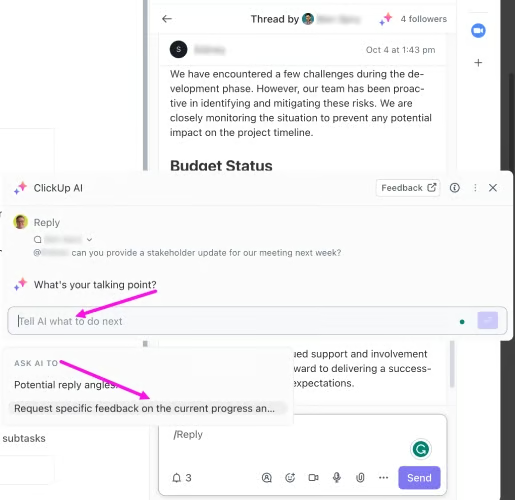
ClickUp Brain adds AI directly into those workflows. It can summarize tasks and documents, generate content drafts, create action items, and pull context from your workspace, which is especially helpful for managing sales enablement content, customer notes, project updates, and internal knowledge bases.
Because ClickUp is not a traditional CRM, it requires more setup than platforms like HubSpot CRM or Pipedrive. However, for businesses that need CRM-adjacent workflows closely connected to content, projects, and team collaboration, ClickUp delivers one of the more adaptable AI-powered workspaces I tested.
Key features
- AI Writing Tools: Automates content generation, outlining, and summarizing for blogs, reports, and emails
- AI for sales ops: Helps with lead scoring, follow-ups, and task automation in sales pipelines
- Custom CRM setup: Allows users to tailor ClickUp for CRM use with flexible workspaces
ClickUp pricing
| Free Forever | Plus | Business | Enterprise | |
|---|---|---|---|---|
| Monthly price, billed annually | $0 for unlimited users | $7/user | $12/user | Custom |
| Monthly price, billed monthly | $0 for unlimited users | $10/user | $19/user | Custom |
What makes monday CRM the best for no-code AI workflow automation?
Why I chose monday CRM
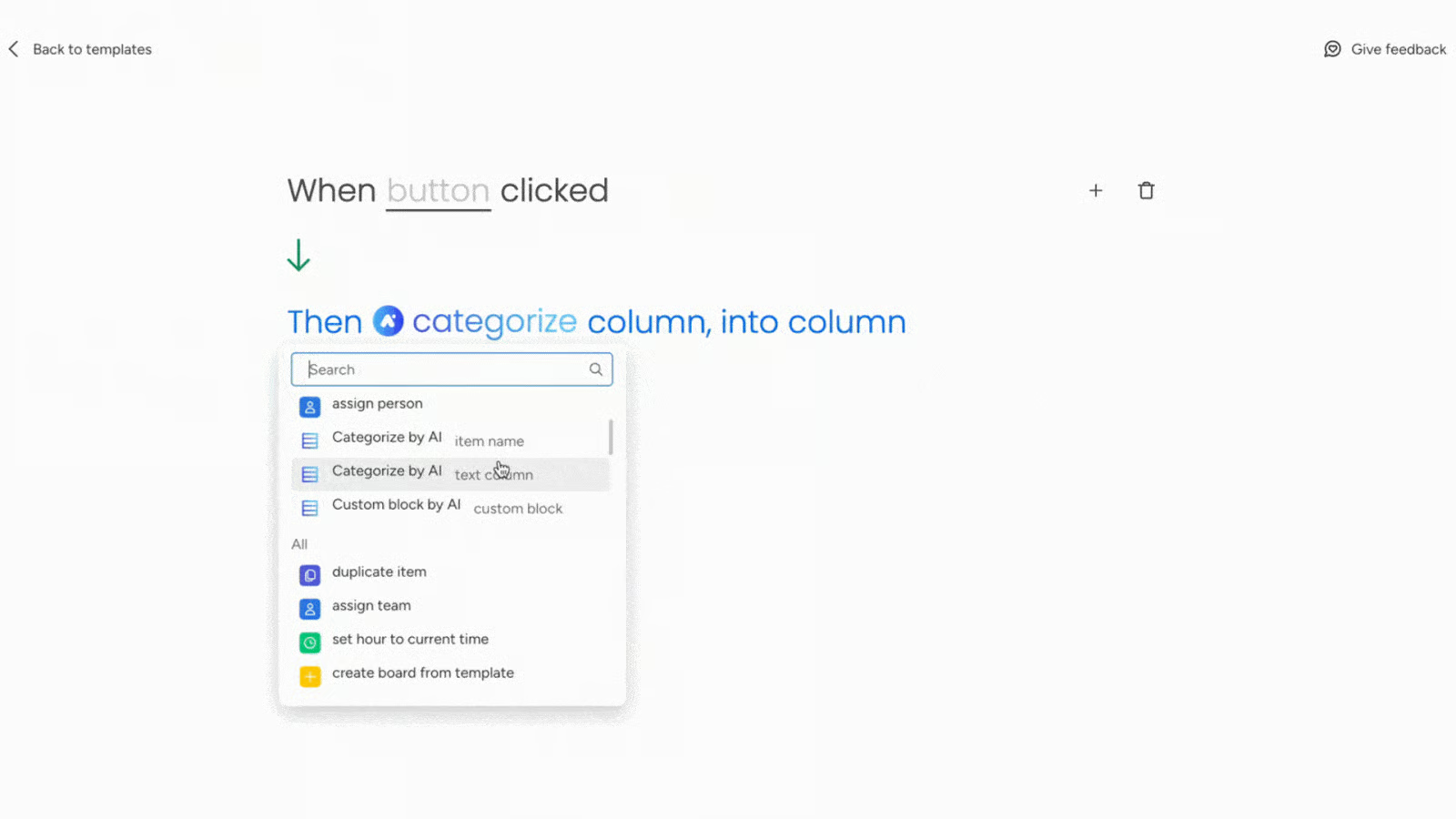
monday CRM is a good fit for businesses that want no-code AI workflow automation without dealing with complicated setup processes. In my evaluation, the platform made it easy to build automated workflows for sales, lead management, and customer tracking using its intuitive drag-and-drop interface.
Its AI tools integrate naturally into everyday workflows. Users can generate and refine emails, create reusable templates, and automate actions like updating records, assigning leads, or triggering follow-up emails based on deal activity. What impressed me most was how approachable these automation tools feel, even for teams without technical experience.
Compared with more rigid CRM systems, monday CRM provides greater flexibility for customizing workflows around how teams actually operate. For businesses prioritizing visual workflow management, AI-assisted task execution, and accessible no-code automation, monday CRM delivers one of the most intuitive user experiences I tested.
Key features
- Drag-and-drop automation builder: Lets users set up custom workflows based on triggers like deal status changes
- AI email assistant: Helps write, polish, and template sales emails with AI suggestions
- Workflow recommendations: Suggests and sets up process automations for lead assignments and task routing
monday CRM pricing
| Basic | Standard | Pro | Enterprise | |
|---|---|---|---|---|
| Monthly price, billed annually | $12/user | $17/user | $28/user | Custom |
| Monthly price, billed monthly | $15/user | $20/user | $33/user | Custom |
All monday CRM plans have a three-user minimum
What makes Apollo.io the best for AI-powered outbound prospecting?
Why I chose Apollo.io
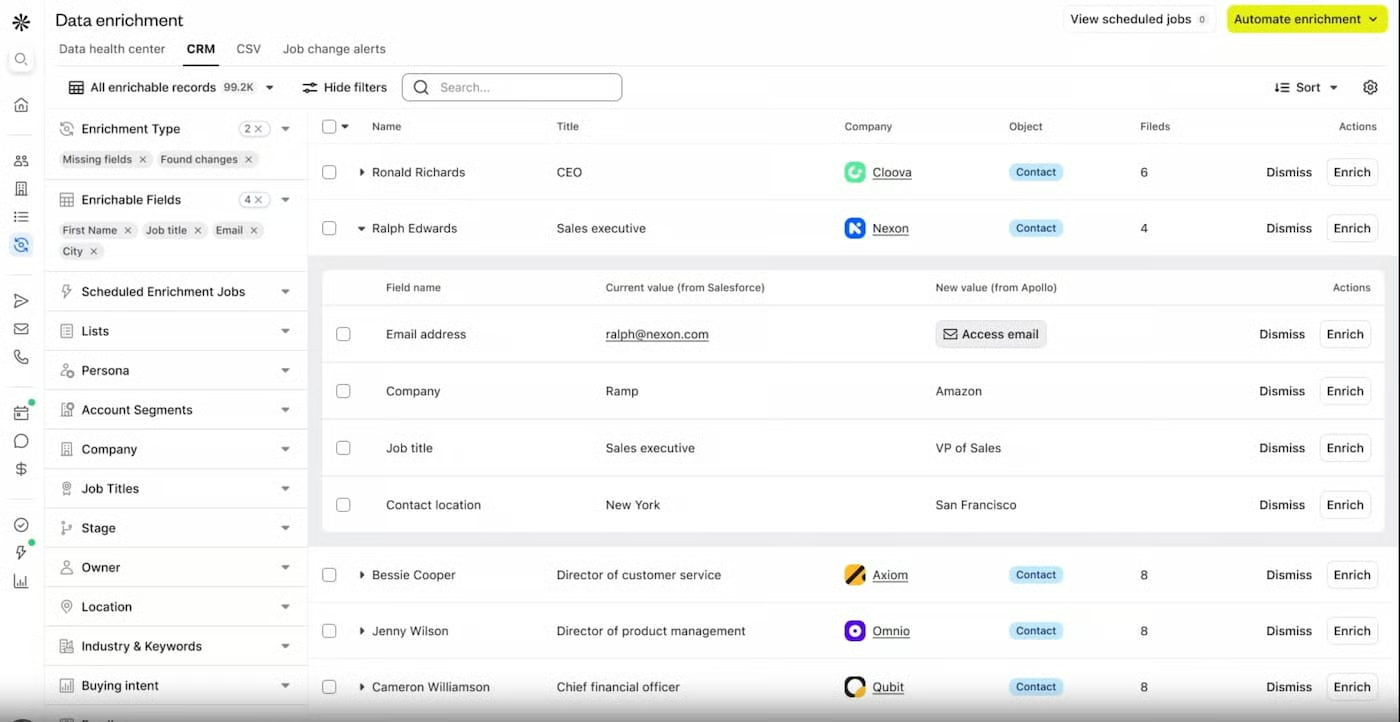
Apollo.io is my leading recommendation for small businesses focused on AI-powered outbound sales and prospecting. In my evaluation, its AI tools significantly reduced the manual work involved in finding leads, enriching contact records, and identifying prospects that align with a team’s ideal customer profile.
What stood out to me most is how Apollo.io combines prospecting, sales intelligence, contact enrichment, and outreach tools within a single platform. Its AI-powered recommendations help teams surface relevant leads faster, while automated data enrichment adds valuable company and contact insights without requiring additional research tools.
For smaller sales teams trying to scale outbound efforts efficiently, Apollo.io creates a streamlined workflow from lead discovery through engagement. Instead of relying on multiple disconnected prospecting platforms, users can research, prioritize, and connect with prospects from one centralized system, making it one of the more efficient outbound-focused AI CRM solutions I tested.
Key features
- AI-powered lead recommendations: Suggests ideal prospects using behavior and firmographic data
- Data enrichment tools: Auto-fills contact and company profiles to streamline outreach
- Sales intelligence engine: Delivers insights for smarter outreach timing and messaging
Apollo.io pricing
| Free | Basic | Professional | |
|---|---|---|---|
| Monthly price, billed annually | $0 for 900 credits | $49/user | $79/user |
| Monthly price, billed monthly | $0 for 900 credits | $65/user | $99/user |
Free trial: 14 days
Frequently asked questions (FAQs)
Which CRM has the best AI?
The CRM with the best AI will ultimately depend on what you’re looking for. HubSpot CRM’s Breeze Copilot covers many aspects of business operations, including sales, marketing, customer service, content management, and commerce. Pipedrive’s Sales Assistant is best for sales-focused teams looking to automate their lead generation processes. If you’re looking to leverage AI to automate customer service, Zendesk is an excellent choice for you.
Can AI be used for CRM?
Yes. Most CRM systems already have built-in AI models, while some need integration with AI software to access their AI functionalities. With AI in CRMs, sales teams gain a significant advantage in automating tasks, generating content, understanding customer responses, and extracting valuable data insights. Many CRM providers, like HubSpot CRM and Bitrix24, have built-in AI assistants that don’t need third-party app integrations.
What is the future of AI CRM?
The next five years will see 80% of businesses starting to leverage AI in their existing CRM. There are several trends and technological advances that are likely to influence the future of AI and CRM’s evolving partnership. These include hyper-personalization of business communication using AI algorithms, AI-powered customer journey mapping, AI-powered predictive maintenance for products and services, and AI-driven customer service innovation.
Bottom line
The best AI CRM software allows users to complete mundane tasks and gain intelligence on their data without any manual requirements. We consider HubSpot CRM the best AI CRM system because of its robust AI capabilities combined with its free tools for sales, marketing, and customer service automation. However, other products could be better fits depending on your use case requirements, budget, and user experience standards.
