







Running an online store can feel exciting, but the real challenge is understanding what you actually earn after fees, shipping, refunds, and fast-moving inventory. Accounting pulls all those pieces together so sellers can spot real profit, avoid common mistakes, and make smarter decisions.
The article breaks down the essentials of accounting for ecommerce in simple terms, from basic accounting methods to tracking product costs and sales tax. I’ll also discuss how QuickBooks helps keep these moving parts organized so growth feels a little less chaotic.
- Why accounting matters for small ecommerce sellers
- Understand the accounting basics you need
- Know your true product costs
- Exploring how to track what your products really cost to sell
- What small sellers must know about sales tax
- How marketplace fees shape your real profit
- The right way to record returns and refunds
- The real cost of shipping your orders
- Frequently asked questions (FAQs)
Why accounting matters for small ecommerce sellers
Accounting shows the difference between selling a lot and actually making money. An online store can receive plenty of orders, but once product costs, shipping, returns, and platform fees are added up, the real profit can look very different.
Accounting also works as the language of business. It turns daily activity into numbers that owners use to make decisions. Without clear figures, it becomes difficult to see what’s working, what’s wasting money, or which products are worth keeping.
For ecommerce sellers, this matters even more because there are so many moving parts. Each platform has its own fees, payout delays, and reporting formats, and deposits rarely match the actual sales they came from. Inventory moves quickly across channels, too, which adds another layer of complexity. All of these factors make accurate accounting essential for understanding the true performance of the business.
Understand the accounting basics you need
The first lesson you’ll need to know is cash and accrual accounting. These two concepts are core to understanding accounting. Cash and accrual accounting give two different views of your finances.
- Cash accounting is simple because it records money only when it moves in or out, but it can give a misleading picture when sales and payouts don’t line up.
- Accrual accounting records revenue when it’s earned and expenses when they happen, which gives a clearer view for ecommerce where timing differences are common.
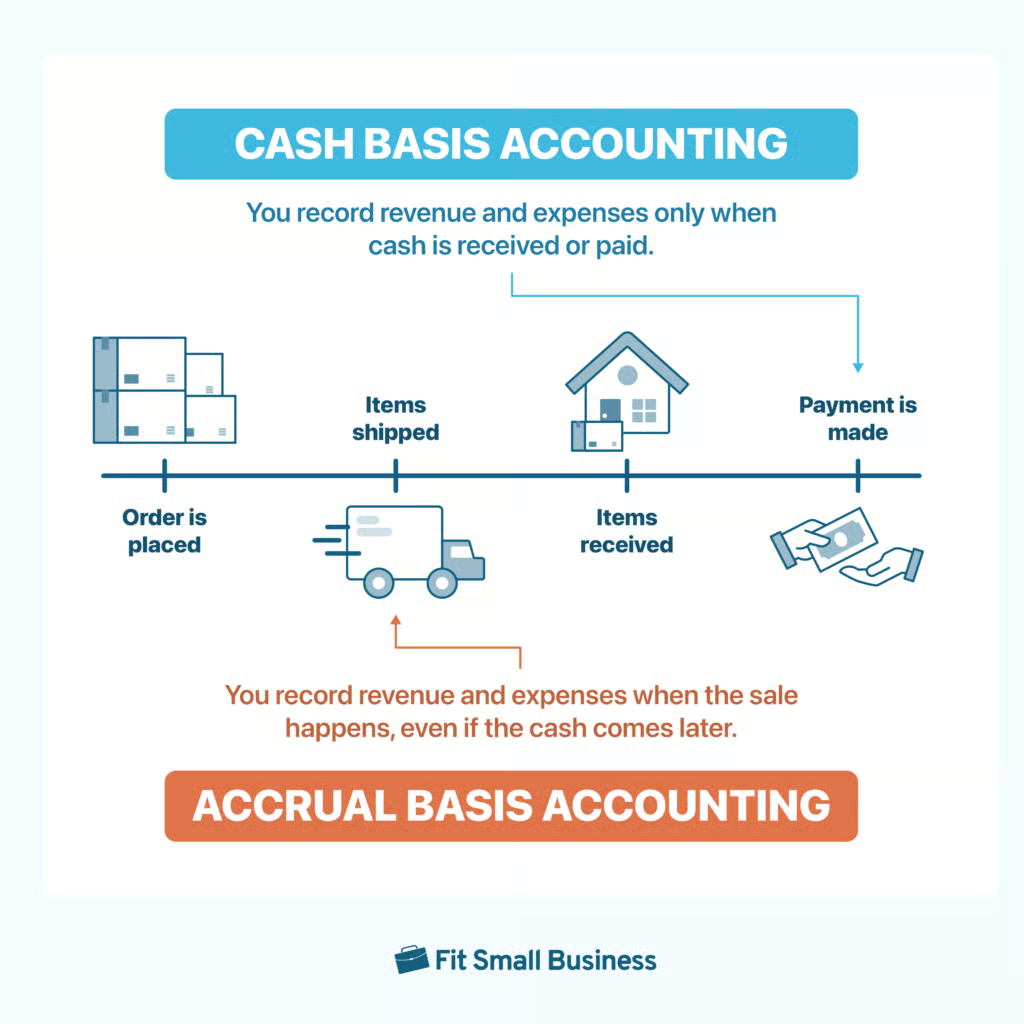
The whole graphic shows how the same transaction shows up at different points depending on the method used. In cash basis accounting, a business waits until money is actually received or paid before anything is recorded. Even if the order was placed and the items were already delivered, the books only change when the cash moves.
Accrual basis accounting works differently. It records revenue and expenses when the business activity happens. In the timeline shown, the sale is recognized around the point at which the items are shipped or delivered, even if the payment comes later.
Bookkeeping vs accounting
Bookkeeping focuses on the day-to-day tasks like recording each sale, tracking expenses, managing invoices, and keeping accounts reconciled. Accounting builds on that work by turning the recorded information into financial statements, tax plans, forecasts, and clearer explanations of what those numbers say about the business’ overall health.
For ecommerce sellers, this distinction matters because the business involves high transaction volume, mixed fees, delayed payouts, and fast-moving inventory. Clear bookkeeping keeps all those details organized, while accounting helps interpret them so sellers can understand profitability, spot issues early, and make informed decisions as the business grows.
Basic financial statements
You’ll also need to be aware of the three financial statements.
- The profit and loss statement shows whether the business made money during a certain period by comparing revenue and expenses.
- The balance sheet shows what the business owns and owes at a specific point in time.
- The cash flow statement shows how money actually moves in and out, which is important because ecommerce payouts often arrive after the sale.
These three financial statements are the core reports in financial reporting, but it doesn’t immediately provide granular details. You’ll need to create special reports for that, like accounts receivable aging reports, sales reports, and customer reports, to name a few.
Know your true product costs
Shopify, Amazon, and other ecommerce platforms use payment batching and fee deductions that affect when and how you receive your money. This setup often confuses new sellers because the deposits that arrive in the bank rarely match the sales totals shown in their dashboards.
- Shopify collects customer payments, holds the funds, and sends payouts on a set schedule after deducting platform fees, processing charges, and any refunds.
- Amazon batches transactions over one to two weeks, subtracts selling fees, fulfillment costs, and refunds, and then sends a single payout that may cover many days’ worth of sales.
Because both platforms bundle activity together and deduct fees before paying out, the deposit almost never reflects any single day’s actual sales. This explains why deposits don’t match reported sales.
- Fees reduce the payout
- Timing differences mix sales and refunds from different days
- Reserves may be held back for future refunds or disputes.
If you sell internationally, currency conversions or extra charges can reduce the deposit even further. A daily sales total may show one figure, but the payout will reflect all these adjustments. Gross-versus-net mistakes happen when sellers record only the net payout as revenue.
For example, a $1,000 sales day might turn into an $850 deposit after $150 in fees and refunds. If you record only the $850, your revenue appears smaller, your fees disappear from your expense records, and profitability becomes distorted. The correct approach is to record the $1,000 as gross revenue and the $150 as fees or refunds so the $850 matches the change in your bank balance.
Exploring how to track what your products really cost to sell
Understanding the real cost of your products helps you see whether each sale actually makes money. Ecommerce sellers deal with many moving pieces—purchases, packaging, inbound shipping, and inventory changes—so having a clear system for tracking costs keeps your numbers accurate and your margins realistic.
What counts as inventory
Inventory includes anything you buy or produce with the intention of selling. This covers finished products, raw materials, and packaging that becomes part of the item you ship to customers. These costs sit in inventory until the products are sold.
Inventory is valued using methods that track how costs flow out of your stock. FIFO treats the oldest items as the first sold, LIFO uses the newest items first, and average cost spreads costs evenly across all units. Most ecommerce sellers rely on FIFO because it matches how products usually move through storage.
This graphic shows two different ways to think about how inventory moves through your business. In the top section, you see FIFO, which treats the oldest inventory as the first to be sold. New products come into the warehouse, get placed behind the older ones, and the older boxes are the ones that get shipped out first. It works like a line at a store. Those who arrive first get served first.
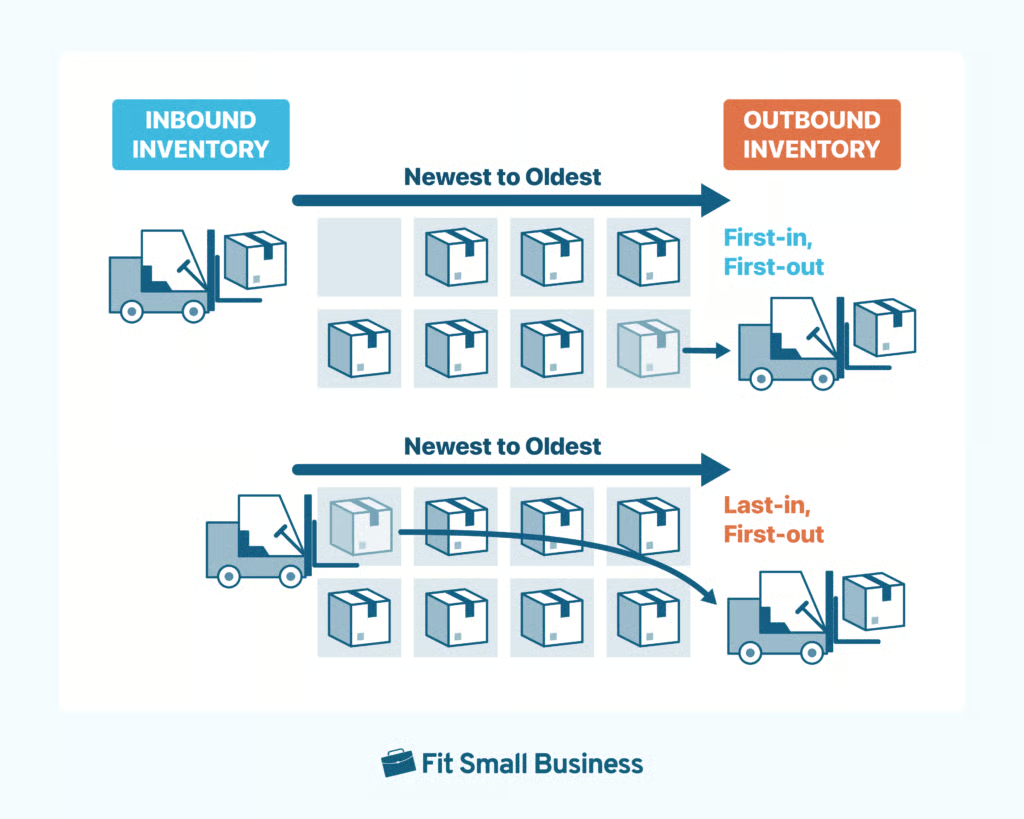
In the bottom section, the graphic shows LIFO, which flips the order. Here, the newest items brought into the warehouse are the first to go back out. Older boxes stay on the shelves while the newer ones are picked and shipped. It works more like stacking boxes in a pile—whatever you place on top gets taken off first.
Both approaches describe the flow of costs, not the physical movement of goods. But FIFO tends to match how most ecommerce sellers handle stock, which is why it’s the more common method.
What small sellers must know about sales tax
Sales tax can feel confusing, but the basics come down to understanding where you’re required to collect tax and when you must charge it. The key concept is something called sales tax nexus, which simply means you have enough of a connection to a state that they expect you to collect sales tax from customers there. Nexus can happen in more than one way:
- Physical presence: Having inventory, an office, an employee, or anything physically located in that state.
- Economic presence: Reaching a state’s sales threshold, such as $100,000 in revenue or 200+ transactions, even if you’ve never been there.
- Warehouse storage: Using Amazon FBA or any third-party warehouse can create nexus in the state where your products are stored.
Once you have nexus in a state, you’re responsible for collecting sales tax on taxable products shipped to customers in that state. The specific tax rate depends on local rules. Most states use destination-based tax, meaning the rate is based on the buyer’s address. A few are origin-based, so the tax rate comes from your business location.
Marketplace platforms like Amazon, eBay, Etsy, and sometimes Shopify may collect and remit sales tax for you in certain states, but they don’t always cover every state or every type of sale, so you may still need to register and file on your own.
Small sellers often run into trouble because of a few common mistakes:
- Collecting tax without a permit: You must register for a state sales tax permit before you start collecting. Doing it early is illegal in many states.
- Missing nexus triggers: Sellers often overlook that storing inventory out of state or passing a state’s sales threshold creates new tax obligations.
- Not filing or remitting collected tax: Forgetting to send in the tax you collected or missing filing deadlines can lead to penalties.
- Assuming the marketplace handles everything: Even if a platform collects tax in some states, you’re still responsible for states they don’t cover and for sales from your own website.
How marketplace fees shape your real profit
Marketplace fees play a major role in shaping the real profit of small ecommerce sellers. The money that hits your bank account is already reduced by platform deductions, so recording revenue, fees, chargebacks, and refunds correctly is the only way to see your true financial performance. Your margins shrink further when fast-shipping programs, paid promotions, or PPC ads are added.
The fees that hurt profitability the most
- Referral commissions that take a percentage of every sale
- Payment processing fees from gateways like PayPal or Stripe
- Fulfillment charges for picking, packing, shipping, and storage
- Subscription fees and paid advertising
- Hidden charges such as penalties, adjustments, or dispute-related fees
The right way to record revenue and fees
Record the full sale amount as gross revenue so your sales totals reflect what the customer actually paid. Then record each fee as its own expense category. After these entries are made, the net payout should match the cash deposited into your bank account, making reconciliation straightforward and allowing you to compare profitability across products or channels.
Example: A $100 Amazon sale with $15 in fees should show $100 in revenue and $15 in expenses, leaving an $85 net that matches the payout you receive.
Chargebacks, refunds, and how to track them cleanly
Chargebacks require recording a negative sale entry along with a chargeback expense if a penalty is applied. Refunds should appear as sales returns that reduce the original revenue, followed by a refund entry that lowers the bank balance. If part of the transaction fee is not returned, record the withheld amount as an expense.
- Using separate categories for chargebacks and refunds helps you spot patterns, identify problem products, and understand customer behavior more clearly.
- Consistent tracking of fees, chargebacks, and refunds provides a clear picture of actual profitability and highlights areas for improvement.
The right way to record returns and refunds
Returns and refunds should reduce your sales revenue, not show up as an expense. The cleanest approach is to create a credit memo or sales return entry for each refund. This keeps every sale paired with its matching return, so your net sales stay accurate.
To record a return:
- Start by entering a sales return that reduces the revenue from the original sale.
- When you issue the refund, record the payment against the customer’s account to clear the balance.
- If the marketplace keeps its transaction fees, record those fees as expenses rather than reducing the original revenue.
What to do with inventory when items come back
If a returned item is still in good condition, add the unit back into inventory and reduce COGS by the original cost of that item. If the return is damaged or unsellable, remove it from inventory and record the amount as a loss or write-off. This keeps inventory balances accurate and shows the true cost of returns.
When returns become a red-flag metric
Rising return rates, especially above 5–10%, can signal problems with product quality, descriptions, or fulfillment. High returns lower net sales, increase handling and waste costs, and can erode margins over time. Tracking return trends by product, channel, or return reason helps identify issues before they become costly.
The real cost of shipping your orders
Inbound shipping covers the cost of bringing inventory to you and is part of your product cost. These amounts belong in COGS or inventory value. Outbound shipping covers sending products to customers after a sale. This is an operating expense and should be tracked separately.
Why shipping erodes margin
Shipping can quickly reduce profit if it isn’t priced into your products. Offering free or discounted shipping means absorbing that cost yourself. For many ecommerce sellers, outbound shipping becomes one of the largest expenses after COGS. Fulfillment fees from services like FBA may bundle shipping with other charges, so separating these expenses when possible gives a clearer view of true selling costs.
Tracking shipping by product or order
A simple method is to record the actual outbound shipping cost for each order and assign it to a shipping expense account. If you sell multiple product types, tag shipping costs by product or SKU to understand which items consume the most shipping budget. Reviewing these totals monthly helps you compare shipping expenses to sales and spot products or channels that weaken your margins.
Frequently asked questions (FAQs)
How to do accounting for an ecommerce business?
Track every sale, fee, refund, and payout from your ecommerce platforms, and separate gross sales from the net amounts deposited into your bank. Use a system that records inventory, COGS, operating expenses, and sales tax so your reports show what you truly earned and spent.
Do you need an accountant for ecommerce?
You may not need one when you’re small with simple transactions, but hiring an accountant becomes helpful once you start selling through multiple channels, dealing with more complex fees, or needing tax planning and financial guidance as you grow.
What is a P&L in ecommerce?
A P&L, or profit and loss statement, shows whether your store made money during a certain period. It summarizes your revenue, COGS, operating expenses, and net income so you can see how profitable your ecommerce business truly is.
