






QuickBooks Free gives freelancers and solopreneurs a simple way to organize their finances without paying for accounting software. You can track income and expenses, keep transactions in one place, and get a clearer picture of how your business is doing. It's a practical starting point if you run a one-person business with straightforward bookkeeping needs. The tradeoff is that you give up some features available in paid QuickBooks plans.
- QuickBooks Free at a glance
- What is QuickBooks Free?
- Benefits of QuickBooks Free for freelancers and solopreneurs
- Limitations of QuickBooks Free
- Who QuickBooks Free is best for
- QuickBooks Free vs QuickBooks Solopreneur
- How to set up QuickBooks Free
- A simple QuickBooks Free workflow for freelancers
- When should you upgrade from QuickBooks Free?
- Tips for using QuickBooks Free effectively
- Frequently asked questions (FAQs)
QuickBooks Free at a glance
If you’re a freelancer who gets paid by a few clients each month and mainly spends on things like software, internet, and supplies, your bookkeeping needs may still be fairly simple. At this stage, you may only need a way to organize transactions, track income and expenses, and see how your business is performing. The table below shows what QuickBooks Free includes and where its limits begin.
| Feature | |
| Monthly cost | $0 |
| Best for | Freelancers and one-person businesses |
| Users | 1, no accountant access |
| Bank connection | ✅, 1 account only |
| Income and expense tracking | ✅ |
| Automatic transaction imports | ✅ |
| Accept payments | ✅, transaction fees apply |
| Invoicing and upload receipts | 2 per month |
| Track mileage | 5 trips per month |
| Financial reports | Profit and Loss, Balance Sheet, and Account Quick Report |
| Inventory tracking | ✕ |
| Advanced accounting features | ✕ |
| Learn more |
Why you can trust Fit Small Business
I have more than a decade of experience in finance and bookkeeping, including managing accounting systems, bank reconciliations, accounts payable and receivable, and financial reporting. I have also worked with US-based bookkeeping clients using QuickBooks, which gives me firsthand experience with how small businesses use accounting software in day-to-day operations.
For this article, I evaluated QuickBooks Free from a practical freelancer and solopreneur perspective, focusing on whether its features are enough for basic bookkeeping, where its limits start to matter, and when a paid plan may make more sense.


What is QuickBooks Free?
QuickBooks Free is Intuit’s $0 accounting option for very small businesses that only need basic financial tracking. It is designed for one user and focuses on core tasks such as organizing transactions, tracking income and expenses, and keeping basic business records in one place.
It is not the same as the older QuickBooks Self-Employed product, and it is more limited than paid QuickBooks plans such as Solopreneur and Simple Start. For freelancers, the main question is whether those basic tools are enough for the way you currently run your business.
| Product | Availabity | Main purpose |
| QuickBooks Free | Available to new users | $0 plan for basic business finance management |
| QuickBooks Solopreneur | Available, $20/month | More complete bookkeeping and tax tools for one-person businesses |
| QuickBooks Self-Employed | Legacy product | Older self-employed product; generally not available to new customers |
QuickBooks Free and QuickBooks Solopreneur are the options Intuit currently offers to new freelancers and one-person businesses. QuickBooks Self-Employed is a legacy product, so new customers generally cannot sign up for it.
Benefits of QuickBooks Free for freelancers and solopreneurs
For someone running a one-person business, the biggest benefit of QuickBooks Free is convenience. Instead of maintaining a separate spreadsheet and manually checking your bank statement, you can keep routine bookkeeping tasks in one place.
No monthly software cost
QuickBooks Free costs $0 per month, but the bigger savings can come from reducing manual bookkeeping. If you rely on spreadsheets, you may spend time entering transactions, sorting expenses, and checking bank statements — work that could otherwise go toward clients or growing your business.
For example, if manual bookkeeping takes you two hours per month and your freelance time is worth $40 per hour, that is effectively $80 worth of your time each month.
Approach | Software cost | Time cost |
| QuickBooks Free | $0/month | Less manual transaction entry |
| Spreadsheet/manual bookkeeping | $0/month | Potentially hours of your own time |
Example: Saving even two hours of bookkeeping each month gives a freelancer two more hours for billable work, prospecting, or serving existing clients.
Why it matters: You save both money and time. Instead of paying for accounting software or spending hours updating spreadsheets, you can use that time for clients, sales, or other work that helps grow your business.
Automatic bank feeds
Connecting your bank account can reduce manual data entry because it imports transactions for review and categorization.
For a freelancer, that means client payments, software subscriptions, advertising costs, bank fees, and other expenses can appear in QuickBooks without retyping them from a statement. You still need to review and categorize the transactions, but the repetitive data entry is largely reduced.
Why it matters: If you currently update a spreadsheet by copying transactions from your bank statement, automatic bank feeds can save time and reduce the chance of missing or duplicating entries.
Easier income and expense tracking
QuickBooks Free gives you one place to see the money coming into and going out of your business. Instead of checking separate bank statements, invoices, and spreadsheets, you can review your income and expenses inside QuickBooks and keep them organized by category.
For example, a freelance designer may receive payments from three clients while paying for Canva, Adobe, internet, and online ads. If those transactions are scattered across a bank statement and spreadsheet, it takes more effort to see whether the month was actually profitable. In QuickBooks Free, you can review and group those transactions so the overall picture is easier to understand. This makes it easier to see how much you earned, where most of your money went, and whether your business made a profit.
Why it matters: This is especially useful if you are moving from manual tracking. You spend less time piecing together where your money went and can make decisions sooner, such as whether you can afford a new tool, raise your rates, cut an unnecessary expense, or set aside more cash for taxes. For a freelancer, that kind of visibility can be more valuable than simply knowing your current bank balance.
Better visibility into your business
Imagine you had a strong month and saw plenty of money coming into your bank account. It may feel like the business is doing well, but once you factor in software subscriptions, internet, advertising, bank fees, and other costs, your actual profit may be much lower than expected.
QuickBooks Free helps bring those numbers together so you can see more than just your current bank balance. By organizing your income and expenses and showing them in basic financial reports, you get a clearer picture of how the business is performing over time. That can help you notice patterns, such as expenses creeping up, slower months, or certain costs taking a bigger share of your income than before.
Why it matters: Better visibility gives you more context for everyday business decisions. You can judge whether you can afford a new tool, whether your rates still make sense, or whether you need to cut back on certain expenses. For freelancers and solopreneurs, that can make financial decisions feel less like guesswork.
A simpler starting point
If you are just starting out, you may not need inventory tracking, advanced reports, multiple users, or other tools built for larger businesses. Paying for those features before you actually need them can add cost without making your day-to-day bookkeeping any easier.
For example, a freelance writer with a few clients may only need to track payments, record business expenses, and check whether the business is profitable. In that situation, a simpler system can be easier to learn and maintain than a more feature-heavy accounting plan.
Why it matters: Starting simple reduces both cost and complexity. You can focus on building a consistent bookkeeping routine first, then move to a paid plan later if your business grows and your needs become more advanced.
Limitations of QuickBooks Free
QuickBooks Free works well for simple bookkeeping, but its limits become more noticeable as your business grows or your accounting needs become more complex.
Limited to one user
QuickBooks Free is built around a one-person setup, so only one user can work in the account. That may be perfectly fine if you are a freelancer who handles your own invoicing, transaction review, and basic bookkeeping.
The limitation becomes more important once you want to share the work. For example, you may eventually hire a bookkeeper to clean up transactions each month, ask an accountant to review your records, or have an assistant help with invoicing. With QuickBooks Free, you do not have separate user access for those people, so the plan can become inconvenient even if the rest of its features are still enough for your business.
This also matters during tax preparation. If your accountant cannot log in directly, you may have to provide reports or other financial information yourself instead of letting them review the books inside QuickBooks.
What this means for you: If you expect to manage your books entirely on your own, the one-user limit may not be a problem. But if you already work with a bookkeeper or accountant — or plan to delegate financial tasks soon — this is one of the first limitations to consider before choosing QuickBooks Free.
Basic reporting only
QuickBooks Free gives you enough reporting to answer basic questions about your business, such as how much you earned, how much you spent, and whether you made a profit during a given period. For many freelancers, that may be enough at the beginning.
The limitation is that you do not get the same reporting depth available in paid QuickBooks plans. If you want to compare performance across customers, projects, services, or other parts of the business, you may find the available reports too limited.
For example, a freelance consultant may be able to see total monthly profit, but not easily break down which client relationships are most profitable or where costs are increasing. At that point, you may need to export data to a spreadsheet or do extra analysis outside QuickBooks.
What this means for you: If you mainly want a simple view of income, expenses, and overall profit, the reporting may be enough. But if you rely on reports to make pricing, budgeting, or growth decisions, this limitation can become noticeable fairly quickly.
No inventory tracking
Say you run a small online shop and sell 30 handmade products each month. You may want your accounting software to tell you how many units are left, which items are selling fastest, and when to reorder materials or stock.
QuickBooks Free doesn't include inventory tracking, so you would need to manage those details elsewhere, such as in a spreadsheet or another app. That may be manageable with only a few products, but it becomes harder as your product list and sales volume grow.
For a service-based freelancer, this limitation may not matter at all. But for a business that sells physical goods, using one system for bookkeeping and another for inventory can create extra work and make it easier for records to fall out of sync.
What this means for you: If you sell services, you can probably ignore this limitation. If you sell products and need to track stock levels, quantities sold, or reorder needs, QuickBooks Free may not be the right fit.
Fewer advanced accounting tools
At first, you may only need to track income, record expenses, and send a few invoices. As the business gets busier, however, you may need more control over how transactions, customers, and financial information are managed.
Here’s where the difference starts to matter:
| Accounting need | QuickBooks Free | Effect on your business |
| Basic income and expense tracking | Available | Enough for straightforward freelance bookkeeping |
| Basic financial reports | Available | You can monitor overall income, expenses, and profit |
| Multiple users or accountant access | Not available | You may need to handle the books yourself or upgrade to collaborate |
| Inventory tracking | Not available | Product quantities must be tracked outside QuickBooks |
| More detailed reporting | Limited | You may need spreadsheets or a paid plan for deeper analysis |
| Higher-volume invoicing and mileage tracking | Limited | You can hit the monthly limits as your business becomes more active |
| More complex accounting workflows | Limited | Additional manual work or separate tools may be needed |
For example, a freelancer sending one or two invoices a month may never notice these limitations. But once you are billing several clients, working with an accountant, or trying to analyze the business in more detail, tasks that were once simple can start requiring spreadsheets or other workarounds.
What this means for you: The free plan works best when your accounting needs are basic. If you repeatedly have to leave QuickBooks to complete a task, that is a practical sign that the missing tools — not just the feature list — are starting to affect your workflow.
You may outgrow it quickly
A freelancer with a few clients and straightforward expenses may be comfortable on the free plan. But once you add more transactions, people, products, or reporting needs, the time saved by upgrading can become more valuable than the monthly subscription cost.
Who QuickBooks Free is best for
QuickBooks Free makes the most sense when your business is still simple, and you mainly need help staying organized.
- Freelancers with a few regular clients: If you send a small number of invoices each month and mostly track client payments and routine expenses, the free plan may be enough.
- Solo service providers: Consultants, designers, writers, virtual assistants, and similar businesses usually have straightforward income and expenses without inventory or complex workflows
- New businesses testing the waters: If you are still building your client base, using a free accounting tool can help you establish good bookkeeping habits before taking on another monthly cost.
- Side hustlers: If your freelance work is still part-time, using QuickBooks alongside a separate business bank account can make it easier to distinguish business activity from personal spending.
| Quick rule: If you are the only person using the books and your main needs are tracking income, expenses, and routine transactions, QuickBooks Free is likely a good fit. |
QuickBooks Free vs QuickBooks Solopreneur
These two plans target similar users, but they're meant for different stages of business. QuickBooks Free suits very simple bookkeeping, while QuickBooks Solopreneur adds tools for self-employed users who need more help managing taxes and day-to-day business finances.
| Feature | QuickBooks Free | QuickBooks Solopreneur |
| Monthly cost | $0 | $20 |
| Best for | Basic bookkeeping | More active one-person businesses |
| Bank feeds | ✅ | ✅ |
| Income and expense tracking | ✅ | ✅ |
| Invoicing | 2 per month | Unlimited |
| Mileage tracking | 5 trips per month | Unlimited |
| Tax-focused tools | Limited | More extensive |
| Reporting | Basic | More detailed |
| Users | 1 | 1 |
- Choose QuickBooks Free if you mainly want to organize transactions, track income and expenses, and avoid paying for features you do not yet need.
- Choose QuickBooks Solopreneur if your freelance work is more established and you want additional tools for invoicing, mileage, taxes, and managing a larger volume of business activity.
How to set up QuickBooks Free
Setting up QuickBooks Free should only take a short time if your business finances are still straightforward. The goal is to get your accounts connected and your bookkeeping organized from the start.
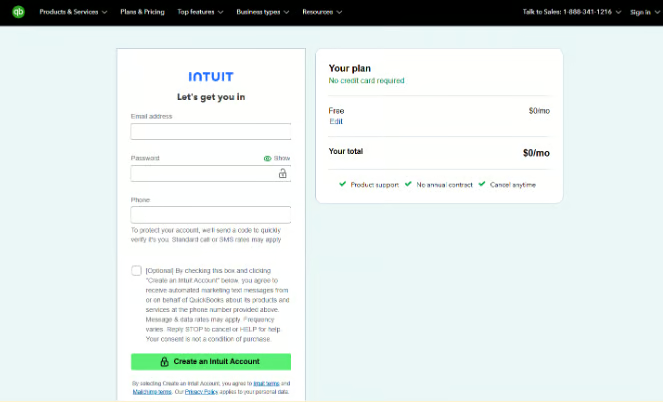
1. Create your account
Start by creating your QuickBooks Free account and adding your basic business details.
Go to: QuickBooks Free sign-up page → click Get started → enter your email address → create a password → click Create an Intuit Account
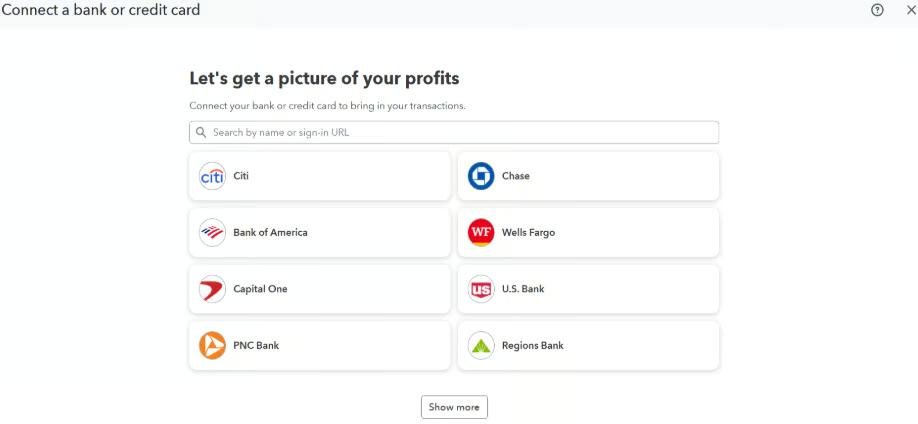
2. Connect your bank account
Connect the bank or credit card account you use for business. This lets QuickBooks automatically import your transactions, so you don't have to enter each one manually.
Go to: Left menu → All Apps → Accounting → Bank transactions → Connect account → search for your bank → sign in and follow the prompts
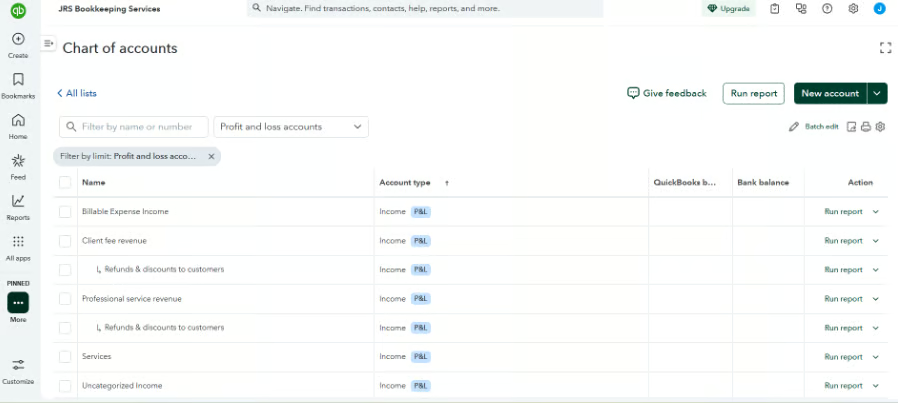
3. Review your chart of accounts
The chart of accounts is simply the list QuickBooks uses to organize your money, such as income, advertising, software, bank fees, and other expenses. Review the default accounts and make sure they match the way you run your business.
Go to: All Apps → Accounting → Chart of Accounts → review the accounts already created → edit or add accounts if needed
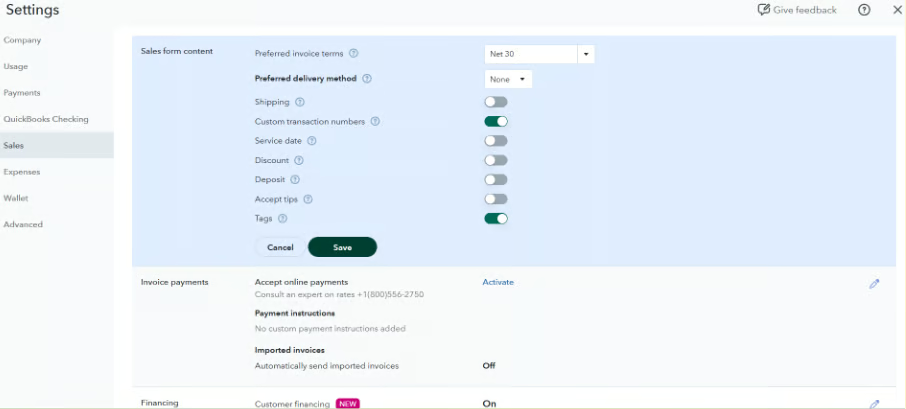
4. Set up invoicing
Customize your invoices before sending them to clients. You can add your business information, payment terms, payment options, and other details you want to appear on your invoices.
Go to: Left menu → click Create (+) → Invoice → Manage → update your sales form content, payment options, payment terms, and other invoice settings
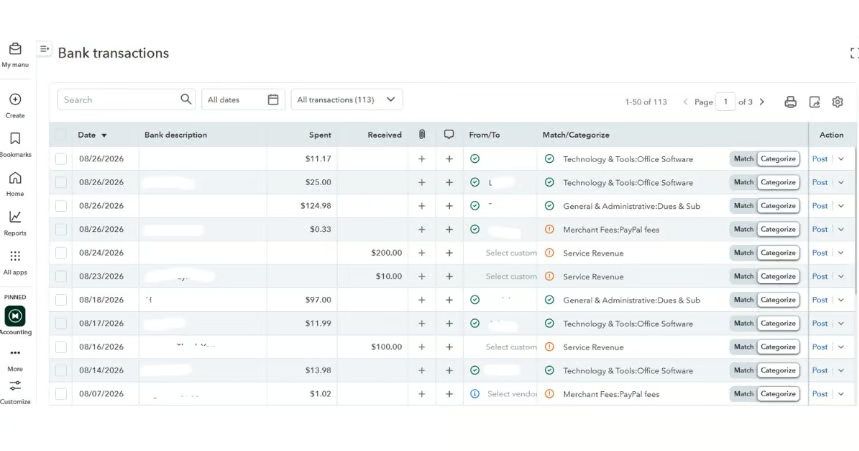
5. Review imported transactions
Once your bank is connected, QuickBooks will start showing your bank activity in the Bank transactions area. Review each item and tell QuickBooks what it is, such as client income, software expense, bank fee, or transfer between accounts.
Go to: All Apps → Accounting → Bank transactions → review each transaction → choose the correct category, match it to an existing transaction, or confirm it
6. Check your reports
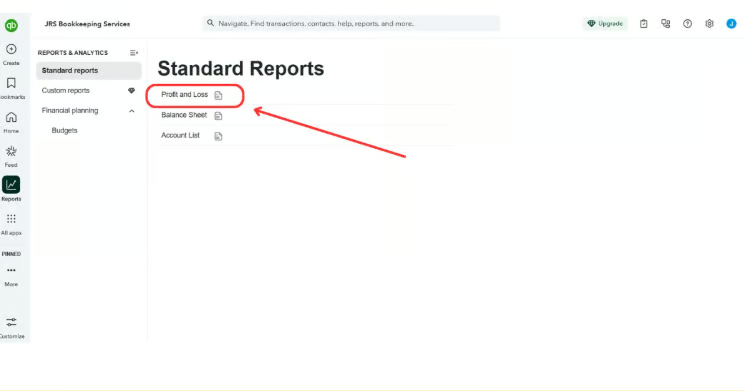
Use reports to see how your business is doing. A good place to start is the Profit and Loss report, which shows your income, expenses, and whether you made a profit or loss during a selected period.
Go to: Reports → search for or select Profit and Loss → choose the date range you want to review
A simple QuickBooks Free workflow for freelancers
Once your account is set up, the key is to keep the routine simple. For most freelancers, a basic workflow can look like this:
- Send an invoice or receive a client payment.
- Let the transaction import through your connected bank account.
- Review and categorize the transaction.
- Record business expenses as they come in.
- Check your income and expenses at the end of the week.
- Review your reports at month-end to see how the business performed.
For example, if a client pays you $1,000 and you spend $120 on software, internet, and supplies, QuickBooks Free can help you keep those transactions organized instead of piecing them together later from bank statements.
The real value is consistency. A few minutes of bookkeeping each week can prevent a much bigger cleanup at tax time.
When should you upgrade from QuickBooks Free?
You do not need to upgrade just because your freelance income increases. The better time to move to a paid QuickBooks plan is when the limits of the free plan start creating extra work or preventing you from managing the business properly.
Consider upgrading when:
- You need more than one user in the account.
- You want more detailed financial reports.
- You start carrying inventory.
- You need more advanced invoicing or expense management.
- You are handling a much higher volume of transactions.
- You need stronger accounting workflows as the business grows.
For example, a freelance consultant with a few monthly clients may be fine on QuickBooks Free for quite some time. But if that same business starts hiring staff, managing more expenses, or needing deeper reporting, a paid plan can save more time than the subscription costs.
Tips for using QuickBooks Free effectively
QuickBooks Free works best when you keep your bookkeeping routine simple and consistent.
- Use a separate business bank account. This makes it much easier to identify business income and expenses.
- Review transactions weekly. Do not wait until month-end to sort through everything at once.
- Keep your categories simple. Avoid creating too many expense categories unless you actually need them.
- Check your Profit and Loss report monthly. This helps you see whether your freelance work is generating a profit.
- Attach receipts when possible. Keeping supporting documents with transactions can make tax preparation and recordkeeping easier.
- Fix mistakes as soon as you see them. A wrong category or duplicate transaction is easier to correct early than during a year-end cleanup.
Frequently asked questions (FAQs)
Is QuickBooks Free really free?
Yes. QuickBooks Free has no monthly subscription fee. However, it includes fewer features than paid QuickBooks plans, so it is best suited to users with relatively simple bookkeeping needs.
Is QuickBooks Free good for freelancers?
It can be. Freelancers who mainly need to track income, expenses, and bank transactions may find the free plan sufficient, especially if they are the only person managing the books.
Can I send invoices with QuickBooks Free?
Yes, but invoicing features are more limited (two invoices per month) than in paid QuickBooks plans. It should still be enough for freelancers who only send a relatively small number of straightforward invoices.
Is QuickBooks Free the same as QuickBooks Self-Employed?
No. QuickBooks Self-Employed is an older product, while QuickBooks Free is part of Intuit’s current offering for small, one-person businesses.
When should I move from QuickBooks Free to a paid plan?
Consider upgrading when the free plan starts creating extra manual work or when you need features such as more advanced reporting, additional users, or more complex accounting tools.
Can my accountant access QuickBooks Free?
No. QuickBooks Free is limited to one user and does not include accountant access. If you want your bookkeeper or accountant to log in separately and work directly in your books, you will need to move to a paid QuickBooks plan that supports additional or accountant users.