







Asana is a project management software solution offering unlimited use of essential features, including tasks, activity logs, file storage, and messages. It has robust project views that include lists, boards, timelines, and Gantt charts, which facilitate seamless supervision of project activities and to-dos. In this Asana review, we awarded the solution a perfect score for ease of use because of its highly intuitive interface that appeals to project management solution beginners.
The platform’s entry-level subscription plan is priced at $13.49 per user, monthly. However, it features a free version with over 100 third-party integrations, unlimited projects, assignees, and due dates, as well as multiselect and bulk actions.
Asana Review: At a Glance
When to Use Asana
- Wanting a free project management solution: The solution offers robust tools in its free plan, including unlimited projects, tasks, comments, and activity logs. Unlimited storage is likewise available, allowing 100MB per file.
- Using third-party business tools: The platform seamlessly links with over 300 third-party solutions. Connect the business apps you already use, including Slack, Zoom, Gmail, Salesforce, and Dropbox, to Asana to reduce the need to switch between apps.
- Streamlining workflows through artificial intelligence (AI): Asana Intelligence features smart fields, which automatically generate custom fields in project boards; smart digests, a tool that automatically summarizes recent activities; and smart editor, which offers recommendations for task descriptions and comments.
When to Use an Alternative
- Needing an affordable software solution: While Asana offers a free plan, its monthly subscription plan starts at $13.49 per user, slightly more expensive than other providers. Moreover, several valuable tools, such as resource management and compliance with Health Insurance Portability and Accountability Act (HIPAA) standards, require a subscription upgrade.
- Requiring several workflow automations: While the platform offers unlimited automations, you must upgrade to the highest-tier plans to access them. Other platforms like Trello offer unlimited automations for free.
- Using a spreadsheet for managing projects: Although Asana has a spreadsheet-style list view, alternative platforms like Smartsheet feature a more familiar spreadsheet interface, similar to Microsoft Excel.
Asana Deciding Factors
Asana is an ideal project management solution for businesses needing free project management tools, robust third-party integrations, and excellent artificial intelligence features. It offers multiple subscription plans, starting at $13.49 per user, monthly.
Its free version is packed with unlimited project management essentials, including tasks, projects, comments, and storage space. If you’re keen on using this platform, here are some of the highlights you must know about Asana:
| Best For | Small teams needing a free project management software solution and looking to connect existing third-party business tools |
|---|---|
| Standout Features |
|
| Pricing Plans |
|
| Annual or Volume Discounts Available | Annual billing discount is available, with the entry-level plan reduced from $13.49 to $10.99 per user, per month |
| Key Integrations |
|
| Customer Service |
|
Asana Alternatives
Although Asana is an excellent project management solution, it comes with limitations that make it a less ideal platform for some teams. For instance, you need to upgrade to the Enterprise plans to access unlimited automations. In contrast, Asana alternatives like Trello provide this feature for free. Plug in as many automations as you need in its built-in automation tool, Butler.
While Asana features time tracking, it’s not available in the entry-level package. If you don’t want to pay more for this feature, go for ClickUp. Its native time tracking tool is in its base-tier plan, priced at just $10 per user, per month.
Asana isn’t the best platform for spreadsheet-style project management either. If your team is used to plotting activities and tasks on Microsoft Excel, it’s best to choose Smartsheet, a software solution with a default spreadsheet view, complete with the familiar numbered rows, column headings, and cells.
 |  |  | |
|---|---|---|---|
| Best For | Budget-conscious teams needing unlimited automations | Teams working on time-sensitive assignments | Teams fond of using spreadsheets when tracking tasks |
| Monthly Starting Price (per User) | $6 | $10 | $12 |
| Learn More |
Asana Pricing
4.50 / 5
Asana’s pricing earned a high score because it offers multiple subscription plans that accommodate different budget requirements. Moreover, it features discounts for annual billing arrangements.
However, it should be noted that its entry-level plan rate is slightly more expensive than that of other project management solution vendors. In addition, businesses must choose higher-tier packages to access some essential tools, like native time tracking and unlimited workflow automations. Here’s an overview of Asana pricing:
| Asana Plans | Personal | Starter | Advanced | Enterprise | Enterprise+ |
|---|---|---|---|---|---|
| Best For | Managing simple project tasks and activities | Monitoring project milestones and deadlines | Tracking multiple projects | Automating workflows | Securing confidential project information |
| Monthly Pricing($/User/Month) | $0 | $13.49 | $30.49 | Custom pricing | Custom pricing |
| Annual Pricing($/User/Month) | $0 | $10.99 | $24.99 | Custom pricing | Custom pricing |
| Unlimited Projects, Tasks, Comments, Activity Logs & Storage | ✓ | ✓ | ✓ | ✓ | ✓ |
| List, Boards, Calendar & Saved Views | ✓ | ✓ | ✓ | ✓ | ✓ |
| Asana Intelligence | ✕ | ✓ | ✓ | ✓ | ✓ |
| Workflow Automations | ✕ | 250 actions per month | 25,000 actions per month | Unlimited | Unlimited |
| Critical Path | ✕ | ✕ | ✓ | ✓ | ✓ |
| Universal Workload | ✕ | ✕ | ✕ | ✓ | ✓ |
| Managed Workspaces | ✕ | ✕ | ✕ | ✕ | ✓ |
Asana General Features
4.38 / 5
If you need a platform that lets you assign tasks and track activities efficiently, Asana is a good choice since it features basic project management tools. For this reason, we gave a high score in the general features category of this Asana review. Here are some of the essential tools you’ll find in the software solution:
- Unlimited projects and tasks: Create as many projects and tasks as you want in your account. Projects refer to the group of tasks presented in a table, a timeline, or a Gantt chart. Tasks are actionable steps assigned to individuals.
- Unlimited messages: Send updates to an individual or a team. To help users coordinate tasks efficiently, Asana recommends a list of tasks you can share with a team member.
- Project views: Choose among list, calendar, timeline, and Gantt views when tracking project activities and tasks.
- Project dashboards: See graphs and charts representing completed, incomplete, overdue, and total number of tasks. This allows you to measure progress over time and make necessary adjustments in case your pace doesn’t match your intended project completion date.
- Custom templates: Edit templates to reflect the workflows you typically use in projects. This enables you to create and organize boards instantly whenever there’s a new project.
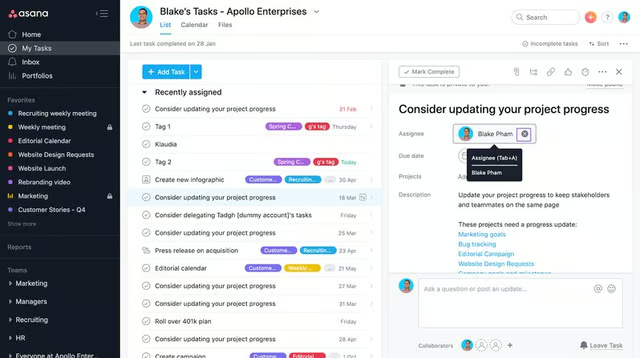
Add tasks to your project board. (Source: Asana) 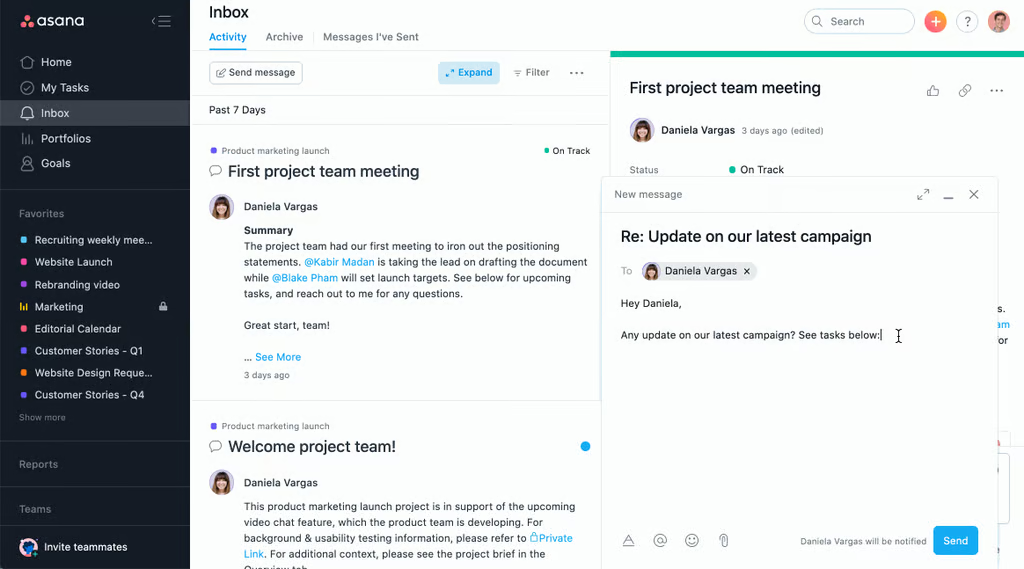
Send instant messages with task attachments to team members. (Source: Asana) 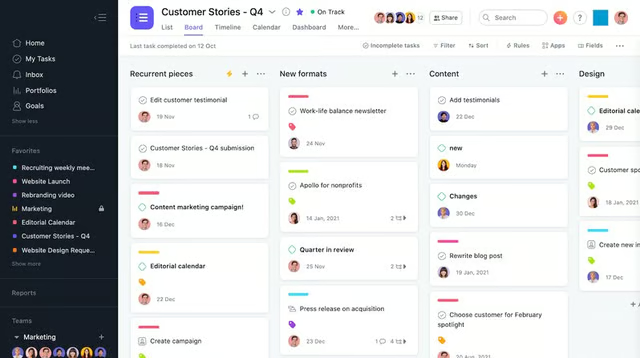
Create a project board to get an overview of tasks and activities. (Source: Asana) 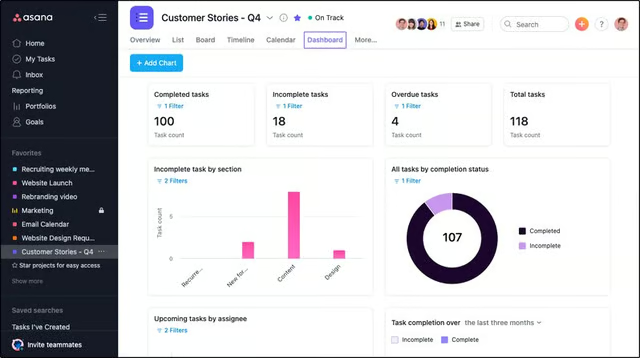
Track work progress through Asana’s project dashboard. (Source: Asana)


Asana Niche Features
4.38 / 5
Asana features advanced capabilities for monitoring multiple projects, optimizing resources, and streamlining workflows through artificial intelligence (AI). This is why, similar to general features, we rated its niche features as a high score in this Asana review. Let’s discuss some of the platform’s specialized tools:
Goals
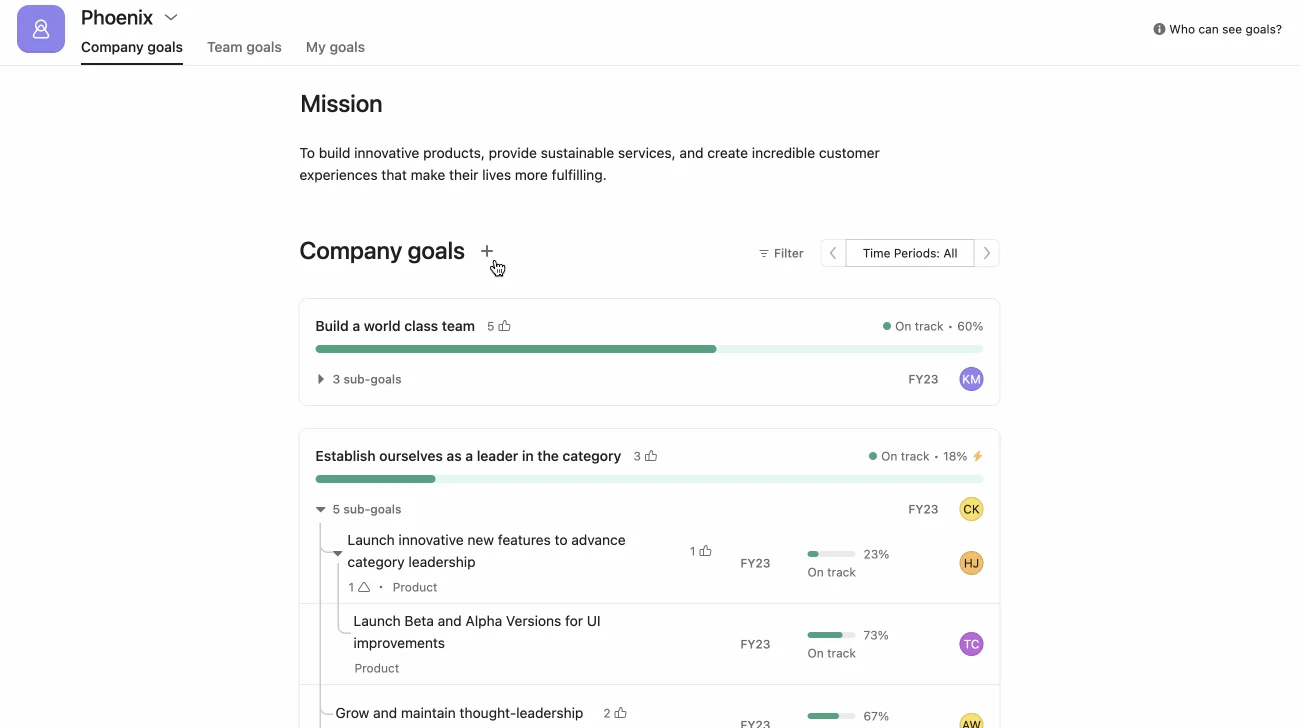
The software solution helps teams be more intentional in ironing out the project plan by letting them define objectives. Asana has a “Goals” feature with three tabs for keying in different types of goals: “Company goals,” “Team goals,” and “My goals.” Adding a goal in each of these tabs requires identifying the goal owner, covered time period, accountable members, and the measurement of progress toward success.
Portfolios
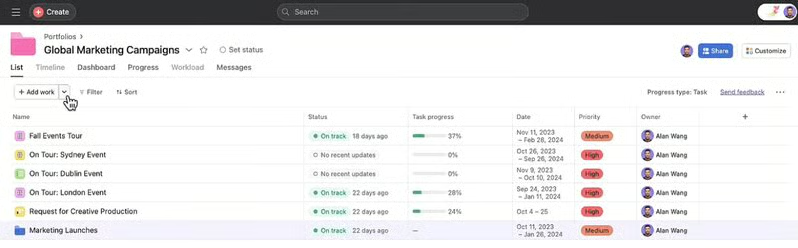
To see all your related projects in one glance, put them under an Asana portfolio. When you add projects to a portfolio, you’ll see in a list view the key details of each initiative, including their statuses (whether they’re on track or delayed), task progress in percentage, project duration, priority levels, and project owners.
Clicking on a particular project will bring up the project description and summary without leaving the portfolio view. Asana offers a bird’s-eye view of all your initiatives, making it easy to manage multiple campaigns.
Resource Management
Time tracking is part of Asana’s robust resource management system. Measure how long team members spend on individual assignments to make an accurate timeline forecast. Use the time tracking insights to strategically plan similar projects in the future.
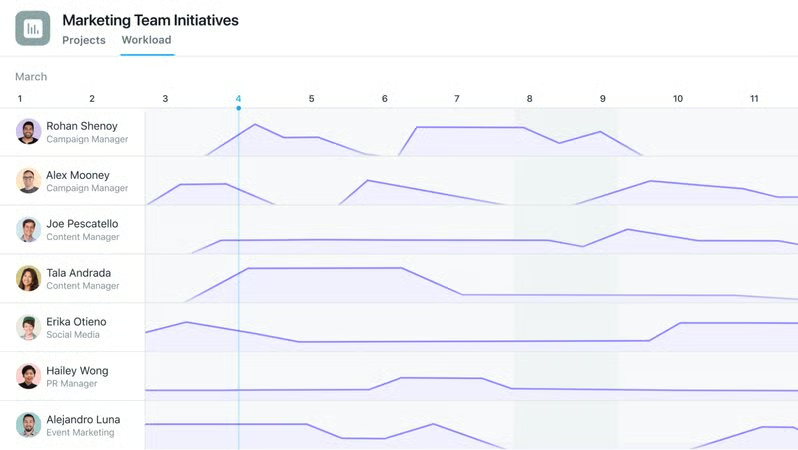
Workload, on the other hand, shows what team members are working on for a specific period. With this, you’ll quickly spot which team members are underworked and overworked, enabling you to redistribute assignments and prevent burnout and low productivity.
Workflow Bundles
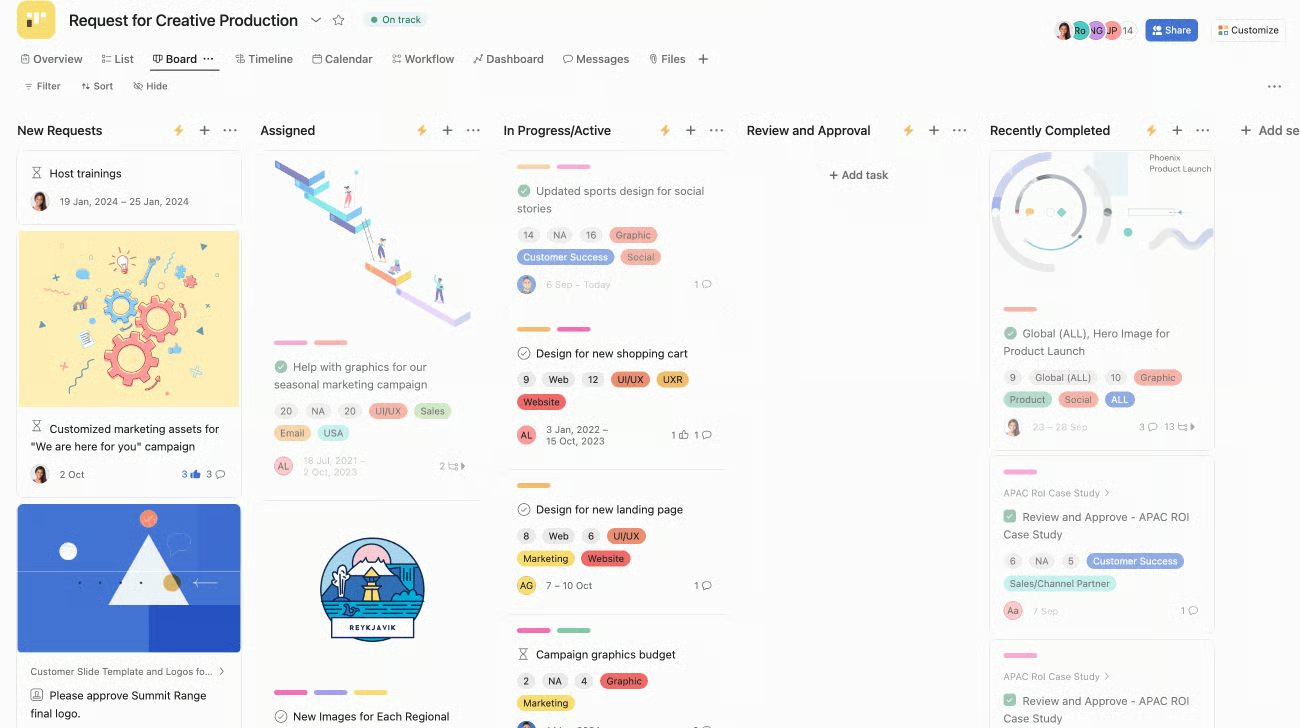
Workflow bundles are a collection of workflow tools applied to various projects. A bundle may feature a particular set of project sections, custom fields, rules, and task templates. This makes it easier to standardize processes across multiple initiatives.
Moreover, this lessens the manual work in updating project elements because once you update a workflow bundle, the changes affect all projects using that bundle. Note that the changes applied are retroactive and prospective.
Asana Intelligence
The project management software solution features various artificial intelligence (AI) tools, namely:
- Smart summaries: Describes task content and highlights key action items as subtasks
- Smart fields: Generates custom fields automatically
- Smart answers: Offers answers to user questions about strategies to adopt for a successful project
- Smart status: Creates status updates that enable users to quickly see open questions from discussions and project bottlenecks
- Smart editor: Recommends task descriptions and responses to messages
- Smart digests: Summarizes recent activities, such as subject matters discussed and tasks completed

Asana Customer Service
2.50 / 5
In our review of Asana, we gave the platform a relatively low score on customer support mainly because direct lines of communication are either unavailable or exclusively offered in the highest-tier subscription plans. The provider doesn’t offer phone support. Additionally, you must choose the Enterprise plan to get 24/7 assistance and receive timely responses to inquiries filed in the help center.
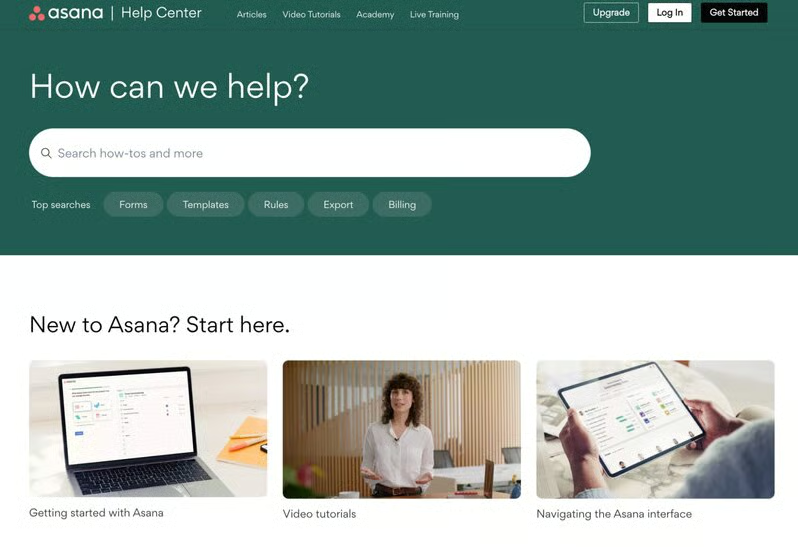
Nonetheless, Asana has various self-help channels. Its community forum lets users ask questions and learn from fellow Asana users about best practices. The learning portal, Asana Academy, features how-to guides in written text and video formats. Live webinars and prerecorded training sessions are likewise available.
Asana’s Ease of Use
5.00 / 5
Our Asana software review yielded a perfect score on ease of use primarily because it has a clean, intuitive interface that facilitates seamless navigation. Users will quickly find the features they’re looking for. The sidebar makes essential features accessible, including the Homepage, My Tasks, Inbox, and Projects. At the top bar, you’ll find the features for creating tasks, projects, messages, or teams instantly as well as finding tasks or content.
On top of these, Asana’s learning portals are extremely helpful to new users. The guides are comprehensive and easy to understand, especially since they contain visual aids, like screenshots of the interface and videos of how to use specific features.
Expert Score
4.69 / 5
Asana’s easily navigable interface could benefit first-time project management software users. Its free plan is packed with valuable tools, making it ideal for small teams handling simple tasks.
Our observations were echoed in Asana app reviews on third-party websites, with users noting its intuitive interface that enables a seamless transition from a different project management tool. Some found the webinars extremely helpful in maximizing the features.
Others commended the robust third-party integrations, automation rules, and messaging. The downsides users shared were customization tools being locked behind higher-tier subscription plans and the lack of privacy tools for custom fields.
As of this writing, Asana earned the following ratings on popular user review sites:
- G2: 4.3 out of 5 based on 9,731 reviews
- GetApp: 4.5 out of 5 based on 12,406 reviews
- Software Advice: 4.5 out of 5 based on 12,085 reviews
- TrustRadius: 8.4 out of 10 based on 2,463 reviews
How We Evaluated Asana
Frequently Asked Questions (FAQs)
Is Asana free?
Yes, Asana offers a free version with unlimited projects, activity logs, storage, and messages. It offers access to desktop and mobile apps and third-party integrations. The project views available are lists, boards, and calendars.
Is Asana a customer relationship management (CRM) software?
No, it’s not. Asana is a project management tool that enables teams to plan activities and organize tasks to achieve their goals. If you need a solution with a built-in CRM, try Bitrix24. This app lets you oversee tasks and projects in Kanban boards and Gantt charts and manage leads and deals through its sales pipeline feature.
Which one is better, Asana or Trello?
Asana is the ideal software solution if you need resource management tools, like workload and time tracking. Trello is better if you prioritize an easy-to-navigate platform offering unlimited automations without the need for a subscription upgrade.
Bottom Line
Asana is an excellent project management system known for its unlimited projects, activity logs, and storage, robust third-party integrations, and flexible project views. It’s slightly more expensive than other vendors, with a starting price of $13.49 per user, per month. The free plan offers valuable tools, including unlimited messages; list, board, and calendar views; and CSV and PDF export support.
Try Asana’s free plan first to see if it suits your project needs. Or, take advantage of the 14-day free trial to access premium features for a limited time.
