







In today’s economy, customers expect to pay how they want, when they want, without friction. Whether you run an online boutique, a subscription box service, or a neighborhood restaurant taking orders through delivery apps, payments are a direct driver of sales, customer loyalty, and growth.
But here’s the problem: most small businesses stitch together a patchwork of payment solutions. You might use one processor for online sales, another for in-person transactions, and a third for digital wallets. If one of them goes down, or if a customer’s card gets declined for no good reason, you lose revenue — and possibly that customer.
This is where payment orchestration comes in. Until recently, payment orchestration was mainly the domain of large enterprises. But today, the technology is more accessible and increasingly relevant for small businesses that want to scale without being held back by their payment stack.
- What is payment orchestration?
- Does my small business need payment orchestration?
- Payment orchestration pros and cons
- Is my business ready for payment orchestration?
- 5 Best payment orchestration service providers for small business
- Runners-up: Stripe & Stax
- How to implement payment orchestration for small businesses
- Payment orchestration best practices
- Frequently asked questions (FAQs)
- Bottom line
What is payment orchestration?
Payment orchestration is a platform that helps businesses manage multiple payment providers, methods, and tools in one place. It acts like a control center for payments, routing each transaction to the best option, reducing failed payments, and making it easier to accept new methods, such as PayPal, Apple Pay, or BNPL.
What does this mean for cost? Small businesses do not need to sign up for dozens of providers directly. Most orchestration platforms handle the integrations and relationships, so you can add new processors or wallets without negotiating every contract yourself.
However, you may still pay transaction fees to the processors you choose, plus a platform fee to the orchestration provider. The trade-off: while you pay for more flexibility, you can often save money overall by cutting failed transactions, lowering cross-border costs, and reducing time spent managing multiple dashboards.
Payment orchestration key features
Payment orchestration platforms vary in scope, but most share a common set of features designed to give small businesses more control and flexibility. Here are the essentials:
- Multi-processor connectivity: Link to several payment gateways and acquirers through one integration.
- Smart routing: Direct transactions based on rules (region, card type, amount) and retry failed payments automatically.
- Real-time monitoring and analytics: See performance across providers, get decline codes, measure cost per route, run A/B tests.
- Centralized reconciliation: View transactions, fees, and settlement data from all providers in one dashboard.
- Fraud and risk management: Automated compliance (PCI DSS, local regulation), tokenization, adaptive fraud tools, dynamic 3D Secure.
- Scalability: Start small, then add providers or channels as your business grows.
How payment orchestration works
At a high level, payment orchestration acts like a traffic controller for your transactions. Instead of sending every payment through a single provider, it connects your business to multiple gateways and processors at once.
This setup enables smart routing, where failed or risky payments can be retried with another provider. It also makes it simple to plug in wallets, Buy Now, Pay Later options, or regional methods as customer preferences change.
Behind the scenes, orchestration consolidates everything into a single reporting dashboard and integrates fraud prevention and compliance tools, such as tokenization and PCI support.
Here’s how a transaction flows through a payment orchestration platform.
- Customer checkout: A shopper clicks “Pay” on your website or app, or checks out in-person through your point-of-sale (POS) system.
- Orchestration layer receives request: Instead of going straight to one processor, the payment first flows through the orchestration platform.
- Smart routing and failover logic: Based on pre-set rules (e.g., card type, region, transaction size), the platform chooses the best processor. If the first attempt fails, it can retry with another.
- Processor authorization: The chosen processor sends the request to the card network (Visa, Mastercard, etc.) and the customer’s bank for approval.
- Risk and fraud screening: Orchestration initiates integrated fraud detection and tokenization, tools before final approval.
- Payment approval or retry: If approved, the payment goes through. If declined for a soft reason (like a network error), orchestration automatically retries via a backup route.
- Settlement and reporting: The processor settles funds to your merchant account. Orchestration consolidates the data into one dashboard for reporting and reconciliation.
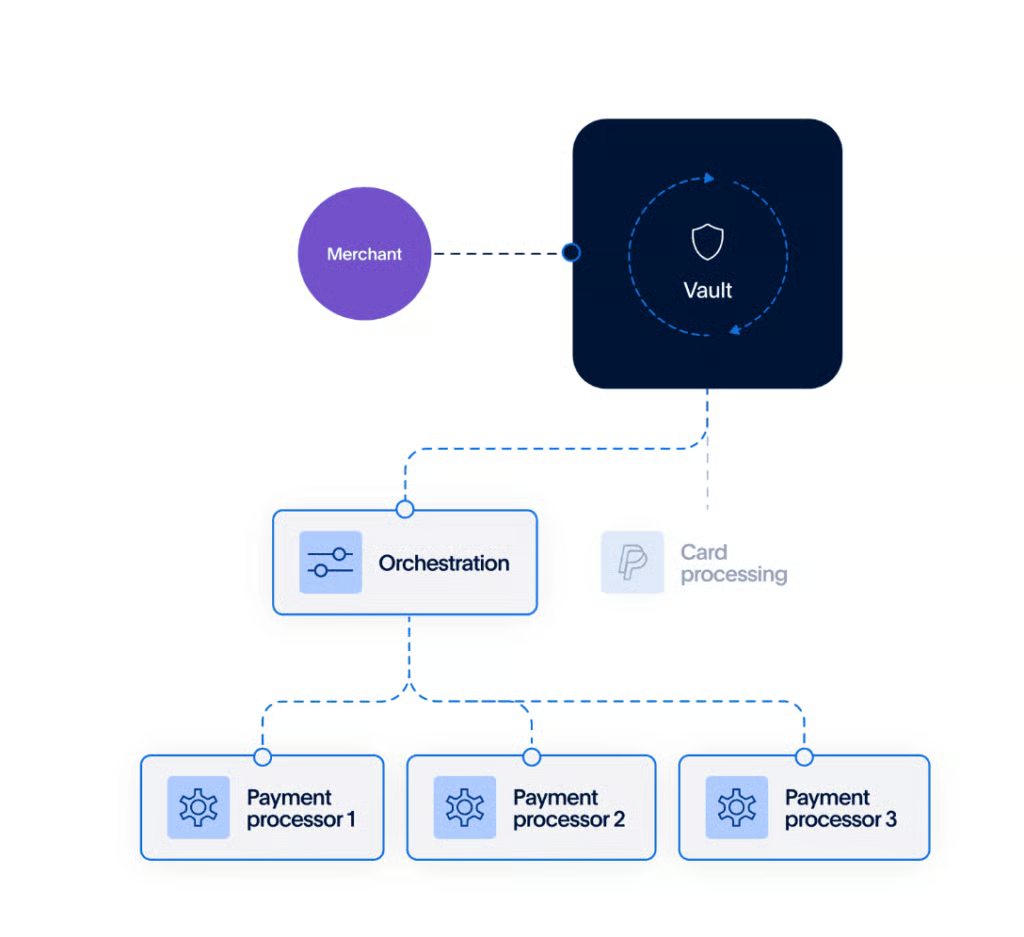
Payment orchestration vs payment gateway
It’s easy to confuse a payment gateway with payment orchestration, but they solve different problems. A gateway is like a tunnel. It passes transactions from your checkout to a single processor. Orchestration sits above that layer, letting you connect to multiple gateways and processors at once, then decide the best path for each payment.
Here’s a simple side-by-side comparison:
| Feature | Payment gateway | Payment orchestration |
|---|---|---|
| Role | Connects checkout to one processor or acquirer | Manages many gateways and processors from one platform |
| Flexibility | Limited to what one provider supports | Add, remove, or switch providers without rebuilding checkout |
| Routing | Sends every transaction through the same path | Routes transactions based on rules (issuer, region, amount, failover) |
| Payment methods | Limited to what the gateway offers | Easier to plug in wallets, BNPL, and regional methods |
| Reporting | Separate dashboards per provider | Unified reporting across all processors and channels |
| Resilience | Single point of failure | Failover options if one processor is down |
Does my small business need payment orchestration?
When most people hear about payment orchestration, they think of global enterprises handling millions of transactions across dozens of markets. But small businesses face many of the same challenges, just on a smaller scale. A failed payment hurts more when margins are tight, and downtime during a busy Saturday can make or break a week’s revenue.
For small businesses, the case for payment orchestration boils down to three things:
- Revenue protection: Every prevented failed payment means money that stays in your pocket.
- Customer experience: Giving shoppers the payment methods they prefer (wallets, BNPL, local options) removes friction and boosts conversions.
- Operational simplicity: Instead of juggling multiple dashboards, contracts, and reports, orchestration pulls everything into one view.
SMB use cases: How orchestration solves real problems
Payment orchestration may sound complex, but the real value shows up in everyday business scenarios. Here are some of the most common small-business use cases:
For ecommerce SMB expanding payment methods
- Problem: Shoppers abandon carts when their preferred wallet or BNPL option isn’t available.
- Solution: Orchestration makes it easy to add PayPal, Apple Pay, Google Pay, or regional wallets without a full reintegration.
- Impact: Higher checkout conversions and happier customers.
For cross-border “micro-exporters”
- Problem: Selling abroad often leads to card declines, high foreign exchange fees, and missing local payment methods.
- Solution: Route payments through local acquirers, add methods like iDEAL (Netherlands) or Pix (Brazil), and reduce FX costs.
- Impact: More successful international transactions and improved margins on cross-border sales.
For subscription SMBs (SaaS, Memberships, Boxes)
- Problem: Involuntary churn from expired or declined cards eats into recurring revenue.
- Solution: Intelligent retry logic across multiple processors recovers failed payments and reduces customer drop-off.
- Impact: More predictable cash flow and improved customer lifetime value.
For omnichannel local retailers and restaurants
- Problem: Separate systems for online orders, in-store transactions, and delivery apps cause silos and outages.
- Solution: Orchestration unifies all channels, provides backup routing, and consolidates reporting.
- Impact: Fewer disruptions, easier reconciliation, and a smoother customer experience both in-store and online.
For seasonal or flash-sale businesses
- Problem: Processor outages or throttling during peak traffic can cost thousands in lost sales.
- Solution: Split traffic across multiple providers, use failover rules, and scale capacity instantly.
- Impact: Higher uptime and revenue protection during critical sales events.
For niche use cases (field services, nonprofits)
- Field Services: Contractors and home service providers can quickly adopt real-time payments or digital wallets for on-site jobs.
- Nonprofits: Donor campaigns benefit from supporting multiple payment types and recovering failed recurring donations.
Payment orchestration pros and cons
Like any business tool, payment orchestration comes with clear advantages, but also some trade-offs to weigh. Here’s a quick comparison to help small businesses decide if it’s the right fit:
| Pros | Cons |
|---|---|
| Higher acceptance rates through smart routing and multiple acquirers | Costs and complexity can add up with integration, platform fees, and ongoing maintenance |
| Flexibility to add or remove payment methods quickly | May be over-engineering for very small or low-volume businesses |
| Cost savings from optimized routing and fewer failed transactions | Vendor lock-in risks if you choose an orchestration provider without easy exit options |
| Centralized reporting and reconciliation across all channels | |
| Built-in fraud and risk management layers for extra protection | |
Core benefits of payment orchestration
Payment orchestration gives small businesses more control over how payments are handled. By routing transactions across multiple acquirers, businesses can lift approval rates and reduce costly declines.
It also makes it easy to add or remove wallets, Buy Now, Pay Later options, or regional methods without starting from scratch, helping you meet customer preferences faster. For many SMBs, these improvements translate directly into higher conversions and more reliable cash flow.
Another major benefit is operational efficiency. Instead of juggling separate dashboards, contracts, and reports, orchestration pulls everything into a single platform. This central view makes reconciliation simpler, helps track fees across providers, and can include built-in fraud prevention tools.
Operational risks and red flags
While orchestration can be valuable, it’s not a fit for every business. Implementation can bring added costs, technical complexity, and platform fees that may not make sense for low-volume merchants.
Some small businesses may over-engineer their payment setup before they truly need it, leading to unnecessary expense. There’s also the risk of vendor lock-in if you choose a provider without clear exit options, so evaluating long-term flexibility is critical.
Is my business ready for payment orchestration?
At Fit Small Business, we know payment orchestration isn’t a silver bullet, and we won’t pretend otherwise. For some SMBs, the costs and complexity may outweigh the short-term benefits. That’s why this guide highlights not only the advantages but also the risks, so you can make a decision based on your actual stage and needs.
By laying out both sides, we aim to help small business owners cut through vendor hype and decide if orchestration is the right move or something to revisit later.
You may be ready if:
- You process more than 1,000 transactions per month and notice revenue lost to failed payments.
- You need to support multiple payment methods or expand into new regions in the next year.
- You’ve already experienced outages or downtime with a single provider.
- You want unified reporting and simpler reconciliation across online, in-person, or subscription channels.
You may want to wait if:
- Your business is still very early-stage with low monthly transaction volumes.
- You rely on a single processor and haven’t yet run into major limitations.
- You don’t have the time or budget to manage integration and ongoing platform fees.
- Simplicity and ease of setup matter more right now than flexibility or redundancy.
Most small businesses start with a one-stop-shop processor, such as Square or PayPal. And for good reason: they’re easy to set up, offer bundled features (checkout, invoicing, fraud tools), and don’t require heavy technical resources. For a business processing a few hundred to a few thousand transactions a month, that simplicity often outweighs the need for more control.
But as a business grows, those all-in-one solutions can start to feel restrictive. This is where payment orchestration comes in: offering flexibility, redundancy, and smarter optimization. The trade-off: more complexity, and usually higher setup costs.
5 Best payment orchestration service providers for small business
To help you get started, I evaluated the most popular payment orchestration service providers in the market today to find out which ones will benefit small businesses the most.
- Primer.io: Best for no-code, vendor-agnostic routing
- Solidgate: Best for PSP-plus orchestration with billing
- Checkout.com: Best for multi-acquirer global payments
- Corefy: Best for huge connector coverage
- Gr4vy: Best for cloud-native, regional deployments
| Our Score (out of 5) | Coverage | Routing & resilience | Reconciliation & analytics | Pricing & contract | |
|---|---|---|---|---|---|
 | 3.60 | Connectors: 100+Methods:
| Advanced: Rules, A/B tests, auto-retry, failover, 3DS orchestration | Unified: PartialDisputes: YesReal-time: Yes | Model: Platform+txnMinimums: VariesTerm: ContractFrom: Custom pricing |
| Visit Primer.io | |||||
 | 3.58 | Connectors: Multi-acquirerMethods:
| Advanced: Rules, split, cascade, retries, SCA | Unified: All Disputes: Yes Real-time: Yes | Model: Platform+txnMinimums: YesTerm: Contract From: ~$24/mo per IBAN account maintenance; minimum monthly fee example ~$1,182 |
| Visit Solidgate | |||||
 | 3.49 | Connectors: Multi-acquirerMethods:
| Standard+: Rules + retries, 3DS across acquirers | Unified: Partial Disputes: Partial Real-time: Near | Model: platform+txnMinimums: VariesTerm: Contract From: Custom pricing |
| Visit Checkout.com | |||||
 | 3.44 | Connectors: 500+Methods:
| Advanced: Routing & cascading, failover | Unified: Partial Disputes: Yes Real-time: Yes | Model: Platform+txnMinimums: No Term: MTM/AnnualFrom: ~$2,955/mo (Standard); ~$7,091/mo (Professional) |
| VIsit Corefy | |||||
 | 3.39 | Connectors: 100+Methods:
| Advanced: Rules, retries/cascades, Dynamic 3DS | Unified: PartialDisputes: PartialReal-time: Yes | Model: platform+txnMinimums: VariesTerm: Contract From: Custom pricing |
| VIsit Gr4vy | |||||
Primer.io: Best for no-code, vendor-agnostic routing
Primer gives you true, vendor-agnostic orchestration with no-code workflows, such as drag, drop, and ship routing rules, fallbacks, and tests without engineering sprints. You get broad processor/payment-method coverage, a unified checkout, and real-time observability so you can spot issues and optimize fast. The trade-offs: pricing isn’t public, it’s not a full subscription-billing system, and reconciliation across some external processors isn’t fully “single pane.”
Solidgate: Best for PSP-plus orchestration with billing
Solidgate bundles processing and orchestration in one stack, then layers on scheme tokenization, a billing portal, and chargeback tools, so you can scale without stitching features together. Strengths include network tokens, smart retries, and consolidated financial reporting. Watch for higher minimums and sales-led contracts, plus fewer third-party reviews than the biggest PSPs.
Checkout.com: Best for multi-acquirer global payments
Checkout.com adds multi-acquirer routing (Flow/Standalone Flow) on top of a global PSP footprint with wide APM coverage and robust 3D Secure. You get strong issuer authentication, method breadth, and mature analytics backed by enterprise scale. Downsides are tailored (less transparent) pricing, variable orchestration depth by region/integration, and only partial centralization of reconciliation and disputes off-platform.
Corefy: Best for huge connector coverage
Corefy focuses on scale: hundreds of connectors, advanced routing/cascading, reconciliation, and chargeback workflows, plus clear, published pricing. Expect granular control and a quick hosted checkout to add new markets or methods fast. The trade-offs are higher monthly minimums for SMB budgets, no clear network-token product, limited tax features, and light detail on issuer-level 3DS optimization.
Gr4vy: Best for cloud-native, regional deployments
Gr4vy is cloud-native orchestration built for regional deployment and data residency, with dynamic 3D Secure, scheme tokenization, and fast hosted-checkout options. Best for cloud-native, regional deployments. You get clean SDKs, no-code flows, and quick rollouts across regions. The catches: contact-sales pricing, partial reconciliation/dispute centralization across external providers, and no native tax engine.
Runners-up: Stripe & Stax
Stripe: Simple card backup routing if you already use Stripe
Use Stripe when most of your volume already runs on Stripe and you want straightforward card failover/routing without adding another vendor. You’ll get polished checkout, strong add-ons (Billing, Tax), and excellent developer tools.
Trade-offs: orchestration is card-only, centralized disputes/settlements for third-party processors are limited, and orchestration pricing isn’t publicly listed.
Stax: Predictable flat-fee processing with built-in tools
Pick Stax if you want a single provider with a predictable subscription fee and everyday tools out of the box, such as hosted checkout, links, PayPal buttons, ACH, and a dispute manager. It can be cost-effective at higher volumes.
Trade-offs: it’s not vendor-agnostic (no multi-PSP routing/failover), reconciliation beyond Stax’s own rails is limited, and pricing/terms are handled through sales.
How to implement payment orchestration for small businesses
This playbook lays out a simple roadmap to help small businesses implement orchestration without getting lost in technical complexity.
Step 1: Establish your baseline metrics
Track your current performance so you know what to improve. Key numbers include authorization rates, average order value, decline codes, and refund or chargeback levels. These benchmarks will help you calculate ROI once orchestration is in place.
Step 2: Add or test multiple providers
Begin by connecting a second processor or acquirer alongside your current setup. This creates redundancy and allows you to experiment with smart routing. You don’t need to overhaul everything at once — start small and scale.
Step 3: Pilot routing rules
Set up basic rules to route transactions based on region, card type, or decline reason. For example, if a transaction is declined by Processor A, automatically retry with Processor B. Piloting simple rules helps you validate the benefits quickly.
Step 4: Measure and refine
Review performance weekly. Compare your new metrics against the baseline to see if authorization rates improved, declines dropped, or reconciliation got easier. Use these insights to fine-tune routing rules or decide when to add more providers.
KPIs to monitor
Once orchestration is live, keep an eye on these metrics to ensure it’s delivering real business value:
- Authorization rate: % of successful transactions vs. attempts.
Benchmark: Aim for 95%+; even a 2-3% lift can mean thousands in extra revenue. Global card-not-present (CNP) authorization rates average between 80-90%, but well-optimized merchants often achieve 95%+ with smart routing and local acquiring. - Decline codes: Track reasons for failures to spot fixable issues.
Benchmark: Soft declines (e.g., issuer network errors) should be <5% of total transactions. This is based on the average soft declines of roughly 3–5% of transactions in card-not-present environments. - Involuntary churn: Subscription customers lost due to failed payments.
Benchmark: Keep this under 1-2% per billing cycle for healthy recurring revenue. Subscription industry data consistently show involuntary churn averages 1-3% per month, with “best-in-class” merchants pushing it down to under 1% through retry logic and account updaters. - Blended cost: Effective fee across all processors and methods.
Benchmark: Many SMBs land between 2-3% of volume; orchestration should lower this over time. - Reconciliation time: Hours your team spends closing books each month.
Benchmark: Manual reconciliation can take 10-20 hours; orchestration should cut this in half or more.
Payment orchestration best practices
Payment orchestration can unlock big advantages, but the results depend on how you implement and manage it. Here are some best practices small businesses should follow:
- Start with clear goals: Decide what matters most: higher approval rates, adding wallets, cross-border expansion, or easier reconciliation. Clear goals will guide your setup and keep you from over-engineering features you don’t need yet.
- Benchmark before you begin: Track current metrics like authorization rate, average order value, and reconciliation time before turning on orchestration. These numbers will give you a baseline to measure against, so you can prove ROI.
- Add redundancy gradually: Don’t try to connect five processors at once. Start with your main provider plus one backup, then add more as transaction volume grows. This keeps integration manageable and reduces the risk of errors.
- Optimize routing rules regularly: Set up simple rules at first (e.g., retrying a declined card with another processor). As you grow, refine by issuer, region, or transaction type. Regular reviews ensure you’re always sending payments through the best route.
- Keep an eye on costs: Platform fees and extra integrations can eat into margins if you’re not careful. Balance the flexibility orchestration provides with the actual savings in reduced declines and operational efficiency.
- Prioritize security and compliance: Look for orchestration platforms that support tokenization, PCI DSS compliance, and built-in fraud tools. This reduces risk and builds trust with customers, especially as you add new payment methods.
Frequently asked questions (FAQs)
What is payment orchestration and how does it work?
Payment orchestration is a technology layer that lets you manage multiple payment gateways, processors, and payment methods in one unified platform. It routes transactions based on rules (cost, region, success rate), retries or fails over to backups, handles reconciliation, and helps you add new payment types without rebuilding each integration.
How is payment orchestration different from traditional payment processing or gateways?
Traditional payment gateways typically connect you to one processor or acquirer and may limit flexibility. Payment orchestration lets you use many providers concurrently, optimize routing, reduce declines, and gain resilience if one provider fails.
Can payment orchestration help with cross-border transactions?
Yes, orchestration platforms often support local payment methods, region-specific processors, and currency conversions. They reduce foreign exchange fees and decline rates when dealing with international cards or wallets.
How much does payment orchestration cost for small businesses?
Most orchestration platforms charge a platform fee plus per-transaction costs on top of standard processor fees. Pricing can range from a few hundred dollars per month for entry-level plans to custom enterprise pricing. For small businesses, the key is comparing the platform fee against the potential savings from reduced declines, lower cross-border costs, and faster reconciliation.
How should I choose my first payment orchestration provider?
Start by listing your top priorities: lower costs, cross-border support, or adding new payment methods. Then look for providers that offer simple integrations, transparent pricing, and the ability to exit without heavy penalties. Small businesses should favor platforms with pre-built connections to major processors and wallets, so you can get started quickly without custom development.
Bottom line
The way customers pay is changing fast. Digital wallets like Apple Pay and Google Pay are now mainstream, Buy Now Pay Later continues to grow, and new rails like FedNow and open banking are reshaping how money moves. For small businesses, falling behind means risking lost sales to competitors who meet customer expectations first.
This is where payment orchestration becomes more than a convenience. By layering multiple providers and payment methods into one platform, orchestration gives you the flexibility to adopt new technologies as they emerge, without re-engineering your checkout every time.
And with the payment orchestration market expected to grow from US$2.65 billion in 2025 to over USD 6.23 billion by 2030, at a CAGR of 18.59%, SMBs adopting orchestration now are positioning themselves to ride one of the fastest-growing waves in fintech.
Ready to start exploring payment orchestration? Primer is a perfect launching pad to find out how this service can help scale your small business.
