







A product catalog template is a ready-made layout that helps businesses organize and present their products or services with images, descriptions, prices, and key details. Commonly used by retailers, wholesalers, and ecommerce sellers, these templates are ideal for both customer-facing catalogs and internal product lists, whether shared online, printed, or integrated into sales systems.
The best product list templates are customizable, offer free and paid options, and function as a standalone or integrate with your current systems. To save you time, I’ve handpicked some of the best templates available online to help you make the right choice.
- Top product catalog templates compared
- Canva: Design-ready catalogs for any industry
- Airtable: Flexible catalogs powered by data
- Knack: Build interactive catalogs with no code
- Notion: Simple, shareable catalogs for teams
- Stackby: API-connected catalogs that scale
- Catalog Machine: Custom catalogs with ecommerce sync
- Flipsnack: Interactive flipbook catalogs for digital sharing
- Venngage: Eye-catching catalogs without a designer
- Template.net AI: Instant catalogs, minimal effort
- 💡Bonus: Fit Small Business Free Product Catalog Template
- What to look for in a product catalog template
- How to create a product catalog from a template
- Design tips for beginners
- Frequently asked questions (FAQs)
- Bottom line
Top product catalog templates compared
| Tool | Pricing | Usability | Template format | Integrations |
|---|---|---|---|---|
| Canva | Freemium + Paid | Both (Digital + Printable) | Web App / Design Tool | Google Drive, Dropbox, Slack, Asana, Salesforce, +100 others |
| Airtable | Freemium + Paid | Digital (Exportable) | Spreadsheet / Web App | Slack, Salesforce, Google Drive, Zapier, APIs, Interface Designer |
| Knack | Trial + Paid | Digital (Internal/Embed) | Web App (Database-Driven) | Zapier, APIs, Embed into websites |
| Notion | Free + Paid | Digital (Internal Sharing) | Web App (Workspace) | Zapier, Slack (limited sync) |
| Stackby | Freemium + Paid | Digital (Shareable) | Spreadsheet / Web App | Google Analytics, YouTube, Clearbit, APIs |
| Catalog Machine | Freemium + Paid | Both (Print + Digital) | Web App / Catalog Builder | Shopify, WooCommerce, Etsy, Zapier |
| Flipsnack | Freemium + Paid | Both (Flipbook, Printable) | Web App / Visual Editor | None (Standalone — share via link or embed) |
| Venngage | Freemium + Paid | Both (PDF + Online Link) | Web App / Visual Editor | None (Standalone — download or public link) |
| Template.net AI | Freemium + Paid | Both (HTML, PDF, PNG) | Web App / AI Generator | None (Standalone — export in multiple formats) |
Canva: Design-ready catalogs for any industry
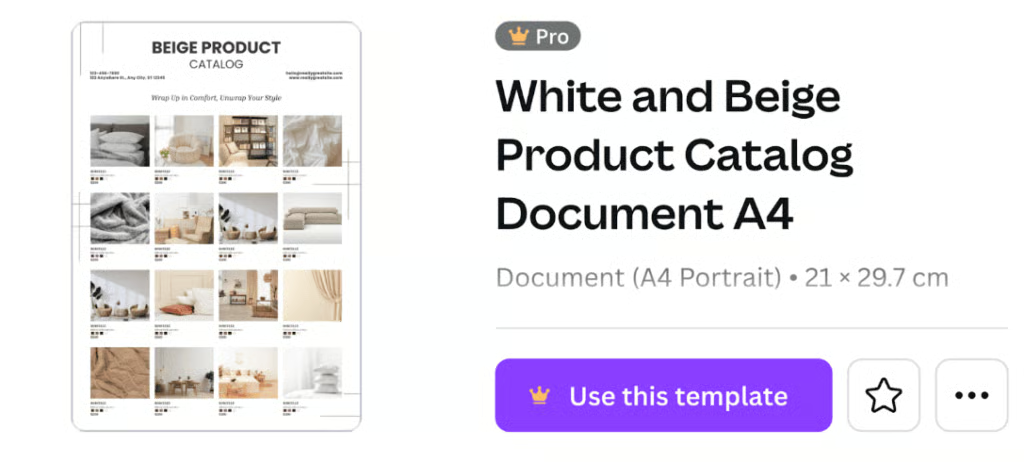
Canva’s catalog templates are visually polished and ready to use without design experience. You can personalize every element, export for print or web, and enjoy a smart, intuitive interface.
What I like about Canva
I love how approachable Canva is for non-designers. The drag-and-drop interface makes building catalogs fast and easy. I’m impressed by the AI “Magic Design” tools that generate layouts and assist with content and visuals. It’s perfect for branding without design skills.
✓ Product variants support ✗ Mobile-friendly ✓ AI tools
Airtable: Flexible catalogs powered by data
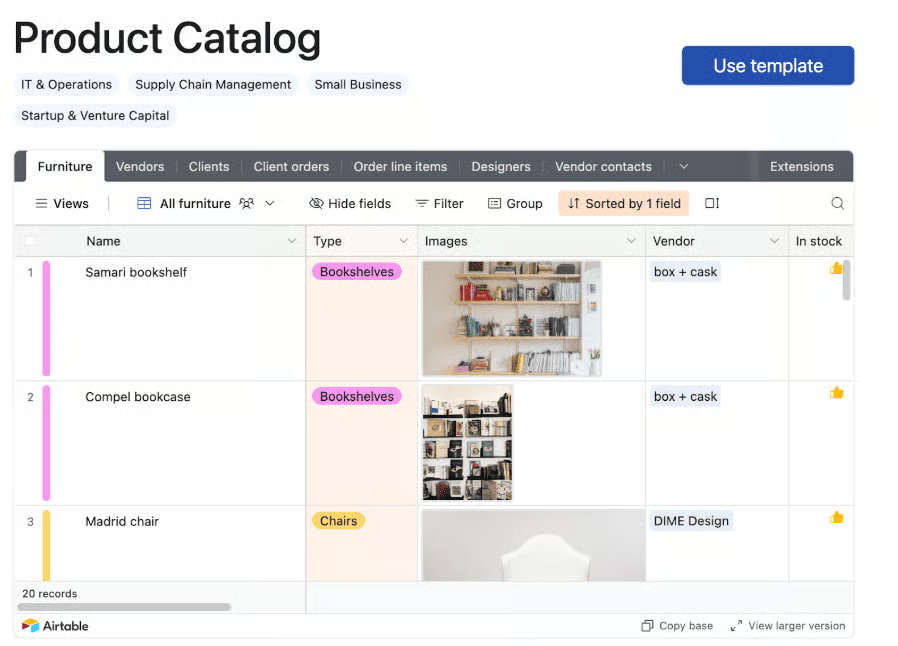
Airtable blends spreadsheet and database features, enabling structured product catalogs with fields, views, and tags. Choose from gallery, grid, kanban, and form views ideal for internal or shared catalogs. It’s data-rich, customizable, and built for collaboration.
What I like about Airtable
For businesses managing large or complex product inventories, Airtable is one of the most versatile tools I’ve seen. You can track variants, such as color, size, and pricing tiers, using linked records and filters. The AI features streamline repetitive tasks, such as categorization and copywriting. It also performs well on mobile, which is essential for teams in the field.
✓ Product variants support ✓ Mobile-friendly ✓ AI tools
Knack: Build interactive catalogs with no code
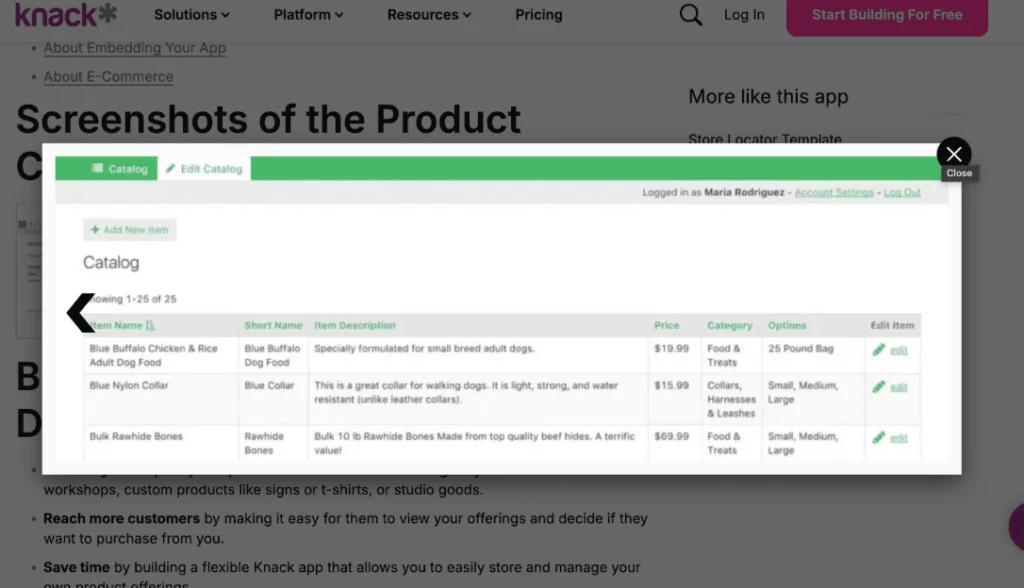
Knack is a web app builder that enables you to create searchable, filterable product catalogs with custom user roles. It’s ideal for businesses that need interactive, data-driven catalogs for both internal operations and client-facing portals.
What I like about Knack
Businesses that want to present products in an interactive, searchable format without needing technical skills will find Knack’s advanced features appealing. You can design logic-based product pages, manage variants, and control user access all without writing a single line of code. Then embed your catalog into a website, control access by user type, and update content in real time. Its mobile responsiveness also ensures your catalog performs well across devices.
✓ Product variants support ✓ Mobile-friendly ✗ AI tools
Notion: Simple, shareable catalogs for teams
Notion uses databases and galleries for clean, collaborative product catalogs. While not image-heavy, it excels at handling specs, links, and internal sharing.
What I like about Notion
For lean teams who need fast internal alignment, Notion works well as a lightweight catalog solution. You can structure product data clearly and use databases to represent variants. Notion is not optimized for mobile browsing or public-facing use, but I find it a solid choice for internal documentation or early-stage cataloging.
✓ Product variants support ✗ Mobile-friendly ✗ AI tools
Stackby: API-connected catalogs that scale
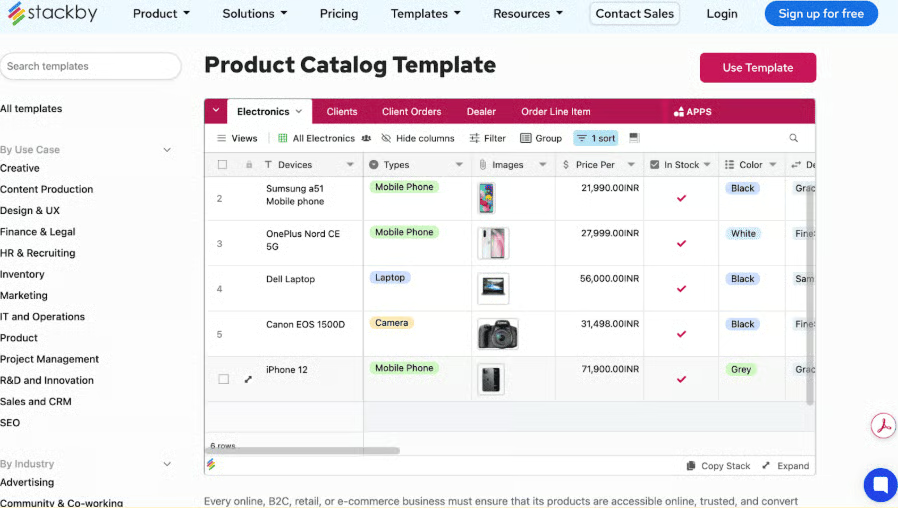
Stackby is a flexible spreadsheet-style database platform that combines the simplicity of Excel with the power of modern APIs. It enables you to organize product data, connect to live sources such as Google Analytics or Clearbit, and create automated workflows within a mobile-friendly interface.
What I like about Stackby
Stackby is an excellent choice for teams who want automation without full custom development. It supports live data sync through APIs and provides enough structure to handle product variations and inventory. The mobile app is capable, making real-time access easy for field reps or distributed teams. It’s a great fit for process-driven operations.
✓ Product variants support ✓ Mobile-friendly ✗ AI tools
Catalog Machine: Custom catalogs with ecommerce sync
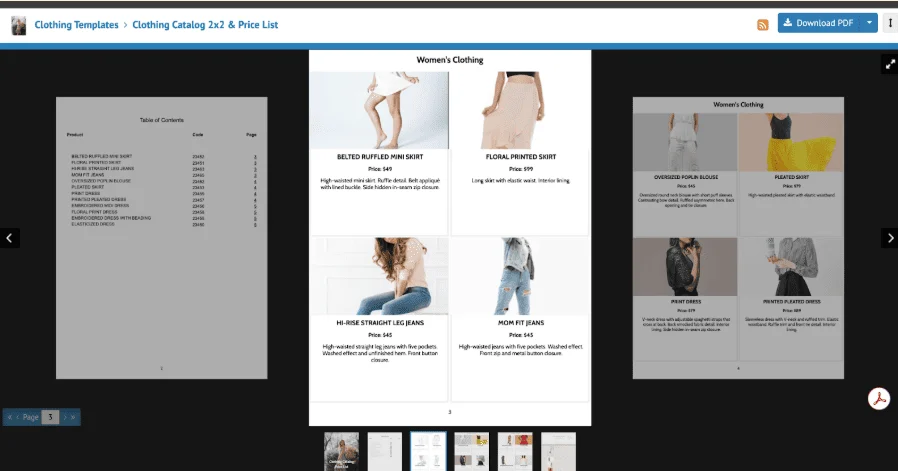
Catalog Machine lets you build catalogs pulled directly from Shopify, WooCommerce, or Etsy. Its online catalogs are responsive, including tablet and mobile. The platform makes it easy to maintain consistent catalogs across digital and physical formats.
What I like about Catalog Machine
This platform is purpose-built for ecommerce sellers who need to link catalogs directly to platforms like Shopify or WooCommerce. Product variants sync automatically, reducing errors and saving time. The catalog outputs are mobile-optimized and print-ready, giving you flexibility in how you distribute them. I’ve seen it work particularly well for sellers updating their catalogs frequently.
✓ Product variants support ✓ Mobile-friendly ✗ AI tools
Flipsnack: Interactive flipbook catalogs for digital sharing
Flipsnack creates flipbook-style catalogs that are fully responsive across devices. Features like clickable links, embedded videos, and page-flip animations make it ideal for engaging, customer-facing catalogs.
What I like about Flipsnack
If brand experience matters, Flipsnack delivers a visually compelling catalog format that mimics a real flipbook. It’s ideal for lookbooks, product guides, or sales presentations. The viewer is fully mobile-responsive, which ensures accessibility without compromising design. It’s a great fit for marketing teams looking to enhance their customer-facing materials.
✓ Product variants support ✓ Mobile-friendly ✗ AI tools
Venngage: Eye-catching catalogs without a designer
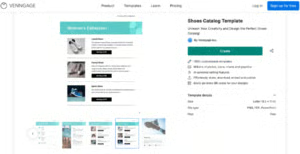
Venngage offers visual templates that now include mobile-responsive embed and view options. It supports drag-and-drop editing, making it easy to create professional-looking catalogs without design experience.
What I like about Venngage
Venngage is great for businesses that need a strong visual presentation without a dedicated design team. You can easily map out product variants within layouts, and the templates offer clean, professional results. The recent addition of mobile-responsive link sharing is a helpful bonus. It’s well-suited for marketing-led catalogs or proposals.
✓ Product variants support ✓ Mobile-friendly ✗ AI tools
Template.net AI: Instant catalogs, minimal effort
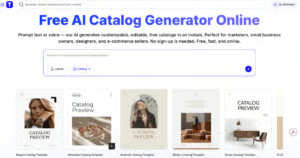
Template.net’s AI catalog builder generates layouts exported as PDF, PNG, HTML, or SVG. There are no native mobile-responsive or embedded formats, but exports can be hosted responsively.
What I like about Template.net AI
I find Template.net’s AI catalog builder is most useful when speed is your top priority. You can generate a ready-to-edit catalog from minimal input and then export it in multiple formats. While it doesn’t support responsive mobile views natively, the HTML version can be adapted for digital use. I recommend it as a starting point for quick-turn projects.
✓ Product variants support ✓ Mobile-friendly ✗ AI tools
Also read: 10 Free Inventory Templates + Instructions
💡Bonus: Fit Small Business Free Product Catalog Template
If you’re just starting out and on a budget, this free product catalog template is a solid option. Here’s how to use it:
- Step 1: Click on the download button, open the file and choose “Make a copy” to have an editable version of the spreadsheet.
- Step 2: Go to the Pricelist tab and encode your product information. Don’t forget to add the URL to your product images.
- Step 3: When adding a product description, include a link to the product’s hosted webpage if available to provide your customers with more detailed information or visuals beyond the catalog.
- Step 4: If you need to send a list to your customer, make a copy of your spreadsheet and rename the file by adding your customer’s name.
- Step 5: Make sure to protect the pricelist tab before sending it to your customer. Right-click on the tab name>Protect Sheet>Permissions “Only You”
- Step 6: Provide an initial list of recommended products to your customer in the product catalog tab, but also let them know that they can add more by clicking on the product name column
What to look for in a product catalog template
Choosing the right product list template needs to fit the way your business operates. Whether you’re selling online, managing wholesale accounts, or equipping a sales team, your catalog should be flexible, clear, and easy to maintain. Consider these essential features before selecting a template or platform:
- Format: Decide whether you need a print-ready layout, a shareable digital version, or both. Some tools support flipbooks, while others lean toward data-driven spreadsheets or web pages.
- Customizability: Look for templates that let you modify layouts, branding, product details, and add or remove fields as needed. This is especially important if you have product variants or unique specifications.
- Integrations: If your products live in platforms like Shopify, WooCommerce, or Airtable, integrations can save hours of manual work and reduce errors.
- Mobile optimization: Make sure the catalog works well on mobile devices, especially if it’s customer-facing or used by reps in the field.
- Ease of use: Choose a tool that matches your team’s technical comfort level. Some tools are no-code and intuitive, while others may require a steeper learning curve.
Here are some tips for matching templates to your business type:
- Retail businesses: Prioritize visual layouts and printable formats to use in-store or at events. Canva and Flipsnack are strong choices here.
- Ecommerce brands: Look for platforms with real-time sync and online publishing. Catalog Machine and Airtable stand out for Shopify or WooCommerce users.
- Wholesale or B2B sellers: You’ll need catalog tools that handle large inventories, pricing tiers, and product variants. Stackby and Knack offer database-style control and filtering.
- Service-based businesses: Consider using more flexible formats like Notion or Venngage to highlight offerings in a presentation-friendly way.
- Multi-channel sellers: Choose templates that can easily be exported or adapted to print, digital, and embedded formats. Catalog Machine and Template.net AI offer this flexibility.
How to create a product catalog from a template
Using a pre-made template is one of the fastest and most efficient ways to build a product catalog. Below are simple steps to guide your process, along with design tips for non-designers.
- Step 1: Choose the right platform or file type. Pick a template that aligns with your goals (print, digital, interactive, or database-style).
- Step 2: Gather your product information. Prepare images, SKUs, descriptions, pricing, sizes, and other specs before starting.
- Step 3: Customize the layout. Replace placeholder content with your own. Update colors, logos, fonts, and sections to reflect your brand.
- Step 4: Add product variants and categories. Organize products by type, and clearly display size, color, or model options if applicable.
- Step 5: Optimize for your output format. If printing, use high-res images and export to PDF. For digital catalogs, test on mobile and desktop to ensure readability.
- Step 6: Publish and share. Export, embed, print, or share your catalog link depending on your audience and channel.
Design tips for beginners
Once you’ve nailed down the ideal template, consider these tips for cohesive and functional design:
- Start simple: Catalogs with straightforward layouts, such as a two-column grid with product images and details, perform best. For example, a home goods retailer will see better engagement after switching from a multi-tabbed design to a clean one-page layout grouped by category.
- Use consistent formatting: Aligning all product titles, descriptions, and pricing makes the catalog easier to scan. I often recommend using uniform spacing and icons, much like what Canva’s templates offer by default, to maintain visual consistency across pages.
- Limit your font choices: Too many font styles can feel disjointed and unprofessional. For instance, you can improve readability by using a bold sans-serif for product names and a clean serif for descriptions – just two fonts used consistently throughout.
- Use high-quality visuals: Clear, consistent product images build trust and reduce bounce. You’ll be surprised how much switching from stock photos to professionally shot product images on a neutral background can increase your catalog download.
- Highlight important details: To draw attention to high-margin items or promotions, I often suggest using color callouts or “Best Seller” tags, similar to what you’d see in a Venngage layout. These subtle design cues guide purchasing decisions without being overwhelming.
- Preview before publishing: It’s critical to test your catalog on mobile and desktop. For example, flipbook-style catalogs like those in Flipsnack may look sharp on desktop but require careful resizing and link testing to work smoothly on smartphones.
Need brochures to go with your catalog? Check out our guides:
- 25 Engaging Brochure Examples + Tips for Small Business Marketing
- 12 Brochure Design Ideas to Showcase Your Brand (+ Takeaways)
Frequently asked questions (FAQs)
Here are the most common questions around product catalog templates.
What format is best for a digital product catalog?
A digital product catalog template is best shared as an HTML embed, flipbook, or interactive PDF. These formats work across devices and look professional online. Some platforms even offer a free catalog template to get started.
Can I turn a spreadsheet into a product catalog?
Yes. You can use an Excel spreadsheet product list template or import your data into tools like Airtable or Stackby. These let you turn raw product lists into a clean, digital catalog with sorting and filtering.
Can I use a product catalog on my Shopify/WooCommerce site?
Yes. Many tools offer free catalog templates with Shopify or WooCommerce integrations. You can also embed a digital product catalog template or flipbook directly on your store for a visual shopping experience.
Bottom line
Creating a product catalog is easier than ever with the right tools and templates. Whether you need a free catalog template, a visual digital product catalog template, or an Excel spreadsheet product catalog template for internal use, there’s a solution for every business type. The key is choosing one that fits your products, workflow, and customer touchpoints. Use the product catalog examples in this guide to find a format that works and start building a catalog that actually helps you sell more effectively.
