








Safety management systems help you manage, track, and improve workplace well-being and safety compliance. Designed to ensure employee health and safety while in the workplace, the best safety management software offers comprehensive emergency alerts, reporting and analytics, and risk assessment tools that allow you to identify and proactively address potential hazards.
In this guide, I researched and compared seven popular options and narrowed the list to the four best software for safety management.
- SafetyCulture: Best overall safety management software
- Workhub: Best budget-friendly safety management system
- Safesite: Best for OSHA safety compliance
- EHS Insight: Best for flexibility and AI reporting
Why You Can Trust Fit Small Business
The Fit Small Business editorial process follows strict standards to ensure that our best answers are founded on the basis of accuracy, clarity, authority, objectivity, and accessibility.
With over five years of experience evaluating payroll and HR software and 10 years of experience in human resources and handling HR systems, I am familiar with employers’ responsibility to maintain workplace safety for their employees.
To evaluate the best safety management software for small businesses, I compared seven software providers across 48 data points, prioritizing functionality, ease of use, and value for money. See my full methodology below.
- Top Safety Management Software Compared
- SafetyCulture: Best Overall Safety Management Software
- Workhub: Best Budget-friendly Safety Management System
- Safesite: Best for OSHA Safety Compliance
- EHS Insight: Best for Flexibility & AI Reporting
- EHSInsight
- How to Choose a Safety Management System
- Methodology: How I Evaluated the Best Safety Management Software
- Frequently Asked Questions (FAQs) About Safety Management Software
Top Safety Management Software Compared
All the safety compliance software in this guide offer tools to help you manage documents, workplace inspections, corrective actions, and incident reporting of injuries and accidents. These safety management solutions also have automated notifications, analytics, and a library of forms and checklists you can access anytime. Below are some of each provider’s key features and pricing details.
| Our Score (out of 5) | Free Trial | Free Plan | Starter Pricing | Offline Mode | Safety Meetings | |
|---|---|---|---|---|---|---|
 | 3.86 | 30 days | For up to 10 employees only | $6 or $29 per user seat monthly | ✓ | ✕ |
| Visit SafetyCulture | ||||||
 | 3.47 | 30 days | ✓ | $3 per user monthly | ✕ | ✓ |
| Visit Workhub | ||||||
 | 3.21 | 30 days | ✓ | $20 per user monthly | ✓ | ✓ |
| Visit Safesite | ||||||
 | 2.89 | 14 days | ✕ | $3,600 per year | ✓ | ✓ |
| Visit EHS Insight | ||||||
SafetyCulture: Best Overall Safety Management Software
Overview
Who should use it:
SafetyCulture is great for small and midsized businesses (SMBs) looking for online tools to simplify and automate workplace safety tracking and management. It has a wide range of features to help you manage employees and their safety at the work, which also makes it a good option for businesses with plans to scale.
Why I like it:
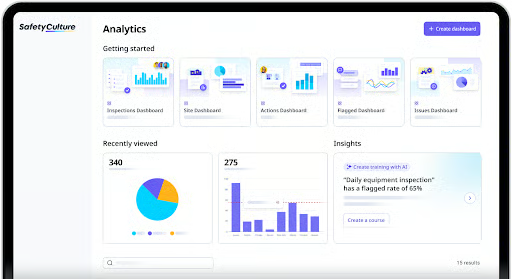
SafetyCulture impressed me with its library of safety learning courses and customizable templates, which includes over 100K courses and more than 130K inspection templates—the largest collection of resources on our list of best safety management software. Let’s say your businesses are in the manufacturing or construction industries, SafetyCulture has checklists you can use to inspect machinery to ensure there are no safety hazards or to spot potential mechanical issues. It even has templates for risk assessments, audits, correction actions, and quality assurance plans to help you enforce and monitor safety standards.
If you need to create safety courses and custom audit or inspection checklists, SafetyCulture and EHS Insights have AI tools to make the process easier for you. It also integrates with Gmail Calendar, Microsoft Outlook, and Zapier, enabling you to connect SafetyCulture with several popular business software.
It offers flexible paid plans that allow you to choose seat types depending on the workplace safety responsibilities of users. For example, you want most workers to have “create and view” access to conduct monthly inspections or report issues. Then place them in the Lite user category. For employees who need advanced edit and manage access, tag them as Full users.
All these features contributed to SafetyCulture’s overall rating of 3.86 out of 5. It scored the lowest in risk management because most of its tools are available in paid tiers.
Pricing
The SafetyCulture pricing matrix is different from the other safety software I reviewed. It requires you to choose a plan and select the applicable seat type for all users. While you can get a mix of seat types for one plan, you can only get one plan for all user seats.
- Free trial: 30 days
- Plans:
- Free: $0 for up to 10 employees only
- Premium: $29 per user seat monthly (if all users have Full seat types); you can create a plan with a mix of Full and Lite seats; for Lite seats, the monthly fee is $6 per employee
- Enterprise: Call for a quote
- User seat types:
- Lite: Ideal for team members who need to conduct monthly inspections, create tasks, report issues, build and access training courses, receive communications, and view files, assets, and analytics dashboards
- Full: Optimal for managers and employees who need to perform inspections regularly, create inspection templates, use analytics to check trends, and manage documents, integrations, and files
- Guest: Free “guest” access to report issues, receive communications, create and complete tasks, and view files; ideal for external users, such as contractors and visitors; only available in paid plans
- Monthly or annual billing options: Both options are available; annual billing comes with discounted rates but requires upfront and lump sum payment of all fees
- Add ons:
- SHEQSY by SafetyCulture: Call for a quote; this is a mobile app designed to track the safety of lone remote workers in real-time
- SafetyCulture Care: Call for a quote; this combines risk management, insurance coverage and claims, and a workplace safety system in one product
Key Features
- Drag-and-drop course builder: SafetyCulture offers various course templates you can customize with drag-and-drop tools, but you can also build your own. You can enhance workplace safety training programs by adding video clips, quizzes, and assessments. Its AI tools can create a training program for you, expand current courses by adding new content, and translate your training deck into over 100 languages. It can even convert a photo or file you uploaded into slides you can include in learning courses, reducing the time it takes to build a training presentation.
- Issue and incident reporting: Unlike the other workplace safety software in this guide, SafetyCulture lets you generate unique QR codes you can add to safety posters or stickers posted near office equipment or around the workplace. Your employees can simply scan the QR code with their mobile devices to raise safety issues. Mobile devices with cameras also allow you and your employees to capture photos or videos of the incident. This is great for reporting accidents or safety issues as it is happening or in areas where a computer is unavailable. Further, it allows you to electronically sign reports—a feature only SafetyCulture and Safesite offer.
- Smart logic workflows: With SafetyCulture’s automation tools and smart workflows, you can easily manage and track reported incidents. Its drag-and-drop form editor lets you add pre-built responses to trigger specific actions. You can dictate the type of response you want (such as free text, photo upload, or multiple choice options) and set up the next actions like assigning follow-up tasks to specific employees. You can also schedule automated reminders to ensure employees complete safety and equipment checks before starting a shift or during monthly or quarterly audits.
- Safety sensors: SafetyCulture is the only provider on my list that offers sensors to help you track the conditions of assets or the general workplace in real time. For example, you can add a sensor to a chiller or freezer to monitor the temperature and ensure food safety compliance. You can also add sensors to field equipment and company assets to monitor location and utilization, enabling you to prevent theft and improve efficiency. Plus, its automated alerts notify you when something goes out of range, making it easy to spot potential issues and assign corrective actions to mitigate risks. Note that this is an add-on product, so contact SafetyCulture to get a quote.
- Workplace communications: With SafetyCulture’s “Heads Up” feature, you can communicate with team members about changes in workplace safety procedures. You can also ask for feedback and share training programs or refresher courses to guide or remind employees how to operate an equipment or conduct pre-shift safety checks.
What Users Think
Most users find SafetyCulture easy to learn and use. They like its intuitive platform that makes managing workplace safety and inspections easy for them. However, some reviewers said it can get a bit pricey depending on the number of users you have. Others dislike the occasional mobile app glitches, adding that it tends to load slowly if you have a big database with multiple photos and video files.
As of this writing, SafetyCulture earned the following scores on popular review sites:
- G2: 4.6 out of 5 based on more than 120 reviews
- Capterra: 4.6 out of 5 based on over 190 reviews
Workhub: Best Budget-friendly Safety Management System
Overview
Who should use it:
Small businesses with limited budgets can benefit from using Workhub’s safety compliance software. Its free plan has most of the features of the paid tier, such as safety training programs, inspection checklists, incident reporting, and workplace screening.
Why I like it:
While Workhub may not have SafetyCulture’s extensive library of training programs, it has over 60 workplace safety learning courses you can access for free. I also appreciate its feature-rich free plan that doesn’t have user limits like SafetyCulture’s free tier. And even if you upgrade to the paid tier, the plan only costs $3 per user monthly—the cheapest paid option on our list of best safety management software.
What makes it unique from the other safety software I reviewed are its gamification features, allowing you to reward employees who regularly comply with workplace safety policies or even help team members. These functionalities, including its risk assessment and incident reporting tools, contributed to Workhub’s overall score. However, it lost points because phone support is limited to the paid tier, and it lacks the streamlined Occupational Safety and Health Administration (OSHA) reporting that Safesite and the other providers in this guide offer—you have to manually manage OSHA reporting.
Pricing
- Free trial: 30 days
- Plans:
- Free: $0
- Standard: $3 per user monthly; requires at least three users
- Monthly or annual billing options: Month-to-month billing only
Key Features
- Behavior observations: Like Safesite, it lets you log positive and negative observations to track behavioral trends in your team. However, Workhub takes it a step further, allowing you to set the required frequency (e.g. once a month) and assign a supervisor or qualified employee to observe and assess worker behaviors—whether or not they are exhibiting attitudes that contribute to situations that could negatively impact workplace safety. Knowing these behaviors can help you identify improvement areas and come up with corrective actions to address potential safety issues.
- Workplace screening and contractor safety orientations: You can use Workhub to create a site orientation program to inform contractors and visitors about your company’s safety protocols. It assigns unique worker IDs to contractors and visitors, allowing you to check whether they already completed the orientation. You can also create screening questions to help you determine whether or not visitors are allowed to enter company premises based on various criteria, such as health checks (e.g. COVID screening) and certifications. This is great for companies in the chemicals, pharmaceutical, and food manufacturing industries that need to maintain high safety protocols to keep their workplaces safe.
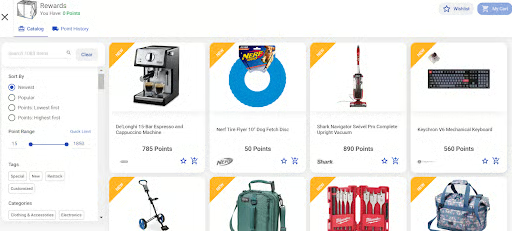
- Safety recognition: Workhub is the only safety compliance software in this guide that offers recognition tools to reward employees who follow compliance policies or exhibit exemplary behavior. You can use its scratch cards that allow workers to earn points to get branded apparel, customized company swag items, and other rewards. It also has a “Joke of the Week” feature that lets employees access a joke by completing specific requirements each week.
- Bulletins and alerts: SafetyCulture may have a “heads up” communication feature that sends alerts through its app, but Workhub offers more than just app notifications, it sends alerts via text messages as well. It can also help you run surveys and collect employee suggestions, enabling you to gather feedback and insights to help improve workplace safety.
What Users Think
There are very few up-to-date Workhub reviews on third-party review sites. Those that I found are mostly positive, with reviewers complimenting its user-friendly and intuitive platform. They also appreciate its simple pricing matrix, communication tools for sharing policy updates, and online database to store forms, documents, and training modules. On the other hand, some users said that the report options and course customization tools are limited.
As of this writing, Workhub earned the following scores on popular review sites:
- G2: 4.6 out of 5 based on nearly 50 reviews
- Capterra: 4.5 out of 5 based on over 100 reviews
Safesite: Best for OSHA Safety Compliance
Overview
Who should use it:
Safesite is great for safety compliance tracking and reporting, making it easy for businesses in high-risk industries (like manufacturing, construction, forestry, and agriculture) to manage and comply with incident and injury report requirements. This includes annual submissions of the OSHA 300 form via the US government’s Injury Tracking Application (ITA) web page.
Why I like it:
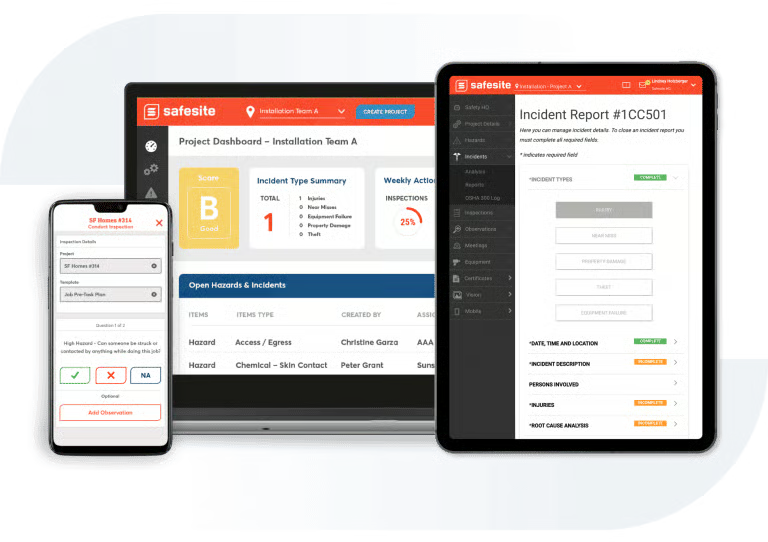
Safesite is the only safety management software I reviewed that offers an OSHA 300 form integration, which allows you to export the OSHA report as an Excel file and upload it to the ITA page with just a few clicks. Not only does it improve OSHA compliance, but also simplifies the form preparation process since all data will come directly from work-related injuries or illnesses reported through the Safesite platform.
You also get a library of customizable forms and checklists, including advanced data analytics and a risk scorecard to help you track the performance of your workplace safety strategies. These features contributed to Safesite earning an overall rating of 3.21 out of 5. It would have received a higher score if it offered phone support and a wider network of third-party software integrations. It also lost points because it doesn’t have pre-built safety learning courses, although it can track training certifications.
Pricing
- Free trial: 30 days
- Plans:
- Free: $0 for unlimited users, but reporting is limited to the last 30 days
- Premium: $20 per employee monthly; you get unrestricted reporting access + assisted client onboarding
- Foresight: Call for a quote; Premium plan features + priority support, telemedicine services, and workers’ compensation via Foresight
- Monthly or annual billing options: Both options are available; annual billing comes with discounted rates but requires upfront and lump sum payment of all fees
Key Features
- One-click OSHA 300 logs: With Safesite, you can automatically complete OSHA 300 forms. With just one click, it adds workplace injuries and serious illnesses to an OSHA 300 log. In addition to reducing the time it takes to complete the form, it prevents potential data input errors because the information will come directly from Safesite’s database.
- Dedicated safety success coach: This is a unique service that Safesite offers to its clients. Aside from setting up your safety compliance plan, your dedicated safety success coach will help you stay on top of changing safety and health regulations to ensure your program includes current policies. The safety success coach will also track program performance and worker participation, alerting you of potential risks or if there are spikes in incident and hazard reports. Further, the coach will work with you to create a digital library of your safety policies and guides, helping you upload documents into Safesite’s online database.
- Equipment inspections: While it doesn’t have SafetyCulture’s sensors or Workhub’s safety data QR codes, Safesite creates dedicated profiles for each piece of equipment, making it easy for you to handle inspection scheduling and track maintenance records. It also supports bulk uploads of equipment lists, which helps save you time from manually creating equipment profiles.
- Risk scorecard: With the “Safesite Score,” you get a risk scoring tool that measures the strength of your safety program and how engaged your workers are in following safety protocols. It has four letter grades: A for excellent, B for good, C for fair, and D for poor. The letter grade is calculated daily and looks at available data from various Safesite modules, such as incident and hazard reporting, OSHA compliance, safety inspections and observations, and equipment audits. It also allows you to choose the modules that should be factored into your risk scorecard. SafetyCulture, Workhub, and EHS Insight don’t have this feature.
What Users Think
Like Workhub, there are only a handful of up-to-date Safesite reviews online. Those who left positive feedback said that its incident reporting tools, mobile app functionalities, and ease of use are its best features. Meanwhile, some users dislike its limited customization options and occasional software glitches.
As of this writing, Safesite earned the following scores on popular review sites:
- G2: 4.5 out of 5 based on nearly 5 reviews
- Capterra: 4.7 out of 5 based on over 70 reviews
EHS Insight: Best for Flexibility & AI Reporting
Overview
Who should use it:
EHS Insight’s AI tools make it a good option for businesses seeking efficient safety compliance reporting. It’s also an ideal choice for companies looking for a flexible solution where they can choose the safety tools and features they need.
Why I like it:
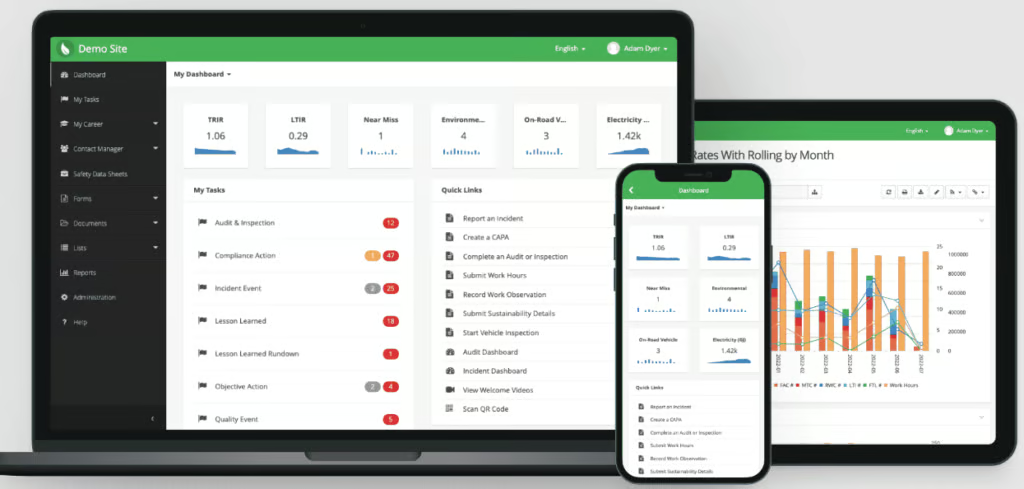
One of the things I appreciate about EHS Insight is its AI tools that help simplify compliance reporting. It ensures that applicable data are captured and analyzes information quality for easy and reliable reporting. It even identifies warning signs of potential serious workplace injuries and accidents, allowing you to address issues proactively.
I also like that it offers flexible plans, allowing you to choose the modules or features that your business needs. The three other health and safety software in this guide don’t provide that flexibility. Plus, EHS Insight has an extensive selection of modules—32 options that include safety data management, incident reporting, hazard identification, compliance tasks, training tracking, and job safety analysis tools.
These functionalities contributed to EHS Insight earning an overall rating of 2.89 out of 5. What pulled its score down are its annual contract requirement, limited automation tools, and lack of pre-built software integrations. While EHS Insight may have a low overall score, its versatile platform still makes it a valuable tool for maintaining a safe and compliant workplace. Plus, the other safety software on my list can’t compare to its strong AI tool, which is similar to having a virtual assistant that can improve safety reporting, provide analytical and computational support, and gather high-quality data to help you make informed decisions about workplace safety.
Pricing
The EHS Insight pricing matrix is based on the number of employees you have and the modules selected. It offers 32 workplace safety solutions you can mix and match to create a custom bundle for your company.
- Free trial: 14 days
- Plans:
- Small & Medium Business Solution: Starts at $3,600 per year
- Enterprise Solution: Call for a quote
- Monthly or annual billing options: Annual option only; this comes with discounted rates but requires upfront and lump sum payment of all fees
Key Features
- Safety drills monitoring: EHS Insight is the only safety management software in this guide that allows you to plan, implement, and track emergency safety drills. You can use it to monitor employee participation, attach photos of the activity, and track response timelines. These tools enable you to assess the performance of safety teams in addressing workplace emergencies and identify areas that need to be enhanced.
- Customizable email and task alerts: You can create custom email and task notifications based on specific triggers, such as when an employee completes an incident report. It also allows you to alert field employees, such as construction or maintenance workers, of weather alerts and other critical information that will affect their work location, which helps to keep them safe from potential incidents.
- AI-powered reporting: SafetyCulture’s AI features may be focused on creating forms and templates, but EHS Insight’s AI tools are designed to improve data quality, safety reporting, and risk mitigation. With its AI Report Chatbot, you can input simple conversational prompts so it can summarize data, perform complex calculations, and uncover trends—saving you time from manually doing these yourself. It also evaluates form submissions and assigns quality scores based on predefined criteria, helping you maintain high data integrity for effective and reliable reporting. It even suggests additional data fields to boost reporting accuracy.
What Users Think
Reviewers described EHS Insight as a powerful app that’s easy to use and set up. They also appreciate its intuitive and user-friendly tools, including the reporting tools that it offers. However, some users dislike its limited report customization options and training management features.
As of this writing, EHS Insight earned the following scores on popular review sites:
- G2: 4.7 out of 5 based on over 40 reviews
- Capterra: 4.4 out of 5 based on more than 40 reviews
How to Choose a Safety Management System
In selecting the best safety management software for your business, consider the following factors:
- Your budget and safety compliance needs: Create a list of the features you need and identify which tools are most important to you. Don’t forget to add industry-specific safety compliance requirements, such as OSHA reporting and safety equipment monitoring. This list will help you determine which software plan to get given your identified budget.
- Ease of use and accessibility: Choose a safety compliance software that offers a user-friendly interface with intuitive features that streamline incident tracking and workplace safety management. You should also look for mobile apps that allow your employees to access the system via smartphones and tablets.
- Scalability: If you have plans to grow your business, you must consider software options with flexible tools that can cover your growing safety compliance needs.
- Data security and user permissions: Don’t forget to check if the software has data security and user permission controls. These features ensure that your company’s safety protocols, incident reports, and employee data are protected and stored in a secure database. It also allows you to restrict access to specific documents and features, such as manager approvals.
- Customer support options: Look for software providers that offer live phone support across all plans. Don’t forget to check the support hours and if there are add-on fees for dedicated support.
Methodology: How I Evaluated the Best Safety Management Software
Evaluation Criteria
To evaluate the best safety software for small businesses, a collaborative assessment was made using a new rubric containing several criteria that looked at the software’s features, pricing, ease of use, reporting tools, customer support options, and user reviews. Irene Casucian, one of Fit Small Business’s expert research analysts, objectively scored the rubric. From there, I added my expert rating to each criterion, where I considered the effectiveness of that area or feature.
Together with Irene Casucian, we evaluated seven solutions. These are:
- Safesite
- EHS Insight
- Workhub
- SafetyCulture
- Safety Amp
- Paychex
- 1Life Workplace Safety Solutions
Then, I compared each software, and while I wasn’t able to test each one, I looked for features to help streamline safety reporting, risk management, and compliance monitoring. I also checked video tutorials if available and user reviews for feedback about the system’s overall ease of use and functionality. Of the seven solutions on our list, I narrowed it down to the four best safety management software.
To view the full evaluation criteria, click through the tabs in the box below.
Our Scoring Methodology
How we weighted each factor in this evaluation.
Because users have real-world experience with each platform, they played a significant role in narrowing down my list of solutions to compare. For this criterion, we checked the user reviews from third-party software review sites like Capterra, G2, and TrustRadius.
In this criterion, we looked for free trials, discount offers, and software plans without long-term contract requirements. We also considered each platform’s “value for money,” which determines whether the number of features in each price tier or module is competitive with other vendors in the space.
We looked at the support options available, such as the support hours and if customer representatives can be reached via phone, email, or chat. We also checked the types of help resources offered, such as how-to guides, safety learning courses and inspections, and a community forum.
In this criterion, we considered the platform’s data security features, permission controls, language support, software integrations, and accessibility options.
Safety management systems require a centralized database to store documents, forms, and important data, so we gave the most points for this feature. We also looked at the safety inspection management, incident and OSHA reporting, document automation, and certification tracking tools offered.
Software with customizable task management tools, inspection checklists, risk assessments, and corrective action planning earned top marks. We also checked if a safety meeting feature is offered to help document meeting minutes, assign tasks, and track task progress.
We gave the most points to software that offers safety-related templates and data export options. We also looked for report customizations and OSHA safety tracking.
Meet the Experts
The following HR and research experts contributed to this article:
 | Robie Ann Ferrer is an HR expert writer at Fit Small Business, focusing on small business HR and payroll software content. She has over eight years of content writing experience, handling different topics. Robie also worked as an HR specialist for 10 years where she managed various facets of HR—from payroll and benefits to employee services and HR systems. |
|---|---|
 | Irene Casucian is a research analyst for Fit Small Business. With sufficient experience as an HR writer, she has developed a profound understanding of various business needs that inform her research and analysis of HR platforms. Irene specializes in HR software evaluation and draws on her experience as a research assistant to provide in-depth assessments. Irene conducts objective research by gathering data to evaluate HR software performance across various HR functions, such as payroll, ATS, and onboarding, using carefully defined criteria to assess each platform’s effectiveness. |
 | Jessica Dennis is the HR lead writer at TechnologyAdvice and also lends her expertise reviewing content for Fit Small Business. She has B.A. in English Literature from the University of Michigan and over six years of experience in onboarding, payroll, benefits, compliance, and workforce management as an HR generalist. Since joining TA, she’s covered additional topics like DEI, engagement, training, communication, hiring, and performance management best practices. Her expertise, in-depth research, and hands-on experience with HR software ensures she provides the best people operations and technology insights to readers. When she’s not writing, you can find her obsessing over her labrador retriever, crocheting, or jumping into the nearest body of water. |
Frequently Asked Questions (FAQs) About Safety Management Software
What is the main purpose of a safety management system?
A safety management software provides the tools you need to identify workplace hazards, assess and analyze safety risks, and report incidents while ensuring that you remain compliant with workplace safety regulations and laws.
Do I need to get safety management software?
This isn’t required by law, but you should have safety protocols in place to protect your employees. While you can use paper forms or an Excel file to track reported incidents, an online system will help you effectively plan, monitor, and review preventive measures to enhance workplace health and safety. If your business belongs to safety-sensitive industries, such as manufacturing and construction, a safety management system will also help you comply with laws around workplace accident reporting, safety training and policy creation, and maintaining safe working environments.
What industries use safety management systems?
Safety management tools are crucial for high-risk and highly regulated industries, such as aviation, oil, automotive, healthcare, construction, and manufacturing.
