







A cheap payroll service is only a good deal if it reduces the work and risk that make payroll expensive in the first place. A low monthly fee can lose its shine fast if you have to pay extra for time tracking, multi-state pay runs, HR support, tax help, or basic workforce management tools.
Gusto is our best overall cheap payroll service for small businesses, while Square Payroll has the lowest starting price for employee payroll among our five picks at $35 per month plus $6 per employee. I compared seven providers across pricing, payroll features, HR tools, and support to find the best value for different business needs.
Below are my top five picks:
| Software | Best for | Starter monthly pricing |
| Gusto | Overall cheap payroll service | $6 per person + $49 base fee |
| OnPay | Payroll & basic HR | $6 per person + $49 base fee |
| Homebase | Paying hourly workers | $6 per person + $39 base fee |
| QuickBooks Workforce | Contractor payments | $7 per person + $50 base fee |
| Square Payroll | Small restaurants & retail shops | $6 per person + $35 base fee |
Honorable Mention: SurePayroll (by Paychex)
SurePayroll didn’t make my list because of its limited HR tools and integration options. You’ll also pay extra for certain payroll needs, including multi-state payroll. However, it can still work if you only need simple pay runs. SurePayroll starts at $29 per month plus $7 per employee, with one state included. Multi-state payroll costs an additional $9.99 per month, and W-2 and 1099-NEC forms are billed annually at a $50 base fee plus $5 per form. It also offers a lower-cost, no-tax filing option, but you’ll be responsible for remitting payroll taxes and sending tax forms to government agencies yourself.
To learn more about its features, visit SurePayroll.
Why you can trust Fit Small Business
- Cheap payroll software compared
- Gusto: Best overall cheap payroll service
- OnPay: Best for payroll & HR tools
- Homebase: Best for paying hourly employees
- QuickBooks Workforce: Best for contractor payments
- Square Payroll: Best for small restaurants & retail shops
- How to choose the best cheap payroll software
- Common cheap payroll cost traps
- Methodology: How I evaluated the top cheap payroll services
- Frequently asked questions (FAQs) about cheap payroll services
Cheap payroll software compared
| Expert score (out of 5) | Multi-state pay runs | Contractor-only payroll* | Time tracking in basic plan | |
|---|---|---|---|---|
| Gusto | 4.32 | Included in higher tiers | $6 per worker + $35 base fee monthly | $6 per employee monthly |
| OnPay | 4.09 | ✓ | Included in payroll plan | Via integrations |
| Homebase | 3.93 | ✓ | Included in payroll plan | ✓ |
| QuickBooks Workforce | 3.82 | ✓ | $25 monthly for up to 20 workers + $2 per additional person | Included in higher tiers |
| Square Payroll | 3.71 | ✓ | $6 per worker monthly | ✓ |
| *This is an optional package for processing contractor-only payouts. However, all these providers’ starter plans can handle employee and contractor payments in one pay run. |
Gusto: Best overall cheap payroll service
Overview
Who should use it:
Gusto is my top pick for small businesses that want payroll and basic HR tools in one platform. It supports employee and contractor payments, onboarding, benefits, and payroll tax filings at a reasonable starting price.
Why I like it:
Gusto is a full-service payroll software that provides unlimited pay runs, handles all tax filings, and offers automated pay runs, helping you save time. It lets you onboard new hires, offer different types of benefits, and track employee hours, making actual attendance data retrieval for pay processing easy. Gusto can even help you hire and pay international workers with its employer of record (EOR) service, Gusto Global. And if you need to process global contractor payments, Gusto can handle payouts in over 120 countries.
These features contributed to its overall score of 4.32 out of 5. Its starter tier has all the essential tools for managing simple pay runs. However, Gusto’s contractor-only payroll plan isn’t as affordable as Square Payroll and QuickBooks Workforce’s. Also, you must upgrade to at least its Plus plan or pay extra to access time-tracking functionalities. This is unlike Homebase and Square Payroll, which offer basic time tracking in their starter tiers.
Gusto isn’t the lowest-priced payroll service in this guide, but it offers the best overall value for small businesses that want full-service payroll, tax filing, onboarding, benefits administration, and basic HR tools in one platform.
Pricing
Gusto plans
- Simple: $49 per month + $6 per person per month
- Plus: $80 base fee + $12 per employee monthly
- Premium: $180 base fee + $22 per employee monthly
- Contractor-only payroll plan*: $35 base fee + $6 per contractor monthly (for businesses that only pay contract workers)
*Gusto currently advertises a $0 base fee for the first six months, subject to eligibility.
Add-ons
- State payroll tax registration: Pricing varies per state
- R&D tax credits: 15% of identified tax credits
- Health insurance and other benefits: Pricing varies by benefit
- Health insurance broker integration: $6 per eligible employee
- Workers’ compensation: Starts at $14 per month
- International contractor payments: No monthly fee, paid per transaction
- Gusto Global: $699 per employee monthly
- Instant pay: $100 per payroll; lets you pay your team in minutes
- Same-day pay: $90 per payroll; lets you pay employees within hours
- Gusto Money Plus: $19 per month; includes tools to help you manage and organize business funds
Add-ons for the Simple plan only
- Time & Attendance Plus: $6 per employee monthly
- Next-day direct deposits: $15 base fee + $3 per employee monthly
- Performance reviews: $3 per employee monthly
Add-ons for the Simple and Plus plans
- Priority support: $30 base fee + $3 per employee monthly
- HR resources: $50 base fee + $5 per employee monthly
- Includes access to HR documents, federal and state compliance alerts, and HR advisory services
A business with 10 employees would pay $109 per month for Gusto Simple before add-ons. Adding Time & Attendance Plus would increase the estimated monthly cost to $169.
What Users Say About Gusto
Gusto users frequently praise its easy setup, intuitive interface, and employee self-service tools. Small business owners particularly appreciate being able to manage payroll, tax filings, and basic HR tasks in one platform without a steep learning curve.
However, customer support is a recurring concern. Some reviewers report slow responses and difficulty resolving payroll errors, direct deposit issues, and tax-related corrections.
Overall, user feedback suggests Gusto works well for routine payroll tasks, but getting timely help when something goes wrong can be frustrating.
Key Features
- Tax services: Gusto handles quarterly and year-end tax filings for you. It can even help register your business in all the states where your company operates, although this service costs extra.
- Gusto Wallet: This app lets your employees split their paychecks into separate accounts, set budgets, and track debit card transactions so they can see how they spend their money versus their planned budgets.
- Time and project tracking: Employees can clock in/out directly in the software or through the Gusto Wallet app. It also lets them track actual work hours spent on specific projects. This allows you to monitor projects against your goals, spot where workloads must be adjusted, and evaluate your payroll and workforce costs by project.
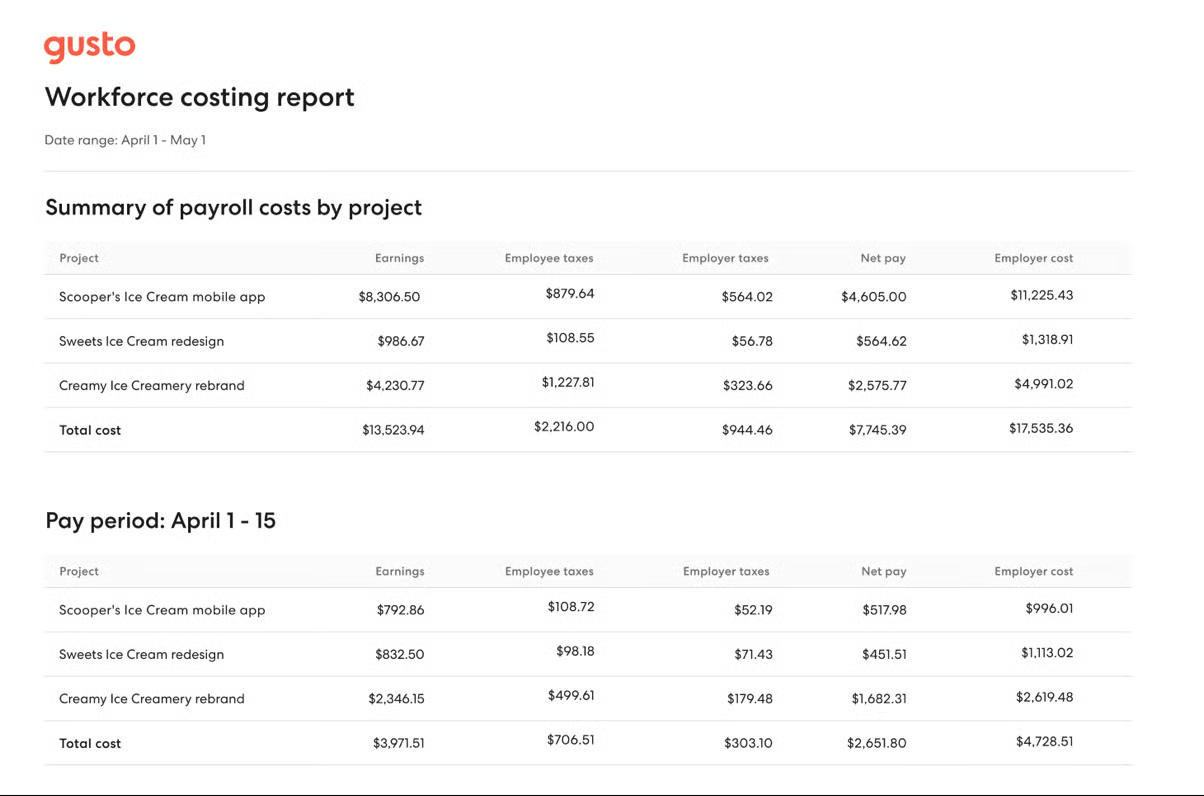
Interested to see how Gusto compares with some of the payroll software in this guide and other competitors? Check out these articles:
What’s New in Gusto
In September 2026, Gusto expanded its AI integrations with ChatGPT and Claude, allowing users to prepare payroll, make timesheet adjustments, review labor costs, and manage other payroll tasks through natural-language requests. The updates build on Gusto’s earlier automation improvements, though businesses will still need to review payroll changes before approving them. For small teams, the added convenience is useful, but how much time this saves will ultimately depend on your existing payroll workflows.
OnPay: Best for payroll & HR tools
Overview
Who should use it:
OnPay is ideal for small businesses that want one predictable monthly payroll price and don’t need native time tracking or a large marketplace of third-party integrations. It onboards new employees, processes payments, and provides access to health plans from major insurers—all for a monthly fee of $49 plus $6 per employee.
Why I like it:
It may cost the same as Gusto’s starter plan, but you save more with OnPay. Unlike providers with multiple payroll tiers, OnPay includes its core payroll features in one plan. Basic HR tools are included, while expanded onboarding workflows, PTO management, org charts, and HR insights require the HR add-on.
In my evaluation, OnPay earned an overall score of 4.09 out of 5 because its efficient payroll tools can handle payments for many types of businesses, including farms and non-profit organizations. I gave it top marks for its new client services, which include free account migration and support for setting up integrations. However, unlike Gusto, it only offers benefits via partner brokers. It also connects with only a handful of third-party software and lacks time tracking and performance review tools.
Pricing
OnPay plan
- Payroll Essentials: $49 base fee + $6 per employee monthly
- Includes full-service payroll with tax filings, basic hiring and onboarding, document storage, benefits administration, reporting tools, integration options, permission levels, and expert support
Add-on
- HR: $15 base fee + $2 per employee monthly
- Includes onboarding workflows, employee directory and org charts, PTO management, equipment and software provisioning, and HR insights
A business with 10 employees would pay $109 per month before optional services ($49 base fee + $6 per employee).
What Users Say About OnPay
Straightforward pricing and helpful customer support are among OnPay's most frequently praised qualities. Reviewers appreciate how easy it is to set up payroll, manage employee payments, and handle tax filings, particularly for small businesses without dedicated payroll staff.
OnPay's simplicity does come with some trade-offs. Users looking for built-in time tracking, more detailed reporting, or flexible payroll scheduling may find the platform restrictive. While customer service generally receives positive feedback, some reviewers also mention occasional support delays and difficulties accessing their accounts.
Key Features
- Niche payroll: OnPay can process pay runs for employees and contractors in various industries. Further, it’s the only provider on my list that processes payments and tax filings for agricultural workers. It can even handle payouts for workers with H-2A visas.
- Team management tools: OnPay offers document services where you can customize templates, send them for e-signatures, and instantly add them to your employee records. You can stay organized with in-app messaging between team members and use org charts to create employee rosters automatically.
- Integrated benefits: OnPay partners with top healthcare and retirement plan providers, such as Humana, BlueCross BlueShield, Aetna, Vestwell, and Guideline. If you’re unsure which plan to get, OnPay’s in-house team of licensed experts can help you select the right one. The benefits programs you choose also sync with payroll for payment processing and deductions.
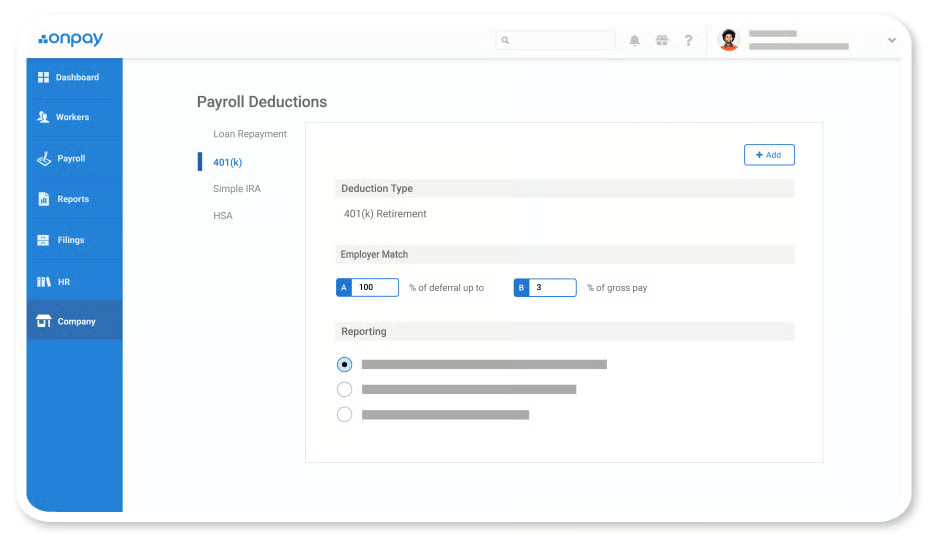
What’s New in OnPay
In July 2026, OnPay expanded its employee benefits platform, bringing health insurance, retirement plans, and other benefits management tools closer to its payroll workflows. The update includes automated benefits enrollment, access to more insurance carriers, and support from licensed agents. It follows a May integration with Betterment at Work that automates 401(k) contributions and employee data syncing.
Homebase: Best for paying hourly employees
Overview
Who should use it:
If you mostly hire hourly employees, Homebase’s core platform primarily has time tracking and scheduling features to help you manage staff attendance. With its Homebase Payroll add-on, you can easily use the core platform’s time data to pay employees compliantly.
Why I like it:
Homebase Payroll may be a paid add-on, but it can be an inexpensive payroll service if partnered with the core platform’s free plan for one-location businesses with up to 10 workers. It’s even slightly cheaper than Gusto because you get time tracking, a feature that’s included in Gusto’s higher tiers or costs extra with the starter plan.
In my evaluation, Homebase earned a 3.93 out of 5 score. I gave it top marks in pay processing because of its automatic pay runs, next-day payroll, and tax filing services. Unlike Gusto, OnPay, and QuickBooks Workforce, you complete payroll with just a few taps via Homebase’s mobile apps for iOS and Android devices. However, it doesn’t provide access to benefits plans and performance reviews. It can also become a pricey option if you get the payroll add-on and upgrade to the core platform’s paid plans to access other features, such as labor cost management, hiring, and more advanced reporting tools.
Pricing
Core Homebase time tracking and scheduling plans:
- Basic: Free for one location and up to 10 employees
- Essentials: $30 per location monthly; includes unlimited employees
- Plus: $70 per location monthly; includes unlimited employees
- All-in-One: $120 per location monthly; includes unlimited employees
Add-ons
- Homebase Payroll: $39 base fee + $6 per employee monthly
- Background checks: $30 each
- Job post boosts: Starts at $50 per job post
- Hiring assistant: Starts at $99 per month
- Tip manager: $25 per location monthly; includes tip pool calculations and automatic tip data imports from your point-of-sale (POS) software into Homebase
- Task manager: $13 per location monthly; this lets you build and assign task lists in Homebase
A business with 10 active employees would pay $99 per month for payroll before add-ons ($39 base fee + $6 per active employee).
What Users Say About Homebase
For businesses managing hourly employees, Homebase's biggest selling point among reviewers is convenience. Employees can check schedules, swap shifts, clock in, and request time off from one app, while managers spend less time tracking hours and preparing payroll.
The experience isn't always as smooth on mobile, though. Some users find schedule adjustments and approvals easier to manage on desktop, while others report app glitches and limited reporting options. Payroll reviews also raise concerns about tax filing errors and slow issue resolution, which are worth considering if you plan to use Homebase for more than scheduling and time tracking.
Key Features
- Pay on demand: Homebase may not provide access to benefits plans, but offers a pay-on-demand feature, Cash Out. Your employees must meet Homebase’s eligibility requirements to enjoy pay advances. However, instant payouts cost extra.
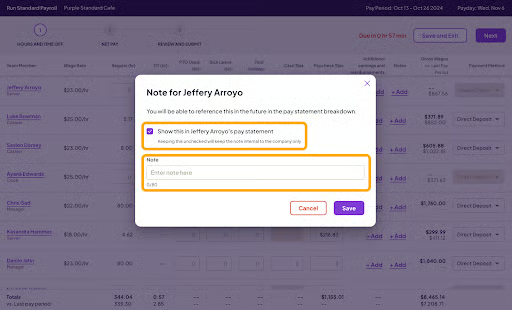
- Payroll notes: You can add special messages to specific employees without needing to exit the payroll process. Homebase’s pay grid has a Notes column where you click the “+ Add” button, input, and save your pay message. The saved notes will automatically appear on the employee’s pay slip.
- Child-support garnishments and payments: Homebase can handle child-support wage garnishments and remit the payments to applicable government agencies in all US states. While Gusto offers the same feature, its service doesn’t cover South Carolina.
What’s New in Homebase
Homebase recently introduced an AI Scheduling Assistant that builds schedules using employee availability, work history, and time-off data. For businesses paying hourly workers, this adds value by reducing scheduling work and keeping shift information in the same platform that tracks hours and prepares payroll. The tool may help small teams save on administrative time without adding separate scheduling software, although availability varies by plan.
QuickBooks Workforce: Best for contractor payments
Overview
Who should use it:
QuickBooks Workforce, formerly QuickBooks Payroll, now better reflects QuickBooks’ broader employee-facing tools, including payroll, time tracking, pay stubs, W-2s, PTO, and schedules. It can handle both contractor and employee payroll, but if you only pay contract workers, its contractor payments package is the cheapest payroll service on my list.
Why I like it:
The easy integration between Intuit products and QuickBooks’ fast payment options is just some of the things I like about this software. You get next-day direct deposits even with its starter tier—a feature Gusto offers in its higher plans. And you can easily import pay-related data into your general ledger for easy bookkeeping if you use both its accounting and payroll modules.
It also offers full-service payroll with tax filing assistance, employee benefits plans, and time tracking tools—functionalities that contributed to QuickBooks Workforce’s overall score of 3.82 out of 5. While its contractor payments package is more affordable than Square Payroll, it has limited HR features. Unlike Gusto and Homebase, you can’t use its platform to hire employees or post jobs. It also doesn’t offer online org charts or an employee directory that you can search through.
Pricing
QuickBooks Workforce plans
- Contractor payments package: $25 monthly for 20 workers + $2 for each additional contractor
- Workforce Payroll: $50 per month + $7 per employee monthly
- Workforce Premium: $88 per month + $10 per employee monthly
- Workforce Elite: $134 per month + $12 per employee monthly
A business with 10 active employees would pay $120 per month for QuickBooks Workforce's lowest-priced payroll plan before add-ons ($50 base fee + $7 per employee).
What Users Say About QuickBooks Workforce
For businesses already using QuickBooks, the convenience of having payroll, accounting, and time tracking connected is a major draw. Reviewers appreciate being able to access pay stubs, W-2s, PTO balances, and schedules in one app, while integration with QuickBooks Time helps reduce manual data entry.
That convenience can be undermined by reliability issues. Some users report glitches with time entries and job tracking, which can create extra work when preparing payroll. Broader QuickBooks reviews also highlight inconsistent customer support, unexpected costs, and a steep learning curve. Businesses that rely heavily on mobile time tracking should weigh these complaints against the benefits of staying within the QuickBooks ecosystem.
Key Features
- Affordable contractor-only payment plan: For $25 monthly, you can process payments for up to 20 workers. This is significantly lower than Square Payroll’s contractor-only payroll option. For 20 workers, Square will charge you $120 monthly (computed as $6 per worker × 20 contractors).
- Extensive tax accuracy and tax guarantee program: QuickBooks is the only software provider on my list that offers two tax penalty programs. Its tax accuracy program, available in all plans, covers mistakes that its representatives make. However, its tax guarantee program, limited to its Elite plan, covers all tax filing errors, regardless of who made the mistake, but only up to $25,000.
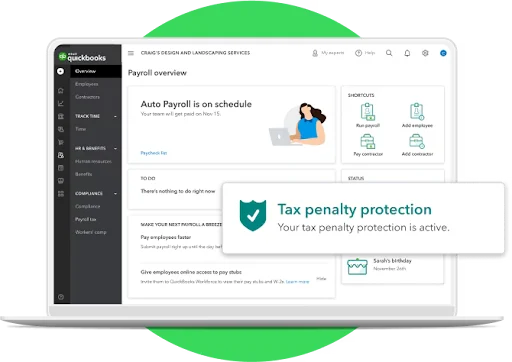
QuickBooks Workforce offers tax accuracy and tax penalty protection programs to its clients. (Source: QuickBooks)
What’s New in QuickBooks Workforce
In August 2026, Intuit updated QuickBooks Workforce with a redesigned payroll screen, making it easier to filter employees by pay type, payment method, and work location. It also added batch actions and customizable tables to help businesses manage payroll runs. Separately, its Payroll AI assistant can collect employee hours, overtime, and tips, flag discrepancies, and prepare payroll for approval. However, the AI features are limited to eligible Premium and Elite subscribers, so businesses on the cheapest plan won't have access to them.
Square Payroll: Best for small restaurants & retail shops
Overview
Who should use it:
If your restaurant or retail shop uses Square POS, getting Square Payroll to process employee payments is better than using third-party payroll software. You can track tips or commissions via Square POS and then automatically transfer the data into Square Payroll for payment processing.
Why I like it:
I appreciate the easy data imports between Square products. It helps save time and minimize errors from manual data entries. Square Payroll also has a mobile app that supports pay runs, which is great if you’re always on the go and need to submit payroll.
It earned an overall score of 3.71 out of 5 because of its efficient payroll features, but lost several points because of its limited HR features and integration options. Its contractor plan isn’t as affordable as QuickBooks Workforce’s, and it also lacks the local tax support that most of the providers on my list offer.
Pricing
Square Payroll plans
- Full-service payroll: $35 base fee + $6 per employee monthly
- Contractor-only payroll: $6 per person monthly
Add-ons
- Health, retirement, and workers’ comp plans: Custom-priced
- Mail paper copies of W2s/1099s: $3 per mailed form annually (digital delivery of Form W2s and 1099s is free)
- Federal and state compliance alerts: Custom-priced; this is included free in the Full-service payroll plan
- Paid amendment services: Custom-priced
A business with 10 employees would pay $95 per month for employee payroll before add-ons ($35 base fee + $6 per employee).
What Users Say About Square Payroll
Square Payroll gets positive feedback for making payroll easier for businesses already using Square POS. Restaurant and retail owners particularly appreciate how employee hours, tips, and timecards sync with payroll, reducing manual data entry. Reviewers also highlight its straightforward setup, transparent pricing, and automatic tax filings.
The trade-off is limited flexibility outside the Square ecosystem. Businesses needing advanced reporting, more comprehensive HR tools, or customizable payroll workflows may find the platform restrictive. For existing Square users, the convenience is a major advantage, but businesses starting from scratch may want to compare more versatile payroll options.
Key Features
- Cash App: You can deposit salary payments into the accounts of employees who sign up for the Cash App. They can get their money via the ATM or transfer it to another account.
- Instant or next-day payouts: You can pull money from your Square balance to pay workers via direct deposit the next business day or instantly through the Cash App.
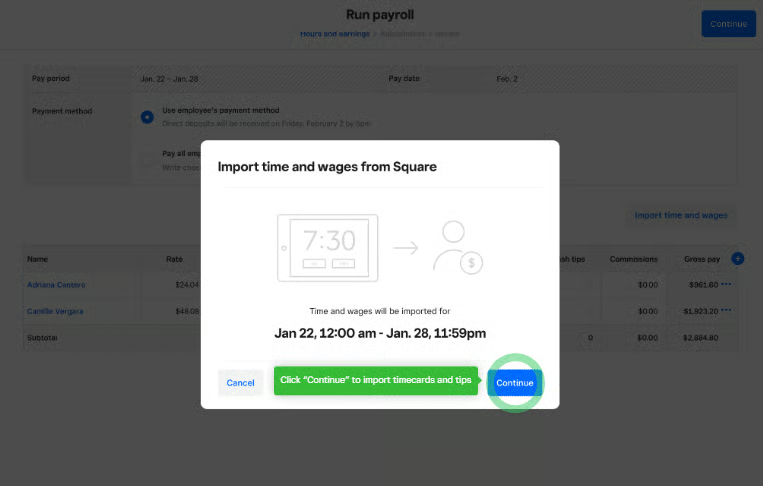
- Tips, commissions, and attendance data uploads: With the Square POS, you can capture tips and commission payments. You can even use it to capture employee clock-ins/outs. With the seamless integration between Square products, transferring the information you need to process employee payments is very easy.
What’s New in Square Payroll
In September 2026, Square added preset tipping options for online invoice payments, allowing businesses to offer suggested tip percentages alongside custom amounts. While this is a Square Invoices feature rather than a direct payroll update, it expands the company's tipping tools for service businesses. Square Payroll already supports importing eligible employee tips, commissions, and timecards, although invoice tips aren't automatically covered by those workflows. For businesses considering Square Payroll, the main advantage remains its integration with Square's broader payment and workforce tools.
How to choose the best cheap payroll software
When looking for the best cheap payroll service, don’t focus only on the price. Check which essential features are included in the starter plan and which ones require an upgrade or add-on. Extra fees for time tracking, multi-state pay runs, priority support, HR advisory services, and faster direct deposits can all change the real monthly cost.
I recommend looking at the full payroll setup your business needs, not just comparing the lowest advertised plan. For most small businesses, that means asking: Can this provider run payroll accurately, handle tax filings, support the way I pay workers, and reduce the number of separate tools I need?
Also, consider the following:
- Security: Ensure the service follows strict data protection protocols to keep your sensitive employee information safe.
- Automated tasks: A service that can automate tasks like tax calculations and direct deposits will save time and reduce errors in your payroll processes.
- Benefits: Consider if you need HR benefits as well as payroll. This may cost you extra, but it can give you a complete package of benefits.
- Scalability: If your business plans to scale and grow, you may need a service that can grow with you. That may not be the cheapest option on the list, but it may still be within your budget.
- Compliance: Look for a service that provides both payroll and compliance needs.
- Reviews: Before relying on price alone, check the rating and what users say about the payroll service.
Check out our article on how to choose a payroll service to learn more. For software options, read our buyer’s guides on the best payroll services and top payroll software for small businesses.
Common cheap payroll cost traps
The lowest monthly fee does not always tell the full story. Before choosing a provider, check for these common cost traps:
- Time tracking add-ons: If you pay hourly workers, make sure time tracking is included or affordable. Otherwise, you may need a separate tool.
- Multi-state payroll costs: Some providers charge extra for additional state tax support or limit multi-state processing to higher plans.
- Integration costs: Check whether the payroll service connects with your accounting, time tracking, POS, benefits, or HR software. If it does not offer native integrations, you may need a paid connector, a manual workaround, or a separate platform to keep payroll data moving accurately.
- Support limitations: Some low-cost plans only include weekday support hours or assistance via email and a chatbot. That may be fine most weeks, but it can be stressful if payroll is due and you need quick help fixing a tax, direct deposit, or employee pay issue.
- Contractor-to-employee growth: Contractor-only payroll plans can be inexpensive, but costs may change significantly once you start hiring employees.
- DIY tax filing: No-tax filing plans can save money upfront, but they shift compliance work back to your team.
Methodology: How I evaluated the top cheap payroll services
To evaluate the best cheap payroll software for small businesses, I collaborated with Irene Casucian, one of our expert research analysts. We used a rubric with 42 data points to compare these payroll software:
- Gusto
- QuickBooks Workforce
- OnPay
- Rippling
- Square Payroll
- SurePayroll
- Homebase
We prioritized pricing and gave the most points to software that costs up to $300 monthly to pay 50 employees. We checked if the software has free trial offers, unlimited pay runs, and zero long-term contract requirements. In addition to customer support options, we looked for payroll tax payment and filing assistance, contractor payroll tools, third-party software integrations, reporting functions, and basic HR information (HRIS) features for easy employee onboarding and offboarding.
I also added my expert rating to each criterion, where I looked at the general effectiveness of that feature. While I couldn’t test all of the software on my list, I looked for key payroll features, watched video tutorials if available, and checked user reviews for feedback about the system’s overall ease of use.
Below is my full evaluation criteria:
- Pricing (30%): We looked for transparent pricing, free trial and discount offers, unlimited pay runs, and each platform’s “value for money,” which determines whether the number of features in the basic plan is competitive with other vendors in the space. We also gave points to software that only costs up to $300 monthly for businesses with 50 employees.
- Payroll features (20%): We gave priority to those that offer multiple pay schedules, tax payment and filing services, year-end tax reporting (W-2s and 1099s), and two-day direct deposits. We also checked if it supports contractor payroll and pay processing in all US states.
- HRIS & reporting (15%): We looked for HRIS features to help with onboarding and offboarding, new hire reporting, employee data storage, and recordkeeping. We also gave points to those that offer employee self-service portals, payroll report templates, benefits plans available in all US states, and org charts or a company directory that employees can access online.
- Platform & interface (15%): Here, we considered the platform’s mobile app functionalities, data security controls, and integration options.
- Customer support (15%): We looked at the support options available, such as the support hours and whether customer representatives can be reached via phone, chat, or email. We also checked for user help resources, such as a knowledge base or an online community forum.
- User reviews (5%): We considered user reviews from third-party review sites like Capterra, G2, and TrustRadius. We also checked the ratings and number of reviews, wherein those with 500 or more reviews received higher points.
Frequently asked questions (FAQs) about cheap payroll services
What’s the best payroll for a small business?
The best payroll software for small companies should have a user-friendly interface and offer full-service payroll with tax filing assistance. It should also have the features that most small businesses need, such as direct deposit payments, time tracking tools, and basic HRIS functions to securely store essential employee information.
How can I do payroll myself for free?
You can use an Excel spreadsheet or free payroll systems, such as Payroll4Free, if you want to do payroll yourself at zero cost. However, I only recommend these tools if you only pay up to five employees. And since an Excel program and most free payroll tools don’t have automatic tax reporting features, you have to file tax forms yourself.
Who is the cheapest payroll provider?
Several providers offer cheap payroll software, such as the ones on my list. However, don’t just focus on the cost. While affordability is important, consider the features you get for the price. You might be paying a low fee, but if the software requires a lot of manual data input and processing, it can lead to payroll errors and potential tax penalties—which can cost you more in the long run.
