







Dropbox beats Box in this head-to-head challenge, thanks to its excellent user-first interface and automatic file synchronization across devices. On the other hand, Box is a low-cost option offering a free plan with 10GB of data storage that a small business may find suitable for its needs. This Box vs Dropbox comparison found that the best cloud storage platforms offer high data storage, file sharing, user management, and enterprise-grade security.
Based on our comparison, the best use cases for Box vs Dropbox are as follows:
- Box: Better for advanced business solutions and unlimited storage
- Dropbox: Better for everyday use and mobile accessibility
Dropbox and Box are two powerhouse cloud storage solutions, but they lack advanced unified communication (UC) capabilities beyond cloud storage and file sharing. Here’s a great alternative if you are looking for a free-to-use option with ecosystem integrations that expand your business communication stack.
- Google Drive via Google Workspace: Best for native Google users looking for a free cloud storage solution and access to productivity tools
Box vs Dropbox at a Glance
 |  | |
|---|---|---|
| Monthly Starting Price | $14 per user | $11.99 per user |
| Annual Billing Discount | ✓ | ✓ |
| Free Trial | 14 days | 30 days |
| Free Version | ✓ | ✓ |
| Secure File Sharing | ✓ | ✓ |
| Unlimited Storage | ✓ | ✓ |
| Zero-knowledge Security | ✕ | ✕ |
| Integrations | 100-plus | 1,500-plus |
| Customer Support | Phone, chat, web form, and knowledge base | Phone, chat, help center, community forums, email, and chatbot |
| For More Information | Visit Box | Visit Dropbox |
Best Alternatives
Aside from Box and Dropbox, several cloud storage solutions in the market respond to different business needs. Dropbox and Box are storage-first solutions, but neither are all-in-one UC solutions nor offer zero-knowledge technology. Before choosing a cloud service provider, double-check to ensure they offer all the tools you need to minimize using multiple platforms.
To save you time and money, here are a few Box and Dropbox alternatives to consider:
- Google Drive via Google Workspace: This is an excellent cloud storage and file management platform. It’s secure, easy to use, and works seamlessly with Google Workspace. Get 15GB of free Google Drive storage when you sign up for a Google account. If you require more storage, easily upgrade to a Google One account.
- Microsoft OneDrive: If you’re looking for a platform with Microsoft and Windows integration, OneDrive is your best bet. OneDrive’s business plans start at $5 per user monthly and come with 1TB total storage, file sharing, mobile apps, data encryption, and 24/7 support.
- Sync.com: This is an excellent option with enterprise-grade security features, specifically, a zero-knowledge encryption policy, available even in the free plan. This means you are the sole owner of your data. Sync.com’s free plan has 5GB of storage and basic sharing features.
Best for Pricing: Box
| |
|---|---|
Box Monthly Pricing
| Dropbox Monthly Pricing
|
When it comes to Box vs Dropbox pricing and value for money, Box wins because of its more affordable business plan pricing and unlimited storage unlocks at a lower price. While both providers offer free plans, Box’s free-to-use plan comes with 10GB of storage, much higher than Dropbox’s 2GB. Box also offers its business starter plan, ideal for small companies, at just $7 while Dropbox’s Standard plan for smaller teams starts at $18 per user, monthly.
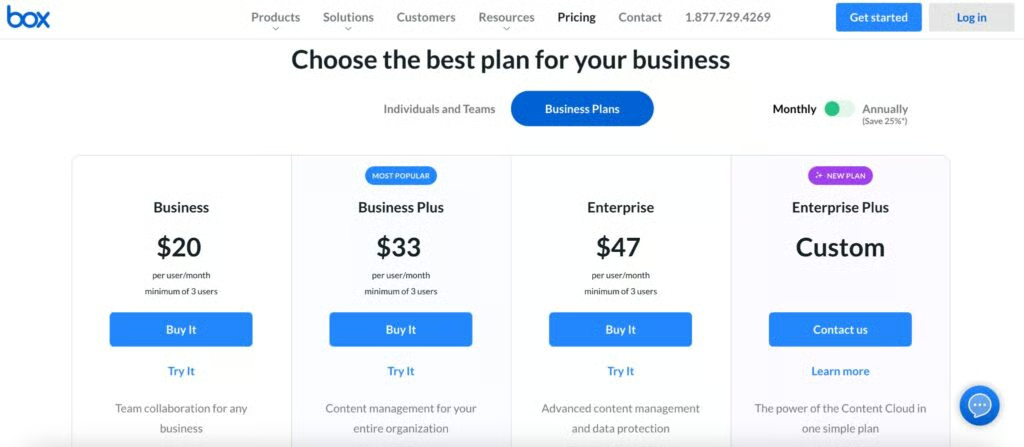
Box’s business plan options with monthly pricing. (Source: Box)
If you’re a business owner looking for unlimited storage, Box is the way to go. Both providers offer unlimited storage, but it’s only available under Dropbox’s highest plan, priced at $30 per user. Box also makes unlimited storage available under its Business plan, which starts at $20 per user. This means businesses that require unlimited storage are better off with Box.
While Dropbox comes out as the more expensive option in this round, small teams that don’t need high-volume storage should consider Dropbox’s Family plan. At only $19.99 per month, it lets up to six users share 2TB of storage. It comes with multidevice access, unlimited signing, and 30-day file recovery and history.
Best for Security & Data Privacy: Tie
| |
|---|---|
|
|
In terms of Box vs Dropbox security, both have similar enterprise-grade security features, including 256-bit and SSL/TLS encryption. They offer at rest and in transit encryption and two-factor authentication as an additional layer of protection. Box and Dropbox have file-level security features like file and folder password protections and access expirations. Also, Box and Dropbox have online security resources like how-to guides to help users maximize features.
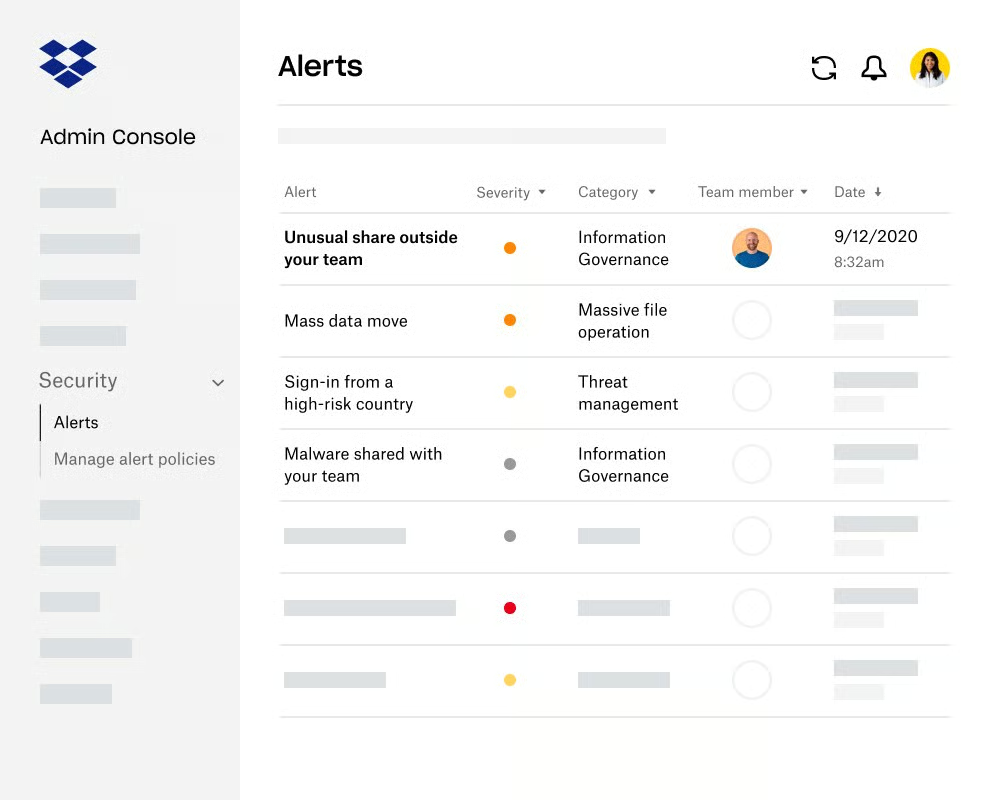
Dropbox offers alerts and notifications to update you on security risks and updates. (Source: Dropbox) 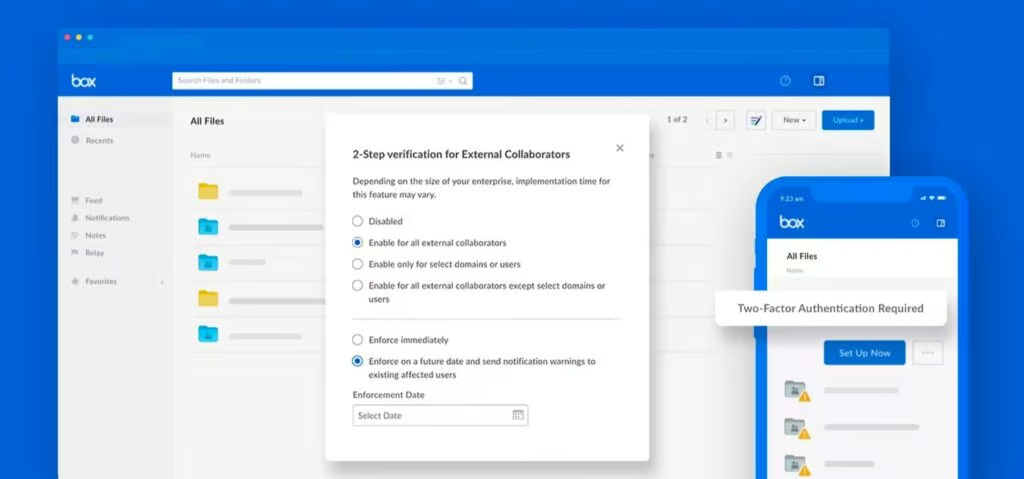
Box extended two-factor authorization to external users. (Source: Box)


Both providers support Health Insurance Portability and Accountability Act (HIPAA) compliance. Dropbox is on our list of top HIPAA-compliant cloud storage providers, and Box’s Enterprise plans are HIPAA-eligible. These two options support SSO (single sign-on), allowing users to log into different applications using one set of credentials.
Best for User Interface (UI): Dropbox
| |
|---|---|
| Very intuitive with a user-first design | Straightforward to use even with little technical know-how |
Dropbox trumps Box when it comes to usability because of its clean and easy-to-understand design. As a file organizational platform, there isn’t much on its interface that the average user can’t decipher. Users can drag and drop files easily from their desktops to the web browser interface without a second thought. It has a consistent UI across all platforms, and we observed that the app categorizes information, making it easy for users to locate what they’re looking for.
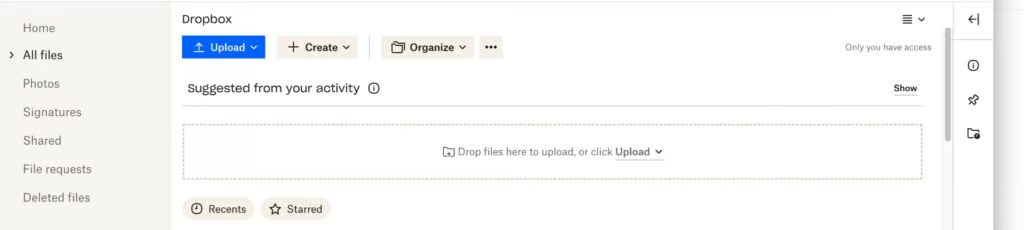
Dropbox’s drag-and-drop bar makes it easy to upload files to the cloud. 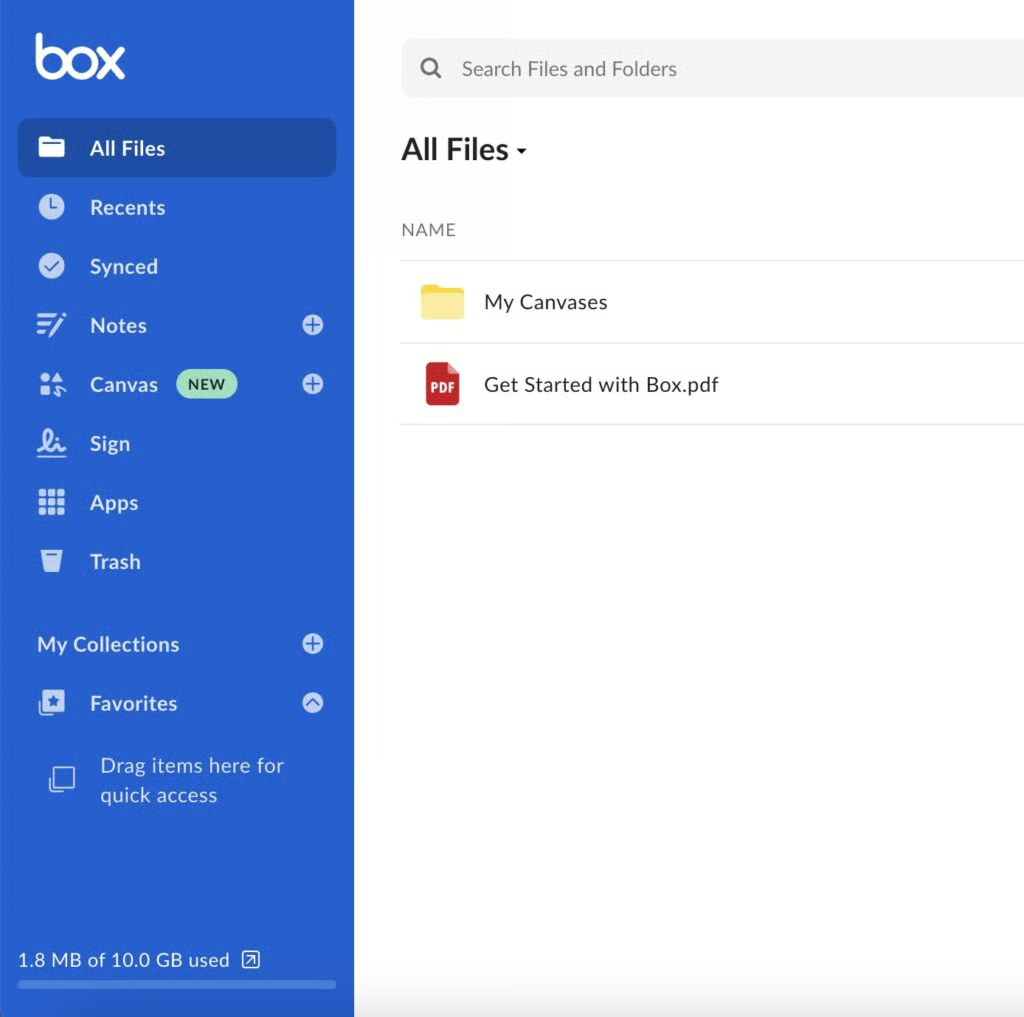
The Box browser interface with a detailed sidebar.


Dropbox has a casual, friendly aesthetic that makes users feel comfortable when using the platform. While it has a similar format as Box, Dropbox takes the lead because it also has a details pane, letting you do more with one click. Comparatively, Box’s UI is clear and easy to navigate, but its drag-and-drop bar is smaller and a bit more hidden than Dropbox’s. It also presents less to the viewer on the main page, so it takes more effort to search for files.
Best for File & Collaboration: Dropbox
| |
|---|---|
|
|
Dropbox excels when it comes to file syncing and collaboration because it offers block-level syncing, which Box does not. Dropbox’s Smart Sync feature enables users to access, edit, and collaborate on files without downloading, saving time and desktop space. It also lets users set expiration dates on links and directly send files to specific people. Dropbox also offers a very generous 100GB data transfer limit.
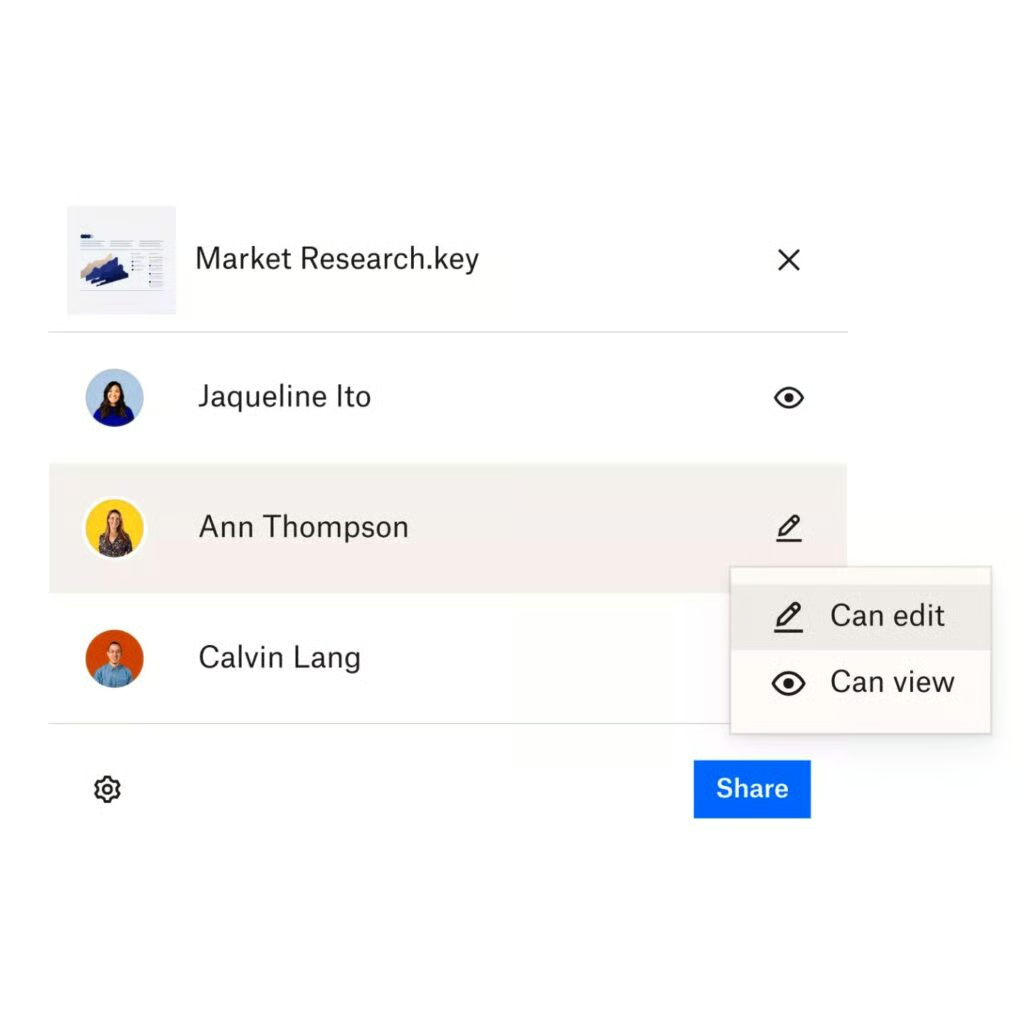
Dropbox’s multiple folder permissions let you choose whether recipients have editing or view-only access. (Source: Dropbox)
While Box lags behind Dropbox, it offers great features like password-protected files and file request tools. Exercise more control over your files with granular sharing permissions and access controls. Box Sign allows from 100 to unlimited document signatures per year, depending on your plan. It offers extensive app connections with over 1,500 integrations for security, collaboration, productivity, and workflows.
Best for Mobility & Access: Dropbox
| |
|---|---|
|
|
When it comes to mobile access, Dropbox edges over Box because of its automatic mobile upload and synchronization across all linked devices. Unlike Box, Dropbox offers media backup and organization, including automatic upload from mobile devices. Set screenshot backups by setting your mobile and desktop app to send screenshots to your Dropbox account instantly. The mobile app scans receipts and documents, turning content into scanned PDFs.

Dropbox’s home screen updates users on the latest file and folder updates. (Source: Dropbox)
Like Dropbox, Box has desktop and mobile apps for Windows, Mac, Android, and Apple, but it lacks the seamless mobile sync and backup feature of Dropbox. However, it offers instant and intelligent content capture using optical character recognition (OCR) technology that recognizes text and turns it into scanned PDFs.
Frequently Asked Questions (FAQs)
What is the difference between cloud storage and online backup?
Cloud storage is geared towards file access and collaboration, while online backup focuses on safeguarding hard drives and disaster recovery. Both cloud storage and online backup are used to store and safeguard data on servers in off-site locations.
What are the disadvantages of cloud storage?
Cloud storage is highly dependent on internet connectivity, and extra storage often comes at a cost. However, with the proper infrastructure and service provider, you can offset these challenges and risks and focus on its benefits, including cost-effectiveness, accessibility, and convenience.
Can multiple people share a Dropbox account?
Yes, Dropbox offers individual and shared plans for families and small teams. Businesses can opt for the Family plan, which includes six individual accounts, shared billing, and a Family Room folder for group sharing and coordination. Smaller teams are better off with the Standard plan with 5TB, file and account recovery, and automatic computer backup. You need at least three users to avail yourself of the Standard plan.
How We Evaluated Box vs Dropbox
We compared Dropbox vs Box as cloud storage solutions to find out what sets each provider apart. We examined their strengths and weaknesses, including their unique functionalities, and weighed that against practical feedback from users on legitimate review websites. From there, we scored each provider based on factors that matter most to small businesses, such as pricing, feature, integrations, ease of use, and expert score.
Here’s a complete breakdown of these factors:
- Pricing: We compared Box vs Dropbox monthly per-user pricing and the inclusive features at each tier. Free trials and discounts for annual pre-payments and volume purchases were also figured into our review.
- General features: When comparing Dropbox vs Box, we considered the tools essential to a cloud storage solution, such as file sharing, user management, and integrations. We also checked which provider has more security capabilities and better customer support.
- Ease of use: We tested both platforms to determine how easy it is to set up, upload and download, file share, and adjust security settings. In addition, we evaluated each provider based on ease of setup and implementation.
- Data and security: As we compared Box.com vs Dropbox, we looked at the features related to data and security, specifically types of encryption offered as well as file control measures like password protections. We also favored the provider that supports HIPAA compliance.
- Expert score: We analyzed each product’s overall value by looking at the feature set and total costs. We also examine user reviews to determine the popularity of both providers while considering our personal experiences.
Bottom Line
When comparing Box vs Dropbox, we found that both popular cloud storage solutions offer similar security and file-sharing features that small businesses appreciate. Dropbox is an ideal solution for professionals and small teams looking for an easy-to-use platform that supports mobile access and file sharing. Box is better for enterprise-level businesses needing unlimited storage. Sign up for Dropbox’s free plan today and see if it’s the right solution for you.
