






Retail media is advertising that appears directly on retailer platforms like Amazon, Walmart, Target, and Kroger, reaching shoppers while they are already browsing or checking out. US retail media ad spend reached an estimated $51.94 billion in 2024 and is estimated to reach $62 billion in 2025, making it one of the fastest-growing digital channels, and more of that spend is coming from smaller brands that want clearer, closer-to-the-sale performance.
If you are a small business owner wondering whether this is worth testing, I will show you how retail media works, which networks to start with, how much to spend, and the exact steps to launch and measure your first campaign in this guide.
- What is retail media?
- Why retail media matters for small businesses
- The retail media ecosystem: How this channel actually works
- Types of retail media
- Real-world examples: How small businesses use retail media to drive sales
- How SMBs should choose a retail media network
- How to launch your first retail media campaign
- Retail media key metrics you should track
- Common pitfalls and how to avoid them
- Frequently asked questions (FAQs)
- Bottom line
What is retail media?
Retail media is advertising that appears directly on a retailer’s platforms (think Amazon, Walmart, Target, or Kroger) using their first-party shopper data to reach people who are already in buying mode. That’s the simplest way I explain it to small business owners.
When you see a “Sponsored” product sitting at the top of a search page on Amazon or a display ad on a Walmart category page, that’s retail media. These ads show up right where purchase decisions happen, which is one reason the channel has become so big. In fact, US retail media ad spend reached $51.94 billion in 2024, according to Insider Intelligence.
When working with small business owners, here’s the definition I use most often because it clicks immediately: Retail media lets you put your product in front of shoppers while they’re actively browsing or buying from a retailer, whether it’s online or in-store.
Retail media includes several placements:
- Sponsored product listings on retailer websites
- Sponsored search results
- Display ads on category pages or product pages
- Digital screens in-store (grocery, big-box, and convenience stores)
- Off-site ads powered by retailer shopper data, such as Kroger audiences targeted on YouTube or Instagram
I recommend retail media for small businesses because you’re not paying to reach random people. You’re showing up inside a retailer’s ecosystem, where the shopper intent is already high. And because retailers use their own loyalty and purchase data, the targeting is far sharper than what most small brands could build on their own. If you want to stretch a small ad budget and get closer to the actual sale, this is one channel worth understanding from the start.
Why retail media matters for small businesses
Retail media helps you reach high-intent shoppers, waste less budget, and access retailer-level data you might not usually have access to. In my experience working with small brands, this is one of the few ad channels where even a modest daily spend can produce meaningful results.
Let’s break down what I mean below — here are the key reasons you, as a small business owner, should lean into retail media.
Retail media has higher buyer intent than social or search ads
When someone is browsing on Amazon, Walmart, or a grocery app, they’re not casually scrolling; you can bet that they’re planning to buy something or already shopping. That intent alone makes the spend more efficient.
Moreover, in my research about how people shop online, Amazon not only drew the most traffic but also claimed the highest global merchandise sales in 2024, reinforcing its role as both a shopping destination and a product discovery engine. You can read all about it in my online shopping statistics article.
If most customers start their search on retail sites, showing up in those search results puts you in front of people who are ready to buy, not just browse.
Retail media has access to retailer first-party data
Retailers hold incredibly detailed purchase data — everything from loyalty activity to basket composition. As a small brand, you would never be able to build that dataset yourself. Advertising Week puts it clearly: retail media gives SMBs direct access to retailer-owned data that makes targeting more precise and lowers wasted spend.
Retail media shows you exactly what your ads led to — views, clicks, and real purchases
One of my favorite parts of retail media is that you can easily connect ad spend to sales. If someone sees your sponsored placement and buys your product later that day, you can track it without having the need to guess where the sale came from.
This “closed-loop” measurement is one reason retail media is exploding. Advertisers are shifting budgets toward channels that can link impressions to real purchases, which is exactly what retail media does.
Retail media is a strong, efficient channel for businesses on a budget
Retail media keeps proving itself when budgets are tight. In 2024, it was the fastest-growing digital ad channel even as many advertisers cut spending elsewhere, according to eMarketer.
Smaller brands are leaning into this. Digiday reported that emerging beverage and fragrance companies shifted more money into retail media during recession concerns because it delivered “clearer and faster sales impact.”
The reason is simple: retail media ads run close to the point of sale. You are not paying to educate people who may never buy. You are showing up in front of shoppers who are already comparing products, which makes it a more efficient way to spend a small budget.
Retail media gives you a chance to compete with bigger brands
I hear this from small business owners all the time: How can I stand out next to bigger brands?
On retail platforms, sponsored search levels the playing field. If you bid on the right keywords and optimize your product pages, you can appear above major competitors even with a small spend.
The retail media ecosystem: How this channel actually works
Retail media works because retailers own three things small businesses usually can’t build on their own: audience, data, and digital real estate. Once you see how these pieces come together, the whole channel becomes easier to understand.
Meanwhile, a retail media network (RMN) is simply the retailer’s advertising platform — Amazon Ads, Walmart Connect, Target Roundel, Kroger Precision Marketing, and Instacart Ads are some of the best-known examples. Smaller networks can also be strong options, especially if they fit your product category.
Below is a straightforward breakdown so you can see how the ecosystem functions and why it matters for your budget.
Retailer inventory (where ads appear)
Retailers own the digital spaces where shoppers browse, compare, and buy — from search results to product pages to in-store screens. This inventory is valuable because your ads appear exactly where buying decisions happen, not scattered across the open web. For small brands, this makes visibility much more meaningful.
First-party data (who sees the ads)
Retailers use loyalty activity, purchase history, and basket behavior to decide who should see your ads. Most small businesses can’t build this level of targeting on their own, so tapping into retailer data gives you access to audiences already proven to buy in your category. It’s one of the main reasons retail media stretches a small budget further.
Closed-loop measurement (what those people bought)
Retailers can connect the dots between ad exposure and actual sales, both online and in-store. That means you can see if your ad led to a click, a product view, or a purchase — something many other ad platforms can’t offer without complicated tracking setups. For SMBs, this removes a lot of guesswork.
How these pieces work together
Here’s the simplest way I can describe it: Retailers own the space. They own the data. They own the moment of purchase. Retail media lets you rent all three.
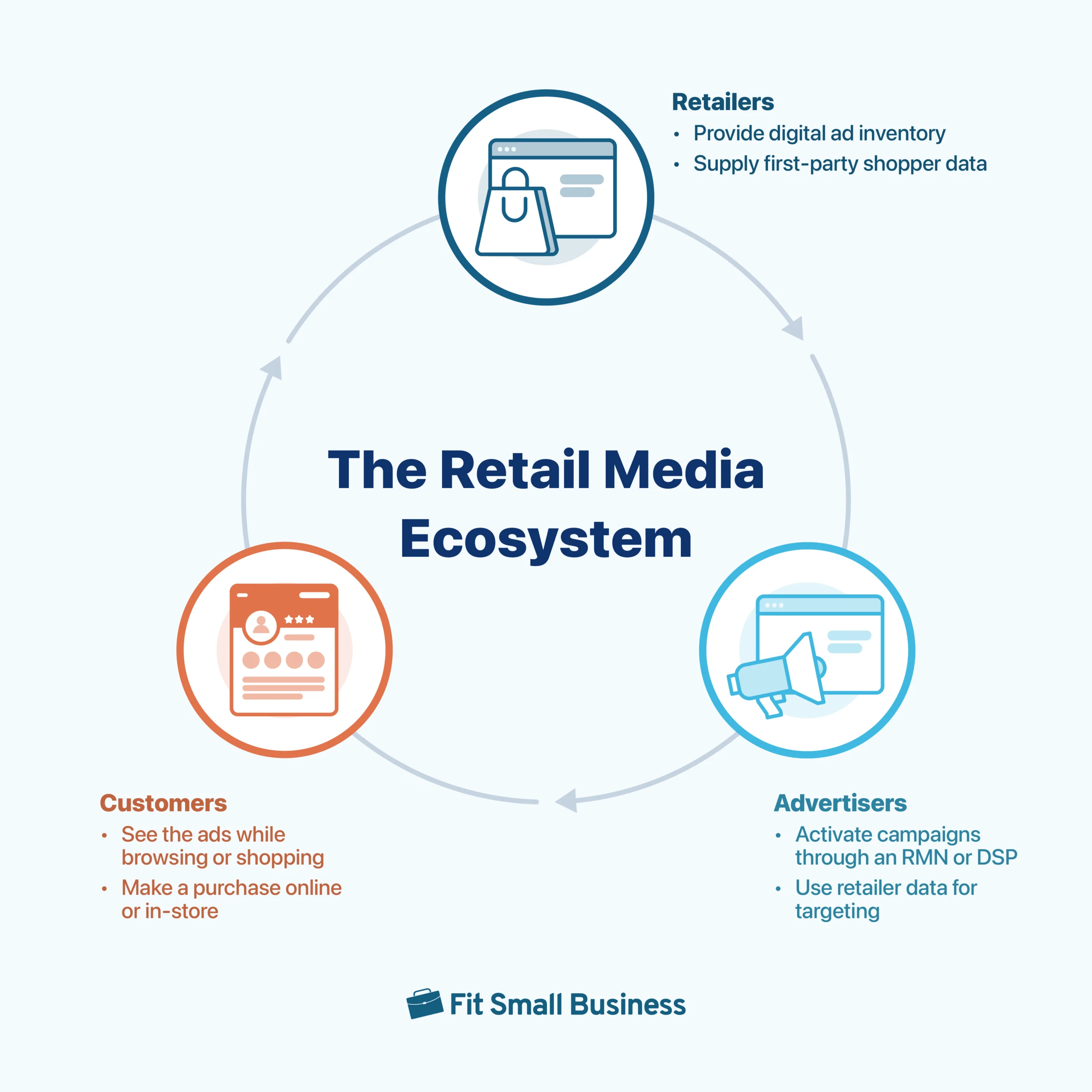
The ecosystem works by combining:
- Retailer inventory (where ads appear)
- First-party data (who sees the ads)
- Closed-loop measurement (what those people bought)
This combination of inventory, data, and measurement is why retail media tends to perform better for small budgets than broad awareness channels. Everything is built around one thing: the sale.
Types of retail media
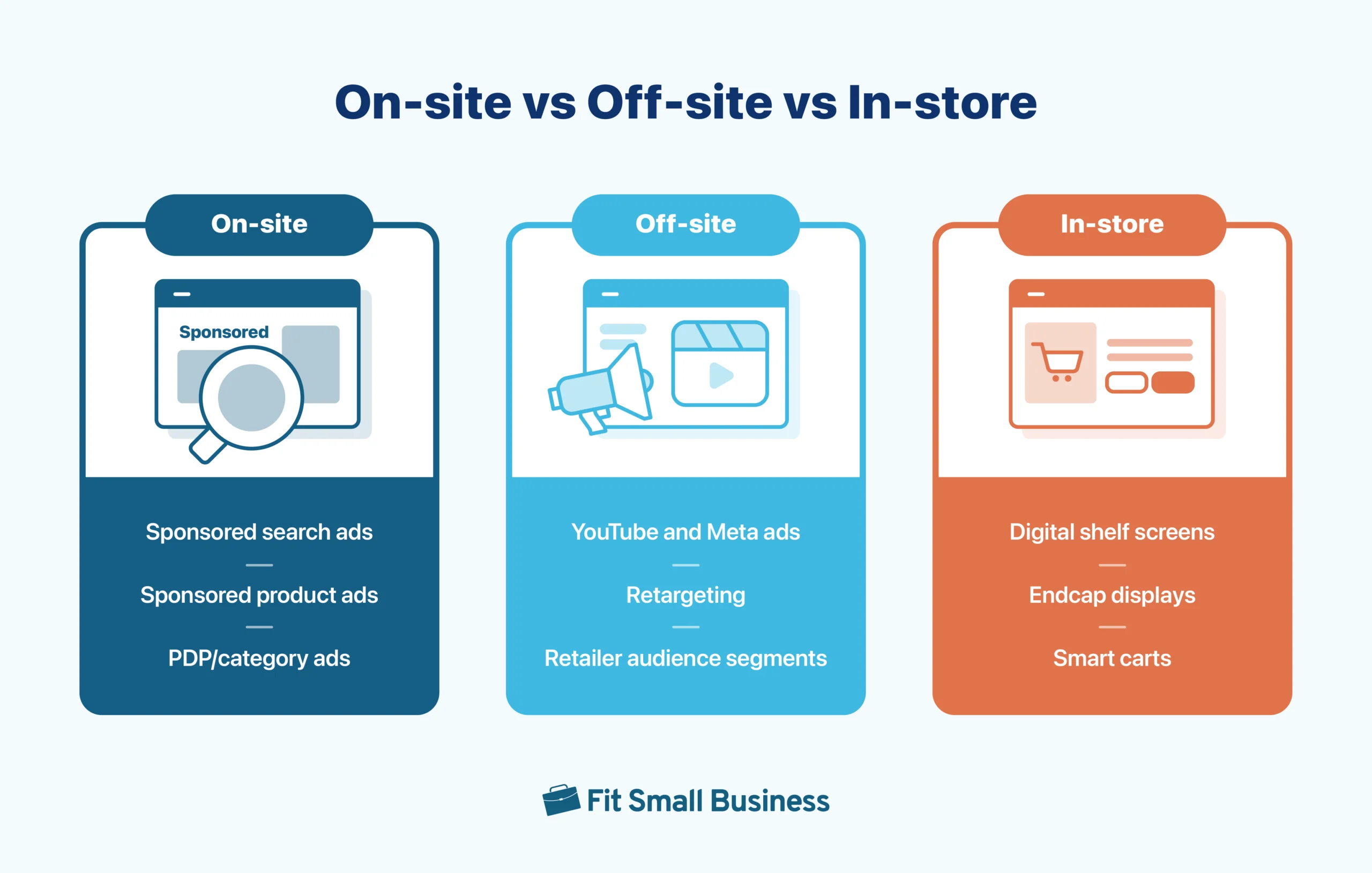
On-site retail media: Ads that show up inside retailer websites and apps
This is the part most business owners recognize. These are the ads shoppers see when they’re actively browsing or adding to cart. Common formats include:
- Sponsored product listings at the top of search results
- Sponsored search ads triggered by keywords
- Display ads on category pages, product pages, or homepages
- “Buy box” placements or suggested items
- Video ads inside retailer apps (like Amazon or Walmart)
Why this matters: These placements catch shoppers right when they’re choosing between products. You don’t need a huge budget to compete for visibility if your targeting is dialed in.
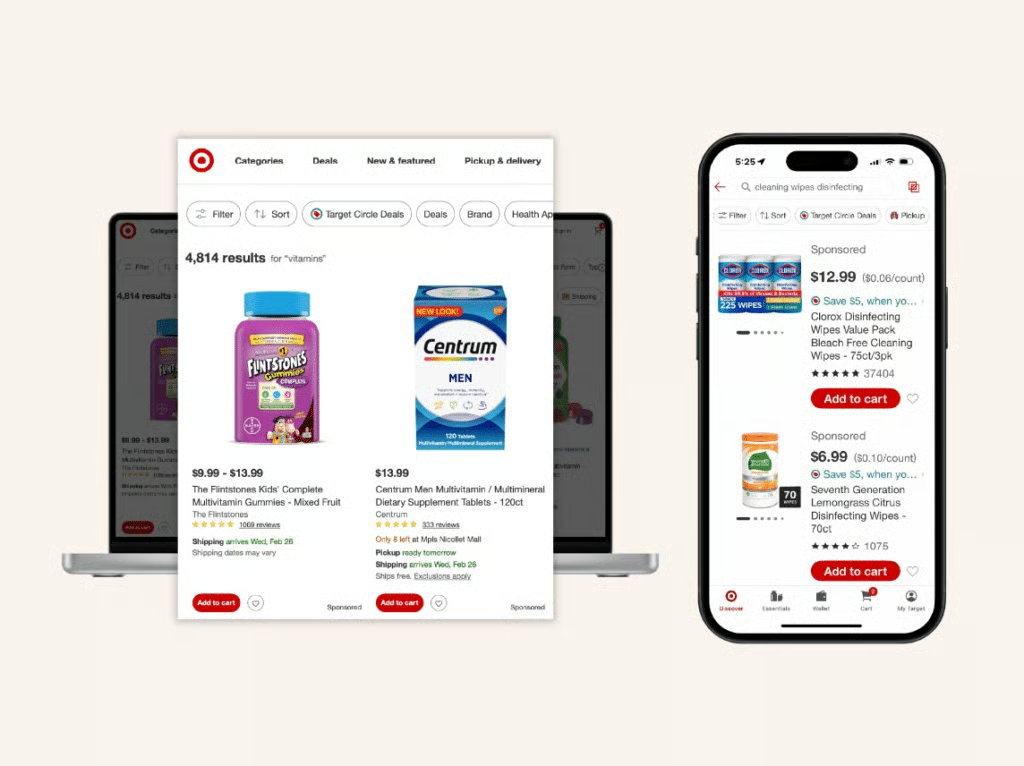
Target’s retail media network, Roundel, places sponsored products and paid listings directly inside Target.com and the Target app, reaching shoppers as they browse and search. Their on-site placements appear alongside organic results, giving brands visibility at the exact moment customers are choosing what to buy.
Off-site retail media: Retailer data powering ads everywhere else
This surprises a lot of small business owners. Retailers now let you use their shopper data to target audiences beyond their site. Examples include:
- Running a YouTube campaign that targets “Kroger high-frequency buyers”
- Showing a Meta ad to “Walmart back-to-school shoppers”
- Retargeting someone who viewed your product on Target.com but didn’t buy
Why this matters: You get enterprise-level audience targeting without needing enterprise-level tools.
With Instacart’s Off-Platform Solutions, for example, you can deliver ads driven by Instacart’s shopper data onto off-site channels like YouTube. This lets you reach grocery-shopper audiences beyond the Instacart app and still tie exposure back to purchase behavior.

In-store retail media: Screens, smart carts, and aisle displays
Retailers are quickly adding in-store digital inventory, and it counts as retail media. Common formats include:
- Digital shelf screens
- Endcap displays with motion graphics
- Smart carts with built-in screens
- Self-checkout screen ads
Why this matters: If your product is already on shelves locally, these ads catch shoppers when they’re physically making choices. This can be powerful for food, beauty, beverage, and household brands.
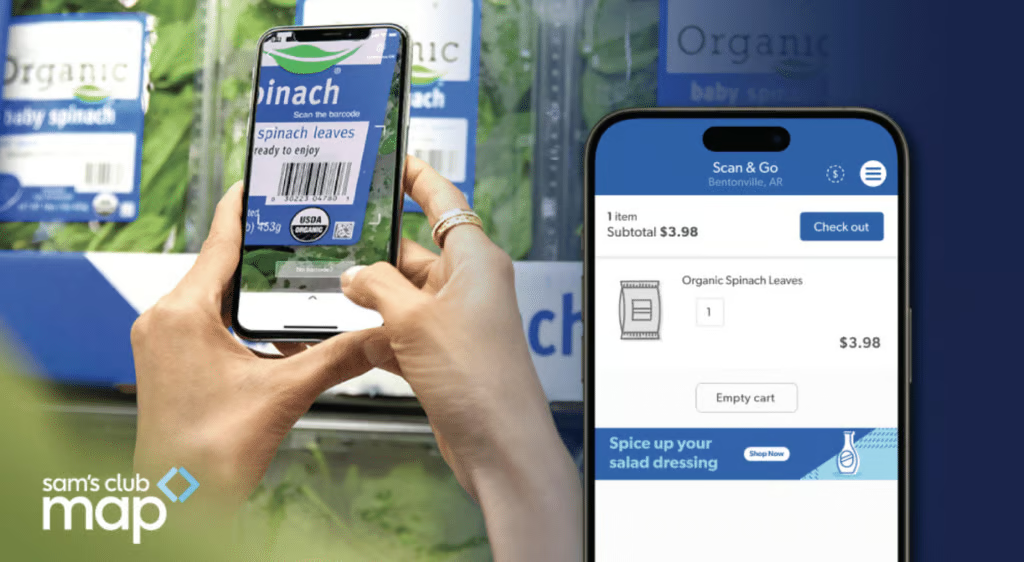
Sam’s Club’s smart carts, equipped with digital screens through Sam’s Cart & Go, are a practical example of in-store retail media in action — showing sponsored messages while shoppers move through the aisles.
Real-world examples: How small businesses use retail media to drive sales
One of the biggest questions I get from small business owners is, “Does retail media actually work for brands my size?” The short answer is yes.
I want to show how other small brands are winning so you can see where this might fit into your own strategy. Below are real examples from verified case studies showing how smaller brands use retail media to grow sales, improve ROAS, and compete with bigger companies.
Example 1: Kazi (small home goods brand) grew Amazon sales 350% with retail media
Kazi is a small home goods brand selling artisan-made baskets and décor. It leaned into Amazon Ads to scale its visibility and focused its budget on hero products that already resonated with shoppers.
Key results:
- 350% increase in Amazon sales year over year
- 80% of Amazon sales driven by Amazon Ads
- 4x return on ad spend (ROAS)
What other SMBs can learn:
Kazi didn’t try to promote everything. It ran Sponsored Products, Sponsored Brands, and Sponsored Display for a handful of items, watched which ones took off, and reallocated the budget to the winners. That’s a strategy any small brand can copy.
Example 2: Made for Locs (niche beauty SMB) hit 10x ROAS by showing up in the right searches
Made for Locs is a small, niche hair-care brand created by a solo founder who couldn’t find the right products for her own locs. She used Amazon Ads to get in front of shoppers already searching for loc-specific products.
Key results:
- 10x ROAS from Sponsored Products
- 40% increase in average order value
- 60% increase in Subscribe & Save conversions
Why this matters for SMBs:
This is a perfect example of a small brand punching above its weight. When you appear in searches like “loc shampoo” or “loc conditioner,” you’re not competing with the entire beauty industry; you’re competing only with products solving that specific problem.
After reviewing dozens of small-brand case studies, here’s what I have noticed consistently:
- They all focused their spend on high-intent placements like sponsored search or sponsored product listings.
- They started with a small, controlled budget, measured results closely, and only scaled what worked.
- They used retail media data to refine which keywords, audiences, and SKUs to keep funding.
- They didn’t try to “win everything”, they focused on the most profitable product lines first.
As you can see, small brands see stronger results when they invest in ads that reach shoppers who are close to making a purchase.
How SMBs should choose a retail media network
Choosing the right retail media network comes down to where your customers shop, what budget you’re working with, and which retailer can give you the best visibility for your category. Small business owners often think they need to be on every platform at once, but the reality is you only need one good fit to get started.
Here’s how I walk SMBs through the decision.
1. Start with where your products already sell
If your product is already listed or stocked somewhere, the best place to start is the retail media network connected to that retailer. This gives you clearer attribution, better data, and a faster feedback loop.
For example, if you sell on Amazon, begin with Amazon Ads. If your products are in local grocery stores, look into in-store or digital shelf placements through Kroger Precision Marketing, Albertsons Media Collective, or Hy-Vee RedMedia. And if you’re listed on Target.com, explore Target Roundel.
The closer the retail media network is to your actual point of sale, the easier it is to see whether your ads are truly working.
2. Pick networks aligned with your product category
Not every retailer is strong in every category. Some specialize; this matters more than business owners expect. Here are a few examples:
- Grocery / beverage: Kroger Precision Marketing, Instacart Ads, Walmart Connect
- Household/CPG: Walmart Connect, Target Roundel
- Beauty: Amazon Ads, Ulta Media Network, Sephora’s retail media pilots
- Pet products: Chewy Ads
- Home goods: Amazon Ads, Wayfair Media Solutions
- Office and supplies: Staples Media Network
This is where you can save a lot of money. Competing on Amazon for “all-purpose cleaner” might be pricey, but a network like Kroger or Albertsons could offer cheaper clicks and more qualified shoppers.
3. Check minimum spends and cost structure
Some RMNs are fully self-serve with no minimums (Amazon, Walmart, Instacart). Others require a managed service minimum. If you’re working with a very small budget, Amazon, Walmart, and Instacart are usually the most accessible starting points.
Here are the typical ranges of RMNs:
- Amazon Ads: No minimum. You can start with $10–$20 per day.
- Walmart Connect: No minimum for self-serve; managed services vary.
- Instacart Ads: No minimum; CPC-based.
- Target Roundel: Often requires higher budget or agency partnership.
Grocery chains: Some charge fixed fees for in-store placements.
4. Look at reporting transparency
When you compare retail media networks, reporting is one of the most important things to look at. You want a platform that clearly shows sales attributed to your ads, click-through rate, return on ad spend (ROAS), ad cost of sale (ACOS), new-to-brand customers, and incremental sales.
Some networks, especially Amazon and Instacart, offer strong, easy-to-use dashboards for self-serve advertisers, while others rely more on reports delivered through account representatives, which can slow down how often you check performance.
5. Consider the competitive landscape
A common trap: picking the biggest retailer first because “that’s where everyone is.” But for SMBs, less competitive networks can deliver stronger returns.
Example: A small beverage brand might face high CPCs on Amazon, but significantly lower competition and better category relevance on Kroger Precision Marketing or Instacart.
6. Use one network first, then expand
In my experience, small businesses get the best results when they keep things focused. Start by choosing one retailer, run a small test — usually with sponsored search — see what works, and then scale within that same network before expanding anywhere else.
Retail media rewards this kind of focused, step-by-step approach. Spreading a small budget across multiple networks too early usually slows your results and makes it harder to learn what’s actually working.
How to launch your first retail media campaign
Follow these simple steps to get started with retail media.
- Step 1: Pick one retailer and one hero product. Choose the retailer that already sells your product (or fits your category best), then pick one product with decent margin and the best reviews you have.
- Step 2: Fix your product page. Make sure your listing has clear photos, a simple title, helpful bullet points, a solid description, and accurate pricing. Ads will not work well if the page is confusing.
- Step 3: Set a small daily budget: Start with around $10 to $20 per day on one campaign. Treat this as a test, not a final setup.
- Step 4: Launch a sponsored search campaign: Use Sponsored Products or Sponsored Search. Target a mix of obvious keywords (what your product is) and longer phrases customers might type when they are ready to buy.
- Step 5: Let it run and watch the basics. Give it seven to 14 days. Then check which keywords drove clicks and sales, what your ROAS and ACOS look like, and whether total sales on that retailer went up.
- Step 6: Cut what wastes money, keep what works. Lower bids or pause keywords that spend but do not convert. Keep or slightly raise bids on keywords that bring profitable sales. If results look stable and profitable, slowly increase your daily budget or add a second product. Do this in small steps so you can see what actually improves performance.
Retail media key metrics you should track
The most important thing with retail media is not how much you spend, but what you learn from your numbers. More than 70% of retail media advertisers now say incrementality is their top KPI, which tells you how serious brands are about measuring true impact, not just clicks.
You do not need a data team, but you do need to watch a few core metrics. Here are the metrics I recommend you track:
ROAS and ACOS: Are your ads profitable?
ROAS and ACOS tell you, in plain numbers, whether your retail media spend is paying off or eating into your margin. ROAS (return on ad spend) is revenue generated divided by ad spend. For example, if you spend $100 and make $400, ROAS is 4. ACOS (ad cost of sales) is ad spend divided by revenue. This means if you spend $100 and make $400, ACOS is 25%.
These metrics show if your campaigns are actually making money, not just driving clicks, and help you decide which ads to scale, fix, or shut off.
Most RMNs and ad dashboards show ROAS and ACOS at the campaign, ad group, and keyword level. Export reports weekly, line them up against your product margins, and flag anything where ACOS is higher than your profit margin.
Incremental sales and iROAS: Did the ads drive extra sales?
Incremental sales tell you whether your ads actually produced new revenue or just shifted around orders you would have gotten anyway. Incremental sales measure the “extra” lift your ads created. iROAS (incremental return on ad spend) looks only at that extra revenue, not your full sales total.
These metrics help you see the real impact of your spend, not just what the ad platform attributes. They also prevent you from wasting budget on campaigns that look good on paper but don’t actually grow your business.
You can track incremental sales through built-in lift reports (if your RMN offers them) or by comparing on/off periods. Look for total sales increases during active campaigns and pay attention to whether performance holds when ads pause.
New-to-brand customers: Are you gaining new buyers?
New-to-brand customers are shoppers buying your product for the first time on that retailer network. This metric helps you understand whether your ads are expanding your customer base or just attracting people who already buy from you.
It’s important because new buyers help your long-term growth and often come back to purchase again. It also lets you justify a slightly higher ACOS if the campaign is bringing in high-value first-time customers.
Most retail media dashboards show a “new-to-brand” or “first-time buyer” column. Track these numbers by campaign and keyword, and compare the share of new customers to repeat buyers to see which ads are helping you grow.
CTR and conversion rate: Is your listing doing its job?
CTR (click-through rate) tells you how many people clicked your ad after seeing it. Conversion rate tells you how many buyers completed a purchase after landing on your product page. Together, they show whether your ads and product pages are working.
These metrics matter because they highlight exactly where the problem is. A low CTR usually means your ad or keyword targeting isn’t aligned with what shoppers want. A low conversion rate usually means the product page needs improvement.
Track CTR and conversion rate inside your RMN dashboard. If CTR is low, adjust creative or keyword targeting. If conversion is low, update your product photos, bullets, description, or price before increasing bids.
Share of voice: How visible are you compared to others?
Share of voice (SOV) measures how much exposure your brand gets within a category or set of keywords compared to competitors. It tells you whether you’re actually showing up where customers shop—or getting drowned out.
This matters because strong visibility drives awareness and sales, especially during seasonal windows or promotional periods. Low SOV can explain why good campaigns still underperform in crowded categories.
Many RMNs and third-party tools offer SOV or “search impression share.” Track SOV for your top search terms weekly and watch how budget changes or competitor activity affect your visibility.
Margin and profit: Are you actually making money?
Margin and profit show whether your retail media campaigns are sustainable after you account for product costs, platform fees, and ads. Margin is the percentage left after all costs. Profit after ads is what you keep once ad spend is factored in.
This is the most important metric because it protects you from scaling campaigns that look good in ROAS but are actually losing money per sale. It helps you identify which products can support paid ads and which cannot.
To track this, map out each SKU’s price, item cost, retailer fees, and typical ACOS. Compare these numbers weekly to make sure your ads aren’t cutting too far into your margin and adjust bids or pause SKUs that can’t support paid spend.
Common pitfalls and how to avoid them
Even with a good setup, small businesses often run into the same problems when they start using retail media. Here are the most common pitfalls I see and how you can avoid them.
Pitfall 1: Treating retail media like a set-and-forget channel
A lot of small brands turn on ads and walk away. Weeks later, they are unhappy with the results but have no idea what happened.
How to avoid it: Block a short weekly review to check ROAS, ACOS, top search terms, and your best-performing SKUs. Small, regular adjustments beat big, panic changes later.
Pitfall 2: Spreading a small budget across too many retailers
If you put $5 here, $10 there, and $15 somewhere else, you typically end up with weak results everywhere and no clear learnings.
How to avoid it: Focus on one retailer first. Prove success on that platform, then expand.
Pitfall 3: Ignoring product-page quality
Retail media will send traffic, but the product page still has to do its job. Poor photos, confusing copy, and missing details will quietly kill your conversion rate.
How to avoid it: Improve your product detail pages before scaling spend. Look at your top competitors and make sure your listing feels at least as clear and complete.
Pitfall 4: Not watching stock levels
There are plenty of horror stories where brands kept paying for ads while items were out of stock.
How to avoid it: Either set up automation or build a simple habit: whenever you adjust campaigns, check inventory on those SKUs too. Some networks let you pause ads when stock drops below a certain threshold.
Pitfall 5: Over-fixating on one metric
Some brands chase ROAS so hard they forget about new customer growth. Others focus only on impressions or click-through rate.
How to avoid it: Track a small set of metrics together: ROAS, ACOS, incremental sales, new-to-brand customers, and share of voice for your main terms. You want a healthy mix, not one number that looks great while the rest lag.
Frequently asked questions (FAQs)
Do I have to sell on a retailer’s website to use its retail media network?
Not always. Some networks let you run off-site campaigns that drive to your own site or to stores. That said, if your product is listed on the retailer’s site, it is much easier to see exactly how many sales your ads generated.
What is the minimum budget I need to start a retail media campaign?
In practice, many small brands start with $10–$20 per day on a single retailer and run that for a couple of weeks. That is enough to see which keywords or placements could work for you without risking too much upfront.
How long before I see results when I launch a retail media campaign?
You can start seeing directional results within 7–14 days if you have decent traffic and a solid product page. Reliable patterns, especially for seasonal items, often take a few weeks of testing and adjustment.
Is retail media only for product brands?
Retail media is strongest when you have a product to put in a cart, but service businesses that sell via marketplaces or big-box partners can sometimes use these platforms too. The key is whether there is a clear way to connect the ad to a sale.
How is retail media different from Google Ads or Meta?
Google and Meta are great for discovery and intent-based search in general. Retail media, on the other hand, shows your ads when people are already shopping on a retailer site, app, or in-store channel. You are closer to the sale, which usually makes small budgets work harder.
Bottom line
Retail media is one of the few ad channels where a small budget can still move the needle, because you are meeting shoppers inside the retailer’s ecosystem at the moment they are ready to buy. If you start with one retailer, clean up one great product page, run a small sponsored search test, and watch your core metrics closely, you will know quickly whether retail media deserves a permanent spot in your marketing mix.
