







In this ultimate headless commerce guide, you’ll learn what this commerce platform architecture actually means, how it compares to traditional platforms, whether it’s right for your business, and how to make the switch. I break it down using real-world examples, platform comparisons, and cost insights that growing small businesses should consider.
- What is a headless commerce platform?
- Is headless commerce right for your small business?
- How much does headless commerce cost?
- How to choose a headless commerce platform for your small business
- Top headless commerce platforms for small businesses
- How to transition to headless commerce
- Headless commerce examples: Use cases
- Frequently asked questions (FAQs)
- Bottom line
What is a headless commerce platform?
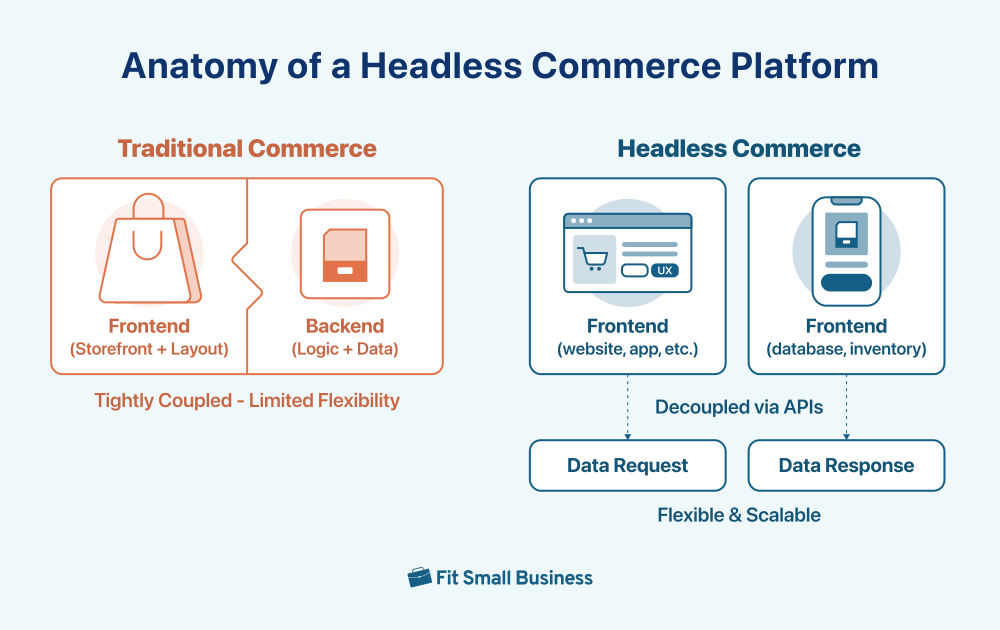
A headless commerce platform is an ecommerce architecture that has a separated frontend (the part users interact with) and backend (where your products, orders, and customer data live). In a headless commerce infrastructure, the layers communicate through APIs (Application Programming Interface), giving businesses more freedom to design, scale, and integrate with tools without being limited by each other.
How headless commerce works
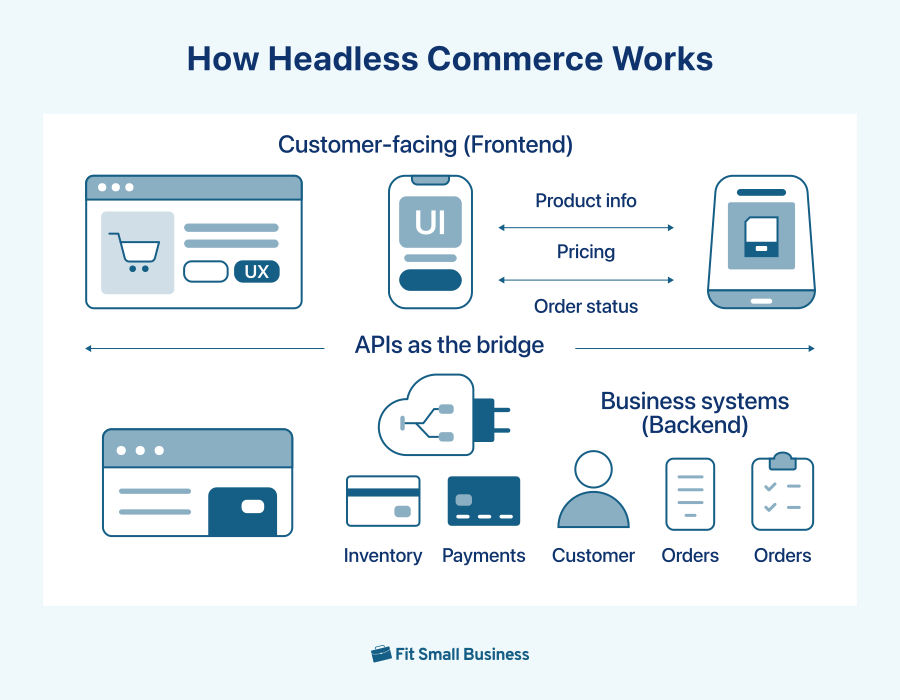
Headless commerce works by decoupling (separating) the visual layer of your site (frontend) from the system (backend) that powers its operations. Here’s a breakdown of how the pieces come together:
1. Separation of front-end and back-end
- Frontend (the “head”): This is what your customers see — your website, mobile app, smart mirror, or any other digital storefront. It handles all aspects of UI (user interface) and UX (user experience), from product browsing to the checkout experience.
- Backend (the “body”): This is the engine of your business — where product data, inventory, orders, customer profiles, and payments are stored and processed.
2. Connection through APIs
- APIs act as the bridge: Instead of hardcoding how the front and back talk to each other, APIs allow the front-end to request and receive data (such as product info or pricing) in real time.
Because the frontend and backend are no longer locked together, you can change one without affecting the other. That means your developers can use modern frameworks on the frontend, and you can switch your commerce engine later if needed, without rebuilding everything.
Headless commerce vs traditional commerce
Traditional ecommerce platforms are like all-in-one solutions; everything from your store’s design to your inventory system is bundled together. That makes them easier to manage but harder to customize. Headless commerce, on the other hand, splits the frontend and backend, giving you room to tailor each part of your store independently.
Here’s how they compare:
| Feature | Traditional commerce | Headless commerce |
|---|---|---|
| Flexibility | Limited to platform templates | Total design freedom |
| Site speed | Depends on built-in tools | Optimized through custom front-ends |
| Omnichannel readiness | Often limited or add-on | Built for multichannel delivery |
| Developer requirements | Low | Medium to high |
| Cost | Lower upfront | Higher upfront, scalable long-term |
In short, if you’re looking for a fast (easily deployable), out-of-the-box solution and don’t need a lot of customization, traditional commerce may suit you just fine. But if you’re scaling fast, need deeper integrations, or want full control over the user experience, going headless is the more sound decision.
Key terms explained
If you’re new to headless commerce, you’ll come across a lot of technical jargon. This glossary has most of the important and often mentioned terms, so whether you’re talking to a developer or choosing tools, you’ll know exactly what each term means and why it matters.
- API (Application Programming Interface): A set of tools that allows software components (like frontend and backend) to communicate.
- API-first: A development approach where all features are available via API for maximum flexibility.
- CMS (Content Management System): Software that helps you create, manage, and update content like blog posts, product descriptions, or landing pages.
- Headless CMS: A CMS that delivers content via API instead of a pre-built template.
- Frontend: The visual layer that users interact with (e.g., your store’s homepage or product page).
- Backend: The server-side layer handling data like inventory, payments, and customer info.
- GraphQL: A modern language for querying APIs that lets you request exactly the data you need, no more, no less.
- Storefront: The digital face of your store, where customers browse and buy products — like your homepage, collections, and product pages.
- Composable commerce: A modular approach to building your tech stack using best-in-class tools for each function (e.g., CMS, payments, search).
Is headless commerce right for your small business?
Choosing headless commerce isn’t just about chasing trends; it’s about aligning your tech stack with your growth goals. If you’re selling across multiple channels, running into platform limitations, or scaling fast, headless might offer the flexibility and control you need. But it also comes with added complexity, costs, and technical demands. Let’s walk through the upsides and trade-offs so you can decide what’s right for your store.
Benefits of headless commerce for small businesses
Headless commerce is definitely not just for tech giants; small businesses that are growing fast or selling across multiple channels can benefit from going headless. Here’s how:
- Standout branding and custom design: Traditional platforms can feel limiting when you want your site to look and behave a certain way. Headless gives you full control over the front-end, so you can create a storefront that looks nothing like your competitors’ and matches your brand to a tee.
- Consistent experience across every channel: Whether your customers shop through your website, mobile app, Instagram Shop, or even an in-store kiosk, headless lets you manage all these touchpoints from one system. That means your brand looks and feels the same no matter where your customers are.
- Faster site performance = better conversions: A decoupled front-end often leads to much faster loading times. In fact, businesses that switch to a headless setup often see their pages load up to 30% faster. That speed matters; quicker load times keep visitors engaged and increase the likelihood they’ll complete a purchase. Many companies also report a 20–25% boost in customer interaction after going headless, thanks to smoother, more responsive experiences.
- Better personalization options: You can tailor your content, layout, and promotions to individual shoppers based on what they’ve browsed or bought, without having to rebuild entire pages.
- Faster updates and campaigns: Want to change your homepage for a weekend promo? Headless setups let your team make updates without waiting on full site deployments or dev tickets, especially if you’re using a visual builder (this is similar to the drag-and-drop builders you might be currently using).
- Easier integrations with your tools: If you use different software for email marketing, accounting, or customer management, headless lets you connect them via APIs, so you are not constrained to app store limitations or forced to do workarounds.
- Built to scale with you: As you grow — whether that’s adding new sales channels, launching international sites, or handling more traffic — headless can scale each part of your system independently. You won’t need to tear everything down and start over when it’s time to expand.
- Future-ready and flexible: Headless helps you stay ahead. If the platform you’re on changes pricing or limits your features, you’re not stuck. Since your front-end is separate, you can switch back-ends without redoing the entire site.
Common challenges of headless commerce for small businesses
Even if I have given several benefits of going headless in ecommerce, I need to stress this — it’s not a perfect fit for everyone. If you’re thinking about making the switch, it’s just as important to understand the trade-offs, especially if you’re working with a lean team or limited budget.
Here are the most common hurdles small businesses run into:
- It’s more expensive upfront: Going headless isn’t a plug-and-play solution. You’ll likely need to invest in developers or an agency to build your front-end, connect everything via APIs, and integrate tools like your CMS, CRM, or payment gateway. Depending on your setup, costs can range from several thousand dollars to significantly more, and that’s before ongoing maintenance.
- You’ll need technical support to build and maintain it: Unlike drag-and-drop platforms, headless commerce involves more moving parts. You’re working with APIs, modular tools, and possibly a custom-built front-end. That means troubleshooting issues (like broken product feeds or checkout bugs) usually requires someone with technical know-how or a partner who can jump in when needed.
- Integration takes work: Headless platforms rely on APIs to connect everything, from your storefront to your inventory system, email provider, or loyalty app. While that means more freedom, it also means more time spent making sure everything syncs properly.
- You might need to rebuild missing features: Some features that come built into traditional platforms — like advanced search, email templates, or analytics dashboards — may need to be custom-built or added via third-party tools. That can increase your budget and your launch timeline.
- There’s more to manage long-term: With headless, you’re essentially assembling your own tech stack. That’s great for flexibility, but it also means you (or someone on your team) has to keep up with updates, monitor performance, manage APIs, and stay ahead of security threats.
- Security takes extra effort: Decoupling your front-end and back-end adds more endpoints to secure. That means setting up proper authentication, keeping APIs locked down, and regularly auditing your systems to protect sensitive customer data.
In short: headless commerce gives you powerful tools, but it also gives you more responsibility. If you don’t have a developer or agency you can count on, or if you’re not quite ready for the added complexity, a traditional or hybrid solution might serve you better in the short term.
Is your business ready for headless commerce? (A checklist)
Before you commit to going headless, it’s important to weigh the pros and cons in the context of your business. Yes, headless commerce can offer faster sites, better UX, and more flexibility, but it also comes with complexity, costs, and maintenance. So, how do you know if it’s the next best step for your business?
Use the checklist below to see whether headless commerce fits your current setup, goals, and resources, or if it’s better to wait until you’re further along.
| You might be ready for headless commerce if… | You might want to wait if… |
|---|---|
| ✅ You want a completely custom storefront beyond what templates offer. | ❌ You’re using themes that already meet your design needs. |
| ✅ You sell across multiple channels and want a consistent brand experience. | ❌ You mostly sell through one storefront (like just your website). |
| ✅ You have a developer or agency familiar with APIs and front-end frameworks. | ❌ You don’t have a developer or partner to help build and maintain your site. |
| ✅ You’re using or plan to use tools like an external CMS, CRM, or search engine. | ❌ You rely solely on built-in tools provided by your current platform. |
| ✅ You’re planning for rapid growth — more channels, traffic, or product lines. | ❌ You’re not scaling aggressively and just need something reliable and easy. |
| ✅ Your current platform limits performance, design flexibility, or checkout flow. | ❌ Your current platform handles everything you need without friction. |
- If most of your checks land on the left side: Headless commerce could be a smart investment. It may take more time and resources upfront, but it will give you more control, speed, and room to grow.
- If your answers skew right: Stick with your current setup or explore low-code options. You can always revisit headless when your needs — and your team — grow.
How much does headless commerce cost?
The cost of going headless can vary dramatically depending on the platform, tooling, and developer resources involved. On average, here’s what small businesses can expect:
- Headless platform (e.g., Shopify Plus, BigCommerce Pro): $400-$2,000+ per month.
- Front-end hosting (e.g., Vercel, Netlify): $20-$300 per month.
- CMS (e.g., Storyblok, Contentful): Free to $99+ per month.
- Developer retainer or agency fees: $2,000-$10,000+ per month.
- Third-party tools (analytics, search, personalization): $50-$500+ per month.
Your estimated monthly costs can range anywhere from $2,500 to $13,000+, depending on your tech stack, team, and integrations.
Cost comparison: Shopify Plus + Hydrogen vs. traditional Shopify
| Setup | Monthly Platform Fee | Development Costs | Customization | Time to Launch |
|---|---|---|---|---|
| Shopify Basic (traditional) | $39-$399 | Low | Template-based | Fast (1-2 weeks) |
| Shopify Plus + Hydrogen | $2,000+ | Medium-High | Full control | Longer (1-3 months) |
Shopify Plus combined with Hydrogen gives you flexibility and performance, but it comes at a premium. For many small brands, Basic Shopify plus some third-party apps already deliver more than enough to run and grow effectively.
Consider going headless when:
- You’re making $1M+ in annual revenue and want more flexibility.
- Your conversion rate is capped by slow performance or UX limitations.
- You’re ready to invest in long-term tech infrastructure vs. short-term hacks.
- You plan to scale across multiple channels, regions, or storefronts.
- Your marketing team needs custom landing pages, fast updates, or multivariate testing that your current system can’t support.
If your business generates less than $500K/year in online revenue, consider sticking with Shopify, Wix, or BigCommerce’s native stack and revisit headless when your needs grow. See my top picks for best ecommerce platforms.
How to choose a headless commerce platform for your small business
By now, you’ve seen the benefits of headless commerce, the potential challenges, and how to evaluate if your business is ready to make the switch. If you’ve checked most of the boxes for readiness, your next step is picking the right platform.
This isn’t about finding the “best” platform on paper. It’s about finding the right fit for your workflow, tech stack, and customers. Choosing the right headless ecommerce platform is a big decision, and it’s easy to get distracted by flashy features or technical jargon. Instead of guessing, focus on what really matters for your daily business needs and growth plans.
Below are six steps to guide your decision-making process:
- Check for ease of use: Choose a platform with a clean, intuitive interface. You’ll be in and out of the backend daily, so the interface needs to be easy to navigate and operate.
- Pay attention to integration capabilities: Make sure the platform fits well with your current stack, from your CRM and CMS to your inventory or fulfillment system.
- Evaluate customization flexibility: Your platform should allow full front- and backend control, whether you’re tweaking product pages or building new customer experiences.
- Look for strong support and documentation: Prioritize platforms with 24/7 support and a deep knowledge base, including videos, forums, and API docs.
- Verify its scalability: You might start small, but your platform shouldn’t hold you back when you grow. Choose a provider that can scale with you across more traffic, SKUs, regions, or brands.
- Check for security and reliability standards: Look for authentication layers, uptime guarantees, and regular updates that keep your site safe and online.
With these factors in mind, let’s take a look at the top headless commerce platforms that small businesses are using to grow and scale.
Top headless commerce platforms for small businesses
If you’ve evaluated your needs and are ready to explore options, the next step is choosing a platform that aligns with your goals and resources. Below are five leading headless commerce platforms.
 | Best for fast-growing DTC brands needing design control and performance | Visit Shopify |
|---|---|---|
 | Best for large businesses with custom workflows and complex inventory needs | Visit Adobe Commerce |
 | Best for SMBs and mid-size brands blending content and commerce | Visit BigCommerce |
 | Best for high-growth brands exploring emerging channels (e.g., VR, mobile, IoT) | Visit Salesforce Commerce Cloud |
 | Best for customer-driven brands focused on multichannel CRM integration | Visit Commercetools |
Shopify
Shopify is one of the most well-known ecommerce platforms, and with Shopify Plus and Hydrogen, it’s now a major player in headless commerce. You get a stable, scalable backend with the flexibility to design a custom storefront using modern frameworks like React.
- Best for: Fast-growing DTC brands needing full control over design and performance
- Pricing: Starts at $39/month for Basic Shopify. Shopify Plus begins at $2,000/month
- Integrations: CRM, CMS, ERP, PIM, marketplaces (Amazon, eBay), and tools like Mailchimp, Slack, and Google Sheets
Read more: Shopify vs Shopify Plus: Is Plus Worth the Splurge?
Adobe Commerce (Magento)
Now under the Adobe umbrella, Magento is an enterprise-grade, open-source headless platform ideal for businesses needing deep customization and robust inventory management. It’s best suited for stores with internal dev teams or access to advanced technical help.
- Best for: Larger, complex businesses with custom workflows and omnichannel sales
- Pricing: Custom quote
- Integrations: REST/SOAP API support for CRM, ERP, accounting, CMS, inventory tools
BigCommerce
BigCommerce offers headless capabilities out of the box with a clean UI and strong multi-storefront support. It’s especially powerful for B2B and B2C brands wanting to scale across channels while maintaining centralized backend operations.
- Best for: SMBs and mid-size brands looking to blend content management and ecommerce
- Pricing: To unlock the ability to go headless, you must need to be on the highest plan (Pro $399/month)
- Integrations: WordPress, Amazon, Stripe, Google, Mailchimp, eBay, Adobe Experience Manager
Salesforce Commerce Cloud
Built by the CRM giant Salesforce, Commerce Cloud gives you built-in connections to your sales, marketing, and service tools, making it ideal for customer-driven commerce strategies. It supports headless builds with AI and automation baked in.
- Best for: Businesses that want tight CRM and e-commerce alignment, especially with multi-channel engagement
- Pricing: Contact Salesforce for a quote
- Integrations: Salesforce ecosystem (Sales Cloud, Service Cloud), Slack, marketplaces, AR tools
Visit Salesforce Commerce Cloud
Commercetools
A fully API-first headless platform, Commercetools is designed for modular commerce. It supports omnichannel delivery across web, mobile, VR, and more, making it great for businesses pushing into innovative sales channels.
- Best for: High-growth brands with unique use cases or emerging technology strategies
- Pricing: Custom quote required
- Integrations: Contentstack, Cybersource, Frontastic, and front-end CMS tools like Adobe Experience Cloud
How to transition to headless commerce
Switching to headless commerce isn’t something you can do overnight. It takes planning, the right tools, and a clear understanding of your business goals. This step-by-step guide will walk you through the process, from evaluating your current setup to launching your new storefront with confidence, whether you’re moving from a traditional platform or starting fresh.
Step 1: Evaluate your current stack
Before jumping into headless commerce, assess where your current platform is falling short. Are you facing slow load times, limited customization, or growing pains as you expand channels? Use tools like Google PageSpeed Insights to benchmark performance. Then review the checklist I mentioned in the previous section or answer these self-assessment questions:
- Is your storefront performance affecting conversions?
- Do you need more design flexibility than your theme allows?
- Are you integrating multiple tools and workarounds to make things work?
- Are you preparing to scale rapidly (more products, channels, markets)?
If you answer “yes” to most, headless could be worth the investment.
Step 2: Choose a headless platform
Based on your needs, pick a platform that aligns with your growth goals and tech capabilities. Platforms like Shopify and BigCommerce are great for small businesses starting their headless journey, while Adobe Commerce and Commercetools cater to advanced use cases and enterprises.
Review the platform comparison section.
Step 3: Design or select your frontend
Your frontend is what your customers interact with, so design matters. You have two main options:
- Custom build with modern frameworks: If you have a developer (or work with an agency), you can build your frontend from scratch using frameworks like React, Vue, or Next.js. For example, Shopify offers Hydrogen, a React-based framework specifically for building custom storefronts on Shopify. This route gives you full control over every pixel of your design and performance, but it requires strong technical skills and more build time.
- Use low-code or visual builders: If your team doesn’t include a developer, tools like Shogun Frontend or Builder.io let you build beautiful, fast-loading storefronts using drag-and-drop components. These platforms connect to your backend via API, so you can still reap the benefits of headless commerce without needing to code everything yourself. Some tools even offer templates or pre-built UI blocks that help you move faster.
Tips for non-dev teams designing a headless frontend:
- Start with mobile-first design. Most shoppers browse on phones so make sure your site loads fast and looks great on smaller screens.
- Use pre-built sections. Tools like Shogun offer customizable blocks for product grids, carousels, and checkout pages. Use these to cut down dev time and keep your design consistent.
- Keep UX simple. Focus on intuitive navigation, clear CTAs, and consistent branding. Don’t overdesign; clarity beats cleverness when it comes to conversions.
If you’re unsure where to start, try building a simple landing page in a visual tool to test out the process. You’ll quickly see how flexible headless can be and whether you need to bring in more technical support as you scale.
Step 4: Connect APIs and integrate tools
Once your frontend is ready, it’s time to wire it all together. This is where headless commerce really starts to shine; instead of being locked into one monolithic system, you can pick best-in-class tools for each part of your business and connect them via APIs. As mentioned, APIs let your frontend “talk” to your backend systems in real time, whether it’s fetching product details, sending customer data, or processing payments.
Here are the core tools you’ll want to connect:
- CMS (Content Management System): Use a headless CMS like Storyblok, Contentful, or Sanity to manage your blogs, landing pages, and product content. These systems let marketers update content without touching the code — and send it instantly to any channel.
- CRM (Customer Relationship Management): Connect platforms like HubSpot or Klaviyo to your store to unify customer profiles, track behavior, and trigger personalized messages or email flows.
- PIM (Product Information Management) and inventory: Tools like Akeneo or native inventory systems from your ecommerce backend (like Shopify or BigCommerce) sync product data, pricing, and stock levels across all channels — your website, marketplaces, and even in-store POS.
- Payments and checkout: Integrate with services like Stripe, PayPal, Adyen, or Shopify Payments to handle secure transactions and checkout flows. Headless setups allow you to fully customize this process, improving conversion and user experience.
- Other common integrations: search and personalization (SEO), analytics and tracking, shipping and fulfillment, and marketing automation
Integration tips for small teams:
- Start with must-haves. Don’t try to connect everything at once. Prioritize systems that directly affect customer experience (like payments, CMS, and inventory).
- Use middleware tools. Platforms like Zapier can help connect APIs without heavy development.
- Lean on platform marketplaces. Some headless CMS and commerce engines have prebuilt plugins or connectors that reduce setup time.
- Document everything. Keep a log of which APIs you’ve connected, what they do, and who’s responsible for maintaining them. This will save you hours later.
If you don’t have an in-house dev, work with a developer or agency to make sure these integrations are secure, reliable, and scalable. You’re building your own ecosystem so the goal is to make it clean, efficient, and easy to evolve over time.
Step 5: Test, launch, and monitor performance
Before you flip the switch on your new headless storefront, it’s critical to test every moving part, from site speed to checkout flow, across devices and browsers. Here are some things to cross of your list before launching:
- Run performance audits: Use Google Lighthouse and GTmetrix to benchmark load times, core web vitals, and code efficiency.
- Test mobile responsiveness: Tools like BrowserStack let you preview your site on different devices, screen sizes, and operating systems.
- Review checkout and user experience manually: Walk through your storefront like a customer. Test product search, filters, add-to-cart, checkout, and account creation.
- Monitor for errors and bottlenecks: Set up real-time analytics and error logging tools.
- Add session recordings or heatmaps: Tools like Hotjar or Microsoft Clarity help visualize how users navigate your store and where they get stuck.
After launch, monitor performance continuously, especially during high-traffic events or promotions. Schedule regular health checks for your APIs, uptime monitoring, and frontend performance.
Headless commerce examples: Use cases
Ruggable
Challenge: Ruggable, known for its machine-washable rugs, aimed to expand into multiple international markets and enhance site performance. Their traditional Shopify setup limited their ability to scale efficiently and deliver personalized experiences.
Solution: By adopting a headless architecture using Shopify’s backend coupled with a custom frontend built on Next.js and Vercel, Ruggable achieved:
- Global expansion: Launched in eight new international markets with localized experiences.
- Performance boost: Improved site speed and stability, leading to a 300% increase in organic search traffic.
- Streamlined operations: Reduced checkout from three pages to one and decreased new market launch times to under a month.
- Enhanced content management: Utilized Contentful CMS for efficient content updates without developer intervention.
Results: Ruggable’s headless transition enabled rapid global growth, improved user experience, and operational efficiency, positioning them for continued success in the competitive ecommerce landscape.

Burrow
Challenge: As Burrow scaled rapidly from launch to $3M in sales, they quickly outgrew their original ecommerce platform. Their team needed more agility, especially for marketing and content updates, but traditional templates made it difficult to test and iterate without developer support. They also required a backend robust enough to support a modular product line.
Solution: Burrow adopted a headless approach using BigCommerce as their backend and a custom CMS for the frontend. This gave them:
- Marketing agility: Easily test and deploy new landing pages without relying on developers.
- Backend power: BigCommerce handled their complex product structure and order management.
- Creative freedom: A custom CMS enables brand-consistent experiences without template limitations.
Results: In just two months post-launch, Burrow achieved a 30% increase in conversion rate, a 50% improvement in site speed and performance, and a flexible setup that empowered both their technical and marketing teams
Frequently asked questions (FAQs)
Is headless commerce too complex for a small business?
Not always, as it depends on your team and needs. Headless setups are more flexible but also more technical. If you don’t have in-house developers or a trusted agency, it might feel overwhelming. That said, some platforms offer low-code tools and prebuilt integrations that can make headless more accessible for lean teams.
What’s the difference between headless commerce and traditional ecommerce?
Traditional platforms bundle the front-end and back-end together, while headless commerce separates them. This means you can customize the front-end independently using APIs. It gives you more flexibility to control user experience across devices — but it also introduces more moving parts to manage.
Can I go headless with Shopify Basic or do I need Shopify Plus?
Technically, you can connect a custom front-end to Shopify’s Storefront API on any plan, but Shopify Plus unlocks more robust tools like Shopify Hydrogen and advanced API access. If you want full headless capabilities with fewer limitations, Shopify Plus is the better fit.
Do I need a developer to run a headless commerce site?
Yes — in most cases. Headless commerce requires connecting systems via APIs and building or maintaining a custom front-end. Unless you’re using a low-code solution, you’ll likely need developer support for setup and ongoing updates. Non-dev-friendly tools are emerging, but they’re not yet the norm.
How much does headless commerce really cost for a small business?
Costs vary widely, but most small businesses should expect to spend a few thousand dollars upfront for development and setup, plus ongoing maintenance. Using tools like Shopify Plus or BigCommerce can reduce custom dev time, but you’ll still need to budget for integration work and support.
Is headless commerce the same as composable commerce?
Not exactly, but they’re closely related. Headless commerce refers to decoupling the front-end and back-end. Composable commerce takes that a step further by using modular, best-of-breed tools for each function (e.g., CMS, search, payments), all connected via APIs. Headless is often part of a composable strategy.
Can headless commerce improve SEO for my online store?
Yes — if implemented well. A custom front-end built for speed and structured data can boost SEO performance. You’ll have more control over meta tags, URL structure, and page speed. Just make sure your headless setup supports server-side rendering or static site generation to stay search-friendly.
Can I still use my current CMS with a headless store?
Usually, yes. Many businesses pair headless commerce platforms with headless CMS tools like Storyblok or Contentful. This setup lets you keep using your favorite CMS for content while your storefront pulls that content via API. It’s one of the key benefits of going headless.
How long does it take to switch to headless commerce?
It depends on complexity, but most small businesses can expect a transition to take anywhere from a few weeks to a few months. A phased migration can help reduce risk and downtime. The timeline includes platform selection, front-end build, integrations, testing, and data migration.
Bottom line
For small businesses looking to stand out in a crowded online market, headless commerce offers significant advantages in customization, performance, and scalability. But it also demands more planning, investment, and technical oversight. If your current platform is holding you back — and you have the resources to execute a transition — going headless can be a game-changer.
On the other hand, if you’re a solopreneur or still early in your growth journey, you may want to explore hybrid solutions or low-code front-end tools that offer some flexibility without the full commitment of a headless build.
Headless isn’t for everyone, but when it fits, it’s powerful. It can elevate your online presence, future-proof your tech stack, and give you control over every digital touchpoint with your customer.
