




April is fast approaching, and for many people, that means it’s time to think seriously about filing taxes. TurboTax is a widely used tax preparation platform designed to help individuals and businesses complete their returns through guided, software-driven workflows. Rather than relying on manual form entry, it breaks the process into step-by-step questions aligned with federal and state requirements, offering options ranging from do-it-yourself (DIY) filing to expert-assisted or full-service preparation.
File your taxes with confidence using TurboTax. Start for free, follow guided steps, and get your return done right. |

|
I review accounting and business software from a buyer-first perspective, focusing on the workflows small businesses need to manage money, stay organized, and choose tools that fit their operations. For this real estate accounting software guide, I compared each provider against real estate-specific needs, including property-level tracking, rent collection, common area maintenance allocations, tenant and owner portals, maintenance management, reporting, user access, pricing, and ease of use.
I also considered how each tool fits different real estate users. A solo agent does not need the same system as a landlord with several rental units or a property manager overseeing hundreds of units, so the recommendations prioritize practical buyer fit rather than ranking every product by the same generic accounting checklist.

I evaluated real estate accounting software using a weighted rubric that reflects the needs of landlords, real estate agents, investors, and property managers.
- Pricing (10%): I considered the cost for one, three, and five users, free trials or money-back guarantees, monthly plan availability, and discounts for new customers.
- Accounting features (25%): I reviewed whether each platform supports double-entry accounting, chart of accounts customization, multiple users, vendor and customer records, unpaid bill tracking, invoice creation, recurring invoices, check printing, bank connections, bank reconciliation, balance sheets, profit and loss statements, A/R and A/P aging, general ledger reports, trial balance reports, adjusting journal entries, and accountant access.
- Real estate-specific features (20%): I evaluated whether the software can separate profit and loss by property or sale, track vehicle mileage, allocate common area expenses, receive online payments, provide a tenant portal, and manage maintenance workflows.
- Customer support (15%): I considered overall support availability, formal training or onboarding, outbound phone support, inbound phone support, chatbot support, live chat, email support, user communities, self-help resources, and the availability of independent bookkeepers familiar with the platform.
- Ease of use (20%): I reviewed user feedback related to usability, dashboard readability, dashboard customization, interface design, whether users can open new transactions from the dashboard, overall ease of use, cloud-based access, and Mac compatibility.

Pros
- Access to CPAs and tax advisors through the Intuit network
- Comprehensive coverage for employment, self-employment, investments, rentals, credits, deductions, and crypto
- Paid access to human help, including live assistance or full-service return preparation
- Established reputation with accuracy guarantees and bank-level data security protections
Cons
- Some advanced tools have been removed or limited to higher-priced tiers
- Not ideal for very complex, multi-entity, or internationally complicated tax returns
- Is not the most affordable tax support out there
Intended Users | QuickBooks users and freelancers who want to consult with a tax expert |
Business Returns Supported |
|
Communication | Phone, live chat, one-way video conferencing |
User Reviews | User reviews averaged 2.4 out of 5 over the three review sites we examined |
Federal Online Preparation & Filing | $0 to $129 |
State Online Preparation & Filing | $0 to $59 |
Federal Live Assisted | $0 to $219 if filed before March 31, 2024 $89 to $219 if filed after March 31, 2024 |
State Live Assisted | $0 for simple returns filed before March 31, 2024 $64 for others |
Federal Live Full Service | Starting at $89 to $389 |
State Live Full Service | $79 |
CD or Downloadable Version | $50 to $130 |
Free Trial of TurboTax | Pay only when you file for the online program |
Mobile App | ✓ |
100% Accuracy Guarantee | ✓ |
Cryptocurrency Support | ✓ |
Free Plan Available | ✓ |
Tax Calculator | ✓ |
- Self-employed professionals and freelancers: It works well for self-employed filers because business income, expenses, and deductions are automatically organized, reducing filing complexity and reliance on CPAs.
- Cryptocurrency and investment traders: Active traders benefit because large transaction volumes are imported and reconciled automatically, eliminating manual cost-basis calculations.
- Rental property owners and landlords: Owners and landlords would like TurboTax because depreciation, passive loss rules, and multi-property expenses are guided step by step.
- First-time filers and tax-anxious users: New filers benefit because guided questions, plain-language explanations, and error checks reduce confusion and filing mistakes.
- Multi-income stream households: Households with multiple income sources benefit because wages, freelance work, investments, and rentals are consolidated into one workflow.
- Users needing professional review: Filers benefit because expert review or full-service options provide reassurance without paying traditional CPA fees.
TurboTax alternatives
Individual tax return | S-corps, C-corps, partnerships & nonprofits | Full-service federal tax filing | Assisted federal or state tax filing | |
|---|---|---|---|---|
| ✓ | ✓ | Starts at $89 plus state additional | Starts at $79 plus state additional |
 | ✓ | ✓ | ✕ | $60 federal and state |
 | ✓ | ✓ | Included in federal & state pricing | Starts at $89 federal plus state additional |
 | ✓ | ✕ | $49.99 | $49.99 |
TurboTax pricing
TurboTax pricing ranges from free DIY filing for simple returns to several hundred dollars for expert-assisted and full-service options. Costs increase with tax complexity and the level of professional support included, with state filing typically priced separately. The structure allows users to start for free and pay only when filing, but final pricing often depends on upgrades, business entity type, and eligibility for limited-time promotions.
TurboTax Do It Yourself is designed for filers who want to prepare and file their own return without human assistance. Federal pricing ranges from $0 to $139, with state filing priced separately on paid tiers. The plan includes guided, step-by-step software, AI-powered Intuit Assist for instant questions, CompleteCheck error scanning with a 100% accuracy guarantee, and document import or photo upload. It does not include live access to tax professionals or a final expert review.
TurboTax Do It Yourself with Expert Assist is intended for filers who want to file their own return but also want access to human help. Federal pricing ranges from $39 to $159, with state filing priced separately. In addition to the guided software and automation tools, this option includes unlimited, on-demand support from tax experts and a final expert review before filing. It is positioned for filers who want professional validation without handing off the entire return.
TurboTax Expert Full Service is the highest-touch option and is designed for filers who want to hand off their entire tax return to a professional. Standard pricing starts at $89 for federal returns, with state filing priced separately. The final cost varies based on tax complexity and the forms required. An Intuit tax expert is matched to the filer’s situation and handles preparation, signing, and filing, with a final review backed by a 100% accuracy guarantee.
TurboTax is currently offering a flat $150 price for both federal and state returns, regardless of tax complexity, but this promotion has strict eligibility requirements. To qualify, the filer must not have used TurboTax Expert Full Service for their prior-year return and must file their 2025 personal taxes using Expert Full Service by February 28.
TurboTax Expert Assist Business for self-employed filers is priced at $179 to $229 for federal returns, with state filing costing extra. Users can start for free and only pay when they file. This price includes both personal and self-employed filing, making it a bundled option rather than a separate add-on.
At this price point, filers prepare their own return but receive unlimited, on-demand help from an industry-specific tax expert. The cost also covers QuickBooks and spreadsheet imports, quarterly tax estimates, audit support, and a 100% accuracy guarantee. The higher price reflects ongoing expert access and business-specific guidance rather than full-service preparation.
TurboTax Expert Assist Business for S-Corps and partnerships is priced higher, at $399 to $639 for federal returns, with state filing priced separately. As with other TurboTax products, users can start for free and pay only when they file.
The increased price reflects the complexity of entity-level returns such as Form 1120-S and Form 1065. This tier includes unlimited access to a small-business tax expert, industry-specific deduction guidance, audit defense, and guarantees for accuracy and maximum tax savings. Filers still complete the return themselves, but the pricing accounts for expert involvement and the higher risk and complexity of business tax filings.
TurboTax features
I received access to TurboTax to explore the interface and understand how the software works. This review reflects a walkthrough of the filing experience rather than a completed return. Because tax filing requires real financial information, it isn’t possible to enter fictitious data and submit a return through TurboTax. I will focus on showing what to expect inside the software and sharing my observations from exploring the filing workflow.

Upon login, the Tax Home screen appears with a clean, uncluttered layout. A simple left-hand navigation shows only essential sections, such as Tax Home and Documents, while the rest of the interface stays intentionally minimal.
The overall impression is calm and non-overwhelming, which works well for a task many users find stressful. Instead of immediately listing tasks or forms, the screen focuses on continuity and reassurance, guiding users back into the process without demanding immediate decisions or actions.
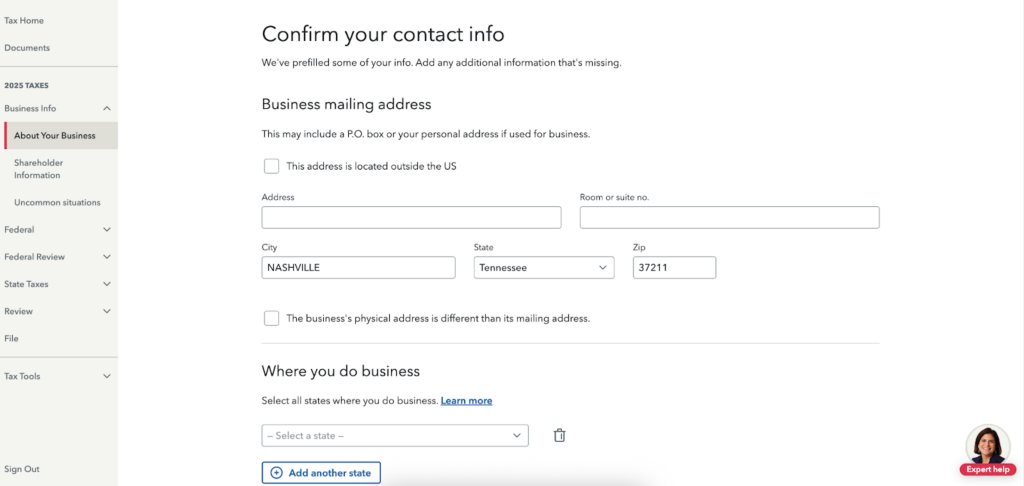
After selecting “Pick up where you left off,” the software moves straight into collecting required details. The screen presents a structured form focused on confirming business contact information, starting with the mailing address and the states where the business operates. Fields are clearly labeled, prefilled where possible, and grouped logically so it feels more like completing a questionnaire than filling out a tax form.
The flow keeps the process approachable by breaking information into simple prompts and fill-in-the-blank fields. Each section explains what is needed in plain language, which helps reduce hesitation around unfamiliar terms. For questions that feel unclear, the interface makes it easy to pause and seek clarification, either by consulting a CPA or using TurboTax’s Expert Assist for guidance.
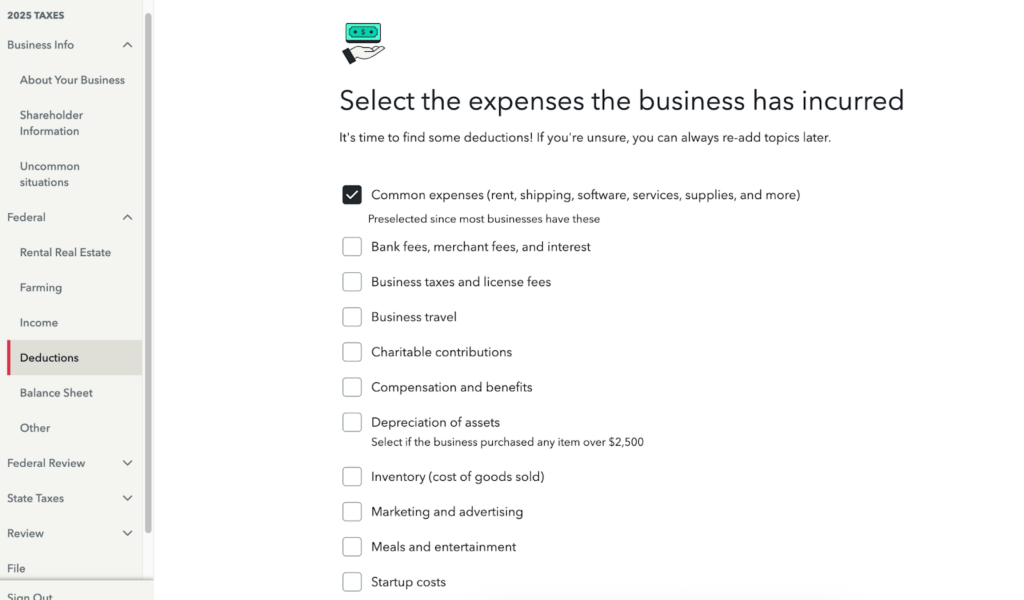
On the Federal side, a vertical navigation toolbar appears on the left, showing each major section of the return in sequence. Sections such as Income, Deductions, Balance Sheet, Review, and File are clearly labeled, making it easy to see where you are in the process and what comes next. The current section is highlighted, which helps anchor progress without exposing too much detail at once.
The deductions screen shows how streamlined the workflow is. Instead of asking for numbers upfront, TurboTax first asks users to select which expense categories apply by checking simple boxes. Common expenses are preselected, while less common categories remain optional to keep the screen focused and manageable. Nothing feels buried in tax jargon or dense forms.
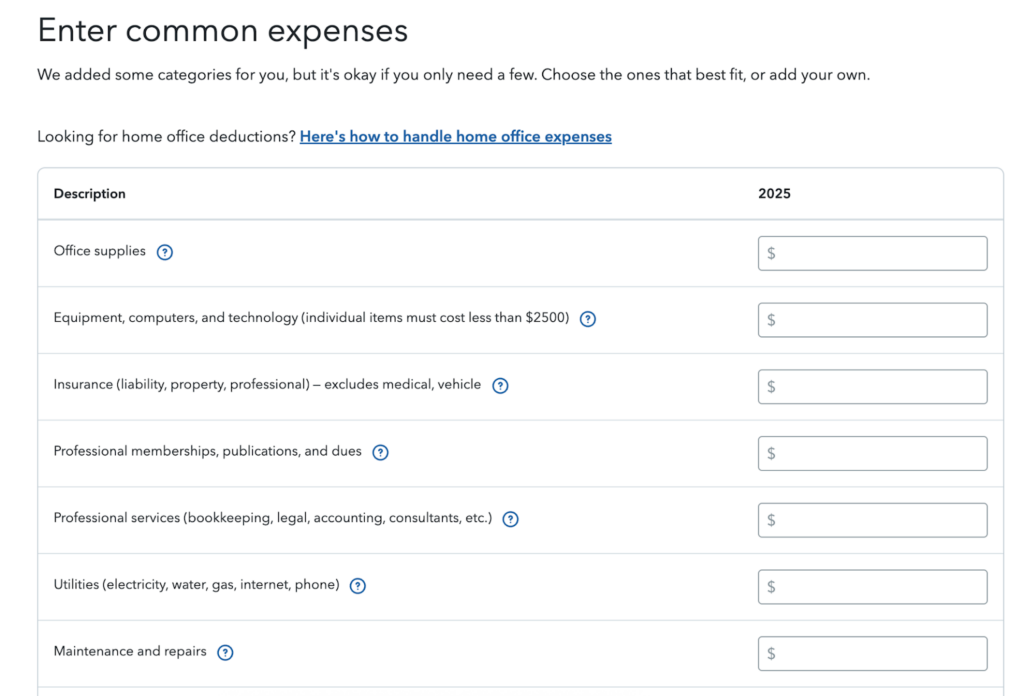
After expenses are selected, TurboTax walks through each category one at a time, prompting users to enter amounts in a structured, step-by-step flow. The interface encourages focus on the current task rather than the entire return, reinforcing a linear process that feels approachable for DIY filers.
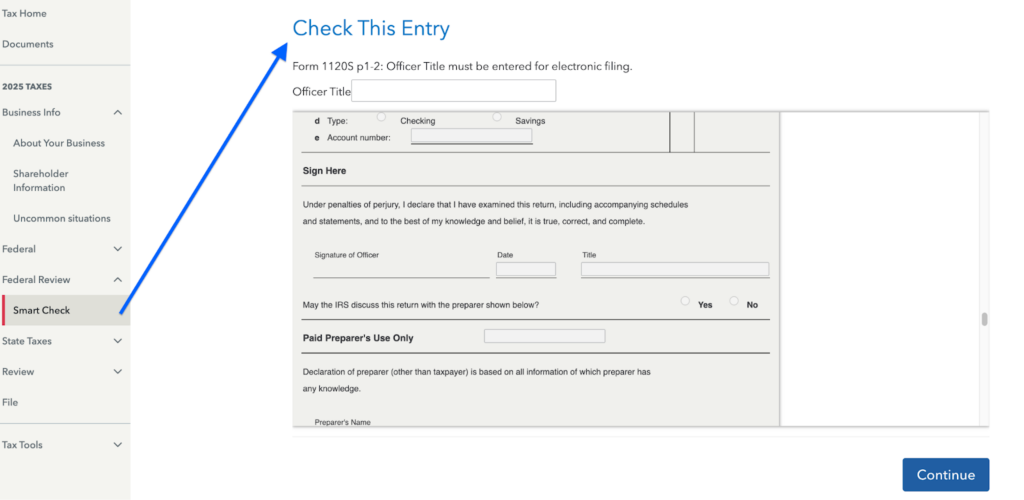
Smart Check is a feature worth revisiting before filing, especially near the end of the return. It serves as TurboTax’s built-in review step, designed to catch issues that could otherwise delay filing or trigger follow-up notices.
This feature scans the entire return for missing or inconsistent information, such as blank required fields, mismatched figures, or forms that don’t align with one another. It also flags items the IRS commonly scrutinizes, including identity details, dependents, credits, and income entries. When an issue appears, Smart Check presents it as a fixable item and links directly to the relevant section, so corrections happen in context rather than through manual searching.
The feature can be accessed from the Federal Review section and typically runs automatically as filing approaches. While it does not eliminate audit risk, it helps reduce avoidable errors that often lead to rejected returns or IRS notices.
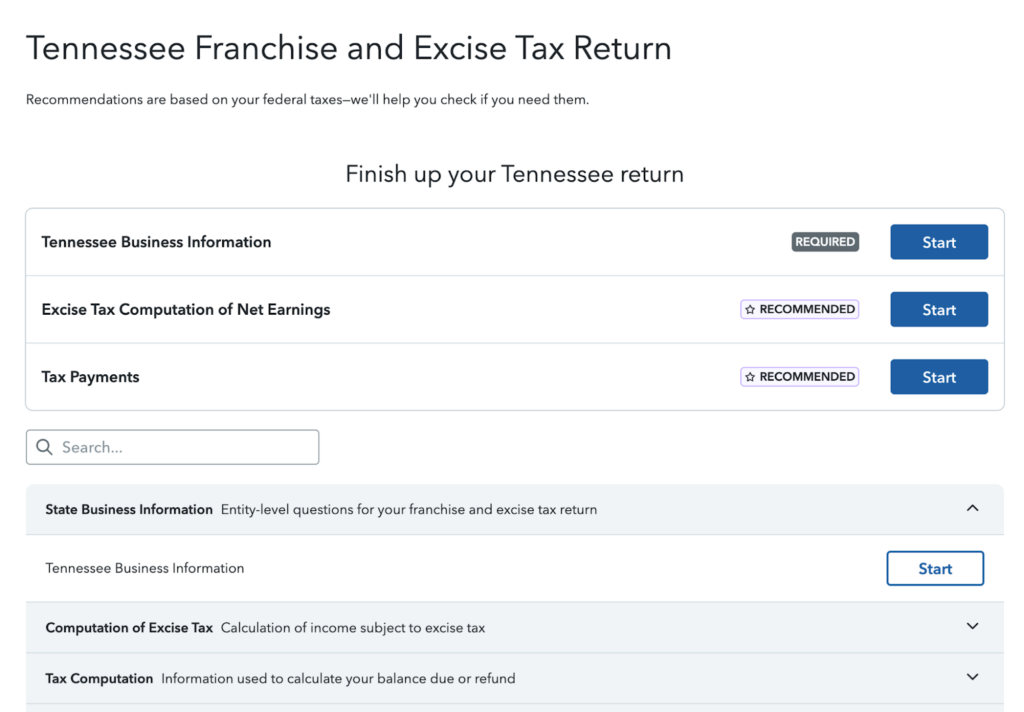
This is what the state tax return filing screen looks like. The page breaks the Tennessee return into clear sections, each with a “Start” button to guide you through the process. Once selected, TurboTax walks you through a series of questions similar to the federal filing flow. The prompts stay straightforward and easy to follow, which keeps the experience from feeling intimidating, even when dealing with state-specific requirements.
My verdict
TurboTax makes filing feel very different from completing a traditional tax return. Instead of presenting full forms upfront, the software guides users through a series of questions that map directly to the return, without exposing the dense boxes and layouts that often feel intimidating. That said, taxes can still feel overwhelming for some users simply because of the subject matter.
For those situations, Expert Assist provides added reassurance by offering access to live experts for questions along the way, while Expert Full Service removes the workload entirely by handing the return off to a professional. The higher cost of these options reflects the convenience and reduced effort, which may be worthwhile depending on the level of support required.
Frequently asked questions (FAQs)
The right version depends on tax complexity. Simple W-2 returns may qualify for Free, while self-employment, investments, rentals, or crypto typically require Deluxe or Premium. Expert Assist and Full Service add professional help.
TurboTax supports importing prior-year returns, W-2s, most 1099 forms, investment data, and crypto transactions from supported employers, brokerages, exchanges, and financial platforms.
Federal pricing varies by version, and state returns usually cost extra. Optional add-ons, such as Audit Defense or expert services, can increase the final price shown at checkout.
TurboTax uses Smart Check to scan the return for missing information, inconsistencies, and common IRS red flags. Intuit Assist also helps answer questions during the filing process.
TurboTax includes an accuracy guarantee, a maximum refund guarantee, and optional audit support. These cover calculation errors and eligible audit assistance, but not broader tax planning outcomes.