







A CDJ helps bookkeepers track outgoing cash transactions in one organized place. Instead of recording every payment separately in the general journal, all cash payments are first listed in the cash disbursement journal throughout the period.
At the end of the accounting period, the totals are summarized and posted as a single compound entry in the general journal. For anyone wondering what a cash disbursement journal is, it is simply a tool that centralizes and summarizes all outgoing cash transactions to streamline bookkeeping and reduce repetitive entries.
Free cash disbursement journal template
Below, I walk through how the Google Sheets table feature can be used to track all cash payments in a structured way. If the goal is to jump straight into building the cash disbursement journal in Google Sheets, you can proceed directly to that section.
Using the cash disbursement journal
As mentioned above, the CDJ streamlines the recording of all cash disbursements. As long as there is an outflow of cash, it should be recorded in the CDJ.
Without a CDJ, the GJ will look like this:
| GENERAL JOURNAL | |||
|---|---|---|---|
| Date | Account | Debit | Credit |
| Jan 1 | Supplies expense | 250 | |
| Cash | 250 | ||
| Jan 2 | Shipping fees | 65 | |
| Cash | 65 | ||
| Jan 2 | Equipment | 2,000 | |
| Cash | 2,000 | ||
| Jan 3 | Loan payable - National Bank | 3,000 | |
| Interest expense | 80 | ||
| Cash | 3,080 | ||
| Jan 3 | Utilities | 70 | |
| Cash | 70 | ||
Recording every transaction directly in the general journal can quickly become overwhelming. Imagine managing at least 100 cash disbursement entries each day. The volume alone creates a heavy administrative burden, especially when each payment must be posted and later reconciled individually.
Without a more efficient system, errors become more likely, deadlines start to stack up, and financial accuracy can suffer. This is where a cash disbursement journal becomes valuable. Instead of treating each payment as a separate entry in the general journal, the cash disbursement journal organizes and summarizes outgoing cash transactions in one place. To better understand what a cash disbursement journal is, it helps to see how those same daily transactions would appear when structured inside a CDJ.
Understanding the parts of the CDJ
In its most basic form, the cash disbursement journal should at least have the following columns:
| CASH DISBURSEMENT JOURNAL | |||||||
|---|---|---|---|---|---|---|---|
| Date | Ref. No. | Payee | Account Debited | Amount | Post. Ref. | Others, Dr. (Cr.) | Notes |
- Date: The date should be when the transaction occurred, not when it was recorded.
- Ref. No.: It is short for “reference number,” which pertains to any number that can vouch for the entry (e.g., check number, invoice number, or transaction ID).
- Payee: The payee is the individual or business receiving the payment.
- Account Debited: This refers to the expense or asset account that receives the charge when a payment is made.
- Amount: This is the amount of cash disbursement.
- Post. Ref.: It is short for “posting reference,” which connects each transaction in the CDJ to its corresponding account in the general ledger (GL). The number in this column is the account number from the Chart of Accounts that matches the account debited for the transaction.
- Others, Dr. (Cr.): This column is used when a single transaction affects multiple accounts.
- Others, Dr. (Debit): This records additional debits beyond the main account debited column, such as interest expenses when paying off a loan.
- Others, Cr. (Credit): This records additional credits, though it’s less common in a CDJ since most entries involve cash payments.
- Notes: These are memos or descriptions relevant to the transaction. They provide additional information that can shed light on the nature of the transaction. While this is an optional field, I highly encourage you to fill this out when the CDJ entry is out of the ordinary.
Making entries in the CDJ
Now that I’ve explained the columns in the CDJ, I’ll show you how to make entries. For quick reference, I’ve included transaction data per entry so that you don’t have to revisit the GJ above.
Note: I’ll skip the reference number column for brevity.
Jan 1: Purchased $250 worth of supplies from Macy’s Emporium
| CASH DISBURSEMENT JOURNAL | |||||||
|---|---|---|---|---|---|---|---|
| Date | Ref. No. | Payee | Account Debited | Amount | Post. Ref. | Others, Dr. (Cr.) | Notes |
| Jan 1 | Macy’s Emporium | Supplies | 250 | 1305 | |||
- The company purchased supplies from Macy’s Emporium (Payee).
- In the Account Debited column, the company specified which account was charged (Supplies).
- To make posting easier, the Post Ref. column should include the account number from the Chart of Accounts. In this example, I used 1305 for the supplies account, but in your business, you should refer to your own chart of accounts and use the number assigned to that account.
Jan 2: Paid $65 for FedEx shipping for goods sold to Max Jones, a customer from New York
| CASH DISBURSEMENT JOURNAL | |||||||
|---|---|---|---|---|---|---|---|
| Date | Ref. No. | Payee | Account Debited | Amount | Post. Ref. | Others, Dr. (Cr.) | Notes |
| Jan 1 | Macy’s Emporium | Supplies | 250 | 1305 | |||
| Jan 2 | FedEx | Shipping | 65 | 6022 | |||
- The payee is FedEx because the company paid FedEx directly for the shipping. Even though the package was sent to Max Jones, the actual payment went to FedEx.
- The posting reference number 6022 is simply an example. It is shown to demonstrate how a reference number might look in the record.
Jan 2: Reimbursed Justin Lim, the company’s marketing officer, who purchased a work laptop from Greg’s Gadgets for $2,000 because he used his personal credit card for the purchase
| CASH DISBURSEMENT JOURNAL | |||||||
|---|---|---|---|---|---|---|---|
| Date | Ref. No. | Payee | Account Debited | Amount | Post. Ref. | Others, Dr. (Cr.) | Notes |
| Jan 1 | Macy’s Emporium | Supplies | 250 | 1305 | |||
| Jan 2 | FedEx | Shipping | 65 | 6022 | |||
| Jan 2 | Justin Lim | Equipment | 2,000 | 1801 | |||
- If Greg’s Gadgets seemed like the right payee, that is an easy mistake to make. The laptop was bought from Greg’s Gadgets, but the company did not pay the store directly.
- Instead, the company is paying Justin back for the purchase. Since Justin is the one receiving the money, he is the correct payee for this transaction.
- The posting reference number 1801 is simply an example to show how a reference number might appear in the record.
Jan 3: Paid $3,080 amortization to National Bank, inclusive of $80 interest
| CASH DISBURSEMENT JOURNAL | |||||||
|---|---|---|---|---|---|---|---|
| Date | Ref. No. | Payee | Account Debited | Amount | Post. Ref. | Others, Dr. (Cr.) | Notes |
| Jan 1 | Macy’s Emporium | Supplies | 250 | 1305 | |||
| Jan 2 | FedEx | Shipping | 65 | 6022 | |||
| Jan 2 | Justin Lim | Equipment | 2,000 | 1801 | |||
| Jan 3 | National Bank | Loan Payable | 3,000 | 2801 | 80 | Interest, $80 | |
- The Amount column shows $3,000 instead of $3,080 because the payment is split into two parts. One part is the loan balance, and the other part is the interest.
- The $3,000 goes toward reducing the loan, so it is recorded under Loan Payable. The extra $80 is the cost of borrowing, so it is recorded separately as Interest Expense in the Others column.
- The posting reference number 2801 is simply an example to show how a reference number might appear in the record.
Jan 3: Paid City Gas $70 for the monthly gas bill
| CASH DISBURSEMENT JOURNAL | |||||||
|---|---|---|---|---|---|---|---|
| Date | Ref. No. | Payee | Account Debited | Amount | Post. Ref. | Others, Dr. (Cr.) | Notes |
| Jan 1 | Macy’s Emporium | Supplies | 250 | 1305 | |||
| Jan 2 | FedEx | Shipping | 65 | 6022 | |||
| Jan 2 | Justin Lim | Equipment | 2,000 | 1801 | |||
| Jan 3 | National Bank | Loan Payable | 3,000 | 2801 | 80 | Interest, $80 | |
| Jan 3 | City Gas | Utilities | 70 | 5601 | |||
- The posting reference number 5601 is just for the sake of illustration.
Summarizing CDJ entries
Assuming all CDJ entries ended on Jan. 3, the next thing you need to do is foot the totals.
| CASH DISBURSEMENT JOURNAL | |||||||
|---|---|---|---|---|---|---|---|
| Date | Ref. No. | Payee | Account Debited | Amount | Post. Ref. | Others, Dr. (Cr.) | Notes |
| Jan 1 | Macy’s Emporium | Supplies | 250 | 1305 | |||
| Jan 2 | FedEx | Shipping | 65 | 6022 | |||
| Jan 2 | Justin Lim | Equipment | 2,000 | 1801 | |||
| Jan 3 | National Bank | Loan Payable | 3,000 | 2801 | 80 | Interest, $80 | |
| Jan 3 | City Gas | Utilities | 70 | 5601 | |||
| 5,385 | 80 | ||||||
In total, the amount of cash disbursements is $5,465 ($5,385 + $80). Now, it’s time to record the single compound entry in the GJ.
| GENERAL JOURNAL | |||
|---|---|---|---|
| Date | Account | Debit | Credit |
| Jan 3 | Supplies expense | 250 | |
| Shipping | 65 | ||
| Equipment | 2,000 | ||
| Loan payable | 3,000 | ||
| Interest expense | 80 | ||
| Utilities | 70 | ||
| Cash | 5,465 | ||
| (To record total cash disbursements) | |||
The entry above is clean and streamlined, making it easier to post transactions in the GL later.
Common errors in using the cash disbursements journal
A cash disbursement journal makes recording payments easier, but mistakes can still happen. Most errors occur when classifying accounts, entering posting details, or summarizing totals. Below are the most common issues and simple ways to prevent them.
Recording the wrong payee
The payee is the person or business that actually receives the cash. In reimbursement cases, that is the employee, not the store where the item was purchased. In loan payments, the payee is the bank, not “loan payable,” since loan payable is an account, not a person or company.
For example, if an employee buys supplies and is later reimbursed, the employee’s name should appear in the Payee column. A simple way to avoid confusion is to ask: “Who is actually receiving the cash?”
Failing to split principal and interest
Loan payments often include two parts: principal and interest. The principal reduces the loan balance, while interest is an expense.
If a $3,080 payment includes $3,000 principal and $80 interest, the $3,000 is recorded under Loan Payable, and the $80 is recorded separately as Interest Expense. To avoid errors, always review the loan statement and confirm the breakdown before recording the entry.
Using the wrong account in “Account Debited”
Another common mistake is selecting the wrong account. Equipment might be recorded as Supplies Expense, or shipping might be charged to the wrong expense category.
Using the Chart of Accounts helps prevent this. Before choosing an account, review the nature of the transaction and determine whether it is an asset, an expense, or something else.
Posting incorrect or missing posting references
The Post. Ref. column connects the cash disbursement journal to the general ledger. Missing or incorrect account numbers make reconciliation more difficult and can create confusion during reviews or audits.
Before posting, verify each account number against the Chart of Accounts to ensure it matches the correct ledger account.
Forgetting to total columns before posting
Before posting to the general journal, all columns in the cash disbursement journal should be totaled. The total cash credit must equal the combined debit amounts.
If the numbers do not match, an error has occurred. Double-check the math to make sure the journal stays balanced.
Recording non-cash transactions in the journal
A cash disbursement journal is only for transactions where cash actually leaves the business. Accrued expenses, depreciation, and adjusting entries do not belong in this journal.
When unsure, ask: “Did cash actually leave the business?” If the answer is no, the transaction should be recorded elsewhere.
Cash disbursement journal via Google Sheets
Google Sheets is a free spreadsheet tool that works like Microsoft Excel. It is available to anyone with a Google account and includes both basic and advanced formulas.
I used Google Sheets for this cash disbursement journal template because it is easy to access and provides a consistent experience for users, no matter what device or version they use.
Tables in Google Sheets
The table feature in Google Sheets now includes built-in filtering and sorting tools. This makes it easier to control which information appears on the screen without creating extra reports.
For this cash disbursement journal template, the table feature handles simple data organization. There is no need to use pivot tables for basic filtering and sorting, which keeps the process straightforward and easier to manage.
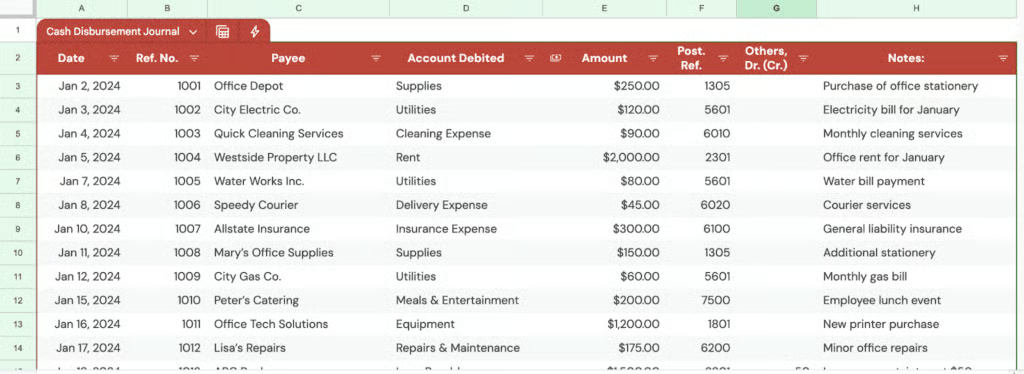
The format I used in the template is similar to the one I used in the examples. The advantage of Google Sheets is that it can help you track items easily with filters, groups, and views.
Filter and sort
Filtering and sorting are easy. Just click the funnel icon in the column you want to filter or sort, then choose your preferred method, as shown in the image below.
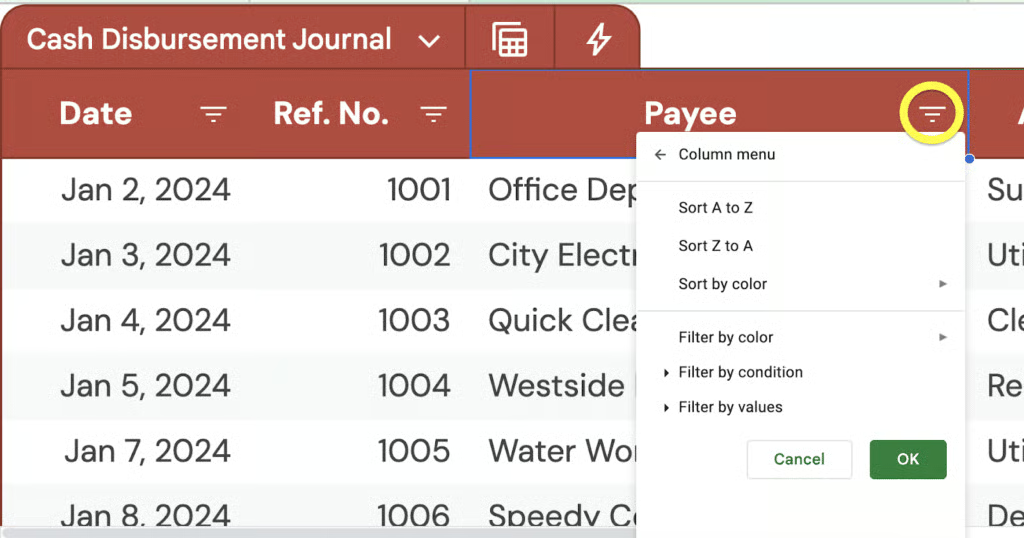
While filters are great, I no longer find them the best way to filter data. In the next section, I’ll teach you a better way.
Group and filter views
In a table, there are two simple ways to organize your data. You can group the data, or you can create a filter view.
- Grouping lets you place rows with the same value together. For example, you can group transactions by Account Debited and then collapse the rows to see totals more easily. This makes large lists easier to scan.
- A filter view works differently. It lets you show only the data you want to see without changing the main table. Other users will still see the original table, while you focus on your custom view.
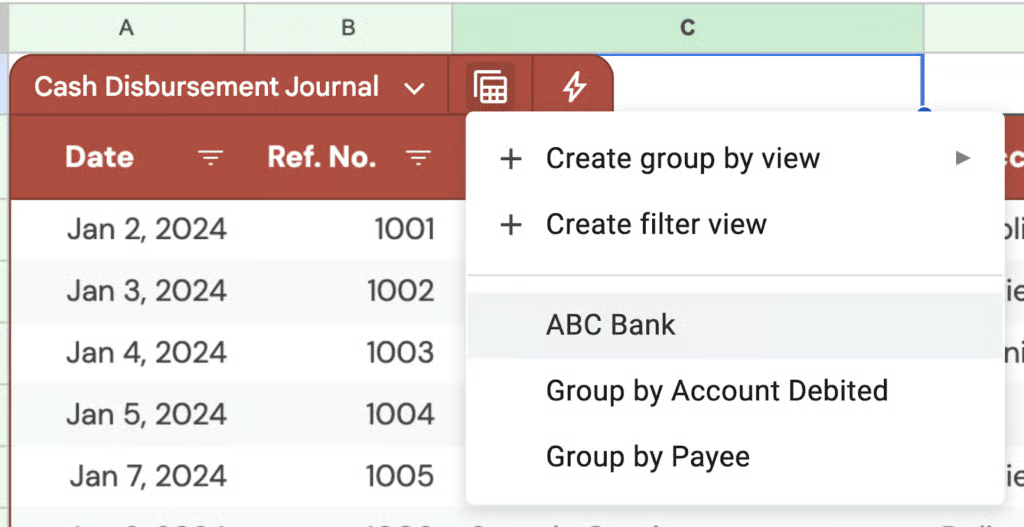
Both options give better control over how information is displayed in the cash disbursement journal. To create a group or a filter view, click the Calculator icon beside the table name. In the example shown below, a group-by view was created under Account Debited to display all transactions for each account.
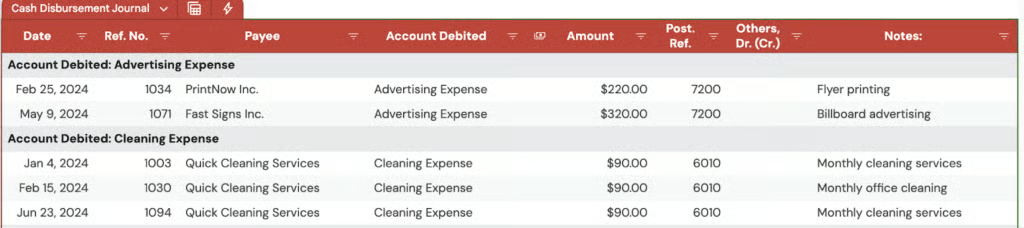
Grouping organizes transactions based on the column you choose, allowing you to see related entries together in a structured view.
Now, let’s move on to filter views. They work just like the regular filter feature I mentioned earlier; you can save them. This means you don’t have to repeatedly adjust filter conditions every time you need a specific view.
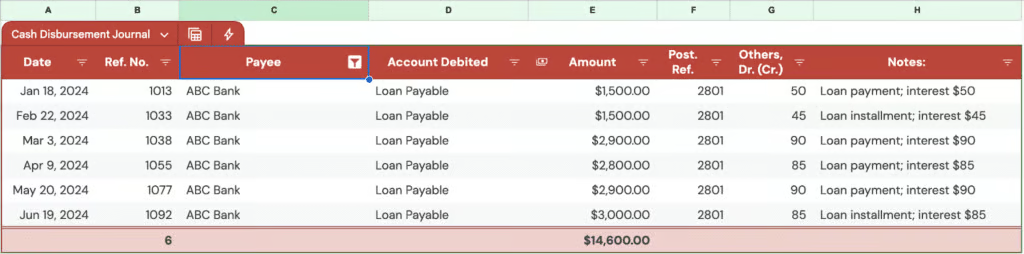
In the image above, I filtered the table to show only ABC Bank. The main advantage of this is that I can easily access this view by clicking the Calculator icon and selecting the saved view (see image below).
Using the template
The sample entries in the sheet are only there to show how the cash disbursement journal works. They can be deleted when ready to track real transactions, or used for practice without concern about making mistakes.
As new payments are made, additional rows can simply be added at the bottom of the table. Filters can narrow the view to a specific month or quarter, while group and view options can help organize transactions in a clearer way.
For long-term use, it is best to create a separate sheet for each year. This keeps the cash disbursement journal organized and prevents the file from becoming too crowded over time.
How CDJ fits in the accounting cycle
The cash disbursement journal is one step in the full accounting cycle. It does not stand alone, but works within a structured process. Understanding where it fits helps prevent posting mistakes and keeps records accurate. Below is the flow from a transaction to the financial statements.
Step 1: Business transaction occurs
The process begins when a business makes a cash payment. This could be for an expense, a loan payment, or the purchase of an asset.
Each transaction is supported by source documents such as invoices, receipts, loan statements, or check stubs. These documents serve as proof that the transaction happened and provide the details needed for accurate recording.
Once the transaction happens, it must be recorded.
Step 2: Record the transaction in the cash disbursement journal
All cash outflows are first recorded in the cash disbursement journal, not directly in the general ledger. Each entry includes the date, payee, account debited, amount, and posting reference.
Using a special journal like the CDJ reduces repetitive entries in the general journal. It organizes similar transactions in one place and simplifies the posting process.
Only transactions involving actual cash payments belong here. Accrued expenses and adjustments are recorded elsewhere.
Step 3: Post to the general ledger
At the end of the accounting period, the columns in the cash disbursement journal are totaled. These totals are then posted as a single compound entry to the general journal or directly to the general ledger, depending on the system used.
Individual accounts in the general ledger are updated using the posting references shown in the CDJ. The CDJ supports and feeds the general ledger, but it does not replace it.
Step 4: Prepare the trial balance
After posting, updated balances appear in the general ledger accounts. These balances are then compiled into a trial balance.
The trial balance checks that total debits equal total credits. Accurate entries in the cash disbursement journal help ensure that expense, asset, and liability balances are correct at this stage.
Step 5: Financial statements are prepared
From the trial balance, financial statements are prepared. Expense accounts appear on the income statement, while asset and liability accounts appear on the balance sheet.
Cash payments affect both profit and the company’s cash position. Errors in the cash disbursement journal can flow through the system and eventually distort the financial statements.
Frequently asked questions (FAQs)
What does a cash disbursement journal track?
A cash disbursement journal tracks a business’s cash payments, including expenses, loan payments, vendor purchases, and reimbursements. It records details such as date, payee, amount, account debited, and payment method, which ensures accurate tracking of outgoing cash flow.
What is a cash disbursement journal in QuickBooks?
In QuickBooks, the cash disbursement journal isn’t a standalone feature but is reflected in check registers, vendor payment reports, and the expenses tab. Modern accounting software eliminates the need for traditional manual records, focusing on streamlining the recording process for efficiency and accuracy.
