







Nonprofit accounting focuses on accountability rather than profit. It ensures that every donation, grant, or contribution is tracked according to donor intent and used in line with the organization’s mission. Unlike for-profit businesses, nonprofits must separate funds, document restrictions, and report transparently to maintain compliance and trust.
Tools like QuickBooks Online can handle these needs when set up properly with fund-based tracking and tailored reporting. However, there are also nonprofit-specific accounting platforms, such as Aplos, which are designed with built-in fund accounting and donor management features. Whether using QuickBooks or a specialized tool, the goal remains the same: to keep accurate, transparent records that demonstrate responsible stewardship of every dollar.
Nonprofit accounting fundamentals
The heart of nonprofit accounting is fund accounting. Because nonprofits exist to serve a mission rather than make a profit, their main goal is to track and manage funds in line with donor intentions and the organization’s purpose.
What is fund accounting?
Fund accounting is a way for nonprofits to keep track of how money is received and spent. Unlike regular business accounting that focuses on profits, fund accounting organizes money into different “buckets” based on where it came from and how it should be used.
These buckets might represent different programs, grants, or donor requirements. This method helps nonprofits show exactly how every dollar is used, proving to donors and regulators that funds are spent responsibly. It also builds trust by keeping financial reports clear and transparent.
Restricted vs unrestricted funds
Restricted funds are donations that come with rules. A donor might say their money must go toward a specific project, like building a school or funding a research program. The nonprofit must follow those rules and keep detailed records to show the money was used as intended. Restrictions be:
- Temporary: The fund stays restricted only until certain goals or time periods are met.
- Permanent: The fund can’t be used, and only the investment income can be spent.
Unrestricted funds are more flexible because they don’t come with donor-imposed limits. The nonprofit can decide how to use them based on its most urgent needs. These funds often cover everyday operating costs, such as staff salaries, rent, and utilities. They can also be used for unexpected expenses or to invest in long-term growth, such as upgrading technology or expanding programs.
Setting up your accounting system
A strong accounting system helps a nonprofit stay organized, transparent, and audit-ready. It starts with setting up a chart of accounts that fits nonprofit needs, choosing the right accounting software, and building clear financial procedures. Together, these steps make it easier to track restricted and unrestricted funds, manage grants, and produce accurate reports for donors and regulators.
Selecting the right accounting software
When you pick an accounting tool, you have to look at how your organization manages donations, grants, and programs.
| General business accounting software | Nonprofit-specific accounting software | |
|---|---|---|
| Main purpose | Focuses on tracking income, expenses, and profit to measure business performance | Focuses on fund accounting to ensure donations and grants are used according to donor intent and compliance rules |
| Best for | Small to medium for-profit businesses needing basic bookkeeping and invoicing | Nonprofits, charities, and foundations that manage multiple programs, grants, or restricted funds |
| Pros | ✅Versatile for different industries and sectors✅Ideal for tracking profit and loss efficiently and effectively✅Commonly supported by accountants | ✅Tracks restricted and unrestricted funds separately ✅Complies with nonprofit accounting standards ✅Supports fund- and program-level reporting |
| Cons | ❌Lacks fund tracking and donor reporting features ❌Cannot generate nonprofit reports like Form 990 ❌Not designed for grant or compliance management | ❌May require setup time to customize funds and programs ❌Can be more expensive than basic business versions ❌Requires some accounting knowledge for full use |
While nonprofit-specific accounting software is clearly built for the unique needs of mission-driven organizations, choosing a general business accounting system can still make sense in certain cases.
For small nonprofits with simple operations, limited funding sources, or minimal donor restrictions, general software may provide all the basic bookkeeping features they need at a lower cost. It can handle day-to-day transactions, generate financial statements, and support basic budgeting without the complexity of fund-based tracking.
However, as the organization grows and begins managing multiple grants or donor-restricted funds, upgrading to nonprofit-specific software becomes essential to maintain transparency, compliance, and accurate reporting.
How QuickBooks Online works in a nonprofit setup
QuickBooks Online is a general business accounting software made for profit businesses. However, it can be modified for nonprofit organizations. Our guide on setting up QuickBooks Online for nonprofits provides more detail on the process.
So, what can QuickBooks Online bring to nonprofits?
- Fund-based accounting: Using QBO’s Classes feature, you can separate income and expenses by fund, project, or grant. Combine this with Locations to track program services or departments, giving you a clear view of how each part of the organization performs financially.
- Custom reporting: You can structure your Chart of Accounts in QBO to mirror IRS Form 990 categories. This setup allows you to pull reports that match nonprofit reporting standards and simplify year-end tax preparation or grantor reporting.
- System integration: QBO syncs directly with donor management tools like Kindful, DonorPerfect, or Neon CRM. This integration ensures that donor contributions and fundraising data are automatically imported into your accounting records, reducing manual entry and improving accuracy.
- Automation: QBO automatically categorizes recurring donations, schedules expense payments, and matches bank transactions. For nonprofits, this reduces administrative workload and ensures every transaction is consistently tracked against the correct fund or program.
- Ease of use: With dashboards and tailored nonprofit templates, QBO helps users manage restricted funds, monitor budgets, and prepare compliance-ready reports—without needing deep accounting expertise. This makes professional-level financial management accessible to small and growing nonprofits alike.
Preparing essential financial statements
Statement of financial position (a.k.a Balance sheet)
This statement gives you a clear look at your nonprofit’s overall financial standing: what it owns, what it owes, and what’s left over. It helps you gauge stability and liquidity at a glance. QuickBooks Online builds this as the Balance Sheet, where you can sort details by program, location, or donor restriction and share it easily for board meetings or audits.
Here’s a sample statement of financial position
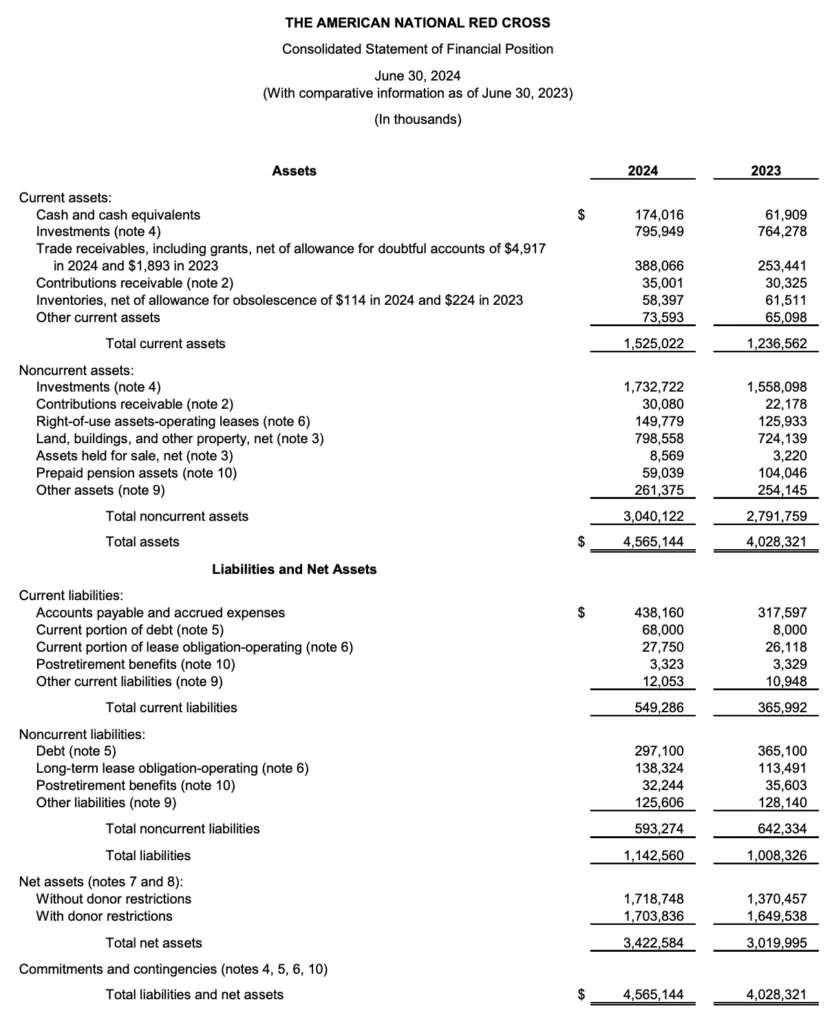
In this statement from the American National Red Cross, the net assets section shows the organization’s financial position after all liabilities have been subtracted from total assets. In simple terms, it reflects what the organization owns outright—the portion of resources that belongs to the nonprofit and its mission.
There are two key parts under net assets:
- Without donor restrictions: These are funds the Red Cross can use for any purpose that supports its mission. In 2024, this balance increased to $1,718,748 thousand (from $1,370,457 thousand in 2023). This rise suggests the organization generated a surplus or received unrestricted funding that strengthened its operating flexibility.
- With donor restrictions: These funds come with conditions or specific purposes defined by donors, such as for certain relief programs or capital projects. In 2024, this balance also grew—from $1,649,538 thousand to $1,703,836 thousand. That means more money was given for specific uses, and the organization is holding or managing those restricted resources until they are used as intended.
Statement of activities (a.k.a. income statement)
Here’s where you see your nonprofit’s story in numbers—how much came in, how much went out, and what changed along the way. It helps explain how different programs or funding sources impact your bottom line. In QuickBooks Online, the Profit and Loss report does this automatically, and you can tweak it to show results by program or time period for donor updates or tax filings.
Here’s a sample statement of activities
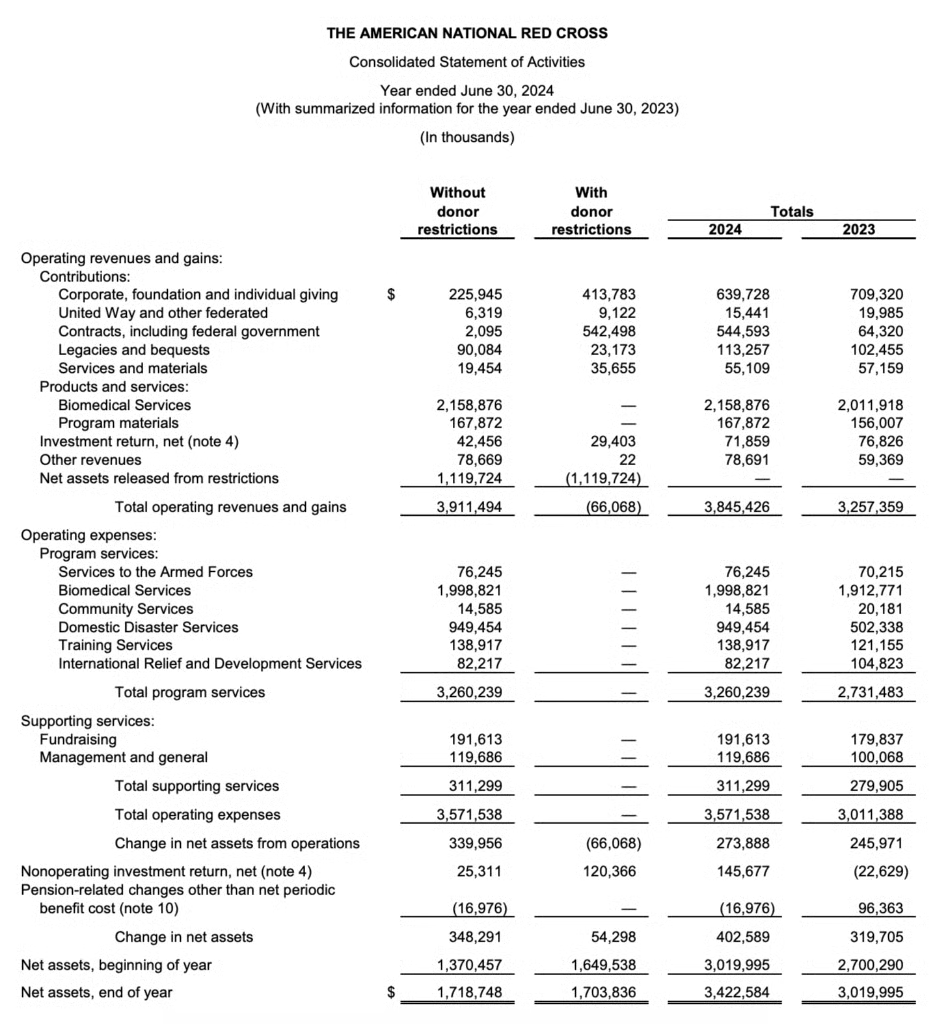
This statement shows the American National Red Cross’s Statement of Activities, which is similar to an income statement in business. It tracks how much revenue came in, how it was spent, and how that affected the organization’s net assets. The report separates activities into two columns: Without donor restrictions and With donor restrictions.
- Without donor restrictions: These are funds the Red Cross can use freely to support its programs and operations. In 2024, this category brought in about $3.9 billion in operating revenues and gains, with major sources including Biomedical Services, contributions, and released restricted funds. After expenses, the organization ended the year with a $348.3 million increase in unrestricted net assets, showing strong operational performance.
- With donor restrictions: These funds are earmarked by donors for specific purposes—such as particular programs or projects. In 2024, this section shows a $66.1 million decrease in net assets with donor restrictions. This doesn’t necessarily mean a loss; it often reflects that funds were spent for their intended purposes, converting restricted resources into mission-related activities.
Overall, the Red Cross’s total net assets grew from $3.02 billion to $3.42 billion, an increase of roughly $403 million year over year. This growth indicates that, even after accounting for all expenses and the use of restricted funds, the organization strengthened its financial position and maintained solid fiscal health while continuing to deliver on its humanitarian mission.
Statement of cash flows
Cash flow shows when money actually moved: what came in, what went out, and what’s left to keep the operations moving. For a nonprofit, cash flow replaces net income as the most important metric to track. Nonprofits don’t ask if they’re making money. Instead, nonprofits want to know if there are enough resources for their programs and projects.
QuickBooks Online has a Statement of Cash Flows built in, grouping transactions into operating, investing, and financing so you can see how daily decisions affect your cash position.
Here’s a sample statement of cash flows
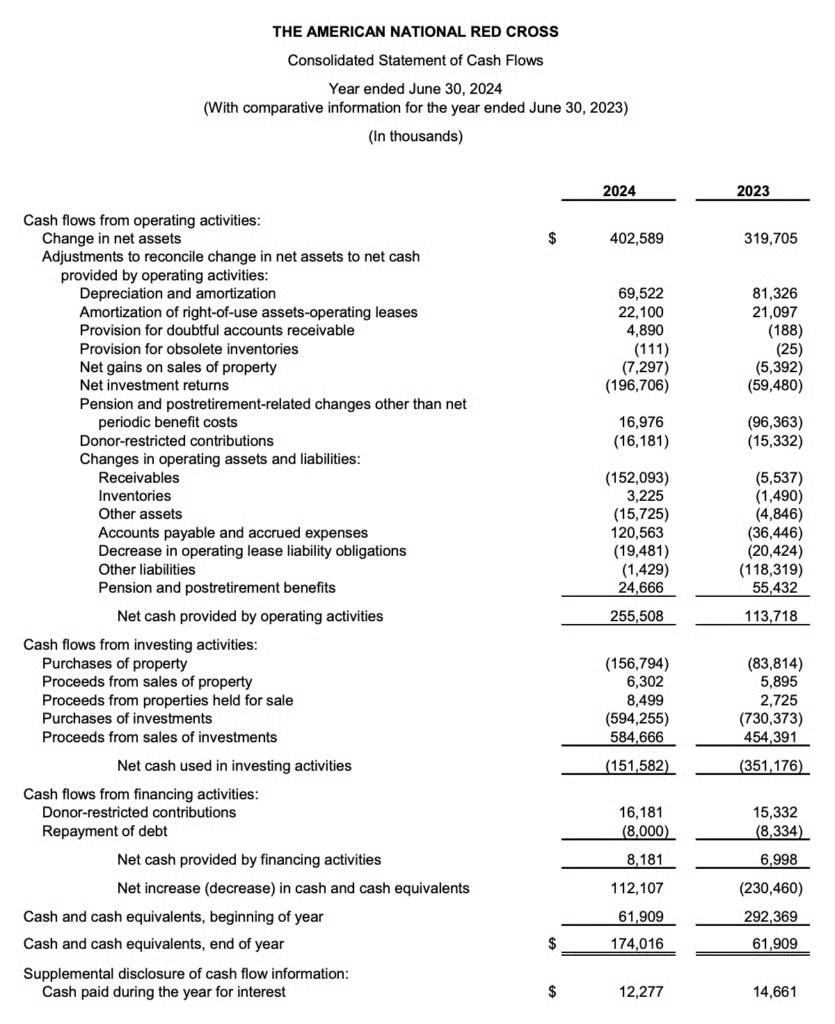
This report is the Statement of Cash Flows for the American National Red Cross for the year ended June 30, 2024. It explains how cash moved in and out of the organization during the year, showing whether money came from operations, investments, or financing activities.
Here’s what’s happening:
- Cash flows from operating activities: This section shows cash generated from the Red Cross’s core operations, like donations, grants, and services. After adjusting for non-cash items (such as depreciation, investment returns, and changes in receivables or payables), the organization ended with $255.5 million in net cash provided by operations—more than double the $113.7 million in 2023. This indicates stronger day-to-day cash performance and better liquidity from its main activities.
- Cash flows from investing activities: The Red Cross spent money on property and investments, but also sold some assets. It used $151.6 million of cash overall in 2024 for investing, which is an improvement from the $351.2 million used in 2023. The reduction means less cash was tied up in long-term investments compared to the prior year.
- Cash flows from financing activities: This part covers external funding sources or repayments, like donor-restricted contributions and debt payments. The Red Cross received $16.2 million in restricted contributions and repaid $8 million in debt, ending with a small positive cash flow of $8.2 million from financing activities.
Putting it all together, the Red Cross had a net increase of $112.1 million in cash and cash equivalents, compared to a large decrease in the prior year. The organization finished the year with $174 million in cash, up from $61.9 million in 2023. Overall, this shows improved cash management, stronger operating performance, and a more stable financial position heading into the next year.
Statement of functional expenses
If donors want to know how their money supports your mission, this is the report that tells them. It shows how much you spend on programs, management, and fundraising, which reveals how efficiently your organization runs. In QuickBooks Online, you can tag transactions by class (program, admin, fundraising) and then run an Expense by Class report or use an add-on app for a polished, detailed version.
Here’s a sample statement of functional expenses
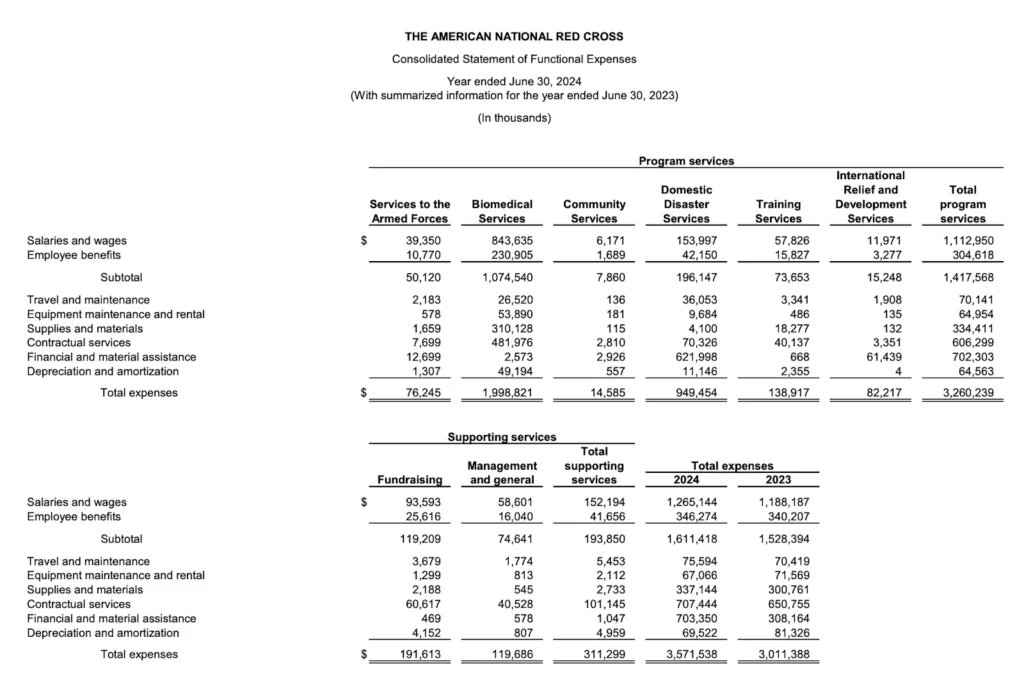
This report is the Statement of Functional Expenses for the American National Red Cross. It shows exactly how the organization spent its money across different activities, separating program services (the mission-driven work) from supporting services (the behind-the-scenes operations that keep the organization running).
Here’s what it reveals:
- Program services: These represent the direct work the Red Cross does to fulfill its mission, like Biomedical Services, Disaster Relief, and Services to the Armed Forces. Together, these accounted for about $3.26 billion in expenses. The largest share, nearly $2 billion, went to Biomedical Services, which covers blood collection, testing, and distribution. Other major costs include Domestic Disaster Services at $949 million, showing how heavily the Red Cross invests in emergency response.
- Supporting services: These include Fundraising and Management and General expenses, totaling about $311 million. Fundraising alone costs $191.6 million, covering donor engagement, campaigns, and events. Management and general expenses were $119.7 million, reflecting administrative functions such as finance, HR, and compliance.
The total expenses for 2024 were $3.57 billion, up slightly from $3.01 billion in 2023. Most of the spending went directly to program services, showing that the Red Cross channels the vast majority of its resources into mission-related work rather than overhead.
Meeting tax compliance and filing requirements
Staying compliant with tax and reporting rules is critical for nonprofits to maintain their tax-exempt status and public trust. It involves understanding what to file, when to file it, and how to manage payroll, recordkeeping, and state-level obligations.
IRS Form 990
Every tax-exempt nonprofit must file an annual Form 990 (or its variation) with the IRS by the 15th day of the 5th month after its fiscal year ends. The form type depends on the organization’s size:
- Form 990-N: For organizations with gross receipts under $50,000 and total assets under $250,000.
- Form 990-EZ: For nonprofits with gross receipts under $200,000 and total assets under $500,000.
- Form 990: Required if gross receipts are $200,000 or more or total assets are $500,000 or more.
Failing to file for three consecutive years leads to automatic revocation of tax-exempt status. That means the organization loses its ability to accept tax-deductible donations and becomes subject to federal income tax.
If a nonprofit earns more than $1,000 from activities not directly tied to its mission, it must also file Form 990-T and pay a 21% corporate tax on that unrelated business income. Penalties for late filing can reach up to $60,000, depending on the organization’s size, though reasonable cause (such as illness or disaster) may waive them.
Form 990 also helps demonstrate transparency. Donors, regulators, and the public use it to understand how the organization earns and spends money, so accuracy and detail are key.
State-specific filing obligations
Each state has its own nonprofit rules. Staying compliant means keeping track of registration, reporting, and recordkeeping requirements.
Fundraising registration
- Most states require charitable solicitation registration before fundraising, even for online donations.
- Registration usually applies in every state where donations are requested, not just where the nonprofit is based.
- States without registration requirements include Indiana, Idaho, Delaware, Nebraska, South Dakota, Vermont, and Wyoming (always confirm locally).
Annual reports and audits
- Many states require annual nonprofit or corporate filings to stay in good standing.
- Some also require audited financial statements once revenue passes a certain threshold.
- Failure to comply can lead to fines or fundraising suspension.
- The Unified Registration Statement (URS) can simplify multi-state registration, but not all states accept it.
Best nonprofit accounting software picks
QuickBooks Online: Best for small to mid-sized nonprofits needing comprehensive accounting with wide integrations

QuickBooks Online offers a full suite of accounting tools that fit most nonprofit operations. It allows fund, program, and grant tracking through a customizable chart of accounts and class tracking (available in Plus and Advanced plans). Prebuilt reports support Form 990 filing, donor summaries, and functional expense breakdowns.
With built-in bank reconciliation, grant tracking, and extensive third-party app integrations, QuickBooks Online is both flexible and familiar to most accountants and bookkeepers.
Pricing
- QuickBooks Online Plus (recommended): $115/month retail (5 users)
- QuickBooks Online Advanced: $200/month retail (25 users)
- Promotional offer: 50% off for the first 3 months for new customers
Aplos: Best for small to mid-sized churches & faith-based organizations needing true fund accounting
Aplos is purpose-built for nonprofits and churches, offering genuine fund accounting out of the box. It combines accounting, donor management, and online giving tools in one platform. Reports can be generated by fund, giving a clear view of restricted and unrestricted balances.
Its interface is simple enough for volunteers to use, while still offering advanced tools for experienced bookkeepers. Aplos also provides award-winning customer support, which helps small teams stay compliant and confident.
Pricing
- Lite Plan: $79 per month (2 users); basic fund accounting, bank reconciliation, and reporting
- Core Plan: $129 per month (2 users); adds budgeting, A/P, A/R, and recurring transactions
- Advanced Plan: $229 per month (3 users); for nonprofits with $250K+ revenue; includes budgeting by fund or grant
Xero: Best for growing nonprofits needing affordable, customizable financial reporting & multi-user access

Xero is a cloud-based platform with unlimited users across all plans, making it ideal for collaborative nonprofit teams. It supports multiple entities and currencies, perfect for organizations with international programs or grant funding. The mobile app allows staff to manage receipts, expenses, and approvals from anywhere. Though not built exclusively for nonprofits, Xero can be customized for fund accounting with the right setup.
Pricing
- Early: $25 per month
- Growing: $55 per month
- Established: $90 per month
Avoiding common nonprofit accounting mistakes
Many nonprofits face accounting challenges stemming from minor gaps in structure or oversight. The issues below often look minor day to day. But over time, they can affect transparency, reporting accuracy, and even tax compliance. Here are some common not-for-profit accounting mistakes and some tips on how to fix it.
Operating without formal financial procedures
Smaller nonprofits often rely on informal systems handled by one or two staff members. These unwritten methods can seem efficient until someone leaves or a new hire struggles to follow them. When financial processes aren’t documented, the organization faces inconsistent handling of donations and expenses, longer training times, and confusion during audits. Without checks and balances, mistakes or misuse are more likely to go unnoticed.
Data entry and reconciliation errors
A mistyped number or misplaced decimal can cause major discrepancies down the line. Common mistakes include duplicate entries, misclassified expenses, missing transactions, or posting items to the wrong period. These errors distort reports, make audits harder, and can lead to overstating income or hiding liabilities. When accounts aren’t reconciled regularly, small issues grow into big ones that are harder to fix.
Operating without a budget
Without a budget, nonprofits lose control over spending, can’t track progress, and risk drifting away from their mission. It also becomes harder to convince donors or grantors that the organization is financially stable. Lack of budgeting can lead to missed funding opportunities, staff burnout from taking on too many projects, and unexpected shortfalls when expenses rise. It also limits transparency, since leaders can’t easily compare actual results against expectations.
Poor document management and record-keeping
Scattered receipts, delayed data entry, or missing invoices are common in nonprofits that rely on a mix of staff and volunteers without clear filing systems. Over time, this makes audits stressful and compliance harder to prove. Keep receipts, invoices, donor and grant agreements, board minutes, payroll records, and permanent files such as bylaws, IRS determination letters, and annual audits.
Frequently asked questions (FAQs)
What is not-for-profit accounting?
Nonprofit accounting is the system of recording, tracking, and reporting financial transactions for organizations whose purpose is mission-driven rather than profit-driven. It focuses on accountability to donors, grantors, regulators, and the public, emphasizing how funds are received and used.
What is the accounting method for nonprofits?
Most nonprofits use accrual accounting, which records revenue when it is earned and expenses when they are incurred. Smaller nonprofits may use cash accounting, but GAAP and most grant requirements favor accrual.
Do all nonprofits need to file Form 990?
Most tax-exempt nonprofits must file some version of Form 990 annually:
- 990-N for small organizations (normally ≤ $50,000 revenue)
- 990-EZ for mid-sized
- 990 for larger nonprofits
Some groups (e.g., certain churches) are exempt from filing.
