







Accepting credit cards means staying compliant with Payment Card Industry (PCI) standards, and the newest update, Payment Card Industry Data Security Standard (PCI DSS) 4.0.1, which became the active version on December 31, 2024, doesn’t introduce new requirements. Instead, it clarifies several areas that were causing confusion under PCI DSS 4.0, including patching timelines, payment-page scripts, multi-factor authentication (MFA), and vendor responsibilities.
- What actually changed
- Patching timelines: Critical only (Req. 6.3.3)
- Payment-page scripts: Inventory, approve & monitor (Req. 6.4.3 / 11.6.1)
- MFA flexibility and phishing-resistant login (Req. 8 / 8.4.2)
- Keyed hashes & PAN protection (Req. 3 / 3.5.1.1)
- Third-party service providers (Req. 12.8)
- Appendices and definitions
- Do-this-now checklist
- Frequently asked questions (FAQs)
- Bottom line
What actually changed
PCI DSS 4.0.1 did not add new controls. But it clarified several areas where assessors and merchants were interpreting 4.0 differently.
Here’s a quick snapshot of the changes that matter most to small businesses:
| Area Updated | What Changed in 4.0.1 | Related Requirement | Why It Matters to SMBs |
|---|---|---|---|
| Patching timelines | Confirms the 30-day rule applies only to critical vulnerabilities, not all patches. | 6.3.3 | Reduces operational burden; you only need to fast-track critical patches and log exceptions. |
| Payment-page scripts | Must inventory, approve, and monitor all client-side scripts on checkout/payment pages. | 6.4.3, 11.6.1 | Protects against eSkimming; applies even when using hosted payment buttons or redirects. |
| MFA & phishing-resistant login | Clarifies that WebAuthn/FIDO2 can satisfy MFA for non-admin access. | 8, 8.4.2 | Lets SMBs simplify employee login without weakening security. Admin access must still use traditional MFA. |
| PAN protection & keyed hashing | Clearer rules on when keyed hashing meets PCI requirements; updates to customized approach documentation. | 3, 3.5.1.1 | Helps businesses using tokenization/hashing document the method correctly — especially if outsourcing to Stripe, Square, etc. |
| Third-party service providers | Strengthens guidance on PCI responsibility assignments, incident reporting, and evidence expectations. | 12.8 | Makes vendor accountability clearer; contracts may need updating. |
| Appendices & definitions | Updates definitions (e.g., “significant change,” “script management,” “phishing-resistant MFA”). | Appendices | Reduces confusion and standardizes what assessors look for. |
Patching timelines: Critical only (Req. 6.3.3)
PCI DSS 4.0.1 clarifies how the “30-day patch rule” works going forward. The rule isn’t tied to the standard’s effective date — it applies to any new critical vulnerability your business discovers.
The requirement is simple:
- Patch critical vulnerabilities within 30 days of identification.
- Other updates can follow your normal maintenance schedule.
For small businesses, this clarification reduces unnecessary pressure to deploy every vendor update immediately. What matters is having a consistent, lightweight process for identifying critical issues and tracking when they’re resolved.
What you need to do
Use a practical workflow you can maintain month after month:
- Review security bulletins for your POS, website platform, payment gateway, and operating systems.
- Label each vulnerability by severity (Critical, High, Medium, Low).
- Patch Critical vulnerabilities within 30 days — or document why an exception was needed.
- Apply non-critical updates during your usual update window.
What auditors will look for
Auditors need clear evidence that you follow your process. Typically, this includes:
- A patching policy referencing the 30-day SLA for Critical vulnerabilities
- Ticket logs or screenshots showing detection and remediation dates
- A short exception log documenting any delayed Critical patches
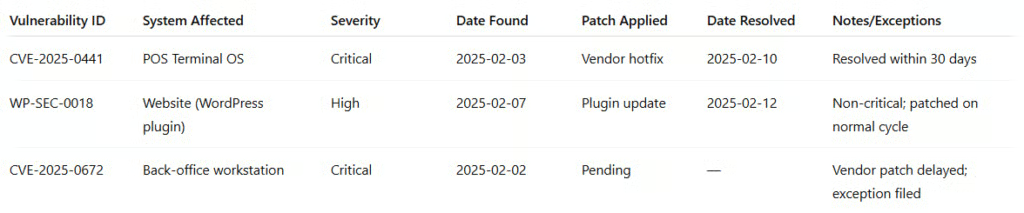
- Example: Simple SMB critical vulnerability patch log
To make this easier, here’s an example of the type of documentation that satisfies PCI requirements:
Payment-page scripts: Inventory, approve & monitor (Req. 6.4.3 / 11.6.1)
One of the most impactful clarifications in PCI DSS 4.0.1 is how businesses should manage client-side scripts on any page that collects or touches payment information. This includes checkout pages, embedded payment forms, “Pay Now” buttons, hosted payment redirects, and order pages that load third-party scripts.
The goal is to reduce eSkimming attacks, where malicious JavaScript silently steals card data from your site.
Under 4.0.1, small businesses must be able to show three things:
- You know which scripts run on your payment pages.
- You approve each script and understand why it’s there.
- You monitor those scripts for unexpected changes.
What you need to do
Even if you’re not technically proficient, the requirements can be managed with a simple routine:
1. Inventory scripts on your checkout pages
Start by listing every script that loads on:
- Your checkout page
- Any page with a payment form or embedded payment field
- Any page that loads the redirect to a hosted payment page
For most SMBs, this includes:
- Stripe/Square/PayPal scripts
- Shopify or WooCommerce storefront scripts
- Google Tag Manager tags
- Analytics and marketing scripts
- Theme/plugin JavaScript
2. Approve each script
Your inventory should include:
- Script name or source URL
- Purpose (e.g., payment tokenization, analytics, fraud tools)
- Version or hash (if available)
- Who approved it and when
3. Monitor changes with CSP/SRI or tools
You must detect tampering or new scripts you didn’t authorize. You can do this using:
- A Content Security Policy (CSP) to control which scripts are allowed
- Subresource Integrity (SRI) to detect altered scripts
- Built-in monitoring tools from your ecommerce host
- Third-party services like SiteLock or Managed WordPress Security
Most small businesses don’t need custom development — your ecommerce platform or hosting provider likely supports CSP and script monitoring natively or through plugins.
What auditors will look for
You don’t need a sophisticated system — just these items:
- A script inventory
- Approval dates and script owners
- CSP/SRI configuration screenshots
- Proof of validations (e.g., monthly check logs)
If your business uses a hosted checkout option like Stripe Checkout or PayPal, the good news is: You only need to manage scripts on your pages, not the hosted payment page itself.
But any script running before the redirect still counts, which is where most SMBs miss the requirement.
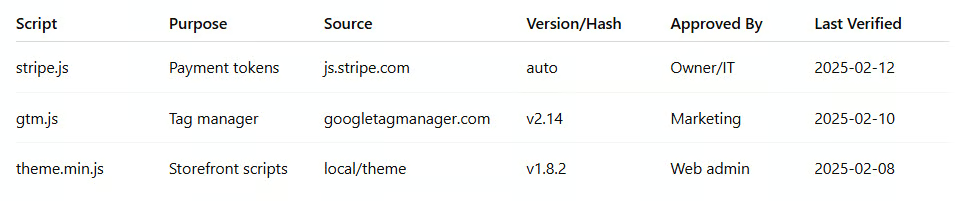
Example: SMB-friendly script allowlist
Here is a simple format to track script approvals:
MFA flexibility and phishing-resistant login (Req. 8 / 8.4.2)
PCI DSS 4.0.1 clarifies when businesses can use phishing-resistant authentication, such as WebAuthn or FIDO2 security keys, to meet MFA requirements. This update doesn’t change the underlying controls, but it makes it easier for small businesses to choose the right authentication method for each type of user.
The most important takeaway:
- WebAuthn/FIDO2 can satisfy MFA for users who do not have administrative access.
- Administrative access still requires full MFA as defined in Requirement 8.
This clarification gives SMBs more flexibility and can simplify login for employees, especially in retail or multi-shift environments where using an app-based authenticator isn’t always practical.
What you need to do
1. Identify who is an admin vs a non-admin
This distinction matters because it determines which MFA path is allowed.
Admin users include:
- Owners and system administrators
- Anyone who can make configuration changes
- Users with access to cardholder data environments (servers, payment systems, firewalls)
Non-admin users include:
- Regular POS users
- Cashiers
- Staff logging in only to cloud dashboards or business tools without privileged access
2. Choose your MFA method
For most SMBs, two paths make sense:
Option A: WebAuthn/FIDO2 for non-admin users
- Fast tap-in authentication
- Phishing-resistant
- Works well for employees with shared or controlled devices
Option B: Traditional MFA (app-based or token) for admin accounts
- Required for privileged access
- Works with most cloud platforms, POS systems, and hosting providers
3. Update your access control policy
This is often the step small businesses overlook. Auditors will expect:
- A written process defining who is admin vs. non-admin
- Which authentication method each role uses
- How security keys or MFA apps are issued and revoked
- What happens when an employee leaves
What auditors will look for
You should maintain the following items:
- MFA configuration screenshots (admin and non-admin)
- List of users and their assigned authentication method
- Documentation showing how you provision/revoke MFA
- Policy updates reflecting the clarified requirements
You don’t need a complex IAM system; basic platform logs from your POS, payment gateway, or hosting provider are generally enough.
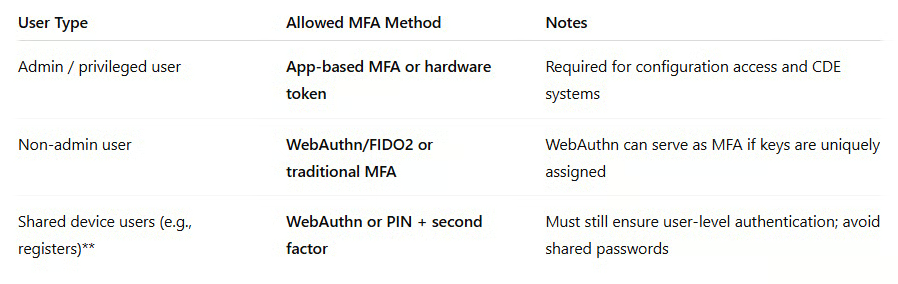
Example: SMB-friendly MFA decision guide
Keyed hashes & PAN protection (Req. 3 / 3.5.1.1)
PCI DSS 4.0.1 also clarifies how businesses should document keyed hashing and other methods used to protect Primary Account Numbers (PAN). The update doesn’t add new controls; it simply explains when a keyed hash qualifies as strong protection and how to document it more clearly.
For most small businesses using Stripe, Square, Shopify Payments, Helcim, or other modern processors, the good news is: You probably don’t handle PAN at all, so your payment provider manages hashing, encryption, and storage on your behalf.
Even so, PCI DSS expects you to understand how your provider protects card data and to document that they handle these requirements.
What you need to do
1. Identify whether you store, transmit, or process PAN
Most small merchants using hosted payment forms or tokenized APIs never touch PAN. If that’s the case:
- Your environment is significantly reduced in scope
- Your payment provider handles hashing and key management
- You simply need to document this in your SAQ or compliance file
If you do store or transmit PAN (rare for SMBs), keyed hash methods must meet stricter requirements.
2. Document your tokenization or hashing method
PCI DSS 4.0.1 clarifies that keyed hashes must:
- Use strong cryptographic keys
- Be non-reversible
- Protect the key according to Requirement 3
- Prevent reconstruction of PAN
- If your payment processor handles this, your documentation can be straightforward:
“Our business does not store or process PAN. Tokenization and cardholder data protection are provided by [Processor], as documented in their PCI DSS Attestation of Compliance.”
3. Update your Customized Approach documentation (if applicable)
This mainly applies to businesses using custom-made systems or storing hashed PAN values. Most SMBs will not use the Customized Approach at all but if you do, 4.0.1 makes the expected documentation much clearer.
What auditors will look for
Whether you outsource payment processing or handle PAN directly, auditors typically want:
- Your payment provider’s Attestation of Compliance (AOC)
- Documentation stating you do not store PAN locally
- Network diagrams showing where card data does not flow
- Evidence of key management procedures (only if you control the keys)
If you rely on a third-party provider, your job is mainly to gather their compliance documentation and confirm your environment never sees raw cardholder data.
Third-party service providers (Req. 12.8)
Most small businesses rely heavily on third-party service providers (TPSPs) for payments, hosting, ecommerce platforms, POS systems, and security tools. PCI DSS 4.0.1 strengthens the guidance around how merchants should manage these providers, specifically who is responsible for what, how incidents should be reported, and what evidence providers must supply.
These aren’t new requirements, but 4.0.1 makes expectations clearer so small businesses can avoid gaps that often show up during assessments.
What you need to do
1. Maintain a list of all PCI-relevant vendors
This includes any provider that:
- Stores, processes, or transmits cardholder data
- Hosts your payment pages or ecommerce site
- Provides security services (like vulnerability scanning or WAFs)
- Supplies your POS or payment hardware
Typical SMB examples:
- Stripe, Square, PayPal
- Shopify, WooCommerce hosting, BigCommerce
- Your POS vendor (Toast, Clover, Lightspeed, etc.)
- Website hosting providers
- Managed IT or security vendors
2. Collect and validate their PCI compliance documents
At minimum, you need:
- The vendor’s Attestation of Compliance (AOC)
- Any Responsibility Matrix showing which PCI controls they cover
- Security or incident response contact details
You don’t need to analyze their entire compliance program; just keep these documents on file and make sure they’re current.
3. Update contracts with clearer PCI language
PCI DSS 4.0.1 sharpens the expectation that merchants must formally assign responsibilities.
Contracts or service agreements should specify:
- Who is responsible for protecting cardholder data
- When the provider must notify you of a security incident
- What logs, reports, or evidence the provider must supply and how quickly
- How they maintain PCI DSS compliance annually
If your vendor doesn’t update contracts automatically, you can add an addendum (even a simple one-page attachment works).
What auditors will look for
Auditors typically request:
- Your vendor list (including which ones impact PCI scope)
- Copies of AOCs for all relevant TPSPs
- Contracts containing PCI responsibility language
- Evidence that you reviewed and maintained these documents annually
Most SMBs are surprised by how little is actually required. What matters is keeping everything in one place and making sure contracts clearly assign responsibilities.
Example: Contract clauses to add
You can add these to vendor agreements or service addendums:
- “Vendor shall maintain PCI DSS compliance and provide an annual AOC or equivalent evidence.”
- “Vendor shall notify Merchant of any security incident involving cardholder data within 72 hours.”
- “Vendor shall provide all PCI-relevant logs, reports, and documentation within five business days of request.”
- “Vendor is responsible for the PCI requirements outlined in the attached Responsibility Matrix.”
These clauses help close the biggest gaps auditors flag for small businesses.
Appendices and definitions
PCI DSS 4.0.1 includes several updates to the appendices and glossary to clear up terms that caused confusion in earlier versions of the standard. While these aren’t new requirements, they matter because assessors rely on these definitions when deciding whether something is “in scope” or needs extra evidence.
For small businesses, the biggest benefit is consistency — using the clarified language helps you document things the same way your assessor expects to see them.
Key definition updates you should know
“Significant Change”
PCI now defines this more clearly, reducing guesswork. Examples include:
- New payment channels or integrations
- Major ecommerce or POS upgrades
- Moving systems to a new hosting provider
- Substantial network architecture changes
Small updates, like content edits or minor plugin fixes, don’t count.
“Script Management”
This definition supports the payment-page script requirement. It now spells out that script management includes:
- Inventorying scripts
- Approving their purpose
- Tracking versions/hashes
- Monitoring for unexpected changes
This helps justify your script allowlist and CSP/SRI configuration during assessments.
“Phishing-Resistant Authentication”
This definition now maps directly to WebAuthn/FIDO2 capabilities, making it easier to decide when a security key can satisfy MFA requirements.
“Keyed Hash”
The glossary now clarifies the conditions for secure keyed hashing, including non-reversibility and proper key management. For most SMBs using third-party processors, this simply helps you document that your provider meets these conditions.
Why these definitions matter
- They guide how assessors interpret requirements.
- They help small businesses avoid over-documentation.
- They ensure your SAQ responses use the same terminology as the standard.
- They reduce disagreements between merchants and assessors about what is “significant,” “in scope,” or “monitored.”
Even if you don’t read the full appendices, using the updated terms in your policies, vendor agreements, and SAQ will make your documentation cleaner and more aligned with PCI DSS 4.0.1 expectations.
Do-this-now checklist
PCI DSS 4.0.1 doesn’t add new requirements, but it does clarify what documentation and processes small businesses should tighten. Use this short checklist to make sure you’re aligned with the updated standard.
Immediate actions for small businesses:
- Tighten your Critical-only patch process. Update your policy to reflect the 30-day requirement for critical vulnerabilities and document how you track exceptions.
- Inventory and approve all scripts on your payment pages. Maintain an allowlist, record the purpose of each script, and set up CSP/SRI or platform-based monitoring.
- Choose your MFA path for each user type. Use WebAuthn/FIDO2 for non-admin users if you want simpler authentication, and require app-based MFA for admin access.
- Document how PAN protection works in your environment. If you use a hosted or tokenized solution, note that your payment provider manages keying, hashing, and storage.
- Refresh third-party service provider (TPSP) contracts. Make sure each agreement includes PCI responsibility assignments, incident reporting timelines, and evidence SLAs.
- Switch to the latest PCI DSS 4.0.1 SAQ templates. These replace older versions and reflect the clarified guidance assessors now expect.
This checklist covers the most critical updates and is typically enough for small businesses to stay compliant without adding new technology or complex processes.
Frequently asked questions (FAQs)
Click through the sections below to read answers to common questions about PCI Dss 4.0.1:
Does PCI DSS 4.0.1 add any new requirements?
No. PCI DSS 4.0.1 only clarifies existing requirements. It does not add new controls or increase scope for small businesses.
Do I need to change my MFA setup?
Maybe. If employees aren’t admins, you can use WebAuthn/FIDO2 as their MFA method. Admin users still need app-based or token-based MFA.
I use a hosted payment page, do script requirements apply to me?
Yes, but only for your pages. If your site loads a “Pay Now” button or redirect link, you must inventory and approve any scripts on that page. You do not need to manage scripts on the hosted payment page itself.
Do I need to update my SAQ?
Yes. You should now use the PCI DSS 4.0.1 SAQ templates, even if your environment hasn’t changed.
How do I know which vendors fall under PCI scope?
Any provider that stores, processes, or transmits card data, or hosts systems that support payment flows, is considered a Third-Party Service Provider (TPSP). Collect their AOCs and ensure your contracts assign PCI responsibilities.
Do I need to change how I patch systems?
Only for Critical vulnerabilities. You must patch Critical issues within 30 days of identification. Other updates follow your normal schedule.
What if I don’t store or process PAN?
Then your payment provider handles hashing and encryption for you. Document this in your SAQ and keep their AOC on file.
Bottom line
PCI DSS 4.0.1 doesn’t introduce new requirements, but it does clarify how small businesses should document patching, script management, MFA, and vendor responsibilities. For most merchants, staying compliant comes down to keeping clean records, updating a few policies, and ensuring your payment providers stay up-to-date.
If you follow the checklist above, maintain a simple script allowlist, and keep your vendor files in order, you’ll meet the intent of the updated standard without adding extra work or tools.
