







Quoting software lets businesses create and send price estimates or proposals to sales leads for review. While often a feature included in customer relationship management (CRM) software, quoting tools can also be found in specialty document management, proposal generation, and work management systems. The best options must have intuitive features like proposal templates, price calculations, and payment processing at an affordable price.
Explore the 10 best quoting software for small business teams based on my expert evaluation.
| Best for | Quote acceptance/e-signature | |
|---|---|---|
| HubSpot CRM | Overall free quoting software | E-signatures included |
| Jobber | Trade contractors | Quote approvals |
| PandaDoc | Getting quote signatures | Unlimited e-signatures |
| Bitrix24 | Generating unlimited quotes | E-signature included |
| QuoteWerks | Centralizing business management activities | With the QuoteValet add-on |
| Scoro | Customizable quoting software | Quote tracking & approval |
| Quotient | Collecting customer feedback on quotes | One-click acceptance |
| Qwilr | Ease of use | E-signatures included |
| Zoho CRM | Inventory management | Quote generation only |
| Salesforce CPQ | Quote automation | Approval automation |
How I chose the best quoting software for small businesses
To evaluate the best quoting software, I fact-checked each provider’s pricing, quote creation tools, proposal features, e-signature options, and payment capabilities. I then scored each one based on the features small businesses need most, prioritizing affordability, ease of use, templates, automation, and customer support. See my full methodology below.
Why you can trust Fit Small Business
- Best quoting software comparison
- HubSpot CRM: Best free quoting software
- Jobber: Best for trade contractors
- PandaDoc: Best for getting quote signatures
- Bitrix24: Best for generating unlimited quotes
- QuoteWerks: Best for centralizing business management activities
- Scoro: Best customizable quoting software
- Quotient: Best for collecting customer feedback on quotes
- Qwilr: Best for ease of use
- Zoho CRM: Best for inventory management
- Salesforce CPQ: Best for quote automation
- Methodology: How I evaluated the best quoting software
- How to choose the best quoting software
- Frequently asked questions (FAQs)
- Bottom line
Best quoting software comparison
| Our rating (out of 5) | Free plan | Free trial | Starting monthly price | |
|---|---|---|---|---|
| HubSpot CRM | 4.70 | ✔ 2 users | ✕ | $9 per user |
| Jobber | 4.68 | ✕ | ✔ 14 days | $22 for one user |
| PandaDoc | 4.50 | ✔ Unlimited users | ✔ 14 days | $19 per user |
| Bitrix24 | 4.36 | ✔ 2 users | ✔ 15 days | $49 for five users |
| QuoteWerks | 4.34 | ✕ | ✔ 30 days | $45.83 per user |
| Scoro | 4.32 | ✕ | ✔ 14 days | $19.90 per user |
| Quotient | 4.28 | ✕ | ✔ 21 days | $28 for one user |
| Qwilr | 4.24 | ✕ | ✔ 14 days | $35 per user |
| Zoho CRM | 4.08 | ✔ 3 users | ✔ 15 days | $14 per user |
| Salesforce CPQ | 4.03 | ✕ | ✔ 30 days | $100 per user |
HubSpot CRM: Best free quoting software
Why I chose HubSpot CRM
HubSpot CRM is the top free quote generation tool that also happens to be my pick for the best free CRM system. Its simple and highly intuitive interface makes it easy for anyone to go in and create quote proposals for leads and customers. You can autopopulate stored CRM data and product information onto premade templates—allowing for a fast creation and deployment process via its free email tools.
When to use HubSpot Quote software
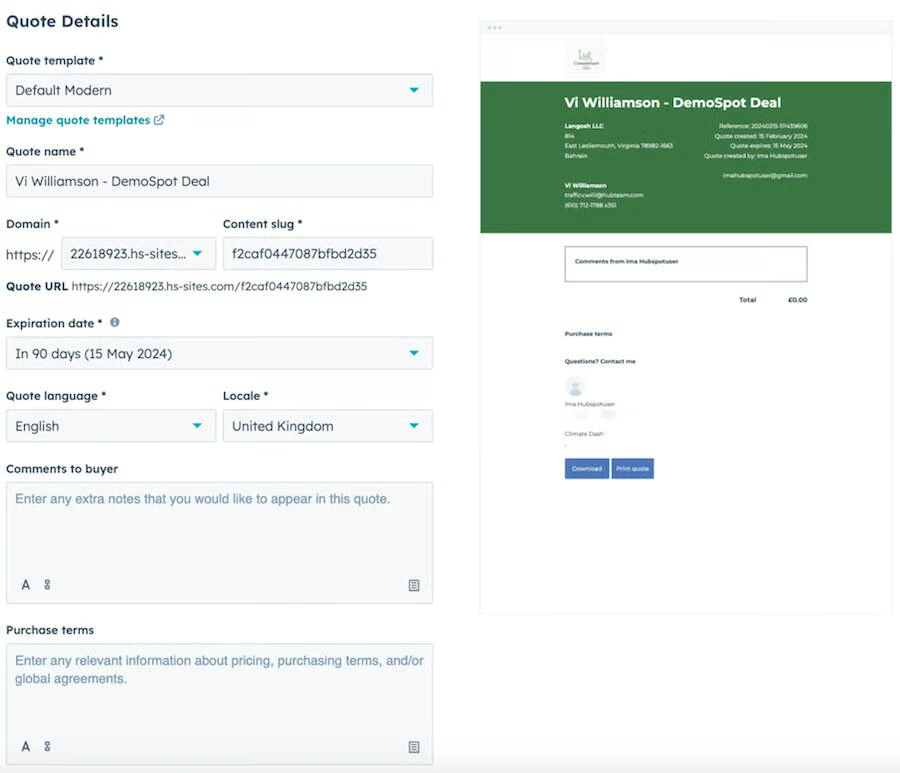
You need a free and basic quoting tool: HubSpot CRM’s free plan includes a Commerce Hub that allows you to access quoting, e-signature, invoicing, and Stripe payment processing tools. You can customize its quote templates to generate branded sales quotes. Plus, you can gather e-signatures and embed payment links to collect payments. A bonus advantage is that it’s an all-in-one CRM that autopopulates proposal data onto templates using CRM data.
When to use an alternative
You need a solution with a higher e-signature allocation: With HubSpot CRM, you can only procure up to 10 e-signatures per month for all plans up to the Sales Hub Professional plan ($90 per user monthly). The Enterprise plan ($150 per user monthly) allows you to get up to 30 e-signatures per month.
Alternatives: PandaDoc’s Business plan ($49 per user monthly) includes quoting features with no limit on the number of e-signatures you can add to an existing document. If you have a bigger team needing unlimited e-signatures for quotes, consider subscribing to Bitrix24’s Standard plan ($99 per month for 50 users).
Pricing
| Free tools | Starter | Professional | Enterprise | |
|---|---|---|---|---|
| Monthly fee* | $0 | $9 | $90 | $150 |
| Key features |
|
|
|
|
*Pricing is based on annual billing on a per-month breakdown of the HubSpot Sales Hub plans for individuals and small teams. Monthly billing and enterprise-level options are available at a higher cost. While I update pricing information regularly, I encourage readers to check current pricing.
Jobber: Best for trade contractors
Why I chose Jobber
Carpenters, cleaners, landscapers, roofers, plumbers, and any other trade contractors seeking quote tools need look no further than Jobber. The product lets you oversee the entire sales cycle from start to finish — combining a CRM and job management system. Additionally, the financial tools (quotes, invoices, and payment processing) let you easily run job cost estimates, provide pricing details to prospects, and process payments, all in the same interface.
When to Use Jobber
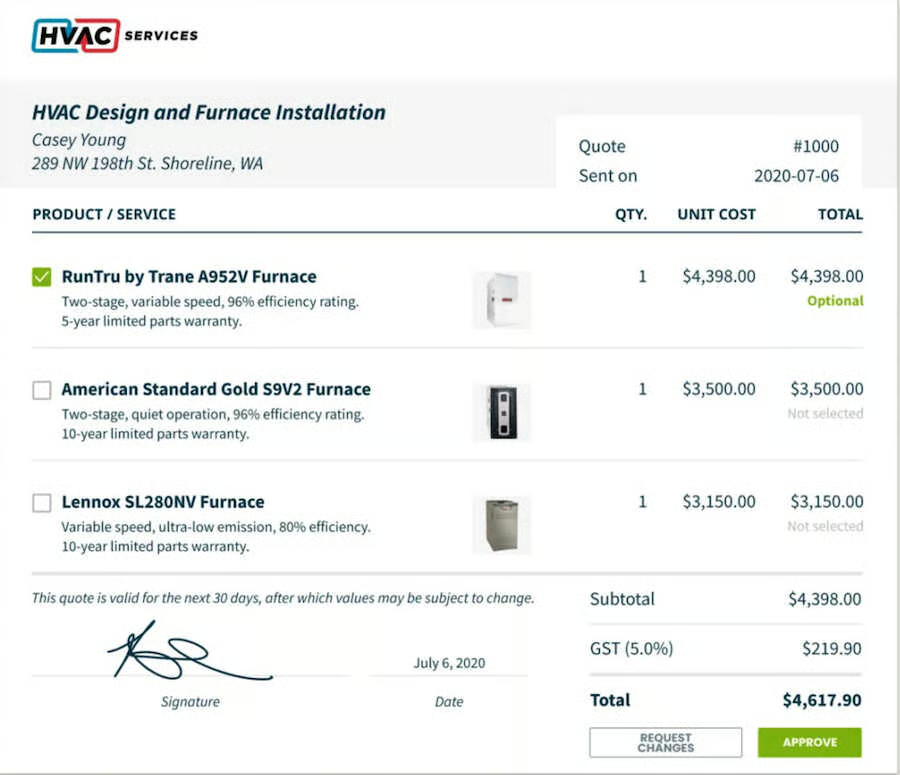
You’re a trade contractor needing a robust job quoting solution: Jobber is a niche job management platform designed for general contractors and private labor forces, such as those in landscaping, plumbing, and appliance repairs. Aside from job management features, it has built-in job quoting features, including customizable templates, signature approvals, and automated calendar reminders.
When to use an alternative
You’re looking for more cost-friendly marketing tools: Jobber’s basic marketing capabilities are limited to tracking won deals from marketing campaigns and building websites. Marketing campaigns and referrals require an add-on that costs $79 per user monthly.
Alternative: HubSpot CRM offers free tools that include mass email marketing, automated campaigns, web forms, website landing pages, and blog hosting.
Pricing
| Core | Connect | Grow | |
|---|---|---|---|
| Monthly fee* | $22 | $73 | $109 |
| Key features |
|
|
|
*Pricing is based on annual billing on a per-month breakdown of the plans. Monthly billing is also available at a higher cost. While I update pricing information regularly, I encourage readers to check current pricing.
PandaDoc: Best for getting quote signatures
Why I chose PandaDoc
PandaDoc is a great specialty tool if all you need is a solution for creating signable quotes. It’s a super-intuitive product in terms of creating and sending new contracts that also stands out for its payment processing capabilities. Though there’s no free-forever plan, its Business plan ($49 per user monthly) gives small businesses everything they need to finalize sales deals and collect payments.
When to use PandaDoc
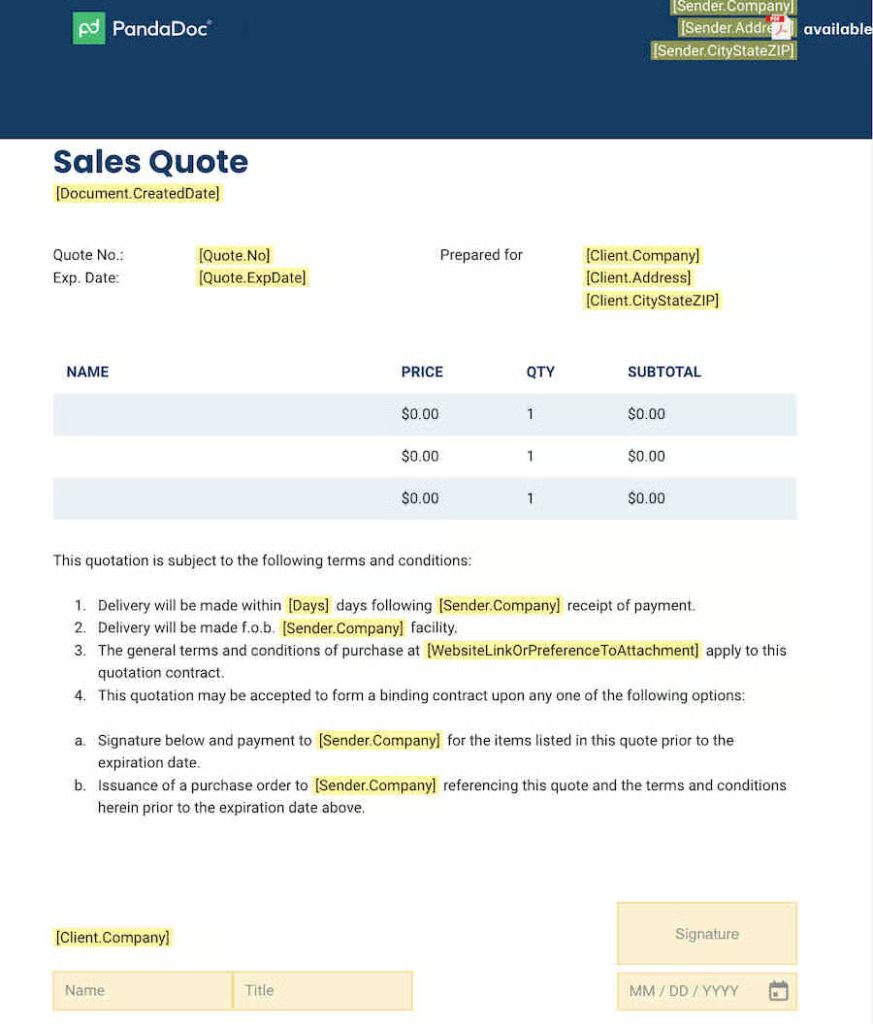
You need a specialty document management system with e-signature: Across all plans, PandaDoc lets you upload and send unlimited documents and quotes, as well as add an e-signature block to an existing document. The Business plan ($49 per user monthly) lets you build a content library and create branded quotes. You can also add interactive elements to quotes, such as upgrades, add-ons, and product visuals.
When to use an alternative
You want access to broader sales management features: One of the limitations of a specialty document management tool like PandaDoc is its lack of built-in sales management features. You must integrate it with a third-party tool like a CRM system to access pipeline management, lead management, and forecasting.
Alternatives: Consider using a CRM system if you want out-of-the-box sales management features. Some of the best options include HubSpot CRM’s free tools for two users, Bitrix24’s Standard plan ($99 per month for 50 users), and Zoho CRM’s Professional plan ($23 per user monthly).
Pricing
| Free tools | Starter | Business | Enterprise | |
|---|---|---|---|---|
| Monthly fee* | $0 | $19 | $49 | Custom |
| Key features |
|
|
|
|
*Pricing is based on annual billing on a per-month breakdown of the plans, though monthly billing is also available at a higher cost. While I update pricing information regularly, I encourage readers to check current pricing.
Bitrix24: Best for generating unlimited quotes
Why I chose Bitrix24
Bitrix24 takes the spot as the best CRM system that offers quote tools. I like that it has unlimited quoting capacity and lets users one-click convert deal-to-quote, quote-to-invoice, and quote-to-deal—a huge time-saver. Additionally, the CRM has features that supplement quote generation tools like lead, client, and contact management, e-signatures, and payment processing.
When to use Bitrix24
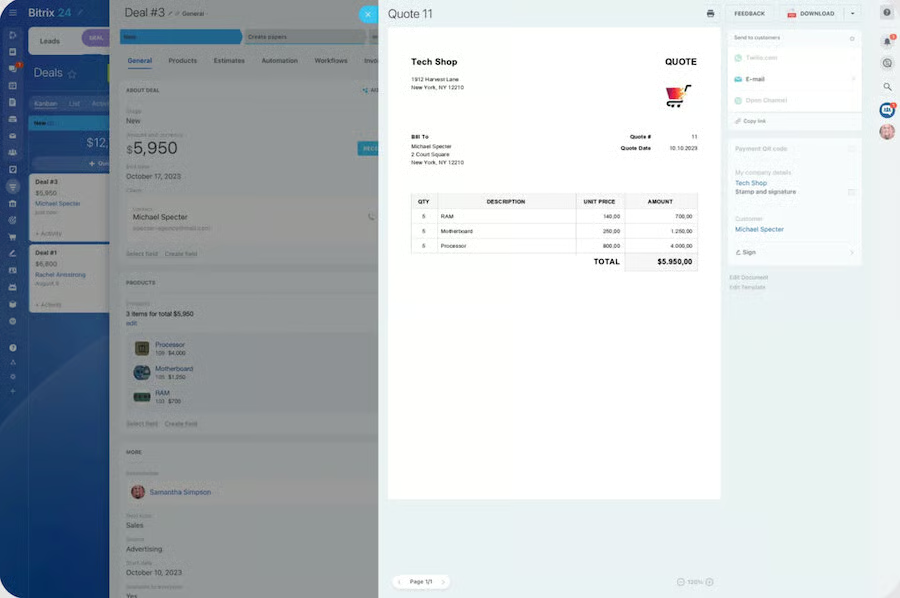
You need a CRM with unlimited quoting and e-signature features: Bitrix24 is a full-featured CRM system that comes out of the box with quoting features in the form of estimates. With just a click, you can generate unlimited quotes directly from a CRM record or convert a quote into a deal or invoice. You can also use the Bitrix24 sign tool to procure e-signatures for unlimited documents.
When to use an alternative
You’re a small business looking for a more affordable quote management solution: Bitrix24’s quote management tools are only available starting with its mid-level tier, which costs $99 per month for 50 users. This could be costly or impractical for solopreneurs or smaller businesses with fewer team members.
Alternatives: HubSpot CRM tops my list of the best quoting software because of its free plan for two users. Other alternatives that are more suitable for solo users and small teams include QuoteWerks (starting at $13.75 per user monthly) and Jobber (starting at $29 for one user).
Pricing
| Free | Basic | Standard | Professional | Enterprise | |
|---|---|---|---|---|---|
| Monthly fee* | $0 | $49 | $99 | $199 | $399 |
| Key features |
|
|
|
|
|
*Pricing is based on annual billing on a per-month breakdown of the plans, though monthly billing is also available at a higher cost. While I update pricing information regularly, I encourage readers to check current pricing
QuoteWerks: Best for centralizing business management activities
Why I chose QuoteWerks
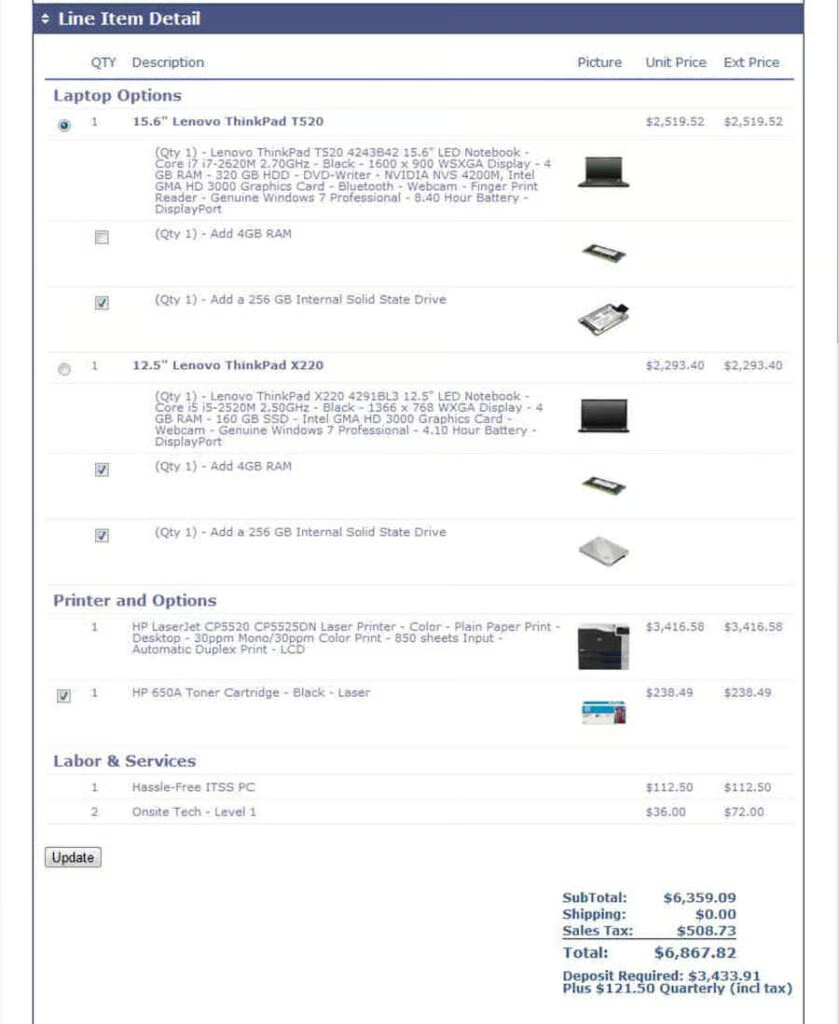
QuoteWerks is an excellent quote management option if you’re looking to centralize workflows into one platform. Most of its value comes from the vast number of third-party integrations with external CRM, accounting, vendor management, shipping, leasing, and payment processing systems. This enables teams to manage quotes and proposals while maintaining a clean, synchronized database across the entire business.
When to use QuoteWerks
You need a specialty tool to manage quotes, orders, and invoices: QuoteWerks’ Standard Edition ($13.75 per user monthly) allows users to store templates and create quotes, sales orders, and invoice documents from the platform. This edition also includes an unlimited product database to store details and pricing information on products or services to easily add them to quotes.
When to use an alternative
You’re looking for a platform with a simpler pricing scheme: QuoteWerks has a complex pricing system that requires add-ons for most of the advanced features. For instance, you need the QuoteValet ($25.67 per user monthly) if you want to use an online quote delivery and acceptance system. Other add-ons, like database hosting and distributor integration, require subscriptions to higher-level plans.
Alternative: In this guide, Quotient has the simplest pricing scheme that offers all of its features in a single plan. These include online quoting, delivery, automated follow-ups, quote templates, and customer feedback. It costs $28 per month for a single user and $48 per month for two to five users.
Pricing
| Essential | Balanced | Pinnacle | |
|---|---|---|---|
| Monthly fee* | $45.83 | $71.50 | $93.50 |
| Key features |
|
|
|
*Pricing is based on annual billing on a per-month breakdown of the plans, though monthly billing is also available at a higher cost. While I update pricing information regularly, I encourage readers to check current pricing.
Scoro: Best customizable quoting software
Why I chose Scoro
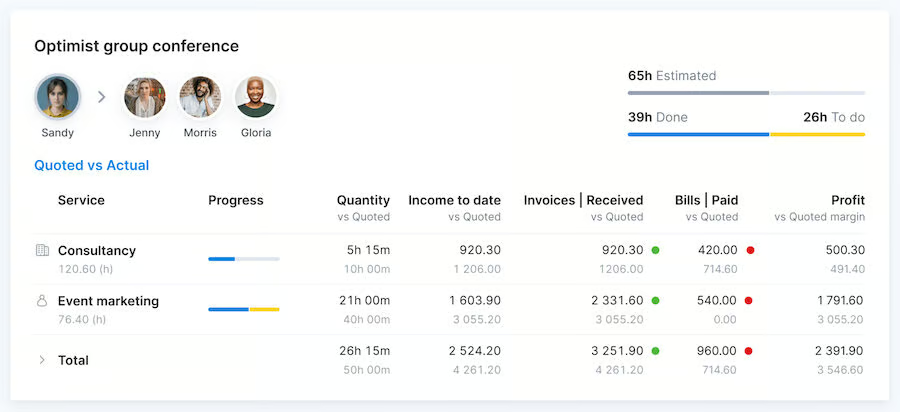
Scoro is a complete work management system, tailored for teams to track projects and store any information required for their businesses, such as customers or task data. What makes it unique compared with other work management tools is the sales and finance module. This is where you can create and send quotes, invoices, and receipts. There are also advanced features in higher tiers for managing suppliers, as well as budgeting and calculating costs and margins.
When to use Scoro
You need a highly customizable quoting platform: Scoro is a full work management system that allows you to manage a customizable database, as well as create, send, sign, and track custom quote documents. You can also create customized invoices either from scratch or from existing quotes. Teams subscribed to the Pro plan ($63 per user monthly) can manage their retainer-based businesses and help create custom budgets and profit margins for client projects.
When to use an alternative
You’re seeking a niche solution with built-in sales management features: Like most specialty quoting platforms in this guide, Scoro’s basic plan also lacks built-in tools for managing sales and customer relationships. You have to subscribe to a higher-level plan (Pro plan at $63 per user monthly) or integrate it with a CRM system to access sales pipeline management features.
Alternative: Jobber is a niche work management platform that offers quoting features, along with a CRM, client hub, and lead management capabilities with its Core plan ($29 per month for one user).
Pricing
| Core | Growth | Performance | Enterprise | |
|---|---|---|---|---|
| Monthly fee* | $19.90 | $32.90 | $49.90 | Custom |
| Key features |
|
|
|
|
*Pricing is based on annual billing on a per-month breakdown of the plans, though monthly billing is also available at a higher cost. While I update pricing information regularly, I encourage readers to check current pricing.
Quotient: Best for collecting customer feedback on quotes
Why I chose Quotient
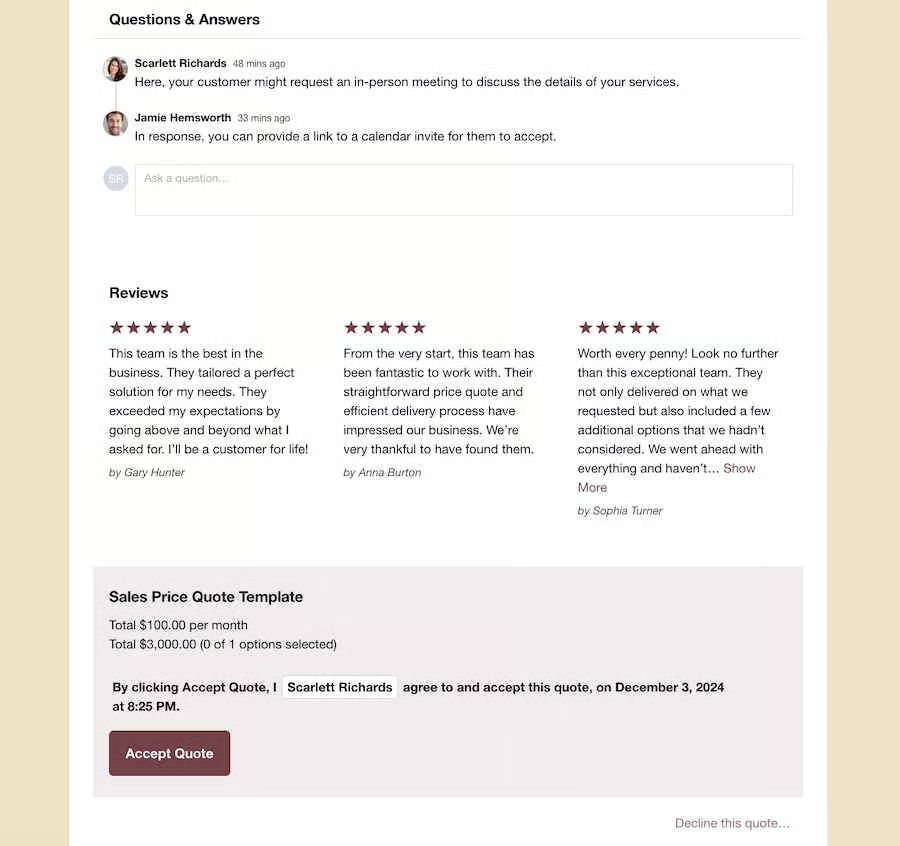
Quotient is an easy-to-use specialty quoting software that gives you the ability to accelerate your proposal management processes. Prospects can view their quotes, make comments, and ask questions in their personalized portal, plus accept the proposal in one click—all streamlining the entire process. It also comes with quote generation on stored templates and multiple-choice or menu selection of products with pricing for potential customers to choose from.
When to use Quotient
You want to streamline collaboration with prospects on a quote: One of Quotient’s unique features is the special section in the quote that allows customers to post their questions right after receiving the document. Templates also include essential details, such as payment terms, warranties, and next steps after they accept the quote. You can also add an About Us and a customer feedback section.
When to use an alternative
You need a specialty quoting solution with payment processing features: Quotient’s features are mainly for quote creation, delivery, tracking, and acceptance. It does not have built-in features for collecting and accepting customer payments.
Alternatives: Jobber’s Core plan ($29 per month for one user) includes quotes, invoicing, and payment processing. Qwilr is another great alternative that offers quotes, proposals, e-signatures, and payments with its Business plan ($35 per user monthly).
Pricing
| Solo | Team | Team+ | |
|---|---|---|---|
| Monthly fee* | $28 | $48 | $56 |
| Key features |
|
|
|
*Pricing is based on monthly billing on a per-month breakdown of the plans. While I update pricing information regularly, I encourage readers to check current pricing.
Qwilr: Best for ease of use
Why I chose Qwilr
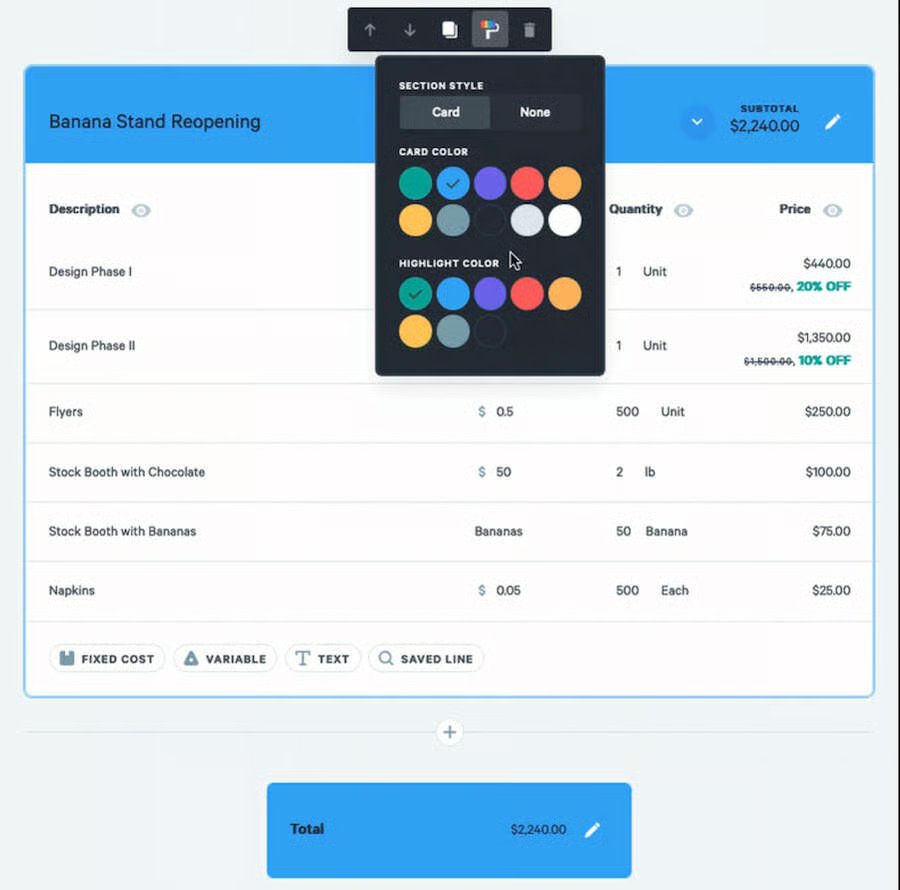
Qwilr’s system is modern and super-easy to operate—allowing users at all skill levels to add proposal components. These include interactive price tables, images, customer acceptance buttons, e-signatures sections, and payment links. It is also the most unique online quoting software on this list. Rather than sending PDF quotes or proposal documents, Qwilr does everything via a web page, which you can customize and send to prospects via a link.
When to use Qwilr
You want an intuitive platform to create modern-looking quotes quickly: Qwilr has a highly intuitive drag-and-drop interface that makes it easy to learn for users of all levels. Its Quote Block feature lets you add traditional line items, pricing plans, or both to the quote. Then, you can manually add the data or populate the document with data from your CRM. This allows you to generate modern-looking quotes with just a few clicks.
When to use an alternative
You need a solution with a native customer database: Unfortunately, Qwilr does not have its own customer database, so you must either manually fill up quotes with customer data or populate them with data from your CRM. This requires a separate subscription to a CRM system.
Alternatives: Scoro’s Essential plan ($26 per user monthly) includes contact management features and a customer database. If you’re looking for a CRM system with a contact database and more advanced quoting features, try Zoho CRM (Professional plan at $23 per user monthly) or Salesforce Sales Cloud’s Pro Suite ($100 per user monthly) with the Salesforce CPQ tool.
Pricing
| Business | Enterprise | |
|---|---|---|
| Monthly fee* | $35 | $59 |
| Key features |
|
|
*Pricing is based on annual billing on a per-month breakdown of the plans. Monthly billing is also available at a higher cost. While I update pricing information regularly, I encourage readers to check current pricing.
Zoho CRM: Best for inventory management
Why I chose Zoho CRM
The big standout for Zoho CRM is its complete inventory management module, which lets you create and send quotes to sales leads. Additionally, it includes vendor management, inventory tracking, invoicing, price books, product storage, and the ability to process purchase and sales orders. Overall, Zoho is one of the best sales management software options if you want to couple quoting tools with lead management, deal tracking, and contact storage.
When to use Zoho CRM
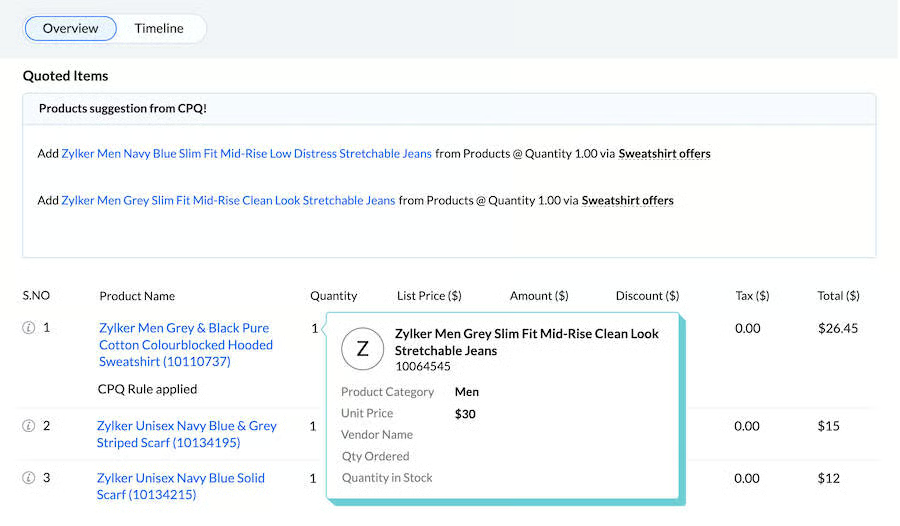
You need a solution with integrated inventory management features: Zoho CRM’s Professional plan ($23 per user monthly) comes with a complete inventory management module. This includes quote and invoice generation, which can autopopulate CRM data onto premade templates. Users can store product and price book information, track inventory, process purchase and sales orders, and add subproducts for upselling or cross-selling.
When to use an alternative
You’re looking for a more affordable CRM with quoting features: Zoho CRM’s quoting tools are gated with its Professional plan ($23 per user monthly). While this is not relatively expensive, there are still other similar providers that offer these features for free or at a much lower cost.
Alternative: HubSpot is one of the best sales management software with affordable built-in quoting capabilities. Its free plan for two users includes its quote software with a product library, customizable quote templates, and payment processing. The Sales Hub Starter plan ($15 per user monthly) includes e-signatures and simple automation for deal tasks.
Pricing
| Standard | Professional | Enterprise | Ultimate | |
|---|---|---|---|---|
| Monthly fee* | $14 | $23 | $40 | $52 |
| Key features |
|
|
|
|
*Pricing is based on annual billing on a per-month breakdown of the plans, though monthly billing is also available at a higher cost. While I update pricing information regularly, I encourage readers to check current pricing.
Salesforce CPQ: Best for quote automation
Why I chose Salesforce
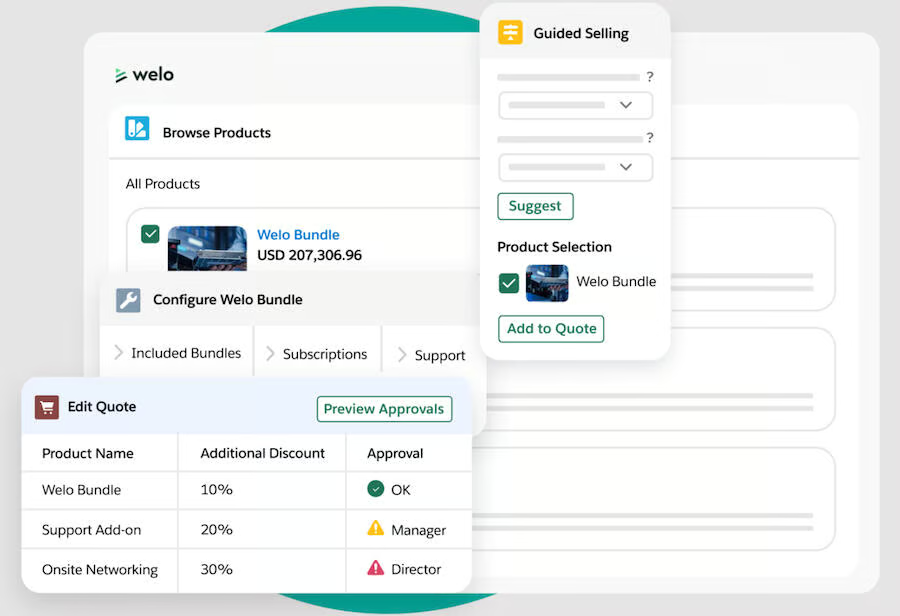
With one of the most advanced quoting software options, Salesforce CPQ can align cross-functional teams through automation. It allows users to store product books, generate quotes, and create automations that connect processes. You can set a workflow that automatically submits a sales order to operations once a quote is approved by a customer. You can also apply the workflows for legal to one-click approve a contract that then autosends to a lead.
When to Use Salesforce CPQ
You need a quoting platform with strong automation features: Salesforce CPQ’s basic plan (CPQ at $75 per user monthly) allows teams to store product and price book information to create sales quotes with just one click. The CPQ+ plan ($150 per user monthly) lets you automate quote-to-order handoffs, contract approvals, and proposal estimate changes based on price updates.
When to use an alternative
You’re looking for a simpler and more affordable quoting tool: A quoting platform with sophisticated and advanced features usually comes at a steep price that could put off small teams and businesses with limited budgets. For Salesforce CPQ, the price starts at $75 per user monthly for the standalone tool and $100 per user monthly for the Sales Cloud CRM.
Alternatives: Qwilr is highly acclaimed for its simplicity and ease of use, thanks to its intuitive drag-and-drop quote builder. Its plans start at $35 per user monthly. If you want a free quoting tool within a CRM system, try HubSpot CRM.
Pricing
| Starter Suite | Pro Suite | |
|---|---|---|
| Monthly fee* | $25 | $100 |
| Key features |
|
|
*Pricing is based on annual billing on a per-month breakdown of the plans. While I update pricing information regularly, I encourage readers to check current pricing.
Methodology: How I evaluated the best quoting software
To determine the best quotation software, I evaluated the specific features relevant to creating and sending either price quotes to leads or full, signable business proposals. I wanted to see things like storable templates, price calculators, e-signature options, and even payment processing for the advanced tools.
I also looked at other critical software attributes, including affordability, ease of use, and customer support. Review my evaluation process of the best sales quote software.
- General features (30%): I looked for core quoting features, including customizable templates, quote or proposal generation, automated email reminders, mobile access, and integrations, especially CRM integrations for syncing quote and customer data.
- Advanced/Niche features (25%): I reviewed advanced quote and proposal tools, such as prestored templates, price and cost calculators, e-signatures, contact management, and built-in or third-party payment processing.
- Pricing (15%): I considered free plan availability, paid plan options, quote management costs, billing flexibility, and whether users could save with annual pricing.
- Support (15%): I evaluated available support channels, including phone, live chat, email, knowledge bases, and community forums, plus whether support was available 24/7 or during extended hours.
- Expert score (15%): I considered my firsthand experience with each product, along with user reviews, to assess overall value, usability, feature quality, and interface intuitiveness.
How to choose the best quoting software
The best quoting software depends on how your business creates quotes, gets approvals, and turns accepted proposals into paid work. Start by deciding whether you need a simple quote builder, a full proposal tool, or a CRM with built-in quoting features. Then, compare tools based on pricing, templates, e-signatures, payment processing, automation, and integrations with the systems you already use.
Consider these factors when choosing a quoting tool:
- Quote complexity: Simple service quotes may only need templates and line items, while custom products may require CPQ, price books, or cost calculators.
- Sales workflow: If you manage leads and deals, choose a CRM with quoting tools. If you only need polished proposals, a document or proposal platform may be enough.
- Customer approvals: Look for e-signatures, one-click acceptance, quote tracking, and automated follow-ups to shorten the approval process.
- Payments: If you want to collect deposits or full payments after quote approval, choose software with built-in or integrated payment processing.
- Ease of use: The best tool should let your team build, send, and revise quotes quickly without needing extensive setup or training.
- Scalability: Consider whether the platform can support more users, higher quote volume, advanced automations, or integrations as your business grows.
Frequently asked questions (FAQs)
What makes a good quoting tool?
A good quoting tool will provide easy-to-use and advanced quote management features for an affordable price. In addition to allowing users to automate quote generation by pulling data from a contact or company record, the best quoting tools will let you calculate the price of products or services and send out proposals for review. Top-of-the-line products will also come with e-signature features and payment processing, all in one interface.
Which software is best for quotation?
Depending on your budget, feature needs, and product preferences, there are various apps you can use to make quotations for customers. HubSpot CRM, for example, offers a free plan that includes access to its quoting software, as well as contact and deal management tools. Alternatively, PandaDoc is a document management system that’s best for those that primarily need proposal generation and digital signature capabilities. And Jobber is the best quoting tool for trade contractors.
What is the CPQ system?
The CPQ (or configure, price, quote) system is the sales process that involves product configuration, setting the pricing, and creating a quote for customized products. This process can also be simplified and automated with the help of CPQ software. This tool automatically configures products and services based on customers’ needs and preferences. Next, it calculates the pricing in real time based on the configuration. Then, it generates a branded quote that specifies any applicable discounts or special offers.
Bottom line
Quote management tools enable businesses to easily create, send, and process business proposals from one system. The best quoting software will include affordable quote generation features and advanced capabilities like e-signature, payment processing, and price calculation tools.
While HubSpot CRM topped this list for its free quote software, other tools could be a better fit for your business needs. For instance, specialty products like Jobber are best for trade contractors, while Quotient is great for collecting customer feedback on quotes.
