







TurboTax Online is best for business owners who want cloud access, mobile filing, and the option to get expert help or hand off their return entirely. TurboTax Desktop is better for small businesses that prefer locally installed software, want to prepare multiple federal returns, or need DIY filing for partnerships, S-corps, C-corps, multi-member LLCs, trusts, or estates.
When comparing TurboTax Online vs. desktop, the right choice depends on how much control and support you want. Choose TurboTax Online if convenience, expert assistance, and access from any device matter most. Choose TurboTax Desktop if you are comfortable preparing your own return, want one-time software pricing, or need business entity filing that is not available through TurboTax Online’s DIY path.
- TurboTax Online is best for business owners who prefer a full-service tax preparation experience with professional assistance.
- TurboTax Desktop is ideal for small businesses that want to handle their own partnership and S-Corp tax filings independently.
- TurboTax Desktop vs. Online quick comparison
- Use cases and pros & cons
- Pricing: TurboTax Online wins
- Live assistance: TurboTax Online wins
- Helpful tools: TurboTax Online wins
- Mobile app: TurboTax Online wins
- Customer service and ease of use: TurboTax Online wins
- TurboTax Desktop vs Online: User reviews
- How to choose between TurboTax Online and Desktop
- How I evaluated TurboTax Online vs TurboTax Desktop
- Frequently Asked Questions (FAQs)
- Bottom Line
TurboTax Desktop vs. Online quick comparison
TurboTax Online | TurboTax Desktop | |
|---|---|---|
| Pricing for Do-it-Yourself (DIY) filing (Federal) | $0 to $139 | $80 to $190 |
| Accessibility | Cloud-based; use from a browser or mobile app | Installed locally on one computer |
| Schedule C support | Yes | Yes, with Home & Business |
| Import data from QuickBooks | ✕ | ✓ |
| Audit guidance and/or defense | ✓ | ✓ |
| Deduction finder | ✓ | ✓ |
| Mobile app | ✓ | ✕ |
| S-corp, partnership, C-corp, and multi-member LLC returns | Expert Assist or Full Service only; no DIY online filing | Yes, with TurboTax Business |
| Average user review score on third-party sites | 4.5 out of 5 | 4.1 out of 5 |
Use cases and pros & cons
Pros
- Accessible from any device with an internet connection
- Offers DIY filing, expert assistance, and full-service filing
- No installation or manual software updates required
- Supports mobile filing and document upload tools
Cons
- Pricing can increase as forms and support needs are added
- Business entity DIY filing is not available online
- Your tax information is stored in the cloud
- It may be less cost-effective for users filing several returns
Use Cases
- Small business owners who want expert help: TurboTax Online is the better choice if you want to ask questions while filing or have an expert review your return before submitting it.
- Business owners who want someone else to file: TurboTax Expert Full Service lets you hand off your tax return to a professional instead of preparing it yourself.
- Self-employed individuals with Schedule C income: Freelancers, contractors, and sole proprietors can use TurboTax Online for guided Schedule C filing.
- Remote or mobile users: TurboTax Online also works well if you want to start your return on one device and continue on another.
Pros
- Lets you prepare multiple federal returns with one software purchase
- Supports DIY filing for S-corps, partnerships, C-corps, multi-member LLCs, trusts, and estates
- Stores tax files locally instead of entirely in the cloud
- Can import data from QuickBooks
Cons
- Must be installed on a compatible computer
- No mobile app or browser-based access
- No live tax filing assistance
- State e-filing may cost extra
Use Cases
- Partnerships and corporations that want DIY filing: TurboTax Business supports Forms 1120, 1120-S, and 1065.
- Users preparing several federal returns: Desktop products offer multiple federal e-file options, making the software more cost-effective for households or users filing multiple returns.
- QuickBooks users: TurboTax Desktop can import QuickBooks data, which may reduce manual entry and help keep records consistent.
- Privacy-conscious users: The Desktop version of TurboTax is also a good choice for those who prefer to store return data locally rather than relying solely on cloud access.
- Small businesses looking for inexpensive DIY online filing: H&R Block is often a less expensive alternative to TurboTax for paid DIY filing, while still offering online filing, expert help options, and support for more complex tax situations. Read our review of H&R Block for more information about its features and pricing.
- Businesses that want to file both their individual and business returns online: TaxAct is a strong TurboTax alternative for filers seeking online options for individual and business returns. It is especially worth considering if you want a lower-cost platform and do not need TurboTax’s more robust expert-guided experience.
- Freelancers who need free software to file an individual return with Schedule C: FreeTaxUSA is a great option for freelancers, contractors, and sole proprietors who want to file a federal Form 1040 with Schedule C for free. It supports self-employment income and major small business deductions, though state returns cost extra.
Pricing: TurboTax Online wins
| Tax Return | TurboTax Online | TurboTax Desktop |
| Form 1040 only | TurboTax Do It Yourself: $0 federal; $0 state for eligible simple returns | Basic: $80 federal |
| Form 1040 with Schedules 1-3 | TurboTax Do It Yourself: $59 to $79 federal; $64 per state | Deluxe: $80 federal; includes 1 state download; State e-file sold separately |
| Form 1040 with rental property, investments, or cryptocurrency | TurboTax Do It Yourself: $129 to $139 federal; $64 per state | Premier: $115 federal; includes 1 state download; State e-file sold separately |
| Form 1040 with self-employed income | TurboTax Do It Yourself: $129 to $139 federal; $64 per state | Home & Business: $130 federal; includes 1 state download; State e-file sold separately |
| Business returns: Form 1120, 1120S, or 1065 | Not available for DIY online filing | Business: $190 federal; State download sold separately |
| Tax Return | TurboTax Online | TurboTax Desktop |
| Form 1040 only | TurboTax Expert Assist: $0 federal; $0 state for eligible simple returns | Live tax assistance unavailable |
| Form 1040 and supporting Schedules | TurboTax Expert Assist: $59 to $209 federal; $64 to $69 per state | Live tax assistance unavailable |
| Form 1040 with self-employed income | TurboTax Expert Assist: Up to $209 federal; Up to $69 per state | Live tax assistance unavailable |
| Tax Return | TurboTax Online | TurboTax Desktop |
| Form 1040 and supporting Schedules | Expert Full Service: Starts at $129 federal; $79 per state | Full Service filing unavailable |
| Form 1040 with self-employed income | Expert Full Service: Starts at $129 federal; $79 per state; final price varies by tax situation | Full Service filing unavailable |
| S-corp or partnership return | Expert Full Service Business: $1,549 federal; state additional | Full Service filing unavailable |
At the same time, TurboTax Online wins if you want expert help or full-service filing because Desktop does not offer comparable tax professional assistance. However, TurboTax Desktop is still the better deal if you want to file your own business entity return or prepare several federal returns with one purchase.
For 2026, the biggest distinction is not just Online versus Desktop; it is also DIY versus expert-supported filing. TurboTax Online gives you more support options, including expert-assisted and full-service filing, while TurboTax Desktop gives experienced filers more control over self-prepared returns, especially for entities like partnerships, S-corps, C-corps, multi-member LLCs, trusts, and estates.
Live assistance: TurboTax Online wins
TurboTax Online is the clear winner for live assistance, offering two levels of expert support: TurboTax Expert Assist and TurboTax Expert Full Service. With Expert Assist, you file your own return with unlimited expert help and a final review before filing. With Expert Full Service, a dedicated expert prepares and files your return from start to finish.
However, TurboTax Desktop does not offer comparable live tax assistance. It includes technical and product support, but users who want tax advice, expert review, or full-service filing should choose TurboTax Online instead.
Feature | TurboTax Online | TurboTax Desktop |
Communication method | Phone, chat, or one-way video with tax experts | Product support only |
Qualifications of professionals | Certified public accountants (CPAs), enrolled agents (EAs), and tax specialists | N/A |
Tax pro assistance for individual returns | ✓ | ✕ |
Full-service filing for individual returns | ✓ | ✕ |
Full-service filing for business returns | ✓ | ✕ |
Helpful tools: TurboTax Online wins
TurboTax Online wins for convenience because it includes cloud access, mobile support, document upload tools, and expert help options. It is also easier for users who want to move between devices, upload tax documents from a phone, or work with a tax professional through TurboTax Expert Assist or Expert Full Service.
In contrast, TurboTax Desktop is stronger for users who want local software, QuickBooks import, or DIY business entity filing. If QuickBooks integration, multiple federal returns, or preparing a partnership, S-corp, C-corp, multi-member LLC, trust, or estate return matters more than mobile access, Desktop is the better fit.
TurboTax Online | TurboTax Desktop | |
| Import from QuickBooks | No | Yes |
| Deduction finder | Yes | Yes |
| Audit guidance or support | Yes | Yes, but support varies by product |
| Cryptocurrency support | Yes, with Premium | Yes, with Premier and higher |
| Tax calculator | Yes | Yes |
| Import W-2s & 1099s | Yes | Yes |
| Amended returns | Yes | Yes |
| Tax law and software updates | Automatic online updates | Available with an internet connection |
| Real-time expert collaboration | Yes, with Expert Assist or Full Service | No |
| Business entity return support | Expert Assist or Full Service for supported entities | DIY filing with TurboTax Business |
It is also important to note that TurboTax Online has the stronger set of convenience tools because it works from a browser or mobile app and connects users to live expert help. However, TurboTax Desktop still has important advantages for experienced filers, especially those who want to import from QuickBooks or prepare their own business entity return.
Mobile app: TurboTax Online wins
TurboTax Online is the only option that works with the TurboTax mobile app, allowing users to prepare and e-file their tax returns directly from their smartphones or tablets. The app enables users to scan and upload tax documents, track refunds in real-time, and access support features, providing a convenient solution for filing taxes on the go.
In contrast, TurboTax Desktop does not have a comparable mobile app because it is installed locally on a computer. If mobile access, document scanning, or filing from multiple devices is important, choose TurboTax Online.
Therefore, TurboTax Online wins this category because its app supports mobile tax preparation, document upload, e-filing, refund tracking, and access to expert help for eligible products. TurboTax Desktop is still useful for DIY entity filing and local software access, but it is not designed for mobile filing.
TurboTax Online App | TurboTax Desktop App | |
| Availability | iOS and Android | N/A |
| Products supported | TurboTax Online products | N/A |
| Talk live with a tax specialist | Yes, with eligible Expert Assist or Full Service products | N/A |
| Prepare and e-file a return | Yes | N/A |
| Scan and upload W-2s and other tax documents | Yes | N/A |
| Track IRS refund status | Yes | N/A |
| Print or save returns as a PDF | Limited; full print/save tools may be easier from a browser | N/A |
Customer service and ease of use: TurboTax Online wins
TurboTax Online is easier to use for most small business owners because there is no software installation, no local file management, and no need to work from a single computer. It is also the better option for users who want expert help while filing, a final expert review, or full-service tax preparation.
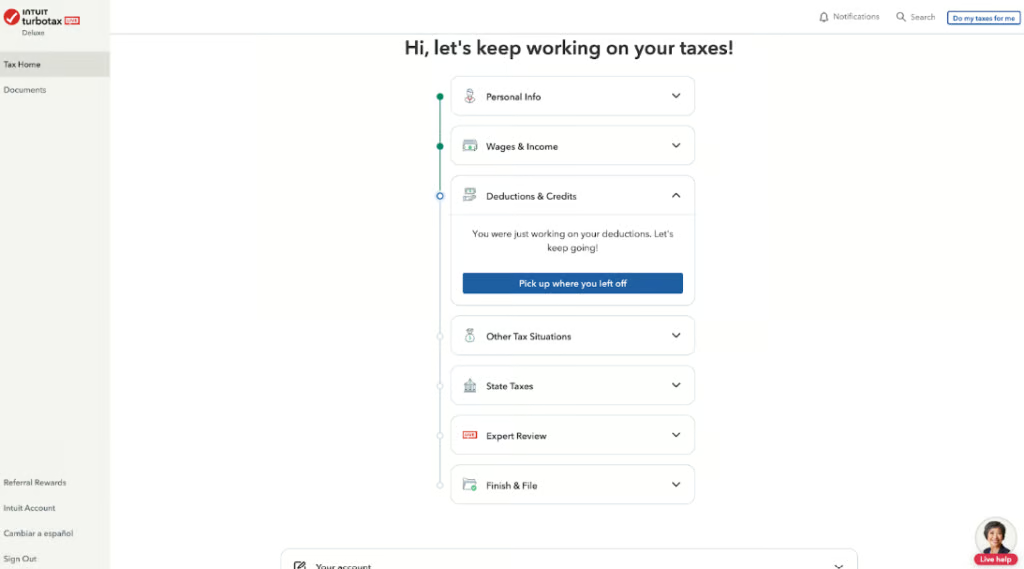
TurboTax Online input screen (Source: TurboTax)
TurboTax Desktop is still straightforward, especially for users who are comfortable with installed tax software. However, it has more setup requirements. Users must install and activate the software, confirm operating system compatibility, download updates, and work from the computer where the program is installed.
TurboTax Online | TurboTax Desktop | |
| User interface | Guided online filing with browser and mobile access | Guided desktop software installed on one computer |
| Setup required | No software installation | Software installation and activation required |
| Support channels | Phone, chat, and one-way video with eligible expert products | Technical and product support |
| Expert tax help | Yes, with Expert Assist and Full Service | No |
TurboTax Desktop vs Online: User reviews
TurboTax Online and Desktop both receive strong reviews from users, but the feedback tends to highlight different strengths. Online users often praise the guided experience, convenience, and expert help options, while Desktop users tend to value the familiar interface, local installation, and ability to prepare more complex or multiple returns.
The biggest complaints about TurboTax Online are cost and unexpected upgrades when a return requires additional forms. For Desktop, common complaints include installation issues, software crashes, and the inconvenience of working on a single device. These review patterns reinforce the core trade-off: TurboTax Online is more convenient, while TurboTax Desktop offers more control.
How to choose between TurboTax Online and Desktop
Choosing between TurboTax Online and TurboTax Desktop means determining how you prefer to file, what type of return you need to prepare, and whether you want professional tax help. Specifically, you should:
Choose TurboTax Online if you want expert help
TurboTax Online is the better choice if you want access to a tax expert while filing or prefer to hand off your return entirely. It offers DIY filing, expert-assisted filing, and full-service tax preparation, making it more flexible for business owners who are unsure about deductions, forms, or filing requirements.
This is especially helpful for freelancers, contractors, and sole proprietors who want guidance while completing a Schedule C return. It is also the better option if you want to work from multiple devices or use TurboTax’s mobile app.
Choose TurboTax Desktop if you want to file your own business return
TurboTax Desktop is the better option if you want to prepare returns for a partnership, S-corp, C-corp, multi-member LLC, trust, or estate yourself. TurboTax Online does not support DIY filing for these entity returns, so Desktop is the stronger fit for business owners who are comfortable handling tax preparation without live expert support.
Desktop may also be more cost-effective if you need to prepare multiple federal returns with one software purchase. It is best for users who prefer local installation, local file storage, and more control over the filing process.
Compare the total cost, not just the starting price
TurboTax Online can look cheaper at first, especially if you qualify for Free Edition. However, costs can increase if you need additional forms, state filing, expert assistance, or full-service filing.
While TurboTax Desktop has a higher upfront cost for simple returns, it may offer better value if you need multiple federal filings or a business entity return. Before choosing, compare the total cost of federal filing, state filing, expert help, and any add-ons you may need.
Consider how comfortable you are filing on your own
If you are confident in preparing your own return, TurboTax Desktop gives you more control and may save money. If you want reassurance, answers to tax questions, or a professional review, TurboTax Online is the safer choice.
For businesses with more complex tax needs, such as multiple income streams, employees, depreciation, or entity returns, the decision comes down to whether you want to file yourself or pay for expert help.
How I evaluated TurboTax Online vs TurboTax Desktop
I compared TurboTax Online and TurboTax Desktop based on the needs of small business owners, freelancers, and self-employed taxpayers. My evaluation focused on:
- Pricing and value: I compared DIY, expert-assisted, and full-service filing costs, including cases where Desktop may be more cost-effective for multiple returns or entity filings.
- Business return support: I reviewed which version supports Schedule C, partnerships, S-corps, C-corps, multi-member LLCs, trusts, and estates.
- Ease of use: I considered installation requirements, cloud access, mobile support, and how easy each option is for non-tax professionals.
- Expert help: I evaluated whether users can access tax professionals, final review, full-service filing, or only product support.
- Helpful tools: I compared document import, QuickBooks import, deduction guidance, audit support, and mobile filing capabilities.
Frequently Asked Questions (FAQs)
Is TurboTax Online or Desktop better?
TurboTax Online is better for most users who want convenience, cloud access, mobile filing, and the option to get help from a tax expert. TurboTax Desktop is better if you want to prepare multiple returns, store files locally, import from QuickBooks, or file your own business entity return.
Can I file an S-corp or partnership return with TurboTax Online?
You can get help with S-corp and partnership returns through TurboTax Online’s business expert services, but DIY online filing for those entity returns is not available. If you want to prepare and file an S-corp or partnership return yourself, use TurboTax Business Desktop.
Is TurboTax Desktop cheaper than Online?
TurboTax Desktop can be cheaper if you need to prepare multiple federal returns or file a business entity return yourself. TurboTax Online can be cheaper for simple returns because eligible users may qualify for free federal filing.
Can TurboTax Online import from QuickBooks?
No, TurboTax Online does not import from QuickBooks in the same way Desktop does. If importing QuickBooks data is important, TurboTax Desktop is the better choice.
Bottom Line
TurboTax Online is the best choice for most small business owners who want an easy, guided filing experience with the option to get expert help or full-service tax preparation. It is especially useful for freelancers, contractors, sole proprietors, and users who want to work from any device.
However, if you want to prepare your own entity return, file multiple federal returns, import from QuickBooks, or keep your tax software installed locally, then TurboTax Desktop is the better option. You should specifically choose Desktop if you value control and DIY filing more than cloud convenience and expert support.
You might also like
