







Choosing the right sales demo software can feel overwhelming for small business owners. Too many platforms promise big results but deliver complicated setups, steep learning curves, or high price tags.
The best sales demo platforms strike a balance between simplicity, affordability, and performance. With the right tool, your team can create shareable product demos, embed them directly into your website or sales process, and track engagement in real time without the complexity of enterprise systems.
The truth is that the right demo tool can be a game-changer. Companies using interactive demo software see click-through rates (CTRs) between 8.18% and 32.5%, compared to the typical 0.7% – 3.7% average for business-to-business (B2B) marketing channels. If you want to replicate these results in your own business, consider investing in sales demo software.
After reviewing dozens of platforms and testing them for real-world usability, I narrowed it down to the seven best sales demo software tools for small businesses. These picks combine ease of use, flexible pricing, and strong performance to help teams create interactive demos that actually convert.
| CRM vendor | Best for… | Starting price, billed annually |
|---|---|---|
| Arcade Software | Ease of use and simplicity | Free or $32/month |
| Supademo | Lightweight click-through demos | Free or $27/month |
| Storylane | All-in-one demo creation | Free or $40/month |
| Omedym | Video-driven demos | $29/month (minimum of 5 users) |
| ScreenSpace.io | Story-driven visual demos | Free or $80/month |
| Navattic | Self-guided product tours | Free or $500/month |
| Walnut.io | Personalized live demos | $35/month |
- How do the best sales demo software compare?
- What makes Arcade Software the overall best sales demo software for ease of use and simplicity?
- Arcade
- What makes Supademo the best for click-through demos?
- Supademo
- What makes Storylane the best all-in-one product demo software?
- Storylane
- What makes Omedym the best for video-driven demos?
- Omedym
- What makes ScreenSpace.io the best for story-driven visual demos?
- ScreenSpace
- What makes Navattic the best for self-guided product tours?
- Navaticc
- What makes Walnut.io the best for personalized live demos?
- Walnut
- How do CRM integrations elevate your sales demos?
- How to choose the right product demo software for your small business
- Frequently Asked Questions (FAQs)
- Bottom line
How do the best sales demo software compare?
| Provider | Free plan | Free trial | My rating |
|---|---|---|---|
 | ✓1 user/3 demos | ✕ | 4.82/5 |
| Visit Arcade Software | |||
 | ✓1 user/5 demos | ✓14 days | 4.68/5 |
| Visit Supademo | |||
 | ✓1 user/1 demo | ✕Demo only | 4.54/5 |
| Visit Storylane | |||
 | ✕ | ✕Demo only | 4.35/5 |
| Visit Omedym | |||
 | ✓1 user/1 demo | ✓14 days | 4.24/5 |
| Visit ScreenSpace.io | |||
 | ✓2 users/1 demo | ✕Demo by request | 4.11/5 |
| Visit Navattic | |||
 | ✕ | ✕Demo only | 4.02/5 |
| Visit Walnut.io | |||
Why You Can Trust Fit Small Business
What makes Arcade Software the overall best sales demo software for ease of use and simplicity?
My expert opinion on Arcade Software
As a former sales territory manager, I’ve worked with enough tools to know that simplicity often beats sophistication when you’re juggling multiple deals, deadlines, and training. This is why I wish I had Arcade Software back then. I could have saved so much time building sales demos that converted instead of making do with old-fashioned printed promotional materials.
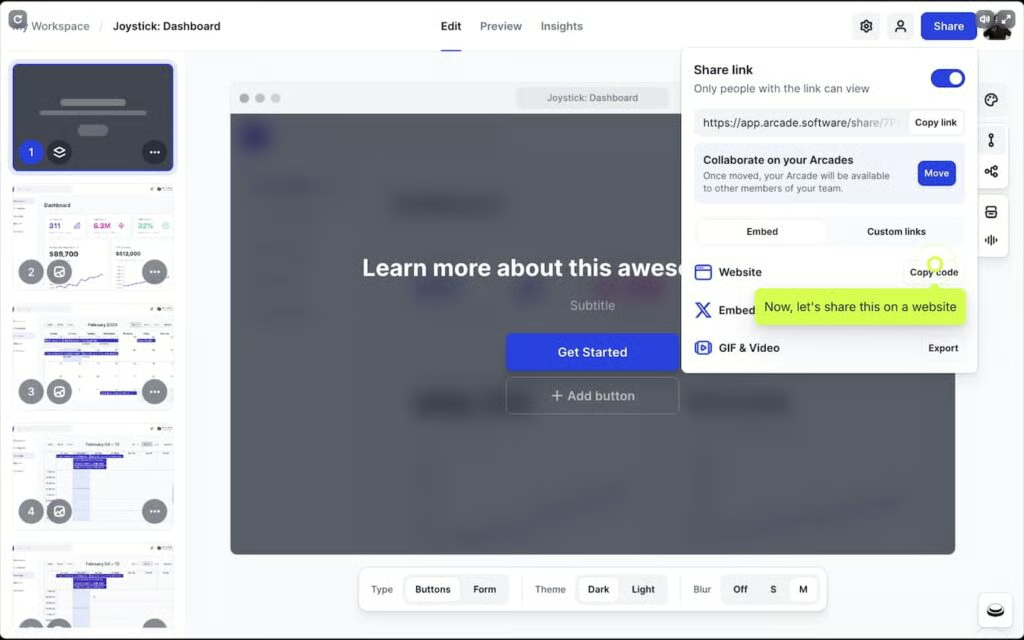
With Arcade Software, it only takes around an hour to record, edit, and share an interactive demo. Plus, you can track how prospects engage with it by integrating it with your customer relationship management (CRM) system.
Unlike heavier platforms that need developer input or complex setup, Arcade Software is truly plug-and-play. Its no-code interface feels intuitive even for non-technical users. The ability to embed demos anywhere (email, website, or sales decks) can save hours of back-and-forth. It’s ideal for small teams looking for a demo platform that strikes the perfect balance between speed and affordability.
What actual Arcade Software users say
- “Love Arcade! It saves a huge amount of time in creating product demos, which is invaluable for a small team that’s launching new functionality all the time. We’re able to repurpose Arcades across our website, blog, changelog, emails, and even ads, so we get a lot of value out of the product. And it keeps getting better! Every time Arcade releases a new feature, it invariably makes my life easier.” — G2 reviewer
- “Arcade is so intuitive and easy that you can get started quickly. You’ll discover more features and get better as you go, but it’s not hard to start. The demos are very professional-looking and helpful for customers. The new AI tool also makes building easier, and I particularly like how it creates screenshots that can be easily duplicated and edited.” — G2 reviewer
- “I used Arcade to create my product demo, and the experience was seamless from start to finish. The interface is incredibly intuitive — I was able to capture, edit, and polish my walkthrough without any hassle.” — Product Hunt reviewer
Arcade Software pricing
| Pro | Growth | Enterprise | |
|---|---|---|---|
| Monthly price, billed annually | $32/user | $42.50/user | Custom |
| Monthly price, billed monthly | $38/user | $50/user | Custom |
What makes Supademo the best for click-through demos?
My expert opinion on Supademo
In my role, I need to move quickly: create a compelling demo, get it into a prospect’s hands, and see how they interact, all without wrestling with complex software. Supademo makes this possible.
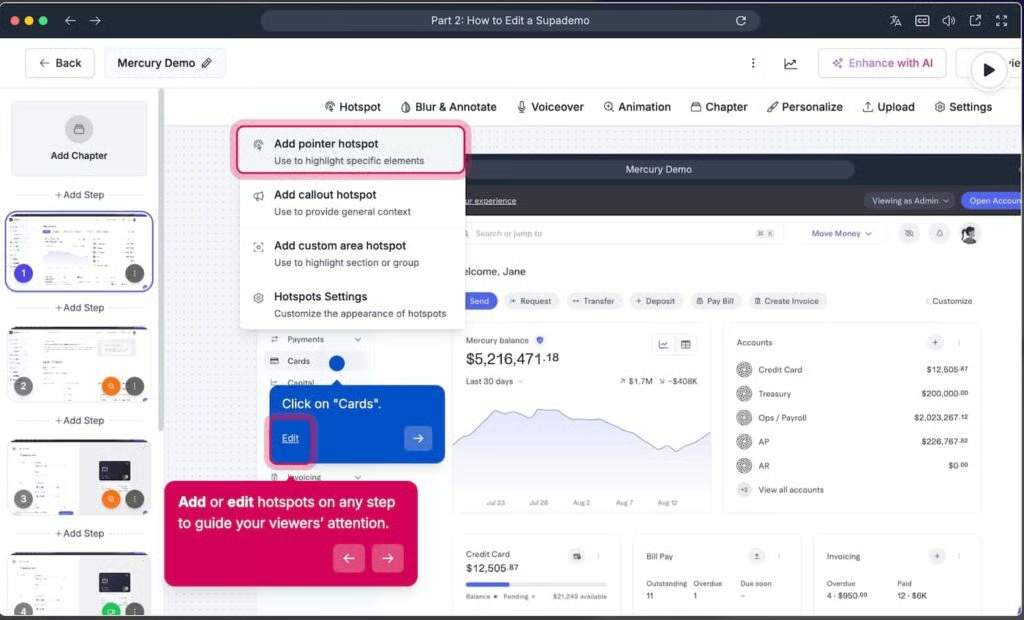
Its no-code builder and interactive features like hotspots, branching paths, and AI-powered voiceovers mean I can launch a fully clickable demo in under an hour, embed it into my outreach, and track exactly what the prospect clicked, watched, or skipped.
What really puts Supademo ahead for the “click-through” use case is its focus on viewer engagement. Instead of a passive video, I’m giving prospects an experience that they control. That means higher click-through rates, deeper interest, and more meaningful follow-up conversations.
For sales teams like mine, this directly translates into turning more demos into deals with less friction and technical overhead.
What actual Supademo users say
- “We needed a simple way to walk users through our web application that is engaging and looks polished. It has saved me hours of work compared to doing it manually with screenshots.” — G2 reviewer
- “What I like best about Supademo is how effortlessly it turns complex workflows into clear, interactive demos. It’s incredibly intuitive — you can record, edit, and publish polished walkthroughs in minutes without needing any design or technical skills. The end result feels professional and engaging, helping viewers truly experience the process rather than just watch it.” — G2 reviewer
- “Supademo, a game-changer that positions itself as the fastest way to craft interactive web app demos. After integrating Supademo into our workflow, we’ve witnessed a remarkable transformation in how we develop and present product demos.” — Chrome Web Store reviewer
Supademo pricing
| Pro | Scale | Growth | Enterprise | |
|---|---|---|---|---|
| Monthly price, billed annually | $27/user | $38/user | $350 for 5 users | Custom |
| Monthly price, billed monthly | $36/user | $50/user | $450 for 5 users | Custom |
What makes Storylane the best all-in-one product demo software?
My expert opinion on Storylane
As a sales territory manager, I have lived through messy demo workflows made up of static slide decks, generic live screenshots, and no engagement tracking. That said, I appreciate an interactive product demo software that handles everything in one place.
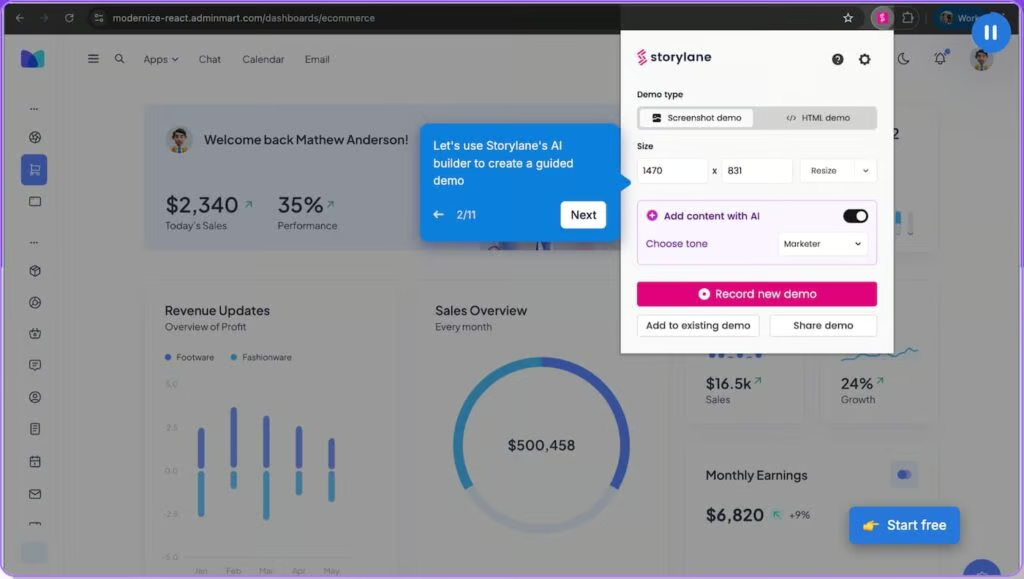
Storylane delivers on that front: From no-code demo building to embedding, personalized links, analytics, and CRM integration, it gives you the full toolkit without juggling multiple systems.
I particularly appreciate Storylane’s balance of depth and simplicity. You can spin up a basic demo in minutes, then seamlessly evolve it into a personalized, branded interactive experience as your demands grow.
The fact that Storylane supports branching logic, tailored tokens per prospect, links straight into your CRM, and keeps things intuitive means you get serious power without enterprise complexity.
What actual Storylane users say
- “Storylane helps us overcome the challenge of showing our product to prospects without requiring live demos or technical setups. Before Storylane, creating product walkthroughs required coordination with engineering or design, which slowed down marketing and sales efforts.” — G2 reviewer
- “Storylane offers a wide range of features, from the ability to create product hierarchies to an AI-powered text-to-speech option, all within an easy-to-use interface. Could easily hand over the tool usage to a new colleague; have consistently used it for a lot of our user demos and client pitches.” – G2 reviewer
- “As someone who has to regularly train my customers on our product, Storylane has been really useful to provide them with quick and easy-to-follow walkthroughs, allowing them to digest in their own time and at their own pace. Other features, like being able to blur parts of the page and adding a call to action, are also really useful. I love the product and so do my customers!” — Amazon Web Services reviewer
Storylane pricing
| Starter | Growth | Premium | Enterprise | |
|---|---|---|---|---|
| Monthly price, billed annually | $40/user | $500 for 5 users | $1,200 for a customized number of users | Custom |
| Monthly price, billed monthly | $50/user | $625 for 5 users | $1,500 for a customized number of users | Custom |
What makes Omedym the best for video-driven demos?
My expert opinion on Omedym
What sets Omedym apart for me is its deep focus on delivering video-first demo experiences that don’t feel like passive presentations but active engagements.
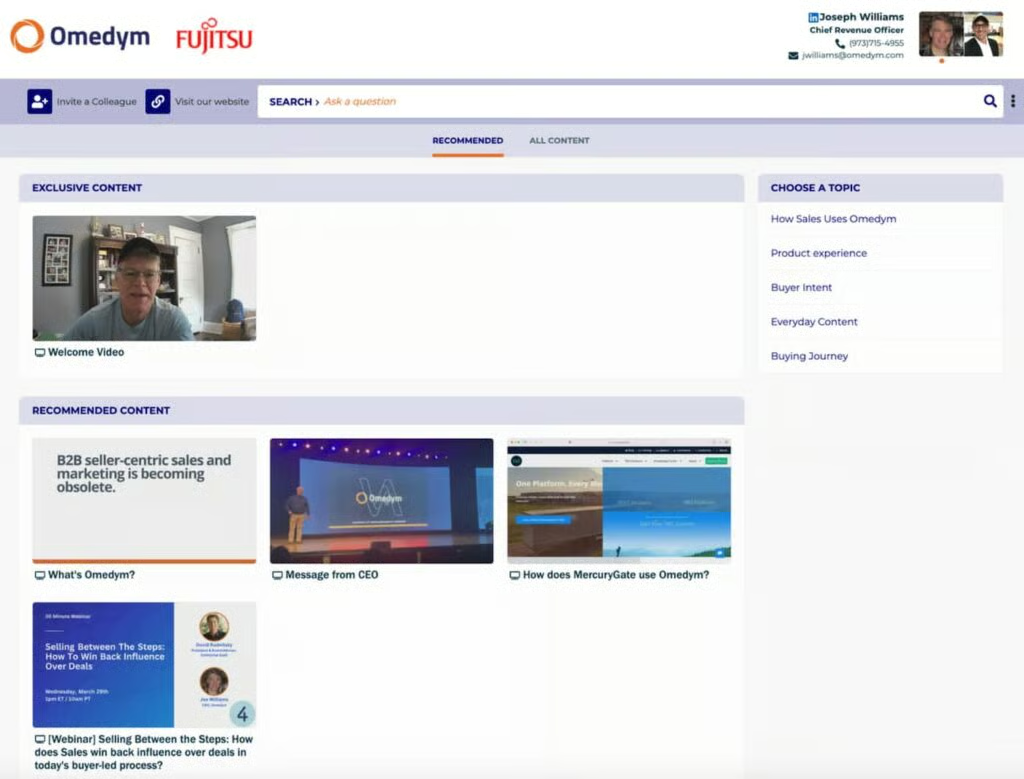
With Omedym, I can build a demo portal where the prospect views a video, then dives into related content, customized links, and resources, all in one flow. I can see exactly what they watched, skipped, or revisited, giving my follow-up conversations precision and relevance rather than generic “did you get a chance to look?” emails.
Also, the portal structure means I can hand off a professional, on-demand experience without scheduling a live demo, freeing up my calendar while still moving the deal forward.
The analytics, personalization, and the branded buyer experience all come together in one platform, rather than me cobbling together a video tool, a landing page, and tracking software. Omedym is the best product demo software for any SMB team that heavily relies on placing compelling video content in front of buyers and wants measurable outcomes.
What actual Omedym users say
- “I think it provides a much-needed solution to a problem we’re all having. How do you get customers to stay engaged? Nurture email campaigns go straight to spam, so Omedym came up with a great solution, creating a tailorable microsite that lets customers engage with material on their own time.” — G2 reviewer
- We use Omedym all the time — it’s become an essential part of our sales process. It’s helped us shorten the sales cycle by making it easy for customers to access the content they need, exactly when they need it. Instead of waiting for follow-up calls or one-off demos, they can get answers immediately, which keeps momentum going.” — G2 reviewer
- “I use Omedym for two reasons. 1. To provide information about my company’s products and offerings to potential clients in the form of an easy-to-navigate portal. 2. To house assets like PDF proposals and PowerPoint presentations from sales cycles. A client-facing portal takes only minutes to set up, and you get incredibly useful insights, such as which pages your prospects are looking at and for how long. Such a great way to measure engagement!” — Gartner reviewer
Omedym pricing*
| Standard | Professional | Enterprise | |
|---|---|---|---|
| Monthly price, billed annually | $29/user | $49/user | $90/user |
| Monthly price, billed monthly | $40/user | $60/user | $110/user |
*Requires a minimum of five users.
What makes ScreenSpace.io the best for story-driven visual demos?
My expert opinion on ScreenSpace.io
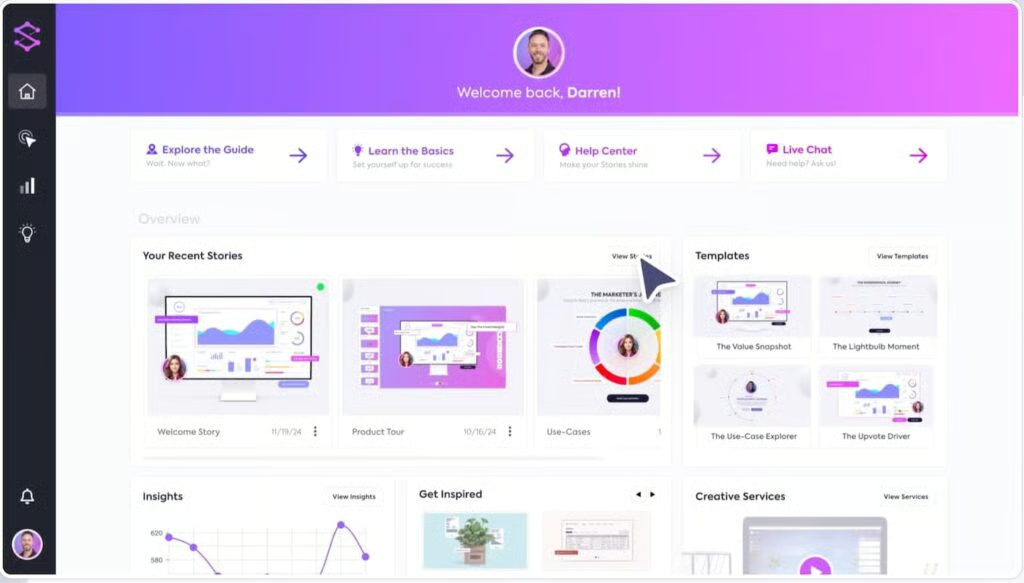
ScreenSpace.io transforms a demo from a static tour into a narrative experience. In the field, when I send prospects a demo link, I want it to feel like a mini-film: branded, smooth, interactive, and self-guided.
ScreenSpace.io’s drag-and-drop builder, video/audio layering, branching decision-paths, and embedded CTAs give me exactly that. It’s something I can hand off and trust that it reflects our product’s story, not just its feature set.
Additionally, the analytics and engagement tracking let me tie story-moments to buyer interest. This product demo software lets me know which scene held their attention, what CTA they clicked, and how long they engaged.
That means my follow-ups aren’t guesswork because they’re precise. This is ideal for small business teams that want to cut through the noise with a polished demo experience without hiring a design studio each time.
What actual ScreenSpace.io users say
- “ScreenSpace is straightforward and simple to use, but it is not a limited tool. It’s very flexible, can be adapted to our brand (huge for me as a content marketer), and provides a great user experience.” — G2 reviewer
- “Essentially, I see this as a self-serve demo where the prospect feels they are in control of the conversation. It’s a phenomenal way to educate your visitors and prospects on how different features correlate to various benefits, all while collecting data on the user. This tool is great for website conversions, success managers, and SDR teams. The design is sleek and engaging.” — G2 reviewer
- “What I appreciate most about ScreenSpace is its compelling blend of power and intuition. Its unique, story-focused approach simplifies the communication of complex products, making it unparalleled among other demo tools. Additionally, the level of customer support offered is truly remarkable.” — Capterra reviewer
ScreenSpace.io pricing
| Launch | Engage | Growth | Enterprise | |
|---|---|---|---|---|
| Monthly price, billed annually | $80/user | $200/user | $500/user | Custom |
| Monthly price, billed monthly | $100/user | $250/user | $625/user | Custom |
What makes Navattic the best for self-guided product tours?
My expert opinion on Navattic
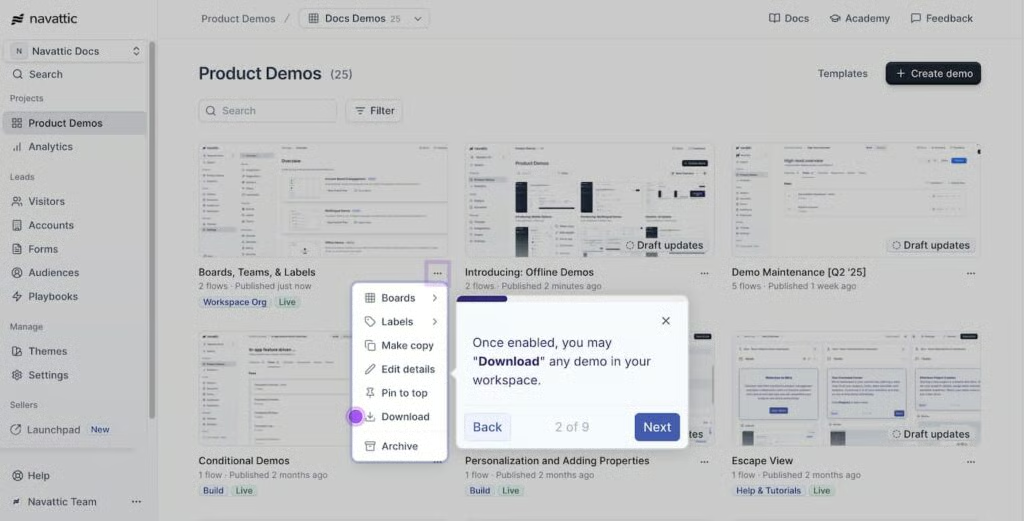
Navattic excels at turning complex software-as-a-service (SaaS) products into click-through tours prospects can explore on their own. With this platform, I can build a high-fidelity, interactive tour of our product that mirrors the real UI and flows like the live app. That means when a prospect clicks through the demo, they’re seeing something close to the real product experience, rather than a static video or slides.
What makes Navattic especially valuable is its ability to provide measurable insights. It tracks exactly where prospects click, what features they spend time on, and where they drop off. That intelligence feeds directly into my follow-up strategy and CRM. Additionally, the no-code builder allows me to iterate quickly without waiting for engineering resources.
The main hurdle here is pricing, as Navattic’s starting price ($600/month for five users) may be too expensive for lean teams. That said, if your goal is to give buyers an independent, self-guided experience that replicates your product, Navattic is your best option.
What actual Navattic users say
- “We are using Navattic to create interactive, self-paced tutorials for eLearning solutions for product training scenarios. The Navattic solution’s easy-to-use out-of-the-box features allow us to develop high-quality solutions in a fraction of the time of our prior processes.” — G2 reviewer
- “Navattic solves the challenge of showing our product in action without requiring lengthy live demos or complex setup. Before, prospects had to sit through calls or wait for custom environments just to understand what we do. Now, we can share self-guided, interactive demos instantly — on our website, in campaigns, or directly with leads.” — G2 reviewer
- “Navattic is a very powerful tool, and can really help bring tutorials/demos to life. However, it takes a fair amount of work to set up the tutorials, and there are some other tools in the marketplace that make it easier to get up and running.” — Gartner reviewer
Navattic pricing
| Base | Growth | Enterprise | |
|---|---|---|---|
| Monthly price, billed annually | $500 for 5 users | $1,000 for 10 users | Custom |
| Monthly price, billed monthly | $600 for 5 users | $1,200 for 10 users | Custom |
What makes Walnut.io the best for personalized live demos?
My expert opinion on Walnut.io
In my line of work, live product demos still matter, especially when you’re tailoring the experience for a specific prospect. With Walnut.io, you’re not handing over a generic walkthrough; you’re crafting a demo that dynamically adapts to the buyer’s context, role, and scenario.
The platform lets you personalize logos, data, workflows, CTAs, and even in-demo branching in real time according to what your prospect cares about. That kind of tailored experience builds trust and accelerates decision-making in ways generic demos simply don’t.
What seals the deal is how Walnut.io supports the “live plus leave-behind” model seamlessly. You can run a customized live demo, let the prospect interact with it post-call, and view exactly how they navigated it, what they clicked, and where they returned.
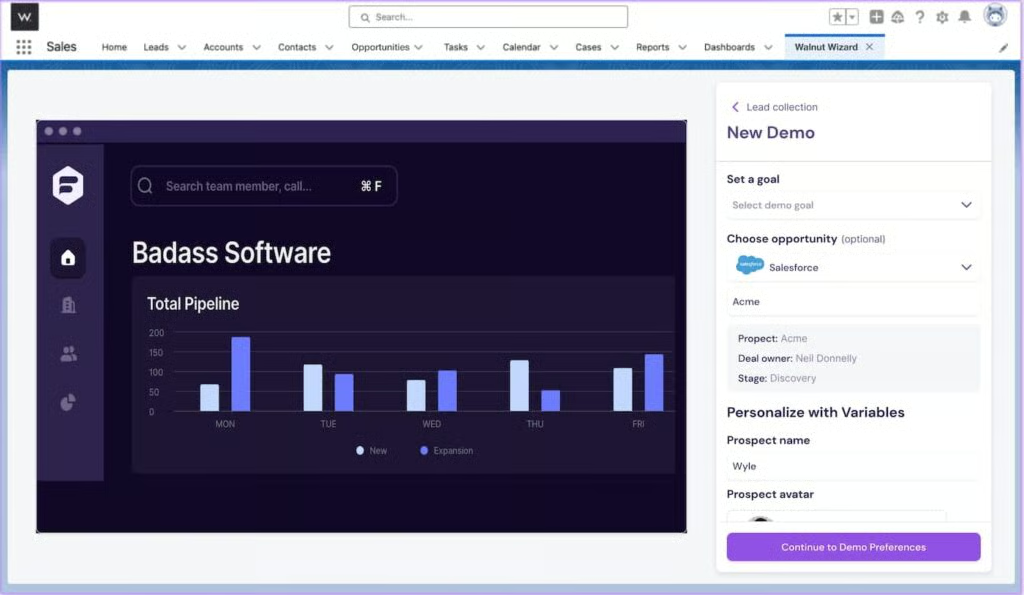
That data flows into your CRM so you can follow up with pinpoint relevance instead of vague assumptions, ideal for small businesses ready to deliver high-impact, one-to-one demo experiences.
What actual Walnut.io users say
- “Walnut helps us create interactive product demos without depending on developers or live environments. It solves the problem of time-consuming demo setups and technical limitations. Now, we can deliver personalized, realistic demos quickly and efficiently, which has improved our sales process and customer engagement.” — G2 reviewer
- “I think Walnut’s pricing is quite high. I would like to use it for my personal projects, but the cost is simply too much for an individual user. Even when we looked into using it for smaller corporate projects, the price was still a major obstacle. Our team manager also felt it was too expensive given the size of our development team.” — G2 reviewer
- “Walnut helps solve the challenge of creating personalized and interactive demos at scale. By using it, I can automate demo delivery, tailor content to each prospect, and ensure a consistent experience across all touchpoints. This saves a lot of time, improves engagement with clients, and ultimately helps drive more informed and faster buying decisions.” — G2 reviewer
Walnut.io pricing
| Interactive Deal Rooms | Interactive Demo Platform | |
|---|---|---|
| Monthly price, billed annually | $35-$70 per user for up to 10 users | Starts at $750 for up to 3 users |
| Monthly price, billed monthly | N/A | N/A |
How do CRM integrations elevate your sales demos?
The best sales demo software doesn’t just help you show off your product; it connects directly with your CRM tools to turn demo engagement into actionable sales insights. Integrating platforms like HubSpot CRM, Zoho CRM, or Pipedrive allows small businesses to automatically sync demo data, track engagement, and personalize follow-up campaigns.
For example, when a prospect watches or interacts with a demo, that activity can automatically update their contact record in the CRM. Sales reps can then see which features captured interest and tailor future emails or calls accordingly. Some demo tools, like Storylane, Navattic, and Omedym, even offer native CRM integrations that pull engagement metrics directly into your pipeline views.
If your team uses Pipedrive or Zoho CRM, look for demo platforms that support Zapier or API integrations. These platforms connect demo analytics to deal stages, so every interaction contributes to your overall sales process. The results include smoother handoffs, smarter nurturing, and faster conversions. Check out how these top CRMs integrate with the best sales demo software for small businesses.
| Sales demo software |  |  |  | How it elevates your demo |
|---|---|---|---|---|
| Arcade Software | Native | Zapier/API | Zapier | Syncs viewer engagement and lead data into HubSpot to automate follow-ups and track demo performance |
| Supademo | Native | Zapier | Zapier | Sends demo view metrics to HubSpot, triggering automated lead-nurture sequences for engaged prospects |
| Storylane | Native | Zapier | Native | Offers deep CRM sync across HubSpot, Zoho, and Pipedrive, giving unified insight into demo interactions within deal records |
| Omedym | Native | Zapier | Zapier | Pushes video engagement analytics into HubSpot contact profiles to refine targeting and re-engagement |
| ScreenSpace.io | Native | Zapier | Zapier | Tracks demo engagement and routes viewer data into HubSpot for follow-up automation |
| Navattic | Native | Zapier | Zapier | Integrates demo analytics into HubSpot pipelines, allowing reps to score and prioritize high-intent leads |
| Walnut.io | Native | Zapier | Zapier | Syncs live-demo and leave-behind engagement data with HubSpot, helping reps personalize next-step outreach |
How to choose the right product demo software for your small business
Choosing the right sales demo platform comes down to striking a balance between simplicity, cost, and impact. For small teams, look for tools that deliver value quickly without heavy setup or enterprise-level pricing.
1. Define your use case
Clarify what you need demos for; it could be lead generation, sales enablement, or onboarding. Tools like Tourial or Supademo work well for top-of-funnel engagement, while Storylane and Walnut support live and personalized demos. If your goal is product-led onboarding, options like Navattic or TestBox provide deeper analytics and guided experiences.
2. Prioritize ease of use
Small teams benefit most from no-code builders and guided templates that enable anyone to create demos quickly. Choose software that allows you to launch within hours, not days. Check reviews for setup difficulty and learning curve. The simpler it is, the faster you’ll see ROI.
3. Check pricing and flexibility
Pricing varies widely in this category. Look for providers with transparent pricing, monthly billing, or free tiers so you can test before committing. For most small businesses, a reasonable monthly cost is under $50 per user. Avoid annual contracts unless you’re confident in long-term use.
4. Look for key integrations
Your demo platform should plug into your existing stack. CRM integrations (like HubSpot or Salesforce) help align demos with deal tracking, while marketing tools (like Marketo or GA4) measure engagement. Bonus points for tools that offer Zapier or Slack integrations to keep data flowing smoothly.
5. Evaluate analytics and reporting
Strong analytics are essential for understanding demo performance. Prioritize platforms with real-time engagement data, conversion tracking, and viewer notifications. These insights enable your team to respond quickly and refine future demos for improved results.
6. Review support and resources
Reliable support saves time and frustration. Seek providers offering chat or email support, a knowledge base, and free onboarding resources like webinars or templates. 24/5 or 24/7 availability is a plus if you serve clients in multiple time zones.
7. Match features to value.
Avoid paying for enterprise extras you won’t use. Focus on core capabilities, such as interactivity, customization, and analytics. Read third-party reviews on G2 or Capterra to gauge real-world value. The best tool isn’t the most advanced; it’s the one that helps your small business sell smarter and faster.
The right demo software should make showcasing your product effortless. For small businesses, prioritize ease of use, pricing transparency, and actionable analytics. When your demo platform fits your workflow and budget, it becomes a genuine growth driver, not just another sales tool.
How did I evaluate the best sales demo software?
When choosing a sales demo platform, it’s important to set clear, objective criteria. I wanted to find the best sales demo software for small businesses, so I evaluated how each tool performs across real-world use cases, from building and sharing demos to tracking engagement and integrating with CRMs. I looked at how easily teams can create interactive demos without coding, how well each platform personalizes content for buyers, and how effectively it provides analytics that help close deals. I also factored in pricing, ease of use, scalability, and customer support quality to make sure each recommendation fits the needs and budgets of growing small businesses.
Since most demo software platforms now offer similar sharing and embedding capabilities, I focused on evaluating the core features that truly impact small business sales teams. These include a no-code demo builder, personalization and customization tools, analytics and tracking, and collaboration or team-sharing options.
I also looked at features that help teams create professional, data-driven demos without enterprise-level complexity. These include demo hosting stability, CRM and marketing integrations, and real-time engagement insights.
I evaluated the advanced and niche features that set each demo platform apart. These include video and audio overlays that bring demos to life, interactive elements such as hotspots, forms, and calls to action that boost engagement, plus AI-driven personalization that tailors each demo to a prospect’s needs. These capabilities go beyond standard functionality, helping small businesses deliver more dynamic, immersive, and conversion-focused demo experiences.
I also evaluated pricing and affordability, focusing on how accessible each platform is for small and growing businesses. This included reviewing whether the software offers a free plan or trial, the cost of entry, mid-tier, and premium plans, and the flexibility of monthly billing versus annual commitments. I also considered whether providers offer annual discounts or scalable pricing that allows teams to start small and expand as their demo needs grow.
To assess ease of use, I looked at whether each platform provides templates or guided demo creation tools that help users build demos quickly. I also reviewed user feedback on the learning curve, setup speed, and overall usability, paying close attention to how intuitive the interface is for non-technical teams. Finally, I evaluated scalability, ensuring that each platform can grow with a small business as its sales process and demo needs evolve.
Comprehensive support is essential for small teams adopting new demo software. I evaluated each provider based on the availability and quality of support channels, including email, chat, and phone assistance, as well as self-service resources like knowledge bases, tutorials, and community forums.
I also considered the customer service hours and whether support is available during standard business hours, extended periods, or 24/7. Moreover, I determined the accessibility of onboarding resources such as demos and webinars to help users get started smoothly.
The expert score reflected both user sentiment and independent evaluation of each demo platform’s overall performance. I considered third-party reviews from trusted sources like G2 and Capterra to determine whether users were satisfied with the platform’s features, ease of setup, and usability.
I also evaluated each product’s value for money, comparing pricing to the features offered, and assessed how transparent and easy it was to find information about the software’s plans, capabilities, and real-world performance.
Frequently Asked Questions (FAQs)
What is sales demo software?
Sales demo software lets you create interactive, no-code demos that show off your product without needing a live presentation. It helps prospects explore key features on their own while giving your team analytics on what they viewed. For small businesses, it’s an efficient, low-effort way to deliver polished product experiences that convert leads faster.
Sales demo vs product tour vs webinar — what’s the difference?
A sales demo is an interactive, personalized walkthrough designed to help a buyer understand your product’s value. A product tour is typically a short, embedded preview that introduces your product on your website. A webinar is a live or recorded event for educating or pitching to groups, not a self-guided experience.
How long does setup take?
Most small business demo tools can be set up in just a few hours using templates and screen-capture tools. After setup, demos can be shared instantly via a link or website embed. More advanced setups, like CRM integrations or branding, might take an extra day or two.
Do I need SSO?
Usually not. Single Sign-On (SSO) is helpful for larger teams managing multiple users and security protocols. For most small businesses, it’s unnecessary and can be skipped to save costs.
Are there free/low-cost options for very small teams?
Yes. Tools like Supademo, Storylane, and Tourial offer free plans or low-cost starter tiers ideal for startups and small teams. They include basic demo creation, sharing, and analytics — without needing an enterprise budget.
Bottom line
Integrating sales demo software into your workflow helps you showcase your product’s value without relying on lengthy live demos. The best tools combine no-code builders, personalization, and analytics to help small teams create engaging, trackable demos that convert prospects into customers.
Depending on your goals and budget, different platforms may fit better. For instance, Arcade Software is best overall for its ease of use and affordable pricing, while Supademo excels at creating quick, click-through demos, and Storylane is ideal for teams that need a scalable, all-in-one demo platform.
