








Brex Empower is a platform that lets Brex users request cards and spending limits, pay vendors, and issue reimbursements to employees. This platform comes with every Brex Business Account, free of charge. Our Brex Empower review will focus only on its features as a spend and expense management tool. For information about the provider’s accounts, see our review of the Brex Business Account.
| Supported Business Types | Businesses looking for a financial service offering spend management, corporate card issuance, and cash management |
|---|---|
| Pricing | Free for all Brex accounts |
| Standout Features |
|
- Existing Brex business accounts: The spend management features of Brex is free for Brex account holders. You don’t need to pay a monthly platform free just to use the spend management platform.
- Tech startups: Brex has strict requirements for applicants like more than $1 million in annual revenues and $50,000 cash balance. However, tech startups are not required to meet these requirements upon application—as long as they can meet these in the future. Moreover, Brex can also accept them if they have a recommendation from an existing Brex customer.
- Businesses looking for an all-in-one financial services solution: If you’re tired of managing and reimbursing expenses through different financial and card services, Brex offers it all. It can issue cards, process expenses reimbursed based on card transactions, and issue reimbursements. Being on a single platform, it’s more convenient for users. Read our review of the Brex Card to learn more about the card’s features.
- Expense approvals and workflows: Brex also features a bill pay feature that lets users process, approve, and pay bills within the spend management platform. These workflows will also help your business review all payables before payment.
- Freelancers and self-employed individuals: Having a Brex account is a requisite before you can use Brex’s spend management platform. Unfortunately, only S corporations (S-corps), C corporations (C-corps), limited liability companies (LLCs) and limited liability partnerships (LLPs) are eligible to apply for a Brex account. If you’re a sole proprietor, we recommend FreshBooks for expense tracking and accounting. You may connect your personal savings account or credit card to FreshBooks for automatic bank feeds and expense recording. Read our FreshBooks review for more information.
- Businesses with existing corporate prepaid cards: If you have an existing corporate card, it’s best to stick with it and get an expense tracker that can connect with your card. We recommend Fyle as an alternative because it has powerful expense tracking features with the ability to connect with multiple cards.
- Businesses looking for accounting software: Though Brex can manage expenses and payables, it’s not a full accounting system—it lacks ledgers or charts of accounts for accounting. If you’re looking for accounting software with expense management, we recommend QuickBooks Online. Our QuickBooks Online review highlights why it’s a well-rounded solution for your business.
Brex Empower Alternatives
 |  |  |
|---|---|---|
| Visit FreshBooks | Visit Fyle | Visit QuickBooks Online |
| Best for: Freelancers and self-employed individuals | Best for: Businesses with existing corporate prepaid cards | Best for: Businesses looking for complete accounting software with expense tracking |
| Starts at: $17 per month | Starts at: $8.99 per user per month | Starts at: $30 per month |
| Read our FreshBooks review | No review available | Read our QuickBooks Online review |
Brex Empower Pricing
The spend management platform comes free with every Brex account. You need a Brex account before you can use this platform.
Brex Empower Features
In this Brex Empower review, we’ll focus only on the features of the spend management platform. If you’re interested in learning more about application requirements, eligibility, and card features, read our Brex Business Account review.
Expense Policies & Review
Managers can create spend policies to easily manage and control employee spending. These policies will be available within the spend management platform so that employees can access them when in doubt whether an expense is allowable or not.
During the expense review process, reviewers will use the policy to check if expense submissions are within the policy. Employees also need to attach supporting documents in expense submissions. If the reviewer needs more documents, employees will also receive alerts for further actions.
Reviewers can either review expenses individually or in bulk. There are filters in place that’ll help segregate and group similar expenses that can be reviewed and approved in bulk.
Reimbursements
Employees can submit reimbursement requests even if they don’t have Brex cards. Admins have to add these employees as “Reimbursements Only” so that they can file reimbursements on the platform. Employees with cards need not file reimbursements for expenses paid using the card.
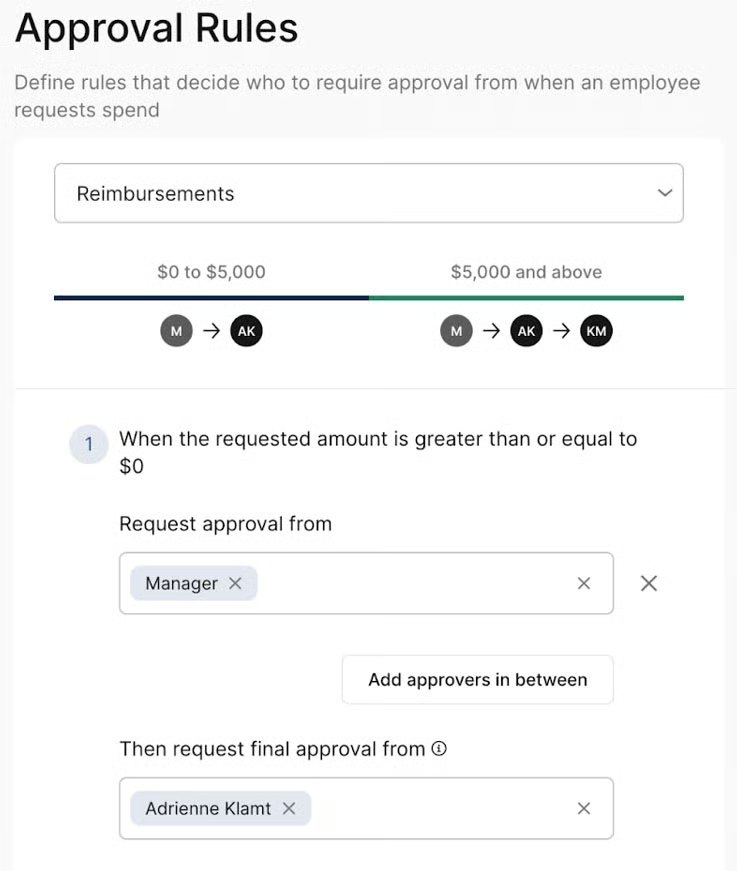
You may pay reimbursements using your Brex Business Account or any external bank linked to your Brex Business Account. All reimbursement requests will go through a series of approvals from elected managers and to the final approver. The image below shows how reimbursements approvals are decided:
Spend Requests
Employees can request cards within the platform. These requests will need approval from managers before employees receive them. Existing employees with cards can also send requests to increase spending limits. The process is just the same whether asking for a card or increasing the limit. Cards can be virtual or physical cards.
Brex Empower Ease of Use
Brex offers an excellent user interface for managers, approvers, and employees because it is simple and easy to use. The platform also offers an all-in-one solution for authorized spending, reimbursement requests, and bill payments. With the addition of expense policies and approval workflows. It’ll be easier for your business to review and approve all transactions within Brex.
Brex Empower Reviews From Users
Brex Empower received an overwhelming positive response from its users. They like how easy it is to file expenses, get reimbursed, approve reimbursements, and navigate through the platform.
Those who left negative comments mentioned bugs in the system and fluctuating credit limits. Some users also found that credit limits change based on the cash balance, which makes available credit less predictable for businesses:
- G2[1]: 4.7 out of 5 stars based on about 1,100 reviews
- Capterra[2]: 4.5 out of 5 stars based on around 120 reviews
Frequently Asked Questions (FAQs)
What is Brex Empower?
Brex Empower is a spend management platform exclusive to Brex Business Accounts. It lets businesses manage spending, increase accountability, and process payments.
Is Brex a bank?
No, Brex is a financial technology (fintech) company backed by and FDIC-insured through supporting bank partnerships offering financial solutions to businesses.
Is Brex Empower totally free?
Yes, it is free for all Brex Business Account holders. However, those without Brex accounts can’t use this platform.
Bottom Line
Overall, our Brex Emburse review reveals that this platform is exclusive only for Brex account holders. We like how this spend management platform streamlines expense reporting and reimbursements. It makes it easy for employees to submit expenses and for managers to review and approve them. But since this software is only for Brex users, you’ll want to ensure Brex business accounts are a good fit for your company.
User review references:
