





.jpg?w=288)

Ecommerce product recommendations are the online version of in-store upselling. Just like a salesperson might suggest a matching belt when you’re buying jeans, your online store can prompt shoppers with relevant products based on what they’re browsing or buying. These days, ecommerce product recommendations have become more accurate and automated thanks to AI technology and the growing demand for personalization.
In this guide, I cover the types of product recommendations and accompanying examples, best practices, and tools you can use to implement them in your store.
- What are ecommerce product recommendations?
- Types of product recommendations
- What is a product recommendation engine for ecommerce?
- Where to place product recommendations to boost ecommerce sales
- Ecommerce product recommendation tools for small businesses
- Best practices for implementing product recommendations
- Why product recommendations matter for ecommerce
- Frequently asked questions (FAQs)
- Bottom line
What are ecommerce product recommendations?
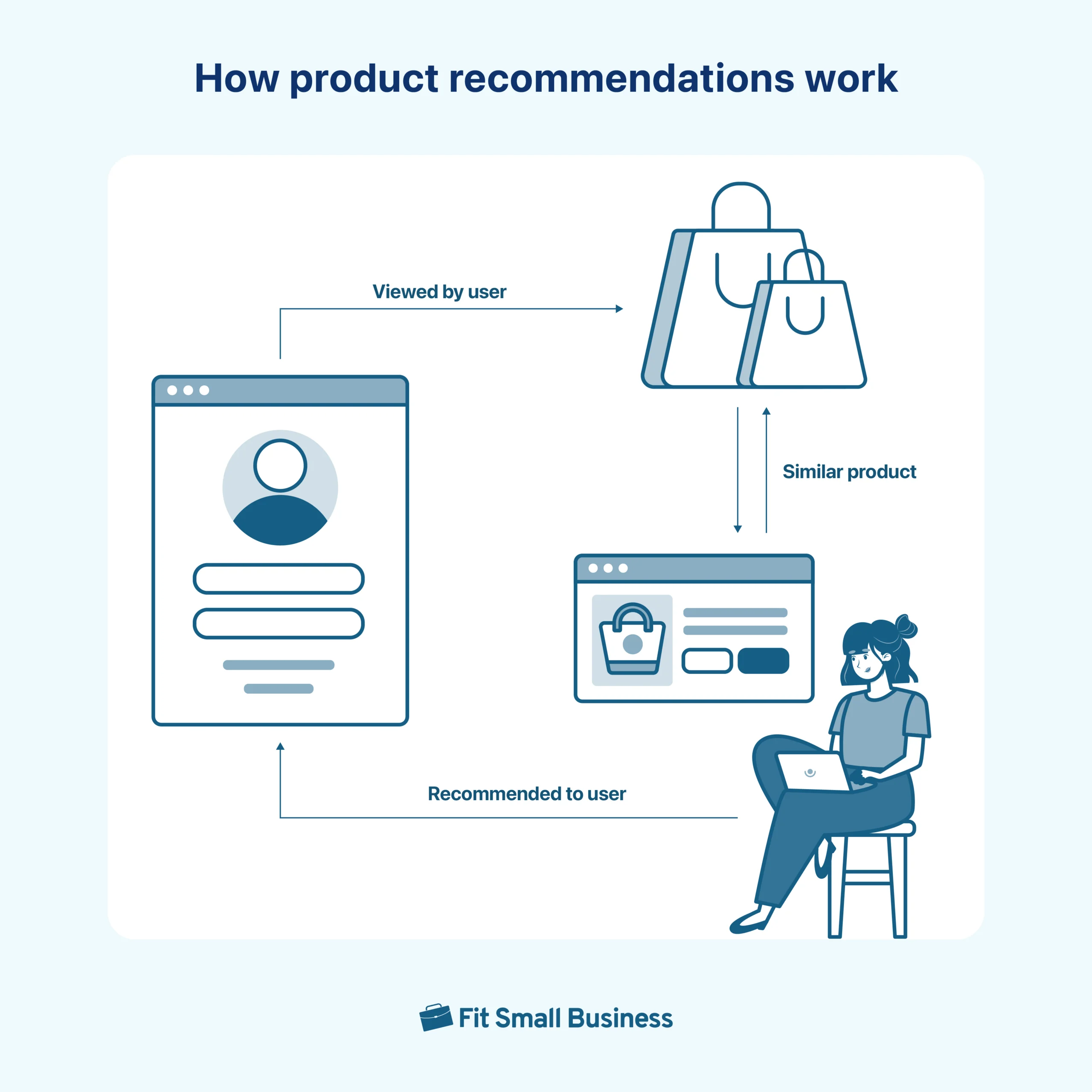
Ecommerce product recommendations are personalized suggestions that help your customers discover items they’re likely to buy, but might not have found on their own. As customers yourselves, you may have seen these in action, like “You may also like,” “Frequently bought together,” or “Customers also viewed.” These recommendations aren’t random; they are a result of using data and customer behavior to personalize your shopping experience.
Here’s how it works in your store: say a customer browses bags and adds one to their cart. Your site might automatically suggest matching accessories or show what other customers typically buy next. The customer’s browsing history, purchase habits, and location are retrieved and analyzed in seconds by an engine, enabling your store to pull up the most relevant products to keep your customer engaged and increase the chance of a sale.
Types of product recommendations
While all product recommendations have the same goal of closing (and increasing) a sale, not all work the same way. Ecommerce product recommendations typically fall into one of three categories: global, contextual, or personalized. Knowing how each one works can help you guide shoppers better and plan for strategic placements.
Global
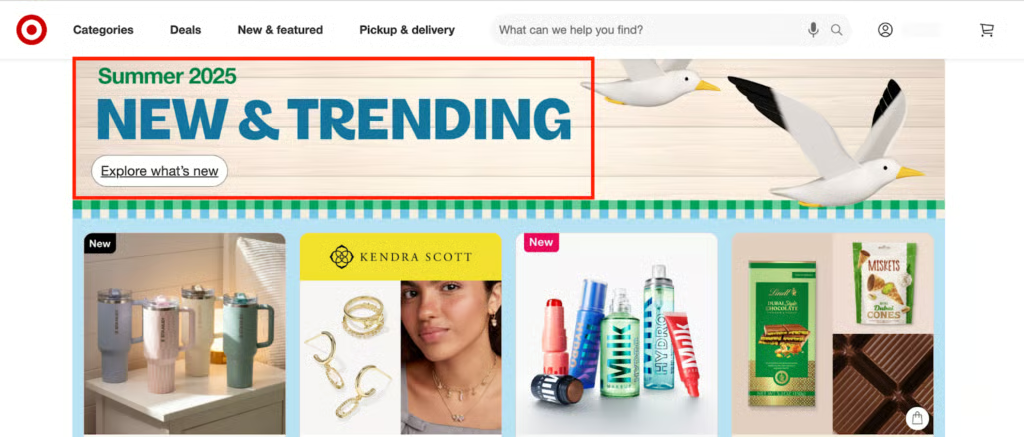
These recommendations are shown to everyone, regardless of behavior. They’re based on overall trends, popularity, or timing and typically are displayed on the homepage.
- Top sellers: Shows best-performing products across your store or within a category; best for new visitors who don’t know what to buy yet
- New arrivals: Highlights your latest products and helps showcase seasonal stock or recent inventory updates
- Trending products: Displays items gaining traction in real time and are based on views or shares (not necessarily sales alone); creates urgency and taps into current demand
- Seasonal recommendations: Adjusts based on time of year, holidays, or events (like “Back to School” or “Winter Essentials”); these help push promotional or time-sensitive items and keep your store timely and relevant
- Customer review-based recommendations: Displays highly rated or well-reviewed products across your site; builds credibility and helps indecisive shoppers make decisions
Contextual
Contextual recommendations are based on what the shopper is doing right now — what they’re viewing, adding to their cart, or searching (looking for).
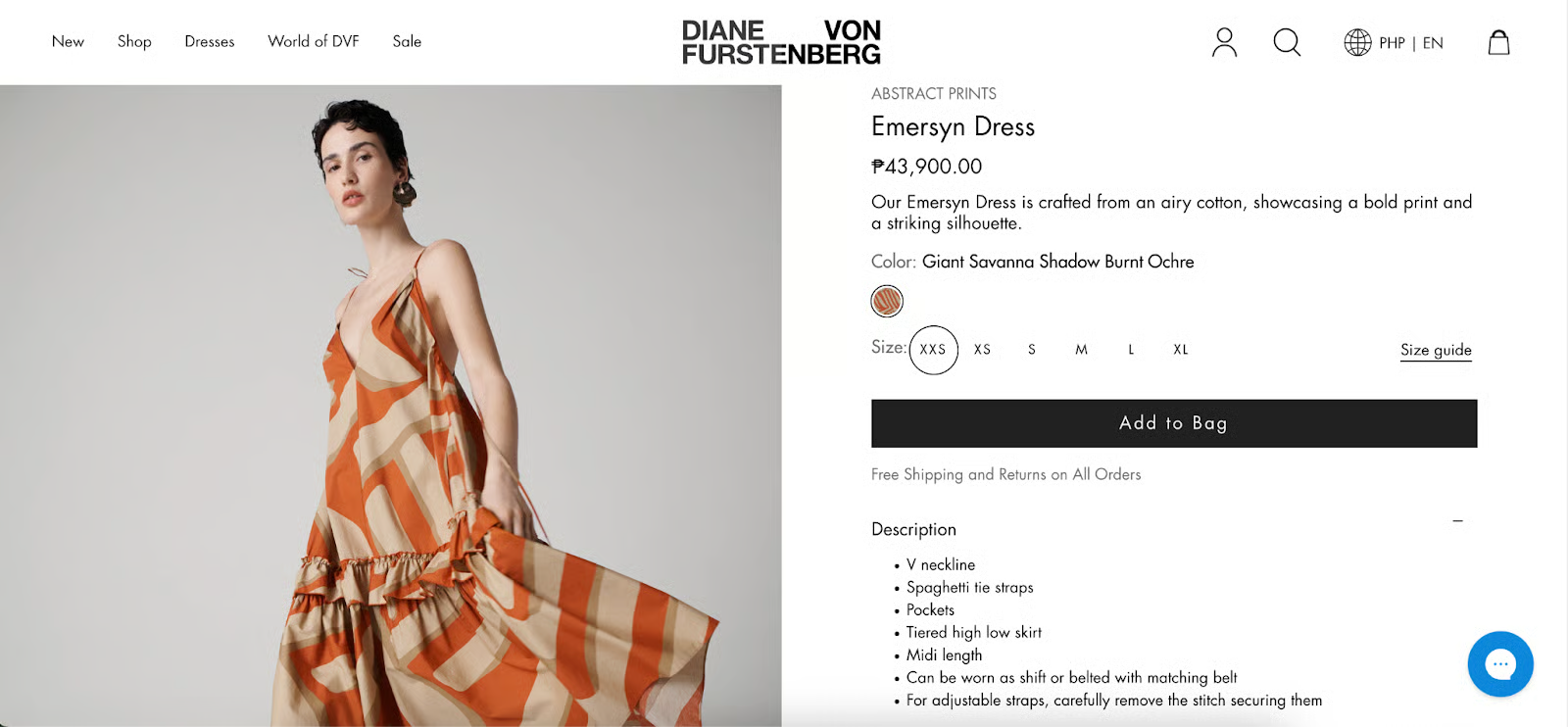
- Similar products: Suggests items with shared features (style and price, for example) to what the customer is currently viewing; these keep them engaged if the first product doesn’t meet their needs and are often placed below product pages
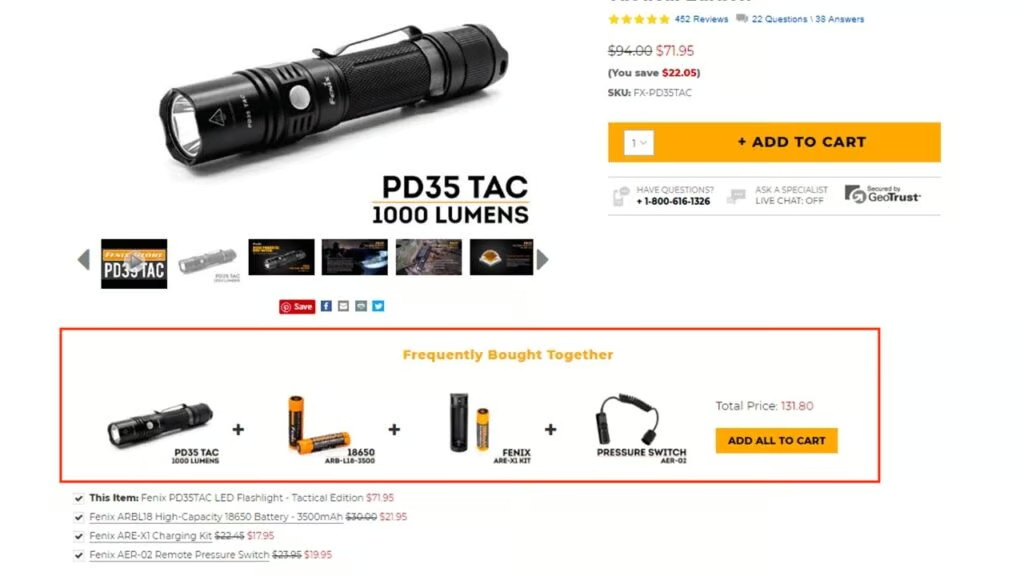
- Frequently bought together: Recommends items commonly purchased with the currently viewed product; automates cross-sells like pairing a camera with a memory card
- Viewed together: Shows products that other shoppers typically browse in the same session; helps in product discovery and supports casual browsing
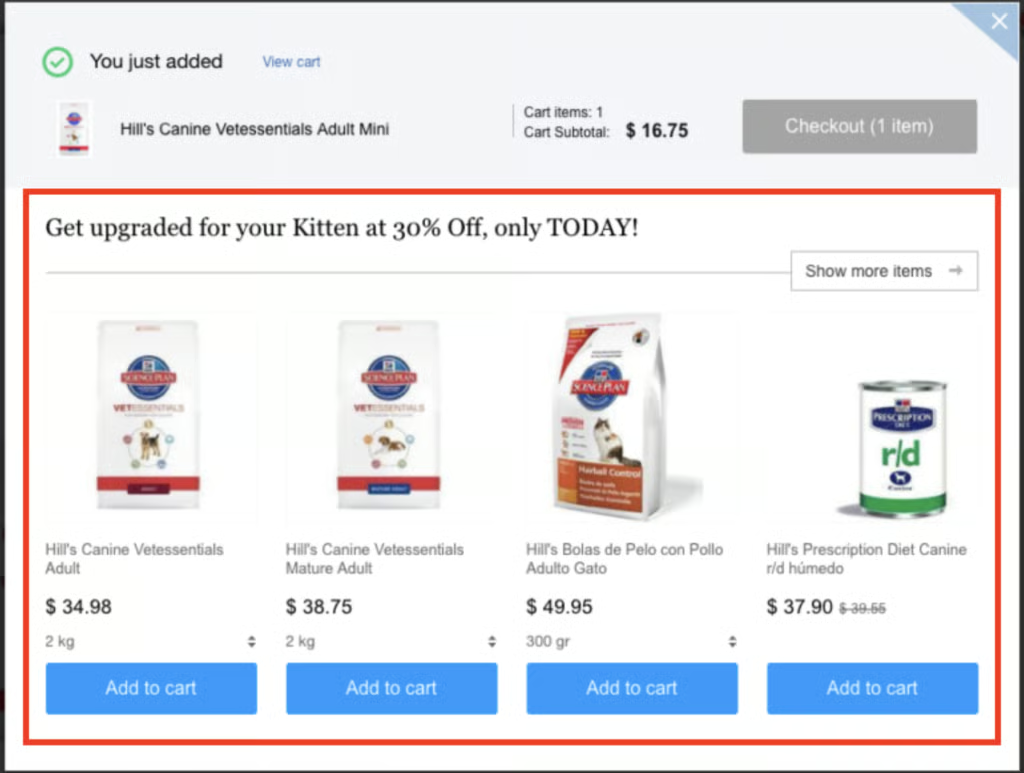
- Complementary items (cart-based): Once an item is added to the cart, useful add-ons or accessories are shown. Think shoe cleaner after suede boots, similar to upselling
- Category-driven: Tailors suggestions based on the category being browsed; keeps recommendations focused without needing in-depth personalization
- Search behavior-based: Uses live keyword input or filter selections to show relevant results; helps with conversion during search-heavy journeys (like “camping gear” or “formalwear”) — these update in real time as customers refine their search

Personalized
These ecommerce product recommendations are based on each shopper’s individual history, preferences, or behavioral signals, making them the most customized and effective.
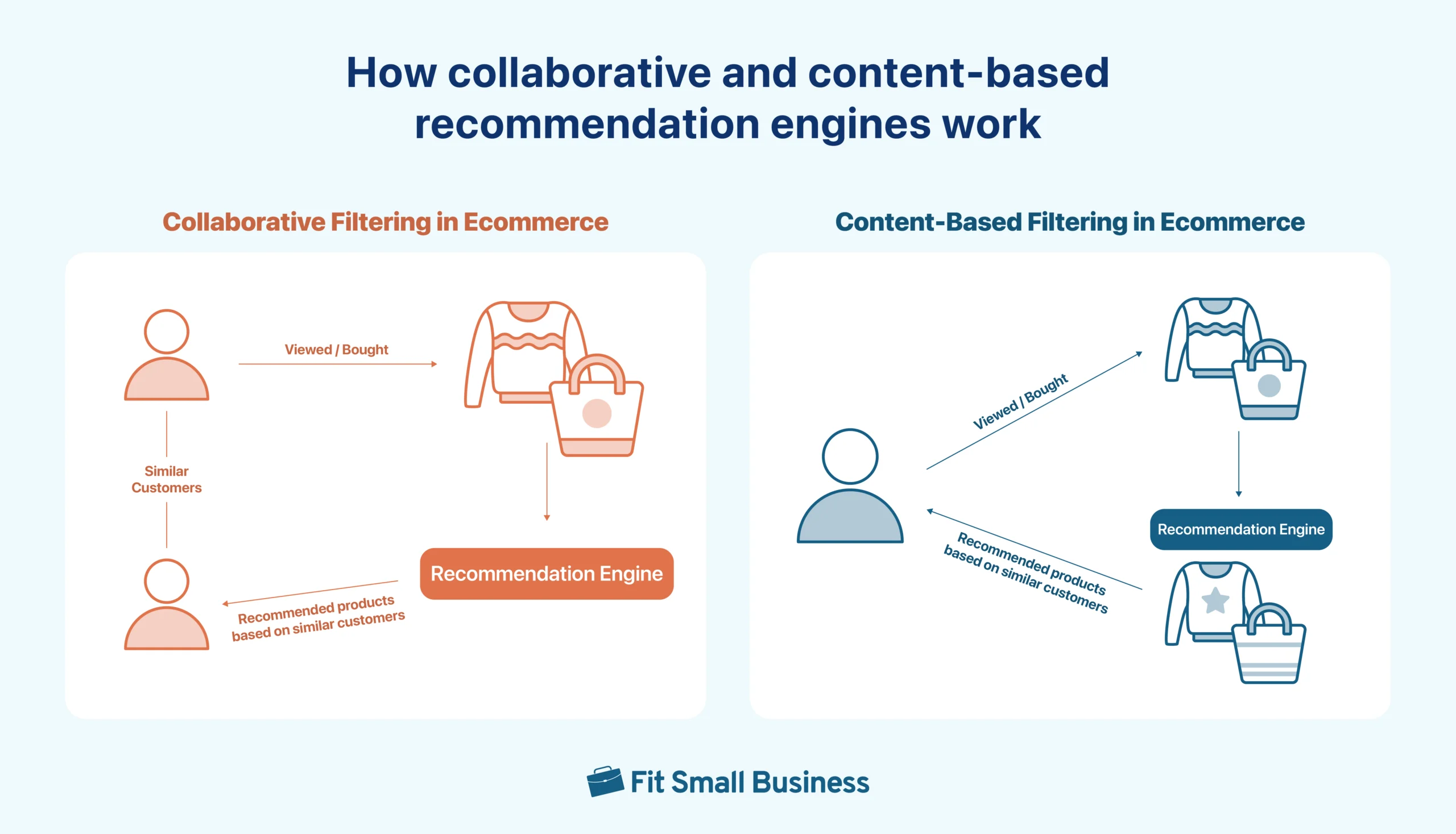
- Collaborative filtering: Recommends products based on what similar shoppers have viewed or bought. For example, if Shopper A and B like the same items, the engine will cross-recommend what the other bought; great for discovering new products not directly related.
- Affinity-based: Focuses on a shopper’s known interests — like favorite brands, categories, or colors; builds a recommendation list unique to their preferences
- Recently viewed items: Reminds shoppers of products they looked at earlier; reduces friction and re-engages returning visitors
- Behavioral collaborative filtering: Looks at deeper signals like scroll depth, repeat views, or time on page; matches those patterns with other users to fine-tune recommendations; this type delivers a high level of personalization, even for undecided shoppers
What is a product recommendation engine for ecommerce?
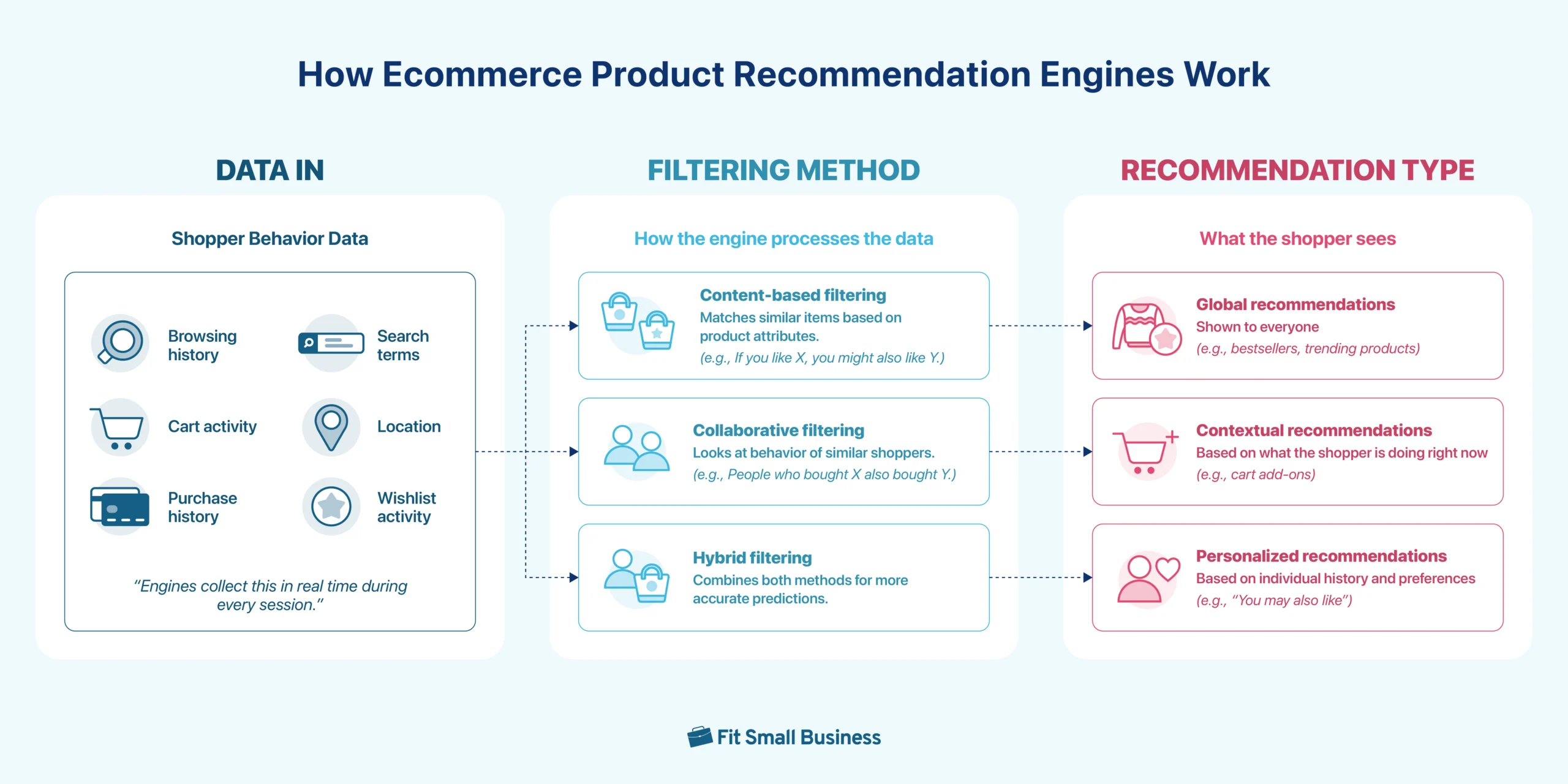
Now that you’ve seen the different types of product recommendations in action, the next step is understanding how they actually get delivered. Behind the scenes, these suggestions are powered by product recommendation engines.
A product recommendation engine is the system that creates the logic that powers what recommendations get shown. It gathers data — what shoppers view, add to cart, purchase, or even ignore — and looks for patterns to predict what each person is most likely to want next. These predictions can be based on product similarities (content-based), behavior of similar shoppers (collaborative filtering), or a mix of both (hybrid).
These systems can serve up different kinds of recommendations depending on the data they’re working with. Some are global (like bestsellers shown to everyone), others are contextual (based on what someone is currently doing), and the most advanced are fully personalized to the individual shopper.
Where to place product recommendations to boost ecommerce sales
Product recommendation placements play a huge part in conversions, almost as important as the type of product recommendation you will use. The goal is to meet shoppers where they’re already making decisions, whether they’re browsing, adding to cart, or thinking about checking out. Here are tried and proven ecommerce product recommendation placements:
Product pages
Product pages are the best places to recommend similar or complementary items. It helps shoppers explore alternatives or complete their purchase with relevant add-ons. Use it for related products, frequently bought together suggestions, or bestsellers within the same category.
Cart and checkout pages
Cart and checkout pages are best for subtle cross-sells or “complete your purchase” nudges. Add low-friction cross-sells like small ticket products or “don’t forget” items right before the customer checks out. It’s a simple way to increase order value without slowing down the buying process.
Homepage and post-purchase pages
Use the homepage to greet returning customers with personalized picks or highlight new arrivals based on past browsing. For post-purchase pages, the order confirmation or “thank you” page can recommend related items, a bonus discount for a limited time on a related item, or even start a bundle offer. This keeps shoppers engaged even after checkout.
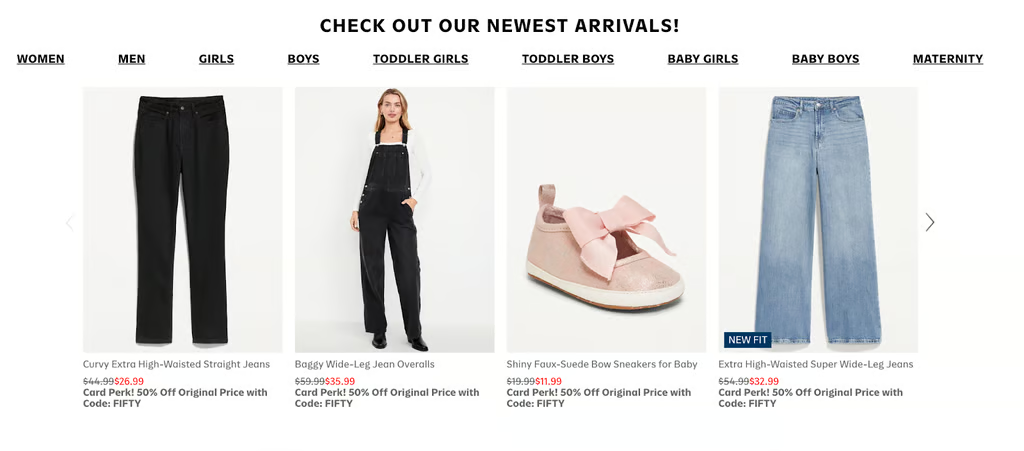
Old Navy always features its newest arrivals on their homepage. 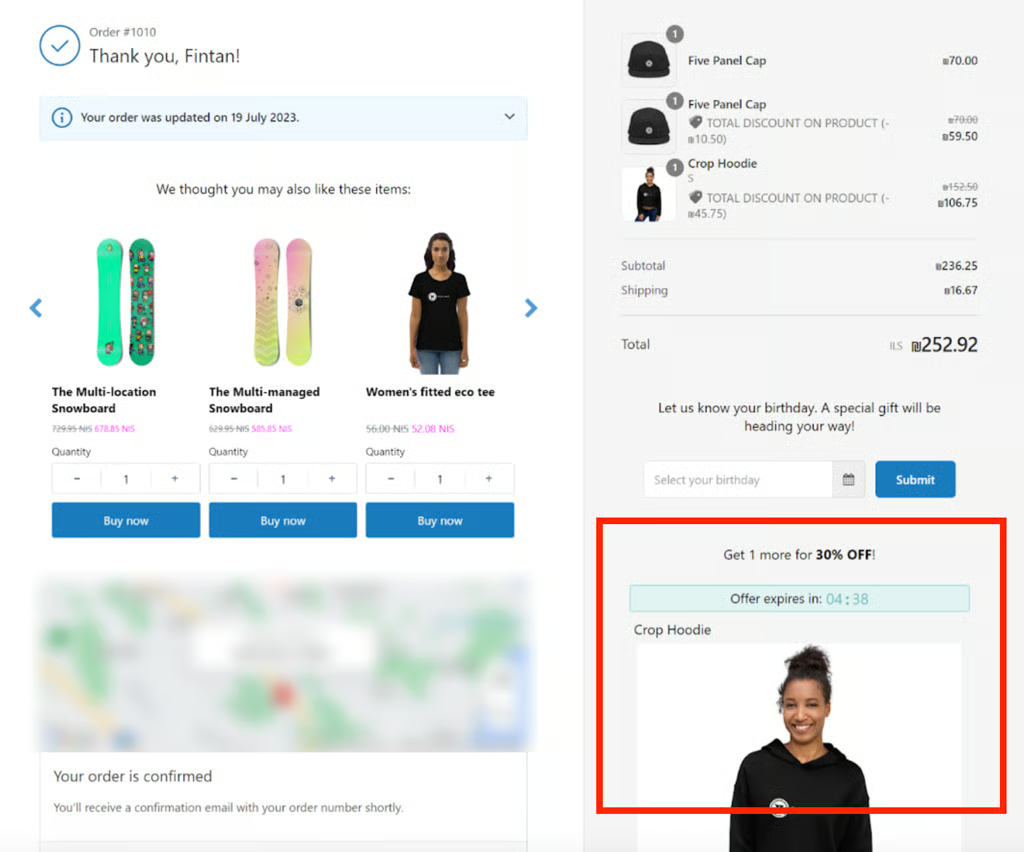
Aside from displaying product recommendations on post-purchase or order confirmation emails, try doing a product recommendation after a sale. Sweeten the deal with an additional discount — but make it a limited or time-bound offer to motivate shopper to checkout.


Abandoned cart emails and 404 pages
Don’t forget to make use of those 404s! Whether from a broken link, a typo, or a removed product, 404s mean that if a visitor lands there, they are interested in something on your site — and likely ready to buy. Instead of letting them drop off, use this moment to show bestsellers or popular items to re-engage them and turn a dead end into a sales opportunity.
For abandoned cart recovery emails, include dynamic recommendations based on what a customer left behind in their carts or viewed. Both are easy wins for re-engagement.
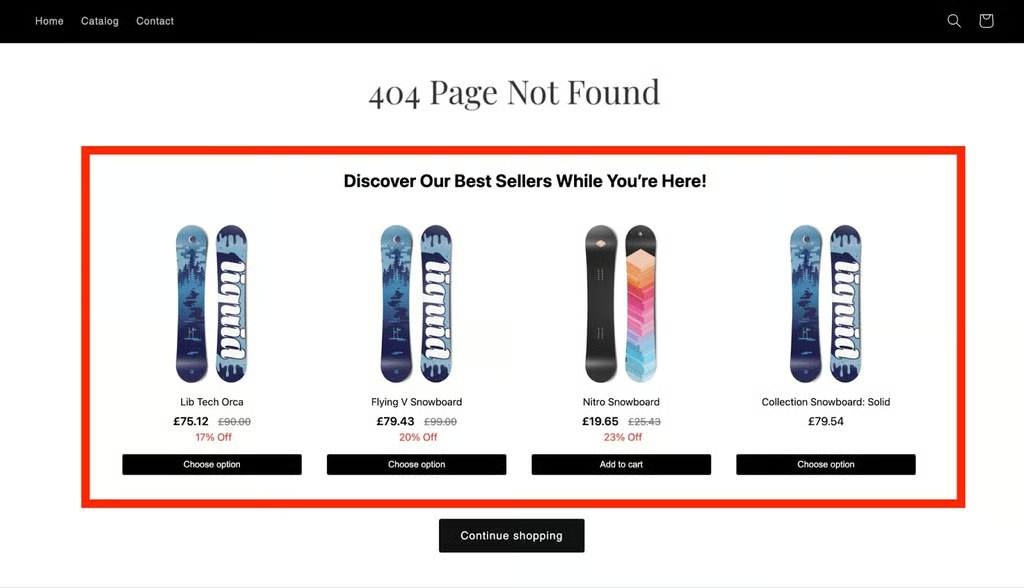
Make use of 404 pages by installing a product recommendation widget. 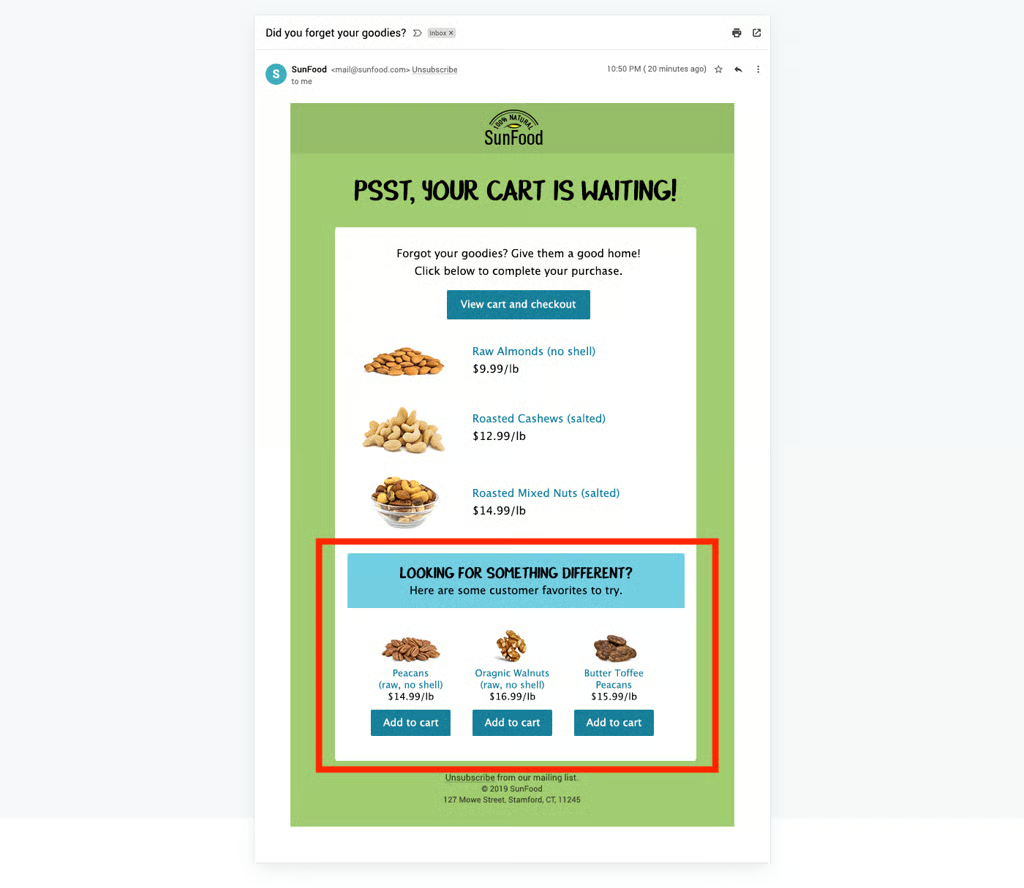
Abandoned cart recovery emails are a good place to suggest other products, too.


Ecommerce product recommendation tools for small businesses
You don’t need custom code or expensive AI to start using a product recommendation engine. There are usually plug-and-play integrations for your ecommerce platform available in their app marketplace, many of which offer free trials or budget-friendly plans. Even without installing extra tools, some platforms make it easy to get started through built-in themes and apps.
If you’re using Shopify, you already have access to a basic product recommendation engine. Shopify’s free Search & Discovery app lets you set up related product blocks, tweak search results, and apply simple rules to recommend products — no third-party tools needed.
And if you’re using Shopify’s Dawn theme, there’s a native “You may also like” section built into product pages. You can populate it manually or let Shopify do the work by pulling from your collections.
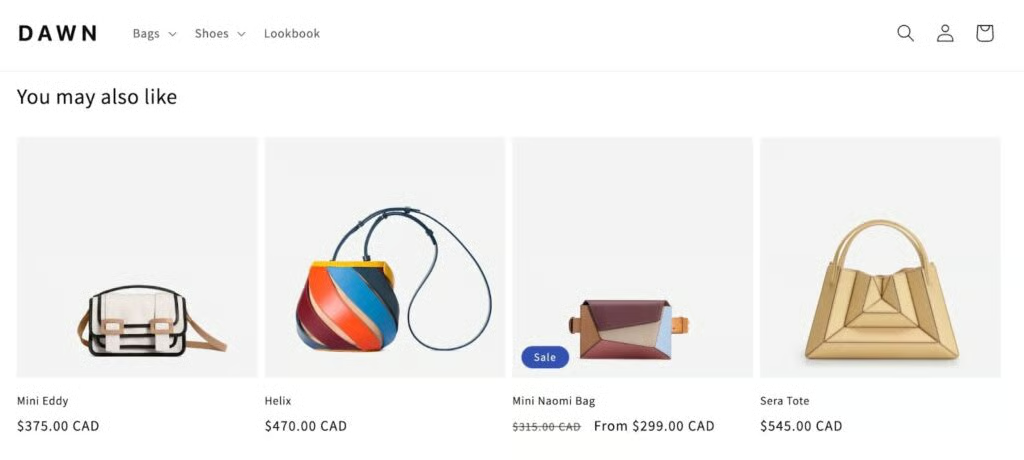
That said, if you want advanced features like dynamic bundles, AI-based targeting, or personalized popups, the tools below are popular choices. Each one offers deeper customization and works well with Shopify and other major ecommerce platforms.
| Tool | Monthly starting price | Works with | Personalization level | Best for |
|---|---|---|---|---|
| Wiser | Free; $9 | Shopify | Related products, frequently bought together, top sellers | Beginners that need no-code recommendation widgets |
| Rebuy | Free; $25 | Shopify Plus | AI + rule-based logic for personalized cross-sells, upsells, and post-purchase offers | High-volume stores on Shopify Plus wanting full-funnel personalization |
| LimeSpot | Free; $6.99 | Shopify, BigCommerce | AI-driven engine with real-time targeting, dynamic bundles, and audience segments | Growing stores needing smart, auto-optimized recommendations |
| OptiMonk | Free; $29 | Shopify, BigCommerce, WooCommerce, WordPress, others via Zapier | Personalized product blocks and popups based on behavior, cart contents, or Shopify data | Stores focused on pop-up-driven seasonal promos, cart recovery, or exit intent offers |
Best practices for implementing product recommendations
Ecommerce product recommendations work best when they’re relevant, well-timed, and easy to act on. I recommend the following best practices to help you get the most out of your product recommendations engine.
Optimize design and delivery for better performance
- Start with simple rule-based logic: Use straightforward rules like “frequently bought together” or “related items.” These are available on most platforms and work well as a starting point.
- Test placements before scaling: A/B test different placements (product, cart, and thank-you page pages) before rolling them out sitewide. Heatmaps also help identify where shoppers are engaging most.
- Use clear CTAs: Simple actionable sentences like “Add to cart” or “Complete the set” tell shoppers what to do next.
- Avoid overloading the page: Keep recommendation blocks tight — around three to five products only. Too many options create choice paralysis — this usually happens to me as a shopper, too. I prefer keeping my choices simple.
- Optimize for mobile: Use carousels or collapsible blocks so product suggestions don’t dominate the screen. Mobile-first formatting is critical for conversion as online shoppers primarily browse and purchase from their phones.
- Keep learning and iterate often: Your product recommendation engine isn’t a one-time setup. Audit your product recommendation widgets, modify targeting or trigger rules, and adjust layouts regularly to optimize performance.
Read also: Ecommerce UX Best Practices: Ultimate Design Guide
Use personalization to drive relevance
- Use product recommendation engines to personalize your email campaigns: Add personalized product recommendations to your email flows, especially post-purchase and abandoned cart emails.
- Introduce shoppers to new items: Show “recently viewed” or “featured picks” to help shoppers discover items they didn’t know they wanted. This works especially well for new visitors unfamiliar with your full product line.
- Tap into returning customers’ previous purchases: Use past purchase data to recommend related or refill products. These work well on the homepage or thank-you page and help customers remember their preferences.
- Tailor recommendations to different shopper segments: Segment by behavior, brand affinity, or purchase frequency. The more relevant your suggestions, the more likely they’ll convert.
Use social proof and urgency to boost trust
- Provide social proof: Recommendations like “Customers who bought this also bought…” build trust by showing what others have purchased. Amazon uses this extensively to surface peer-validated suggestions.
- Showcase your highest-rated items: Show recommendations with top ratings or strong reviews. This adds trust and helps shoppers feel more confident in their choices, especially at the “Add to Cart” stage.
- Add subtle urgency: Use limited-time offers, countdown timers, or low-stock indicators to push action on recommended items. Ensure it is placed on pages such as checkouts, where customers are less likely to think and see anything else. Just make sure it fits the moment, not the homepage.
Strategically place recommendations across the customer journey
- Cross-sell on product pages: Use product detail pages to recommend accessories, bundles, or similar items. Focus on helping the customer complete the look or solve a related problem.
- Offer product pairings on the cart page: Before checkout, recommend items that complement what’s already in the cart, like a screen protector with a phone.
- Use post-purchase recommendations: After the sale, use your thank-you page to suggest useful add-ons or product care items. Tushy, for example, moved its upsells to this page and added $191,000/month in extra revenue.
- Save potentially lost sales with recently viewed recommendations: Make it easy for customers to find items they looked at earlier.
- Get seasonal with your recommendations: Update recommendations ahead of holidays or events, “Mother’s Day gifts”, “Back to School”, etc. This keeps your store timely and helps drive urgency during peak buying moments.
Bonus: Stack your recommendations
Don’t rely on just one type of recommendation or placement, combining them smartly across the customer journey multiplies their impact. Start broad with bestsellers and trending products on your homepage to catch attention. Then layer contextual recs like frequently bought together on product pages and cart suggestions pre-checkout. After the purchase, keep customers engaged with personalized thank-you page offers or refill reminders via email.
Stacking your product recommendation types and placements ensures you’re meeting customers with the right offer at the right time.
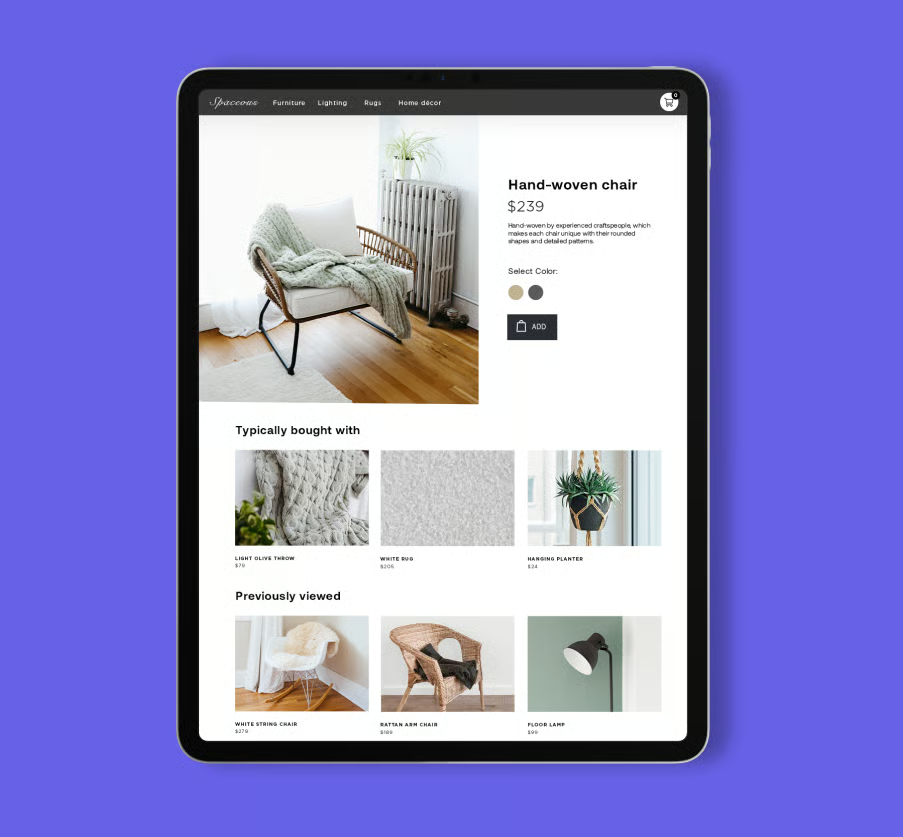
Take a look at how this furniture store displayed their product recommendations in its product page below. It used personalized and contextual recommendations.
Why product recommendations matter for ecommerce
Recommending products for your customers has always been a proven way to boost sales in brick-and-mortar stores. It’s the same online — they improve performance across key metrics, whether it’s to increase sales, boost engagement, or make the shopping experience smoother.
- Increase average order value (AOV): Recommending related or frequently bought together items encourages customers to add more to their carts. According to Barilliance, personalized product recommendations can lift average order value by up to 369%.
- Boost conversion rates: Shoppers who interact with product recommendations are far more likely to buy. In fact, a study shows that shoppers that clicked on recommendations are 4.5x more likely to add items to their cart and 4.5x more likely to complete their purchase.
- Drive repeat purchases: According to an Invesp study, nearly half (45%) of online shoppers are more likely to shop on a site that offers personalized recommendations, and 56% of online shoppers are more likely to return to one that recommends products. It is clear that when shoppers feel understood, they’re more likely to return — so you are also building brand loyalty.
- Reduce cart abandonment: Well-placed recommendations during checkout can re-engage hesitant shoppers with compelling product suggestions. A pop-up product recommendation, for example, reduces cart abandonment by up to 17%. This small nudge can help recover sales before they’re lost.
- Support merchandising goals: You can promote high-margin, seasonal, or overstock items more naturally through recommendation widgets, without being intrusive or relying solely on banner ads. This is part of your overall ecommerce merchandising strategy (yes — there are merchandising strategies when it comes to ecommerce, too!).
Frequently asked questions (FAQs)
Do I need AI or machine learning to use product recommendations?
No, you don’t need AI to get started. Many ecommerce platforms offer rule-based recommendation tools that work based on simple logic like “frequently bought together.” AI helps with personalization at scale, but it’s optional for small businesses.
Where should I place product recommendations on my site?
Product pages, cart pages, and post-purchase screens are the highest-impact placements for product recommendations. These areas influence buying decisions and increase average order value. You can also use product recommendations in emails, search results, and 404 pages.
How can I track the success of product recommendations?
You can track the success of product recommendations through your ecommerce platform’s built-in analytics or third-party tools — measure click-through rates, conversion rates, and average order value. Track how often recommended items are added to cart or purchased. A/B testing placements and formats can help fine-tune results.
Can I personalize recommendations by location, language, or culture?
Yes, many tools support personalization based on geolocation, language settings, or regional preferences. This helps tailor the shopping experience to local audiences. Look for features like geo-targeting and multilingual support.
What’s the difference between upselling and cross-selling?
Upselling suggests a higher-priced or upgraded version of a product the customer is viewing. Cross-selling recommends related or complementary products. Both are effective ways to increase order value, but serve different buyer intents.
Bottom line
Personalization is an ecommerce trend that isn’t going away anytime soon. And recommending personalized products to shoppers is part of this consumer trend. Product recommendations don’t just increase ecommerce sales, they improve your entire customer experience. With the right placements and a balance of relevance, timing, and trust signals, even a small business can deliver tailored suggestions that convert browsers into buyers.
Start simple, test continuously, and scale as you learn — because the more helpful your store is, the more likely your customers are to come back.
Ready to implement recommendations that convert? Shopify gives you the tools to start recommending products today, even if you’re just starting out. Start your free trial today.
