







The key difference between FreeTaxUSA vs TurboTax lies in the use case. FreeTaxUSA stands out with its affordable pricing for individual tax filers and straightforward UI, making it an excellent choice for budget-conscious individuals and those with simpler tax situations. On the other hand, TurboTax provides a more comprehensive and user-friendly experience, particularly for complex tax scenarios and those who value extensive customer support.
- FreeTaxUSA is best for Schedule C businesses seeking free federal filing.
- TurboTax is ideal for those needing full-service filing.
My methodology
I evaluated cryptocurrency bookkeeping software based on how well each platform supports businesses handling digital assets. I focused on these key areas:
- Cryptocurrency management features: I looked at whether the system supports multiple cryptocurrencies, tracks portfolios in real time, and converts crypto to fiat accurately.
- Core accounting functionality: I checked for general ledger capabilities to manage both crypto and fiat transactions in one system.
- Integration and ecosystem fit: I reviewed integrations with platforms like QuickBooks and Xero, along with compatibility with exchanges and wallet tracking tools.
- Pricing and plan value: I compared pricing tiers to see how features align with cost at different business stages.
- Scalability and compliance: I examined how well each solution adapts to growth and whether it aligns with standards like GAAP and IFRS.
Why you can trust Fit Small Business
- FreeTaxUSA vs TurboTax at-a-glance comparison
- Use cases and pros & cons
- TurboTax
- Pricing: FreeTax USA wins
- Tax pro assistance: TurboTax wins
- Mobile app: TurboTax wins
- User interface: TurboTax wins
- User reviews: FreeTaxUSA wins
- How I evaluated FreeTaxUSA vs TurboTax
- Frequently asked questions (FAQs)
- Bottom line
FreeTaxUSA vs TurboTax at-a-glance comparison
 |  | |
|---|---|---|
| Pricing |
|
|
| Data import | ✓ | ✓ |
| Deduction finder | ✓ | ✓ |
| Schedule C business income & loss | ✓ | ✓ |
| Audit guidance and/or defense | $19.99 (add-on) | ✓ |
| Tax pro assistance with business returns | $49.99 (add-on) | ✓ |
| S-corp and partnership returns | ✕ | ✓ |
| Average user review score on third-party sites | 3.0 out of 5 | 1.2 out of 5 |
| Visit FreeTaxUSA | Visit TurboTax |
Use cases and pros & cons
Use cases
- Self-employed business owners seeking free federal filing of Form 1040 with Schedule C: You get free federal filing and access to over 350 deductions and credits. In addition, FreeTaxUSA only charges $14.99 to file your state return, making it an excellent option for Schedule C business owners on a budget. TurboTax costs much more.
- Taxpayers filing returns in multiple states: FreeTaxUSA charges only $14.99 per state, whereas TurboTax charges up to $59 per state. FreeTaxUSA’s state pricing structure could create big savings for businesses with income from multiple states.
- Self-employed business owners wanting advice from a tax pro: You can consult with a tax pro via phone, screen share, or live chat for only $49.99 with FreeTaxUSA. In comparison, TurboTax has a base charge of $219 for a Schedule C return with assistance from a tax pro.
- Rental property owners wanting to file a free federal tax return: FreeTaxUSA allows taxpayers to prepare their federal income tax return for free, which is an ideal solution for confident DIY users who seek free software for complex returns. TurboTax only allows free federal income tax filing for basic filers with Form 1040, which excludes rental income.
Use cases
- Small businesses requiring full-service tax support and filing: With a TurboTax Live Full Service plan, you’ll be paired with a tax professional who will prepare your return for you — and FreeTaxUSA doesn’t offer a similar service. You’ll meet via videoconference at the start of the tax filing process, and then again to review your return before it is filed. This is one of the reasons TurboTax is one of our best small business tax software.
- QuickBooks Self-Employed users: TurboTax offers many features that are useful for QuickBooks Self-Employed users, including the ability to transfer your QuickBooks data to tax forms. This integration, some FreeTaxUSA lacks, eliminates the need to enter data manually, reducing the chance of errors and saving time.
- Small businesses needing to file Form 1120, 1120S or 1065: If your partnership, S-corp, or C-corp business needs to file a business return, TurboTax can help you do so. It offers DIY, assisted, and full-service plans, while FreeTaxUSA doesn’t offer the ability to file any of these returns.
- Taxpayers seeking to import cryptocurrency transactions: FreeTaxUSA lacks cryptocurrency support. Meanwhile, TurboTax has a partnership with Coinbase, one of the popular cryptocurrency exchanges. Users with a Coinbase account can directly import their cryptocurrency transactions into TurboTax. If you subscribe to TurboTax Premier, you can import up to 250 transactions at once from Coinbase.
- Expats needing tax services: Neither FreeTaxUSA nor TurboTax support tax filing for expats. Meanwhile, H&R Block provides both DIY and assisted tax services to US citizens and green card holders who file their expat taxes each year. Additionally, H&R Block’s online software is designed to identify tax benefits specifically for expats. Our H&R Block review provides for more information.
- Businesses seeking an online program to prepare both individual and business returns: FreeTaxUSA doesn’t offer filing for business returns, while TurboTax has limited online options for preparation of business and 1040 returns. TaxAct is a great option for online preparation and filing of both individual returns (Form 1040) and Forms 1120, 1120S, and 1065.
Need accounting software for your small business? Learn more about the pricing and features of different solutions in our guide to the best small business accounting software.
Pricing: FreeTax USA wins
| Tax Return | FreeTaxUSA | TurboTax |
|---|---|---|
| Form 1040 Only | Free Edition $0 Federal $14.99 per State | Basic $0 Federal $0 per State |
| Form 1040 with Schedules 1-3 | Free Edition $0 Federal $14.99 per State | Deluxe $0-$129 Federal $64 per State |
| Form 1040 with rental property, investments, or cryptocurrency | Free Edition $0 Federal $14.99 per State | Premier $129 Federal $64 per State |
| Form 1040 with self-employed income | Free Edition $0 Federal $14.99 per State | Self-Employed $129 Federal $64 per State |
| Forms 1120, 1120S, and 1065 | N/A | N/A |
| Tax Return | FreeTaxUSA | TurboTax |
|---|---|---|
| Form 1040 Only | N/A | Basic $50 Federal $45 per State +25 e-filing fee Includes 5 Federal e-files |
| Form 1040 with Schedules 1-3 | N/A | Basic $50 Federal $45 per State +25 e-filing fee Includes 5 Federal e-files |
| Form 1040 with rental property, investments, or cryptocurrency | N/A | Premier $115 Federal $45 per State +25 e-filing fee Includes 5 Federal e-files plus 1 State return |
| Form 1040 with self-employed income | N/A | Home & Business $130 Federal $45 per State +25 e-filing fee Includes 5 Federal e-files plus 1 State return |
| Forms 1120, 1120S, and 1065 | N/A | Business $219 Federal $69 per State |
| Tax Return | FreeTaxUSA | TurboTax |
|---|---|---|
| Form 1040 Only | $49.99 (add-on) | $0 Federal $0 per State |
| Form 1040 with Schedules 1-3 | $49.99 (add-on) | $79 Federal $59 per State |
| Form 1040 with rental property, investments, or cryptocurrency | $49.99 (add-on) | $219 Federal $64 per State |
| Form 1040 with self-employed income | $49.99 (add-on) | $219 Federal $64 per State |
| Forms 1120, 1120S, and 1065 | N/A | $739 Federal $69 per State |
| Tax Return | FreeTaxUSA | TurboTax |
|---|---|---|
| Form 1040 Only | N/A | $89 Federal $79 per State |
| Form 1040 with Schedules 1-3 | N/A | $89 Federal $79 per State |
| Form 1040 with rental property, investments, or cryptocurrency | N/A | $89 Federal $79 per State |
| Form 1040 with self-employed income | N/A | $89 Federal $79 per State |
| Forms 1120, 1120S, and 1065 | Doesn’t support Forms 1120, 1120S, or 1065 | $1,849 Federal $64 per State |
FreeTaxUSA and TurboTax have very different structures when it comes to pricing and the services provided. FreeTaxUSA is much more affordable than TurboTax while still offering support from a tax pro. However, unlike FreeTaxUSA, TurboTax offers software to prepare corporate and partnership returns and full-service tax preparation for any return.
For individual federal tax returns, FreeTaxUSA is free for all tax situations, including self-employed individuals filing a Schedule C, whereas TurboTax only offers free online filing for basic tax returns (Form 1040 only). TurboTax offers both full-service and assisted support, but FreeTaxUSA only allows for assisted support.
Tax pro assistance: TurboTax wins
| FreeTaxUSA | TurboTax | |
|---|---|---|
| Communication methods | Email or live chat; Pro plan subscribers can schedule a virtual meeting | Phone, chat, and one-way videoconferencing |
| Qualifications of professionals | CPAs, EAs, or tax specialists | CPAs, EAs, or tax specialists |
| Tax pro assistance for individual returns | ✓ | ✓ |
| Tax pro assistance for business returns | N/A | Limited states |
| Full-service filing for individual returns | N/A | ✓ |
| Full-service filing for business returns | N/A | ✓ |
The major difference between FreeTaxUSA vs TurboTax is that FreeTaxUSA has fewer tax pro assistance options. You are limited to email and live chat, although if you sign up for the Pro plan for $49.99, you can schedule a virtual meeting with a tax professional. Meanwhile, TurboTax lets you set up a meeting with one-way videoconferencing, which is useful when sharing documents. Also, FreeTaxUSA doesn’t provide any type of full-service support for preparing and filing business returns, whereas TurboTax does..
Mobile app: TurboTax wins
| FreeTaxUSA App | TurboTax App | |
|---|---|---|
| Availability | N/A | iOS and Android |
| Products supported | N/A | Free |
| Talk live with tax specialist | N/A | ✓ |
| E-file return | N/A | ✓ |
| Scan and upload W-2 | N/A | ✓ |
| IRS refund tracking | N/A | ✓ |
| View/print/save return as PDF | N/A | ✕ |
The clear winner between TurboTax vs FreeTaxUSA in terms of mobile app is TurboTax. It has a mobile app for iOS and Android users, and though it only supports the Free plan, it lets you communicate live with a tax specialist, e-file your tax return, scan and upload W-2s, and track your IRS refund.
User interface: TurboTax wins
TurboTax has an intuitive and user-friendly UI that guides you through its tax preparation process. It provides a step-by-step approach, asking questions relevant to your tax situation and tailoring the experience based on your responses. This helps simplify the tax filing process, making it more accessible to individuals with varying levels of tax knowledge.
The platform also has built-in error-checking mechanisms to help you identify and correct potential errors or discrepancies. It performs automatic calculations and ensures that your tax return is completed accurately.
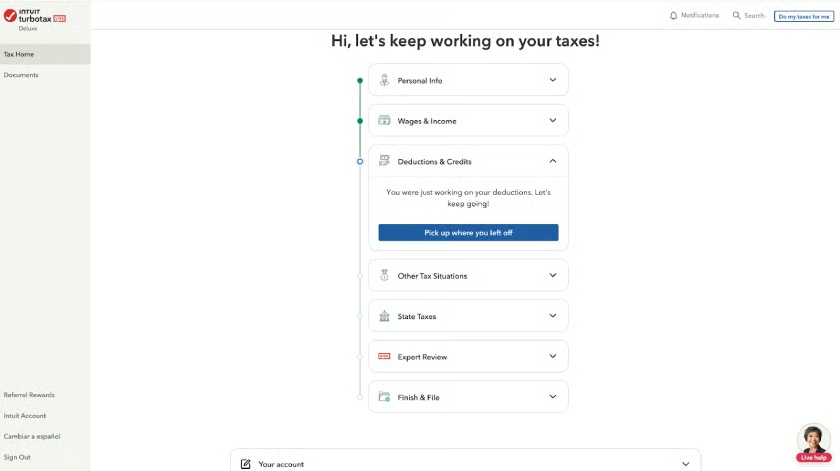
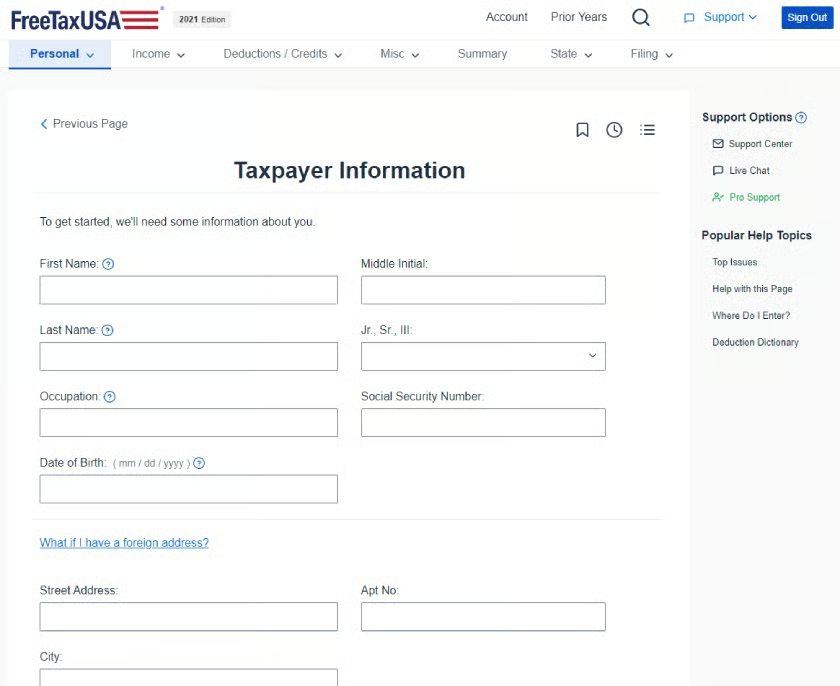
Meanwhile, FreeTaxUSA has a clean UI that is easy to navigate, and it lets you set up your account information easily. You just need to answer a few questions about your tax situation, and then you can determine whether you qualify for particular credits or deductions. Included are helpful explainers of tax concepts and the ability to calculate your estimated tax refund or amount due.
User-friendly navigation tabs allow you to jump to particular sections of your return — namely income, deductions and credits, and a tax filing page. However, the UI doesn’t have all of the bells and whistles immediately available on the TurboTax dashboard.
User reviews: FreeTaxUSA wins
I compared the user reviews for TurboTax vs FreeTaxUSA from two third-party review sites, Trustpilot and Sitejabber. While neither has excellent reviews, FreeTaxUSA’s are significantly higher than TurboTax. In my experience, tax preparation software tends to get much lower review scores than most software, and I feel this is because of the stress and complexity of filing taxes.
| TurboTax | FreeTaxUSA | |
|---|---|---|
| Users like | Simple interface designUncomplicated import processAccuracy guarantee | Free federal returnsLow state filing feesIRS e-file provider endorsement |
| Users dislike | Ambiguous pricingInconsistent customer service qualityCostly advance refund products | No free phone supportConfusion on state processingNo-frills UI |
| Average rating on third-party sites | 1.2 out of 5 (based on ~600 reviews on Truspilot) | 2.0 out of 5 (based on ~290 reviews on Sitejabber) |
FreeTaxUSA reviewers shared that they appreciate the free filing for all federal returns. While some praised the low filing fees for state returns, others felt that the name implied that they shouldn’t have had to pay anything at all. In addition, the lack of phone support was another source of annoyance.
Meanwhile, some TurboTax users were severely critical of the software. Most noted they were upset with what they see as pricing “bait and switch” practices. I certainly agree with their concern as the pricing on its website is far more difficult to discern than any of its competitors. There were also complaints about the low quality of customer service and the fees charged for advance refunds.
How I evaluated FreeTaxUSA vs TurboTax
I compared FreeTaxUSA and TurboTax based on these criteria:
- Features: I looked into how easy it was to get product support, import data, and review self-prepared filings.
- Pricing: I researched pricing for both providers and compared details for each feature
- Technical support: I looked into the ease of which users who are having difficulty can reach customer support.
- Ease of use: I evaluated the effort required to move around the product from inception to completion of the tax return.
Frequently asked questions (FAQs)
Does FreeTaxUSA offer phone support?
No, it currently doesn’t. However, you can contact the company through email or direct messaging within the software or search the Questions and Answers database. FreeTaxUSA’s Deluxe plan subscribers have access to free chat, priority support, and audit assist. If you sign up for the Pro plan, you’ll get access to a CPA or EA who can answer all of your tax questions.
Does TurboTax have a mobile app?
Yes, TurboTax has a free iOS and Android mobile app
Does FreeTaxUSA offer free filing for military personnel and veterans?
Yes, and FreeTaxUSA will assist you with getting the largest refund possible. It focuses on areas relevant to military personnel and veterans, including combat pay exclusion, moving expense and uniform deductions, job search expenses, reservist’s travel deduction, and earned income tax credit (EITC) for nontaxable combat pay.
Does TurboTax offer live tax help?
Yes, TurboTax has two different levels of live tax help. Its Live Basic (assisted) plans offer a consultation with a tax professional, while the Live Full Service plan gives you access to a tax professional who will prepare and file your return, with two consultations scheduled during the process.
Bottom line
In the battle between TurboTax vs FreeTaxUSA, FreeTaxUSA emerges as the winner for self-employed business owners needing to file a Schedule C, whereas TurboTax is best for self-employed business owners wanting full-service tax preparation and partnership, S-corp, or C-corp return preparation.
Both offer a range of features to help navigate the complexities of tax season. Ultimately, the choice between the two will depend on your specific needs, budget, and comfort level with navigating tax software.
