







TaxSlayer and TurboTax are accounting software that differ in key aspects that cater to distinct user needs. After assessing both software, I like that TaxSlayer offers tiered, cost-effective solutions and find it to be better suited for self-employed individuals. While TurboTax is pricier, I find that it provides a user-friendly and comprehensive experience that’s best for those with complex tax situations. Both products offer free versions. Before any add-ons, TaxSlayer’s pricing tops out at $59.95 while TurboTax maxes at $219.
Ultimately, the choice between TaxSlayer vs TurboTax depends on individual preferences, tax requirements, and budget considerations. Here’s where I see best use for either product:
- TaxSlayer: Self-employed individuals who need a low-cost do-it-yourself (DIY) or assisted filing solution.
- TurboTax: Small businesses with complex tax situations seeking full-service tax preparation and filing
My methodology
I evaluated cryptocurrency bookkeeping software based on how well each platform supports businesses handling digital assets. I focused on these key areas:
- Cryptocurrency management features: I looked at whether the system supports multiple cryptocurrencies, tracks portfolios in real time, and converts crypto to fiat accurately.
- Core accounting functionality: I checked for general ledger capabilities to manage both crypto and fiat transactions in one system.
- Integration and ecosystem fit: I reviewed integrations with platforms like QuickBooks and Xero, along with compatibility with exchanges and wallet tracking tools.
- Pricing and plan value: I compared pricing tiers to see how features align with cost at different business stages.
- Scalability and compliance: I examined how well each solution adapts to growth and whether it aligns with standards like GAAP and IFRS.
Why you can trust Fit Small Business
- TaxSlayer vs TurboTax at-a-glance comparison {"message":"Relevant factors shown in the comparison chart represent features of both online and desktop versions.","icon":"info"}
- Use cases and pros & cons
- TurboTax
- Pricing: TaxSlayer wins
- Live assistance: TurboTax wins
- Helpful tools: TurboTax wins
- Mobile app: TaxSlayer wins
- Customer service & ease of use: Tie
- User reviews: TurboTax wins
- How I evaluated TaxSlayer vs TurboTax
- Frequently Asked Questions (FAQs)
- Bottom Line
TaxSlayer vs TurboTax at-a-glance comparison
 |  | |
|---|---|---|
| Visit TaxSlayer | Visit TurboTax | |
| Best For | Self-employed individuals who need a low-cost do-it-yourself (DIY) or assisted filing solution | Small businesses seeking full-service tax preparation and filing |
| Pricing |
|
|
| Free Federal Return for Active Duty Military | ✓ | ✕ |
| Schedule C Business Income & Loss | ✓ | ✓ |
| Data Import | ✕ | ✓ |
| Audit Guidance and/or Defense | ✓ | ✓ |
| Deduction Maximizer | ✕ | ✓ |
| Tax Pro Assistance | Premium & Self-Employed only | ✓ |
| S Corporation (S-corp) & Partnership Returns | ✕ | ✓ |
| Average User Review Score on Third-party Sites | 4.2 out of 5 | 4.6 out of 5 |
Use cases and pros & cons
Use cases
- QuickBooks users seeking a streamlined tax solution: The platform offers seamless integration with QuickBooks Desktop, which allows users to import financial data directly from their QuickBooks account into TurboTax. It has specific versions designed for different types of businesses, including self-employed individuals, small businesses, and corporations. QuickBooks users can choose the appropriate version that best suits their business needs. While TaxSlayer also integrates with QuickBooks, it doesn’t support business forms.
- Taxpayers who want to import cryptocurrency transactions: TaxSlayer doesn’t support cryptocurrency transactions. Meanwhile, TurboTax allows users to import cryptocurrency transaction data from various cryptocurrency exchanges and platforms. It automatically calculates gains and losses based on the imported data and takes into account factors such as the purchase price, sale price, and holding period to determine whether the transactions resulted in a capital gain or loss.
- Small businesses that need full-service tax preparation and filing: TurboTax offers multiple levels of service including do-it-yourself (DIY), assisted, and full-service filing. Its full-service plan includes virtual meetings with a tax professional to ensure that your tax return is accurate before filing. TaxSlayer doesn’t offer full-service filing, nor does it support Forms 1065, 1120, and 1120S.
- Taxpayers who prefer desktop software: TurboTax offers a choice of either online or desktop software while TaxSlayer only offers online software. A benefit to using TurboTax Desktop is that it includes up to five federal e-files. Read our TurboTax Desktop Premier vs Home & Business comparison to learn more about the two popular versions.
Use cases
- Self-employed individuals and 1099 contractors seeking advice from a tax professional: If you sign up for TaxSlayer’s Self-Employed plan, you’ll receive unlimited access to a team of tax professionals who specialize in self-employed tax issues. For an inexpensive tax software option for freelancers that includes advice from tax professionals, TaxSlayer is the optimal choice. Although TurboTax also offers tax assistance, it is at a much higher price.
- Active duty military: Active duty military members get free access to the Classic plan, which can handle any tax situation but provides limited service.
- Taxpayers who require a higher level of audit assistance: While TurboTax provides audit assistance, TaxSlayer offers the option of extended audit assistance. Available with the Premium and Self-Employed plans, this gives you access to TaxSlayer’s staff of IRS-certified experts who can prepare you for a potential IRS audit. This service is available for three years after the IRS accepts your tax return.
- Rental property owners: If you own rental property, TaxSlayer is the better solution. It allows you to prepare your federal tax return with its affordable Classic plan. For this same service, TurboTax requires you to upgrade to a more expensive option.
- Taxpayers who want to meet with a tax professional in person: Neither TaxSlayer nor TurboTax offer the ability to meet with a tax professional in person, so if that’s what you’re looking for, then you may want to consider H&R Block. With nearly 9,000 offices in the United States, you can opt to meet virtually—or prepare your own taxes using H&R Block’s desktop software. Read our H&R Block review to learn more about it.
Businesses organized as C-corps, S corporations (S-corps), or partnerships: TaxAct allows you to file both your personal and business returns online. You need to purchase and download a separate desktop program to do this with TurboTax, while TaxSlayer doesn’t support business returns at all. Our TaxAct Professional review can give you more insight into this alternative. - Businesses seeking both bookkeeping and tax support: Bookkeeping is unavailable with both TaxSlayer and TurboTax, so if you also need bookkeeping support, Bench is an excellent option. Its Premium plan offers all-in-one bookkeeping, unlimited year-round tax advisory services, and annual state and federal income tax filing for both individuals and businesses.
Pricing: TaxSlayer wins
| Tax Return | TaxSlayer | TurboTax |
|---|---|---|
| Form 1040 Only | Simply Free $0 Federal $0 per State | Basic $0 Federal $0 per State |
| Form 1040 With Schedules 1 - 3 | Classic $22.95 Federal $39.95 per State | Deluxe $69 Federal $59 per State |
| Form 1040 With Rental Property, Investments, or Cryptocurrency | Classic $22.95 Federal $39.95 per State | Self-Employed $129 Federal $59 per State |
| Form 1040 With Self-Employed Income | Classic $22.95 Federal $39.95 per State | Self-Employed $129 Federal $59 per State |
| Business Returns: Form 1120, 1120S, or 1065 | Doesn’t support Forms 1120, 1120S, or 1065 | DIY online filing unavailable for business returns |
| Tax Return | TaxSlayer | TurboTax |
|---|---|---|
| Form 1040 Only | N/A | Basic $50 Federal $40 per State (includes 5 Federal e-files) |
| Form 1040 With Schedules 1 - 3 | N/A | Basic $50 Federal $40 per State (includes 5 Federal e-files) |
| Form 1040 With Rental Property, Investments, or Cryptocurrency | N/A | Premier $115 Federal $40 per State (includes 5 Federal e-files plus 1 State return) |
| Form 1040 With Self-Employed Income | N/A | Home & Business $130 Federal $40 per State (includes 5 Federal e-files plus 1 State return) |
| Business Returns: Form 1120, 1120S, or 1065 | N/A | $190 Federal $69 per State (includes 5 Federal e-files plus 1 State return) |
| Tax Return | TaxSlayer | TurboTax |
|---|---|---|
| Form 1040 With Schedules 1 - 3 | Premium $42.95 Federal $39.95 per State | Live Assisted $79 - $219 Federal $69 per State |
| Form 1040 With Rental Property or Investments | Premium $42.95 Federal $39.95 per State | Live Assisted $79 - $219 Federal $69 per State |
| Form 1040 With Self-Employed Income | Self-Employed $52.95 Federal $39.95 per State | Live Assisted $79 - $219 Federal $69 per State |
| Business Returns: Form 1120, 1120S, or 1065 | Doesn’t support Forms 1120, 1120S, or 1065 | Live Assisted Starts at $789 Federal $64 per State |
| Tax Return | TaxSlayer | TurboTax |
|---|---|---|
| Form 1040 Only | N/A | Full Service Starts at $129 $79 per State |
| Form 1040 With Schedules 1 - 3 | N/A | Full Service Starts at $129 $69 per State |
| Form 1040 With Rental Property, Investments, or Cryptocurrency | N/A | Full Service Starts at $129 $69 per State |
| Form 1040 With Self-Employed Income | N/A | Full Service Starts at $209 $69 per State |
| Business Returns: Form 1120, 1120S, or 1065 | N/A | Live Full Service Business $1,849 Federal $69 per State |
From a purely economic standpoint, TaxSlayer comes out as the clear winner. However, TaxSlayer doesn’t offer desktop software and lacks full-service tax preparation and filing. While it charges significantly less for DIY online filing and assisted filing, it doesn’t support business forms such as Forms 1065, 1120, and 1120S. As a result, it is limited to only individual returns, including Schedule C.
Live assistance: TurboTax wins
| TaxSlayer | TurboTax | |
|---|---|---|
| Communication Method | Phone, email, and live chat | Phone, chat, and one-way video conferencing |
| Qualifications of Professionals | CPAs, enrolled agents (EAs), or tax specialists | CPAs, EAs, or tax specialists |
| Tax Pro Assistance for Individual Returns | Premium & Self-Employed plans | ✓ |
| Tax Pro Assistance for Business Returns | N/A | Available in select states |
| Full-service Filing for Individual Returns | N/A | ✓ |
| Full-service Filing for Business Returns | N/A | ✓ |
Both TaxSlayer and TurboTax provide live assistance for individual returns but only TurboTax offers assistance with business returns. Unfortunately, the live assistance is limited to 20 states. Full-service tax preparation and filing is unavailable with TaxSlayer, but TurboTax offers it for all states for both business and individual returns.
Helpful tools: TurboTax wins
| TaxSlayer | TurboTax | |
|---|---|---|
| Accuracy Guarantee | ✓ | ✓ |
| Audit Support | ✓ | ✓ |
| Tax Calculator | ✓ | ✓ |
| Free Plan | ✓ | ✓ |
| Deduction Maximizer | ✕ | ✓ |
| Cryptocurrency Support | ✕ | ✓ |
| Data Import | ✕ | ✓ |
TurboTax wins the battle of TurboTax vs TaxSlayer when it comes to helpful tools. TaxSlayer lacks many features that TurboTax has, such as a deduction maximizer, cryptocurrency support, and the ability to import data. However, both offer an accuracy guarantee, audit support, a tax calculator, and a free plan.
Mobile app: TaxSlayer wins
| TaxSlayer | TurboTax | |
|---|---|---|
| Availability | iOS and Android | iOS and Android |
| Talk Live With Tax Specialist | ✓ | ✓ |
| Prepare More Complicated Returns | ✓ | ✕ |
| E-file Return | ✓ | ✓ |
| Scan & Upload W-2 | ✓ | ✓ |
| IRS Refund Tracking | ✓ | ✓ |
| View, Print & Save Return as PDF | ✕ | ✕ |
Based on user experience, TaxSlayer comes out as the better of the two options for preparing complicated returns. Both offer a mobile app for iOS and Android users. With either product, customers can communicate with a tax specialist directly through the app, prepare and e-file returns, scan and upload W-2 forms, and track IRS refunds.
Neither app allows you to view, print, or save your return as a PDF. While the two products are virtually equal in most categories, the user experience for TaxSlayer’s handling of more difficult returns gives it the win.
Customer service & ease of use: Tie
| TaxSlayer | TurboTax | |
|---|---|---|
| User Interface (UI) | Easy to use | Clean and simple to navigate |
| Support Channels | Phone, email, and live chat | Phone, live chat, and one-way videoconferencing |
| Expert Help Offered | ✓ | ✓ |
| Additional Services | Zero out-of-pocket fees, Ask a Tax Pro, and tax refund calculator | Self-employed expense estimator and check your refund status |
TaxSlayer and TurboTax are tied for customer service and ease of use, given that they don’t offer distinguishably different options. Both products offer customer support through various channels, including email, phone, and live chat. Users can reach out to the respective support teams for assistance with tax-related questions and technical issues.
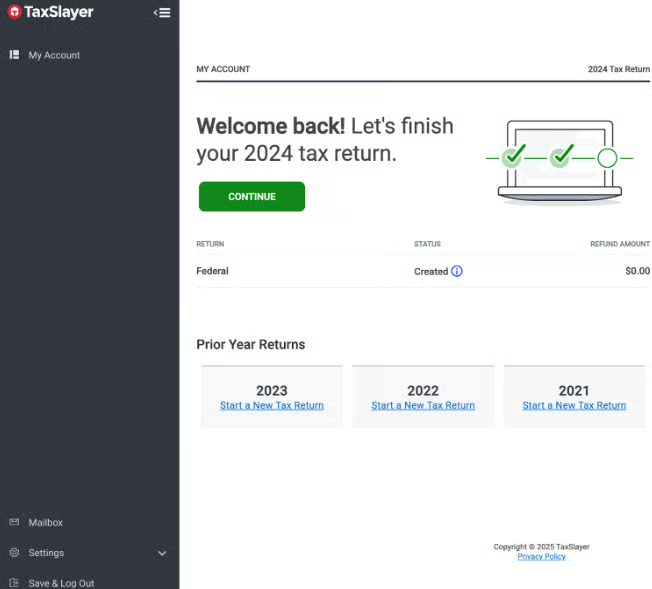
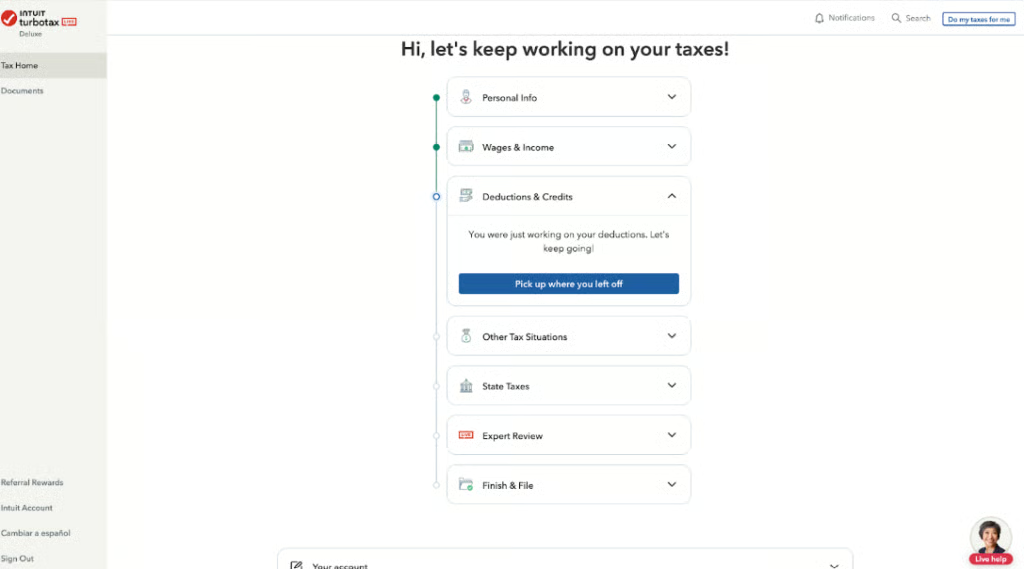
TaxSlayer and TurboTax both provide an online knowledge base with frequently asked questions (FAQs) and helpful articles to guide users through common tax situations and software functionalities. Each software platform has a relatively intuitive interface, making it easy for users to navigate through the tax preparation process. You can see examples of each product’s interface below.
User reviews: TurboTax wins
| TaxSlayer | TurboTax | |
|---|---|---|
| Users like |
|
|
| Users dislike |
|
|
| Average user rating | 4.2 | 4.6 |
In the course of my evaluation, I noted that user review scores varied widely across websites. Some sites showed collective user reviews between 1 and 2 out of 5 for both TaxSlayer and TurboTax. I don’t agree that either software deserves such a low overall rating because thousands of people file returns with both products and have no issues. Self-prep of a tax return is difficult, and some of that difficulty might manifest itself in low user ratings.
Across multiple websites, TurboTax emerged as the overall winner between the two due to its solid platform and ease of navigation.
How I evaluated TaxSlayer vs TurboTax
I compared TaxSlayer and TurboTax based on these criteria:
- Features: I considered product characteristics such as ease of data import, navigation, refund tracking tools, and in-product support.
- Pricing: I verified the availability of free trials and confirmed pricing for varying tax prep packages.
- Technical support: Being able to access help when needed is a primary concern for users, so I assessed the ease of access to product experts via phone, email, or chat options.
- Ease of use: Particularly with DIY software, it’s important that software be easy to navigate. I reviewed how easy it is to move around the product from inception to completion of the tax return.
Frequently Asked Questions (FAQs)
Can I import my previous year’s tax data into TaxSlayer and TurboTax?
Yes, both TaxSlayer and TurboTax allow users to import the previous year’s tax data from their own software or other tax preparation platforms.
What are the qualifications for TaxSlayer’s Simply Free plan?
To qualify for TaxSlayer’s free filing option, Simply Free, your taxable income must be less than $100,000, you must not claim any dependents, your filing status must be Single or Married Filing Jointly, and you must take the standard deduction. In addition, your types of income must be limited to wages, salaries, tips, taxable interest of $1,500 or less, and unemployment compensation.
Does TurboTax have a mobile app?
Yes, TurboTax has a mobile app that is available for both iOS and Android.
Do TaxSlayer and TurboTax offer full-service preparation and filing?
While both providers offer live tax assistance, only TurboTax offers full-service preparation and filing of tax returns.
Which is better, TaxSlayer or TurboTax?
If you’re looking for the cheapest option, TaxSlayer is the better option. However, based on third-party user reviews, TurboTax is the preferred option for most users.
Is TaxSlayer IRS-approved?
Yes, TaxSlayer is IRS-approved. In fact, for 2025, TaxSlayer is the software provider for the IRS free tax prep VITA program.
Bottom Line
TaxSlayer stands out with its affordable pricing and user-friendly interface, making it an excellent choice for individuals with straightforward tax situations. Meanwhile, TurboTax excels with its robust customer support and comprehensive range of tools, making it ideal for both individuals and businesses seeking assisted or full-service filing.
