









HubSpot Service Hub is customer service software that provides essential customer communication touchpoints, including live chat, shared inboxes, and in-app telephony. HubSpot Service Hub reviews show that users love the ticketing workflows and routing, and found it easy to set up a knowledge base for customer support. It’s best for teams that need an easy-to-use, all-in-one solution to centralize their customer support activities.
Who HubSpot Service Hub Is Best For
- Teams that need an omnichannel customer service tool: HubSpot Service Hub provides users with fundamental communication channels: live chat, email, and phone. This makes it easy for customers to reach your business using the channel most convenient for them. It is also the reason we included it in our top picks of the best customer service software.
- Teams that need a free customer support tool for basic service management: Small businesses with no budget for paid customer service software benefit from HubSpot Service Hub’s free support tools, particularly the live chat and email functions. It is ideal for small businesses that want to streamline support services without the need for frequent customer calling. For more options, check out our guide on the best free customer service software.
Who HubSpot Service Hub Is Not a Good Fit For
- Businesses with robust feature needs on tight budgets: While HubSpot Service Hub offers a free plan, the features in this plan are fairly limited. For more extensive customer service tools, you’ll need to subscribe to a paid plan, which is a steep increase and more expensive than what is offered by competitors for a similar feature set. For example, the entry-level plan starts at $45 per month, while the next plan has a significant jump to $360 per month. Users who want more affordable pricing options with access to advanced features should consider Freshdesk instead.
- Larger businesses that need artificial intelligence (AI) features: HubSpot Service Hub offers data-backed reports that help businesses improve customer support quality in a reactive manner. However, it does not have tools that can predict potential trends or problems in active customer cases before they happen—something an AI feature can do. If you need this functionality, we recommend using Zoho Desk.
HubSpot Service Hub Overview
| PROS | CONS |
|---|---|
| Free plan with fundamental customer support features like live chat, shared inbox, chatbots, and basic performance reporting | Free plan lacks access to technical support and is only limited to forums |
| User-friendly interface similar to other HubSpot products, such as HubSpot CRM, HubSpot Sales Hub, and HubSpot Marketing Hub | Paid entry-level plan is more expensive than other providers and it’s very expensive to upgrade to mid-tier and enterprise-level plans |
| Ticket automation and routing features | |
HubSpot Service Hub Pricing
HubSpot Service Hub pricing includes a free plan and three paid subscriptions that range from $45 per month (includes two user seats) to $1,200 per month (includes 10 user seats). Users also have the option to add more users for each plan with corresponding additional costs. Interested users can sign up for a free trial to access the features of the paid plans for 14 days.
| Plans | Free | Starter | Professional | Enterprise |
|---|---|---|---|---|
| Best For | Smaller teams and startups that manage customer queries mostly through live chat | Small businesses that need an in-app phone feature on top of email and live chat tools | Small to mid-size businesses that handle large volumes of customer queries and need ticketing automation tools | Enterprises that want advanced reporting features to ensure that they maintain excellent customer service quality |
| Annual Pricing($/Month) | ✕ | $45 per month, includes 2 user seats | $360 per month; includes 5 user seats | $1,200 per month; includes 10 user seats |
| Monthly Pricing($/Month) | ✕ | $50 per month; includes 2 user seats | $400 per month; includes 5 user seats | $1,200 per month; includes 10 user seats |
| Additional User($/Month) | ✕ | $25 per month | $80 per month | $120 per month |
| Team Email | ✓ | ✓ | ✓ | ✓ |
| Shared Inbox | Limited to 1 shared inbox | Limited to 1 shared inbox | Up to 100 inboxes | Up to 100 inboxes |
| Calling | 15 minutes | 8 hours | 16 hours | 33 hours |
| Live Chat | ✓(with HubSpot branding) | ✓ | ✓ | ✓ |
| Ticket Pipelines | 1 ticket pipeline per account | 2 ticket pipelines per account | Up to 15 ticket pipelines per account | Up to 50 pipeline tickets per account |
| Ticket Automation | ✕ | ✕ | ✓ | ✓ |
For more information on HubSpot Service Hub’s pricing and plan subscriptions, select a plan from the drop-down options below:
Free
HubSpot Service Hub’s free plan offers a wide range of customer service features that are not typically included in the free plans of other providers. These include a live chat tool, team and shared inboxes, chatbots, a 15-minute call allocation, canned responses, and email templates. It includes one ticket pipeline, which lets users assign stages to their tickets. The free plan also offers users helpful reports such as closed tickets and rep productivity performance reports.
Starter
The Starter plan includes a minimum of two users and offers everything under the free plan. Notable additions are the increase of calling time to eight hours, the removal of HubSpot branding in its live chat and meeting scheduling tools, and the inclusion of up to 5,000 email templates. Users of this plan are also provided with up to 5,000 canned snippets, a feature that lets them save up to thousands of short and ready-made responses to support tickets.
Professional
HubSpot Service Hub’s mid-tier plan, called Professional, offers a lot of upgrades compared to the Starter plan. Under this plan, users are provided with up to 100 shared inboxes, 16 hours of calling time, 15 ticket pipelines, and email health reporting. Its advanced features also include a knowledge base, customer satisfaction surveys, ticket automation, ticket routing with up to 300 workflows, and an insights dashboard that helps contextualize data and reports.
Enterprise
This is HubSpot Service Hub’s most advanced plan. Under this plan, users are given 33 hours of calls and 50 ticket pipelines. Features that are only available in this plan include conversation intelligence, which helps spot issues and trends in agent-customer conversations, as well as recurring revenue tracking. It also offers sandboxes, which allow users to test and experiment with system customizations in a safe environment before officially deploying them.
HubSpot Service Hub Features
HubSpot Service Hub has essential features for managing customer questions, issues, and queries. These include ticketing tools that record customer cases, reporting tools that provide an overview of recent and active cases, and analytics tools that track consumer sentiments and satisfaction levels. Below, we take a closer look at some of its key features.
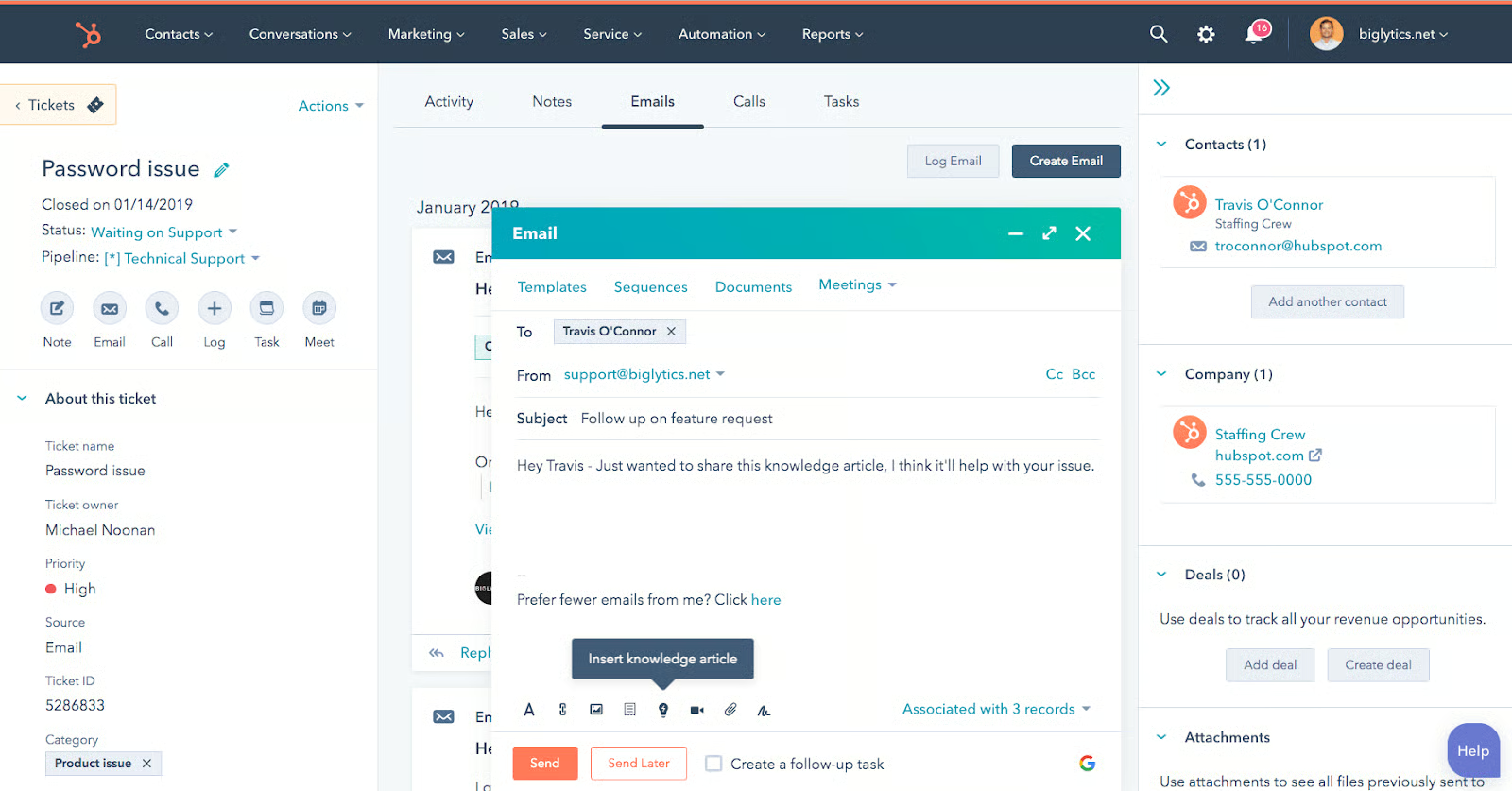
General Features
- Live chat
- Telephony
- Team emails
- Shared inboxes
- Email templates
- Canned response snippets
- Ticket routing
- Knowledge base
Click the tabs below to see a breakdown of some of the key customer service software features HubSpot Service Hub offers:
Ticket Pipelines
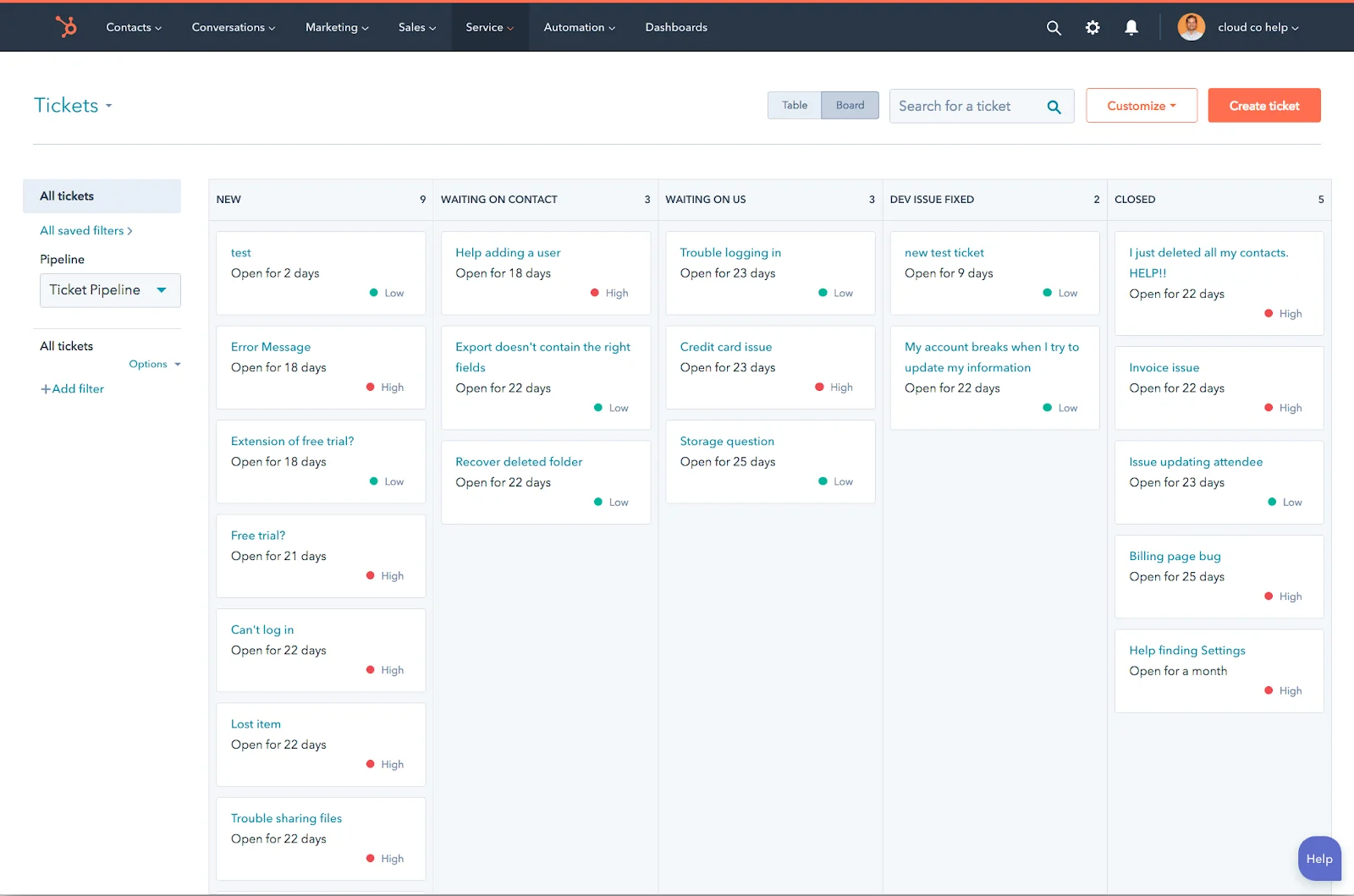
HubSpot Service Hub enables users to create various pipelines that fit a specific issue’s complexity, so a customer query can be managed based on the nature of the case. For example, a product inquiry may have a simple four-step pipeline while a request for repair may have additional steps before being resolved. In addition, pipelines can be split according to region, brands, or teams. However, the number of pipelines varies greatly per pricing plan.
Satisfaction Surveys
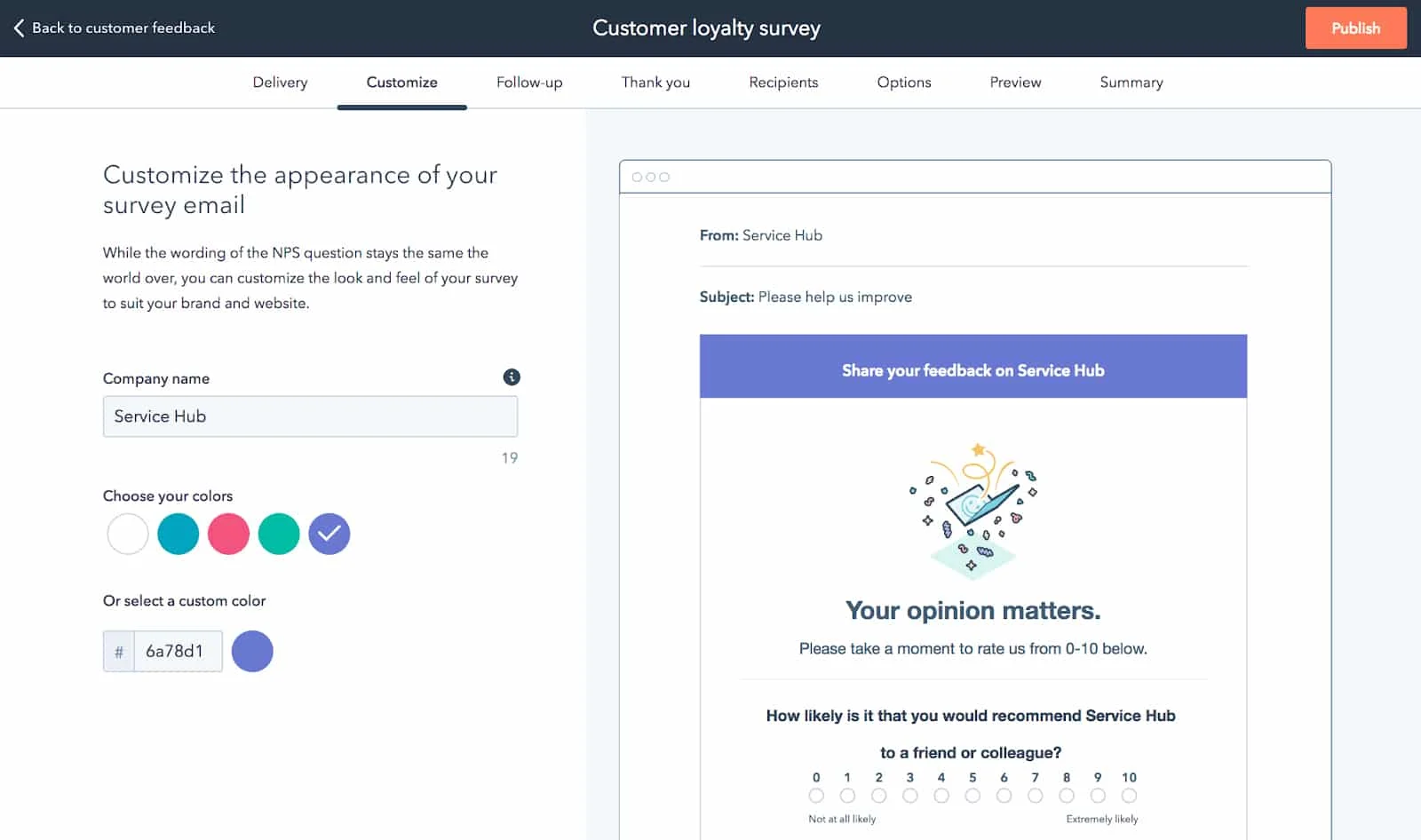
HubSpot Service Hub offers various types of customer surveys meant to provide organizations with feedback from customers to help them improve the quality of their servicing. Some of the most useful surveys it offers include:
- Net Promoter Score (NPS) Surveys: Asks your customers how likely they are to recommend you to their peers, giving you insight into how your existing customers are helping you grow your customer base
- Customer Experience Surveys: Asks your customers for their feedback about a particular product or service to improve your product offerings
- Customer Satisfaction Surveys: Ask your customers about their feedback and satisfaction level on the customer support they received for a particular issue or query
Performance Reports
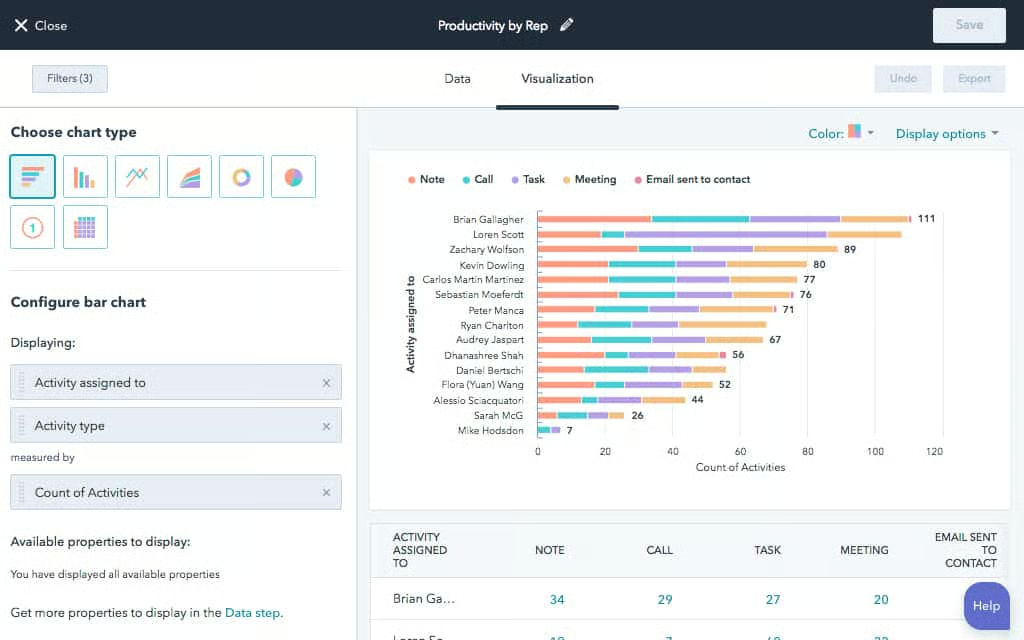
HubSpot Service Hub has reports that help users gauge the performance of the customer support team as well as individual agents. Its customer service reports include tickets closed reports (volume of tickets closed per day), agent productivity reports (number of cases agents worked on and completed), and time-to-close reports (average time for tickets to get resolved).
Third-party Integrations
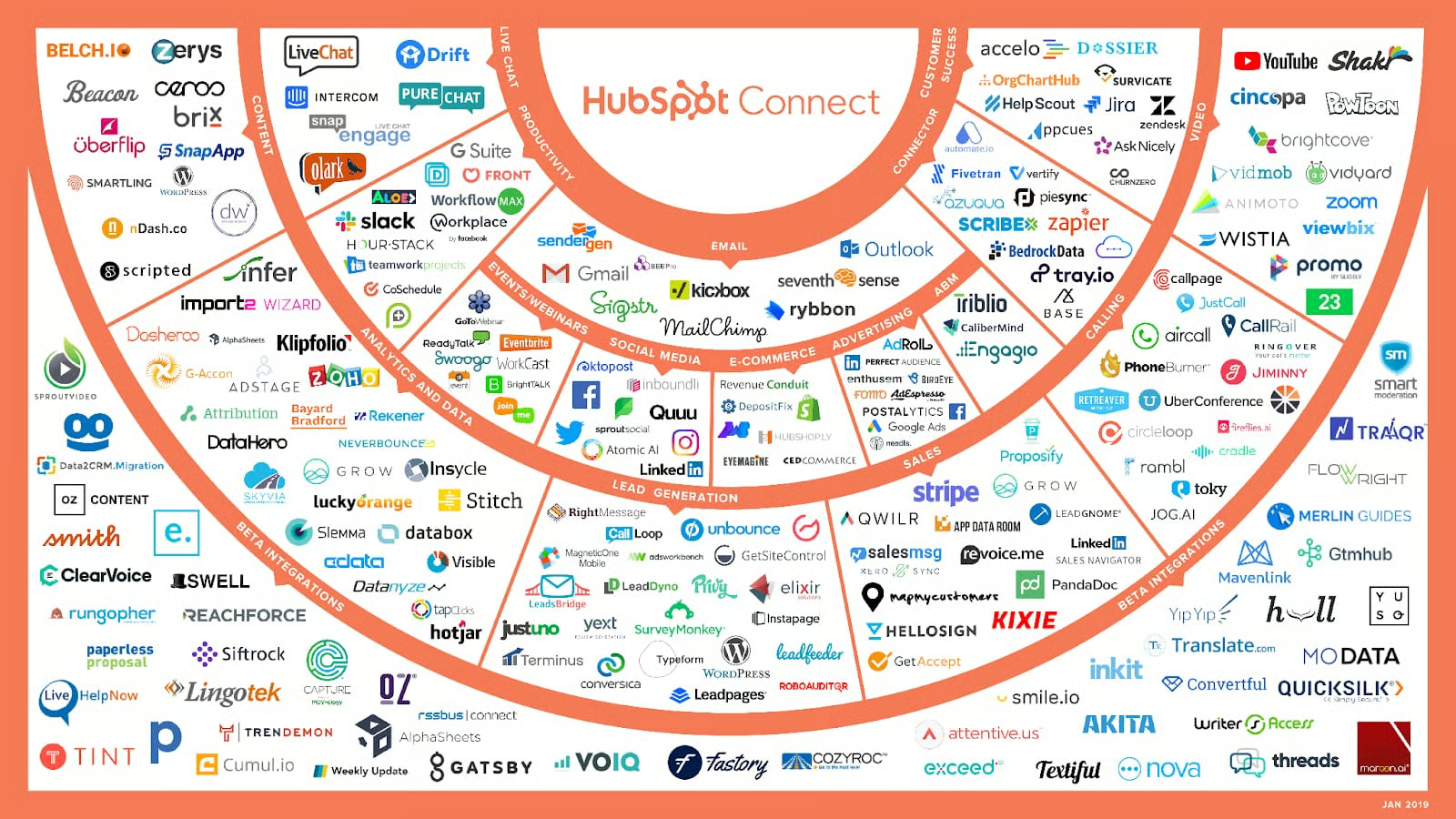
HubSpot Service Hub can be integrated with many third-party applications to help users sync existing customer data from other software into the platform. These include social media, ecommerce, analytics, lead generation, sales, social media, and project management tools.
Some of the most popular HubSpot Service Hub integrations include:
- Mailchimp
- Slack
- Facebook Messenger
- Calendly
- Shopify
- WordPress
- Survey Monkey
- Typeform
- Stripe
- Zoho CRM
- Shopify
Customer Service
HubSpot Service Hub offers customer service during official business hours (Eastern Time). Support is available through email, chat, and phone. However, the type of support varies depending on the plan purchased. Below are the available customer support touchpoints for each plan:
| Free | Starter | Professional | Enterprise | |
|---|---|---|---|---|
| Community Forum | ✓ | ✓ | ✓ | ✓ |
| ✕ | ✓ | ✓ | ✓ | |
| Chat | ✕ | ✓ | ✓ | ✓ |
| Phone | ✕ | ✕ | ✓ | ✓ |
Ease of Use
Similar to other HubSpot products (like the HubSpot CRM, Marketing Hub, and Sales), the HubSpot Service Hub has a simple, straightforward interface that makes it easy for beginners to set up, use, and navigate. It is also easy to look for features within the software’s dashboard, as they are sensibly organized. Most reviews found online also highlighted its ease of use.
HubSpot Service Hub Alternatives
HubSpot Service Hub offers excellent customer support features, but it may not be the best fit for your business. For example, you may be looking for a provider that offers more affordable pricing options that would make it easy for you to upgrade as needed. If so, here are the best HubSpot Service Hub alternatives to consider:
 |  |  | |
|---|---|---|---|
| Best For | Best all-in-one customer service management solutions including a help desk, live chat, email, and ticketing | Best customer service software with artificial intelligence (AI) capabilities | Best for teams who need a robust ticketing system |
| Starting Price | Free version for 2 users and paid plans start at $15 per user, per month | Free version and paid plans start at $14 per user, per month | Starts at $29 per user, per month |
| Freshdesk Review | Zoho Desk Review | No Review Yet |
What Users Say in HubSpot Service Hub Reviews
According to HubSpot Service Hub reviews, users find the knowledge base feature easy to create within the system. They also rave about the helpfulness of ticket pipelines that categorizes cases into different workflows, efficient ticket routing that help equalize agents’ workloads, as well as the overall customizability of the platform.
At the time of this publication, HubSpot Service Hub reviews had garnered the following average ratings on popular user review sites:
- G2: 4.4 out of 5 based on 892 reviews
- Capterra: 4.4 out of 5 based on 120 reviews
- GetApp: 4.4 out of 5 based on 120 reviews
On the other hand, users who left negative HubSpot Service Hub reviews said they are not a fan of the steep pricing. They also encountered occasional system glitches and said the visualization of the reports can be improved.
Bottom Line
HubSpot Service Hub is an intuitive, all-in-one customer support platform. It offers users omnichannel communication tools plus advanced features that include automations. For small businesses looking for a no-frills support tool to manage their customer queries, the free plan is ideal. However, for growing businesses, subscribing to a paid plan with more advanced features, such as multiple ticket pipelines and workflow automation, is recommended.
