









Salesforce Service Cloud is full-service customer service software that helps improve the efficiency and productivity of support teams by automating service processes and streamlining workflows. It is also equipped with artificial intelligence (AI) tools that provide contextual recommendations for both agents and customers. It is recommended for midsize teams wanting a scalable support platform and larger teams looking for an all-in-one customer service platform with AI features.
- What We Recommend Salesforce Service Cloud For
- Who Salesforce Service Cloud Is Good For
- Who Salesforce Service Cloud Is Not a Good Fit For
- Salesforce Service Cloud Overview
- Salesforce Service Cloud Pricing
- Salesforce Service Cloud Features
- Customer Service
- Ease of Use
- Salesforce Service Cloud Alternatives
- What Users Think of Salesforce Service Cloud
- Bottom Line
What We Recommend Salesforce Service Cloud For
Salesforce Service Cloud offers an omnichannel platform with a robust set of tools for case management, opportunity management, communication, and collaboration. It also features AI-powered bots called Einstein that give users smart recommendations on their best-next actions. These capabilities make it best suited for enterprise-level support teams that use social media and telephony in providing customer service.
Who Salesforce Service Cloud Is Good For
- Companies needing a social customer service platform: Salesforce Service Cloud allows you to respond to queries from social media platforms directly within the app. This feature has earned it a spot on our list of the best customer service software.
- Businesses looking for an AI-powered customer service software: Salesforce Service Cloud offers AI features across all of its tiers. Its Einstein feature gives users contextual recommendations on the next-best actions.
- Support teams that need a customer service solution with telephony integration: This software includes computer telephony integration (CTI) in all of its plans. This allows you to add calls to its features without using external tools.
Who Salesforce Service Cloud Is Not a Good Fit For
- Small organizations looking for a free customer service software: Salesforce Service Cloud’s pricing starts at $25 per user, per month. Read our guide to the best free customer service software to explore free options.
- Support teams needing simple, easy-to-use customer service software: Although Salesforce Service Cloud has an intuitive interface, it is not well-suited for beginners because of its learning curve. For an alternative that does not require extensive training and onboarding, consider using Really Simple Systems Service Desk, which is featured in our list of the best customer service software.
- Startups and small companies that prefer customer service software with monthly billing options across all plans: Monthly billing is available only for subscribers to Salesforce Service Cloud’s basic plan, the Essentials edition. Zoho Desk is a solid alternative with more affordable plans with monthly and annual billing options.
Salesforce Service Cloud Overview
| PROS | CONS |
|---|---|
| Lets users respond to queries from social media platforms directly from the app | Does not offer a free plan; expensive to upgrade to higher-priced plan |
| Has extensive omnichannel communication tools, including email, social media, and live chat | Monthly billing option is only available in the lowest-priced plan (the Essentials plan) |
| Telephony integration allows users to make calls directly from the software | 24/7 phone support requires a subscription to a paid support plan |
| Drag-and-drop interface makes it easy to build branded self-help portals | Time-consuming setup and customization, especially after updates are released |
| AI features are available across all tiers | Not suited for beginners because of its steep learning curve |
Salesforce Service Cloud Pricing
Salesforce Service Cloud’s pricing is divided into four paid plans that cost between $25 and $300 per user, per month, billed annually. The main differences between the plans include the contextual recommendations allotment per user, level of customer support, as well as access to special features such as service contracts, smart case routing, service order management, and integration via web application programming interface (API).
Salesforce Service Cloud pricing and plan features at a glance:
| Support Desk Plans | Essentials | Professional | Enterprise | Unlimited |
|---|---|---|---|---|
| Pricing($/User/Month)* | $25 | $75 | $150 | $300 |
| Knowledge Base | ✓ | Read-only; additional $75 per user, per month for read-write function | Read-only; additional $75 per user, per month for read-write function | ✓ |
| Chat (Live Agent) | Limited functionality | ✕ | Additional $75 per user, per month | ✓ |
| Facebook Messenger Support | Limited functionality | ✕ | Additional $75 per user, per month | Additional $75 per user, per month |
| Case Management and Service Console App | ✓ | ✓ | ✓ | ✓ |
| Telephony Integration | ✓ | ✓ | ✓ | ✓ |
| Service Contracts and Entitlement | ✕ | ✓ | ✓ | ✓ |
| Web Services API | ✕ | ✕ | ✓ | ✓ |
| 24/7 Support and Configuration Services | ✕ | ✕ | ✕ | ✓ |
*Based on annual pricing. Monthly pricing is available for the Essentials edition at $35 per user, per month.
Click on the drop-down menu below for more details about each of Salesforce Service Cloud’s plans:
Select to learn moreEssentialsProfessionalEnterpriseUnlimited
Essentials
Salesforce Service Cloud’s basic plan includes collaboration tools such as the Chatter (company news feed and chat app), the mobile app, and file sharing capabilities. It also comes with productivity tools, which include case auto-assignment, web and email case capture, case email auto-response, case escalation rules and queues, and a knowledge base for both customers and agents. You can do all these things from the Service Console.
The Essentials plan allows you to easily integrate your app with popular telephony systems through CTI. In addition, you can connect with your customers in real time via Facebook Messenger and Live Agent chat, and create cases from social channels. You can also easily set up a self-service support site for your customers and deliver up to 5,000 artificial intelligence (AI)-powered contextual recommendations per month.
This platform helps you spot opportunities for upselling and cross-selling by tracking key details about every deal, including products, quotes, and customer engagement. It also integrates with Outlook and Google Workspace, and allows you to create customizable reports and dashboards. Plus, you can customize and automate various support processes using email templates and the Lightning Flow Automation (point-and-click process builder tool).
Professional
When you go up to the Professional tier, you unlock productivity features such as case milestone tracking, service order management, and service contracts. There are also field service operations features like work order management, asset management, and product tracking. Aside from that, you can customize profiles and page layouts to control which fields are visible to different user profiles.
One of the disadvantages of this edition is the additional cost for the knowledge base read-write functionality, which allows users to create, edit, and assign knowledge articles. This tier also does not provide live chat, Facebook Messenger, or help center support options for your customers.
Enterprise
The Enterprise edition lets you customize more than one Service Console app and automatically route cases to the right group or agent. There are also advanced reporting features such as cross-filters, joined reports, bucketing, and customer history tracking. Aside from that, you can use the offline functionality of the Salesforce mobile app, integrate with other apps using web API, and automate an unlimited number of workflows and business processes.
Like the Professional plan, this edition requires additional payment for the knowledge base read-write functionality. You can add live chat and self-service support options for your customers, but you have to pay an additional $75 per user, per month for these features.
Unlimited
The highest-level plan adds AI-powered Einstein Bots to the digital engagement tools included in the lower-level plans. These bots can handle routine requests and gather pre-chat information to save your agents time and allow them to focus on more complicated requests. Another highlight of this plan is the access to 24/7 support and configuration services.
Salesforce Service Cloud Features
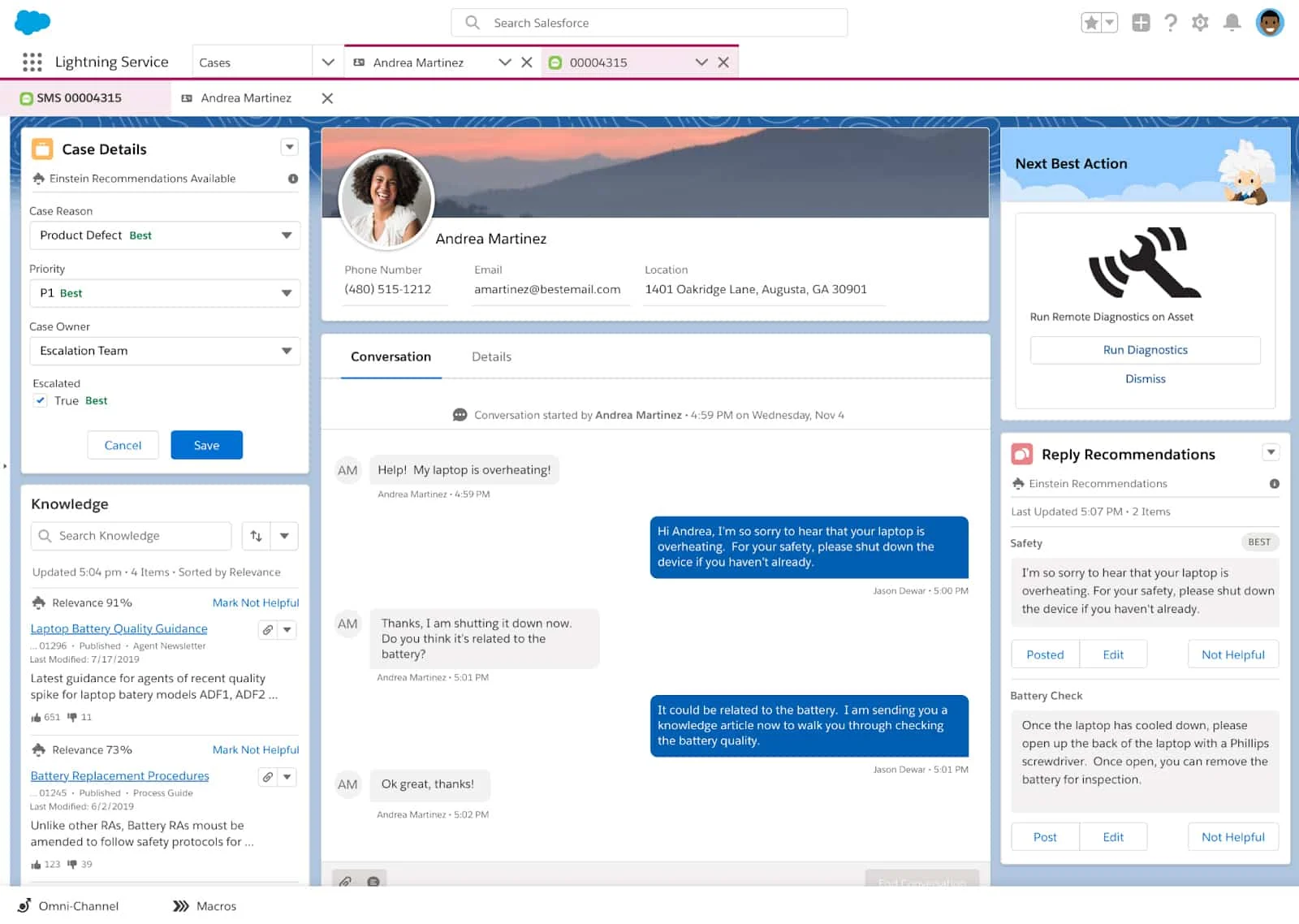
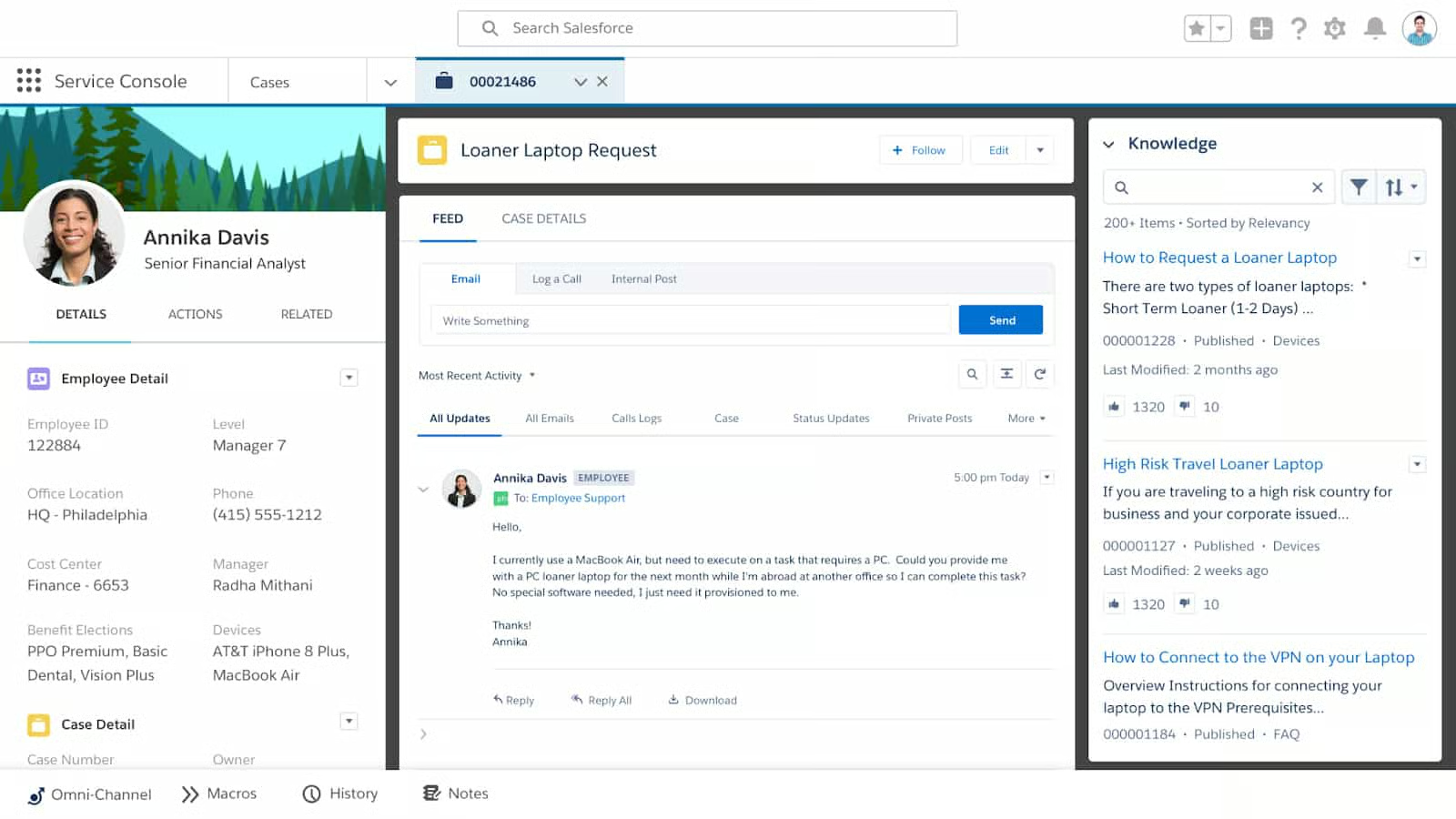
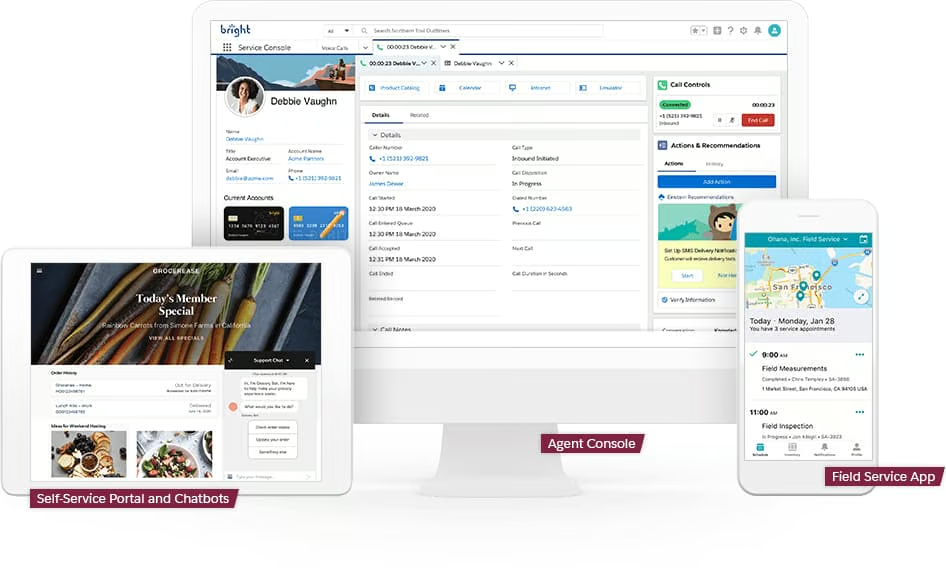
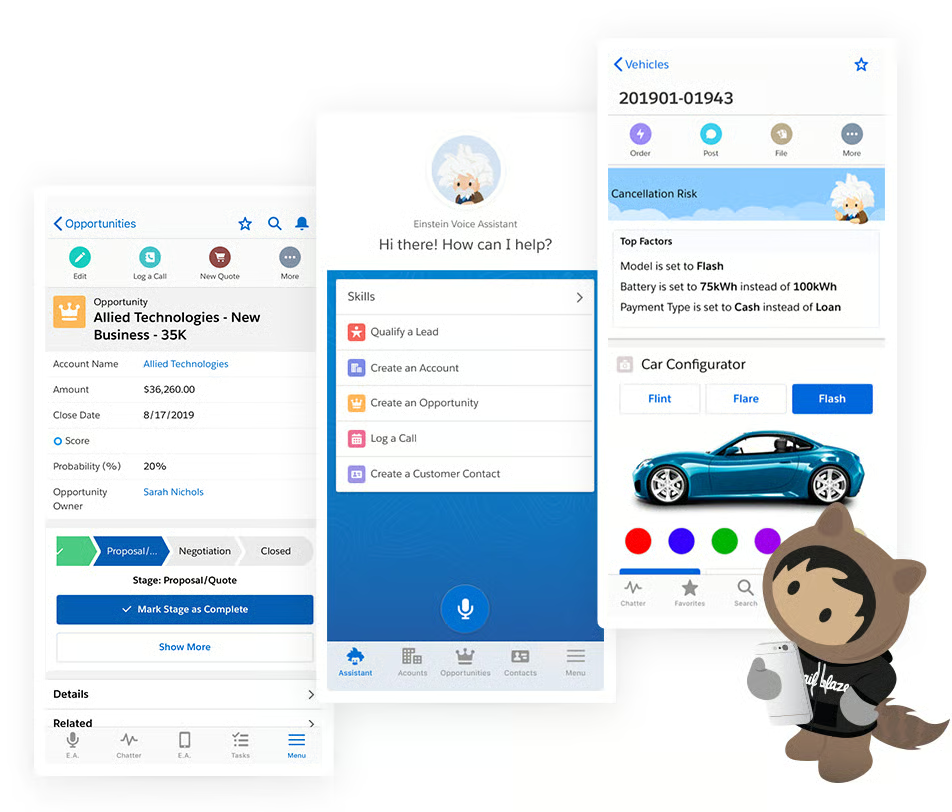
Salesforce Service Cloud provides a Service Console app to track opportunities, collaborate with your team, assign cases, access knowledge content, deliver customer service, and view real-time business insights. Its Einstein AI tools give you smart recommendations on your next-best actions to help you provide more efficient service to your customers.
Opportunities & Collaboration
Salesforce Service Cloud has a built-in company collaboration app called Chatter, where you can join and follow conversation threads, reach out via internal chat, and share files with your team. Its opportunity tracking features allow you to track deal stages, manage tasks, and view activity feeds. It also features an AI-powered Einstein Next-Best Action starter, which displays smart recommendations, like offering a discount or an add-on service to your customer.
The Lightning App Builder is a point-and-click tool that enables you to build custom pages, record pages, and home pages for your service app. Salesforce Flow, on the other hand, is another point-and-click tool for automating and managing any business process. The automation tools include email templates for your prospects and customers.
Productivity
Help your support agents work more efficiently using productivity tools such as case auto-assignment, email auto-response, and web and email case capture. With the Service Console app, you use a single screen to close cases, manage leads and contacts, and access knowledge content. You can also track and manage service contracts, maintenance agreements, and service orders from the same app.
Digital Engagement
Digital engagement tools allow you to connect with your customers and deliver personalized support in real time using Live Agent online chat capability and Facebook Messenger. You can also create cases from social channels.
Mobile App
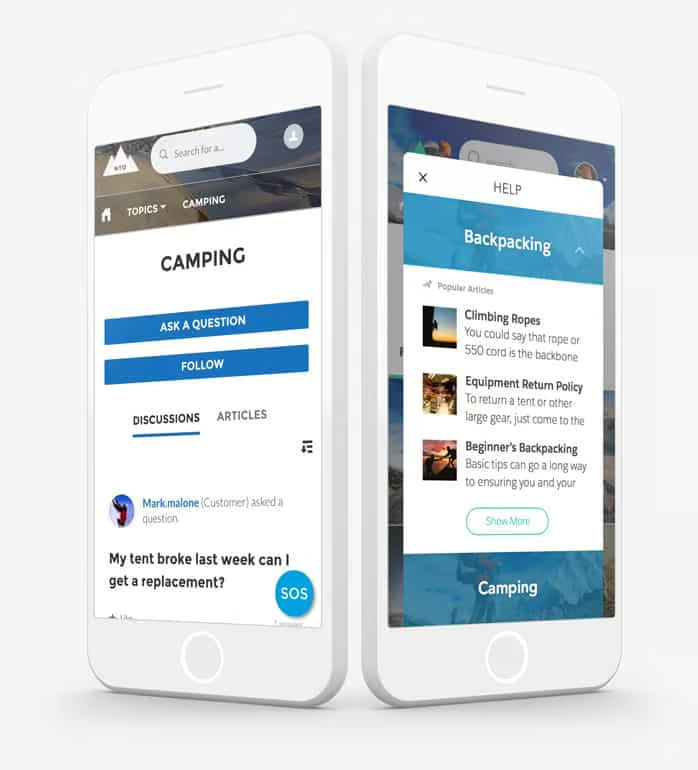
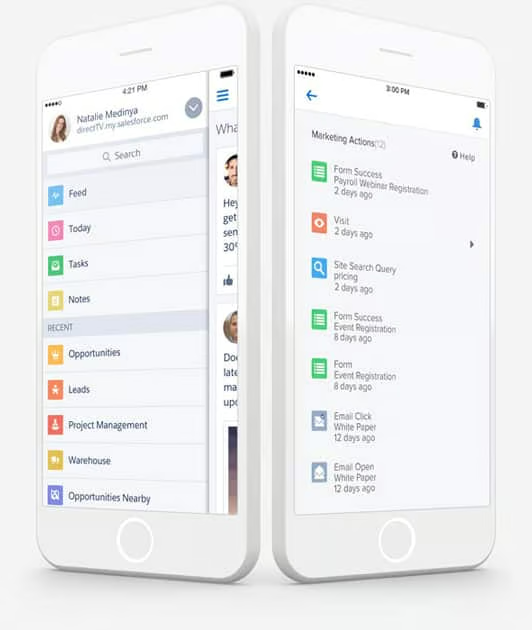
Access your Service Console app from both Android & iOS devices to continue providing customer service while on the go. You can view, create, update, and delete cases, accounts, and contacts. You can also draft email and social app messages from within the mobile app. Bulk actions allow you to update multiple records, including case status, owners, and priorities.
Reporting & Analytics
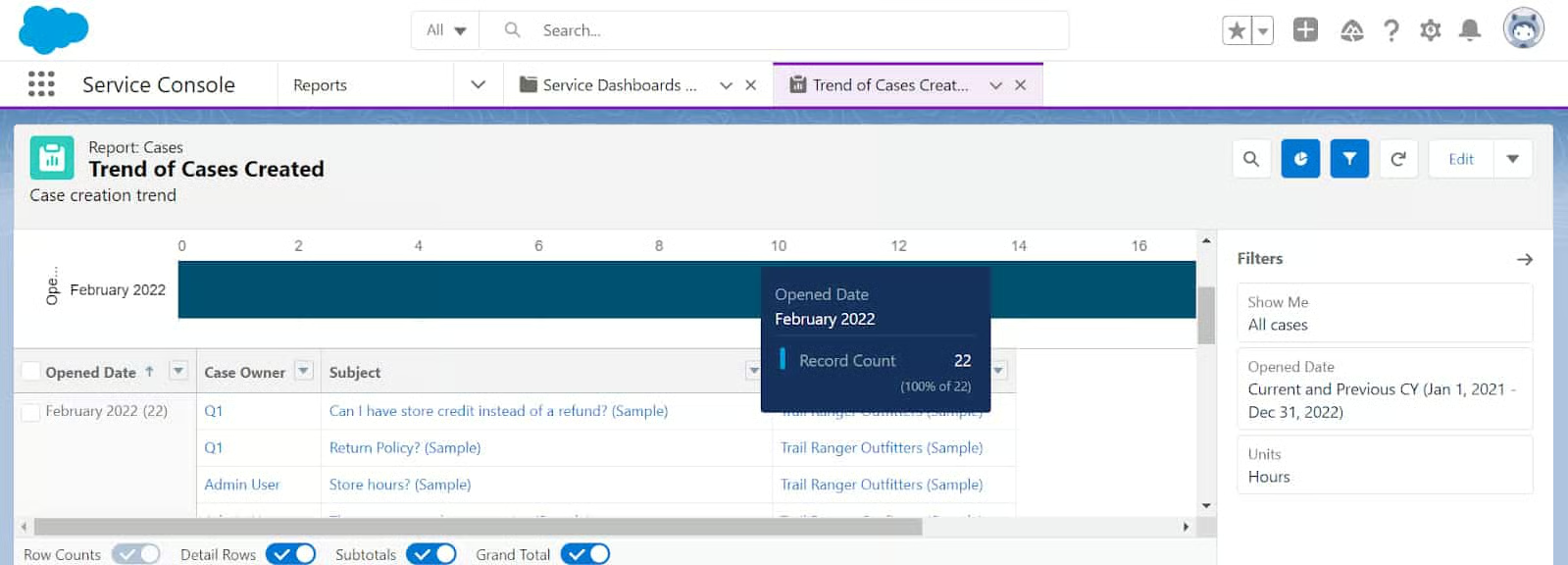
Use the Service Console reports to track various support data in real time, including the number of cases created, case emails, case status, and case history. You can also generate reports on the queues for self-escalation rules, support team activity, and the usage of your Self-service Portal.
Third-party Integrations
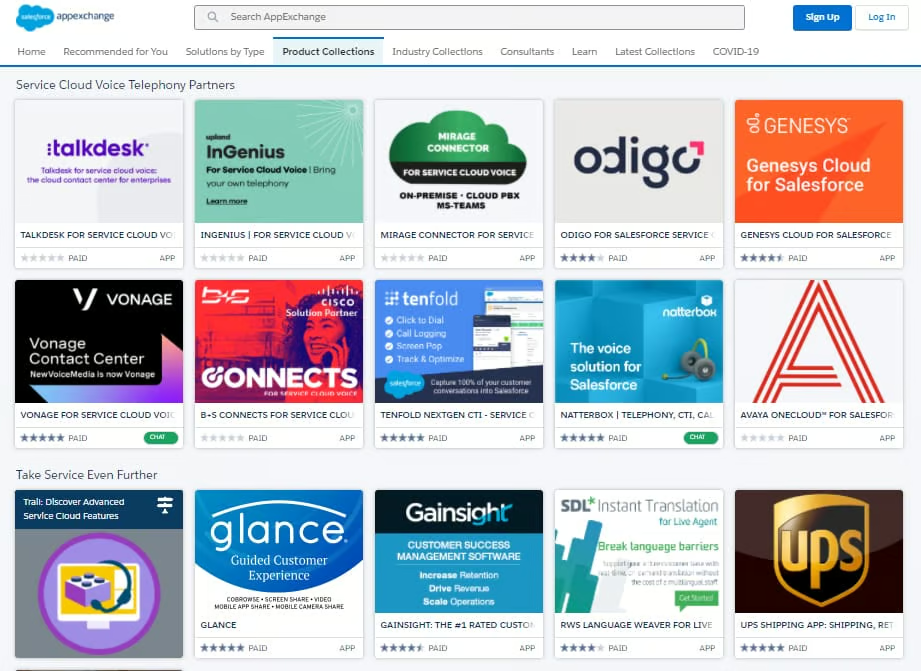
Extend the capabilities of your Service Console app with its built-in integration with email, back-office, and telephony software. The AppExchange marketplace provides robust integration options, which include apps for surveys, lead management, and shipping management. You can also use the web services API if the integration you are looking for is not available on the AppExchange.
Customer Service
Salesforce Service Cloud’s customer service is divided into three types of Success Plans. Under the Standard plan for all licenses, users get access to self-guided resources including, demos, help portal, the Trailblazer community, and online learning portal Trailhead. You can also submit support cases to their technical support team and expect a response within two business days. Paid support plans give you access to 24/7 phone support and personalized resources.
Under the Premier plan, you get developer support or quick access to Salesforce experts to solve integration issues. Expert coaching sessions include specialized resources throughout the customer lifecycle and cover onboarding, implementation, optimization, and adoption. Salesforce experts also review your business outcomes and help you map out your goals using your customer relationship management (CRM) software.
The Signature plan provides deployment planning services, troubleshooting, and optimization guidance for developers. You also receive proactive services, which include automated solution monitoring, 24/7 early warning alerts for performance issues, and rapid review and diagnostics by Salesforce engineers. Technical account managers will work with you to prioritize solutions for performance and usability issues.
| Success Plan Features | Standard | Premier | Signature |
|---|---|---|---|
| Pricing | $0 | 30% of applicable license fees | Contact account executive for custom pricing |
| Trailhead, Help Portal, Trailblazer Community, and Success Center | ✓ | ✓ | ✓ |
| Technical Support | ✓ | ✓ | ✓ |
| Trailhead Academy Discounts | N/A | 25% | 30% |
| 24/7 Phone Support and Developer Support | ✕ | ✓ | ✓ |
| Expert Coaching, Business Value Reviews, and Technical Health Reviews | ✕ | ✓ | ✓ |
| Deployment Planning and Proactive Services | ✕ | ✕ | ✓ |
| Technical Account Management and Key Event Management | ✕ | ✕ | ✓ |
Ease of Use
Salesforce Service Cloud has an intuitive interface that makes it easy to navigate for intermediate-level users who are familiar with its layout. Because it offers a robust set of collaboration and productivity features, there is an initial learning curve that could be overwhelming for beginners. Descriptive tutorials and smart pop-up recommendations make it easier for users to explore its functionalities and know the next-best actions.
If you want access to personalized guidance, expert coaching, and developer support, subscribe to their paid support plans.
Salesforce Service Cloud Alternatives
If you’re still not sure if Salesforce Service Cloud is the right fit for your business needs, below are some of the best alternatives to consider. You can also check out our guide to the best customer service software for even more options.
 |  |  | |
|---|---|---|---|
| Best For | Support teams that want customer service software with native CRM software integration | Companies needing customer service software with omnichannel help desk solution | Businesses wanting a customer service system with voice-over-internet-protocol (VoIP) functionality |
| Starting Price* | $29 per agent, per month | Free for 2 users or $15 per agent, per month | Free for unlimited users or $63 per month, includes 2 users |
| Read Freshdesk Review | Visit HubSpot Service Hub |
*Based on annual billing. Monthly pricing is also available at slightly higher rates.
What Users Think of Salesforce Service Cloud
We scoured Salesforce Service Cloud reviews online and found the majority of its users find it efficient in managing support cases, tracking customer interaction history, and improving agent productivity. They also like its ability to manage service level agreements (SLAs) to set customer expectations and its easy integration with CRMs. Others praised its automation tools for workflows, case assignments, and support processes.
As of this writing, it has earned the following scores from the most popular review sites:
- G2: 4.1 out of 5 based on 1,547 reviews
- Capterra: 4.4 out of 5 based on 532 reviews
- TrustRadius: 8.1 out of 10 based on 306 reviews
- Gartner: 4.4 out of 5 based on 300 reviews
There were only a few common negative Salesforce Service Cloud reviews, and most of them were about its ease of use. Some users acknowledged it takes some time to learn its interface and to discover how to maximize its features. However, they also said it’s easy to manage customer information, update cases, and navigate through reports once you get past the learning curve.
Bottom Line
Salesforce Service Cloud offers an omnichannel Service Console app to manage cases, track customer interactions, and access knowledge content to improve agent productivity and customer support. It is recommended for midsize to large support teams looking for a scalable, all-in-one solution equipped with AI-powered service tools.
Sign up for a 14-day free trial to explore its features and to see if it fits your business needs.
