







Sending a monthly newsletter and following up after a quote request serve different purposes. Email marketing helps you communicate with prospects and customers. Marketing automation uses rules and customer data to coordinate repeatable tasks, including sending emails. The two overlap: an automated welcome email is an example of both.
If you’re comparing email marketing vs marketing automation, start with what needs to happen after a customer takes action. Do you need to send a message, or also update a record, notify an employee, and change the next step based on the response?
Mailchimp is a full-featured email marketing and automation platform for targeted campaigns and automated customer journeys. It lets you manage regular email communication and build rule-based follow-up within the same platform.
Email marketing vs marketing automation at a glance
Email marketing is the practice of communicating with prospects and customers through email, while marketing automation carries out marketing tasks using triggers and rules. Email marketing includes scheduled campaigns and automated messages. Marketing automation, on the other hand, can handle those messages plus actions in connected systems, such as updating a contact record or notifying sales.
The difference between email marketing and marketing automation is scope. A marketing automation platform may include email tools, while an email platform may support workflows beyond sending messages.
Comparison point | Email marketing | Marketing automation |
| Primary focus | Communicating through email | Coordinating repeatable marketing processes |
| Common activities | Newsletters, promotions, welcome emails, and nurture sequences | Triggered messages, contact updates, qualification rules, and sales alerts |
| Channels | Email and potentially other connected channels | |
| Main buying question | Can I create and deliver the right emails? | Can I coordinate the actions my customer process requires? |
Capabilities vary by product and subscription. Marketing automation can run entirely through email, so you don’t need multiple channels to benefit.
Also read: Top 7 Email Marketing Best Practices (+ Examples & Tools)
What is email marketing?
Email marketing uses email to build relationships with subscribers, promote offers, share useful information, and encourage repeat business. Common formats include:
- One-time campaigns: Seasonal promotions, product launches, and special announcements.
- Recurring campaigns: Monthly newsletters or weekly updates.
- Automated emails: Welcome messages triggered by a signup or educational sequences delivered over several days.
Segmentation and personalization help tailor these messages to subscribers’ interests, preferences, or behavior.
For example, a neighborhood bakery might send its weekly menu every Friday and automatically email a welcome offer to new subscribers. Both are email marketing: the menu follows a regular publishing schedule, while each welcome email is triggered by a signup.
Also read: These Are the Best Newsletter Platforms to Build an Audience
What is marketing automation?
Marketing automation uses software to execute repeatable tasks based on events, timing, and predefined rules. Instead of manually deciding what to do for every contact, you define the process and let the software handle the steps it supports.
Most workflows have three building blocks that automate marketing tasks:
- Trigger: An event starts the process, such as a form submission.
- Condition: A rule determines what happens next, such as whether an appointment is already booked.
- Action: The system sends a message, updates information, or performs another supported task.
A home services company, for example, could respond to an estimate request, notify the assigned salesperson, and stop inquiry reminders after the customer books. That process requires the relevant form, booking, and sales systems to share the necessary information.
Automation follows the process you configure. An incorrect enrollment rule or outdated offer can affect every contact who enters, making testing and oversight essential.
Also read: How To Do Permission-based Email Marketing in 5 Steps
Marketing automation vs email marketing: 5 buying differences
When comparing marketing automation vs email marketing, focus on the actions your business needs and the work involved in maintaining them. These five considerations help turn the comparison into a software decision.
Buying consideration | Email-focused needs | Broader automation needs |
| Scope | Send campaigns and automated email sequences | Coordinate messages, record updates, and employee tasks |
| Customer data | Use information to target and personalize emails | Use data from connected systems to direct workflow actions |
| Measurement | Assess email performance and attributable conversions | Monitor progress and outcomes across connected steps |
| Team workload | Produce campaigns and maintain email sequences | Maintain integrations, branching rules, and exceptions |
| Cost and value | Evaluate email features, contacts, and send allowances | Include connected applications, setup, and workflow administration |
These columns describe different requirements; an email marketing platform may support both.
1. Scope: email campaigns vs connected workflows
Email marketing focuses on messages, including newsletters, promotions, and automated sequences. A subscriber could receive three educational emails over a week without anyone sending each message manually.
Broader marketing automation connects messaging with other actions. An inquiry could trigger an acknowledgment email, a CRM update, and a follow-up task for a salesperson.
Verdict: Choose email marketing when relevant emails are the main requirement. Choose broader marketing automation when the process also needs to coordinate records, staff tasks, or other channels.
2. Customer data: targeting emails vs directing actions
Email marketing uses subscriber details and engagement to select recipients and personalize content. With suitable integrations, it can also use purchase history or appointment information.
Marketing automation can use that information to direct additional actions. For example, a new customer purchase could update a lifecycle field and create an onboarding task. The required integration must support those actions, not just import contact details.
Verdict: Choose email marketing with suitable integrations when data mainly determines which emails people receive. Choose broader marketing automation when data must also control tasks or updates across systems.
3. Measurement: campaign results vs workflow progress
Email marketing reporting measures delivery, clicks, unsubscribes, and, where supported, email-attributed conversions or revenue.
Marketing automation reporting can show how contacts move through a workflow, which paths they take, and where they stop progressing. Connecting those steps to sales outcomes requires the right reporting and access to relevant data.
For both approaches, review the actual reports available. Privacy features and automated activity can affect open and click metrics, so use conversion data alongside engagement signals where possible.
Verdict: Choose email marketing if campaign results answer your reporting questions. Choose marketing automation with suitable reporting if you need to assess progress and outcomes across connected steps.
4. Team workload: campaign management vs workflow administration
Email marketing requires content creation, audience selection, and checks before sending. Automated sequences also need updates when links, offers, or customer circumstances change.
Broader marketing automation requires oversight of connected applications, branching rules, assignments, and exceptions. Someone needs to investigate failed updates and check that the workflow still matches your business process.
Verdict: Choose an email-focused setup for campaigns and manageable email sequences. Choose broader marketing automation when you need the connected process and can assign someone to maintain it.
5. Cost: email requirements vs the full workflow
Email marketing costs commonly depend on contact allowances, sending volume, user access, and included features.
Broader marketing automation costs may extend to connected applications, integration work, onboarding, and administration. Either setup can incur these expenses, so compare the complete requirements for the same job rather than assuming one category is cheaper.
Verdict: Choose an email-focused subscription when it covers your communication needs. Choose broader marketing automation when the time saved and follow-up improvements justify its full setup and running costs.
Which approach does your small business need?
Match your immediate goal to the capabilities below. You can combine email marketing and automation within one platform, so check your existing tools before adding another subscription.
Your main requirement | Capabilities to prioritize | What to choose |
| Send newsletters and promotions | Email design, scheduling, segmentation, and reporting | Email marketing |
| Welcome subscribers or deliver an educational series | Email triggers, delays, and sequence controls | Email marketing with built-in automation |
| Send emails based on purchases, inquiries, or bookings | Relevant integration, event triggers, and exit conditions | Email marketing with event-based automation |
| Coordinate messages with employee follow-up | CRM actions, internal notifications, and task creation | Broader marketing automation |
| Coordinate a journey across several applications | Branching workflows, connected data, and administration controls | Broader marketing automation |
For example, a solo consultant may need only a newsletter and welcome sequence. A consultancy with several salespeople may also need inquiry assignment, task creation, and follow-up that changes when a deal progresses.
How email marketing and marketing automation work together
Mailchimp illustrates how a business can use both within one platform. A retailer could send a holiday campaign to a selected audience and run a separate onboarding flow that sends a welcome email, branches according to a subscriber’s selected interest, and applies a tag for future targeting.
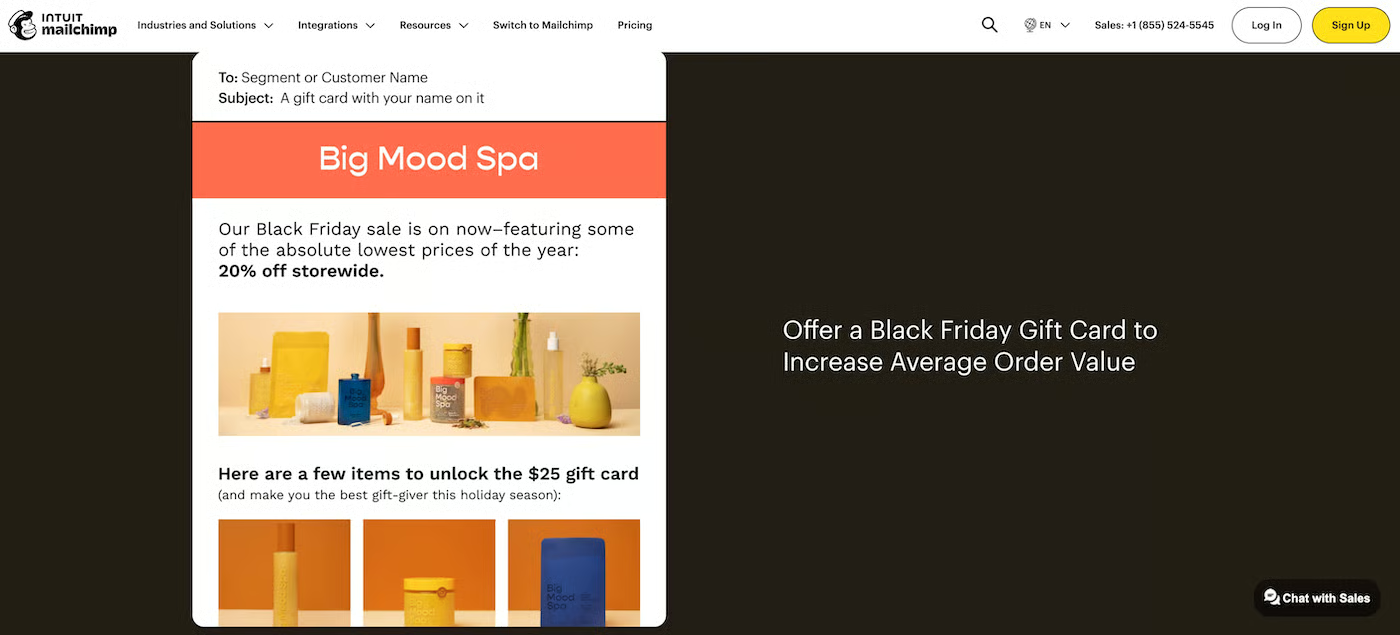
Its marketing automation flows combine messaging with rules and contact updates, allowing subscribers to follow different paths. Available triggers and actions depend on the subscription and connected data.
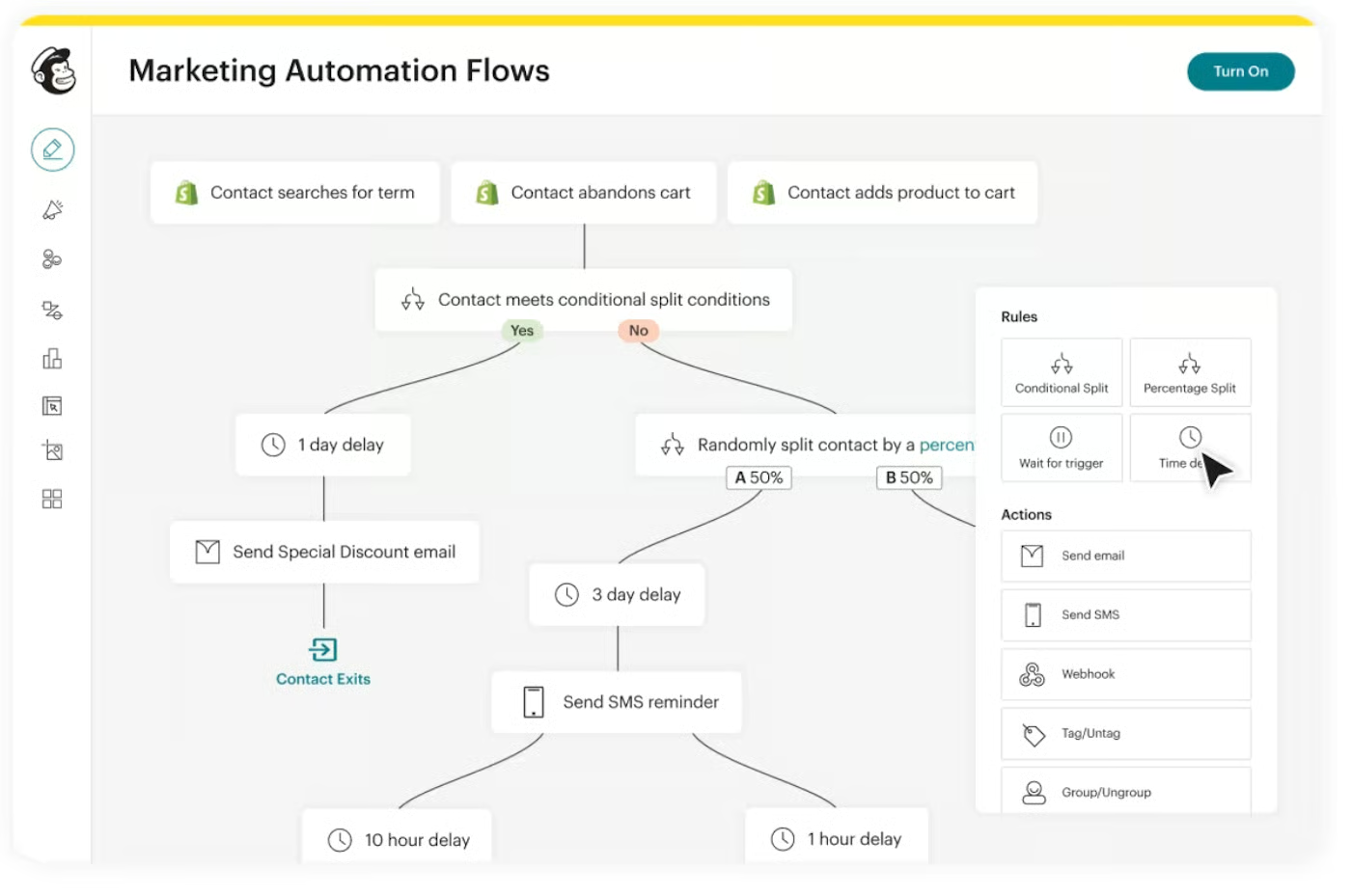
I’d start with one useful workflow, such as subscriber onboarding, and expand after confirming that it works. List size matters less than whether you have a defined process, the necessary data, and someone to maintain it.
Also read: How to Use Mailchimp in 6 Easy Steps
How to choose the right software
Once you know which capabilities you need, compare how each platform would handle your actual workflow. These steps will help you check compatibility, estimate the full cost, and assess whether your team can manage the setup.
1. Map one priority customer journey
Choose a process with a clear starting event and outcome. Write down the messages, decisions, and employee tasks between them.
Example: For an estimate request, map the acknowledgment, salesperson notification, follow-up deadline, and action that stops reminders once the customer books.
2. Audit the tools you already have
Check your email platform, CRM, ecommerce system, and booking software before adding another subscription. You may already have the required triggers and actions, or they may be available through an upgrade.
Example: Check whether your current subscription supports conditional branches or contact updates, then identify which required actions would need an upgrade.
3. Verify the integrations
Ask for the supported fields, sync direction, update timing, and available actions. Check how the connection handles unsubscribes and changes to contact information.
Example: Confirm that appointment status arrives before the next reminder is due. If the update only runs once a day, your proposed workflow may need a longer delay or a different connection.
4. Compare cost and day-to-day usability
Ask shortlisted vendors to demonstrate the same process. This makes a marketing automation vs email marketing software comparison more useful than comparing feature counts.
Include every required subscription and add-on, then assess whether the person maintaining the setup can make routine changes.
Example: Have your campaign owner change a delay, replace an email, and inspect a contact’s path. Note which changes require technical assistance and whether that support costs extra.
5. Test the complete process
Check who enters the workflow, which path they follow, and when they exit. Look for duplicate enrollment, conflicting campaigns, and messages that continue after the intended outcome.
Example: Test a new inquiry, a customer who books immediately, and an unsubscribed contact. Verify that each receives only the appropriate follow-up and that staff notifications reach the right person.
Once you know the required capabilities, compare our picks for the best email marketing software and best marketing automation software.
Frequently asked questions
Is email automation the same as marketing automation?
Email automation is one application of marketing automation, focused on sending messages based on triggers, timing, or conditions. Broader workflows may also update records, notify employees, or coordinate other channels.
Can one platform handle marketing automation and email marketing and marketing automation?
Yes. Many platforms combine campaign creation, subscriber management, and automated workflows. Check the specific triggers, conditions, actions, and integrations included in your subscription rather than relying on the product’s label.
Do small businesses need a CRM for marketing automation?
Not always. An email signup or purchase can trigger useful automation without a separate CRM. A CRM becomes more relevant when your workflow needs sales ownership, deal information, or coordinated follow-up between marketing and sales.
Does marketing automation require AI?
No. A workflow can run on rules you define, such as sending an email two days after a form submission. Some platforms offer optional AI tools to help create content or configure workflows, but rule-based automation works without them.
Bottom line
The right approach to email marketing vs marketing automation depends on what needs to happen after each customer interaction. Choose email tools for campaigns and automated messaging, and broader automation when follow-up also requires coordinated tasks or record updates. Buy the capabilities your process needs and your team can maintain.
Recommended for you…
