








Voice-over-internet-protocol (VoIP) is a type of phone system that uses the internet (instead of conventional copper wires) to make and receive calls. Compared to landline phones, it’s cheaper to set up and maintain and offers more advanced telephony features, such as automatic call distribution (ACD), interactive voice response (IVR) system, call analytics, and third-party integrations. In this article, we dive into the question of what is VoIP and how does VoIP work?
How Does VoIP Work?
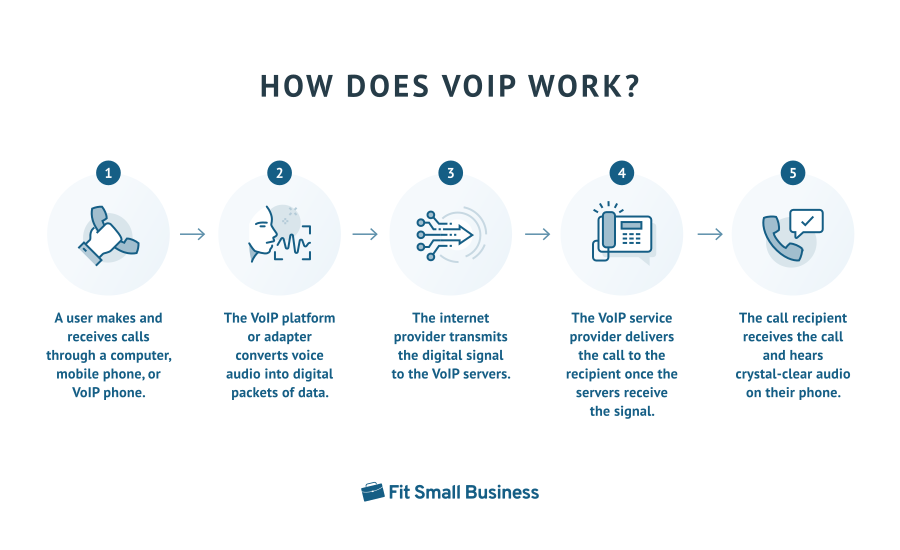
To better answer the question “What is VoIP?” we need to understand how it operates. The process is simple: VoIP converts voice calls into digital signals and transmits them online. Here’s a breakdown of the steps involved in internet telephony:
- A user makes and receives calls through a computer, mobile phone, or VoIP phone.
- The VoIP platform or adapter converts voice audio into digital packets of data.
- The internet provider transmits the digital signal to the VoIP servers.
- The VoIP service provider delivers the call to the recipient once the servers receive the signal.
- The call recipient receives the call and hears crystal-clear audio on their phone.
VoIP Protocols & Standards
Another way to understand what is VoIP calling technology is to know the protocols that make digital communication possible. VoIP uses a specific set of rules to transfer data over the internet, including:
- Session Initiation Protocol (SIP): Establishes, maintains, and terminates sessions by sending messages in the form of data packets. The sessions may be voice calls between a customer and a service representative or a video meeting among team members.
- Real-time transport protocol (RTP): Sends audio, video, and media traffic in real time while reducing jitter and packet loss, which affect VoIP call quality.
- H.323: Allows sending of media data over packet networks (mostly used in video conferencing).
- Secure real-time transport protocol (SRTP): Extends the capabilities of RTP and features stronger security measures, including encryption and message authentication on audio and video traffic.
- Transmission control protocol (TCP): Establishes and maintains connection when devices and applications exchange data.
- User Datagram Protocol (UDP): Allows computers and other devices to send data in a connectionless manner.
Top VoIP Providers at a Glance
The ideal VoIP solution provides the functionalities you need to accommodate the type of call volume your customer service team receives on a regular basis. Compare VoIP providers’ features and take advantage of the free trial offer to learn which platform suits your business operations best.
We compiled the top VoIP vendors in the market in the table below and included their respective features and pricing. To know more about these platforms, including their free trial durations, refer to our in-depth buyer’s guide on the best small business VoIP services.
| VoIP Provider | Monthly Starting Price (per User) | Key Features | Learn More |
|---|---|---|---|
 | $30 |
| RingCentral Review |
| Visit RingCentral | |||
 | $30.95 |
| Nextiva Review |
| Visit Nextiva | |||
 | $27 |
| GoTo Connect Review |
| Visit GoTo Connect | |||
 | $28 |
| 8x8 Review |
| Visit 8x8 | |||
 | $14.99 |
| Phone.com Review |
| Visit Phone.com | |||
 | $19.99 |
| Vonage Review |
| Visit Vonage | |||
 | $19.95 |
| Ooma Office Review |
| Visit Ooma | |||
Advantages of VoIP
Now that we have answered the question of how does VoIP work, let’s discuss its pros and cons. In a nutshell, the benefits include more money savings, cheaper international calls, and more efficient call management.
So, what does VoIP do for business? Learn more about it by familiarizing yourself with the advantages of this internet-based phone system:
Reduced Overhead Costs
Businesses don’t need to rely on dedicated phone lines and equipment to use VoIP, meaning they are able to avoid the usual costs associated with landline phone systems. As your business expands operations, you won’t have to pay more for additional phone lines. If you choose a VoIP service with flat rate pricing, you’ll easily add users to the system in the platform’s admin settings without incurring extra costs.
Unlike traditional phone systems, VoIP doesn’t require hardware. Team members make and receive calls using the devices you already provided for work: laptops and mobile phones. This contributes to lower phone system setup expenses. According to VoIP statistics, the phone system reduces new business costs by as much as 90%.
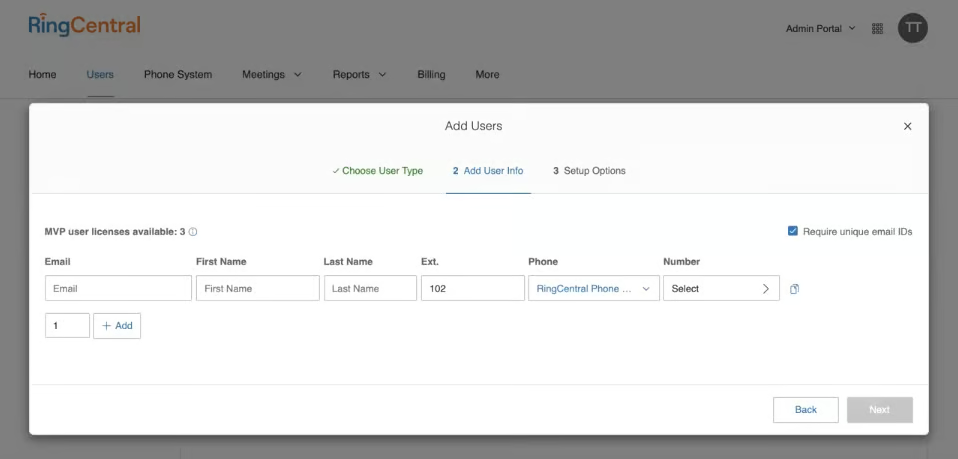
Business phone system RingCentral allows adding several users to the account through the Admin Portal. This makes the platform highly scalable, and most suitable for businesses that foresee growing operations in the future. Its extensive call management features, which include advanced call queue rules, call monitoring, and hotdesking, help you manage large call volumes. Connect the platform with third-party business tools to extend its functionality.
More Affordable International Calls
For those wondering what VoIP is ideal for, its best use case is making international calls. Its rates are significantly cheaper than the fees offered by landline system providers. For instance, Phone.com lets businesses call customers in Australia, Japan, and Mexico for only 3.9 cents per minute.
If you frequently make phone calls overseas, take advantage of VoIP providers’ unlimited international calling plans. Refer to our top picks for the best services for VoIP international calls.
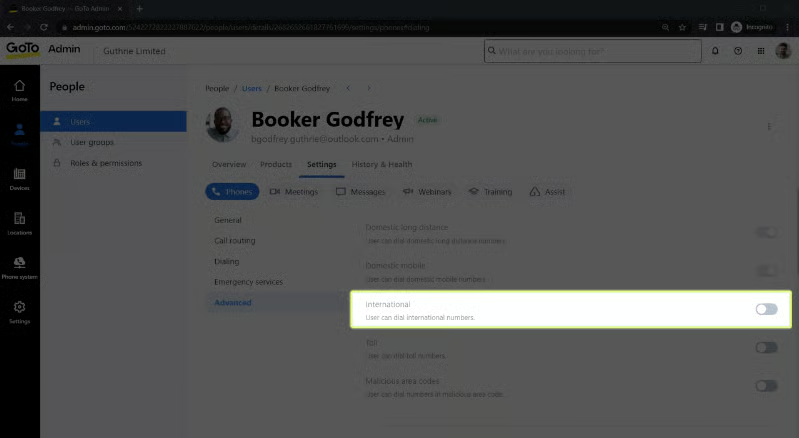
VoIP solution GoTo Connect allows unmetered calls to 50-plus countries, including China, Germany, Ireland, Switzerland, and the United Kingdom. The international calling capability can be accessed via different devices, desktop, mobile, or browser, offering greater flexibility when connecting with overseas clients. Through its call management features, including unlimited ring groups and call queues, you’ll be able to make customer service delivery more efficient.
Streamlined Call Management
We define VoIP as a telephone system that enables calls over the internet. Beyond offering an alternative to copper-wired landlines, the system facilitates efficient call management. For one, it supports several devices, desktops, and smartphones. This means your team members are able to accommodate customer inquiries wherever they are, as long as they have a stable internet connection.
Aside from supporting flexible work, VoIP systems have built-in features that help businesses manage calls in a more streamlined manner. This includes:
- Automated attendant: Gives callers instructions on how to connect with appropriate departments and agents
- Call forwarding: Redirect customers automatically to alternate phone numbers
- Call screening: See who is on the other end of the line and decide whether to accept, transfer, or send the call to voicemail
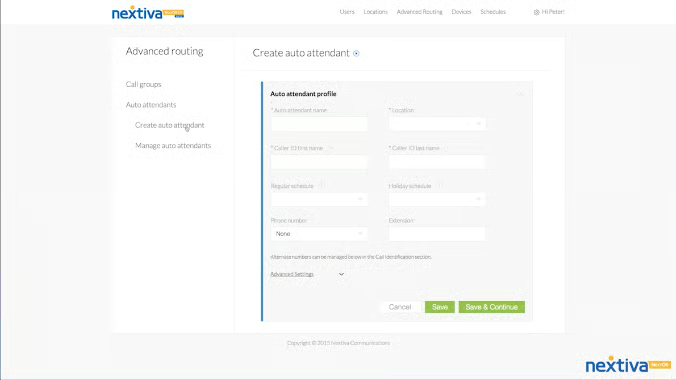
Nextiva, another reliable VoIP system, includes the option to create auto-attendants in its advanced routing settings. Users are able to label virtual receptionists, set business hours and holiday schedules, and assign a phone number and extension. Additionally, you get to specify the caller ID’s first and last name, helping customers recognize your business quicker and increasing the chances of them picking up the call.
Disadvantages of VoIP
While VoIP is an excellent communication solution, it comes with a few drawbacks, such as internet dependence, the possibility of dropped calls, and cybersecurity risks. Knowing these cons helps you decide if VoIP is suitable for your business and better prepare you should you choose to adopt it. These are the disadvantages of using VoIP:
No Offline Functionality
Remember, a VoIP call means a call transmitted over the internet. The VoIP system completely relies on broadband technology to facilitate communication between users. The strength of your internet signal determines call quality, which means a weak connection will result in unintelligible or dropped calls. Before choosing a provider, run a VoIP speed test first to know if your network is ready to accommodate VoIP communications.
Power Supply Requirement
As much as VoIP needs a strong internet connection, it also requires an uninterrupted power supply. This means you won’t be able to use the phone system when there’s a power outage unless you invest in an electricity generator. During emergencies, landlines are more reliable than VoIP since they run on copper wires that aren’t affected by power interruptions and severe weather conditions.
Vulnerable to Cybersecurity Attacks
Since VoIP runs on the internet, it’s susceptible to cybersecurity risks. A common attack is Distributed Denial of Service or DDoS, which involves overwhelming servers with requests for connection or data, preventing you from using the VoIP system. Before subscribing to a specific platform, familiarize yourself with these threats and ask your chosen provider about their VoIP service’s security and compliance certification.
VoIP Costs
Now that we have answered what are VoIP call advantages and disadvantages, we move to the expenses involved in adopting this type of communication solution. The primary cost of a VoIP system is the subscription to a service provider. Most vendors charge a monthly fee, depending on the extent of the features offered. They often follow two pricing models:
- Per user: The cost depends on the number of users in your phone system. RingCentral uses this pricing model, with an entry-level subscription costing $30 a month. This includes unlimited domestic calling within the United States (U.S.) and Canada, multi-level auto-attendants, and call queues. Its most expensive subscription is priced at $45 per user, per month, offering access to advanced call queue rules and routing, call monitoring tools like whisper and barge, and hotdesking.
- Flat rate: The cost has a fixed fee regardless of the number of users. Grasshopper follows this pricing model, with a base-level subscription package priced at $31, offering one phone number, three extensions, and unlimited users. All the VoIP features, such as call forwarding, call transfer, and custom greetings, are included in all subscription plans.
Aside from your service provider’s pricing model, the following factors affect VoIP subscription cost:
- Billing arrangement: Many VoIP service providers offer monthly and annual billing options. Those who choose annual billing get discounted rates. For instance, RingCentral offers up to 33% savings with yearly payments.
- Number of users: Some VoIP vendors provide discounts for businesses needing several seats. Nextiva, for example, lowers its per-user subscription fees for five to 100-plus users.
- Hardware: Although hardware phones aren’t necessary when using a VoIP system, some businesses prefer managing calls through internet protocol (IP) phones. Providers like RingCentral and Nextiva offer different hardware devices, like desk and conference phones, for sale and rent.
Before buying a subscription, ask the provider which VoIP services are included in each package. With this, you’ll be able to guarantee that your subscription has the features you need for managing business communications.
VoIP Features
Knowing about the phone system’s capabilities will help you better understand what is VoIP technology. Throughout VoIP history, the industry has seen rapid development in features offered by different providers. Below is a list of the most useful VoIP capabilities:
Call Management
Handle calls more efficiently by maximizing these call management tools:
- Automatic call distribution (ACD): Let the system automatically route calls to team members or departments. The routing process follows specified criteria. For example, the incoming calls will be distributed evenly across available representatives or according to the order in which the agents appear on the list.
- Interactive voice response (IVR): Connect callers to the right agents or teams through key press instructions. Advanced IVR systems are equipped with speech recognition capabilities so that customers simply voice their concerns or the department they’re looking for.
- Call queues: Have a virtual line of inbound calls to organize the sequence of when clients will be served. The customers hear a welcome message when they enter the phone system, and custom music will play until an agent is available to take the call.
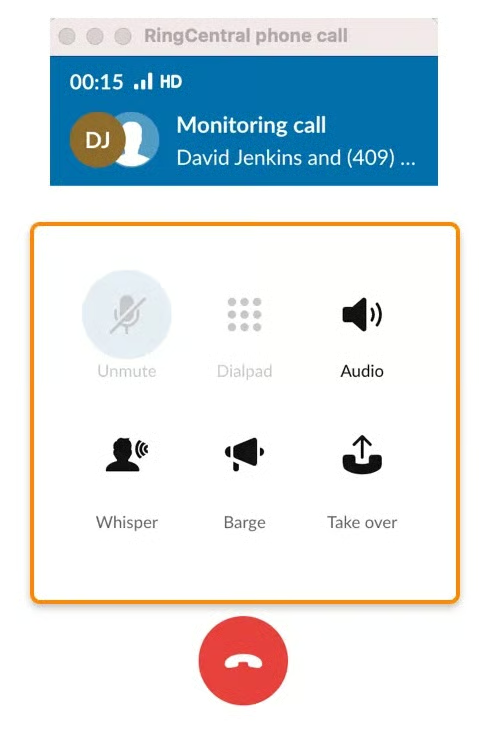
- Call monitoring: Monitor live calls and intervene when necessary. The whisper feature lets you observe ongoing calls and hear the conversation between a customer and an agent. The barge feature lets you join the call and speak to all participants directly.
Phone Numbers
Most VoIP subscriptions come with virtual phone numbers: local, toll-free, and vanity. Some provide phone numbers in international locations for an additional fee. Users are able to claim ownership of such numbers right from the VoIP platform.
Unified Communications
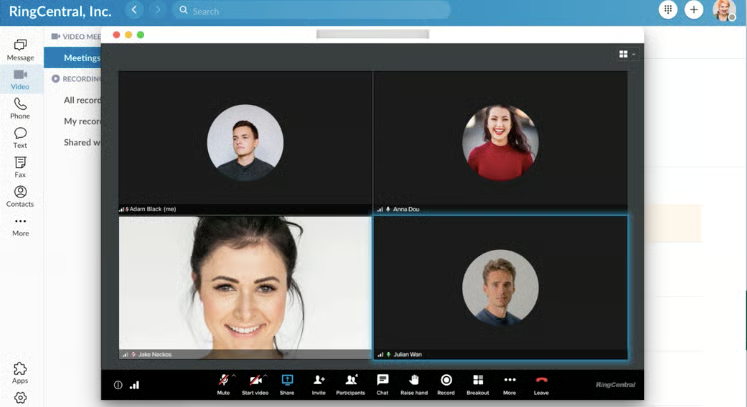
Some VoIP solutions feature team messaging and video conferencing features, which make collaboration among remote employees easier. For example, RingCentral’s chat lets you assign tasks, search keywords, and revisit previously sent files. Its video meeting tool hosts up to 200 participants for a maximum duration of 24 hours.
Call Analytics
Get an overview of important performance metrics to evaluate customer service efforts more strategically. VoIP platforms show the number of total inbound and outbound calls, answered calls, and missed calls in real time. You’ll also see how many calls are in the queue and which agents take the most calls.
Third-party Integrations
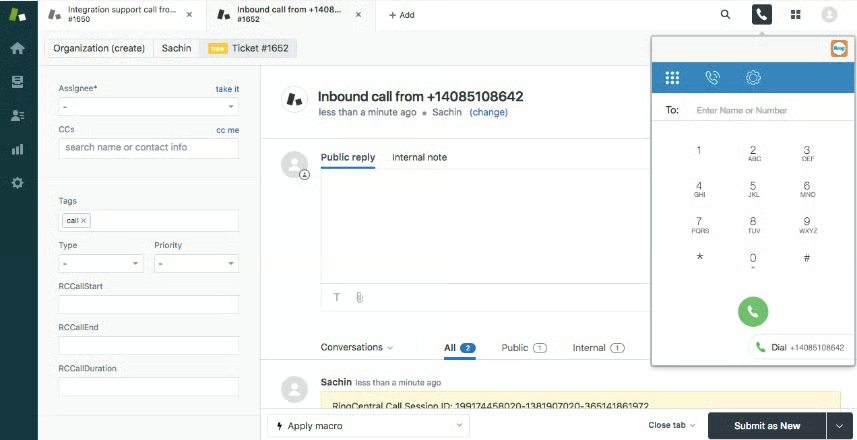
VoIP solutions work with different business tools, which allow users to increase productivity. Customer service representatives are able to deliver faster customer service when all the information they need is accessible in one place. Integrations include customer relationship management (CRM) systems, ticket management, marketing automation, and collaboration tools.
Differences Between VoIP & Landline Phones
VoIP and landline phone systems vary greatly in cost, infrastructure, and features. If you plan to switch from one tool to another, learn their differences to determine which suits your business better. Refer to the table below for the major distinctions between VoIP and landline phone systems.
| VoIP | Landline | |
|---|---|---|
| Installation Cost | $0 | $0 to $300 |
| Average Monthly Cost | $0 to $50 | $20 to $60 per phone line |
| Infrastructure | Internet | PSTN |
| Device Flexibility | Web browsers, desktops or laptops, smartphones, and IP phones | Analog phones |
| Voicemail | ✓ | ✓ |
| Call Recording | ✓ | ✕ |
| Auto-attendant | ✓ | ✕ |
| Business SMS | ✓ | ✕ |
| Video Conferencing | ✓ | ✕ |
| Third-party Integrations | ✓ | ✕ |
To know more about the differences between the two phone systems, check out our VoIP vs landline guide. In a nutshell, we recommend VoIP for small to mid-sized businesses needing a budget-friendly, feature-rich communication platform, and landline for companies requiring a reliable system during power outages.
Which Phone System Is Right for Your Business?
When choosing between VoIP and landline, consider your budget and determine if you’re ready to cover the upfront costs and the monthly expenses. Take into account the functionalities you need in a business phone system. Advanced features, like call queues and various call routing configurations, are essential if you frequently receive a large volume of calls.
Finally, consider the infrastructure you have, if your office space is retrofitted with phone jacks and cables, or if you have a strong internet connection. To help you decide which business phone system to get, take the quiz below.
Which phone system is right for your business?
Answer a few questions about your business, and we'll give you a personalized product match.
Question 1 of 4
Do you have growing customer service demands that require advanced call routing rules?
Frequently Asked Questions (FAQs)
Can I keep my landline number with a VoIP phone?
Yes. VoIP providers offer number porting services, allowing you to transfer existing phone numbers from one vendor to another. While some facilitate the process for free, others charge a fee separate from the subscription plan. Follow these steps to port an existing number.
How do I convert a normal phone to VoIP?
Yes, you need a VoIP adapter, also called an analog telephone adapter (ATA). This device converts analog signals to digital signals and vice versa, enabling users to make VoIP calls using a landline phone. ATA plugs into the analog phone’s FXS port and the local area network (LAN) via the RJ45 port and Ethernet cable. Check out our top ATA picks.
Will VoIP replace landlines?
Yes. In fact, the Federal Communications Commission (FCC) already mandated decommissioning plain old telephone service (POTS) lines, which means telecom providers are not compelled to provide copper wire services and be subject to price caps anymore.
Instead, vendors are free to offer other phone system services, such as VoIP. Even without the order, VoIP will likely replace landlines as they offer greater flexibility, scalability, and money savings for businesses.
Bottom Line
Now that we tackled VoIP’s benefits, costs, features, and differences from landline phones, consider adopting this platform in your business operations. RingCentral is our top pick among VoIP providers, given its extensive call management capabilities, third-party integrations, and team collaboration tools. Sign up for its 14-day free trial to see if it fits your communication requirements.
