







Customer relationship management (CRM) software for mortgage businesses facilitates various mortgage brokering activities such as loan origination. It boosts efficiency in processing new mortgage loans from appraisal and approval to fund disbursement or application denial. The best mortgage CRM software streamlines sales, marketing, and service tasks to help mortgage professionals focus more on client engagement and closing loans.
Plus, they integrate with loan origination software (LOS) and come with document management and electronic signature capability. We evaluated several mortgage CRM software and identified the best options based on their pros, cons, features, pricing, and use cases.
- Zoho CRM: Best overall for mobile mortgage processing
- Shape Mortgage CRM: Best for marketing
- Jungo: Best for Salesforce users
- Pipedrive: Best for automating sales activities
- monday CRM: Best for time tracking and organizing files
- Streak CRM: Best for managing mortgage pipelines in Gmail
- Best Mortgage CRM Software Compared
- Zoho CRM: Best for Overall Mortgage Processing in a Mobile CRM
- Shape Mortgage CRM: Best for Marketing
- Jungo: Best for Salesforce Users
- Pipedrive: Best for Automating Mortgage Sales Activities
- monday CRM: Best for Time Tracking & Organizing Files
- Streak CRM: Best for Managing Mortgage Pipelines in Gmail
- Frequently Asked Questions (FAQ)
- Bottom Line
Best Mortgage CRM Software Compared
| Provider | Starting Monthly Price per User | Free Plan | Our Rating out of 5 |
|---|---|---|---|
 | $14 | ✓3 users | 4.91 |
| Visit Zoho CRM | |||
 | $119 | ✕ | 4.86 |
| Visit Shape Mortgage CRM | |||
 | $119 | ✕ | 4.79 |
| Visit Jungo | |||
 | $14 | ✕ | 4.78 |
| Visit Pipedrive | |||
 | $12 | ✕ | 4.43 |
| Visit monday CRM | |||
 | $49 | ✓1 user | 3.99 |
| Visit Streak CRM | |||
Zoho CRM: Best for Overall Mortgage Processing in a Mobile CRM
When to Use Zoho CRM
- You need a mortgage CRM with excellent mobile app capabilities: Zoho CRM is a general-use CRM system that offers mobile access in its free and scalable paid plans. Once integrated with mortgage apps like BluMortgage, you can access most features like email, calls, and meetings, in the Zoho CRM mobile app.
- You prefer to use a mortgage CRM with robust communication tools: If you’re a loan officer who needs an extensive suite of communications tools, Zoho CRM is for you. It is equipped with web portals, SMS, social media platforms, and direct phone calls for client engagement. These capabilities are also helpful in employee collaboration for mortgage firms with several loan officers.
When to Use Zoho CRM Alternatives
- You prefer a CRM designed for mortgage brokers: Zoho CRM has many helpful features that mortgage professionals can use to generate potential borrowers and manage clients. However, this general-use CRM doesn’t directly integrate with LOS like Encompass by Ellie Mae, Velocity, and Calyx Point.
- Alternatives: Shape Mortgage CRM is a great alternative to Zoho CRM. This mortgage broker CRM has lender and borrower tools and integrates with popular LOS platforms like Encompass. Jungo is also an excellent mortgage CRM software that integrates with Encompass, Velocity, and Calyx Point.
- You want to use a CRM that has a minimal learning curve: Zoho CRM features are already comprehensive, which can be overwhelming to use for first-time CRM users.
- Alternatives: Pipedrive and monday CRM are easy to use with little to zero learning curve, depending on the feature and service package.
Zoho CRM Pricing Plans*
Cost:
- $0 for three users
Key Features:
- Lead, account, contact, and deal management
- Mobile app
- Integration with Zoho apps
- Tasks, meetings, and calls
- Standard CRM reports
- Marketing campaign management
- Mass email and custom email templates
- Customization for the home page and tabs
- Automation for workflow rules, tasks, email notifications, and records
- Document library and approve records on web forms
Cost:
- $14 per user
Key Features:
- Everything in Free
- 100 custom reports and 10 custom dashboards
- 100 custom email templates
- 250 daily mass emails per organization
- Customizable group tabs
- Additional automation
- 1GB file storage per organization
- 200MB data storage (100,000 records)
- Sales forecasting and documents
- Calendar booking
Cost:
- $23 per user
Key Features:
- Everything in Standard
- Zoho Finance Suite Integration
- Assignment rules
- Unlimited custom reports and CRM dashboards
- Unlimited custom email templates
- 10GB data storage
- SalesSignals
- Motivator (sales gamification)
- 500 daily mass emails per organization
- Inventory and case management
Cost:
- $40 per user
Key Features:
- Everything in Professional
- Advanced CRM analytics
- 1GB file storage per organization plus 1GB per user license
- Zia, an AI-powered conversational sales assistant
- Territory-based sales forecasting
- Marketing attribution and customer segmentation
- 1,000 daily bulk emails per organization with email scheduling
- Three autoresponders
- Automations
- Web form analytics and A/B testing
Cost:
- $52 per user
Key Features:
- Everything in Enterprise
- 1GB file storage per organization
- 2,000 daily bulk emails per organization
- Five autoresponders
- Custom modules
- Highest feature limits
Zoho CRM Add-ons:
- Additional File Storage: $4 per month for 5GB (paid plans only)
- Additional Data Storage (up to 200 users): $4 for 100MB per month (for Professional and up)
- Additional Data Storage (>200 users): $2 for 100MB per month (for Professional and up)
- Data Backup: $12 per request
*Pricing is based on annual billing on a per-user monthly breakdown. Monthly billing is available for a higher cost. Zoho CRM comes with a 15-day free trial for the paid plans. While we update pricing information regularly, we encourage our readers to check current pricing.
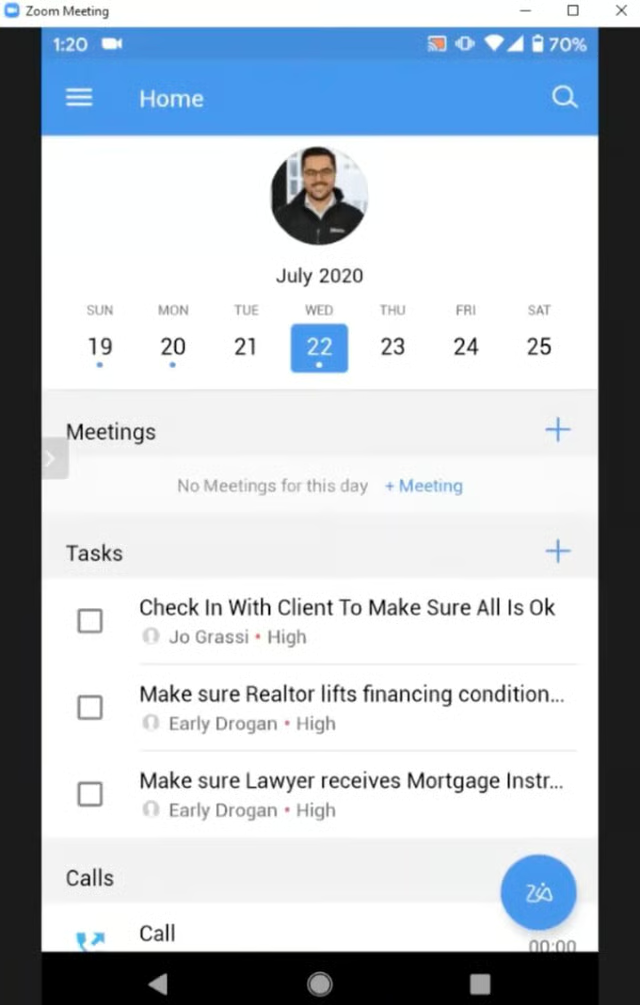
Zoho CRM and BluMortgage integration lets loan officers book meetings on mobile. (Source: YouTube) 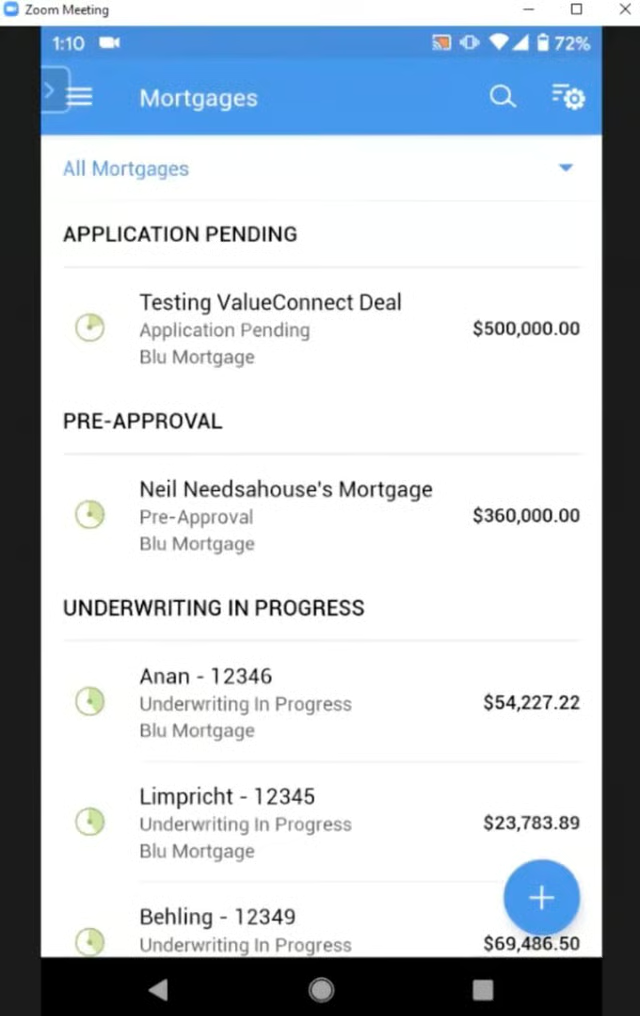
Zoho CRM and BluMortgage integration lets loan officers check mortgage statuses on mobile. (Source: YouTube) 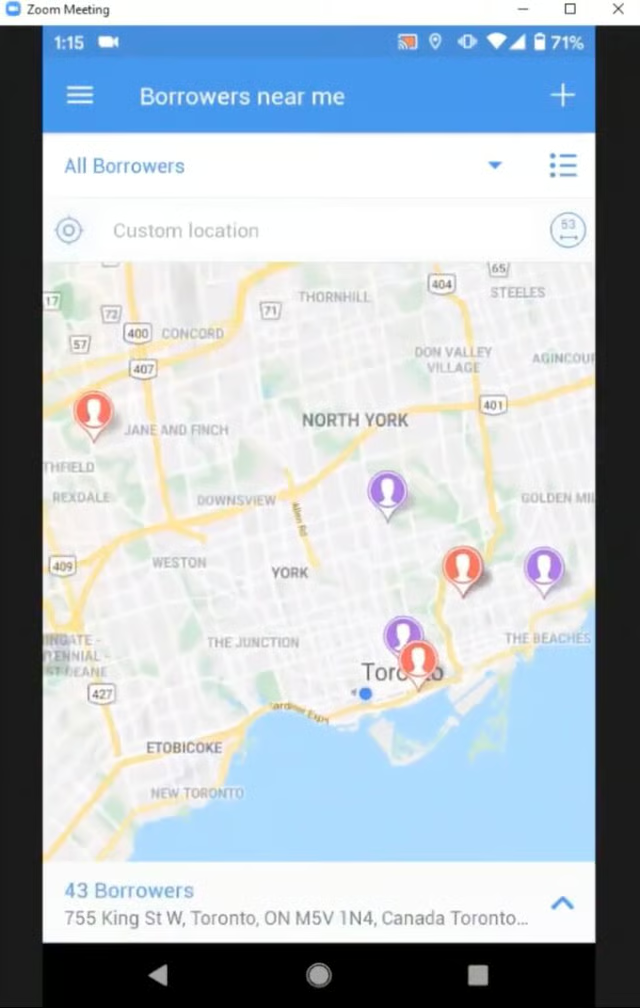
Zoho CRM and BluMortgage integration lets loan officers see nearby borrowers. (Source: YouTube)


Our Expert Opinion
Zoho CRM is the best mortgage CRM software for mobile use because users can quickly access borrower data, engage with clients, and track loan progress using a smartphone, tablet, or laptop.
When integrated with BluMortgage, loan officers can do almost all desktop CRM functionalities on their mobile devices. This includes checking borrowers near you when you are in the field to know how they are currently doing in terms of their home loans.
Shape Mortgage CRM: Best for Marketing
When to Use Shape Mortgage CRM
- You need an industry-specific mortgage CRM to promote your business: Shape Mortgage CRM is equipped with an industry-specific mortgage marketing suite. With just a few clicks, you send a personalized offer to hundreds of contacts with its bulk text messaging and video email tools.
- You’re looking for an industry-specific CRM for mortgage brokers with AI tools: This mortgage broker software features ShapeAI, which can be used as a chatbot and to create AI-generated images, AI transcription, and AI documents for reusing content.At an additional $47 per user, you can use the Shape Customer Portal to review loan applications, pull soft credits, request documents with e-signatures, and more.
When to Use Shape Mortgage CRM Alternatives
- You want a CRM for both mortgage and real estate: Shape Mortgage CRM is designed for mortgage professionals only. You will need to use Zapier, an app connector, to integrate this CRM with real estate apps like Zillow.
- Alternative: Jungo, a Salesforce copilot, offers a mortgage app and real estate app in one system. This provider is an excellent alternative to Shape Mortgage CRM if your mortgage business is tied with a real estate company or offers real estate services.
- You want a more affordable CRM for mortgage purposes: While Shape Mortgage CRM offers many features designed to help loan officers and mortgage advisors, it does not offer a free plan and only comes with one price at $119 per user monthly (annual billing). This is a downside for startups and small mortgage companies with limited resources.
- Alternatives: General-use CRMs like Zoho CRM and Streak CRM offer a freemium plan. Pipedrive and monday CRM offer scalable paid plans that every mortgage professional can choose from based on what they can afford.
Shape Mortgage CRM Pricing Plans*
Sales & Marketing CRM
Cost:
- $119 per user
Key Features:
- Automated CRM
- Built-in calling, text, email, video, and multimedia messaging (MMS)
- Marketing suite with drip campaigns and premade templates
- AI suite (includes ShapeIQ AI lead scoring)
- Task and event management
- Document storage
- Email tracking
- Analytics and reporting
- Custom configurations
- 5,000-plus API integrations
Add-ons:
- Communications Package: $39 per month
- Point of Sale (POS) Customer Portal
- Lead Engine
*Pricing is based on annual billing on a per-month breakdown, though monthly billing is available for a higher cost. While we update pricing information regularly, we encourage our readers to check current pricing.
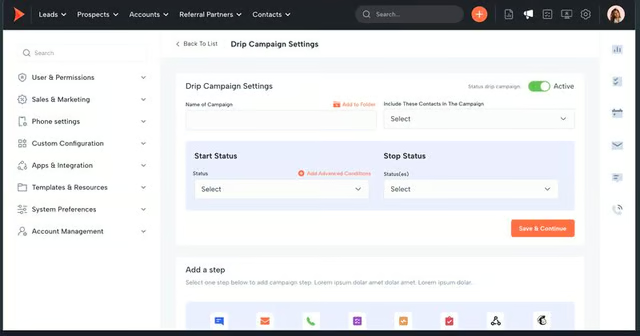
Shape Mortgage CRM’s dashboard shows drip campaign settings. (Source: Shape Mortgage CRM) 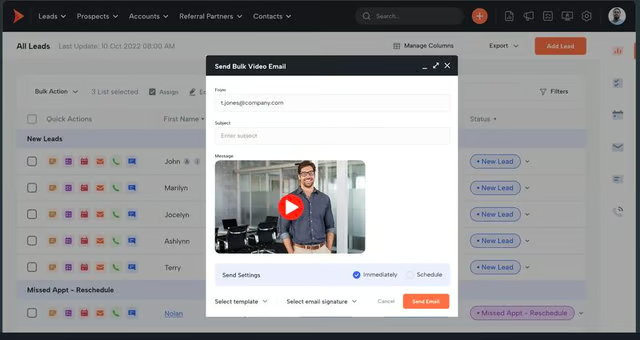
Shape Mortgage CRM lets you send bulk video emails for marketing. (Source: Shape Mortgage CRM)


Our Expert Opinion
We categorized Shape Mortgage CRM as the best mortgage broker software because of its robust marketing features, especially its video marketing and drip campaigns that help promote home loans.
Another notable feature is ShapeAI, which we believe can be a great tool for streamlining content marketing and borrower engagement. Moreover, we find its mortgage POS-branded customer portal highly beneficial for managing loan applications.
Jungo: Best for Salesforce Users
When to Use Jungo
- You use Salesforce CRM to manage customer relationships: Jungo is built on Salesforce as it integrates with popular LOS like Calyx Point, Encompass, LendingPad, and Byte Software. Its mortgage app automatically syncs loan data with mortgage CRM to efficiently complete loan processing from start to finish, boosting efficiency and closing more loans.
- You want a specialized mortgage CRM solution: Jungo is a dedicated mortgage CRM with loan document management for securely housing loan files. It also allows you to create single property websites for listing, while its loan milestone email and alert features keep your clients updated on their loan applications.For business executives and managers, the mortgage reviews feature lets you customize total cost analysis for client presentations.
When to Use Jungo Alternatives
- You prefer a CRM for mortgages with broader AI marketing capabilities: While Jungo enables you to create property listings to promote properties, it lacks broader marketing capabilities like content and email marketing.
- Alternatives: Shape Mortgage CRM has an AI-powered tool called ShapeAI. It is used to create AI content like images and emails for your content marketing and drip campaigns (sending series of emails) to drive engagement.
- You want a standalone mortgage CRM: Jungo is a mortgage CRM on Salesforce that integrates with widely-used LOS like Calyx Point and Encompass. However, you need a Salesforce subscription to use this CRM.
- Alternative: Shape Mortgage CRM is an excellent industry-specific solution if you are looking for a standalone mortgage CRM.
Jungo Pricing Plans*
Jungo Mortgage App
Cost:
- $119 per user
Key Features:
- Optimize Salesforce with LOS integration and Mortgage Coach EDGE
- Send fresh leads from popular LOS and other mortgage solutions directly to Jungo
- Mortgage-customized automated email marketing campaigns
- Access all loan documents like financial history and loan agreements
- Assign and track tasks like loan progress
- Manage calendars and schedule follow-ups
- Set permissions and automate workflows with Jungo’s team management
- Custom, personalized email templates
- Send automatic emails for milestones (like loan anniversaries and birthdays)
*Pricing is based on annual billing on a per-month breakdown of the plans, though monthly billing is available at a higher cost. Jungo offers a real estate app for $799 per user annually. While we update pricing information regularly, we encourage our readers to check current pricing.
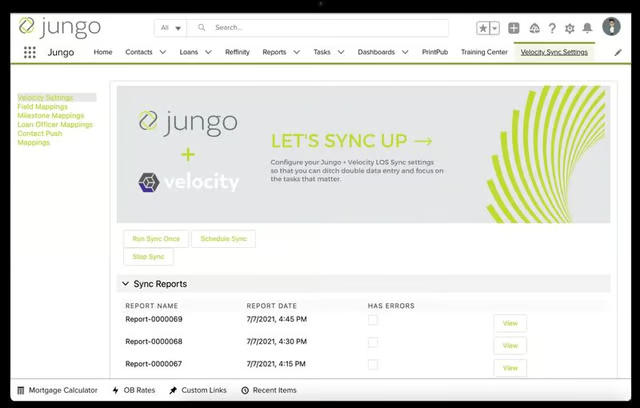
Jungo and Velocity integration with sync reports and other sync options (Source: Jungo) 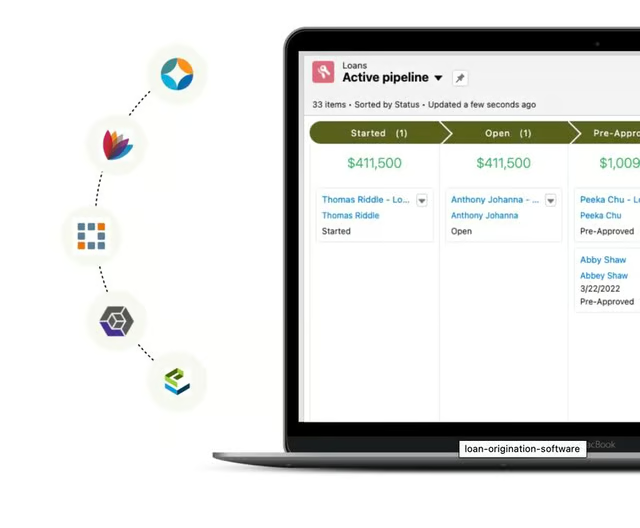
Jungo integrates with popular LOS. (Source: Jungo)


Our Expert Opinion
Jungo is a great option if you’re looking for a dedicated industry-specific CRM for the mortgage sector. It is the best CRM for mortgage and real estate that we recommend for existing Salesforce users since it is already built on the platform.
One of the most notable features of this CRM is its seamless integration with LOS platforms and mortgage apps for accurate loan rate quotes. With Jungo, you can easily access and manage loans and listings on one platform.
Pipedrive: Best for Automating Mortgage Sales Activities
When to Use Pipedrive
- You need robust yet easy-to-use sales automation tools: Pipedrive is one of our best sales automation software that mortgage managers can use to automate tasks, update CRM records, follow up with sales-qualified leads, and more.Its AI Sales Assistant analyzes CRM data to help you prioritize leads. Its Smart Contact Data feature crawls the web for valuable data to help supercharge your mortgage lead generation efforts.
- You use Microsoft Outlook to coordinate mortgage loans: Pipedrive is among our top choices for the best CRMs for Outlook. If you are a mortgage sales manager or loan officer who uses Outlook for your email outreach to contact clients and collaborate with your employer, Pipedrive is an excellent choice. Its two-way integration for contacts, email, and calendar with Outlook keeps data consistent between the two systems.
When to Use Pipedrive Alternatives
- You want a free CRM with many helpful features: While Pipedrive offers affordable paid plans with a 14-day free trial, it does not offer a free plan. Hence, if you’re a freelancer or a startup looking to explore a CRM system at no cost, consider looking elsewhere.
- Alternatives: Zoho CRM is free and easy to use for beginners and small businesses for up to three users. Its free plan features include sales automation tools for leads, accounts, contacts, activities, feeds, deals, and a document library.
- You want a CRM with phone support across all plans: Pipedrive users only get phone support when subscribed to the Enterprise plan at $99 per user monthly.
- Alternative: monday CRM offers 24/7 customer support across all its plans. The price starts at $12 for the Basic plan (with a three-user minimum requirement).
Pipedrive Pricing Plans*
Cost:
- $14 per user
Key Features:
- Apps marketplace for third-party integrations like Microsoft Outlook
- Company and user sales goals tracking
- Custom data fields and pipeline stages
- Deal reports, report collaboration, and activity reporting
- Lead and contact management
- Deal management
- Duplicate data detection and merge
- Comments and user mentions
- Smart-app recommendations and AI sales assistant
- Marketplace search
Cost:
- $39 per user
Key Features:
- Everything in Essentials
- Workflow automation
- Automations builder, including email sequences
- Two-way email sync
- Custom email templates and email signatures
- Smart contact data
- One general availability scheduling link
- Meeting, email, and video call scheduling
- Expanded sales reports
- Live chat support (business hours)
- Cost:
Key Features: - $49 per user
- Everything in Advanced
- Automated deal and lead assignment
- Smart Docs
- AI email creation and summarization
- Multiple email accounts sync and contact timeline
- Expanded reporting
- Sales or revenue forecasting
- Team filters and goals
- Unlimited general availability scheduling links
- Live chat support (24/5)
Cost:
- $64 per user
Key Features:
- Everything in Professional
- Built-in project management
- Live chat support (24/7)
- Phone support
Cost:
- $99 per user
Key Features:
- Everything in Power
- 100 active workflow automations
- Unlimited reports and sales dashboards
- Unlimited teams management
- Security rules and permission settings
- Live chat support (24/7)
Pipedrive Pricing Add-ons:
- Projects
- Campaigns
- LeadBooster
- Smart Docs
- Web Visitors
*Pricing is based on annual billing on a per-month breakdown of the plans, though monthly billing is available at a higher cost. It comes with a 14-day free trial for the paid plans. While we update pricing information regularly, we encourage our readers to check current pricing.
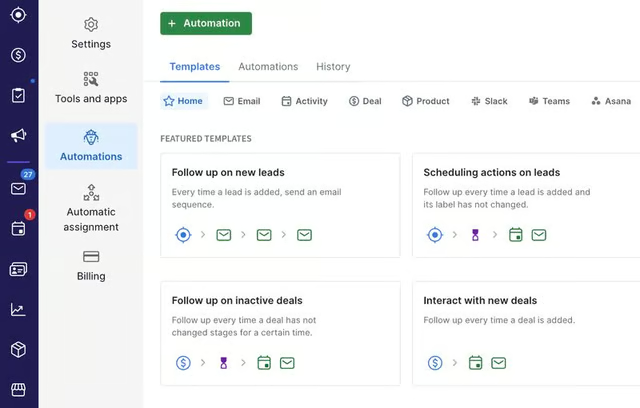
Pipedrive automation to follow up on new leads, interact with new deals, and more (Source: Pipedrive) 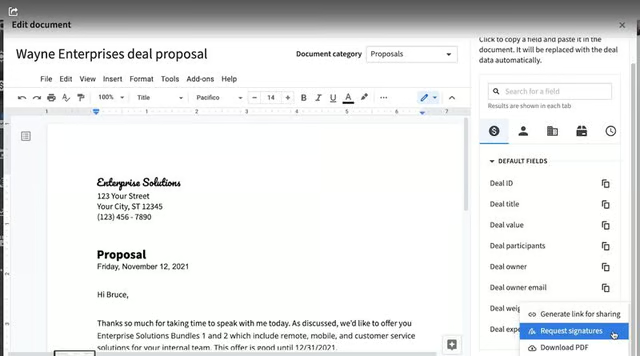
Pipedrive’s Smart Docs with a request to add signatures (Source: Pipedrive)


Our Expert Opinion
Pipedrive is our top pick for mortgage sales automation because of its powerful yet easy-to-use tools like an automation builder to streamline routine tasks like loan appraisal.
These automated capabilities boost work efficiency, so you have more time to engage with potential borrowers and clients and close more loans. Another notable feature for mortgage professionals is the Smart Contact Data for data management, profile enrichment, and mortgage proposal generation.
monday CRM: Best for Time Tracking & Organizing Files
When to Use monday CRM
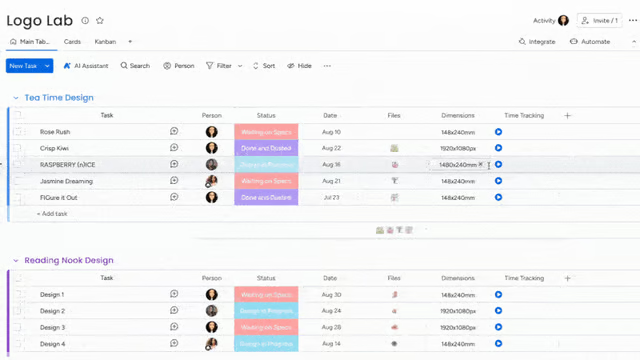
- You want a mortgage CRM with excellent time and task management features: monday CRM offers unlimited boards or areas where you work and manage data. You can add a time-tracking column on boards for every task. Mortgage professionals can use this feature to track time spent on loan application appraisals, underwriting, and other mortgage transactions. This helps you process more loans for higher revenue.
- You need a mortgage CRM system that can help organize your files: Within monday CRM boards, you can create a column where you can attach document links like Google Docs to organize loan documents. Each board also has a file tab to save documents for loan applications and other mortgage-related paperwork.
When to Use monday CRM Alternatives
- You want to integrate your mortgage CRM with Gmail for free: While monday CRM can be integrated with Gmail, this feature is free in other CRM systems on this list.
- Alternatives: Streak CRM offers a free plan, and this CRM is specifically designed for Gmail users. With the freemium plan, you can track and share emails, see the recipients who clicked the links in your email, and merge up to 50 emails per day.
- You need a low-cost mortgage CRM with Google or Microsoft calendar sync: With monday CRM, you can keep track of your loan servicing and other mortgage tasks and appointments via your Google calendar. However, this feature is not available until the Pro CRM plan at $24 per user monthly. It has a three-user requirement for each subscription.
- Alternative: Pipedrive’s calendar sync with Google and Microsoft is available in its Essential plan for only $14 per user monthly. This plan also comes with seamless data import and more than 400 integrations, such as Zoom, Xero, and QuickBooks—apps often used by mortgage professionals.
monday CRM Pricing Plans*
Cost:
- $12 per user
Key Features:
- Unlimited boards
- Templates for lead, contact, and deal management
- Unlimited customizable pipelines
- Unlimited contacts
- iOS and Android apps
- Unlimited free viewers
- Create a dashboard based on one board
Cost:
- $17 per user
Key Features:
- Create a dashboard that combines five boards
- Advanced account, contact, and deal management
- Two-way email integration with Gmail and Outlook
- Custom CRM automations (250 actions per month)
- Custom CRM integrations (250 actions per month)
- Merge duplicate data
- AI email generator
- Activity management
- Quotes and invoices
Cost:
- $28 per user
Key Features:
- Time tracking
- Custom CRM automations (25,000 actions per month)
- Custom CRM integrations (25,000 actions per month)
- Create a dashboard that combines 10 boards
- Customizable email signatures
- Google Calendar sync
- Sales forecasting and analytics
- Email templates with custom parameters
- Email tracking and automations
- Mass emails and email tracking
Cost:
- Contact for pricing
Key Features:
- Dashboards up to 50 boards
- Account management
- Documents for sales
- Lead scoring
- Team goals
- Advanced analytics
- Enterprise-scale automations and integrations
- Enterprise-grade security and governance
- Multilevel permissions
- HIPAA compliance
*Pricing is based on annual billing on a monthly breakdown. Monthly billing is also available for a higher cost. The provider offers a 14-day free trial. Pricing is reflected at the time of this publication. We update pricing information regularly but encourage readers to check current pricing.
Monday CRM’s customizable dashboard allows users to arrange tasks by priority. (Source: monday CRM) 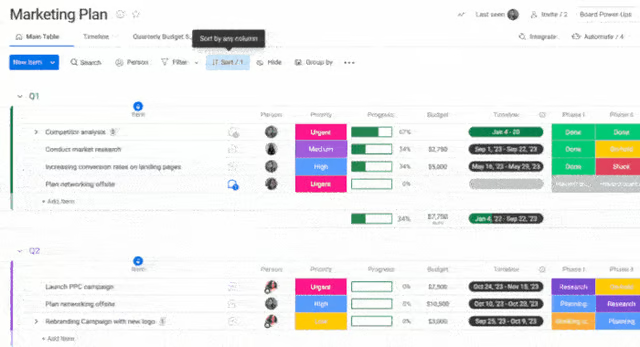
Monday CRM’s customizable dashboard allows users to arrange tasks by priority. (Source: monday CRM)


Our Expert Opinion
We categorized monday CRM as the best mortgage CRM for organizing loan documents with its unlimited boards, multiple views, time-tracking, and document-linking features. This provider seamlessly facilitates the loan origination process and fund disbursement for approved applications. It streamlines client communication and team collaboration, from loan appraisal to status monitoring.
Streak CRM: Best for Managing Mortgage Pipelines in Gmail
When to Use Streak CRM
- You are a Gmail user who wants to create customizable mortgage pipelines: Streak CRM is one of our best CRMs for Google users that connects seamlessly with Gmail. If you’re a mortgage broker using Gmail in most of your client transactions, Streak CRM lets you access and manage CRM data and tools from within your inbox. Track records, tasks, and pipeline stages without hopping back and forth between two platforms.
- You want unlimited contact data storage: Mortgage professionals can store unlimited contacts and track pipeline-related data in Streak’s free plan—a feature included in the paid plans of other CRM providers. On top of that, you can use this data to launch mass email campaigns for mortgage prospects in this basic CRM system.
When to Use Streak CRM Alternatives
- You need a free plan for multiple users: While Streak CRM has a free-forever plan, it is limited to only one user. Furthermore, Streak CRM’s free plan only has email tracking features, such as email sharing, snippets, mail merge, and link tracking.
- Alternative: Zoho CRM provides access to three users in its free plan. Aside from the free workflow automation capabilities, users also benefit from its free standard reports, advanced filters, and lead and deal management.
- You want more affordable workflow automations: Setting sales processes and workflows for home loan lead prospecting and qualification on autopilot will require you to pay $69 (Pro+ plan) per user monthly when using Streak CRM. Other providers offer this feature for free or at a much lower cost.
Streak CRM Pricing Plans*
Cost:
- $0 for one user
Key Features:
- Unlimited contacts and organizations
- Email tracking and snippets
- Link tracking
- Email sharing
- Mail merge up to 50 per day
Cost:
- $49 per user
Key Features:
- Advanced CRM
- Mail merge up to 1,500
- Private pipelines
- Google Workspace integrations
- Mobile access
- Core CRM
- Advanced CRM
- Onboarding and training
- Standard access programming interface (API)
- Live chat support
Cost:
- $69 per user
Key Features:
- Everything in Pro
- Deal data automation via AI copilot
- Task automation and mail merge options
- Integration with other third-party tools like Slack and Calendly
- Advanced reporting features
- Archived users
- Zapier Access
- Webhook API
- Priority support
Cost:
- $129 per user
Key Features:
- Everything in Pro+
- Advanced implementation
- Custom billing
- Pipeline data validation
- Custom roles to view and edit permissions
- Security questionnaires
- Dedicated support
*Pricing is based on annual billing on a monthly breakdown. Monthly billing is also available for a higher cost. Streak CRM offers a 14-day free trial for its Pro+ plan. We update pricing information regularly, but we encourage readers to check current pricing.
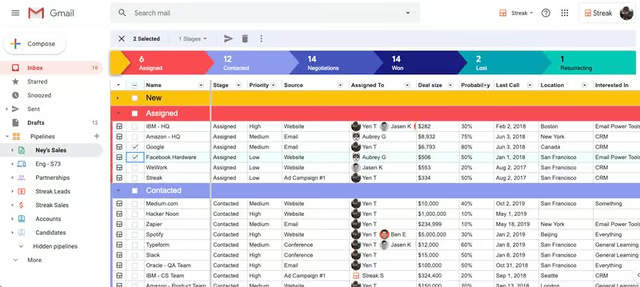
Streak CRM allows you to track pipeline statuses such as won and lost deals directly within your Gmail inbox. (Source: Streak CRM) 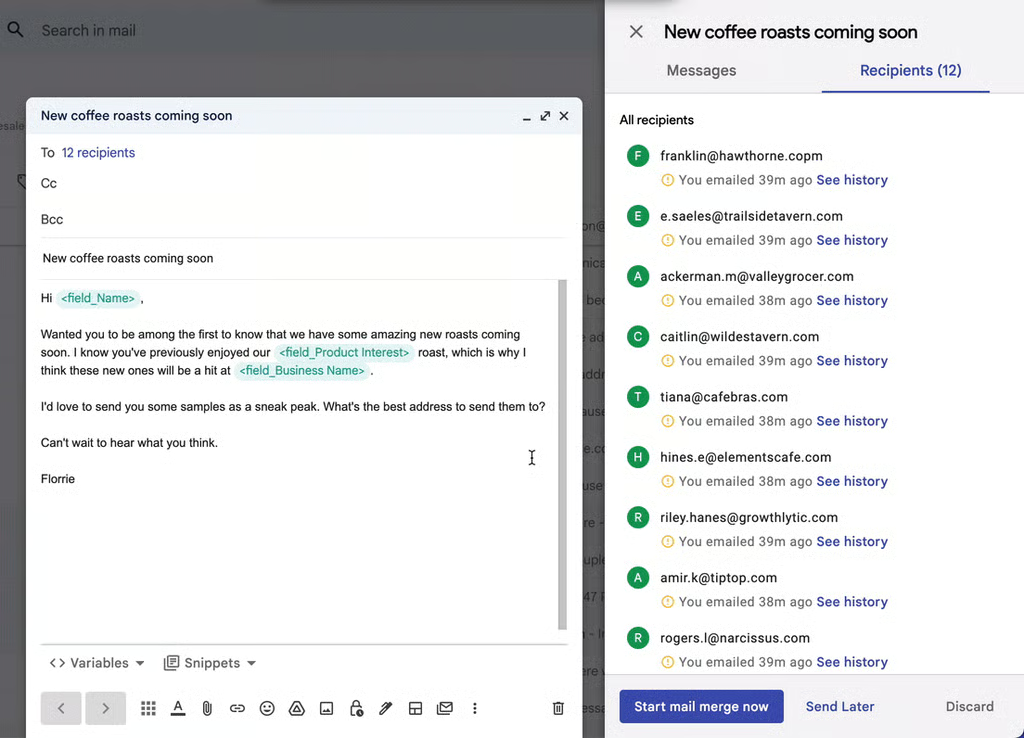
Streak’s mail merge feature for personalized bulk emails from inside Gmail (Source: Streak CRM)


Our Expert Opinion
Streak CRM is our top pick for mortgage pipeline management using Gmail. You can access prospect data and track their statuses in the sales pipeline within your Gmail inbox. This capability lets you quickly send personalized email messages to help more homebuyers find the best mortgage for their needs. With consistent communication, you can decrease your average cycle time or the duration of processing new loans.
How We Evaluated the Best Mortgage CRM Software
To determine the best CRM for mortgage brokers and home loan providers, we evaluated the software in terms of features relevant to these businesses. For example, we looked at the ability to integrate with a LOS. Additionally, each CRM must generate buyer leads and manage critical mortgage documentation. We also evaluated general product characteristics such as price, ease of use, and customer support.
When choosing the best CRM, pricing considerations include having free plan availability and scalable yet affordable product subscription options. We also looked at each provider’s ability to offer flexibility to pay monthly subscription fees or save more by paying annually.
We looked at overall features we feel are necessities for any business, such as CRM integration options, analytics tools, and a mobile app. We also evaluated features specific to mortgage providers, such as integrations with LOS, the ability to generate and track homebuyer opportunities, and robust document management systems to organize important loan files.
We looked at the niche features of the best mortgage software. These include customer segmentation, sales territory management, and document management and storage. We also considered marketing automation and omnichannel marketing tools like text, email, video, and multimedia messaging service (MMS).
Since many mortgage officers may not come from a sales history or have experience with a CRM, platform usability was an important criterion. This was analyzed in terms of the expertise needed to set up an account, the ease of integrating with native or third-party applications, and the skill required to use the features specific to mortgage companies. We also reviewed the overall intuitiveness of navigating the system’s interface.
Extensive support and service help prevent poor user experiences and outcomes users may encounter while using any of these platforms. Help and support were evaluated in terms of customer service hours and the availability of support via phone, live chat, and email.
In addition to firsthand experience with these software systems, we evaluated what users say about each product. These criteria consider how customers feel based on their reviews to gain insight into platform popularity, ease of use, and overall value for the price.
Frequently Asked Questions (FAQ)
What is a loan CRM?
A loan CRM system is specifically designed to help loan officers seamlessly manage loan applications, borrower interactions, and more on a centralized platform. This type of CRM has document management, electronic signature, and other file organization tools.
What software do mortgage brokers use?
Mortgage brokers use LOS for managing loan applications and files, generating disclosures, and submitting files to underwriting. They also use CRM systems for managing leads and deals, marketing, and monitoring sales performance metrics.
Do banks use CRM?
Yes. Banks use CRM systems to serve their clients better. CRMs have customer service and marketing tools that help bankers drive engagement and manage customers in multiple touch points.
Bottom Line
Mortgage CRM systems help mortgage professionals with their day-to-day work by automating prospecting, appraisals, organizing loan documents, marketing, lead nurturing, and more. While Zoho CRM is our top pick, choosing the best mortgage CRM software for your practice or company depends on your needs or use cases.
