







The main differences between TaxAct vs TaxSlayer are pricing and use case. I really like TaxAct’s user interface (UI) and customer support options, but TaxSlayer offers simple filings at a more affordable price point. Both, however, promise ease of use, accuracy, and efficiency in helping users maximize their tax refunds and minimize their tax liabilities.
- TaxAct is a good fit for small businesses seeking an online filing solution.
- TaxSlayer is ideal for self-employed individuals needing tax advice.
My methodology
I evaluated cryptocurrency bookkeeping software based on how well each platform supports businesses handling digital assets. I focused on these key areas:
- Cryptocurrency management features: I looked at whether the system supports multiple cryptocurrencies, tracks portfolios in real time, and converts crypto to fiat accurately.
- Core accounting functionality: I checked for general ledger capabilities to manage both crypto and fiat transactions in one system.
- Integration and ecosystem fit: I reviewed integrations with platforms like QuickBooks and Xero, along with compatibility with exchanges and wallet tracking tools.
- Pricing and plan value: I compared pricing tiers to see how features align with cost at different business stages.
- Scalability and compliance: I examined how well each solution adapts to growth and whether it aligns with standards like GAAP and IFRS.
Why you can trust Fit Small Business
- TaxAct vs TaxSlayer at-a-glance comparison
- Use cases and pros & cons
- TaxSlayer
- Pricing: TaxSlayer wins
- Live assistance: TaxAct wins
- Helpful tools: TaxAct wins
- Mobile app: TaxAct wins
- Ease of use: TaxAct wins
- Customer service: TaxAct wins
- User reviews: TaxSlayer wins
- How I evaluated TaxSlayer vs TaxAct
- Frequently asked questions (FAQs)
- Bottom Line
TaxAct vs TaxSlayer at-a-glance comparison
 |  | |
|---|---|---|
| Best for | Small businesses wanting to file both their personal and business taxes online | Self-employed individuals seeking advice from tax professionals |
| Pricing |
|
|
| Schedule C business income & loss | ✓ | ✓ |
| S-corp & partnership returns | ✓ | ✕ |
| Data import | ✓ | ✕ |
| Deduction finder | ✓ | ✕ |
| Audit guidance and/or defense | ✓ | ✓ |
| Tax pro assistance for self-employed returns | ✓ | ✓ |
| Tax pro assistance for partnership/corporate returns | ✕ | ✕ |
| Average rating on third-party review sites | 1.3 | 4.2 |
| Visit TaxAct | Visit TaxSlayer |
Use cases and pros & cons
Use cases
- Businesses needing to file Forms 1120, 1120S, or 1065: TaxAct offers online tax filing options for S-corps, C-corps, and partnerships that file Forms 1120S, 1120, or 1065, which is why TaxAct is our best tax software for small businesses. TaxSlayer doesn’t offer this.
- Businesses seeking helpful tools like data import and a deduction finder: TaxAct may charge more for its different plans than TaxSlayer, but it also offers useful tools that TaxSlayer lacks, such as a deduction finder and data import.
- Taxpayers wanting desktop software to prepare and file taxes: TaxSlayer lacks desktop software, whereas TaxAct offers that option for individuals with various tax situations, including Schedule C businesses. This also includes corporations and partnerships.
- Taxpayers looking for an interface that’s easy to follow: TaxAct’s platform consolidates necessary information for input in one place. In comparison, TaxSlayer users indicated that they frequently have to do outside research to understand input requests.
Use cases
- Budget-conscious taxpayers: If you have a basic tax situation and are looking to save money, TaxSlayer could be a good option. There’s no added charge to file a state return for the free version, and it’s less expensive than TaxAct overall.
- Contractors and self-employed individuals seeking advice from tax professionals: If you subscribe to TaxSlayer’s Premium or Self-Employed plan, you’ll receive unlimited access to tax professionals who specialize in self-employed tax issues for no additional charge. TaxAct includes live assistance, but you’ll have to pay more for this.
- Taxpayers looking for additional ID protection: TaxSlayer ID Theft Protection includes notification of suspicious activity and data breach. This feature is unavailable with TaxAct.
- Businesses interested in both bookkeeping and tax services: Neither TaxAct nor TaxSlayer provide bookkeeping services. So if you are interested in working with a virtual bookkeeping service, you may want to consider Bench, which offers both bookkeeping and tax help with its Premium plan. You’ll have access to unlimited year-round tax assistance and annual federal and state income tax filing. Read our review of Bench to determine if it’s a fit for your business.
- Taxpayers needing in-person meetings with a tax professional: With almost 9,000 locations in the United States, H&R Block offers the option of meeting with a tax professional. This offers the ability to review and share documents in person instead of through a computer screen. This is an option that both TaxAct and TaxSlayer lack. Our H&R Block review provides more information about the provider.
- QuickBooks Self-Employed users: If you use QuickBooks Self-Employed as your accounting software, you can purchase TurboTax as a bundle. TurboTax will automatically transfer your business income and expenses, making them easier to track. Neither TaxAct nor TaxSlayer integrate with QuickBooks Self-Employed. Read our QuickBooks Self-Employed review for more details.
Pricing: TaxSlayer wins
TaxAct | TaxSlayer | |
|---|---|---|
| Form 1040 Only | (Free) $0 Federal $39.99 per State | (Simply Free) $0 Federal $0 per State |
| Form 1040 with Schedules 1-3 | (Deluxe) | (Classic) |
| Form 1040 with rental property, investments, or cryptocurrency | (Premier) | (Classic) |
| Form 1040 with self-employed income | (Self-Employed) | (Classic) |
| Corporate returns: Form 1120 or 1120S | $164.99 Federal | Doesn’t support Form 1120 or 1120S |
| Partnership returns: Form 1065 | $164.99 Federal | Doesn’t support Form 1065 |
| TaxAct | TaxSlayer | |
|---|---|---|
| Form 1040 Only | (Basic) $44.99 Federal $60 per State Includes 5 Federal e-files | ✕ |
| Form 1040 with Schedules 1-3 | (Basic) $44.99 Federal $60 per State Includes 5 Federal e-files | ✕ |
| Form 1040 With Rental Property, Investments, or Cryptocurrency | (Premier) $149.99 Federal $60 per State Includes 5 Federal e-files and 1 State return | ✕ |
| Form 1040 With Self-Employed Income | (Self-Employed) $159.99 Federal $60 per State 5 Federal e-files and 1 State return included | ✕ |
| Corporate returns: Form 1120 or 1120S | $164.99 Federal States included Form 1040 software for individual returns included | ✕ |
| Partnership returns: Form 1065 | $149.99 Federal States included | ✕ |
| TaxAct | TaxSlayer | |
|---|---|---|
| Form 1040 only | $59.99 Federal $39.99 per State | (Premium) $42.95 Federal $39.95 per State |
| Form 1040 with Schedules 1-3 | $109.98 Federal $39.99 per State | (Premium) $42.95 Federal $39.95 per State |
| Form 1040 with rental property, investments, or cryptocurrency | $129.98 Federal $39.99 per State | (Premium) $42.95 Federal $39.95 per State |
| Form 1040 with self-employed income | $159.98 Federal $39.99 per State | (Self-Employed) $52.95 Federal $39.95 per State |
| Corporate returns: Form 1120 or 1120S | Tax pro assistance unavailable with business returns | Doesn’t support Forms 1120, 1120S, or 1065 |
| Partnership returns: Form 1065 | Tax pro assistance unavailable with business returns | Doesn’t support Forms 1120, 1120S, or 1065 |
TaxSlayer is far less expensive than TaxAct — including for individuals with very simple tax returns that qualify for the free plan. TaxSlayer’s free plan includes a state return, while TaxAct charges $39.99 for the simple state return. TaxSlayer is also much more affordable than TaxAct for taxpayers wanting to consult with a tax professional. It even provides consultation with a tax pro with self-employment expertise as part of TaxSlayer’s Self-Employed plan.
However, alongside a cloud version, TaxAct provides a desktop program option, something TaxSlayer lacks. TaxAct’s desktop rates are much more affordable than its main competitor for desktop software, which is TurboTax. My favorite offering from TaxAct is its online software to prepare Form 1120 or 1120S. TaxAct is the only provider I’ve found that offers a cloud-based program to prepare these business returns.
Live assistance: TaxAct wins
| TaxAct | TaxSlayer | |
|---|---|---|
| Communication method | Phone, email, and live chat | Phone, email, and live chat |
| Qualifications of professionals | CPA, EAs, or tax specialists | CPA, EAs, or tax specialists |
| Tax pro assistance for self-employed returns | $159.98 Federal $39.99 per State | $52.95 Federal $39.95 per State |
| Tax pro assistance for business returns | ✕ | ✕ |
Both TaxAct and TaxSlayer offer tax pro assistance via phone, email, and live chat. They also both have tax professionals who are CPAs, EAs, and tax specialists. However, user reviews point to a better experience with TaxAct.
TaxSlayer’s assisted plan is about a third the cost of TaxAct’s plan, meaning budget-conscious preparers may find TaxSlayer sufficient. But if you’re preparing a return where you think you may need live assistance, it might be worth the extra dollars to splurge on TaxAct’s more consistently positive user experience.
Helpful tools: TaxAct wins
| TaxAct | TaxSlayer | |
|---|---|---|
| Accuracy guarantee | ✓ | ✓ |
| Audit support | ✓ | ✓ |
| Tax calculator | ✓ | ✓ |
| Free plan available | ✓ | ✓ |
| Deduction maximizer | ✓ | ✕ |
| Maximum refund guarantee | ✓ | ✕ |
| Data import | ✓ | ✕ |
| Cryptocurrency support | ✕ | ✕ |
When it comes to comparing TaxSlayer vs TaxAct for helpful tools, there is one major difference: TaxSlayer’s Simply Free plan offers free filing for both federal and state tax returns for individuals with taxable income less than $100,000, no dependents, filing Single or Married Jointly. TaxAct, in contrast, offers free filing for basic federal tax returns and $39.95 for state returns if your adjusted gross income is less than $73,000.
However, TaxAct has a more comprehensive toolset than TaxSlayer, with the addition of a deduction maximizer, a maximum refund guarantee, and the ability to import data. Those added benefits give TaxAct the edge over TaxSlayer as it relates to helpful tools.
Mobile app: TaxAct wins
| TaxAct Express App | TaxSlayer App | |
|---|---|---|
| Availability | iOS and Android | iOS and Android |
| Talk live with tax specialist | ✓ | ✓ |
| E-file return | ✓ | ✓ |
| Scan & upload W-2 | ✓ | ✓ |
| IRS refund tracking | ✓ | ✓ |
| View, print & save return as PDF | ✓ | ✕ |
TaxAct again comes out on top in the mobile app category. TaxAct and TaxSlayer’s mobile apps offer similar features, with a focus on preparing and e-filing your return. You can also track your IRS refund, scan and upload your W-2, and communicate with a tax specialist. However, since TaxSlayer doesn’t allow you to view, print, or save your returns as a PDF file, it comes up short when compared to TaxAct.
Ease of use: TaxAct wins
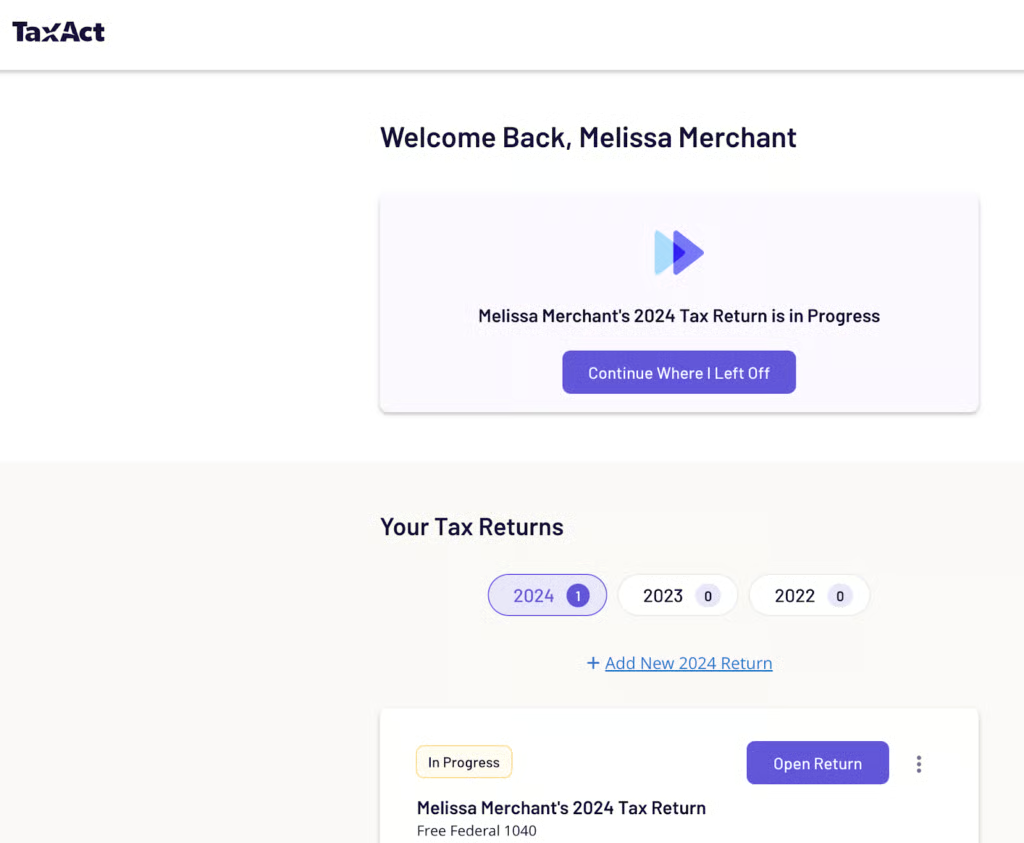
TaxAct offers an intuitive and clean user interface. This is especially helpful for novice users, as it makes it easy for filers to enter their information. Another useful feature is a quick summary of each section that allows you to review for potential errors. You can also easily import your tax forms, such as W-2s and 1099s.
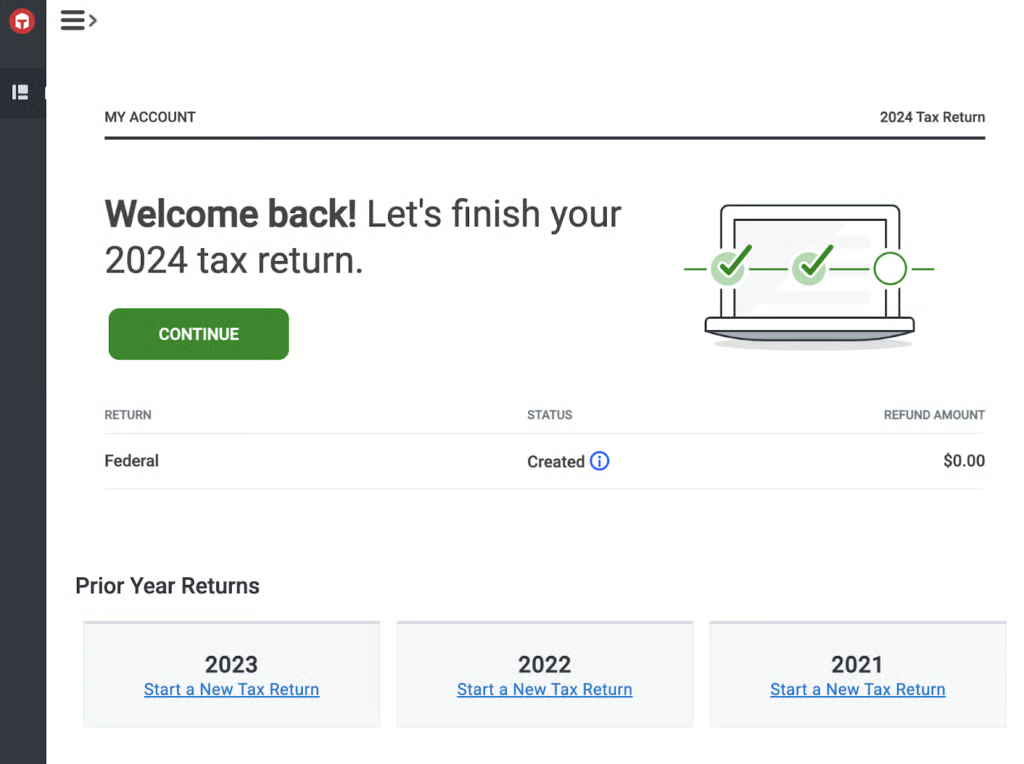
Meanwhile, TaxSlayer’s UI is easy to navigate, and its left navigation bar provides easy access to different sections of the site. To get started, you need to set up a free account, then you’ll be able to view your dashboard and start filing your tax return. Included are an interview process and useful tools like a tax refund calculator. TaxSlayer’s design is similar to TaxAct, with an interview process that also lets you skip from section to section.
Customer service: TaxAct wins
| TaxAct | TaxSlayer | |
|---|---|---|
| Support channels | Phone, email, and live chat | Phone, email, and live chat |
| Expert help offered | ✓ | ✓ |
| Additional services | Deduction maximizer, audit support, and tax calculator | Zero out-of-pocket fees, Ask a Tax Pro, and tax refund calculator |
TaxAct excels in the support realm, as it offers account and technical support through phone, email, and chat for all of its products. It also has an online knowledge base that provides answers to questions and can be used to troubleshoot issues. Xpert Help is available for an additional fee, and it provides unlimited screen-sharing access with a tax expert and help on demand. In some states, you can also set up a call with one of TaxAct’s tax professionals.
Meanwhile, TaxSlayer offers multiple support options, including free phone and email support for all plans. Its online knowledge base is also helpful, as it provides answers and advice for various tax questions. If you purchase the Premium or Self-Employed version, you’ll have access to live help from tax professionals.While TaxSlayer offers very adequate customer support options, TaxAct surpasses the competition in this category.
User reviews: TaxSlayer wins
| TaxAct | TaxSlayer | |
|---|---|---|
| Users like |
|
|
| Users dislike |
|
|
| Average rating on third-party sites | 1.3 out of 5
| 4.2 out of 5
|
I examined user reviews from the providers’ websites and two third-party user review sites. Both TaxAct and TaxSlayer reported high user reviews on their own websites, but third-party websites reported much lower ratings. DIY tax software regularly scores very poorly on third-party review sites, however, and I attribute that at least in part to the stress and frustration users feel when trying to file their taxes.
On TaxAct’s website, users praised the user interface for ease and efficiency of navigation. Most negative feedback on the third-party websites seem to do with the particulars of their returns, like calculations or which forms were included.
Meanwhile, on the TaxSlayer website, users shared that they appreciate that the software is less expensive than most other tax programs. Negative reviews on the third-party sites largely deal with being charged more than expected and confusion with the user interface
How I evaluated TaxSlayer vs TaxAct
I compared TaxSlayer and TaxAct based on these criteria:
- Features: I considered product characteristics such as ease of data import, navigation, refund tracking tools, and in-product support.
- Pricing: I verified the availability of free trials and confirmed pricing for varying tax prep packages.
- Technical support: Being able to access help when needed is a primary concern for users, so I assessed the ease of access to product experts via phone, email, or chat options.
- Ease of use: Particularly with DIY software, it’s important that software be easy to navigate. I reviewed how easy it is to move around the product from inception to completion of the tax return.
Frequently asked questions (FAQs)
Does TaxSlayer have a mobile app?
Yes, TaxSlayer offers a free mobile app for both iOS and Android users.
Do TaxAct or TaxSlayer offer a full-service filing option?
No, neither TaxAct nor TaxSlayer offer full-service filing. I recommend TurboTax if you’re interested in this service.
Can I file S-corp and partnership returns with both TaxAct and TaxSlayer?
Only TaxAct can prepare and file business returns as TaxSlayer doesn’t support Forms 1120, 1120S, and 1065.
Can I use TaxAct or TaxSlayer for free?
Yes, both providers offer free preparation and filing for a basic tax return. However, while TaxAct charges an additional $39.95 fee to file a state tax return, TaxSlayer includes one state at no cost in the free tier.
Which is better, TaxAct or TaxSlayer?
TaxAct is ideal for corporate return filings and individuals needing a more intuitive interface. TaxSlayer is better for taxpayers wishing to file simple returns at a budget-friendly price point.
How reliable is TaxAct?
TaxAct is a trustworthy method of filing business and personal tax returns.
Bottom Line
TaxAct is more expensive but allows for filing of more complex returns. It also offers expert help at an additional cost through its Xpert Assist feature. Meanwhile, TaxSlayer has a clean user interface and extends free IRS audit support to its Premium and Self-Employed subscribers. TaxSlayer, however, only allows for personal tax returns, whereas TaxAct allows you to file both personal and business taxes online.
