






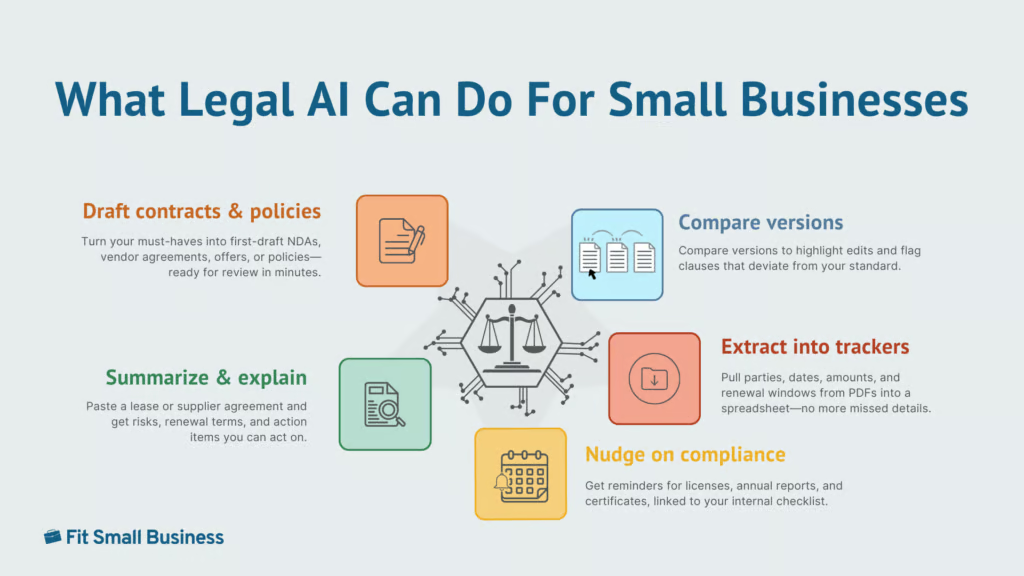
Legal help is traditionally slow, expensive, and hard to navigate. Artificial intelligence and law are intersecting in ways that make legal help faster and more affordable. Today’s tools can draft first-pass documents, summarize long policies, check contracts for missing clauses, answer common questions, and even nudge you about compliance deadlines.
In one benchmark, an AI reviewed NDAs with 94% accuracy in 26 seconds versus lawyers’ 85% over 92 minutes, promising speed and quality gains, though outputs still require jurisdiction checks and attorney review for anything material. In other words, AI is becoming the bridge between “we know we need legal help” and “we have a small-business budget.”
This guide shows where AI fits (and where it doesn’t), with practical workflows, guardrails, RAG/agent basics, quick-start prompts, and a brief comparison of top legal AI tools.
What AI in legal services actually means
Legal artificial intelligence is software that reads and writes legal text. It helps you get from blank page to workable draft quickly, pull key facts out of long PDFs, and keep track of dates and obligations. It does not replace a lawyer’s judgment. Think of it as a fast, tireless assistant that needs your instructions, while a lawyer gives final say on anything that carries risk.
What this means day-to-day is that you spend less time formatting NDAs, searching for that one indemnity clause, or retyping terms from a scanned contract. You move faster on the routine work so your attorney can focus on the decisions that actually change outcomes (negotiation strategy, risk trade-offs, regulatory interpretation).
How legal AI works
Most tools are powered by a large language model (LLM), a writing engine that’s great at drafting and summarizing, but can be confidently wrong if it guesses. The fix is lookup-before-writing, often called retrieval-augmented generation (RAG). You connect the tool to trusted sources, such as your approved templates, policies, and up-to-date references, so it pulls facts before it writes and shows what it used.
RAG reduces, but does not eliminate, hallucinations. It improves grounding and makes errors easier to spot via citations and “last updated” dates, yet outputs can still be wrong or misapplied to your jurisdiction. Treat results as drafts, verify citations against primary or approved sources, and get attorney review for anything material.
What to index first
- Your latest templates, such as non-disclosure agreement (NDA), master services agreement (MSA), statement of work (SOW), and offer letters
- Your policy handbook and compliance checklists
- Any jurisdiction-specific guidance you rely on
- Past “gold standard” contracts with clauses you like.
Some platforms add a simple map of relationships (a “knowledge graph”): who owes what, by when, under which clause. That makes questions like, “Which vendor contracts auto-renew within 60 days and allow 30-day termination?” answerable in seconds.
Two styles you’ll see: generative vs agent
Currently, there are two types of legal AI tools:
- Generative tools wait for requests: Draft a California vendor NDA.
- Agent tools take action when something happens: A signed contract hit the folder — extract the renewal date and remind me 60 days before.
Automation vs advice
A good rule of thumb is: AI is great at doing; lawyers are essential for deciding. Use AI to speed up the paperwork and fact-finding. Use your attorney when judgment, negotiation, or real risk enters the picture.
| What AI should handle | What a lawyer must handle |
|---|---|
|
|
Here’s a simple triage you can use and some examples:
| Green (okay to automate, then self-review) | Yellow (automate first, then lawyer review) | Red (lawyer first) |
|---|---|---|
|
|
|
Common key AI features
Here are some of the most common key AI features you’ll see in legal tools:
- Retrieval‑augmented generation (RAG): The tool looks up text from your approved corpus (templates, policies, prior contracts) before drafting so that answers are grounded. You can restrict sources, see which docs/pages were used, and disable open‑web search.
- Cite: Inline, pinpoint citations (section/page/URL) attached to each claim so a reviewer can click and verify. Citations include section/page and a “last updated” date; fake cites are flagged.
- Redline+: Clause‑level comparisons with suggested language. Think: Word‑style track changes, plus an issues list and recommended fixes. It shows exact diffs against your playbook and never auto‑accepts changes.
- Playbooks: Encoded rules for preferred clauses (e.g., liability cap = 1× fees; indemnity scope = third‑party IP only) with fallback positions. Verify per‑jurisdiction variants, exception notes, and exportable rules.
- Agent: Event-driven automations (watch a folder/email, extract renewal dates, create 90/60/30 reminders) with no auto-send/auto-file, human approval requirements, and full audit logs.
- Guided: Interview-style wizards that assemble documents from answers (great for NDAs, policy updates); supports your jurisdiction, exports to DOCX/PDF, and allows custom clause inserts.
Pros and cons of legal AI tools
The debate around artificial intelligence and law highlights both opportunities and risks. To further help you decide if legal AI is the right solution for your small business, here is a quick rundown of its pros and cons:
| Pros | Cons |
|---|---|
| Faster first drafts | Hallucinations |
| Consistency across contracts | Wrong jurisdiction |
| Clause/issue spotting | Out-of-date sources |
| Renewal/obligation reminders | Data leakage/privacy |
| Self-serve policy answers | Model drift |
AI is a speed and consistency multiplier for routine legal work. It helps you get to first drafts faster, standardize language across contracts, spot missing clauses and issues, and stay on top of renewals and other obligations. Many teams also use it for self-serve policy answers, cutting down on basic “Where is…?” and “What does our policy say about…?” questions.
The tradeoff is risk. Models can be wrong or outdated, apply the wrong jurisdiction, or hallucinate citations. If misconfigured, they can also create privacy/data-leakage exposure, and model behavior can shift over time (model drift). None of this replaces legal judgment; high-risk or strategic matters still require a lawyer.
To stay safe, plug AI into your approved sources (RAG), require citations with dates and governing law, and turn on data controls (customer-managed encryption keys, a data processing addendum, access controls, and audit logs). Treat outputs as drafts/checklists, and get attorney review for anything material.
Legal AI workflows
To help you make the most out of AI tools and standardize your procedures, here are four workflows you can put in place, each with steps and guardrails to cut on busywork, speed up first drafts, and know when to loop in a lawyer without adding risk.
Document generation and contract drafting
| When to use | NDAs, SOWs, simple vendor/customer agreements, offer letters |
|---|---|
| Inputs | Approved template, governing law/jurisdiction, must‑have terms, clause library, counterparty data (if any) |
| Playbook | Pick approved template ↓ Set jurisdiction & must-have terms ↓ Generate draft ↓ Compare to clause library ↓ Attorney review ↓ Finalize/send |
| Outputs | Redlined draft, issues list, citation bundle |
| Guardrails | Make the tool show its sources, don’t let it send anything automatically, and have a person approve any document over a defined amount or that includes intellectual property or data/privacy terms. Log all actions. |
| Target impact | 50%-80% faster first drafts, 90% reduction in clause lookup time |
Legal advice and chatbots
| When to use | Internal handbook/policy Q&A; customer intake/FAQs (not legal advice) |
|---|---|
| Inputs | Handbook; templates; approved responses; escalation keywords (e.g., “sue,” “subpoena,” “regulator,” “demand letter”) |
| Playbook | Define what it can answer (FAQ-only) ↓ Seed with your handbook, templates, and approved responses ↓ Add escalation keywords (“sue,” “subpoena,” “regulator,” “demand letter”) ↓ Show a disclaimer and route edge cases to a human ↓ Log every interaction for tuning/audit |
| Outputs | Answer + citations to internal materials; escalation tickets |
| Guardrails | Display “Not legal advice,” restrict answers to approved sources, enable PII redaction, and require human sign‑off before any email or filing. Log every interaction. |
| Target impact | Faster, consistent answers; reduced interruptions to legal/ops; auditable trail |
Legal research
AI for legal research helps pull statutes, clauses, and references faster than manual search.
| When to use | Definitions, clause comparisons, finding primary sources, basic Q&A for education |
|---|---|
| Inputs | Approved library (policies, templates, primary sources), jurisdiction, and date range |
| Playbook | Ask your question with state/jurisdiction + date range ↓ Search your approved library (policies, templates, primary sources) ↓ Draft a short summary with quotes/snippets and links ↓ List open questions or conflicting sources ↓ Have a human review if you’ll make a decision based on it |
| Outputs | One‑pager with citations and “last updated” dates, open issues list |
| Guardrails | Make the tool show citations with last‑updated dates, label the governing law in every answer, and block strategy or legal advice. Keep sources limited to your approved library. |
| Target impact | 60%+ time savings vs manual search; higher citation discipline |
Compliance and risk management
| When to use | License renewals, annual reports, policy updates, data‑retention schedules |
|---|---|
| Inputs | Entity/state obligations, filing schedules, contract repository, owners |
| Playbook | Map obligations by entity/state ↓ Generate a checklist with tasks, owners, and due dates ↓ Schedule reminders (e.g., 30/60/90 days before) ↓ Store receipts/filings as evidence in one folder ↓ Review quarterly; update when rules/templates change |
| Outputs | Central calendar, checklist, evidence repository, exception log |
| Guardrails | Keep a single source of truth with role‑based access and change logs. For personal data, ensure a Data Processing Addendum (DPA) and Build Your Own Key (BYOK), and require human approval before any filing. Don’t let the system auto‑send or auto‑file. |
| Target impact | Near‑zero missed renewals, fewer auto‑renew surprises, audit readiness |
Quick-start sample legal AI prompts
Use these copy‑paste starters to jump‑start common legal tasks. Replace bracketed fields with your details, set the governing law, and keep sources limited to approved docs. Always show citations and require human approval — no auto‑send or auto‑file.
| Legal AI task | Sample prompt |
|---|---|
| Draft & gap-check | Using the attached NDA template (Governing law: California), draft for a software vendor; flag missing confidentiality carve‑outs, liability cap, and export citations to a summary. |
| Compare MSAs | Compare these two MSAs on liability cap, indemnity scope, data‑processing terms, warranty disclaimers, and termination. Output a 10‑bullet issues list with clause references. |
| Renewal hygiene | Scan all contracts in /Vendor/2024. Extract renewal windows, termination notice requirements, and auto‑renew clauses. Return a CSV and schedule reminders 90/60/30 days before each date. |
| Offer letter (CA at‑will) | Using our Offer Letter template (California), draft for [Role]. Include start date, base pay, exempt status, IP assignment, at‑will disclaimer, and EEO statement. Output DOCX and a citation bundle. Do not email. |
| DPA comparison | Compare Vendor DPA.pdf to our DPA Playbook. Flag SCC module used, subprocessor approval process, audit rights, breach‑notification timeline, and cross‑border transfers. Propose redlines and cite exact clauses. |
| Liability/indemnity normalization | For all MSAs in /Customers/Active, locate liability caps and indemnity scope. List where cap < 1× fees or indemnity includes first‑party damages. Propose our standard language and cite sources.” |
| Insurance requirements audit | From each vendor agreement, extract insurance types, limits, additional‑insured, waiver of subrogation, and COI delivery timing. List gaps versus our Insurance Standard; cite sections. |
| Annual report checklist | Using our compliance calendar and approved DE references, generate an annual report/registered‑agent checklist for [Entity]. Include due dates, fees, forms, source links, and owner. Schedule 90/60/30 reminders. Do not file. |
| Non‑renewal notice draft | Draft a notice of non‑renewal aligned to Contract_X.pdf. Confirm notice window and delivery method; output DOCX with placeholders. Do not send; cite clause references. |
| Policy summary for staff | Condense Employee Social Media Policy.pdf to 8 bullets with an effective date and contact for questions. Cite page numbers; avoid advice. |
| Intake triage setup | Create escalation rules for the policy Q&A bot with keywords [sue, subpoena, regulator, demand]. Draft handoff messages and a short data‑collection form. No emails sent automatically. |
Best AI-powered legal tools for SMBs in 2025
Choosing between law and AI solutions depends on whether you need automation or full legal counsel. Here are some of the top legal AI tools to consider:
| Tool | Primary use case | Best for | Key AI features | Not ideal when… |
|---|---|---|---|---|
 | Business name generation, document review and summarizing (Doc Assist) | DIY SMBs | Business name generator, document review, and summarization | Custom high-risk materials that require attorney advice |
| Visit LegalZoom | ||||
 | Consumer/small claims automation | Solo founders | Guided, Agent | Complex B2B contracts |
| Visit DoNotPay | ||||
 | Drafting/review inside Word | Contract‑heavy teams | Redline+, Playbooks, Cite | One‑off DIY templates only |
| Visit Spellbook | ||||
 | Self‑serve legal templates | One-off docs | Guided | Custom clauses or RAG needs |
| Visit LawDepot | ||||
 | Flexible RAG workspace | Teams with IT support | RAG, Agent | Out‑of‑the‑box guardrails expected |
| Visit ChatGPT | ||||
Real-world example: LegalZoom’s AI partnership with Perplexity
On June 4, 2025, LegalZoom announced a strategic partnership with Perplexity, the AI answer engine. The gist: Perplexity Pro subscribers can access exclusive offers on LegalZoom’s services, and LegalZoom serves as the legal‑services provider for those users. It’s billed as the first known tie‑up between a major generative‑AI platform and a legal‑services provider.
Why this matters for SMBs
Legal help now appears where questions start — inside AI search — so owners can move faster from “what do I need?” to a guided, purchase‑ready workflow. The experience routes users to packaged services with human review rather than open‑ended AI advice, creating a safer handoff. Expect more AI‑to‑service partnerships across legal, tax, and HR that turn research into one‑click execution. Partnerships like this show how AI for law firms and small businesses alike can streamline processes.
What it is (and isn’t)
Put simply, this is a route from AI answers to LegalZoom workflows, such as formations, templates, and filings, with discounts for Perplexity Pro users. It isn’t legal advice or a lawyer replacement; complex or negotiated matters still require counsel.
Ready to turn answers into action? Start your formation, templates, or filings with LegalZoom’s AI-guided workflows, and if you’re a Perplexity Pro subscriber, redeem the exclusive offer to save on services.
Frequently asked questions (FAQs)
Click through the sections below to read answers to common questions around AI and law:
Is it legal to use AI for legal advice?
You can use tools for education/drafts, but only licensed attorneys can provide legal advice. Include disclaimers and human review.
Are AI contracts legally binding?
Enforceability hinges on mutual assent, consideration, clear terms, and applicable law. AI-generated is fine if reviewed/accepted properly.
Is LegalZoom’s AI better than ChatGPT?
LegalZoom and ChatGPT serve different purposes. LegalZoom isn’t positioning itself as a generative-AI drafting tool for templates, and instead, provides attorney-drafted templates and paid legal plans (you can have a lawyer review your documents), plus limited AI utilities like a business-name generator and Doc Assist.
It has partnerships that bring its resources into AI experiences (Perplexity and ChatGPT agent), but its core docs are attorney-drafted, not AI-generated. ChatGPT, by contrast, is a general-purpose AI you configure for drafting and research.
Can I automate client contracts with AI?
Yes for drafting, versioning, and clause checks; add human redlines and final attorney review for anything material.
What are the risks of using AI for legal work?
Hallucinations, data leakage, wrong jurisdiction, outdated law; mitigate with RAG, citations, and governance.
Bottom line
AI is a force multiplier for repeatable legal work, such as drafting from templates, comparing clauses, and keeping renewals on track, so your attorney can focus on strategy and risk.
To use legal AI tools effectively, lock outputs to your approved sources with RAG and visible citations, disable auto-send/auto-file, and require human approval for anything with money, IP, or data/privacy terms. Use a triage to decide what can be automated vs. what needs counsel, and set workflows with tight guardrails for common legal tasks you need help with.
Looking for a low-lift, guardrailed option? Try LegalZoom’s AI‑guided templates and workflows — start with an NDA or basic formation, then layer in attorney review as complexity increases.
