








A cannabis point-of-sale (POS) system is specifically designed to seamlessly handle inventory and sales of cannabis retailers and dispensaries while staying compliant. In the cannabis sales industry, merchants are required to report their sales on a daily, weekly, or monthly basis (depending on the state), which is why compliance and automation are at the core of leading cannabis POS software.
So while it is more expensive than a traditional POS, the right cannabis POS ensures that your business will not be interrupted and can grow despite the rigorous rules and regulations imposed on merchants.
Based on our evaluation, the best cannabis POS systems are:
- Cova: Best overall cannabis POS system
- Blaze: Best all-in-one cannabis POS
- Indica Online: Best for medical marijuana dispensaries
- Dutchie: Best for growing cannabis retailers
- Vende: Best free cannabis POS for startups
- Flowhub Maui: Best for businesses located in multiple states
- Best Cannabis POS Systems Compared
- Cova: Best Overall Cannabis POS System
- Blaze: Best All-in-One Cannabis POS
- IndicaOnline: Best for Medical Marijuana Dispensaries
- Dutchie: Best All-in-One Cannabis POS Solution for Growing Retailers
- Vende: Best Free Retail Cannabis POS for Startups
- Flowhub Maui: Best for Multistate Cannabis Businesses
- Cannabis Retail Legislation Overview
- What to Look for in a Cannabis POS System
- How to Choose a Cannabis POS System
- Cannabis POS Frequently Asked Questions (FAQs)
- Bottom Line
Best Cannabis POS Systems Compared
| Our Score (Out of 5) | Monthly Subscription Fee | METRC Integration | HIPAA Compliant | Ecommerce | Delivery | |
|---|---|---|---|---|---|---|
 | 4.27 | From $349 | Yes | Yes | Requires plan upgrade | 3rd-party integration |
| Visit Cova | ||||||
 | 4.25 | Contact Blaze | Yes | Yes | Built-in & 3rd-party integration | Built-in & 3rd-party integration |
| Visit Blaze | ||||||
 | 4.22 | From $249 | Yes | Yes | Requires plan upgrade | Requires plan upgrade |
| Visit IndicaOnline | ||||||
 | 4.1 | Contact Dutchie | Yes | Yes | Basic w/ upgrades | Comes w/ ecommerce |
| Visit Dutchie POS | ||||||
 | 4.1 | From $0 | Yes | No | Built-in | Built-in |
| Visit Vende | ||||||
 | 4.0 | Contact Flowhub | Yes | w/ Integration | 3rd-party integration | 3rd-party integration |
| Visit FlowHub Maui | ||||||
Looking for more alternatives? KORONA POS is a popular POS solution for high-risk and high-turnover retailers. The system comes with a built-in age restriction feature and integrates with top payment processors that support cannabis retail and dispensaries. Monthly subscriptions range from $59 to $69 and require $0 installation fees.
Cova: Best Overall Cannabis POS System
Overview
Who should use it:
Fast-growing cannabis businesses looking for a scalable POS
Why we like it:
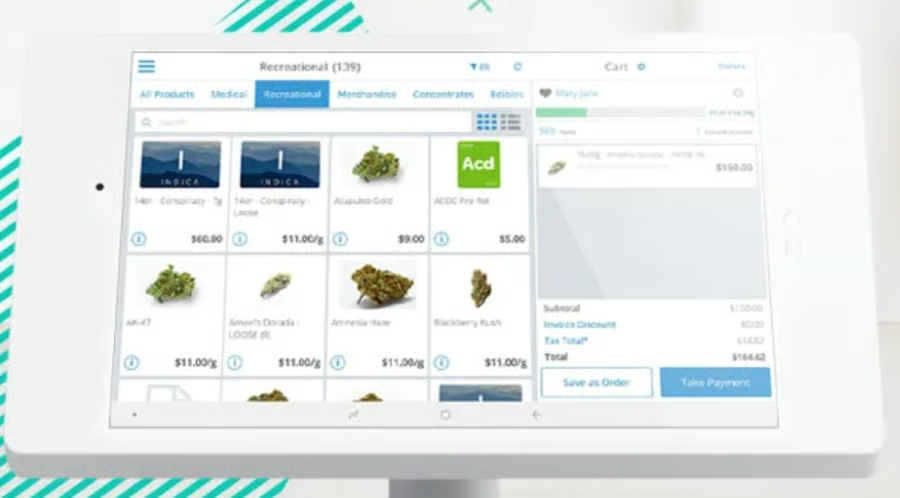
Cova started out in Canada, where it has gained wide approval from most cannabis merchants for its reliable, stable, and easy-to-learn software. The system is now available in 17 states across the US, making a name for its strong compliance features with functions that include robust automated reports and programmable store hours function for hours of operation compliance.
We also like how Cova advertises a base subscription plan, which seems less expensive than Blaze, and comes bundled with SpringBig for compliant customer relationship management (CRM) tools. However, the software is only compatible with Android systems. Also, ecommerce tools and seed-to-sale tracking are add-on features unless you sign up for a custom plan.
Deciding Factors
- Pricing: $349-$549/month, custom pricing available
- Payment processing: Integrates with popular payment processors
- Hardware options: Use your own or contact Cova for their recommended hardware integrations from tablets to weighing scales
- Ecommerce: Cova Ecommerce website builder with built-in SEO and marketing automation.
- Delivery (US): Requires third-party integration such as Webjoint and GreenDoor
- Compliance: METRC, BioTrackTHC, Leaf Data System
- Integrations: Wide integrations—including analytics, HR, insurance, and supply chain management
- Customer support: 24/7 live chat and phone support
- States where available: Alaska, California, Colorado, Illinois, Maine, Massachusetts, Michigan, Missouri, Mississippi, Montana, Nevada, New Jersey, New Mexico, New York, Oklahoma, Oregon, and Washington
Blaze: Best All-in-One Cannabis POS
Overview
Who should use it:
Best for businesses looking for a fast setup
Why we like it:
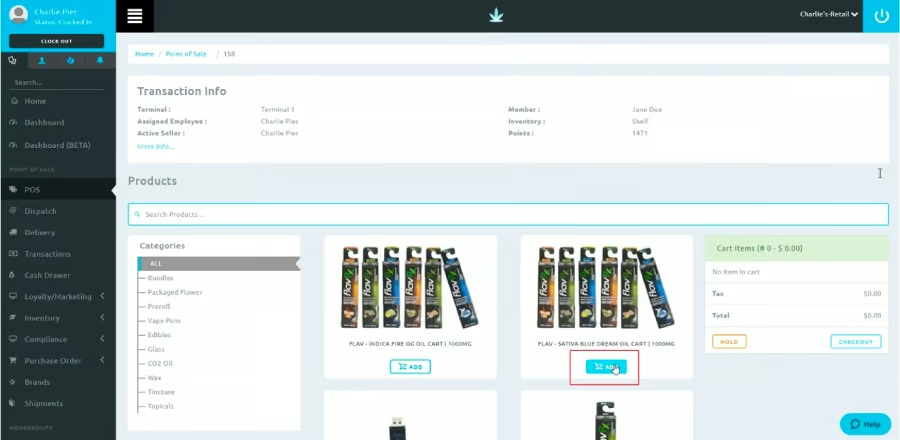
Blaze is one of the most popular cannabis POS software for retailers, dispensaries, and seed-to-sale tracking in the US. Since 2022, it has acquired Greenline, making Blaze one of the few systems available in both the US and Canada. Blaze has also grown its omnichannel services with its acquisition of Tymber (ecommerce cannabis POS software), direct integration with Leafly (online seed-to-sale tracking and distribution), and launching of Blaze Ecom (proprietary ecommerce platform).
Blaze has also recently launched its own integrated payment processing service, BlazePay, and serves most of the states with legal cannabis sales. However, one downside is the lack of available pricing, with third-party sites quoting Blaze charging a monthly fee starting from $500 per month.
Deciding Factors
- Pricing: Not disclosed
- Payment processing: BlazePay
- Hardware options: Integrates with Bluetooth barcode scanner, barcode printer, receipt printer, and cash registers by Star Micronics
- Ecommerce: Blaze Ecom integrated website builder and platform
- Delivery: Blaze Delivery advanced cannabis scheduled and on-demand delivery software
- Compliance: METRC, HIPAA, BioTrack, Leafly
- Integrations: APIs, Online menu inventory, analytics, SMS and Loyalty, cannabis-specific financial services, accounting
- Customer support: Extended business hours, 7 days a week
- States where available: Alaska, Arizona, California, Colorado, Illinois, Maine, Maryland, Massachusetts, Mississippi, Missouri, Montana, New Jersey, New Mexico, New York, Oregon, Washington
IndicaOnline: Best for Medical Marijuana Dispensaries
Overview
Who should use it:
Best for cannabis medical dispensaries looking for HIPAA-compliant POS
Why we like it:
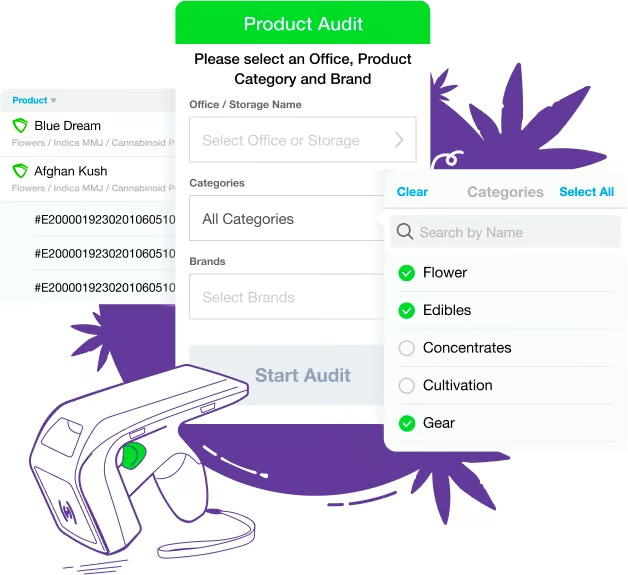
Before becoming a retail POS for recreational cannabis sales, IndicaOnline became popular as a medical marijuana POS solution. Apart from being HIPAA-compliant, IndicaOnline comes with two-way automated state reporting, real-time omnichannel sales tracking, and a proprietary payment processing, delivery, and fleet management app. Like Dutchie, IndicaOnline operates in all states where recreational, medical, and adult-use cannabis is legal.
Users will find IndicaOnline more small business-friendly in terms of monthly subscription fees. While it requires a plan upgrade to access ecommerce and delivery features, the price point is still significantly lower compared to Cova. Inventory and order notifications (that likely include compliance tools like purchase limits) require an upgraded subscription plan.
Deciding Factors
- Pricing: $249-$429 per month, custom plan available, two-week free trial
- Payment processing: Integrated cashless payment processing
- Hardware options: ELO registers and peripherals, including scanners and weighing scales
- Ecommerce: Sweede.io, IndicaOnline’s fully integrated proprietary ecommerce platform
- Delivery: Proprietary hub and on-demand delivery plus fleet management app
- Compliance: METRC, HIPAA, Leafly
- Integrations: Third-party delivery platforms, online and on-screen menu display, open APIs
- Customer support: Extended business hours, 7 days a week
- States where available: Available in all legal states
Dutchie: Best All-in-One Cannabis POS Solution for Growing Retailers
Overview
Who should use it:
Best for growing cannabis dispensaries that also grow their own products
Why we like it:
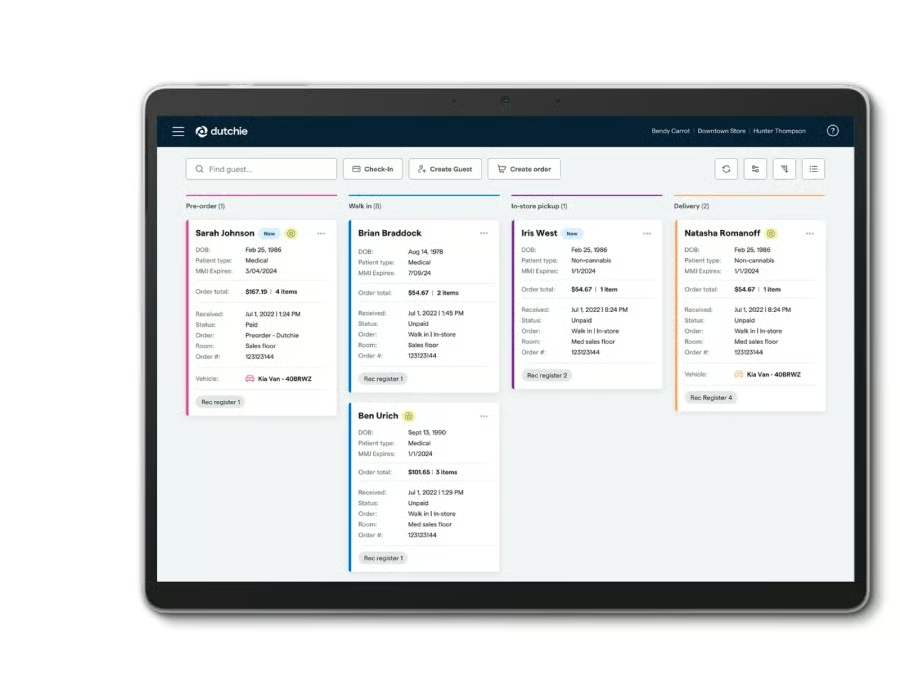
In 2021, Dutchie acquired the popular US cannabis POS system Green Bits and the top cannabis enterprise resource planning (ERP) solution Leaf Logix and created Dutchie POS. The system is a full seed-to-sale compliant management platform that comes with a customizable ecommerce/website builder, digital payment solution, and native business insurance feature.
Like Blaze and Cova, Dutchie includes real-time METRC automation and compliance, along with Leaf Data Systems and BioTrack.
Dutchie does not advertise its monthly subscription plans, although third-party sites quote Dutchie POS pricing starting at $500 per month. One common issue users have with Dutchie is its online menu function, which requires an upgraded ecommerce plan to get the most out of the feature.
Deciding Factors
- Pricing: Not disclosed
- Payment processing: Dutchie Pay
- Hardware options: Use your own or purchase from Dutchie
- Ecommerce: Dutchie Ecommerce, Ecommerce Plus, website builder plus an online menu with SEO
- Delivery: Comes with Dutchie Ecommerce
- Compliance: METRC, Leaf Data Systems, and BioTrack
- Integrations: ID verification (VeriScan), CRM (SpringBig), Loyalty (Alpine IQ), and more
- Customer support: Extended business hours for phone and chat, 7 days a week
- States where available: All legal states
Vende: Best Free Retail Cannabis POS for Startups
Overview
Who should use it:
Best for small cannabis retailers looking for a free POS
Why we like it:
One of the newest cannabis POS systems in the industry, Vende is breaking molds by offering an app-based, free-to-use POS software. While it’s best to be reasonably skeptical, it’s hard not to like Vende because the free version is very functional and can easily manage a small retail cannabis store. You get ecommerce and delivery (with a fleet management app), product ordering, inventory management, ID and barcode scanning, employee management, CRM, and METRC integration.
Paid plans are available and start at $499. Apart from the on-site training and “extra facility” (which may refer to multiple locations), the website’s pricing table is vague in terms of the advantages of a paid plan. Based on the available self-demo, it seems that Vende can use more compliance and back-office integrations. Cashless payments may also require a paid plan.
Deciding Factors
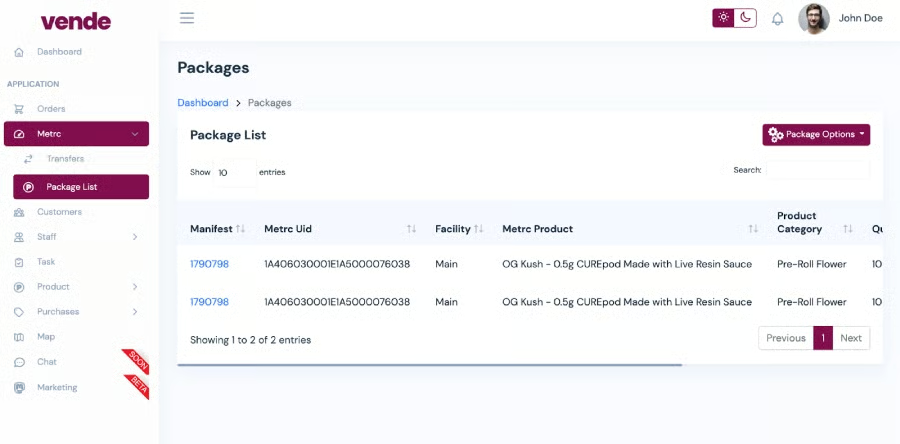
- Pricing: $0, $499, $599 per month
- Payment processing: Cash transactions for free plan, card transactions with plan upgrade
- Hardware options: Runs on compatible Android and iOS devices, barcode scanner
- Ecommerce: Fully integrated, proprietary website builder and remote payments
- Delivery: Proprietary delivery management feature w/ fleet app
- Compliance: METRC
- Integrations: Google Analytics, in-house integrations for ecommerce, delivery, and fleet management
- Customer support: Online, email
- States where available: Available in states where METRC is used for compliance
Flowhub Maui: Best for Multistate Cannabis Businesses
Overview
Who should use it:
Best for established cannabis dispensaries with multiple locations.
Why we like it:
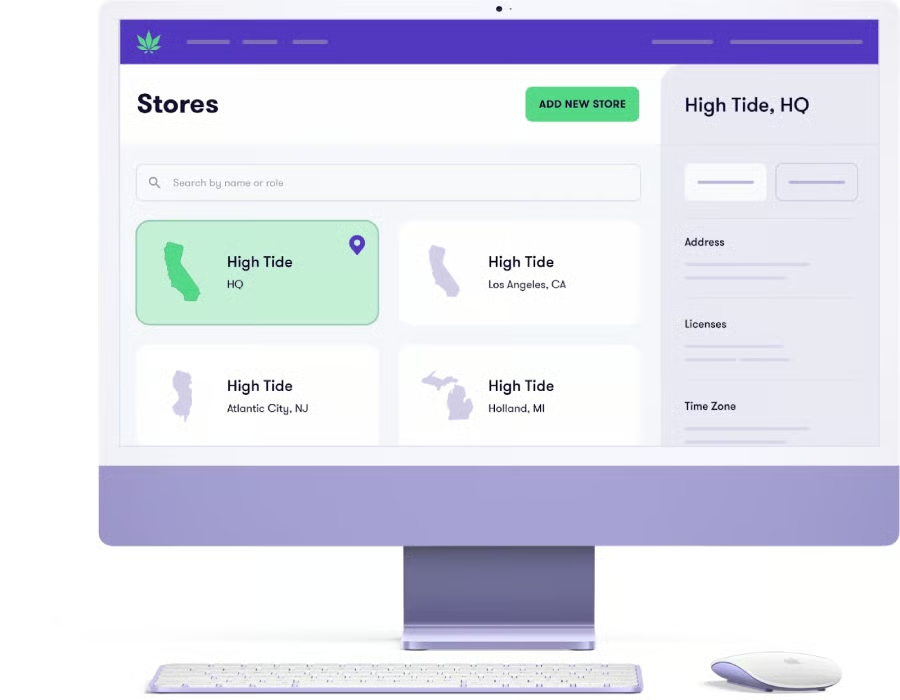
Based out of Colorado, Flowhub has been around since 2015 and has launched its latest retail POS upgrade, Maui. The system is highly customizable and can adjust to regulatory requirements in whichever of the 18 states the business operates.
Maui also comes with a universal login feature, allowing business owners to access and manage data, settings, and reports from multiple states in a single platform. The system also integrates with Flowhub’s mobile apps Greet® (ID verification), Stash® (inventory management), and Nug Pro® (barcode scanner).
Flowhub Maui’s subscription pricing is not advertised, although third-party sites place Flowhub’s monthly cost from $399 per month. It lacks native HIPAA compliance and seed-to-sale tracking features but is possible to add with the help of third-party integration with cannabis-specific POS tools such as Springbig and Flourish.
Deciding Factors
- Pricing: Not disclosed
- Payment processing: Flowhub Pay integrated cashless payments
- Hardware options: Partners with Barcodes to integrate tablets, displays, scanners, weighing scales, cash registers, and more.
- Ecommerce: Weedmaps, Leafly, Dutchie, and more
- Delivery: Comes with ecommerce integrations like Dutchie
- Compliance: METRC, SafeArbor, CannaHauler
- Integrations: Everything from banking and HR to menus, kiosks, CRM, and loyalty
- Customer support: 24/7/365 phone support
- States where available: Alaska, California, Colorado, Maine, Maryland, Massachusetts, Michigan, Mississippi, Missouri, Montana, Nevada, New Jersey, New York, Oklahoma, Oregon, South Dakota, Vermont, and West Virginia
Looking for something different? Check out our list of best POS systems for small business.
Cannabis Retail Legislation Overview
Under federal laws, cannabis use and distribution are still prohibited. However, each state has local laws that allow voter-approved regulatory oversight.
As of this publication, the medical use of cannabis is legal in 38 US states, three territories, and the District of Columbia. Meanwhile, Ohio joined the list of states where recreational marijuana use and retail sales are legal in November of last year, bringing the total up to 24, plus three territories and the District of Columbia.
Another nine states allow “low THC, high cannabidiol (CBD)” product usage. Idaho, Nebraska, and Kansas remain the only states with no access to legal cannabis of any form.
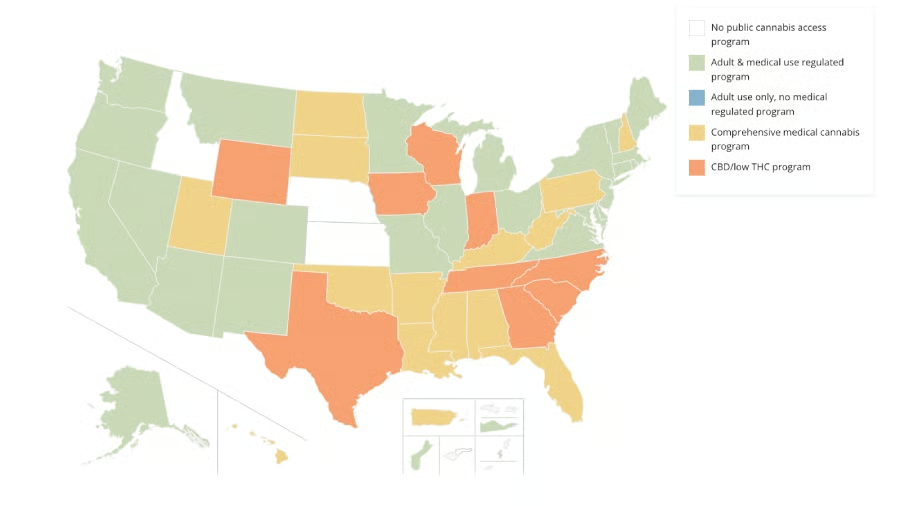
The varying legislation and requirements across states mean that the needs of cannabis retailers and dispensaries are different for each geographical location. When choosing a POS, first and foremost, make sure that it will help you adhere to all of your local laws and regulations.
What to Look for in a Cannabis POS System
In addition to complying with laws and regulations, the type of cannabis business you have will also dictate your POS needs.
Cannabis or marijuana dispensaries are divided into medical and recreational dispensaries, both of which require a POS solution to manage distribution and maintain regulatory compliance.
Cannabis dispensary POS system features should include:
- Customer management: To keep a profile of customers and their transactions
- HIPAA compliance: For medical cannabis dispensaries that have access to patient information
- Purchase limit alerts: Ensures that cannabis sales for each customer do not exceed the THC limit under state regulations
- Inventory management: To track on-hand, sold, damaged, and returned CBD products.
- ID scanner: Authenticating IDs and ensuring that no product is sold to minors
- Compliance reporting: Preparing transactional data to submit to state regulators
- BioTrack is one of the leading cannabis seed-to-sale inventory tracking solutions recognized by most states. Dispensary POS systems with a BioTrack integration allow for automated reporting to state regulators.
- METRC compiles detailed histories of every plant and cannabis-based product of licensed cannabis businesses in a state to help local governments ensure that only regulated products are being circulated for sale. METRC partners with cannabis regulatory agencies in all states where recreational, medical, and adult-use cannabis is legal.
- Payment processor: Payment processing solution that adheres to federal laws around cannabis use and sales. Visit our list of recommended cannabis payment processing solutions.
How to Choose a Cannabis POS System
With a variety of options to choose from, finding the best cannabis POS software that matches your requirements can be challenging. The guide below should help you get started:
Step 1: Make a list of cannabis POS providers that are qualified to operate in your state.
You’ll find many options that are accredited in most (if not all) states, while there are other providers that can be easily configured to comply with your state regulations. These are the most variable options, especially if you have plans to operate or sell across state lines.
Step 2: Narrow down your list by looking for options with integrated compliance that match your business needs.
When working on a budget, it makes sense to only spend on things you need. So, unless you plan on selling medical marijuana on top of recreational cannabis sales, you may not need to pay monthly for a HIPAA-compliant POS when there’s a less expensive alternative that directly integrates with METRC.
This also applies to retailers considering seed-to-sale tracking integrations that are only required if your business includes manufacturing or B2B distribution.
Step 3: Shortlist providers that offer all the features you need in a POS.
Subscription plans for cannabis POS widely vary, so start by identifying which option offers most of the features you need in their basic plan. You may be looking to sell heavily online or have your own fleet of delivery riders. You may want to accept cashless payments that include not only debit cards and gift cards but ACH as well.
Note that the most inexpensive option may not always be the best choice. Before making a decision, ensure that these providers also offer the tools that can support your business needs as it grows.
Step 4: Determine how much you want to invest in hardware.
There’s a big chance that you won’t need to purchase a new set of POS devices. Most cannabis POS systems can run on tablets, desktops, and even on your smartphone, so the only thing you need to do is check which options are compatible with what hardware you already have. If you already have a Mac or an iPad, you will only need to choose the right POS software and invest in printers, weighing scales, and barcode scanners.
Methodology: How We Evaluated Cannabis POS Systems
We compared more than a dozen cannabis and dispensary POS systems based on pricing structure, general POS tools, cannabis POS-specific features, ease of use, and expert score. We gave compliance a heavy consideration in all of the criteria we used and also asked our retail experts to weigh in with their personal knowledge of each software.
Click through the tabs below for a more detailed breakdown of our evaluation criteria:
We took into consideration the monthly fees, contract terms, and hardware options for this category. For cannabis POS providers that do not disclose their pricing and contract terms (as a number of them do not), we applied the lowest score received by those that advertised their pricing. Vende received the best score because of its free-to-use software and pay-as-you-go terms.
For this category, we evaluated each provider based on their ability to support inventory management, omnichannel sales through ecommerce and delivery, cash tracking, payment processing, and CRM functionality. We also highlighted compliance features such as HIPAA accreditation, and custom packaging/labeling. Finally, we awarded points for providers that offer integrated non-cash payment processing. Blaze received a perfect score.
We looked at each provider’s level of compliance in crucial aspects of cannabis regulations such as moving and tracking of products, as well as reporting. We gave premium points for direct METRC integration that helps automate reporting and reconciliation functionalities. We also prioritized options that offer built-in seed-to-sale tracking and ID verification integrations. Blaze, again, received a perfect score, along with Dutchie.
We evaluated each provider for its onboarding and training features as well as its availability in each US state. We also took customer support hours and installation type into consideration to check how easy it is to install and maintain the system. A number of providers fell short because of their limited customer support hours, but Cova came out on top with a perfect score.
Last but not least, we looked at each provider’s POS services as a whole, evaluating its core available features and the overall value-for-money based on the pricing attached to these functions. We also took what current users have to say about each provider into consideration, including their feedback on how easy (or difficult) it is to use the system. Cova and IndicaOnline took the lead, both scoring 4.69 out of 5.
Cannabis POS Frequently Asked Questions (FAQs)
The following are questions often asked about cannabis POS systems:
How much does a cannabis POS subscription cost?
The average monthly cost of cannabis POS systems ranges from $15–$500 based on advertised pricing. While these are not usually disclosed, users have noted incidental fees, such as installation and setup, that can likely cost up to $1,000.
What kind of compliance does my cannabis business need?
Compliance requirements are based on the state where your business is located. These states have accredited certain compliance service providers to help businesses streamline the necessary tasks. For instance, METRC is the most popular cannabis tracking system and is used in most states where cannabis sale is legal.
Meanwhile, if your business goes beyond retail sales and includes business-to-business distribution, you will be required to have seed-to-sale tracking software recognized by your state. Lastly, if you plan to sell cannabis for medical use, your business should have a HIPAA-compliant POS system.
Do I need a seed-to-sale tracking software to run a cannabis POS business?
Manufacturers, cannabis growers, and distributors are required to have a state-accredited seed-to-sale tracking system.
How can I keep my inventory labeling compliant?
Each state requires a uniform way of labeling cannabis and cannabis-derived products such as tinctures, edibles, different strains, and concentrates to closely track the inventory that circulates within the area. A compliant labeling/packaging system includes information such as the amount of THC, dosage, and serving size.
Other states may also require labels to include net weight, strain name, date of sale, tested status, cannabinoid range, and physician name (for medical dispensaries). You will also find some states will require a package ID, a warning statement, and even child-proof packaging.
Bottom Line
With the passing of decriminalized cannabis use into law, there is no longer any shortage of cannabis POS systems to choose from in the market. In order to choose the best cannabis POS system, business owners will need to be aware of the features that they need based on their unique business model. This guide aims to help users get a head start on identifying the potential of every POS option available to them.
Based on our evaluation criteria, Cova is the best cannabis POS and dispensary in the market today. It comes with built-in integrations for ecommerce, delivery, and cash tracking, and is compatible with iOS and Android systems providing the most versatility out of all the alternatives on our list.
