







A marketing technology stack is the set of tools your business uses to plan, create, publish, manage, and measure marketing campaigns. For small businesses, a practical martech stack usually includes tools for business email, project management, email marketing, lead capture, landing pages, social media scheduling, SEO research, content publishing, and design.
The best marketing technology stack depends on your goals, budget, team size, and marketing channels. A local service business may only need email, a simple website, social media scheduling, and a CRM, while a content-led business may need SEO research, blog publishing, design tools, and project management software.
I built this small business marketing technology stack around affordable, beginner-friendly tools that support the main jobs most marketing teams need: creating campaigns, capturing leads, publishing content, managing projects, and tracking results.
| Software | Best for | Monthly starting price |
|---|---|---|
| Google Workspace | Creating a professional email address and collaborating with teams | $7 |
| monday.com | Managing projects efficiently | $9 |
| Later | Social media planning and scheduling | $19.75* |
| Mailchimp | Email campaigns to keep audiences engaged | $13* |
| HubSpot | Capturing and nurturing leads into customers | $15* |
| Wix | Building landing pages for marketing campaigns | $15* |
| Semrush | Planning and researching content | $165.17* |
| WordPress | Building brand awareness through blogging and content marketing | $4* |
| Canva | Designing content and brand assets | $15 |
*Annual billing.
How I chose the best marketing technology stack tools
To build this marketing technology stack, I evaluated tools that support the core marketing tasks most small businesses need: collaboration, project management, social media scheduling, email marketing, lead capture, landing pages, SEO research, content publishing, and design.
I prioritized affordable tools with free or low-cost starter plans, beginner-friendly setup, useful integrations, and enough features to support growth. I also considered whether each tool solved a distinct marketing need, so the stack would reduce manual work instead of adding more disconnected software.
Why you can trust Fit Small Business
- Best marketing technology stack tools compared
- What should be in a marketing technology stack?
- Google Workspace: Best for collaborating with teams
- monday.com: Best for managing projects efficiently
- Later: Best for social media planning and scheduling
- Later Social
- Mailchimp: Best for engaging, multi-touch email campaigns
- HubSpot: Best for capturing and nurturing leads
- Wix: Best for building landing pages
- Semrush: Best for content planning and research
- WordPress: Best for blog content that builds brand awareness
- Canva: Best for designing content and brand assets
- Methodology: How I evaluated the best marketing technology stack tools
- How to build a marketing technology stack
- When you do not need a full martech stack
- Frequently asked questions (FAQs)
- Bottom line
Best marketing technology stack tools compared
| Notable features | Free plan | Free plan limitations | |
|---|---|---|---|
| Google Workspace | Real-time team collaboration on Google Docs, Sheets, and Slides | ✓ | No custom email domain for your team (i.e., @yourbusiness.com). |
| monday.com | Automated project workflows | ✓ | No automated project workflows |
| Later | Social media content planner, unified message inbox | Can only schedule posts on one social media platform | |
| Mailchimp | Drag-and-drop email builder, automated email campaigns | ✓ | No email campaign scheduling |
| HubSpot | Lead nurturing workflows, lead capture forms | ✓ | No automated lead workflows |
| Wix | AI and drag-and-drop landing page builder | ✓ | No custom domain for landing pages |
| Semrush | Keyword researcher and analysis | ✓ | Can only monitor one website |
| WordPress | Content management system, blog publisher | ✓ | No custom domain for blog sites |
| Canva | Brand kit, over 1 million design elements | ✓ | Limited design and template library |
What should be in a marketing technology stack?
A marketing technology (martech, in short) stack should include tools that support how your business attracts, converts, and retains customers. At a minimum, most small businesses need tools for collaboration, content creation, lead capture, email marketing, landing pages, social media, and reporting.
| Martech category | What it does | Example tools |
|---|---|---|
| Business email and collaboration | Gives your team professional email, shared files, documents, spreadsheets, presentations, and video meetings | Google Workspace |
| Project management | Organizes campaigns, deadlines, approvals, and recurring marketing tasks | monday.com |
| Social media scheduling | Plans, schedules, publishes, and tracks social media content | Later |
| Email marketing | Sends newsletters, promotions, drip campaigns, and customer updates | Mailchimp |
| CRM and lead capture | Collects leads, tracks contacts, and helps manage follow-up | HubSpot |
| Landing pages | Builds campaign pages for ads, lead magnets, promotions, and sign-up forms | Wix |
| SEO and content research | Finds keywords, content ideas, competitor gaps, and ranking opportunities | Semrush |
| Blog publishing | Publishes educational content, updates, and SEO articles | WordPress |
| Design and creative | Creates graphics, ads, social posts, presentations, and brand assets | Canva |
Google Workspace: Best for collaborating with teams
Why I like Google Workspace
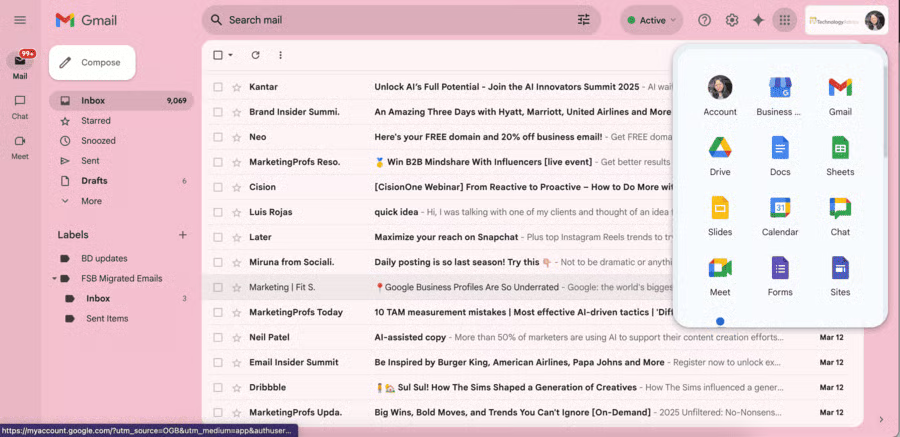
No platform defines business email and productivity like Google Workspace (except perhaps, some would argue, Microsoft 365). But it’s long been our top business email provider for small businesses because it offers all the productivity essentials: documents, spreadsheets, presentation decks, and video conferencing — all while being super easy to set up and use.
Google Workspace is also entirely cloud-based, so it’s ideal for remote teams or for those who are always on the go. Plus, one thing I’ve always found especially helpful is Google Workspace’s auto-saving feature, which saves all your documents to the cloud as you work, so nothing ever gets lost. Also, if you already have a free Gmail account, upgrading to more efficient tools to run your business is easy.
If your team is growing and you’re looking to upgrade to a more efficient collaboration platform, Google Workspace is the best choice.
Standout features: An email platform, an email address with a custom domain for you and your team, cloud-based documents, presentations, and spreadsheets, video conferencing, and real-time collaboration
Google Workspace pricing and plans
| Starter | Standard | Plus | |
|---|---|---|---|
| Monthly cost | $7 | $14 | $22 |
| Email address with a custom domain | ✓ | ✓ | ✓ |
| Shared documents, spreadsheets, presentations, etc. | ✓ | ✓ | ✓ |
| Real-time collaboration | ✓ | ✓ | ✓ |
| Cloud storage | 30GB | 2TB | 5TB |
| Video conferencing | 100 participants | 150 participants | 500 participants |
monday.com: Best for managing projects efficiently
My expert opinion
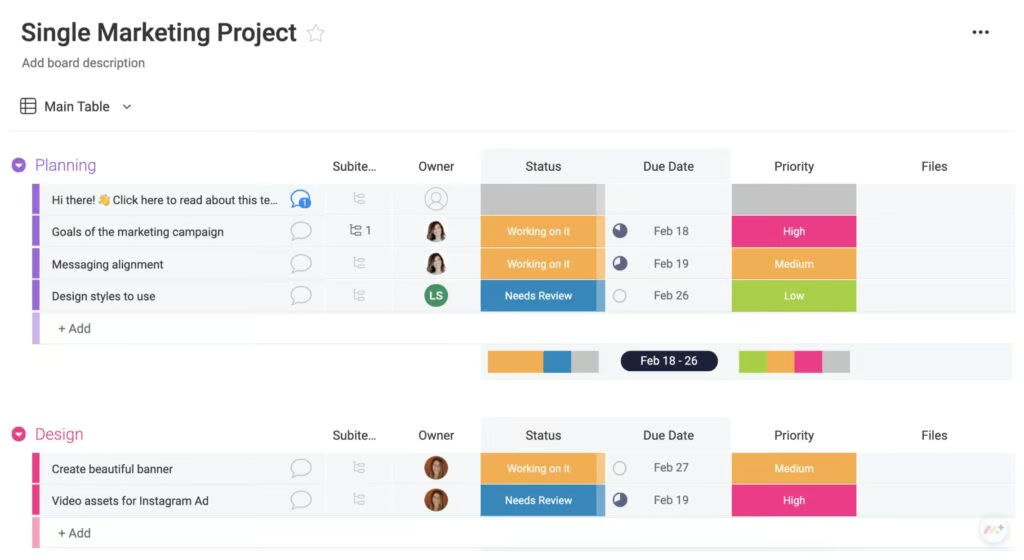
The main benefit of monday.com is its workflow automations that automatically move tasks to different teams’ boards once you update them to a certain status. This is especially helpful if you’re working with a large team (or even multiple teams).
You can also customize monday.com’s automation settings to your team’s needs. For example, at a media publishing company, I worked for used monday.com to organize our content workflows, and once they’re marked “Ready to Upload” in the status column, they’re automatically moved to the website team’s board.
What makes monday.com different from other project management tools like Asana and ClickUp is that it gives you an overview of all your tasks on your board and their statuses, which you can customize to your particular needs.
On the negative side, with monday.com, all your boards are interconnected, sometimes making it difficult to work on your own tasks without accidentally moving something on someone else’s board. In a sense, everything you work on must belong on a board, or it simply doesn’t exist.
monday.com gives each user a “My Work” board for items assigned to or by them. But after using monday.com for nearly a year, I have yet to use this space. In my experience, the more complex your team’s boards, processes, and automation workflows are, the less helpful “My Work” is. Instead, I built a personal dashboard that uses widgets to keep me organized (but even that required significant setup time).
Overall, monday.com’s priority levels for each task, progress bars, and customizable views for each user mean everyone can work how they like. It’ll make a good addition to your tech stack once you have a larger team and need a tool to organize your marketing processes and workflows.
Standout features: A lead management platform, automated lead workflows, lead capture forms, and lead nurturing emails
monday.com pricing and plans
| Free | Basic | Standard | Pro | |
|---|---|---|---|---|
| Monthly cost | $0 | $9 | $12 | $19 |
| Tasks or items | 1,000 | Unlimited | Unlimited | Unlimited |
| Storage | 500MB | 5 | 20 | 100GB |
| Boards | 3 | Unlimited | Unlimited | Unlimited |
| Documents | Unlimited | Unlimited | Unlimited | Unlimited |
| Board templates | ✓ | ✓ | ✓ | ✓ |
| Automated workflows | ✕ | ✕ | 250/month | 250,000/month |
| Activity log | 1 week | 1 week | 6 months | 1 year |
Later: Best for social media planning and scheduling
Why I like Later
Later marries social media scheduling with content planning, which is why it’s my top pick if you’re only adding one social media scheduler to your marketing technology stack. Its best feature by far is its content calendar that lets you plan social content weeks ahead and see everything at a glance, a lifesaver for any social media manager (and much easier to use than Meta Business Suite).
Aside from scheduling social content, there’s also a unified inbox so you can respond to messages and comments from the platform just as easily. However, this is only available for TikTok and Instagram messages, which is the biggest drawback compared to platforms like Sprout Social and Hootsuite.
However, Later Social continuously adds new features to adapt to social media trends. For instance, it has a link-in-bio mini site builder, an influencer management platform, and a creator community, all of which are relevant.
Standout features: A social media content calendar, automatic scheduled posting across multiple platforms, a message inbox, post analytics, social listening, a link-in-bio site builder, influencer management platform, and creator community
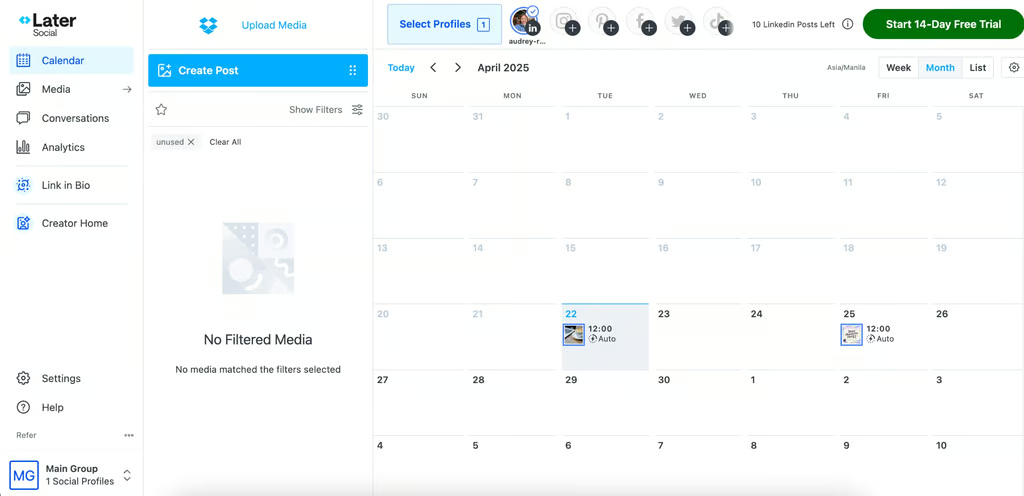
Later Social lets you plan your social media content calendar and schedule posts in advance. (Source: Later Social) 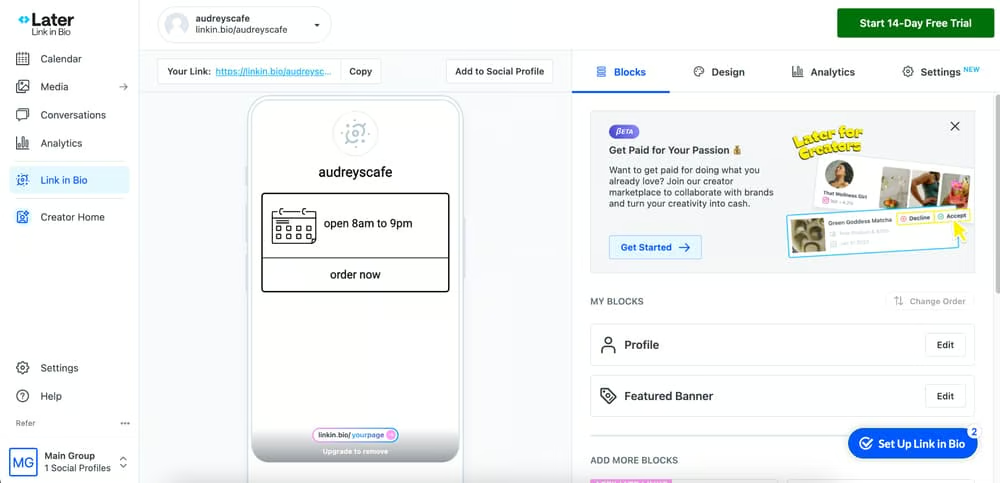
My other favorite feature is the link-in-bio mini site builder. (Source: Later Social)


Later Social pricing and plans
| Plan | Monthly cost | Social sets and users | Key inclusions |
|---|---|---|---|
| Starter | $25 ($18.75, annual billing) | 1 social set, 8 profiles total, 1 user | 14-day free trial, 30 posts per profile, AI content tools with 5 AI credits/month, platform analytics up to 3 months, Link in Bio, and basic support |
| Growth | $50 ($37.50, annual billing) | 2 social sets, 16 profiles total, 2 users | 14-day free trial, 180 posts per profile, AI content tools with 50 AI credits/month, platform analytics up to 1 year, social inbox, UGC collection, custom roles and permissions, and collaboration approvals |
| Scale | $110 ($82.50, annual billing) | 6 social sets, 48 profiles total, 4 users | 14-day free trial, unlimited posts, AI content tools with 100 AI credits/month, platform analytics up to 2 years, custom analytics, competitive benchmarking, future industry insights, brand health, brand mentions, and priority support |
Mailchimp: Best for engaging, multi-touch email campaigns
Why I like Mailchimp
I’ve tried many email marketing platforms, but my main constant has always been Mailchimp. It’s one of the first platforms I tried when I started email marketing, and it’s still the most reliable one I recommend to most small businesses who want a simple, no-fuss email marketing platform to send mass marketing emails to multiple contacts or segmented lists (instead of one by one like Gmail).
Mailchimp has a free plan that can send up to 500 emails a day to the same number of contacts, which is just enough to start building an engaged email audience. It’s also easy to create email campaigns with the drag-and-drop builder, and you can easily use dozens of templates for professional-looking emails.
Mailchimp also lets you build automated email campaigns, say for cart abandonment or new client welcome emails. What I also like about Mailchimp is that it makes all these tasks easy. Even beginners can build professional, customer-ready email campaigns, see their results, and optimize future messages.
Standout features: An email campaign builder and scheduler, an audience management platform, campaign sign-up forms, email analytics (clicks, opens, and conversions), and a creative assistant for building branded emails
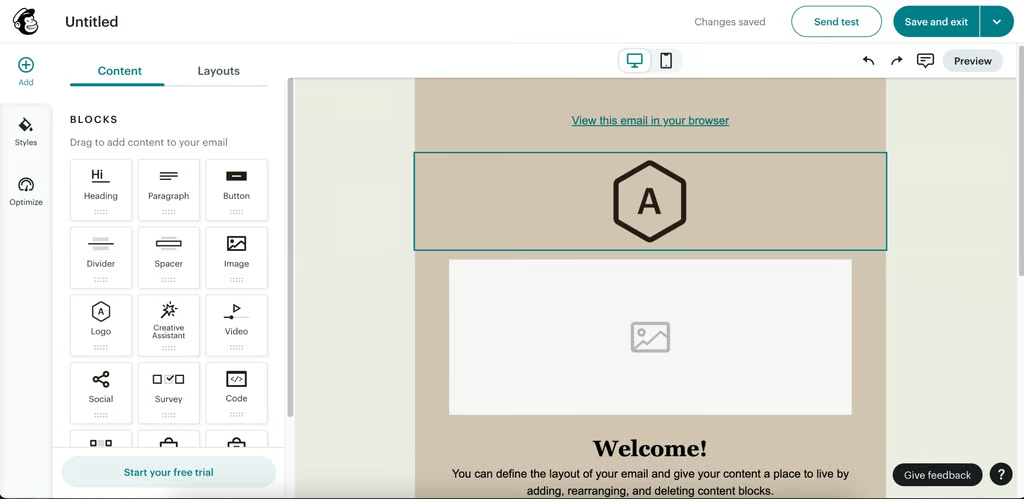
Mailchimp’s drag-and-drop email builder makes it easy to build campaigns. (Source: Mailchimp) 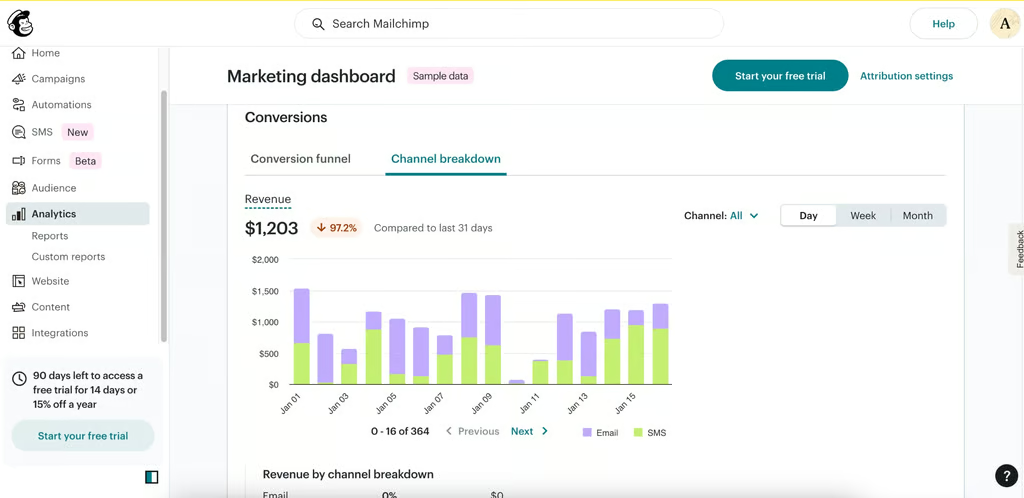
Another thing I like about Mailchimp is that it doesn’t just give open and click rates but also conversions and revenue. (Source: Mailchimp)


Mailchimp pricing and plans
| Free | Essentials | Standard | Premium | |
|---|---|---|---|---|
| Monthly cost (annual billing) | $0 | $13 | $20 | $250 |
| Email sends | 1,000/month or 500/day | 10x contacts | 12x contacts | 15x contacts |
| Contacts | 500 | 500 | 500 | 500 |
| Audience sets | 1 | 3 | 5 | Unlimited |
| Analytics | Basic | Basic | Advanced | Advanced |
| A/B testing | ✕ | ✓ | ✓ | ✓ |
| Advanced segmentation and behavioral targeting | ✕ | ✕ | ✓ | ✓ |
HubSpot: Best for capturing and nurturing leads
Why I like HubSpot
Every good martech stack has a reliable platform for capturing and nurturing leads, aka people who are interested in your business or have heard about it but haven’t yet become customers.
HubSpot has long been one of the best martech companies in that regard. It works for almost any type of business and has an intuitive interface that shows all your leads along with their information and status.
Plus, HubSpot has lead workflows, which are significant time-savers if you have a small but agile team. These workflows can automatically send lead-nurturing emails and alert your team if a lead performs an action like opening a link or completing a purchase.
It’s especially helpful if you have a large volume of leads and don’t have the time to build and send email campaigns to them all. Plus, HubSpot can send more personalized emails to each prospect based on their past behavior.
HubSpot also has tools for building lead capture forms to place on your website or social media pages, all in one platform. What makes it different from regular landing page builders like Wix is that it automatically sends leads to the built-in HubSpot CRM platform along with their information and behavior. While it may take some exploring to get the hang of it, it’s one of the best AI-powered marketing tools to add to your stack.
Standout features: A lead management platform, automated lead workflows, lead capture forms, and lead nurturing emails
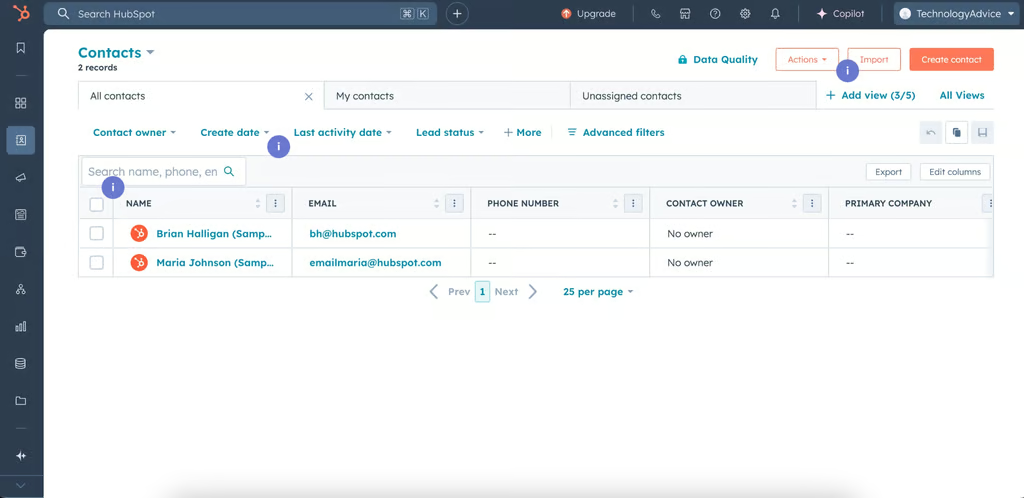
HubSpot’s contact management platform shows all your leads along with their information and activity. (Source: HubSpot) 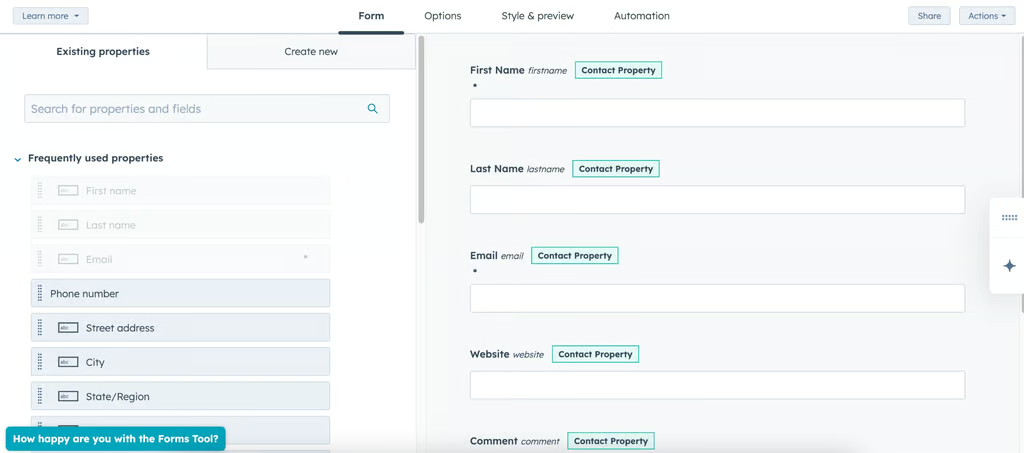
HubSpot also has a form builder for capturing leads. Use them to generate leads from your website, online store, or social media pages. (Source: HubSpot)


HubSpot pricing and plans
| Free | Starter Customer Platform | Professional Customer Platform | Enterprise Customer Platform | |
|---|---|---|---|---|
| Monthly cost (annual billing) | $0 | $15 | $1,300 | $4,700 |
| Contact management platform | ✓ | ✓ | ✓ | ✓ |
| Lead capture forms | ✓ | ✓ | ✓ | ✓ |
| Contacts | 1,000 | 1,000 | 2,000 | 10,000 |
| Email sends | 2,000/month | 5x contacts | 10x contacts | 20x contacts |
| Automated lead workflows | ✕ | ✓ | ✓ | ✓ |
| Conversational chatbots | ✕ | ✓ | ✓ | ✓ |
Wix: Best for building landing pages
Why I like Wix
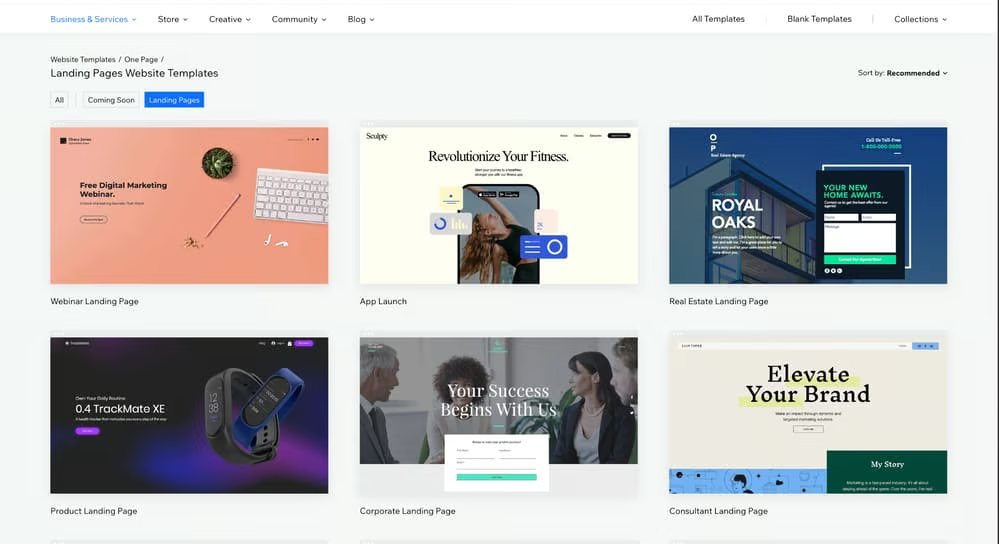
Wix is my go-to website and landing page builder, whether I’m creating a landing page for a Facebook ad campaign or a creative portfolio. It’s always my first recommendation for small businesses and creators because the platform is easy and intuitive without sacrificing essential features or good design.
It’s also free to make as many landing pages as you want, which is handy if you plan to build many digital marketing campaigns (or already do) but don’t want your landing pages indexed with your main website.
For example, let’s say you use WordPress for your main website. You can use Wix to build landing pages for your Google Ads campaign, sign-up forms, or app download badge, on a domain that won’t be connected to your main website.
It can even build your one-page portfolio if you want to promote your services or previous work. Wix also allows complete design freedom, so each landing page can be as unique and customized as you need.
Standout features: A drag-and-drop and AI website builder, over 50 landing page templates, plenty of design customization
Wix pricing and plans
| Free | Core | Business | Business Elite | |
|---|---|---|---|---|
| Monthly cost (annual billing) | $0 | $17 | $29 | $36 |
| Build unlimited landing pages | ✓ | ✓ | ✓ | ✓ |
| Custom domain for your landing page | ✕ | ✓ | ✓ | ✓ |
| Storage space | 500MB | 2GB | 50GB | 100GB |
| Forms | 4 | 10 | 25 | 75 |
| Accept payments | ✕ | ✕ | ✓ | ✓ |
Semrush: Best for content planning and research
Why I like Semrush
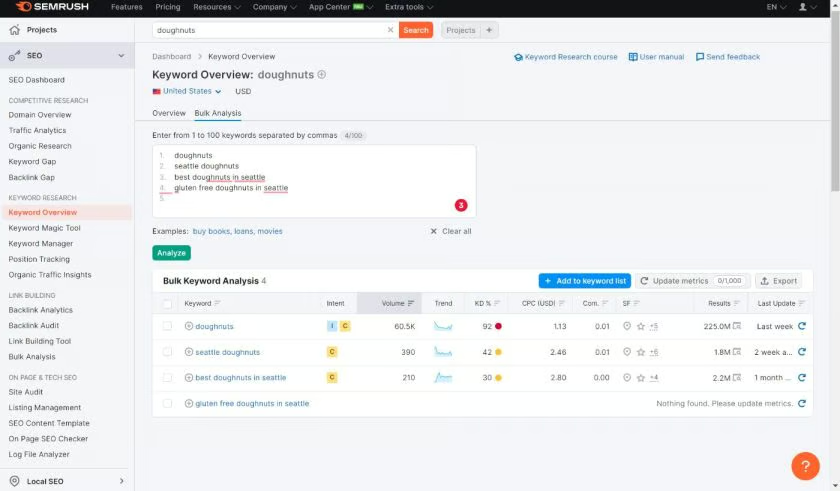
If you want to get your website ranking on Google, the best way is through an SEO content strategy, which is where Semrush can help. It has the most extensive suite of SEO tools, including a keyword researcher, website traffic checker, and even a blog content planner.
You’ll need some basic SEO know-how to get the most out of the platform, but compared to other SEO tools I’ve used, including Ahrefs and SimilarWeb, Semrush has been the most useful as it covers both the planning and analysis parts of SEO.
You can even subscribe to specific Semrush tools based on your content’s needs. For example, Semrush’s Keyword Magic Tool suggests hundreds of keyword combinations from one keyword, while the Traffic Analytics tool compares your website traffic with competitors.
If you’re only adding one SEO tool to your toolbox, this is the one I recommend. Semrush is used by many marketers worldwide (myself included) and is invaluable if you have a website and want it to be found by your target audience. It can help you navigate the best way for your website to be found online.
Standout features: A keyword researcher and keyword recommendations, a website audit tool, website health analysis, and a content marketing planner
Semrush pricing and plans
| Plan | Monthly cost (annual billing) | Key inclusions |
|---|---|---|
| Free account | $0 | Limited access to Domain Overview, Keyword Research, Competitor Research, Site Audit, Position Tracking, Backlinks, and SEO Ideas |
| SEO | $117.3 | 5 websites to monitor, 500 keywords tracked daily, basic keyword research, competitor analysis, position tracking, and site audit |
| Starter | $165.17 | 5 websites to monitor, 500 keywords tracked daily, keyword research and optimization tools, competitor insights, MCP access, 50 AI prompts tracked daily, 1 domain for AI brand performance, 300 AI visibility reports per day, and AI-ready site audit |
| Pro+ | $248.17 | 15 websites to monitor, 1,500 keywords tracked daily, historical SEO data, content optimization, keyword cannibalization analysis, multi-location/device tracking, and 100 AI prompts tracked daily |
| Advanced | $455.67 | 40 websites to monitor, 5,000 keywords tracked daily, SEO share of voice, API data integration, and 200 AI prompts tracked daily |
WordPress: Best for blog content that builds brand awareness
Why I like WordPress
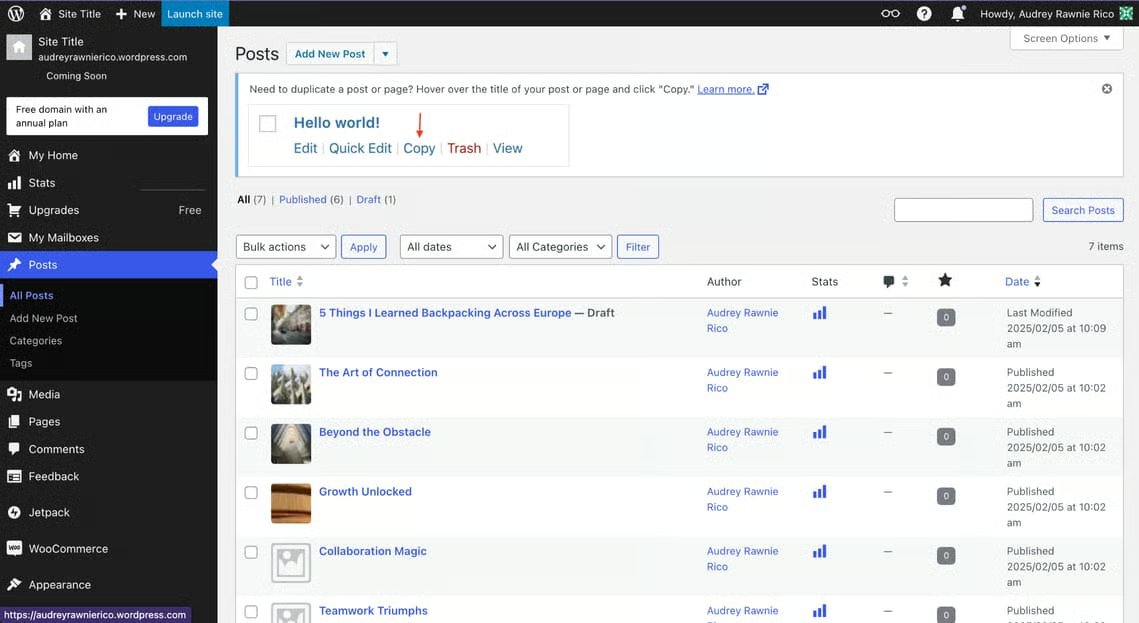
WordPress is still the industry leader for content websites and lets you publish unlimited blogs, even on the free plan. You can also customize your blog’s look and style to match your brand, or use one of WordPress’s blog templates, all of which have a variety of modern, eye-catching designs.
WordPress’s content management system also makes it easy to optimize your blog’s SEO through keywords, titles, and meta descriptions, which are necessary if you have a content marketing plan. You can also see all your blogs at a glance and how much traffic they get, allow comments and discussion forums, and even accept payments and donations.
WordPress will go hand-in-hand with Semrush if you use blogs to grow your brand credibility. Use Semrush to research your keywords and plan your blogs, then publish them on WordPress.
Standout features: A blog publisher, a content management system, blog keywords, and hundreds of blog templates
WordPress pricing and plans
| Free | Personal | Premium | Business | Commerce | |
|---|---|---|---|---|---|
| Monthly cost (annual billing) | $0 | $4 | $8 | $25 | $45 |
| Publish unlimited blogs | ✓ | ✓ | ✓ | ✓ | ✓ |
| Storage | 1GB | 6GB | 13GB | 50GB (Expandable) | 50GB (Expandable) |
| Custom domain | ✕ | ✓ | ✓ | ✓ | ✓ |
| Accept payments and donations | ✓ | ✓ | ✓ | ✓ | ✓ |
| SEO tools and analytics | ✕ | ✕ | ✕ | ✓ | ✓ |
Canva: Best for designing content and brand assets
Why I like Canva
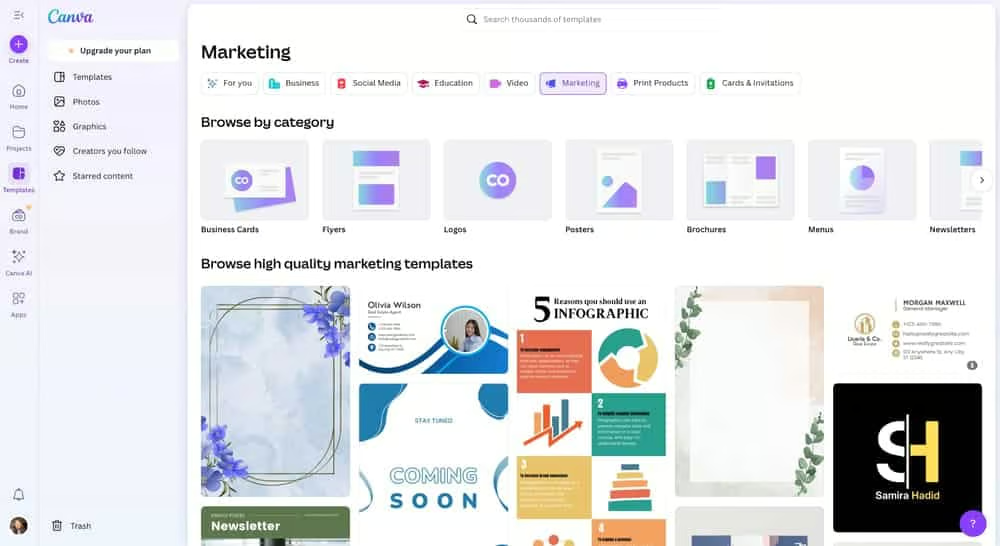
Canva makes design easy and accessible to everyone, even if you don’t have design experience. There are thousands of templates for just about any design or marketing material you’ll need, from business cards to Instagram Stories.
The Brand Kit is invaluable as it stores all your brand assets (logos, colors, fonts, and so on) to make it easier to design branded materials in the future. One notable drawback with Canva is that, because many other people also use it, there’s a chance your designs won’t be entirely unique. I recommend taking the extra time to customize your designs to make them stand out.
Others on my team have reported experiencing a lot of difficulty editing videos for social and even static designs on the mobile app. The video editor isn’t very intuitive (especially when you’re overlaying text), and many of the best design elements are locked behind paid plans. Overall, it’s very easy to move something out of place when selecting small elements, making for a lot of zooming in and out.
Still, Canva’s an invaluable resource in your tech stack. It’s a simple and efficient way to create well-designed content. I just highly recommend using it on your laptop for bigger projects.
Standout features: An online drag-and-drop design platform, design templates for thousands of marketing materials, AI design generators and editors
Canva pricing and plans
| Free | Personal | Premium | |
|---|---|---|---|
| Monthly cost | $0 | $15 for one user | $10 per user (3 users minimum) |
| Drag-and-drop design platform | ✓ | ✓ | ✓ |
| Storage | 5GB | 1TB | 1TB |
| Design templates | Limited access | Full access | Full access |
| Design elements | ✓ | ✓ | ✓ |
| Brand kit | ✕ | ✓ | ✓ |
| Remove image backgrounds | ✕ | ✓ | ✓ |
| Schedule social media posts | ✕ | ✓ | ✓ |
| Collaborate with teams | ✕ | ✕ | ✓ |
| Design approvals | ✕ | ✕ | ✓ |
Methodology: How I evaluated the best marketing technology stack tools
To build this marketing technology stack, I evaluated tools that cover the core marketing jobs most small businesses need: collaboration, project management, social media scheduling, email marketing, lead capture, landing pages, SEO research, content publishing, and design.
I prioritized tools with free or affordable starter plans, beginner-friendly setup, useful integrations, and enough features to support a growing business. I also considered whether each tool solved a distinct marketing need, since a practical martech stack should reduce manual work rather than add more disconnected software.
I scored the tools using the following criteria:
- Value for money: Different platforms have different plans and prices, so I made sure all of them offered good value for your money and let you access essential features on the free or starter plans.
- Marketing usefulness: All the platforms in this guide can help market your business, whether through maximizing your team’s productivity, creating and publishing content, or capturing and managing leads. Many of them are also used by many marketing teams around the world.
- Ease of use: Your team won’t have all the time in the world to learn how to use tech platforms, so I specifically looked for beginner-friendly tools that won’t be a pain to set up.
- My expert opinion: I’ve also personally used or at least tested all the platforms above to prove they can live up to their claims and effectively support small business marketing teams.
How to build a marketing technology stack
To build a marketing technology stack, start with your business goal, then choose only the tools needed to support that goal. A local business focused on visibility may need a website, email marketing tool, social media scheduler, and design platform, while a lead generation business may need a CRM, landing page builder, email platform, and reporting tools.
- Define your main marketing goal. Decide whether you want to generate leads, increase local awareness, grow ecommerce sales, improve customer retention, or publish more content.
- Choose your core marketing channels. Focus on the channels you will actually use, such as email, social media, SEO, paid ads, landing pages, events, or referrals.
- Match each channel to a tool category. For example, email needs an email marketing platform, SEO needs keyword research software, and lead generation needs a CRM or form builder.
- Start with free or low-cost plans. Use free plans and starter tiers until you know which tools your team uses consistently.
- Check integrations before you commit. Your CRM, email platform, website, analytics, and project management tools should work together without manual data entry.
- Assign an owner for each tool. One person should be responsible for setup, permissions, data quality, workflows, and cleanup.
- Review the stack every quarter. Remove tools you do not use, upgrade only when a limit blocks growth, and check whether each platform still supports your current goals.
When you do not need a full martech stack
You may not need a full martech stack if your business only uses one or two marketing channels. For example, a solo consultant may only need Google Workspace, a simple website, and an email marketing tool, while a local shop may only need Canva, a social media scheduler, and a basic email list.
Avoid adding tools just because they are popular. A larger marketing technology stack can create duplicate contacts, messy reporting, unused subscriptions, and extra admin work. Add a new tool only when it solves a clear problem, such as capturing leads, scheduling social posts, sending email campaigns, researching keywords, or managing campaigns across a team.
Frequently asked questions (FAQs)
What is a marketing technology stack?
A marketing technology stack is the set of software tools a business uses to plan, create, publish, automate, and measure marketing campaigns. A small business stack might include tools for email marketing, CRM, landing pages, social media scheduling, SEO, project management, and design.
How much does a marketing technology stack cost?
A small business marketing technology stack can cost $0 if you use free plans, but a paid starter stack often costs between $50 and $250 per month. Costs increase when you add more users, contacts, automation, reporting, storage, or advanced integrations.
What is the best marketing technology stack for small businesses?
The best marketing technology stack for small businesses is one that matches your goals and budget. For many small teams, a strong starting stack includes Google Workspace, monday.com, Later Social, Mailchimp, HubSpot, Wix, Semrush, WordPress, and Canva.
How do I build a martech stack on a budget?
Build a martech stack on a budget by starting with free plans, choosing tools that serve more than one purpose, and adding paid plans only when you hit a real limit. Prioritize the tools tied to revenue or growth first, such as your CRM, website, email marketing platform, and lead capture tools.
What is the difference between a martech stack and a marketing data stack?
A martech stack includes the tools used to run marketing campaigns, such as email, CRM, social media, landing pages, content, and design software. A marketing data stack focuses on collecting, storing, cleaning, analyzing, and reporting marketing data from different systems.
What tools should a startup include in its martech stack?
A startup martech stack should usually include a CRM, landing page builder, email marketing platform, analytics tool, project management software, and design platform. Startups focused on content or inbound leads should also add SEO research and blog publishing tools.
What tools should a local business include in its martech stack?
A local business martech stack should include a website or landing page builder, business email, email marketing software, social media scheduling, design software, and tools for local SEO or review management. If the business collects leads, it should also use a CRM.
Bottom line
A marketing technology stack does not need to be expensive or complicated. Start with the tools that support your most important marketing goal, such as lead generation, local visibility, ecommerce sales, or content growth. Then add software only when it solves a clear problem or saves your team time.
For most small businesses, the best starting point is a practical stack that covers collaboration, project management, email marketing, lead capture, landing pages, social media, SEO, content, and design without going over budget.
