








Martech, short for “marketing technology,” includes any type of software or tool used for business promotional purposes. As such, martech represents a wide range of tech-based tools, from email marketing platforms and website hosts to customer relationship management (CRM) software for lead generation and nurturing. After sifting through more than 40 martech providers, here are the 16 best martech companies for small businesses.
- Best Martech Companies at a Glance
- Top CRMs for Small Business Marketing
- Best Martech Companies for Small Business Productivity
- Top Email Marketing Solutions
- Best Social Media Martech Companies for Small Business
- Best SEO Companies for Small Business Martech
- Best Web Hosting Providers
- How We Decided Which Martech Companies Are Best for Small Business
- Frequently Asked Questions
- Bottom Line
Best Martech Companies at a Glance
- Most comprehensive martech company: HubSpot
- Most budget-friendly CRM for multiple users: Freshsales
- Most fully featured CRM: Bitrix24
- Top choice for cloud productivity suite: Google Workspace
- Best video conferencing tool: Zoom
- Top voice-over-internet-protocol (VoIP) phone system: Nextiva
- Best email marketing platform for landing pages: Mailchimp
- Most beginner-friendly email marketing platform: Constant Contact
- Most affordable email marketing platform for bulk sending: Zoho Campaigns
- Easiest social media scheduling and analysis platform: Later
- Best social media platform with a free trial: Sprout Social
- Best all-in-one SEO suite: Semrush
- Best simple keyword research tool: Serpstat
- Most beginner-friendly website builder: Hostinger
- Best website builder for AI-assisted design and content: Wix
- Best website builder for appointment booking: GoDaddy
Top CRMs for Small Business Marketing
Customer relationship managers (CRMs) are web-based martech software that enable businesses to organize and track customers through the buying process, improving customer experience in the process. These systems provide tracking inbound leads, automation of sales processes, and business performance reporting.
Here are the top choices for small business marketing CRMs:
| HubSpot: Most Comprehensive Martech Stack Solution | |||
|---|---|---|---|
 | Free to start, paid Suite Starter plan from $30 a month |
| Visit HubSpotor read ourHubSpot CRM review |
| Freshsales: Most Budget-friendly CRM for Multiple Users | |||
 | Free to start, paid plans from $15 a month |
| Visit Freshsales |
| Bitrix24: Most Fully Featured CRM | |||
 | Free to start, paid plans from $49 a month |
| Visit Bitrix24or read ourBitrix24 Review |
HubSpot: Most Comprehensive Martech Platform
HubSpot is a virtual one-stop shop for martech. It offers many martech solutions in bundled services to help you maximize your digital marketing efforts. These services include web hosting with a website builder, a fully integrated CRM, an email marketing suite, and tools to help maximize your search engine optimization (SEO).
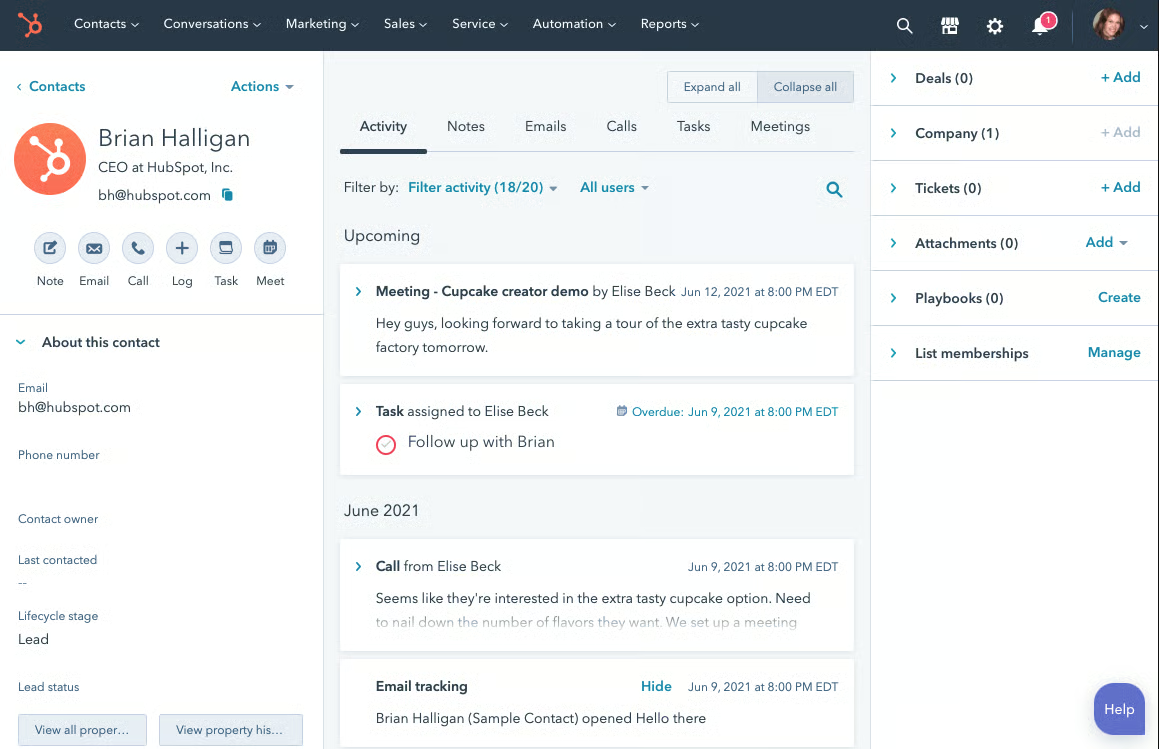
Martech Solutions Offered
- Content management system (CMS) to build and host your website
- Email marketing suite
- Landing pages
- CRM
- Customer service management
- Operations management platform
Pricing
| Free Tools: $0 | Starter: $30* | Professional: $1,600* |
|---|---|---|
The free-forever plan includes:
| HubSpot CRM Starter includes:
| HubSpot CRM Professional includes:
|
| *Billed annually. Monthly billing available at a higher rate. | ||
HubSpot is an enterprise-grade martech company with tools for generating and converting leads to managing customer service and other aspects of your operations. And what’s even better for small businesses is that virtually all of their tools are free to start with. Since they integrate seamlessly with one another, it’s easy to add more martech as you grow.
HubSpot’s suite of martech solutions provides small businesses with essential tools like an integrated CRM, web hosting, and email marketing. It is relatively easy to use, and with paid plans starting at just $30, it can be an affordable solution for many small businesses. However, if you need more than two users, the price scales dramatically, and this can make it too expensive. Businesses with more than two users should consider Freshsales instead.
You can try HubSpot CRM with no risk on its free-forever plan. The free plan includes many of the tools you need to receive inbound leads, track customers, and provide customer support. Full-featured paid plans start at $30 a month. For more information about HubSpot CRM, visit their website.
Freshsales: Most Budget-friendly CRM for Multiple Users
Freshsales offers a CRM that won’t break the bank for small businesses. It charges a fixed monthly rate per user, starting at just $15 a month, and depending on which features you need, this can mean big savings. Freshsales provides dozens of useful tools, including lead management, email automation, and web-to-lead capture capabilities.
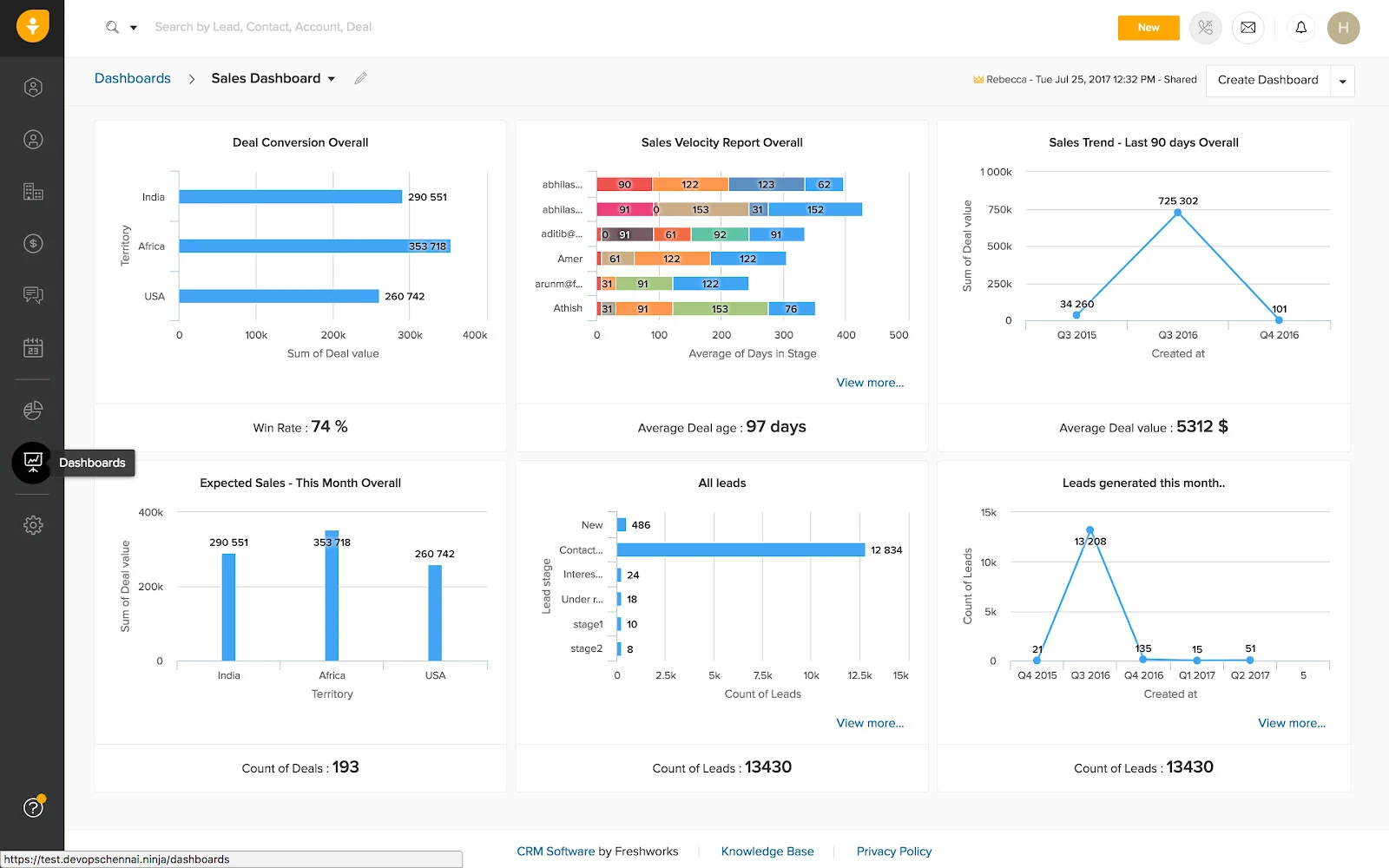
Martech Solutions Offered
- Contact and account management
- Chat, email, and phone integration
- Visual sales pipeline
- AI-powered contact scoring
- Chatbot
- Automated email and invoicing
- Sales team and territory management
Pricing
| Free: $0 | Growth: $15* | Pro: $39* |
|---|---|---|
|
|
|
| *Price is per user, monthly; billed annually. | ||
Freshsales CRM includes many of the features your small business will need to track customers and improve the sales process. However, it offers neither the most comprehensive integrated martech solution nor the most feature-rich CRM. If tons of features and reporting are something you’re looking for, consider Bitrix24. Or, if you require a more comprehensive solution, HubSpot is your answer.
Freshsales offers a limited free-forever plan, but it lacks most of the features you’ll need to manage an effective sales process. However, at just $18 a user to start (when billed monthly), you can try Freshsales with relatively low risk and upgrade to annual billing later to save a few bucks.
Bitrix24: Most Fully Featured CRM
Bitrix24 is a CRM solution that provides small businesses with so much more than many other CRMs. In addition to a feature-rich CRM with deep reporting and granular management tools, Bitrix24 offers solutions for many other business challenges. In fact, for many small businesses, Bitrix24 is a one-stop shop for productivity and project management needs. It offers a fully integrated CRM, web hosting, collaboration tools, and a productivity suite with cloud storage.
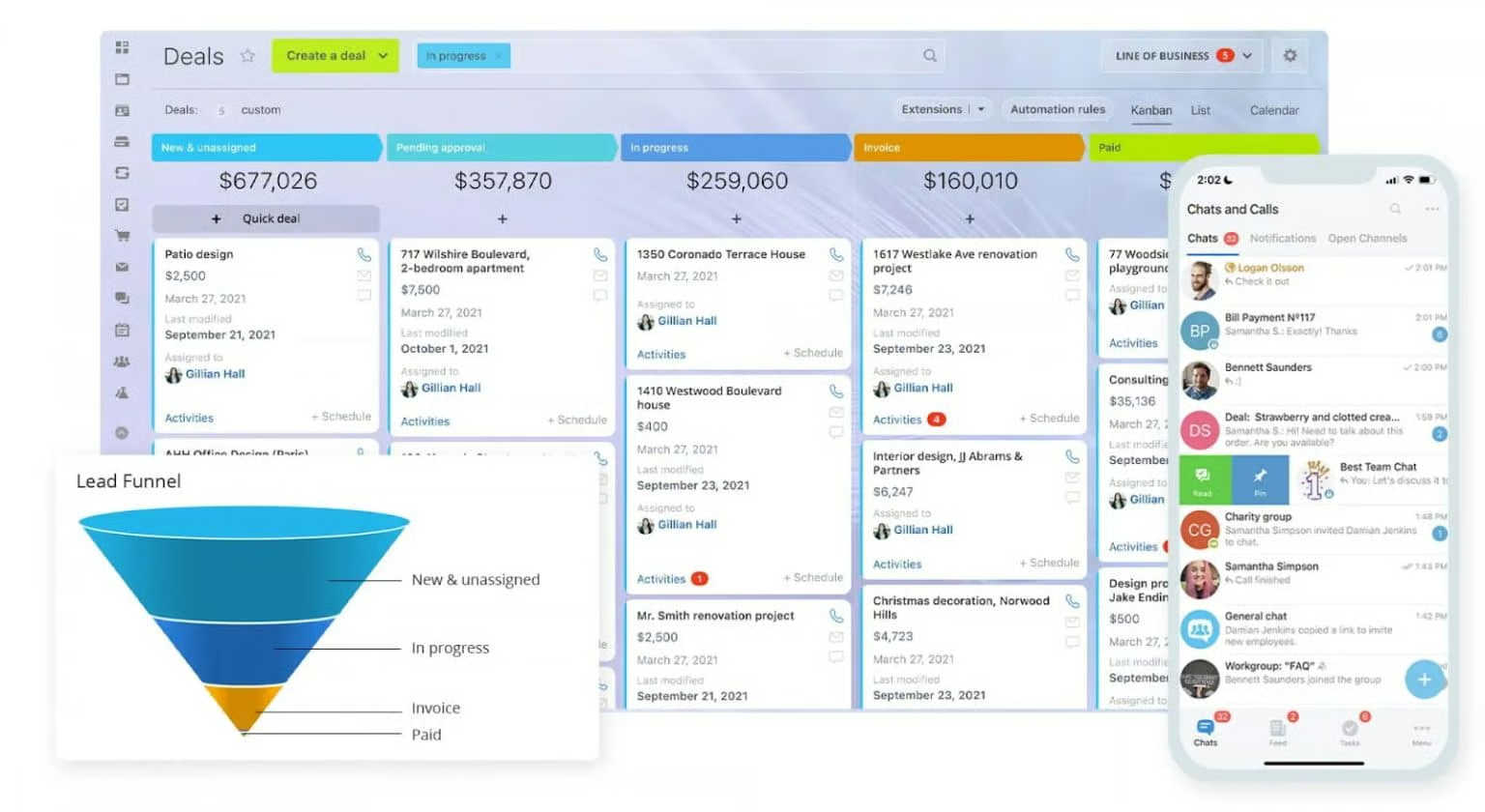
Martech Tools
- Feature-rich CRM
- Collaboration tools
- Task and project management
- Sales intelligence tools
- Marketing suite
- Human resource management tools
- Cloud storage
- Sales intelligence tools
Pricing
| Free: $0 | Basic: $49* | Standard: $99* |
|---|---|---|
|
|
|
| *Billed annually | ||
Bitrix24’s sheer number of tools it offers may be overwhelming. You might find it difficult to utilize the system to its full potential. At the same time, its technical support is somewhat lacking. Bitrix24 offers chat and email support, but it lacks telephone support for customer service, which both Freshsales and HubSpot provide.
This platform provides a powerful suite of tools that can transform your small business’ sales processes. It offers a wide array of productivity and project management features to help ensure the work gets done for your customers. A free-forever plan offers limited functionality, and this will give you a good idea of the platform’s flexibility.
Best Martech Companies for Small Business Productivity
As far as the best martech solutions for productivity, tools range from page layout designers to business communications software. Choosing the right productivity tools can increase the efficiency of your martech solutions, speed up customer communication, and help you rapidly scale your customer base. Here are three productivity suites that can help your small business grow:
| Google Workspace: Top Choice for Cloud Productivity Suite | |||
|---|---|---|---|
 | From $6 a month |
| Visit Google Workspaceor read ourGoogle Workspace review |
| Zoom: Best Video Conferencing Tool | |||
 | Free version, paid plans from $149.90 a year |
| Visit Zoomor read ourZoom review |
| Nextiva: Top VoIP System | |||
 | From $18.95 per user a month |
| Visit Nextivaor read ourNextiva review |
Google Workspace: Top Choice for Cloud Productivity Suite
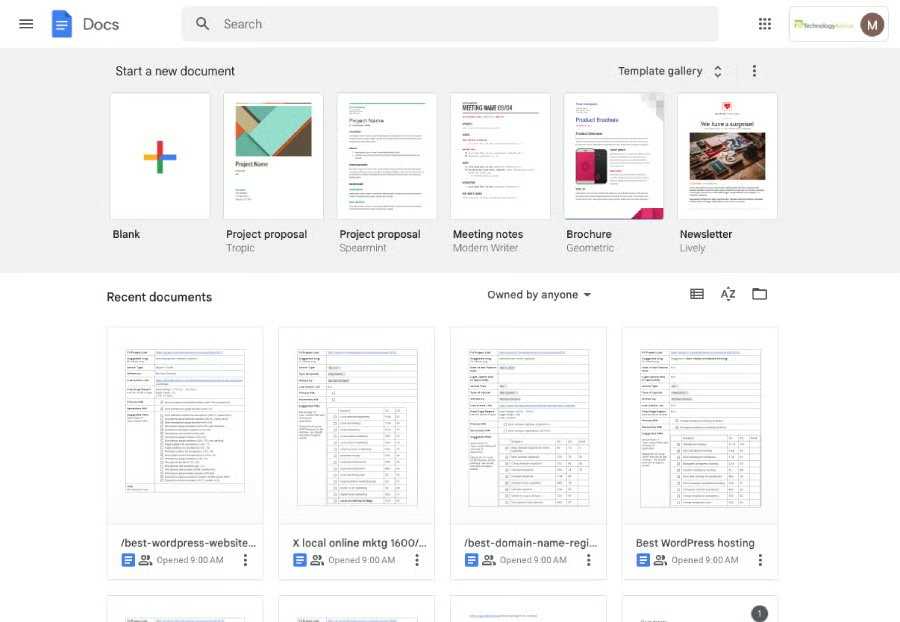
Google Workspace is a complete, web-based productivity suite that works on virtually any computer or tablet with an internet connection. It includes business email, a calendar to track events and meetings, and a video conferencing tool. Google Workspace is a powerful set of productivity tools for small businesses. In fact, Fit Small Business operates on Google Workspace.
Martech Tools
- Business email (see the Gmail tips and tricks that make it great for small businesses)
- Team chat
- Video conferencing
- Calendar
- Word processor
- Spreadsheets
- Slide-based presentations
- Forms
- Website designer
Read our Google Workspace review to learn more.
Pricing
| Starter: $6/month | Standard: $12/month | Plus: $18/month |
|---|---|---|
|
|
|
For the sheer power of Google’s productivity suite, it has few rivals in terms of cost and value. The tools are easy to use, and files can be saved or exported in dozens of common formats. The video conferencing system is simple and supports good video quality. However, all of the apps are web-based, and there are fewer advanced and automated features than higher tier plans of Microsoft 365. (Read our comparison of Google Workspace vs Microsoft 365 office suites.)
For value and ease of use, Google Workspace offers a total solution for your small business productivity needs. Signing up is easy, and its knowledge base provides ample guides to configuring and using business email with a custom domain. Sign up today at Google Workspace.
Zoom: Best Video Conferencing Tool
Zoom is a video conferencing app that connects users via high-quality video and audio. It became wildly popular during the pandemic, but businesses have been using Zoom for years. The plans offer a lot of features that small businesses need to correspond with potential customers, including chat and email clients.

Martech Tools
- Video conferencing
- Chat
- Email client with custom domain available
- Calendar client
- Digital whiteboard
- Cloud storage
Pricing
| Free: $0 | Pro: $149.90/year | Business: $199.90/year |
|---|---|---|
|
|
|
Zoom is primarily a video conferencing app, though it does offer some additional features such as email, calendar, and note-taking apps. However, accessing advanced features means stepping up to the Business plan at $199 per user, per year, which can be a bit expensive. For a more robust suite of products that includes video conferencing, consider Google Workspace instead.
This platform’s popularity makes it a great choice for video conferencing. Virtually everyone is familiar with Zoom, and it’s a trusted video calling tool. Zoom offers a free-forever plan that includes meetings up to 40 minutes long, an email and calendar client, and a basic whiteboard for collaboration. For more advanced features, step up to the Pro plan for $149.90 a year. Give Zoom a try.
Nextiva: Top VoIP System
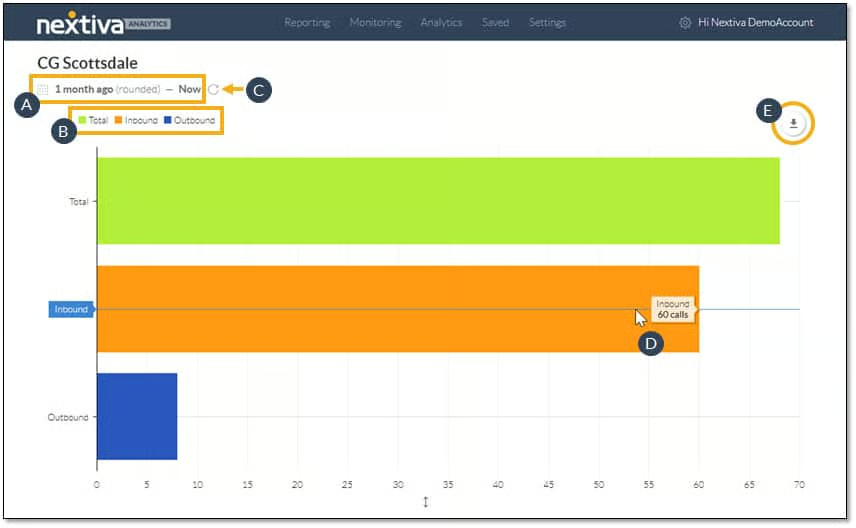
Nextiva provides voice-over-internet-protocol (VoIP) services to a wide range of companies, both small and large. Its VoIP solutions can be accessed via computer, cell phone app, or even wired desktop phones. The system includes VoIP, video, and chat-based communications. You can even bundle Nextiva with a customer relationship manager (CRM) and help desk software. The Nextiva dashboard provides advanced analytics, including call volume, length, and source.
Martech Tools
- VoIP phone system for inbound and outbound calls
- Video and chat clients
- Available help desk bundle
- Sales CRM integration
- Free toll-free number
- Voicemail system
- Auto-attendant/call tree
Pricing
| Essential: $18.95* | Professional: $22.95* | Enterprise: $32.95* |
|---|---|---|
|
|
|
| *Price per user per month, billed monthly. | ||
At first glance, Nextiva makes a compelling case for its VoIP system. It provides robust enhancements to create a full-service communications suite. However, for many small businesses, it may prove too expensive if you have more than a handful of employees. There are cheaper options. To save money, consider Google Voice.
Nextiva provides a good service at a decent value, and it consistently ranks high in our VoIP guide. Like most VoIP providers, it offers neither a free version nor a free trial. However, at $18.95 per user, per month for the Essential plan, it is an affordable system to try. Learn more on the Nextiva website.
Top Email Marketing Solutions
Email marketing is one of the most effective and important tools you’ll choose when building your martech stack for communicating with customers. However, not all email marketing suites are created equally, and choosing the right provider can mean the difference between a successful email marketing campaign and a waste of time and money. Here are our choices for the three best email marketing platforms:
| Mailchimp: Best Email Marketing Platform for Landing Pages | |||
|---|---|---|---|
 | Free up to 500 contacts, paid plans from $13 a month |
| Visit Mailchimp or check out ourMailchimp tutorial video |
| Constant Contact: Most Beginner-friendly Email Marketing Campaign | |||
 | From $12 a month |
| |
| Zoho Campaigns: Cheapest Email Marketing Platform for Bulk Sending | |||
 | Free plan, paid plans from $3 a month |
| |
Mailchimp: Best Email Marketing Platform for Landing Pages
Mailchimp is a popular, easy-to-use email marketing platform. It makes simple work of linking email campaigns to landing pages, forms, and more. Plans offer scaling subscriber counts, so you only pay for what you need. All paid plans also include multiple users and multiple audiences so you can segment your email list.
Martech Tools
- Email marketing
- Multiple users on all paid accounts
- Segmentation on all paid accounts
- Reporting and analytics
- A/B testing
- Automated customer journeys
- Custom templates
- SMS marketing available as add-on
Pricing
| Free: $0* | Essentials: $13* | Standard: $20* |
|---|---|---|
|
|
|
| *Based on 500 contacts, billed monthly after one-month free trial. Additional contacts available for additional fee. | ||
Mailchimp offers features that make email marketing work easier. However, it’s not the most user-friendly system to use. For advanced analytics, you’ll have to upgrade to the Standard tier, and adding additional subscribers can dramatically increase the price. For an easier-to-use system, consider Constant Contact. If cost is a factor, Zoho Campaigns may be a better alternative.
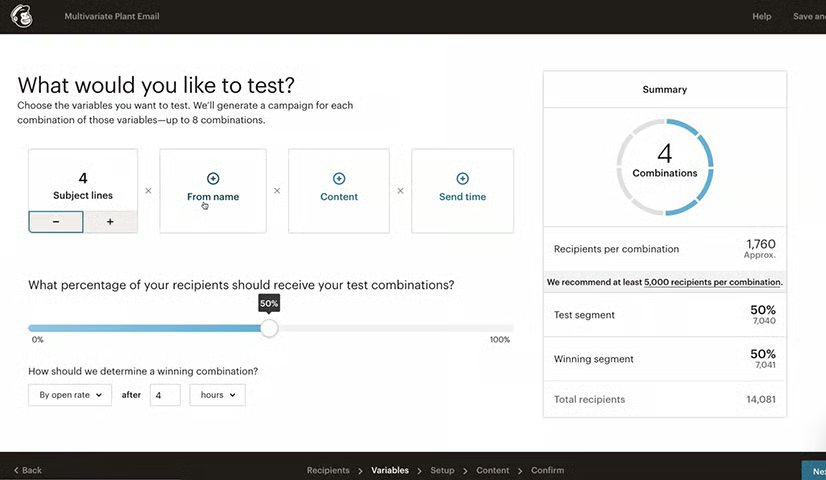
Mailchimp’s A/B testing and automated customer journey make it a good solution for many sales-forward small businesses. It’s especially useful for businesses that rely on repeat customers for revenue growth. This is why it is regularly included in our guide to the best email marketing providers. Try Mailchimp risk-free with the free-forever plan for up to 500 contacts.
Constant Contact: Most Beginner-friendly Email Marketing Campaign
Constant Contact is the OG (short for “original gangster”) of email marketing services. It’s been around long enough to be considered a legacy system, yet over the years, it’s managed to avoid feature bloat and overly complicated interface elements. Consequently, it’s one of the easiest email marketing campaign systems to use.
Martech Tools
- Drag-and-drop email templates
- Reporting
- AI content recommendations
- Marketing CRM
- Web-based sign-up forms
- Polls and surveys
- Landing pages
- Social media posting and ads management
- Segmentation
- Google Ads manager
- Facebook retargeting ads
Pricing
| Lite: $12* | Standard: $35* | Premium: $80* |
|---|---|---|
|
|
|
| *For 500 contacts, billed monthly. Additional contacts available for additional charge. | ||
Constant Contact is simple to use, but it does lack some advanced features of other providers. Analytics are limited, and it may be difficult to gauge the effectiveness of your email campaigns as a result. Also, like Mailchimp, as you add users, your costs can scale dramatically. For more users and more email sends, consider Zoho Campaigns.
This platform has been doing email campaigns for a long time, and they do them well. Its easy-to-use interface is great for beginners, and it offers a generous 60-day free trial to help you determine if it’s right for you. Visit Constant Contact to get started.
Zoho Campaigns: Cheapest Email Marketing Platform for Bulk Sending
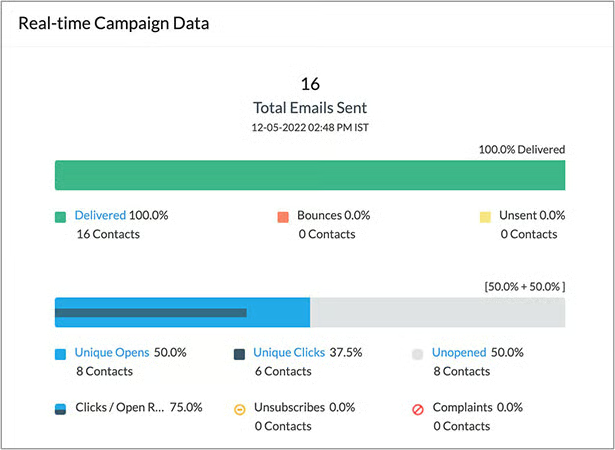
Zoho Campaigns is the email marketing software offered by Zoho, the web-based productivity provider. Zoho Campaigns offers the most affordable email marketing platform we reviewed if you have more than 500 contacts. Plans start at just $3 with unlimited email sends (or use it free forever for up to 2,000 contacts). Campaigns also integrates easily with Zoho’s other products, like its popular CRM.
Martech Tools
- Unlimited email sends on all paid accounts
- Multiple users on all accounts
- Segmentation
- Email templates
- SMS marketing add-on
- Email polls and attachments
- Contact scoring
- Contact tags for easy search
- Time-zone specific delivery
Pricing
| Free: $0 | Standard: $3* | Professional: $4.50* |
|---|---|---|
|
|
|
| *Billed annually | ||
Zoho Campaigns offers great value for the price, but it lacks a drag-and-drop editor. Custom templates are also a challenge for Zoho users. If you need custom templates or prefer a drag-and-drop editor, consider Mailchimp instead.
For the most bang for your email dollars, Zoho Campaigns delivers. Paid plans start at $5.25 a month for 500 users, but for most small businesses, you’ll want to step up to the 4,000-user level at $18 a month. You can try Zoho without risk or commitment on its free-forever plan, which includes up to 500 users and 6,000 email sends.
Best Social Media Martech Companies for Small Business
Social media is playing an increasingly important role in prospect and customer relations. Consumers and business buyers are not only forming relationships with companies through social media posts, but they’re also reaching out via social messaging to inquire about pricing, services, or products, or for customer service. Here are the best social media management tools for your small business:
| Later: Best Social Media Scheduling Platform | |||
|---|---|---|---|
 | From $40 a month |
| |
| Sprout Social: Best Social Media Platform With Free Trial | |||
 | From $249 a month |
| Visit Sprout Socialor read ourSprout Social review |
Later: Easiest Social Media Scheduling Platform
Later is a social media marketing platform that includes a number of tools to make your social media work easier. Its social post scheduling tool is easy to use, includes a calendar so you can see your upcoming posts, and provides optimal post scheduling so your posts appear at the best time to gain traction.
Martech Tools
- Social media scheduler
- Multiple accounts on all platforms
- Instagram captions creator
- AI content assistant
- Analytics with one year of data
- Brand management tools
- Unlimited posts starting with the second tier of service
- Social media management for:
- TikTok
Pricing
| Growth: $40* | Advanced: $80* | Scale: $200* |
|---|---|---|
|
|
|
| *Price is per month, billed monthly. | ||
Later is one of the more affordable social media platforms to get started with. However, it lacks many of the features of more advanced providers. Among the missing features are a social media inbox for messages and commenting and review management. Also, analytics are locked behind higher tiers, while at least basic analytics are a part of most other platforms. For more features, consider Sprout Social instead.
For beginners, Later provides a number of features small businesses will find useful. If you’re looking for a simple social media manager, Later may just fit the bill. You can try it risk-free with its 14-day free trial.
Sprout Social: Best Social Media Platform With Free Trial
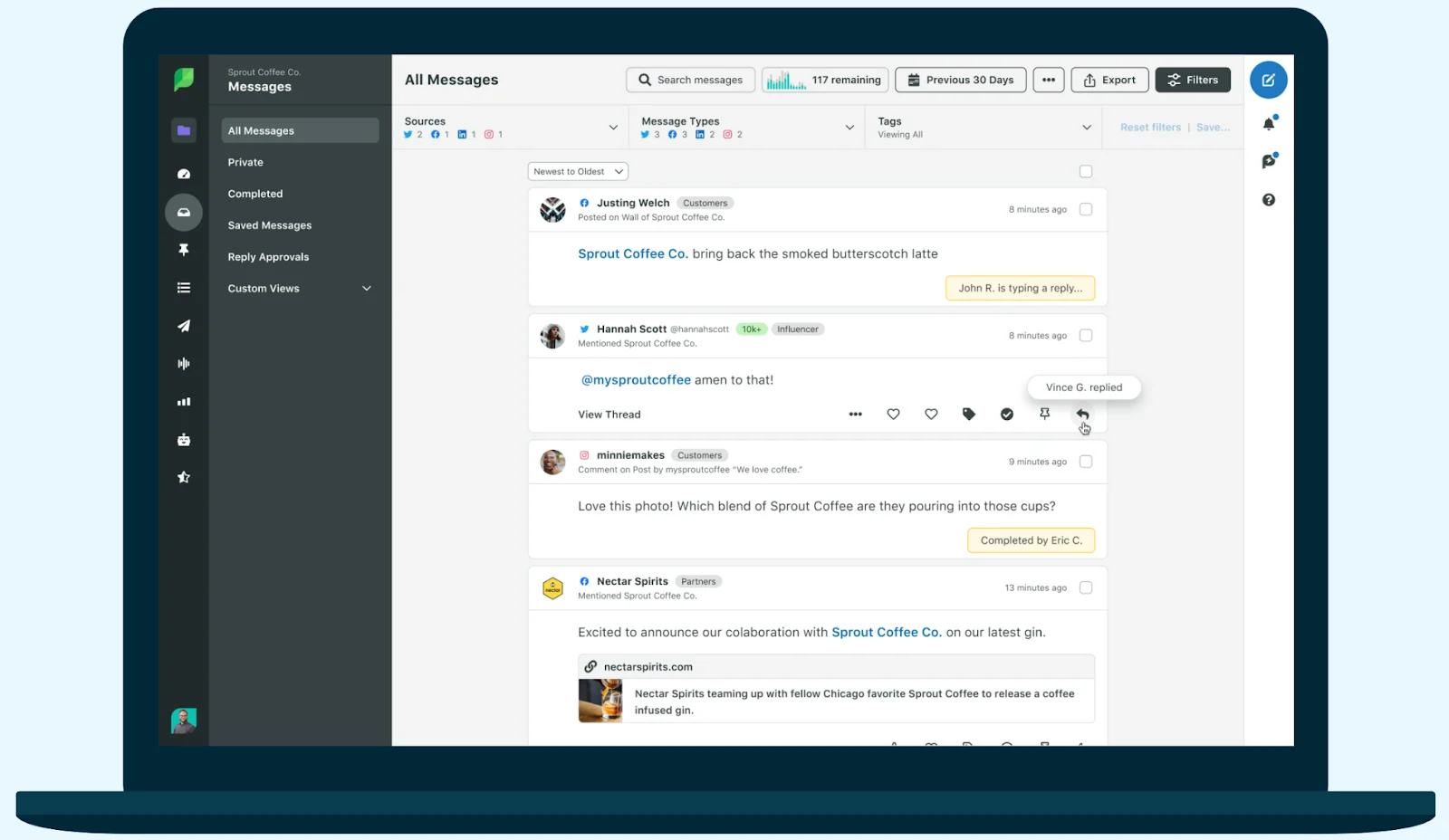
Sprout Social offers a generous, 31-day free trial, which was enough to land it on our list of best free social media schedulers. During the free trial, you can try out all of the platform’s robust features, including its social media scheduler, advanced analytics, and dashboard.
Martech Tools
- All-in-one social media inbox
- AI-powered social listening
- Profile, keyword, and location monitoring
- Advanced analytics
- Integration with help desk, CRM, and ecommerce solutions
- Asset library
- Automated link tracking
Pricing
| Standard: $249* | Professional: $399* | Advanced: $499* |
|---|---|---|
|
|
|
| *Billed monthly, for the first user. Additional users available for additional fee. | ||
Sprout Social stacks up well against competing social media managers. However, it is more expensive than many competitors, and it limits each plan to one user—unless you want to pay a hefty fee. If you’re looking to add more team members, consider Later instead.
When it comes to social media managers, Sprout Social has enough features and data reporting to support most small business needs. Its dashboard provides a clear overview of your social media performance, and with its social calendar, you’ll know what’s posting and when. Try it for 31 days risk-free, no credit card required.
Best SEO Companies for Small Business Martech
Your website is the front line of small business marketing efforts. For many customers, it will be the first place they get to know about your brand. Now more than ever, it’s important that your small business website be optimized to rank well on search engines. Here are two tools to help you find the right keywords and grow your organic search traffic:
| Semrush: Best All-in-one SEO Suite | |||
|---|---|---|---|
 | Free plan, paid plans from $108.33 a month |
| |
| Serpstat: Best Simple Keyword Research Tool | |||
 | From $50 a month |
| |
Semrush: Best All-in-one SEO Suite
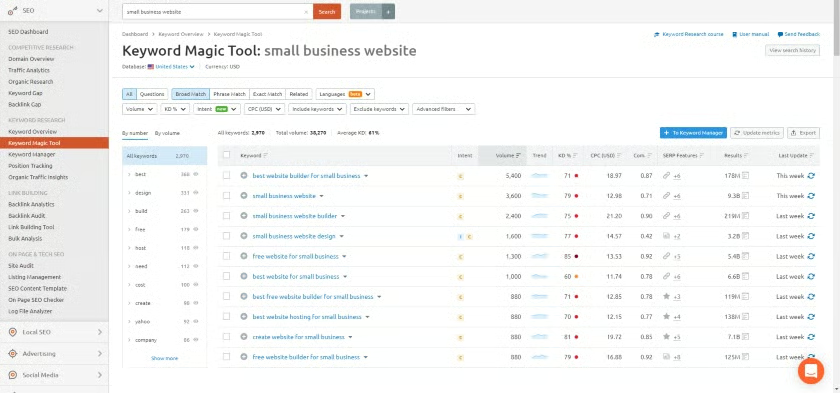
Semrush is an all-in-one set of search engine optimization (SEO) tools to help you maximize the search performance of your small business website. It provides comprehensive tools for SEO research, optimization, checking website traffic, competitor analysis, and website audits. When combined with Semrush Academy, a free learning service the company provides, you can become an SEO expert and drive traffic to your site.
Martech Tools
- Keyword research
- On-page SEO
- Competitor analysis
- Content marketing
- Local SEO
- Rank tracking
- Social media management
- Business directory listings management
- Link building
- Google advertising performance research
Pricing
| Free: $0 | Pro: $108.33* | Guru: $208.33* |
|---|---|---|
|
|
|
| *Billed annually. Monthly billing available at a higher rate. | ||
Semrush is a full-featured SEO platform, and therein lies the challenge. It may be too much for beginners to take in and master. If you need a simpler system with fewer features that’s easier to use, or you’re just looking for keyword research, consider Serpstat instead.
Semrush’s features are bar none more advanced than any other SEO platform. That’s why it’s at the top of our list of SEO audit tools. Plans start at an affordable $108.33 a month, and Fit Small Business readers can enjoy an exclusive, 14-day free trial, risk free.
Serpstat: Best Simple Keyword Research Tool
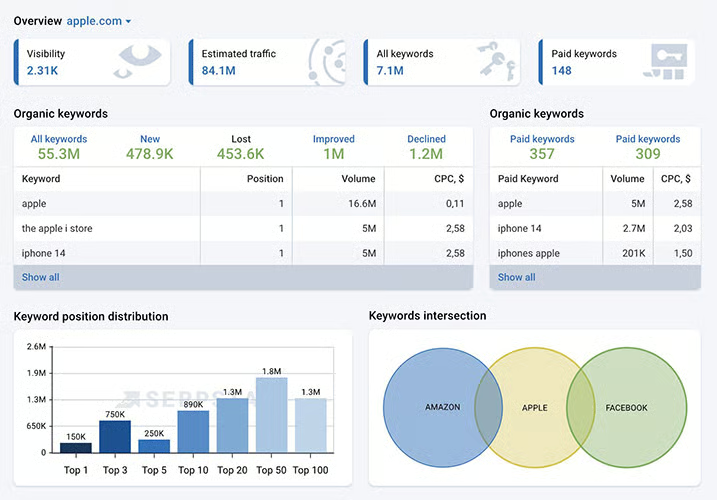
Serpstat is an SEO beginner’s best friend. Its easy-to-master keyword research tool will help you choose the best keywords to increase traffic to your website. In addition, Serpstat offers keyword clustering, competitor analysis, and a site audit feature. It even has an AI content generator to help you craft effective website copy.
Martech Tools
- Keyword research tool
- Keyword cluster map
- AI content generator
- Competitor analysis
- SEO site audit
Pricing
| Individual: $50* | Team: $100* | Agency: $410* |
|---|---|---|
|
|
|
| *Billed annually. Monthly billing available at higher rate. | ||
Serpstat is a great keyword research tool, but it lacks many features you’ll need to do a full optimization of your website. Among the tools you might find lacking are competitor tracking and adjacent keyword recommendations. For a more robust experience (or a free-forever limited plan), consider Semrush.
Serpstat can help you get a jump-start on SEO with its simple keyword research tool and keyword cluster map. The AI content assistant is a great place to get ideas for keyword content. With paid plans starting at just $50 a month, it is an affordable SEO alternative. You can try it for seven days risk-free.
Best Web Hosting Providers
Building a website and optimizing it for search engines also means you need a web hosting provider. Many web hosting providers provide you with the tools you need to not only host your website but to build it, as well. Here are three leading web hosting providers that include a website builder as part of their services:
| Hostinger: Most Beginner-friendly Website Builder | |||
|---|---|---|---|
 | $2.99 a month the first year |
| Visit Hostingeror read ourHostinger website builder review |
| Wix: Best Website Builder for AI-assisted Design & Content | |||
 | Free plan, paid plans from $16 |
| Visit Wixor read ourWix review |
| GoDaddy: Best Website Builder for Appointment Booking | |||
 | Free plan, paid plans from $9.99 |
| Visit GoDaddyor read ourGoDaddy website builder review |
Hostinger: Most Beginner-friendly Website Builder
Hostinger is primarily a web hosting provider. However, it offers a remarkably easy-to-use website builder that includes an AI design assistant. The website builder is menu-driven, so the elements you want to incorporate are never more than a click or two away. The websites Hostinger Builder creates are elegant, professional-looking, and simple to optimize for search engines.
Watch this tutorial video showing how to use the Hostinger website builder to learn more:
Martech Tools
- Easy-to-use website builder
- AI-driven design assistant
- Full ecommerce in the base plan (physical and digital products)
- Integrate Google and Facebook Pixels from the dashboard for advertising
- One-click to add remarketing on Google and Facebook
- Monetize your blog with easy install of Google AdSense
Pricing
| Website Builder & Web Hosting: $2.99* |
|---|
|
| *Billed annually. Plan automatically renews at $8.99 a month. |
Using the Hostinger website builder is simple, but therein lies its biggest downside. It lacks many of the advanced design capabilities other website designers include, like a true drag-and-drop interface and custom-designed elements. This can be a detriment if you need more advanced functionality. For a more robust editor design-wise, use Wix.
It’s hard to argue with Hostinger’s price. At $2.99 a month for the first year, it’s the most affordable website builder we’ve reviewed. It includes enough features to make it an effective solution for many small businesses. While Hostinger does not offer a free trial, it does provide new customers a 30-day, money-back guarantee, and the cost to get started is under $40 a year.
Wix: Best Website Builder for AI-assisted Design & Content
Wix is a full-featured, AI-rich website builder. Its drag-and-drop editor gives you almost unlimited design freedom for every page of your website. It offers users an AI website designer and an AI content creator that, together, can help you have a website up and running in just a few hours. Plus, Wix is easy to use, and that’s why it consistently lands at or near the top of our best website builders list.
Check out the video below, which shows how to build a Wix website in a few easy steps:
Martech Tools
- The best drag-and-drop website builder
- AI content creator (copywriting and images)
- AI website design assistant
- Free domain name and SSL
- The most feature-rich ecommerce plans on the market: appointment booking, ticketing, online ordering, restaurants, subscriptions, and memberships
- Top-level SEO website builder
- More than 300 one-click integrations for advanced functionality
Pricing
Wix has a free-forever plan, but we don’t recommend it for business use. It hosts your site on a Wix subdomain and displays Wix branding, which isn’t credible enough for professional use. Use the free version to test the site builder, then upgrade to a paid plan to host your site on a branded business domain name.
| Light: $16* | Core: $27* |
|---|---|
|
|
| *Billed annually. | |
Wix has a lot to offer in terms of design freedom and functionality. With more than 300 add-ons, it’s possible to achieve just about any level of functionality you need, making Wix a worthy rival to WordPress.
However, all that functionality comes at a higher cost. While Wix starts at just $16 a month, much of what small businesses need will require either expensive paid add-ons or stepping up to the Core plan for $27. While not as feature-rich, Hostinger or GoDaddy will be less expensive.
For your small business needs, Wix offers the most robust solution short of building a WordPress website, and it’s far easier to use than WordPress. You can try Wix on its ad-supported, free-forever plan, but once you’re ready to roll out your website, step up to the Light or Core subscription for a more professional face.
GoDaddy: Best Website Builder for Appointment Booking
If you operate a small business that relies on customers booking appointments for sales or service, GoDaddy provides a website builder that can help you move appointment booking online. Its website builder is renowned for the ease with which you can start taking appointments, and at just $9.99 a month for paid plans the first year, it’s affordable too.
Watch how easy it is to build a website on GoDaddy in the video tutorial below:
Martech Tools
- Section-based page building
- AI-generated template with around 20 layout variations
- Appointment booking
- Chatbots
- Ecommerce (physical and digital products)
- Basic SEO and marketing integrations
Pricing
Like Wix, GoDaddy has a free-forever plan, but it’s not credible for business use as it hosts your site on a GoDaddy subdomain with ads.
| Basic: $9.99* | Premium: $14.99* | Commerce: $16.99* |
|---|---|---|
|
|
|
| *Cost with annual billing the first year; all renew at a higher rate. Monthly billing is available. | ||
GoDaddy’s site builder is built for taking appointments online and building easy-to-operate web stores. However, it leaves a lot to be desired when it comes to design and customization. A template is chosen for you during setup, and your customizations are limited to prebuilt content blocks. This can stifle your website’s design and make for amateurish final layouts. For more customization, go with Wix.
If you need to get a simple website up fast, taking appointments and selling products online, GoDaddy’s website builder can help. It offers one of the fastest ways to get your site up and running, and pricing starts at an affordable $9.99 a month. You can get started on their free-forever trial to make sure GoDaddy is right for you.
How We Decided Which Martech Companies Are Best for Small Business
While our list of the best martech companies is far from comprehensive, we worked to hone down the basic martech needs to a select few providers in categories that virtually every small business requires. This included reviewing CRMs, productivity tools, SEO suites, email and social media marketing providers, and web hosting providers.
In each category, we relied on objective factors like comparative pricing and general features to determine which providers to include. We also considered niche features each provider offers to enhance marketing efforts. We also leaned into decades of martech experience to select providers that deliver working solutions to your marketing technology needs.
Frequently Asked Questions
What is a martech company?
A martech company is any technology product, software, or service provider that can be used in marketing or promoting a business. This includes tools for creating marketing assets, posting or promoting products or services, communicating with customers, tracking customer journeys, and analyzing customer behavior and marketing outcomes. Collectively, the tools and technology a marketing team uses is called a martech stack.
What types of companies use Martech?
Virtually all businesses, large or small, use technology in marketing. If your company has a website or communicates with customers via email or social media, this is part of your martech stack. Your martech stack will depend largely on what kind of industry you’re in and the customers you serve. However, regardless of your business model, you’ll most likely use marketing technology, sometimes daily.
Should my business have a Martech stack?
Yes, your business needs a martech stack. But the good news is that it probably already has one. A martech stack includes any of the technologies and tools you use to promote your business, communicate with customers, or track advertising and marketing performance.
Bottom Line
By choosing the right martech stack components, you can supercharge your marketing and advertising efforts and grow your customer base. At the same time, with the right tools, you’ll save time and money. To get a jump-start on your martech stack, consider putting HubSpot to work for you. They offer a nearly one-stop shop for almost all of your marketing support needs, including web hosting, email marketing, and integrated CRM.
