






The best AI marketing tools for small businesses are most useful when they solve a specific workflow problem. A website generator won’t replace an email automation platform, just as a content writer won’t provide the same value as a design or social media tool. Choosing by use case helps you avoid paying for impressive features that don’t address your most time-consuming marketing tasks.
When comparing the best AI tools for marketing, start with the activity creating the biggest bottleneck. My picks cover the full marketing lifecycle, from establishing a brand and building a website to creating content, managing campaigns, distributing press releases, and researching customers. Whatever you choose, treat AI as an assistant: review its output for accuracy, originality, and alignment with your brand before publishing.
Best AI tools for marketing | Best for… | Starting price* |
| Hostinger | Building websites | $3.99/month |
| Bluehost | Guided AI website creation | $4.99/month |
| Canva | Graphic design | Free or $12/year |
| Mailchimp | Email-first multichannel marketing | Free or $13/month |
| Klaviyo | Marketing automation | Free or $20/month |
| Tailor Brands | Creating your brand identity | Free or $199/year |
| Buffer | AI social media assistance | Free or $5/channel/month |
| Writesonic | Writing content | $79/month |
| Semrush Content Toolkit | SEO content planning | $60/month |
| HubSpot AI Blog Writer | Blogging | Free or $7/month/seat |
| MarketersMEDIA | AI press release generation | $189/release |
| ChatGPT | Conducting market research | Free or $8/month |
*Starting prices may require annual billing or include usage limits. Costs can also vary by contacts, channels, AI usage, and selected features.
- Overview of the best AI marketing tools for small businesses
- Hostinger: Best AI marketing software for building websites
- Bluehost: Best for guided AI website creation
- Canva: Best for graphic design
- Mailchimp: Best for email-first multichannel marketing
- Klaviyo: Best for marketing automation
- Tailor Brands: Best for creating your brand identity
- Buffer: Best AI social media assistant
- Writesonic: Best for writing content
- Semrush Content Toolkit: Best for SEO content planning
- HubSpot AI Blog Writer: Best for blogging
- MarketersMEDIA: Best for AI press release generation
- ChatGPT: Best for conducting market research
- Frequently asked questions (FAQs)
- Bottom Line
Overview of the best AI marketing tools for small businesses
Best AI tools for marketers | Core AI capability | Typical workflow |
| Hostinger | Website generation | Builds and publishes websites and landing pages |
| Bluehost | WordPress site generation | Builds, hosts, and publishes WordPress sites |
| Canva | Generative design | Creates graphics and videos and schedules social content |
| Mailchimp | Campaign content and optimization | Creates and automates email-first multichannel campaigns |
| Klaviyo | Predictive segmentation and personalization | Runs behavior-triggered ecommerce lifecycle flows |
| Tailor Brands | Brand identity generation | Creates logos, branded assets, and websites |
| Buffer | Social copy and repurposing | Creates, schedules, and publishes social posts |
| Writesonic | Marketing copy generation | Produces articles, ads, and website copy |
| Semrush Content Toolkit | SEO planning and optimization | Builds content briefs and optimized articles |
| HubSpot AI Blog Writer | Blog ideation and drafting | Generates topics, outlines, and drafts in HubSpot |
| MarketersMEDIA | Press release generation | Writes and distributes press releases |
| ChatGPT | Research synthesis and content generation | Organizes information, generates ideas, and drafts copy |
Why you can trust Fit Small Business
To ensure we provide readers with the best answers, the Fit Small Business editorial process adheres to strict standards, including rigorous research, assessment, and provider scoring.
In this review, I evaluated the best AI marketing tools for small businesses based on their intended use cases, AI capabilities, output quality, ease of use, pricing, scalability, and support resources. I also tested each platform’s core workflows and reviewed product documentation and user feedback to identify practical strengths and limitations.
Furthermore, I leverage the following work experiences when carrying out software reviews:
- Over 14 years of editorial research and writing
- Over eight years of writing expert reviews about sales and business technologies
- Over two years in insurance sales and team management
- Almost two years in sales territory management


Methodology: How I evaluated the best AI marketing tools
Because these tools serve different marketing functions, I did not use a universal scoring rubric or evaluate them against identical features. Instead, I assessed how well each platform performs its primary task and whether it offers meaningful value for small businesses.
- Usefulness: I prioritized the best AI tool for marketing that addresses common marketing needs. These include website creation, branding, content writing, SEO, email automation, social media management, press release distribution, and market research.
- AI capabilities and output quality: I assessed whether each platform’s AI meaningfully improves its core workflow. I also reviewed the relevance, accuracy, originality, and usability of its generated content, recommendations, or assets.
- Pricing and value: I compared free options, starting prices, usage limits, and paid features. Because the best AI tools for marketing fall into different categories, I evaluated value within each tool’s intended use case rather than comparing prices directly.
- Ease of use: I considered setup, navigation, templates, workflow design, and learning curve, favoring tools that small teams can adopt without extensive technical expertise.
- Scalability: I examined whether each platform can accommodate growing contact lists, campaign volume, publishing needs, marketing channels, and team sizes.
- Support and user feedback: I reviewed available support channels, educational resources, product documentation, and recurring user feedback to identify common strengths, drawbacks, and reliability concerns.
My final selections of the best AI marketing tools reflect the suitability for their featured use case rather than an overall numerical ranking.
Hostinger: Best AI marketing software for building websites
Why I chose Hostinger
A website is one of the first assets I recommend creating when establishing your brand presence. It gives customers a central place to discover your business, submit inquiries, make purchases, and engage with your brand online.
Hostinger is my top AI tool for building business websites because its AI Builder can turn an initial prompt into a publishable site without requiring coding or design experience. Manual mode generates the site and lets you refine it with a drag-and-drop editor, while Agentic mode allows you to build and revise websites or web apps conversationally. Built-in tools for writing, blogging, images, logos, heat maps, and SEO also reduce the need for separate content and design software.
Hostinger combines its website-building tools with hosting, while ecommerce capabilities are available for businesses that want to sell online. You can customize the generated layout, colors, copy, images, and branding rather than being locked into the initial design.
The main drawbacks are that Hostinger has no ongoing free plan and its lowest advertised monthly rate requires a long upfront commitment before renewing at a higher price. Agentic-mode usage is also subject to AI credits. Even with these limitations, Hostinger is one of the best marketing AI tools that provide a clear path from a business idea to a polished, functional website, making it my top choice for AI website building.
Also read: How to Use the Hostinger Website Builder (+ Video Tutorial)
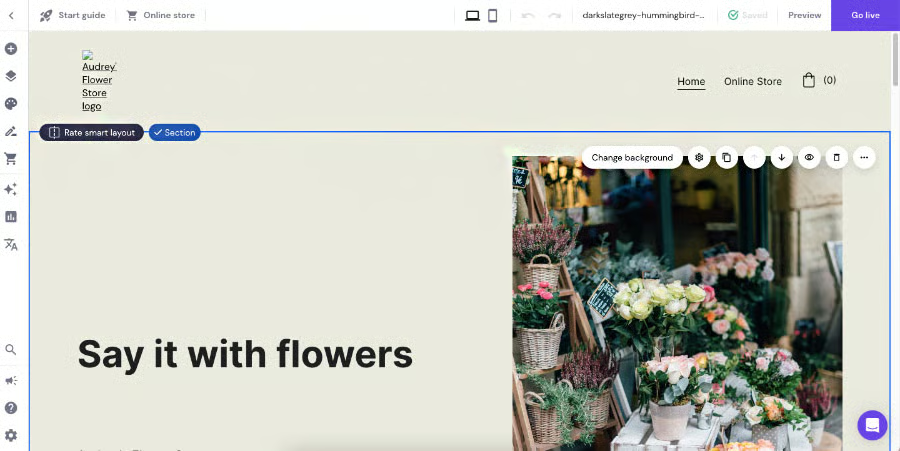
Here’s an example of a website I generated with Hostinger. (Source: Hostinger) 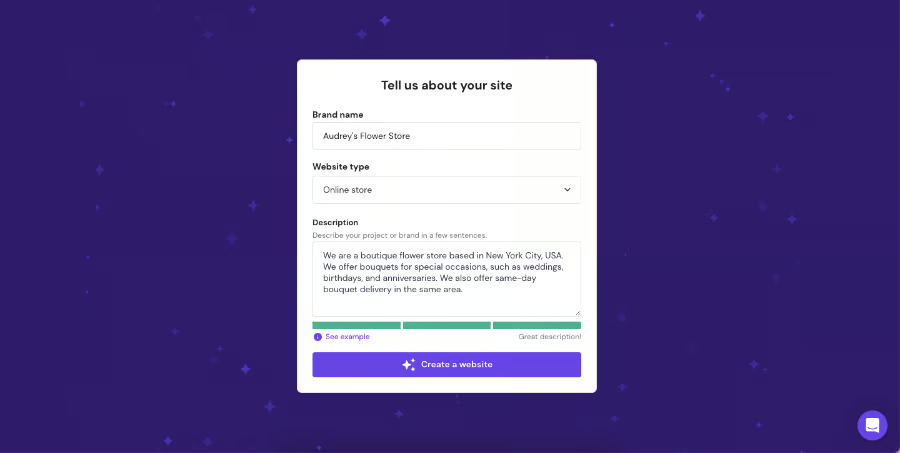
An example of the prompts I answered (Source: Hostinger)


Key AI features
- Website builder: Generates a complete website from a business description, including its layout, structure, and initial content. You can then customize it with drag-and-drop editing or conversational prompts.
- Content writer: Creates and revises website copy, product descriptions, and other marketing content within the builder.
- Blog post generator: Produces blog drafts from a topic or prompt that you can edit and publish directly to your site.
- Image generator: Creates original visuals for website pages, blog posts, and other branded content.
- Logo maker: Generates customizable logo designs to help establish your business’s visual identity.
- Site heat maps: Predict where visitors are likely to focus their attention, helping you improve page layouts and calls to action.
- SEO keyword generator: Suggests relevant focus keywords and helps optimize page titles, descriptions, and other SEO settings.
Hostinger pricing*
Hostinger AI Builder plans | Premium | Unlimited | Cloud Startup |
| Monthly price, billed annually | $3.99 Renewal: $10.99 | $4.99 Renewal: $16.99 | $9.99 Renewal: $25.99 |
| Monthly price, billed monthly | $11.99 | $18.99 | $27.99 |
| Websites | 3 | Unlimited | Unlimited |
| AI credits for website and app creation | 5 | 15 | 15 |
| Mailboxes per website | 2 | Unlimited | Unlimited |
*Also available in two-year and four-year contracts.
Bluehost: Best for guided AI website creation
Why I chose Bluehost
I recommend Bluehost for small businesses that want more guidance than a basic prompt-to-website generator provides. Its AI Website Builder asks follow-up questions about your business, brand, and design preferences before creating the site. You can also submit an existing website for visual inspiration, and the builder will use its layout, colors, and tone as guidance without copying its content.
After Bluehost generates the site, you can revise its copy, images, colors, and layout by chatting with the AI agent or using manual editing controls. Hosting, a custom domain, SSL security, backups, and other publishing essentials are available within the same platform, reducing the number of services you need to configure separately. Paid plans also include Yoast SEO Premium for additional search optimization support.
However, its convenience comes with usage limits. The free trial uses a temporary domain and includes a limited number of AI edits, while paid plans impose a monthly AI-edit allowance. Ecommerce also requires Bluehost’s separate AI Store product. Bluehost is therefore one of the top AI marketing tools for businesses that value guided setup, conversational editing, and bundled website essentials over unlimited AI usage.
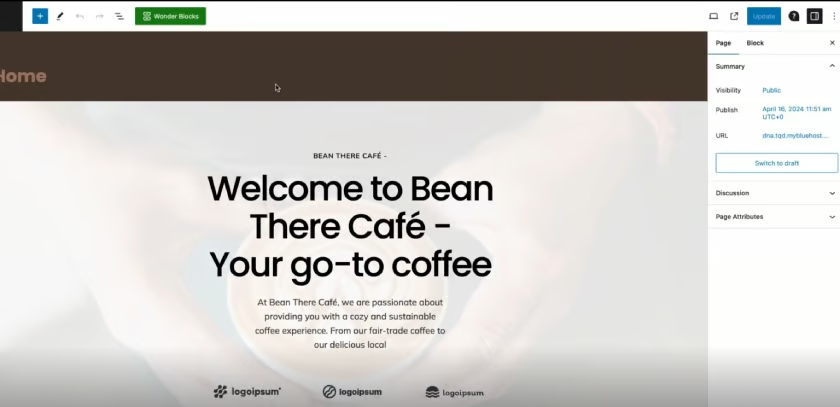
An example of a WordPress website generated by Bluehost (Source: Bluehost) 
You can choose from three versions and customize it further in the drag-and-drop editor. (Source: Bluehost)


Key AI features
- Agentic website generation: Creates an entire website from a plain-language description of your business, audience, and goals.
- Guided prompt refinement: Asks follow-up questions about your brand, industry, colors, and preferred style before building the site.
- Reference-site matching: Uses a website URL as inspiration for the new site’s layout, colors, and tone without copying its text or images.
- Conversational editing: Lets you revise copy, images, colors, sections, and other design elements by describing the changes you want.
- AI-assisted content and design: Generates the initial site structure, copy, imagery, and visual direction from your brief and uploaded brand assets.
Bluehost pricing
Bluehost Standard plans | Starter | Business | eCommerce Essentials |
| Monthly price, billed annually | $4.99 Renewal: $11.99 | $7.99 Renewal: $15.99 | $15.99 Renewal: $23.99 |
| Monthly price, billed every 36 months | $3.99 Renewal: $9.99 | $6.99 Renewal: $13.99 | $14.99 Renewal: $21.99 |
| Websites | 10 | 50 | 100 |
| Web storage | 10GB | 50GB | 100GB |
| Visits per month | 40,000 | 200,000 | 200,000 |
AI Website Builder free trial: 14 days
Canva: Best for graphic design
Why I chose Canva
Canva is one of the best AI marketing tools that combine generative AI with an approachable visual editor. Small businesses can create social posts, presentations, flyers, videos, advertisements, and other marketing materials without advanced design software or professional design skills.
Its value extends beyond generating a single asset. Magic Design creates editable layouts from prompts or uploaded media, Magic Write develops and refines copy, and Magic Media produces images and short videos. Each result remains editable inside Canva, allowing teams to move from an initial concept to a finished campaign asset without switching platforms.
That said, free users receive restricted AI access, while advanced capabilities and higher usage allowances require an upgrade. Generated assets may also need adjustments to align with brand standards and avoid a template-like appearance. However, for small businesses that regularly produce visual content across multiple channels, Canva offers the strongest balance of AI assistance, editing control, and format variety in this guide.
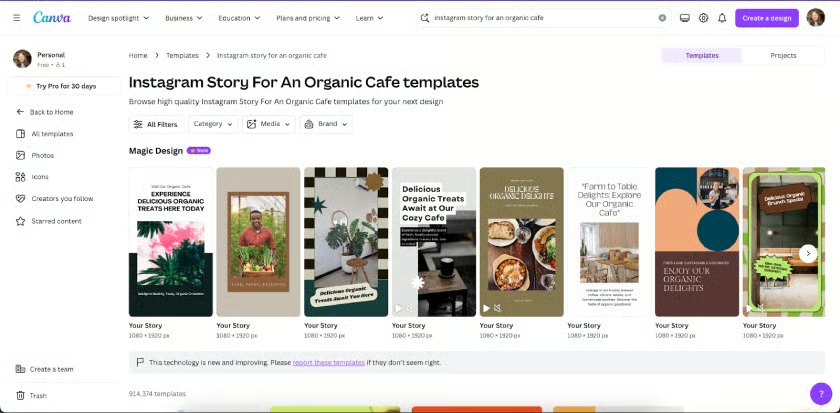
Canva’s Magic Design Tool can generate a selection of graphic design templates based on a prompt. (Source: Canva) 
A sample Instagram Story generated by Canva’s Magic Design Tool (Source: Canva)


Key AI features
- Canva AI: Generates and refines designs, text, images, and creative concepts through a conversational interface.
- Magic Design: Creates editable templates from a written prompt, uploaded image, video, or existing content.
- Magic Media: Produces images and short video clips from text prompts for campaigns and branded content.
- Magic Write: Drafts, summarizes, expands, and rewrites copy for captions, presentations, documents, and other assets.
- Magic Edit: Adds, replaces, or modifies selected image elements using written instructions.
- Magic Switch and Translate: Reformats, resizes, and translates designs for different platforms, formats, and audiences.
Canva pricing
Canva Individual and Business plans | Free | Pro | Business | Enterprise |
| Monthly price, billed annually | $0 for 1 user | $12/user | $20.83/user | Custom |
| Monthly price, billed monthly | $0 for 1 user | $18/user | $25/user | Custom |
Free trial: 30 days
Mailchimp: Best for email-first multichannel marketing
Why I chose Mailchimp
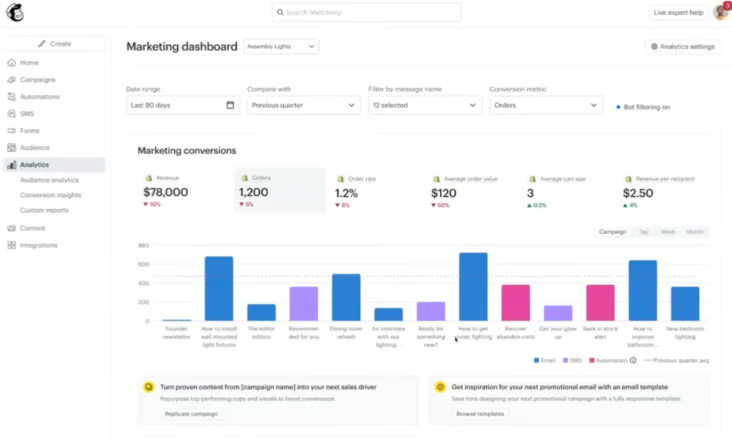
Mailchimp ranks among our best email marketing platforms for small businesses because it extends well beyond standalone email campaigns. It brings campaign creation, audience management, behavioral automation, landing pages, forms, SMS, social media, and digital advertising into one platform. This makes it a strong fit for businesses that rely on email but want to coordinate additional channels without piecing together several applications.
Its AI capabilities support the full campaign lifecycle. Mailchimp can generate copy, improve subject lines, recommend sending times, predict customer behavior, personalize product suggestions, and interpret performance data. Marketing automation flows can then use customer activity and connected-app data to trigger more relevant email and SMS messages.
One area that requires attention is audience management. Mailchimp treats each audience separately, so storing the same contact in multiple audiences increases the total contact count. Its predictive tools also become more useful after you connect an ecommerce store and collect sufficient campaign and purchase history. Still, it delivers a strong combination of AI assistance, automation depth, and multichannel reach for businesses with established customer data and an email-led strategy.
Key AI features
- Write with AI: Generates, rewrites, and polishes email copy within the campaign editor.
- Subject Line Helper: Evaluates subject lines and provides real-time feedback before a campaign is sent.
- Send Time Optimization: Analyzes audience engagement patterns and recommends when contacts are most likely to engage.
- Predictive analytics: Forecasts purchase likelihood, churn risk, customer lifetime value, and other customer behaviors.
- Product recommendations: Analyzes ecommerce activity to select relevant products for individual contacts.
- Analytics AI: Answers natural-language questions about campaign, audience, and revenue performance and suggests potential next steps.
Mailchimp pricing
Mailchimp Email Marketing plans | Free | Essentials | Standard | Premium |
| Monthly price for first 12 months | $0 | From $6.50 | From $10 | From $175 |
| Monthly price after 12 months | $0 | From $13 | From | From $350 |
| Seats | 1 | 3 | 5 | Unlimited |
| Maximum contact count | 250 | 50,000 | 100,000 | Custom |
| Monthly email sends | 500 | 10x contacts | 12x contacts | 15x contacts |
Free trial: 14 days
Klaviyo: Best for marketing automation
Why I chose Klaviyo
Klaviyo turns real-time customer behavior into personalized campaigns. It uses browsing activity, purchases, product interactions, and engagement history to trigger email, SMS, and mobile push journeys. K:AI (Klaviyo AI), the platform’s built-in artificial intelligence layer, adds content generation, natural-language segmentation, predictive insights, and campaign optimization. This makes it a powerful email marketing tool for ecommerce and other consumer-focused businesses.
Klaviyo is less compelling for businesses without substantial commerce data or those that only need straightforward newsletters. Its more sophisticated workflows take time to structure, and certain predictive features require sufficient customer and order history. For growing ecommerce brands, however, Klaviyo provides the data depth and automation flexibility to personalize campaigns throughout the customer lifecycle.
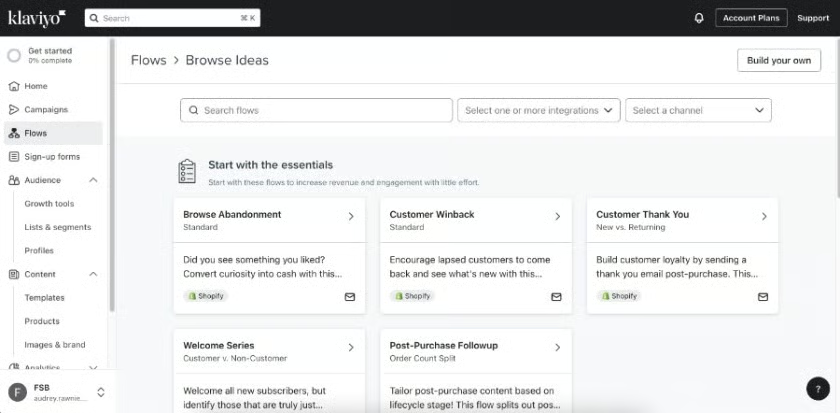
Klaviyo lets you build custom and AI-powered campaign automations. (Source: Klaviyo) 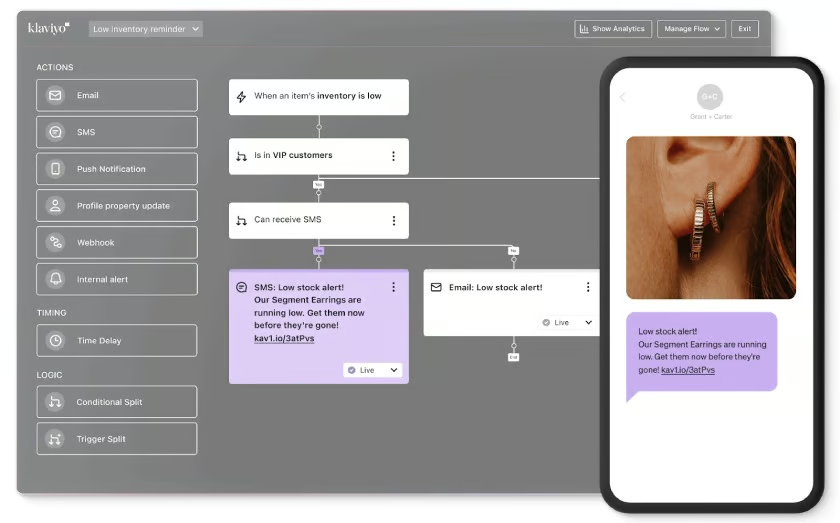
You can build your workflows or generate them using AI. (Source: Klaviyo)


Key AI features
- Composer: Uses conversational prompts to create campaigns and automations, analyze performance, and recommend improvements based on your business context and Klaviyo data.
- Segments AI: Converts natural-language descriptions into audience conditions, reducing the manual work involved in building targeted segments.
- Predictive analytics: Forecasts customer lifetime value, churn risk, next-order timing, and other likely behaviors to support more precise targeting.
- Product recommendations: Uses browsing activity, purchase history, catalog information, and customer data to surface relevant products for each shopper.
- Smart Send Time: Analyzes email engagement patterns to identify when an audience is most likely to open and interact with a campaign.
Klaviyo pricing
| Klaviyo plans | Free | Marketing |
| Monthly price, billed monthly | $0 | From $20 |
| Contacts | 250 | From 500 |
| Emails per month | 500 | From 500 |
| Composer (AI campaigns and analytics) | $5 of usage/month | ✓ |
| Mobile messaging | $5/month | ✓ |
Tailor Brands: Best for creating your brand identity
Why I chose Tailor Brands
Building a cohesive brand identity involves more than creating a logo. Your colors, typography, website, business cards, social media graphics, and merchandise should all present a consistent visual identity. Tailor Brands simplifies this process with an AI Logo Maker that generates original concepts from your business details and design preferences. You can then customize the result and apply it across other branded materials.
Compared with Canva, Tailor Brands is a guided business-building platform rather than a broad creative workspace for producing frequent campaigns, presentations, and videos. Some downloadable assets and services also require paid access. Still, it is a convenient option for entrepreneurs who want to establish a professional visual identity and create essential brand materials without hiring a designer or branding agency.
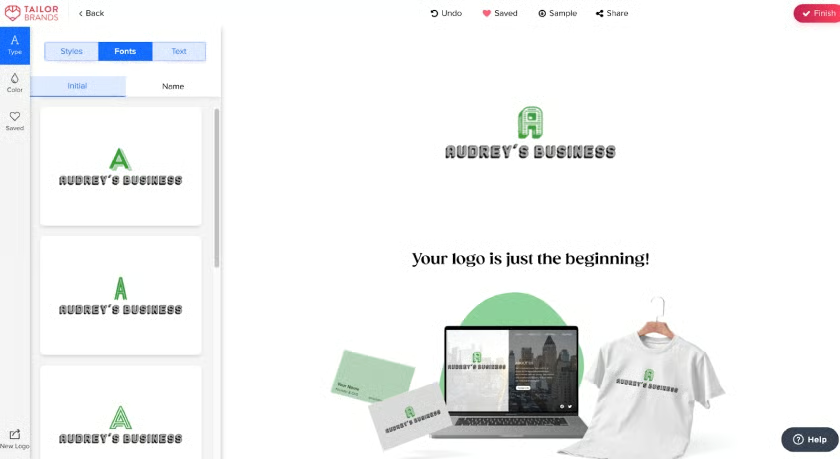
Tailor Brands makes it easy to generate logos and other branding assets. (Source: Tailor Brands) 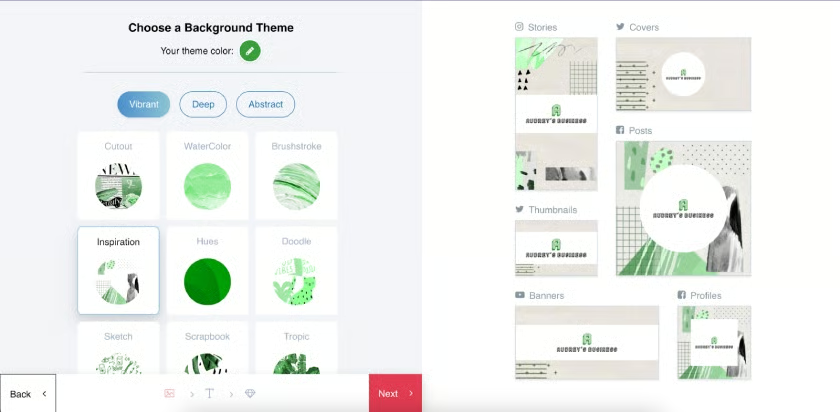
Use your logo to generate other marketing assets. (Source: Tailor Brands)


Key AI features
- AI Logo Maker: Generates original logo concepts based on your business name, industry, style preferences, and design choices.
- Navi AI assistant: Provides personalized guidance for setting up, managing, and growing your business through the platform.
- Logo design studio: Lets you refine generated logos by changing their colors, fonts, icons, layouts, and other visual elements.
- Website builder: Creates a branded business website using customizable, code-free templates.
- Branded asset creation: Applies your visual identity to business cards, social media templates, digital cards, apparel, and other merchandise.
Tailor Brands pricing
Tailor Brands LLC plans:
- Lite: $0 + state fees
- Essential: $199/year + state fees
- Premium: $249/year + state fees
Buffer: Best AI social media assistant
Why I chose Buffer
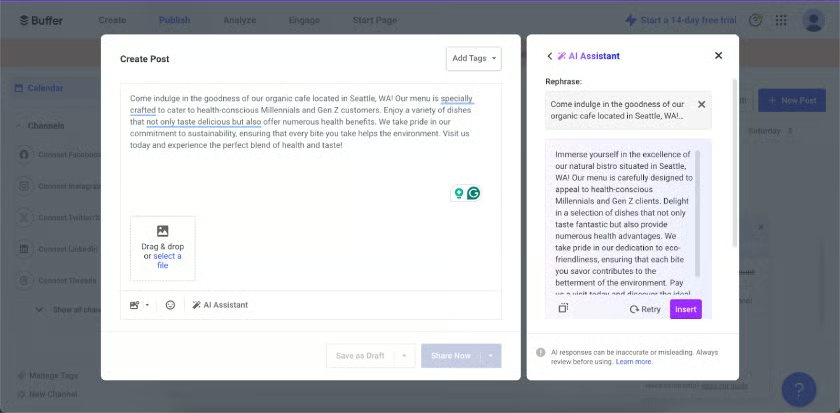
Buffer is a strong fit for small businesses that need AI assistance with everyday social media marketing. Its AI Assistant can brainstorm ideas, draft posts, adjust tone, and repurpose existing content for different platforms. Because these tools sit alongside Buffer’s content calendar, publishing scheduler, comment inbox, and analytics, users can move from idea to publication without switching between multiple applications.
The platform’s AI capabilities focus on written content rather than visual production, so you will need a separate creative tool — like Canva or Unsplash — to produce graphics and videos. It is also not designed for advanced, cross-channel campaign automation. Even so, Buffer is a practical choice for creators and small teams that want accessible AI writing, scheduling, engagement, and performance insights in one workspace.
Key AI features
- Content idea generation: Produces post ideas from short prompts, audience details, campaign themes, or business topics.
- Social post creation: Turns an idea into publishable copy tailored to a specific audience, tone, and social network.
- Content repurposing and refinement: Rewrites, shortens, expands, summarizes, translates, or changes the tone of existing content.
- AI-powered Takeaways: Analyzes social performance and surfaces actionable patterns without requiring users to interpret every metric manually.
- AI assistant integrations: Connects Buffer with tools such as ChatGPT and Claude through its MCP server, allowing users to draft, schedule, and manage posts using natural-language instructions.
Buffer pricing
Buffer plans | Free | Essentials | Team |
| Monthly price, billed annually | $0 for 3 channels | $5/channel | $10/channel |
| Monthly price, billed monthly | $0 for 3 channels | $6/channel | $12/channel |
| Users | 1 | 1 | Unlimited |
| Scheduled posts per channel | 10 | Unlimited | Unlimited |
| Content ideas | 100 | Unlimited | Unlimited |
Free trial: 14 days
Writesonic: Best for writing content
Why I chose Writesonic
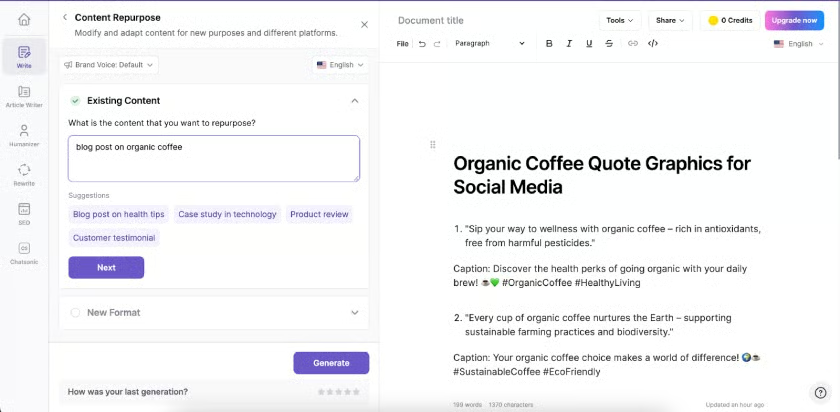
Writesonic covers a wider range of written marketing formats than most single-purpose AI writers. It can produce articles, product descriptions, landing pages, emails, advertisements, and social posts. Its AI Article Writer also incorporates current research, citations, internal links, FAQs, calls to action, and brand-specific writing preferences. This combination makes Writesonic a top AI content writer for businesses that regularly publish across multiple channels.
The platform has expanded into SEO and AI search visibility, giving it more depth but also making it more complex than a basic copy generator. Its output can still contain inaccuracies, unsupported claims, or generic phrasing, so every draft requires human fact-checking and editing. Nevertheless, Writesonic can accelerate research, drafting, optimization, and content repurposing for teams prepared to provide clear source material and editorial oversight.
Key AI features
- AI Article Writer: Produces research-backed long-form content with citations, internal links, FAQs, calls to action, and optional cover images.
- AI Content Agent: Creates multiple content formats using defined brand voice, audience, structural, and style requirements.
- Chatsonic: Supports conversational research and content creation using real-time web information and multiple AI models.
- Writing Style: Learns preferred tone, vocabulary, and narrative patterns to keep content aligned with a brand’s identity.
- Content optimization: Adds keywords, internal links, source citations, and structural elements that improve readability and search visibility.
Writesonic pricing
Writesonic Brands plans | Starter | Basic | Growth | Enterprise |
| Monthly price, billed annually | $79 | $199 | $399 | Custom |
| Monthly price, billed monthly | $99 | $249 | $499 | Custom |
| AI articles per month | 15 | 25 | 50 | Custom |
| Brand voice | 1 | 5 | 10 | Custom |
| Site audits | 10 | 20 | 50 | Custom |
Free trial: 7 days
Semrush Content Toolkit: Best for SEO content planning
Why I chose Semrush Content Toolkit
Search-optimized content is a cornerstone of content marketing. However, finding viable topics and turning them into publishable articles often requires several tools.
Previously offered as ContentShake AI, Semrush’s content creation capabilities are now packaged in the broader Semrush Content Toolkit. It combines topic research, SEO briefs, article generation, optimization, repurposing, and publishing in one workflow.
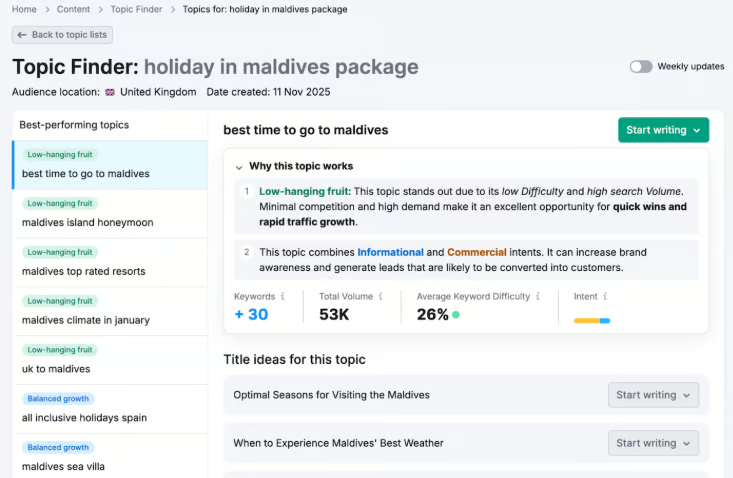
Its main advantage is its connection to Semrush search and competitor data. The toolkit can identify topics based on search demand, analyze competing content, recommend keywords, and generate drafts in your brand voice. It also provides SEO, readability, and tone recommendations before you export content to Google Docs or WordPress.
However, only five articles per month include advanced SERP analysis. Additional credits cost extra, while rank tracking, site audits, and backlink analysis require other Semrush tools. Even so, the Content Toolkit is a practical option for teams that regularly produce content for organic search.
Key AI features
- Topic Finder: Identifies content ideas using search demand, difficulty, and intent.
- SEO Brief Generator: Creates briefs with keywords, outlines, and competitor insights.
- AI Article Generator: Produces search-focused drafts in your saved brand voice.
- Content Optimizer: Suggests improvements for SEO, readability, and tone.
- Content Repurposing: Converts articles into email and social media copy.
Semrush Content Toolkit pricing
Cost:
- Subscription: $60/month
- Additional SEO-boosted articles: 10 articles at $30/month
Features included:
- Unlimited standard articles
- 5 SEO-boosted articles per month
- 50 brand voices
- WordPress publishing supporting up to 100 websites
Free trial: 7 days
HubSpot AI Blog Writer: Best for blogging
Why I chose HubSpot AI Blog Writer
HubSpot AI Blog Writer is my pick for blogging because it combines AI writing assistance with a built-in publishing platform. I recommend it for small businesses that want to maintain a consistent blog, especially those already using HubSpot. Keeping drafting, editing, and publishing in one place helps small marketing teams manage their content with fewer tools.
I particularly like the control its guided generator gives you before creating a full draft. You can specify a target keyword, review suggested titles, upload reference documents, and adjust the outline and talking points. For a service business, that could mean developing a post around a common customer question and providing service details to guide the draft. This makes it easier to create content around a specific reader need.
The main drawback is that the complete workflow isn’t free. Basic AI writing assistance is available across HubSpot plans, but guided full-post generation and Content Remix require Content Hub Professional or Enterprise. I’d start with the basic tools for occasional drafting and editing, and consider upgrading if full drafts and repurposing are recurring needs. Before publishing, check the facts and add your own examples and expertise.
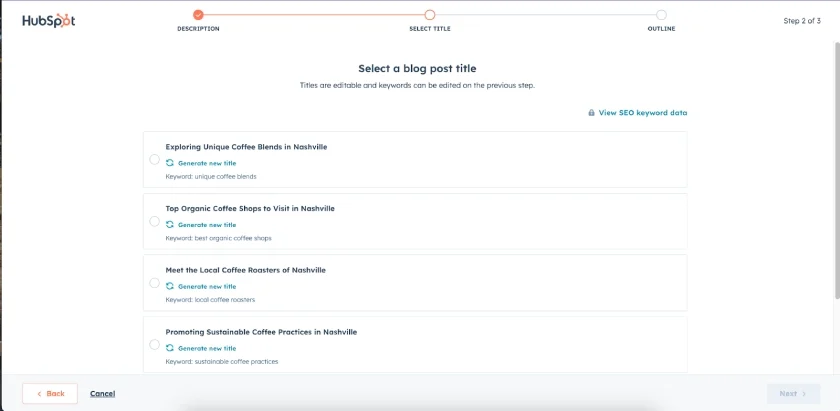
HubSpot can instantly generate blog ideas to fill up your content calendar. (Source: HubSpot) 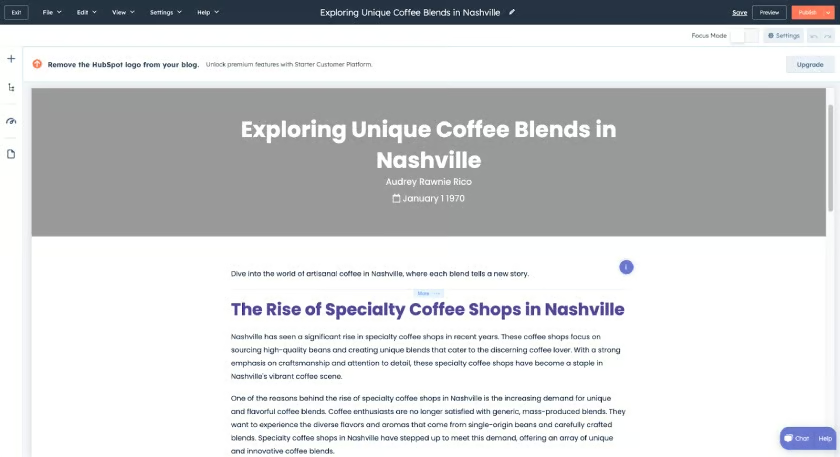
It can also generate full blog drafts, outlines, and individual paragraphs. (Source: HubSpot)


Key AI features
- Blog ideas, outlines, and drafts: Generate topics, titles, and structured drafts to support your content calendar.
- Built-in blogging platform: Edit and publish posts within HubSpot without transferring drafts to a separate publishing tool.
- AI copy editing: Rewrite, expand, shorten, and adjust the tone of existing content directly in the editor.
- Brand voice: Use your existing content to define a writing style and apply it to generated copy.
- SEO recommendations: Identify improvements for individual posts, such as missing metadata or internal linking opportunities.
- Content repurposing: Use Content Remix to turn existing content into additional marketing assets.
- Meta description generation: Generate and edit a post description within the guided blog creation workflow.
HubSpot AI Blog Writer pricing
HubSpot CMS Hub plans | Free | Starter | Professional | Enterprise |
| Monthly price, billed annually | $0 for 2 users | $7/seat | From $450 for 3 seats $45 per additional seat | From $1,500 for 5 seats $75 per additional seat |
| Monthly price, billed monthly | $0 for 2 users | $10/seat | From $500 for 3 seats $50 per additional seat | N/A |
| HubSpot AI credits | N/A | 500 | 3,000 | 5,000 |
| Website pages | 30 | 30 | 10,000 | 10,000 |
| Blogs | 1 | 1 | 100 | 100 |
Free trial: 14 days
MarketersMEDIA: Best for AI press release generation
Why I chose MarketersMEDIA
For small businesses that regularly announce product launches, new locations, events, or company milestones, MarketersMEDIA offers a focused alternative to a general AI writer. Its purpose-built generator helps organize company news into press releases, making it useful for business owners and lean marketing teams with limited PR writing experience.
The announcement-specific inputs are the strongest reason I recommend it. You select the release type and enter your story details, company information, and contact details, which the AI uses to create a draft in a recognizable press release format. A business opening a new branch, for example, can supply the location, opening date, and services available to guide the announcement. Sentence rewriting and summary generation help refine the result without rebuilding the draft.
Having distribution available in the same platform also makes the process more convenient, although it costs extra and submissions must meet editorial guidelines. That convenience is most valuable when press announcements are a recurring part of your marketing. For occasional drafting, a general AI writer may meet your needs. Whichever tool you use, verify the facts and approve any quotes before submission. Distribution can expand your announcement’s reach, but it doesn’t guarantee independent media coverage.
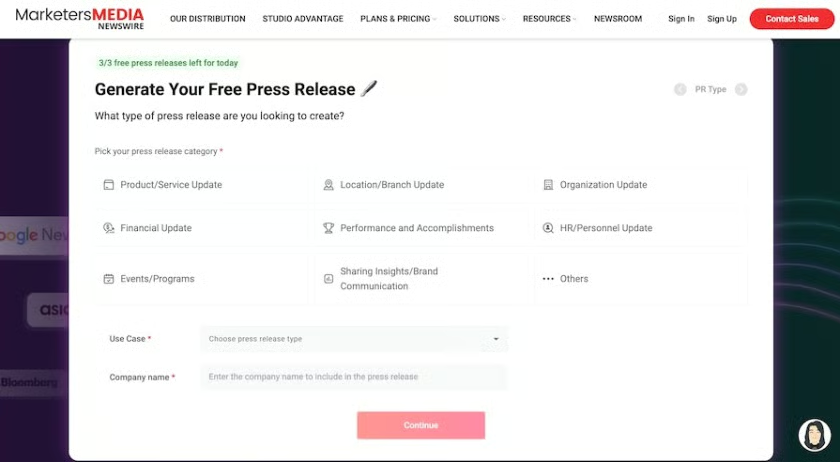
MarketersMEDIA’s AI press release generator lets you choose from different categories and use cases. (Source: MarketersMEDIA) 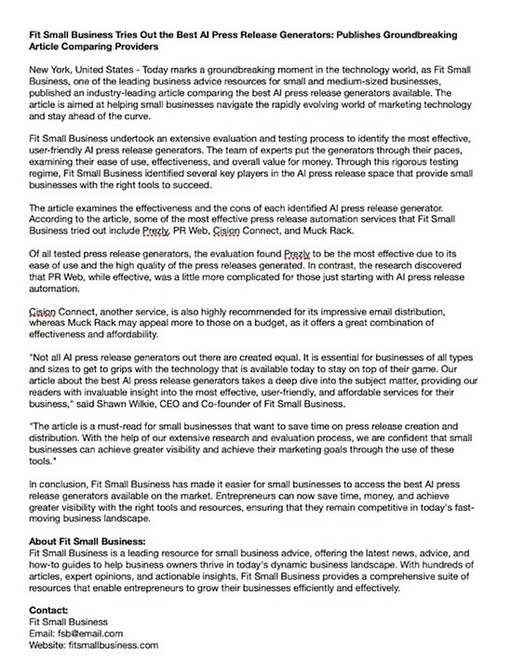
MarketersMEDIA can instantly generate press release drafts for your news stories. (Source: MarketersMEDIA)


Key AI features
- Press release generator: Turn your announcement details into a structured press release draft.
- Announcement-specific generation: Choose from 30+ release types for product launches, events, company updates, and other news.
- Sentence rewriter: Refine selected passages to improve wording or adjust the tone.
- Summary generator: Condense your draft into a brief overview of the announcement.
MarketersMEDIA pricing
MarketersMEDIA plans | Professional | Executive | Director |
| Price per release (1 release) | $189 | $389 | $989 |
| Price per release (5 releases) | $169 | $350 | $929 |
| Price per release (25 releases) | $139 | $300 | $890 |
| Media outlets | 320 | 500 | 570 |
| Potential reach | 200 million | 3.3 billion | 6.1 billion |
ChatGPT: Best for conducting market research
Why I chose ChatGPT
ChatGPT helps small businesses organize market research before deciding who to target or how to position an offer. I recommend it for teams that need to compare competitors, review customer feedback, or prepare audience interview questions. You can describe your business and research goals in plain language, then narrow the questions through follow-up prompts.
Its flexibility is the main advantage. You can review competitors’ publicly listed offerings, summarize customer comments, and identify gaps that warrant further investigation. For an organic café in Seattle, that could mean comparing nearby cafés’ menus and grouping customer feedback into themes such as convenience, dietary preferences, or price. Those themes provide messaging ideas to test with customers rather than assumptions to accept at face value.
I see the most value when ChatGPT works with actual source material from your business or credible external sources. It doesn’t replace customer interviews or a market intelligence platform with proprietary datasets. Verify important claims against the sources and treat AI-generated audience profiles as hypotheses rather than established customer facts. Access and usage limits vary by plan, so assess your recurring research and analysis needs before upgrading.
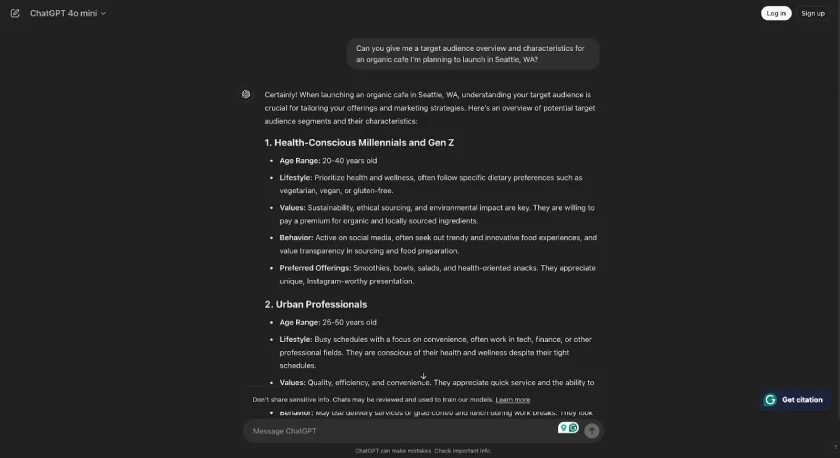
An example of a target market overview generated by ChatGPT (Source: ChatGPT) 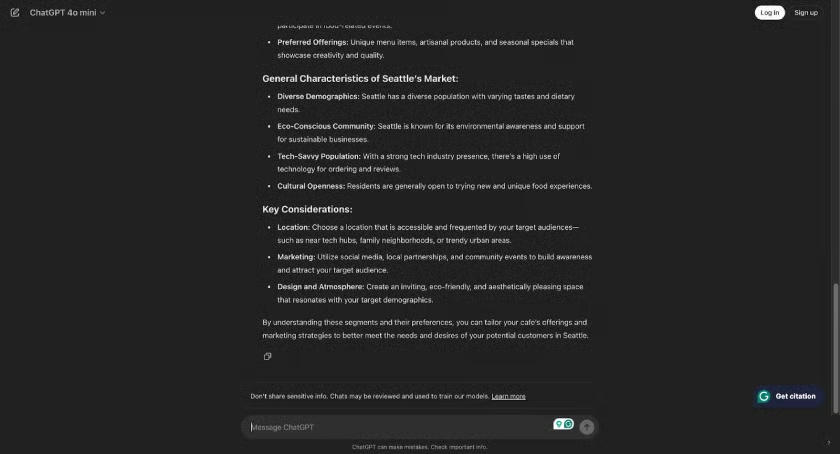
It also conducts basic market research with key considerations. (Source: ChatGPT)


Key AI features
- Conversational research: Explore market questions and refine responses through follow-up prompts.
- Web search: Find current online information with linked sources to review.
- Deep research: Investigate multiple sources and compile findings into a research report.
- File and data analysis: Summarize documents, analyze spreadsheets, and identify patterns.
- Content generation: Draft survey questions, campaign ideas, emails, and marketing copy.
- Image generation and editing: Create or revise visuals using prompts and reference images.
ChatGPT pricing
ChatGPT plans | Free | Go | Plus | Pro | Business Standard | Business Premium |
| Monthly price, billed annually | $0 for 1 user | N/A | N/A | N/A | $20 | $100 |
| Monthly price, billed monthly | $0 for 1 user | $8 | $20 | $100 to $500 | $25 | $125 |
Frequently asked questions (FAQs)
What are the best AI tools for marketing?
For small businesses, the best choice depends on the task. Hostinger helps build websites, Buffer assists with social media content, and ChatGPT supports research and drafting. Prioritize tools that solve a recurring problem, fit your budget, and work with your existing software.
How do I choose the best AI tools for marketing?
Identify the task you want to improve, then compare features, ease of use, integrations, and total cost. Use a free plan or trial, where available, to test a real marketing task. Assess the output quality and editing required before committing to a paid subscription.
How can small businesses use AI in marketing?
The best ways to leverage AI in marketing are by automating processes like sending out email and social media campaigns, making smarter decisions about audience targeting, and simplifying market research. Leaving these tasks to AI can help you focus on more important tasks in running your business. Other ways to leverage AI (although with more precaution) are by generating image and text content for marketing campaigns.
Which AI tool is best for branding?
The best AI tool for branding is Tailor Brands. It uses AI to generate a brand identity for your business, including a logo, brand colors, and basic imagery, based on your preferences. You’ll answer a set of prompts about your business’s characteristics, and then it’ll generate brand identity elements you can choose from. You can then apply your branding to marketing materials like business cards and merch.
Bottom Line
AI is one of the biggest technological developments in recent years, and with the right tools and management, it can pose many advantages to your small business. The AI marketing tools above are some of the best in the industry, and we curated the right ones to help grow your small business, from generating fully formed websites to automating your marketing campaigns. Using them can help you focus on the most important parts of running your business.