







CallRail is the go-to solution for call tracking and marketing analytics with its pre-built integrations, advanced attribution tools, and responsive support team. However, for businesses with high call volumes, it lacks certain features and can become costly due to extra charges for multiple numbers and call minutes. The best CallRail alternatives balance affordability and functionality along with powerful AI capabilities and multichannel support.
- CallTrackingMetrics: Best sales engagement
- Nimbata: Best basic call tracking
- 800.com: Best for enhancing national presence
- WhatConverts: Best multichannel lead tracking
- Invoca: Best digital marketing attribution
- RingBa: Best pay-per-call campaigns
Why You Can Trust Fit Small Business
- Best CallRail Alternatives Compared
- CallTrackingMetrics: Best Sales Engagement
- Nimbata: Best for Basic Call Tracking
- 800.com: Best for Enhancing National Presence
- WhatConverts: Best Multichannel Lead Tracking
- Invoca: Best Digital Marketing Attribution
- Ringba: Best Pay-per-Call Campaigns
- Frequently Asked Questions (FAQs)
- Bottom Line
Best CallRail Alternatives Compared
| Alternatives to Grasshopper | Monthly Starting Price | Key Features | Our Rating |
|---|---|---|---|
 | $50 |
| 4.89 out of 5 |
| Visit CallRail | |||
 | $79 |
| 4.94 out of 5 |
| Visit CallTrackingMetrics | |||
 | $39 |
| 4.89 out of 5 |
| Visit Nimbata | |||
 | $23 |
| 4.31 out of 5 |
| Visit 800.com | |||
 | $30 |
| 4.26 out of 5 |
| Visit WhatConverts | |||
 | Custom pricing |
| 4.18 out of 5 |
| Visit Invoca | |||
 | $147 |
| 3.59 out of 5 |
| Visit RingBa | |||
CallTrackingMetrics: Best Sales Engagement
How It Compares to CallRail
- CallRail focuses solely on call tracking, whereas CallTrackingMetrics combines marketing and sales engagement tools.
- CallTrackingMetrics offers more pre-built integrations than CallRail.
- Unlike CallRail, CallTrackingMetrics offers per-seat and bulk packages for its pricing options.
- CallRail plans include bundled local/toll-free numbers and minutes, while CallTrackingMetrics charges monthly for each.
My Expert Opinion
CallTrackingMetrics emerges as the best CallRail alternative offering a combination of call tracking and contact center functionality. It has a dedicated plan with a fully customizable suite of call management features, enabling inbound and outbound sales teams to operate like an enterprise-level contact center.
The Sales Engage plan enhances CallTrackingMetric’s call tracking platform by incorporating a custom softphone, smart dialer, call scripts, and real-time dashboards. Beyond tracking leads, these features align marketing and sales teams, making it easier to convert potential leads and close more deals.
The usage-based pricing for virtual phone numbers and minutes may be a drawback for budget-conscious teams as each comes with an additional charge. For those prioritizing affordability, 800.com is a better option because it includes bundled phone numbers in its plans without extra monthly fees.
CallTrackingMetrics Pricing
| Plans | Monthly Cost | What’s Included |
|---|---|---|
| Marketing Lite | $79 | Unlimited users, multitouch attribution, call recording, tagging, forwarding, scoring, IVR menus, activity reporting, and Google/Microsoft integrations |
| Marketing Pro | $179 | Call whisper, form tracking, unlimited triggers, keyword spotting, 5,000 form submissions, geographic tracking, smart router, and custom field report |
| Sales Engage | $329 | Bulk SMS, 7,500 form submissions, call queues, call transfers, scheduled SMS, voicemail, call scripts, post-call surveys, live coaching, CRM integrations, and smart dialer |
| Enterprise | $1,999 | 10,000 form submissions and 20 hours of onboarding |
What Users Say
- G2: 4.5 out of 5 based on 695 reviews
- GetApp: 4.6 out of 5 based on 130 reviews
- TrustRadius: 10 out of 10 based on 14 reviews
✅“Customer support was very good as we get answers for all the doubts [and] help us resolve the incidents.” (Source: G2)
✅“CallTrackingMetrics navigates all the messaging structures, and it supports a consistent communication plan.” (Source: GetApp)
❌“While the platform is powerful, it’s not the easiest to use at first. Some users needed extra training and time to fully understand all the features.” (Source: G2)
Additional Features
- Custom routing: Improve the caller experience by building interactive voice menus, creating custom queues, or forwarding calls to another device.
- FormReactor: Add an online form on your business website, automatically triggering a phone call or a personalized text message when someone fills it out. Your website’s form-fill activity syncs with CallTrackingMetrics’ real-time activity log for efficient data management.
- Web-based softphone: Use your mobile device to make calls over the internet and apply changes to your CallTrackingMetrics account, including agent preference options and activity reporting.
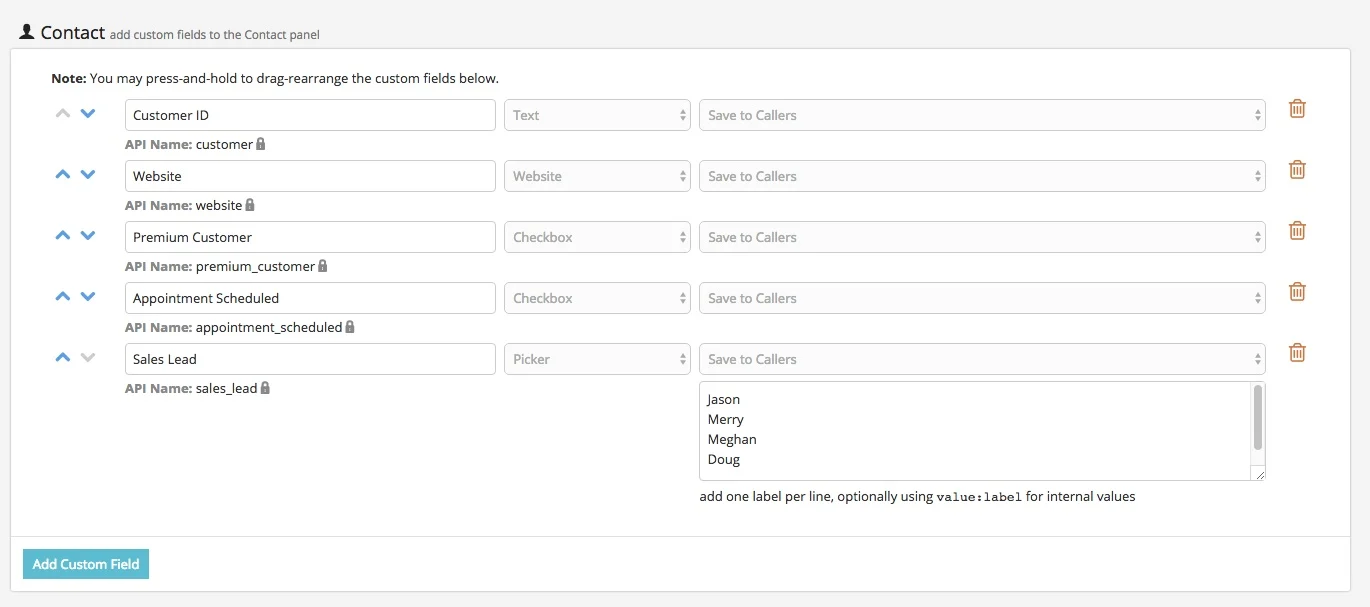
Nimbata: Best for Basic Call Tracking
How It Compares to CallRail
- Nimbata features a more intuitive and attractive interface, while CallRail maintains a straightforward design.
- Nimbata’s bundled call and form tracking plan is $10 cheaper than CallRail’s.
- CallRail charges a flat rate of $3 per additional local number, whereas Nimbata offers tiered pricing with discounts for local numbers on higher plans.
- CallRail has a significantly larger selection of third-party integrations than Nimbata.
My Expert Opinion
Small-scale businesses with basic call tracking needs should go for Nimbata. It focuses on widely used call tracking tools for attributing and managing phone interactions without the complexity of advanced features. With its streamlined interface, users of any skill level can breeze through the setup and configuration process.
As a lightweight call tracking tool, Nimbata sticks to the core capabilities such as call flows, dynamic number insertion (DNI), form tracking, and call recordings. However, the simplicity of its offerings can be a downside for marketing agencies or enterprise-level businesses seeking more AI-driven tools and extensive integrations.
Among our ranking CallRail alternatives, I recommend Invoca, a revenue execution platform that combines call tracking, AI, and interaction management.
Nimbata Pricing
| Plans | Monthly Cost | What’s Included |
|---|---|---|
| Entry | Free | Single call flow, spam blocking, and basic reports |
| Pro | $39 | SMS, unlimited call flows, DNI, call tagging/scoring, call recording, greetings, whispers, one automation, AI call summary, custom fields, and Google Analytics |
| Marketing | $89 | Form tracking, call capping, voicemail, call survey, caller ID masking, geo routing, three automations, keyword spotting, custom reports, and CRM integration |
| Agency | $149 | Unlimited automations, user activity log, training, dedicated support, and API |
What Users Say
- GetApp: 4.7 out of 5 based on 27 reviews
- Trustpilot: 4.5 out of 10 based on 19 reviews
- G2: 4.8 out of 5 based on 18 reviews
✅ “Tool is very clear and simple to use. Setup is also very easy. It is also quite affordable compared to other tools out there.” (Source: GetApp)
✅“Nimbata is simple to set up. It’s quick to learn to use. It is effective for tracking phone calls, starting from the origin of the call to tracking conversions.” (Source: G2)
❌“The AI summary feature can be improved, but currently still in beta so I have high hopes!” (Source: G2)
Additional Features
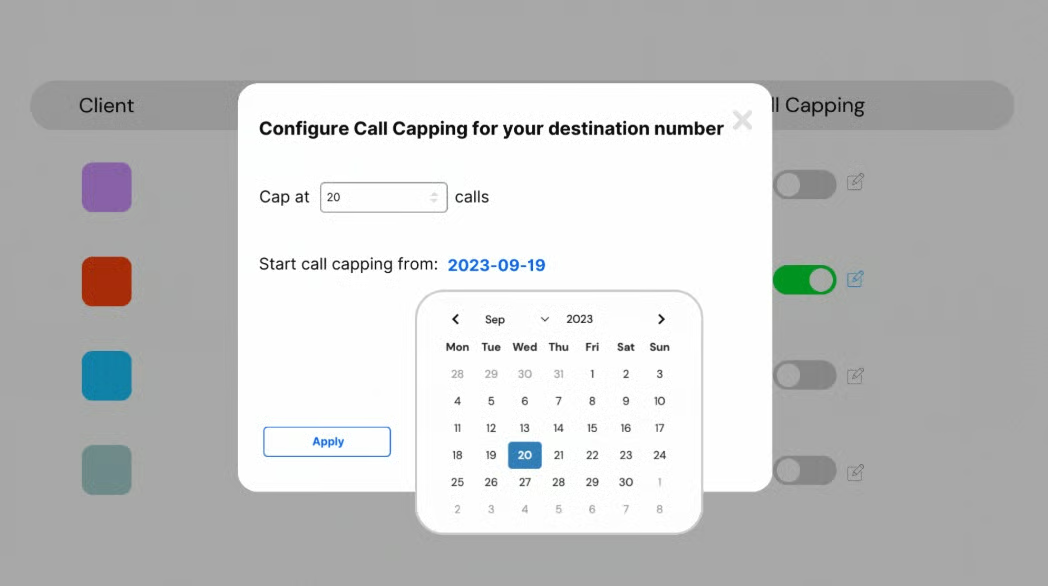
- Call capping: Set the limit of the maximum number of calls each campaign should receive within a specified timeframe, whether daily, weekly, or monthly. This ensures you won’t exceed your incoming call capacity.
- Lead values: Assign a sale value to compute the actual return of a marketing campaign. Whenever a phone lead meets certain criteria, you can set a rule to assign a value automatically.
- Lead scoring: Score leads using a five-star rating system and use the assigned scores to identify quality leads. You can also add notes for conversation outcomes or post-call actions.
800.com: Best for Enhancing National Presence
How It Compares to CallRail
- 800.com has a more extensive selection of toll-free numbers than CallRail.
- 800.com targets businesses with straightforward call tracking requirements, while CallRail focuses on large-scale marketing.
- CallRail leverages AI for its conversational intelligence platform, while 800.com lacks in-depth AI.
- CallRail offers a 14-day trial across all paid plans, 800.com has a 30-day money-back guarantee.
My Expert Opinion
Primarily a VoIP phone system, 800.com offers a suite of marketing tools for reaching customers via calls and SMS. As the name implies, its standout offering is toll-free numbers, helping businesses build a recognizable national presence. A key advantage is that higher-tier plans come with bundled numbers, adding more value as you upgrade.
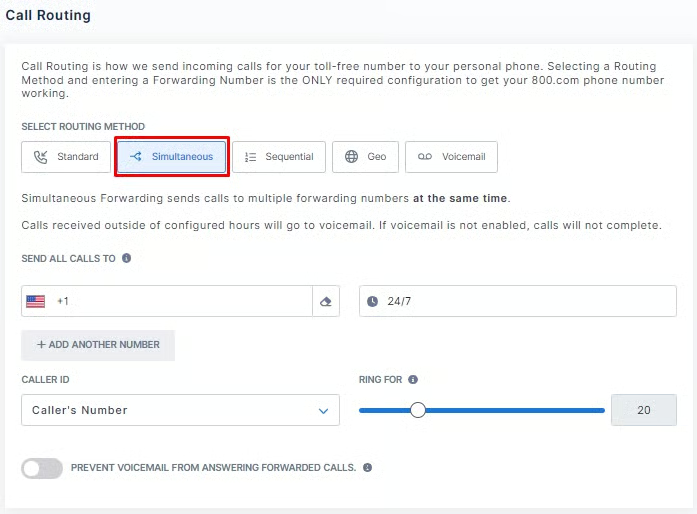
800.com has a large selection of toll-free vanity numbers, allowing you to pick the right phone number that aligns with your brand. You can choose from flexible call forwarding options—standard, simultaneous, and sequential—ensuring every incoming call is answered.
Connecting third-party apps with 800.com can be challenging as it relies on APIs, which require the expertise of a developer. If you’re seeking a fully integrated call tracking solution, check out Invoca. It has a comprehensive library of no-code and low-code integrations, making it easy to activate first-party customer data in apps you currently use.
800.com Pricing
| Plans | Monthly Cost | What’s Included |
|---|---|---|
| Personal | $23 | 1 number, 1 user, and 1 extension |
| Unlimited | $59 | 3 numbers, 3 users, and 3 extensions |
| Pro | $149 | 5 numbers, unlimited texts, and unlimited extensions |
What Users Say
- Trustpilot: 4.6 out of 5 based on 726 reviews
- G2: 4.6 out of 5 based on 415 reviews
- GetApp: 4.7 out of 5 based on 206 reviews
✅“What we love most is how it truly puts everything we need right at our fingertips. From the intuitive interface to the wide array of features, it simplifies every aspect of managing our communications.” (Source: G2)
✅“The platform is incredibly easy to navigate, and I love how simple it is to set up and manage toll-free numbers. It saves me so much time and effort, and their customer service is always there when I need help.” (Source: GetApp)
❌“Their website logs you out after X amount of time inactive. I like to keep the inbox up all day long so I can monitor incoming calls, but that is not possible without constantly going back to the tab every so often and refreshing it to stay logged in.” (Source: GetApp)
Additional Features
- Simultaneous call forwarding: Send incoming calls to multiple forwarding numbers at the same time. You can set specific time ranges and number of rings, and direct unanswered calls to voicemail outside business hours.
- Dynamic number insertion: Automatically changes the displayed phone number on your website based on the ad source that referred the website visitor. This enables you to identify which marketing channels are driving calls.
- GAE events: 800.com works with Google Analytics to better examine user behavior. It tracks online activities such as clicks, page views, and interactions across web platforms.
WhatConverts: Best Multichannel Lead Tracking
How It Compares to CallRail
- WhatConverts has separate pricing for individual businesses and agencies while CallRail maintains a single-structure plan.
- WhatConverts has a specialized ecommerce tracking tool, while CallRail requires a Looker Studio integration to monitor site revenue.
- Unlike CallRail, WhatConverts can track leads through web chat.
- CallRail has an AI-powered conversational intelligence platform, while WhatConverts has no similar feature.
My Expert Opinion
WhatConverts is designed for companies engaged in multichannel marketing, capturing leads from calls, forms, chats, and ecommerce platforms. This approach provides a holistic view of your lead sources, helping you determine which channels are driving customers to your business.
Not all CallRail competitors have chat and ecommerce tracking capabilities, but WhatConverts offers these features for as low as $60 per month. With chat tracking, you can trace web chat visitors back to their source, view full chat transcripts, and send chat events to Google Analytics.
For ecommerce, you can monitor marketing data and measure the revenue generated from each on your platform. However, call handling features can be pricey since call flow configurations are only available in higher-tier plans. I recommend CallTrackingMetrics, offering IVR menus and call routing across plans.
WhatConverts Pricing
| Plans | Monthly Cost | What’s Included |
|---|---|---|
| Call Tracking | $30 | Up to 148 phone call leads, lead management, keyword tracking, DNI, call recording, SMS, and pre-built reports |
| Plus | $60 | Up to 300 tracked transactions, form tracking, and ecommerce tracking |
| Pro | $100 | Call flows, IVR, geo-routing, and custom reports |
| Elite | $160 | Multi-click attribution, lead intelligence, and security controls |
What Users Say
- G2: 4.9 out of 5 based on 223 reviews
- GetApp: 4.9 out of 5 based on 50 reviews
- TrustRadius: 8 out of 10 based on 1 review
✅“We moved to [WhatConverts] from CallRail years ago and still benefit from the cost savings. Generally [we] never have an issue. We had a unique situation come up and support was able to resolve something within a few hours that saves months of time.” (Source: G2)
✅“You can integrate it with almost anything, the clients absolutely love it and become even more involved. It makes many client [relationships] easier” (Source: GetApp)
❌“It is a little bit difficult to track leads with notes, [recategorize] them, and I feel like the user interface could be quite a bit better for that.” (Source: G2)
Additional Features
- Campaign lead qualification: Generate reports containing leads from a specific campaign. You can qualify up to 50 prospects within 15 minutes instead of manually assessing each lead’s potential.
- CRM lead valuation: Facilitates automatic transfer of lead data between your CRM system and WhatConverts, allowing real-time sync of lead data and corresponding monetary value.
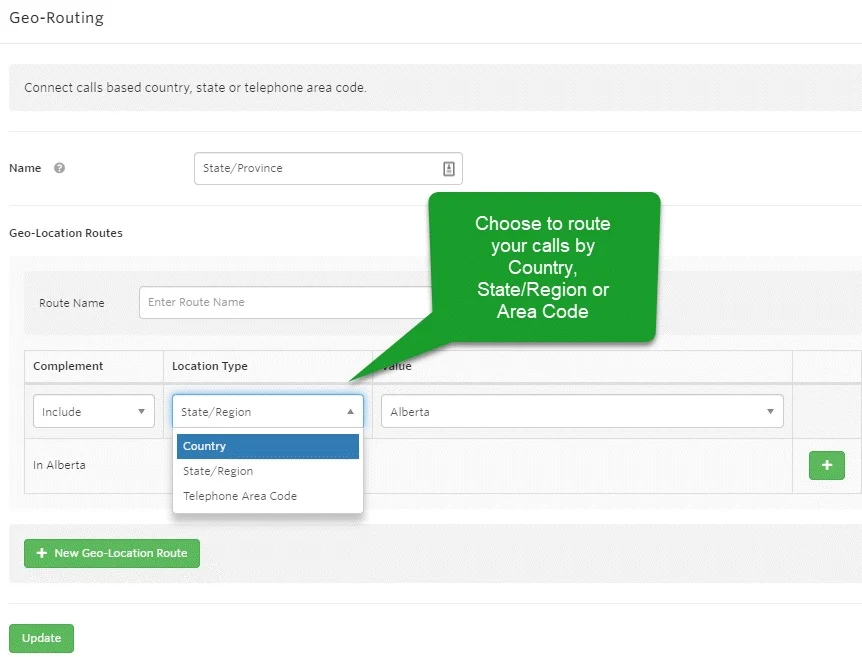
- Georouting: Directs incoming calls to the business closest to their location or a specific destination. The system uses the caller’s area or state code to route the call without relying on the IVR.
Invoca: Best Digital Marketing Attribution
How It Compares to CallRail
- Invoca focuses on performance marketing campaigns, while CallRail emphasizes call tracking and conversation intelligence.
- Invoca’s plans are built for enterprise-level marketing agencies, whereas CallRail serves businesses of all sizes
- Compared to CallRail, Invoca offers a variety of paid add-ons for a more tailored plan.
- Invoca has additional fees to access its integration library, whereas CallRail includes commonly used integrations as part of its plans.
My Expert Opinion
In this digital marketing era, you need a comprehensive marketing strategy to maximize your budget. Invoca ensures full campaign visibility by providing a full view of which platforms effectively drive conversions, including social media, email, paid search, and even direct mail.
Besides attribution data, Invoca provides clear insights into what’s driving your results, including the keyword, campaign, landing page, and Google Click ID. This determines how customers interact with your campaigns and helps you assign the right budget and credits to high-performing initiatives.
Unfortunately, Invoca doesn’t disclose its monthly subscription fees, so you need to request a custom quote. However, those who already have existing subscriptions find it more costly than most CallRail competitors. For a budget-friendly alternative, try WhatConverts. Monthly plans start for as low as $30, inclusive of core call tracking features.
Invoca Pricing
| Plans | What’s Included |
|---|---|
| Pay-per-call & Affiliate Marketing | |
| Performance Professional | 6,000 annual local/toll-free numbers, DNI, IVR, call recording, API, campaign syndication, and payout assignment for qualified calls |
| Performance Enterprise | 12,000 annual local/toll-free numbers, digital data capture, call routing, and call whisper |
| Brands & Agencies | |
| Pro | 6,000 annual local/toll-free numbers, DNI, call recording, and IVR |
| Enterprise | 12,000 annual local/toll-free numbers, advanced report access, and digital ad integrations |
| Elite | 18,000 annual local/toll-free numbers, SIP |
What Users Say
- G2: 4.5 out of 5 based on 919 reviews
- TrustRadius: 9.3 out of 10 based on 42 reviews
- GetApp: 4.5 out of 5 based on 20 reviews
✅“After a brief training in [the] platform by their incredibly helpful reps, the platform is easy to navigate. The dashboards are incredibly helpful at a quick glance, while the reporting helps me get the granular detail I often need when observing performance.” (Source: G2)
✅“Invoca was great for letting us listen to calls and track how users came into the IVR. It is a great and easy-to-use call tracking platform.” (Source: TrustRadius)
❌“The transcriptions really need to be improved. Especially for my business, we are a niche industry with lots of industry-specific languages, and our customer base is from several different regions, so transcriptions are often inaccurate and leave a lot to be desired.” (Source: G2)
Additional Features
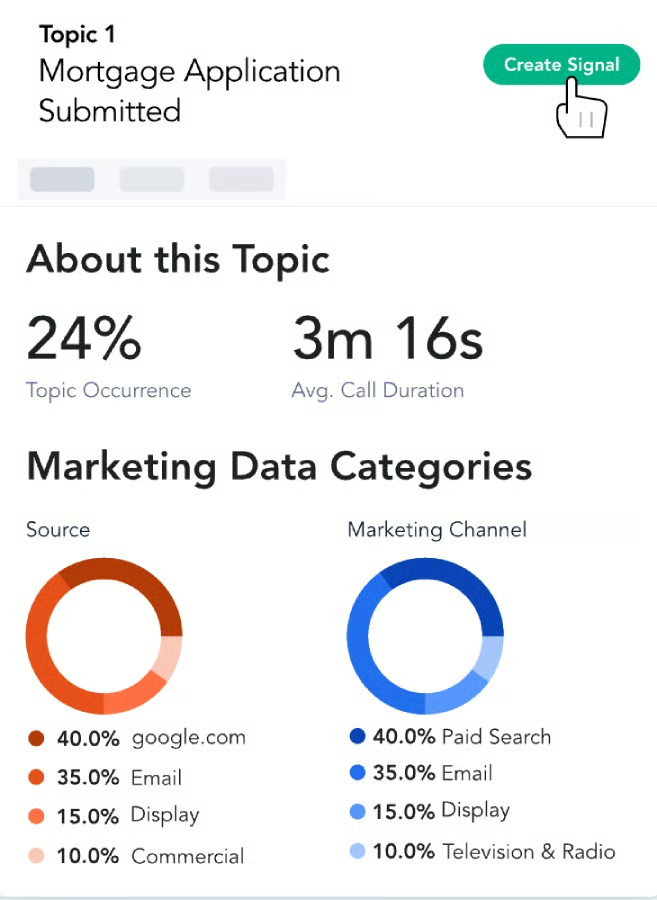
- Signal AI Studio: Powered by machine learning, this no-code AI model examines every call to map conversations according to themes and topics. You can train it to detect the intent, interest, and outcome of each interaction to obtain measurable insights.
- PreSense: Provides a complete context of why customers are calling through a trail of their digital journey data. Before the call begins, a screen pop displays key interaction details and the webpage where they initiated the call.
- Robofraud protection: Scans all incoming calls for robocall fingerprints, including recorded messages, busy signals, and modem. Blocked calls aren’t billed and won’t reflect in your reports.
Ringba: Best Pay-per-Call Campaigns
How It Compares to CallRail
- Ringba uses a predictive routing scheme for call flows, while CallRail offers the standard call flow builder.
- RingBa supports ping/post call trading, whereas CallRail doesn’t advertise this feature in its offerings.
- Unlike Ringba, CallRail allows unlimited use of call recording at no charge.
- Ringba uses a default dark mode theme, making it less intuitive for beginners.
My Expert Opinion
RingBa is one of the few CallRail competitors equipped with a built-in pay-per-call (PPC) framework that helps users maximize the value of their call traffic. Its standout feature, Ring Tree, is a private bidding marketplace where you can engage in real-time bidding (RTB) and create a network of micro-call buyers without needing dedicated account managers.
With RingBa’s automated RTB technology, you can sell calls to the highest bidder as well as connect to any programmatic call buyer API in minutes. The Instant Caller Profile attaches demographic and financial data into calls in real time, making it easier for agencies to provide the best prospect possible to their partners.
RingBa features a free one-hour PPC masterclass to help you learn the best online ad methods and traffic sources for generating calls. However, RingBa’s feature-rich nature can be overkill for individual businesses that don’t require extensive call tracking tools. Instead, I recommend Nimbata, a basic call tracking software built for entry-level use.
Ringba Pricing
| Plans | Monthly Cost | What’s Included |
|---|---|---|
| Business | $147 | Call tracking, call flows, API, and Zapier Integration |
| Professional | $297 | White label, ring trees, predictive routing, and revenue recovery |
| Enterprise | Custom | Real-time bidding and ping/post call trading |
What Users Say
- G2: 4.9 out of 5 based on 149 reviews
- GetApp: 4.9 out of 5 based on 15 reviews
- TrustRadius: 5 out of 10 based on 1 review
✅“Easy to use for basic users and powerful enough for heavy users – integrates well with web and other traffic platforms.” (Source: GetApp)
✅“Ringba is easy to use, very effective at managing call campaigns, and the reporting is excellent. It has all the features any agency or enterprise company would ever need. Our uptick in efficiency since switching to Ringba has been astounding. Sidenote: Best support team I’ve ever seen. Fast, easy, and very helpful.” (Source: G2)
❌“Transparently, some of their extended features (Ring Groups with Simudial, Pixels & Webhooks, etc.) have some limitations. I’m nitpicking, but we have had to get creative with some workarounds and had some things were initially unclear about the functionality.” (Source: G2)
Additional Features
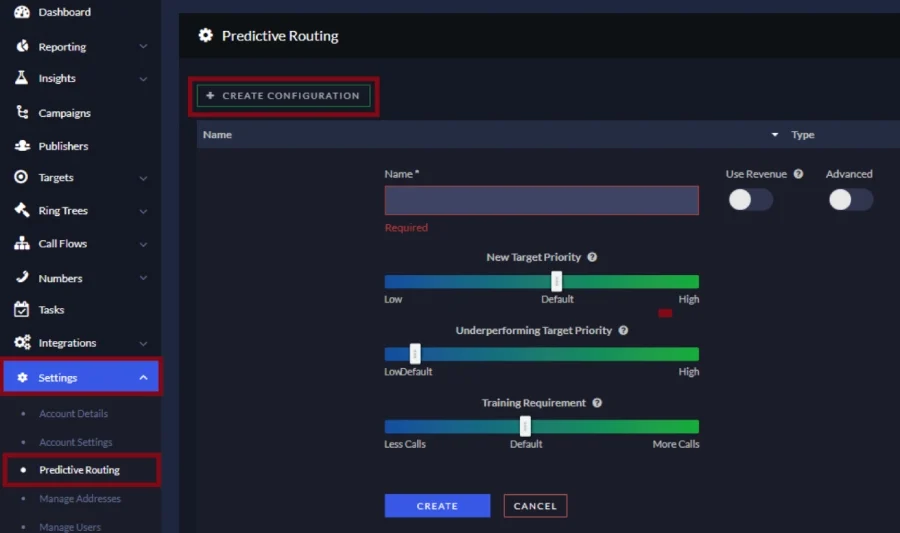
- Predictive routing: Calculates an incoming call’s estimated value then routes them to the best target to receive the call. It determines which target to prioritize by considering their real-time and historical performance every hour.
- Ring Tree: Leverages the ping-post call buying scheme wherein it sends a request to call buyers who then respond to their bid amounts and specific requirements. The system evaluates the responses to determine the best buyer for the call.
- Insights: Provides detailed reports containing filtered data on your campaigns, target, and publisher. You can sort the exact metrics you need for your call optimization strategy.
Methodology: How I Evaluated the Best CallRail Alternatives
Frequently Asked Questions (FAQs)
Is CallRail HIPAA compliant?
Absolutely, CallRail has a dedicated healthcare plan that includes an end-to-end solution exclusive to medical professionals. It engages with a third-party audit firm to test its platform in adherence to HIPAA’s security and privacy guidelines.
Why use CallRail?
CallRail is designed to help businesses measure the performance of their online and offline campaign efforts. It provides a suite of tools to attribute calls to marketing channels and understand the needs and behaviors of their customers.
What's better than CallRail?
The best alternative to CallRail depends on your business’ specific needs and priorities, whether you’re focused on sales, affordability, multichannel support, or AI capabilities. For sales engagement, CallTrackingMetrics is a strong choice; for AI-driven call tracking, Invoca is a standout; and for low-cost pricing, go for Nimbata.
Bottom Line
Businesses looking to replace CallRail will benefit from the conversation analytics platform CallTrackingMetrics. It merges marketing analytics with call management, giving you a unified and data-driven approach to customer engagement.
From campaign attribution to lead management, CallTrackingMetrics is a feature-rich CallRail alternative for optimizing campaign and team performance. Book a demo with the sales team to witness the full scope of its platform.
