








Google Workspace is a cloud productivity suite for office applications, including Gmail, Calendar, Drive, Docs, Slides, and Meet. While Google offers these apps for free through a personal account, Google Workspace offers additional business tools like custom company email, larger cloud storage, and admin controls. The Business Starter monthly plan, which is ideal for solopreneurs, costs $6 monthly, while teams can sign up for more robust plans like the Business Standard plan starting at $12 per user monthly.
Google Workspace Review: At a Glance
When to Use Google Workspace
- All-in-one collaboration suite: Google Workspace brings together office productivity apps, including email, voice, chat, video conferencing, and content management. This allows your teams to streamline workflow into a single, unified experience.
- Remote and hybrid working: The platform is designed for teams needing the flexibility to access information and tools on any device from anywhere. With its cloud-based architecture, it eliminates the inefficiencies of using isolated and computer-dependent productivity tools.
- Organizations working within the Google ecosystem: From shared calendars, branded emails, and document collaboration, Google Workspace includes all the familiar Google-related services in a single, easy-to-manage subscription.
When to Use an Alternative
- Extensive range of content management features: Google Workspace’s formatting options aren’t as advanced compared to Microsoft 365. It has hundreds of selections for prebuilt document templates and chart types for spreadsheets as well as data analysis and visualizations.
- All-in-one business management solution: Bitrix24 offers everything you need to build your pipeline, run your sales, and manage your team, all in one place. It’s an online workspace featuring ecommerce, collaboration, project management, business automation, and customer relationship management (CRM).
- Customizable office suite with collaborative workspace: Zoho Workplace has a unified dashboard view that lets you access all your productivity apps without switching between browser tabs. This makes remote collaboration easier due to its robust customization features like widgets, combined notifications, and announcements.
Google Workspace Deciding Factors
Google Workspace provides all the familiar productivity apps from Google in one affordable package. With a custom business email, teams can use shared calendars, schedule meetings, and invite other members to edit files. It creates an integrated experience across all its productivity tools, allowing multiple users to work together in real time on Documents, Slides, and Sheets across devices.
| Best For | Any size business looking for an easy-to-use office productivity suite |
|---|---|
| Standout Features |
|
| Pricing Plans |
|
| Annual or Volume Discounts Available | Annual discount is available |
| Security Features |
|
| Customer Service |
|
Google Workspace Alternatives
While Google Workspace is one of the most widely used productivity tools, it doesn’t pack as many features in its platform. Compared to other solutions, Google Workspace has a few missing features, like sophisticated team messaging and project management. If you’re looking for other options, here are the top recommended Google Workspace alternatives:
 |  |  | |
|---|---|---|---|
| Best For | Complex collaboration requirements | Complete office suite that tightly integrates with Zoho CRM | All-in-one business management software |
| Monthly Starting Price (per User) | $6 | $4 | $61 |
| Learn More | Visit Microsoft 365 | Visit Zoho Workplace | Visit Bitrix24Read our Review |
Google Workspace Pricing
4.00 / 5
Google Workspace pricing nearly got a perfect score due to its flexible pricing options. Anyone with a personal Gmail account has free access to all Google-based services like Meet, Drive, and Docs. Upgrading to one of its Business edition plans includes more advanced capabilities. All plans have a 14-day free trial and annual billing discounts. While pricing starts at $6 per user per month, the cost doesn’t increase that much as you scale.
| Google Workspace Plans | Business Starter | Business Standard | Business Plus | Enterprise |
|---|---|---|---|---|
| Best For | Professional office suite with verified business domain | Enhanced meeting features and extra storage | Archiving capabilities and advanced admin controls | Advanced security management |
| Monthly Pricing ($/User/Month) | $7.20 | $14.40 | $21.60 | Contact sales |
| Annual Pricing ($/User/Month) | $6.00 | $12 | $18 | Contact sales |
| Custom Business Email (Gmail) | ✓ | ✓ | ✓ | ✓ |
| Video Meeting Capacity (Google Meet) | 100 attendees | 150 attendees | 500 attendees | 1,000 attendees |
| Cloud Storage (Google Drive) | 30GB | 5B | 5TB | 5TB |
| Advanced Chat Rooms | ✕ | ✓ | ✓ | ✓ |
| Shared Calendars | ✓ | ✓ | ✓ | ✓ |
| Appointment Booking Pages (Calendar) | ✕ | ✓ | ✓ | ✓ |
| Security Management Controls | ✓ | ✓ | ✓ | ✓ |
Google Workspace General Features
5.00 / 5
We gave Google Workspace a perfect score for this category because it comes with complete in-demand productivity tools, such as custom email, video meetings, file storage, group chat, and content management apps. These tools are integrated within the platform, allowing you to juggle multiple tasks within the same browser. For example, you can schedule meetings, start a group chat, and access Drive files right within your Gmail account.
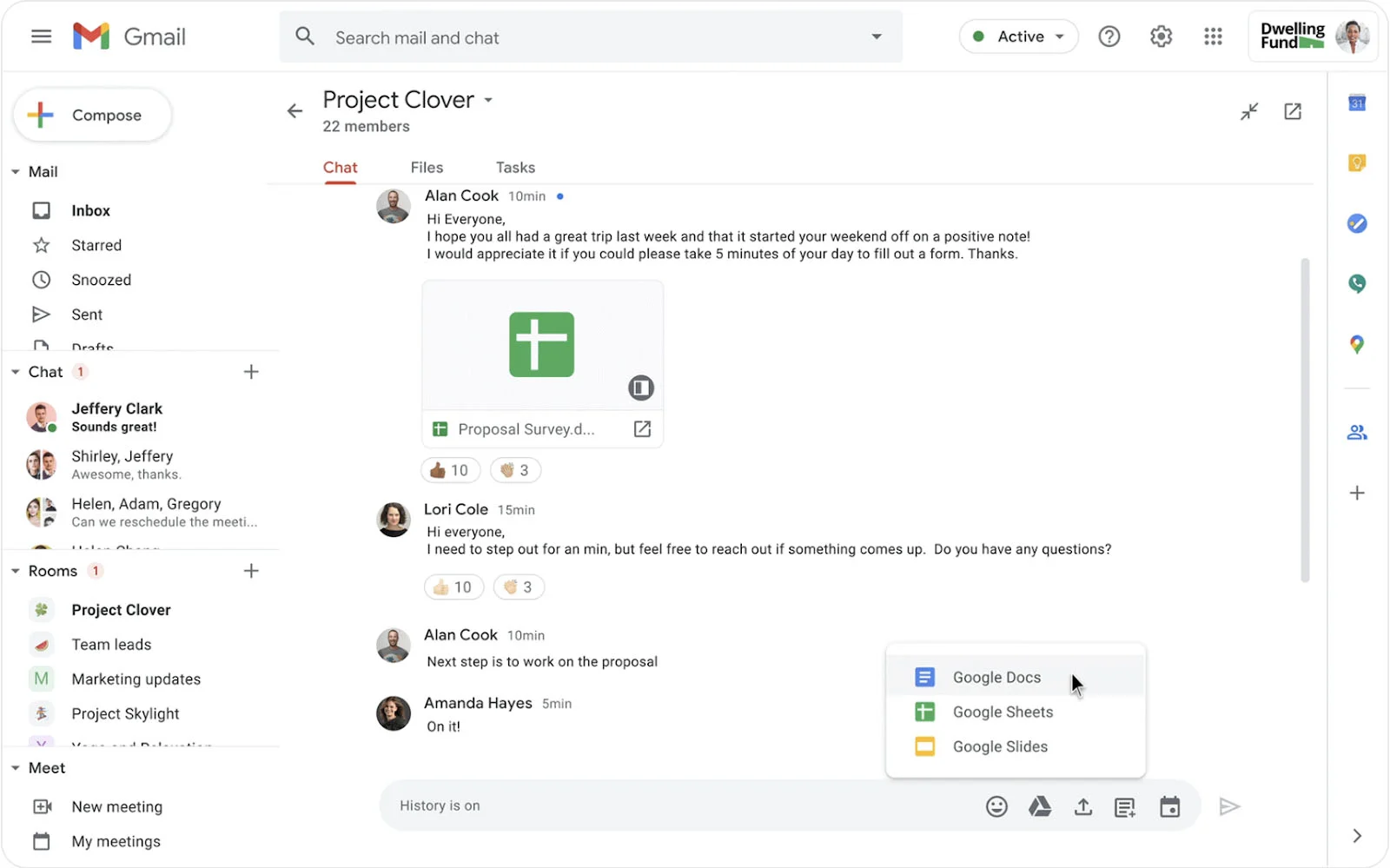
Here are other features to look forward to with a Google Workspace subscription:
- Digital whiteboard
- Meeting recording
- Forms survey builder
- Writing assistance
- Shared cloud storage
- Advanced chat rooms
- One-to-one external chat
- Appointment booking pages
Niche Features
3.13 / 5
When comparing Google Workspace with other leading workspace solutions, this provider got a fairly low score. Missing features include desktop app versions, built-in task management, and flexible document formatting options. It earned extra points due to real-time document collaboration, allowing several users to work on the same file simultaneously and see every change saved automatically.
Click on each feature below for other advanced Google Workspace capabilities:
Named Revisions
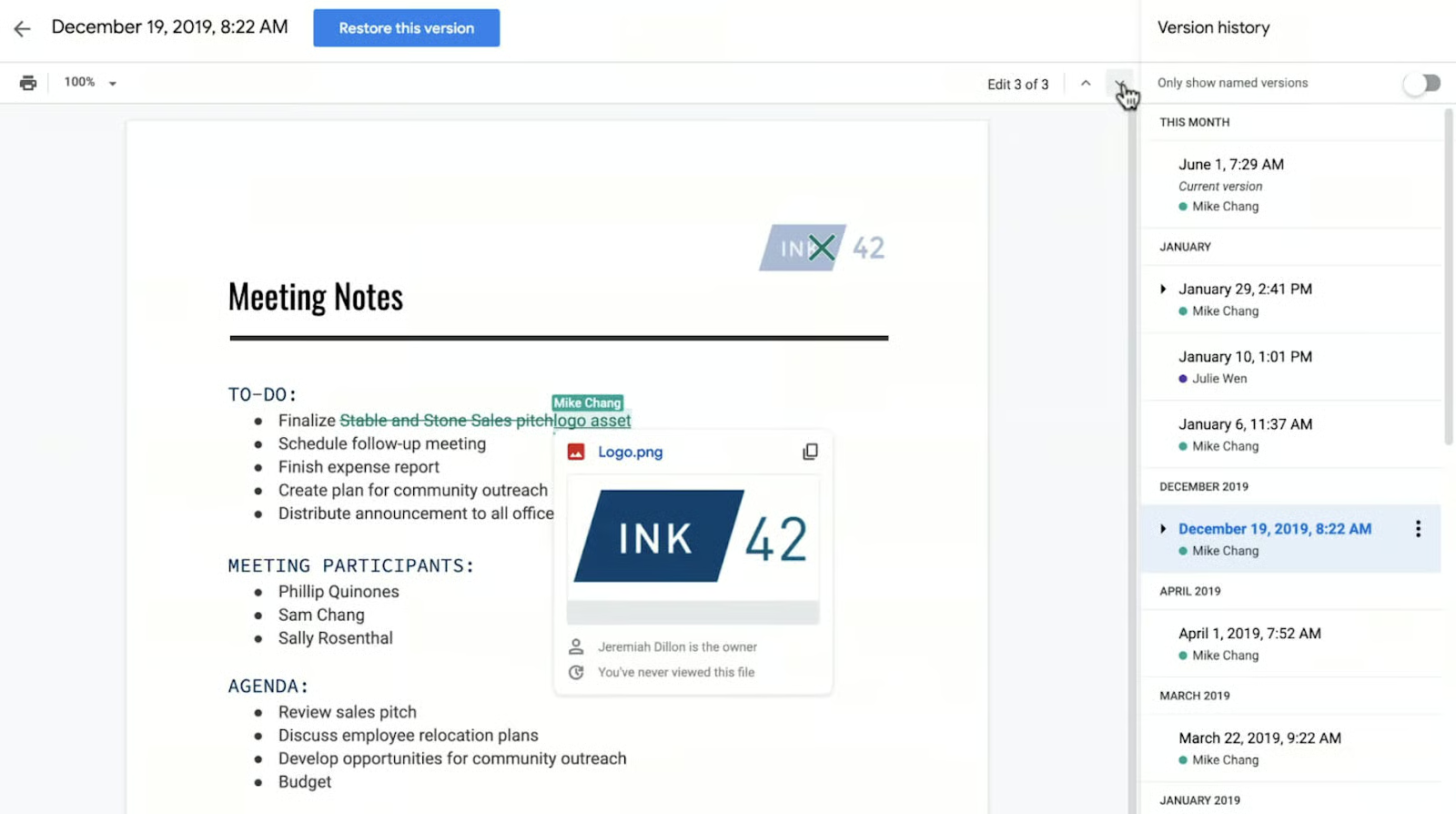
When working with Docs, Sheets, and Slides, anyone with edit access can view the changes that have been made to a document. Revision history lets you track content modifications and revert them to a specific version. You can also see the timestamp when the change was made, highlighted in a specific color based on each collaborator, making it easy to tell what has been added or omitted.
Smart Canvas
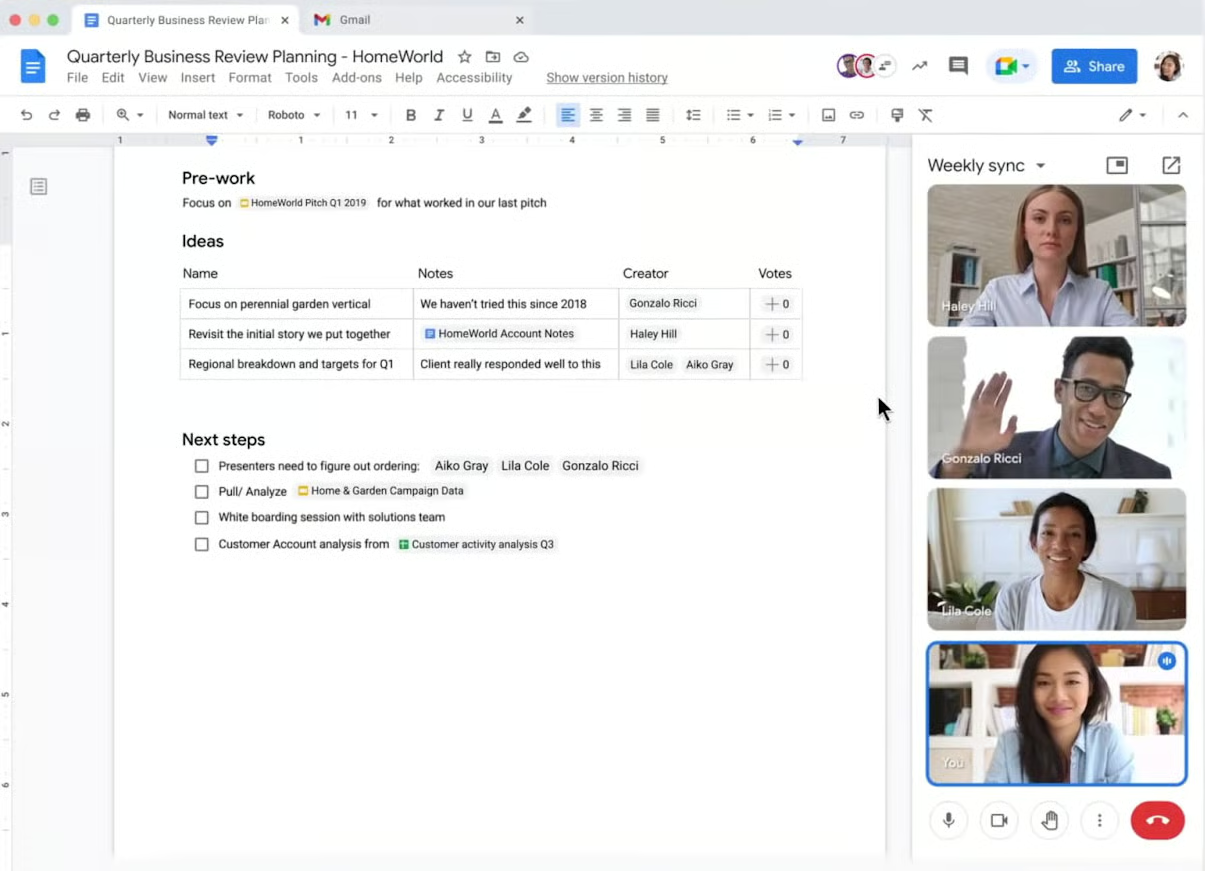
Smart Canvas is a set of components that enhances collaboration and productivity by linking items to create seamless workflows across Google Workspace. For example, custom building blocks let you create new workflows within Docs by launching an email draft, meeting notes, project task list, or product roadmap. Another example is smart chips that let you surface previews or interactive information from partner applications.
Work Insights
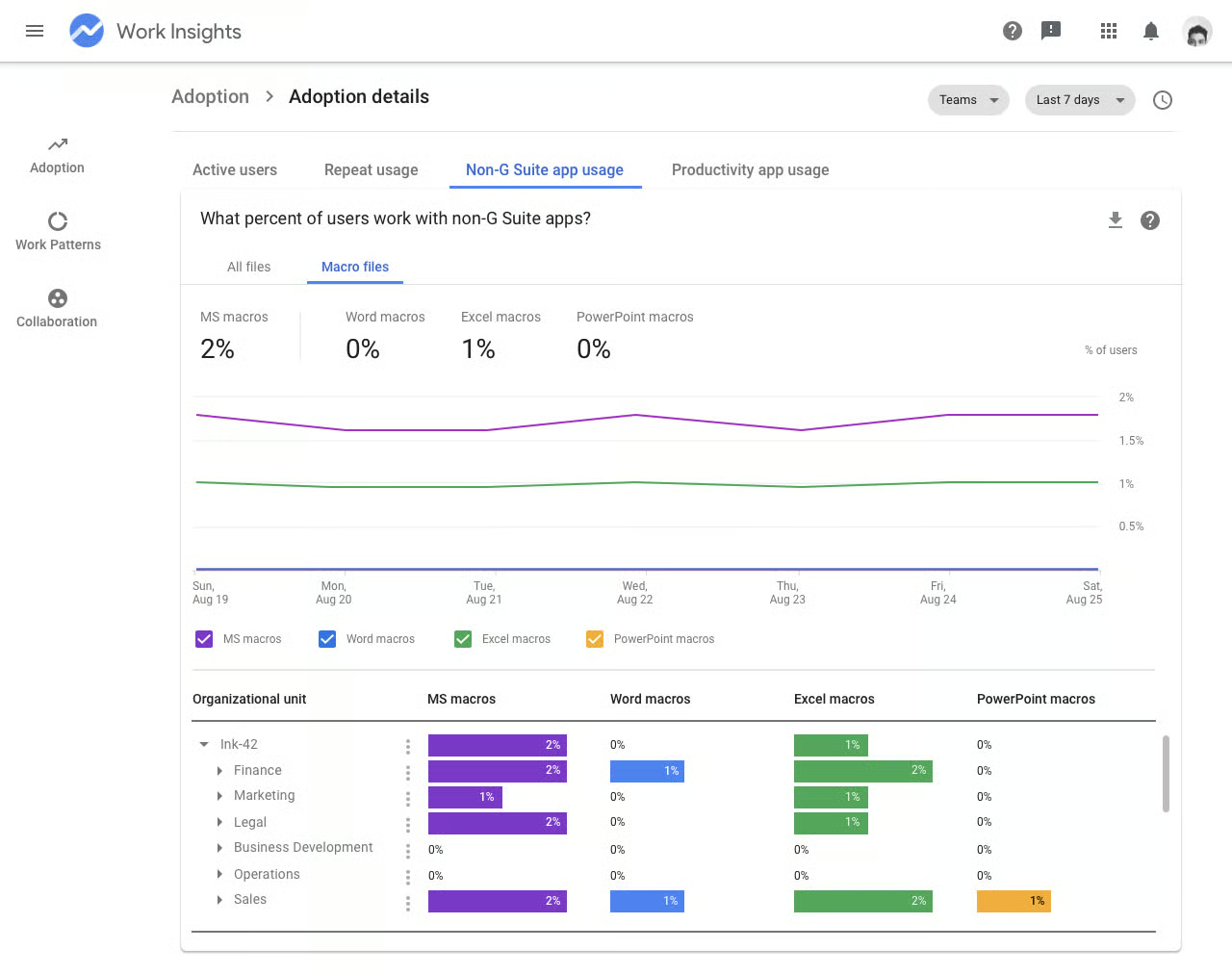
Google Workspace is a reporting tool that delivers insights on how Google Workspace impacts your company’s team collaboration, work patterns, and product adoption. It surfaces organizational data based on Google product usage and analyzes activity trends around meetings, file sharing, and document co-editing. You can also track the most active users, engagement frequency, and repeated app usage.
Customer Service
2.50 / 5
We gave Google Workspace a low score for customer service due to its slow response times and limited support channels. The level of customer support and the speed of response time depends on the chosen subscription plan.
Starter, Standard, and Plus tiers have access to Standard Support. This requires users to submit a support case via Google Cloud Console and has a response service level objective (SLO) of four hours during local business hours. While Enhanced Support offers 24/7 availability, users must wait for a response within one hour. For faster response times, users have to contact the sales team for the cost of Premium support.
Ease of Use
5.00 / 5
Google Workspace earned another 5-star rating, this time for ease of use. Since its platform mainly focuses on key productivity features, many find it less intimidating and more user-friendly. All Google apps maintain a clean and intuitive design that’s easy to get started with among beginner-level users. Collaboration features like Google Meet and Chat are also easy to tap into, allowing users to send messages and start meetings from any Google app.

Expert Score
4.63 / 5
For our expert review of Google Workspace, we give this provider a rating of 4.63 because we find it incredibly easy to use and doesn’t overwhelm users with too many features. It delivers a huge value in having all the most widely used office productivity tools in one platform, including email, chat, calendar, and documents. However, it lost a few points as most existing users seek additional tools for task management, team chat, and word processing.
Here are the updated ratings earned by Google Workspace on popular review sites:
- G2: 4.6 out of 5 based on 40,548 reviews
- Software Advice: 4.7 out of 5 based on 11,875 reviews
- TrustRadius: 9 out of 10 based on 845 reviews
How We Evaluated Google Workspace
For our expert Google Workspace review, we used product information, expert analysis, and a structured approach to help you decide if it’s the best productivity platform for your business. We explored the entire Google Workspace suite and checked the personal experiences of its users from legitimate review websites. Click on the tabs below to see how we came up with our unbiased ratings:
For the Google Workspace pricing, we checked if it has a free version, a lengthy free trial, and discounts for pre-annual billing and volume purchases. We gave extra points if the entry-level plan costs $30 or less and there are more than three pricing options.
We checked the most in-demand features users look for in an office productivity suite, such as video/audio conferencing and custom business email. We also examined the amount of cloud storage offered for each plan tier.
For advanced remote working requirements, we looked for high-level features to see the additional value users get by purchasing any Google Workspace plan. These features include collaborative editing, a desktop app, and task management. We gave extra points for integrations with popular third-party business solutions.
We evaluated the provider’s quality of customer service delivery by checking the hours and days it is available. 24/7 coverage is equivalent to extra points. We checked the availability of support channels, including phone, live chat, email, community forum, and help desk.
We tested all the cloud-based applications under Google Workspace, including Gmail, Docs, Sheets, Slides, Calendar, and Drive. We used our personal experience and customer reviews to determine the system’s quality, effectiveness, and usability.
To arrive at our unbiased scoring, we analyzed how this provider stacks up against leading office productivity platforms. We also examined the most recent Google Workspace reviews to see what customers say about its performance, feature set, and customer service.
Frequently Asked Questions (FAQs)
Is Google Workspace secure?
Yes. Google Workspace implements various security policies to meet compliance requirements and protect its users against data loss and cyber threats. These include data encryption, two-step verification, single sign-on (SSO), phishing protection, and information rights management. All these measures help Google Workspace respond to different threats across its cloud-based ecosystem.
Can I migrate my current email to Google Workspace?
Yes. Google Workspace allows users to transfer email data using its data migration service. The process involves preparing your source account, picking the start date for migration, and selecting which users to include. Migration speed depends on several factors, such as the number of users to be migrated and file size.
Can I purchase a separate Google Workspace app?
No. A Google Workspace subscription includes full access to a collection of integrated apps, such as Gmail, Drive, Meet, Calendar, Chat, and Docs. All Google apps work together seamlessly to streamline workflow. One example is converting a Calendar event to a Google Meet session. However, you have the option to purchase the entire suite and use only the services you need.
Bottom Line
In our Google Workspace review, we give this provider high ratings for pricing, general features, and ease of use. It’s the best office productivity suite for any size business wanting the right balance between cost, functionality, and usability. Although it is not as comprehensive as other leading unified communications like Microsoft 365, Google Workspace offers a powerful solution for companies prioritizing cloud-based sharing and collaboration.
