








The best recruiting apps make it easy for small business owners and hiring managers to find, interview, and hire employees without sitting at a desk or using a computer. These apps for recruitment allow busy employers to track applicants, communicate with stakeholders and candidates, and check interview schedules.
To help you find the best mobile recruiting apps for small businesses, we evaluated more than 20 recruiting solutions that have mobile apps for iOS and Android devices. Then, we narrowed the list down to our top four recommendations.
- Breezy HR: Best overall recruiting app for small businesses
- Workable: Best for recruiters and staffing agencies
- Recruitee: Best for businesses planning to scale
- LinkedIn Recruiter: Best for recruiters needing exposure to a wide network of qualified professionals
- Best Recruiting Apps Compared
- Quiz: Determine Your Ideal Hiring App
- Breezy HR: Best Overall Recruitment App for Small Businesses
- Workable: Best for Recruiters & Staffing Agencies
- Recruitee: Best for Businesses Planning to Scale
- LinkedIn Recruiter: Best for Businesses Needing Exposure to a Large Network of Qualified Professionals
- Bottom Line
Best Recruiting Apps Compared
All of the recruitment apps we reviewed are free to download, but you need a paid plan to access its features. These apps for hiring employees are also available on Google Play (for Android devices) and the App Store (for iOS devices).
| Free Plan | Monthly Pricing | Post Jobs via the App | Track Applicants in App | Average Mobile App Ratings | |
|---|---|---|---|---|---|
 | ✓ | $189–$529 | ✕ | ✓ | 4 out of 5 |
| Visit Breezy HR or Jump to Section ↓ | |||||
 | ✕ | $149–$599 | ✓ | ✓ | 3.35 out of 5 |
| Visit Workable or Jump to Section ↓ | |||||
 | ✕ | $269–$479+ | ✕ | ✓ | 4 out of 5 |
| Visit Recruitee or Jump to Section ↓ | |||||
 | ✕ | $140+ | ✕ | Only via integration | 4.5 out of 5 |
| Visit LinkedIn Recruiter or Jump to Section ↓ | |||||
Quiz: Determine Your Ideal Hiring App
Answer a few questions about your business, and we'll give you a personalized product match.
Question 1 of 2
Which of the following best describes your recruiting needs?
Breezy HR: Best Overall Recruitment App for Small Businesses
Pricing
Mobile App: Free to download, but requires a paid plan to access its features.
Plans*
- Bootstrap: $0
- Startup: $189 per month
- Growth: $329 per month
- Business: $529 per month
- Pro: Call for a quote
Add-ons
- SMS/Text Messaging: $165 per month
- Candidate Match Score: Starts at $165 per month
- Incognito Apply: Starts at 165 per month
*Breezy HR offers two months free if you commit to an annual plan (requires lump sum and upfront payment of all fees).
Breezy HR has a broad set of solutions for advertising job posts, managing candidates, and automating processes. Its hiring apps for employers are available on iOS and Android devices, but you need a paid Breezy HR subscription to access its features. It topped our list of best recruiting apps because of its easy-to-use and intuitive solution for collaborating with hiring stakeholders and candidates while on the go. It also allows you to schedule candidate interviews, score applicants, and move candidates through the hiring stages.
This app earned an overall score of 4.21 out of 5 in our evaluation. Its robust recruiting features, user-friendly platform, transparent pricing, and reporting functionalities contributed to its high scores. While its mobile app has solid candidate management and collaboration tools, it doesn’t allow you to post jobs unlike with the Workable app. You can only monitor jobs already posted via the Breezy HR app.
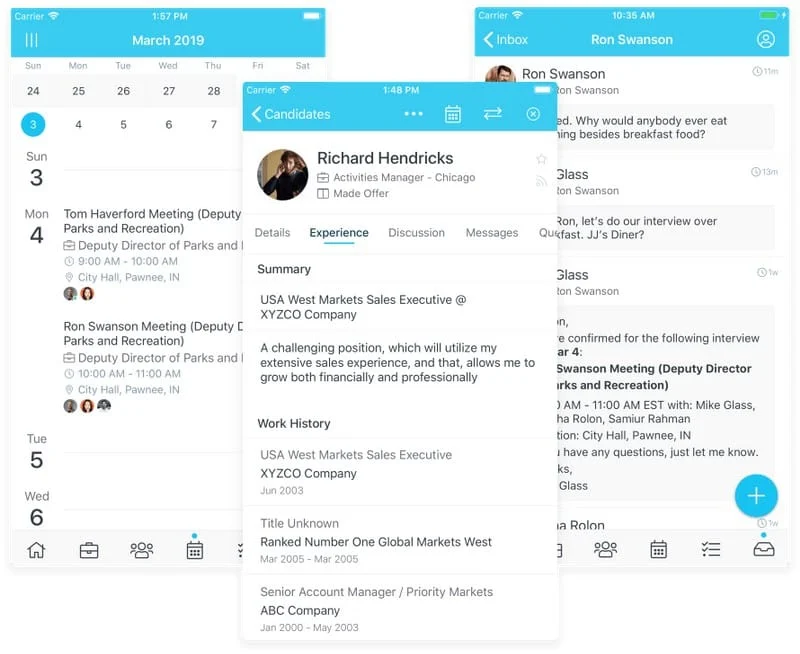
Breezy HR Overview
With the Breezy HR app, you can:
- Coordinate and schedule candidate interviews
- Send and receive candidate email and text messages
- Discuss, score, and vet candidates with the hiring team
- Drag-and-drop candidates through the recruiting pipeline
- Receive real-time notifications for new applications, candidate messages, and hiring team responses
The app also has a 4.5 out of 5 rating on the App Store and a 3.5 out of 5 rating on Google Play (as of this writing). Reviewers like its user-friendly and intuitive interface. However, several users dislike the app’s login issues, adding that it runs slow and crashes at times.
- Simple candidate pipeline management: With a paid plan, Breezy HR lets users see where candidates are in the pipeline, how many are in the different stages, and the next actions they can take. It uses a Kanban board-style candidate pipeline, allowing you to drag and drop applicant profiles as they go through the hiring stages. Breezy HR also allows you to automate the next actions for your pipeline. For example, you can send automated SMSs or emails to new applicants. You can even create different pipelines with various automated actions for each open position. These pipelines are saved so that users can reuse them for similar job roles.
- Candidate scorecard: Starting with the Growth plan, users can customize their scorecard to help evaluate applicants based on predefined criteria for the position. This makes it possible for members of the hiring team to do a quantitative comparison of all the candidates for one position.
- Incognito applications: Available as a paid add-on, this solution removes the names, photos, and other identifiable data from applicant information at the first recruiting stage. This way, recruiting managers can avoid any hiring bias when evaluating candidates and make decisions based on the job requirements instead of depending on gut feeling or personal preference.
- Talent Sourcing: Users can communicate with applicants, review new applications, and look for candidates using the search functionality based on location, job title, skills, or background.
Workable: Best for Recruiters & Staffing Agencies
Pricing
Mobile App: Free to download, but requires a paid plan to access its features.
Plans
- Starter: $149 per month for up to 50 employees; month-to-month billing only
- Standard: Starts at $299 per month for up to 20 employees; has monthly and annual billing options
- Premier: Starts at $599 per month for up to 20 employees; annual billing only (requires lump sum and upfront payment of all fees)
Add-ons*
- Video interviews: $49 per month
- Texting: $39 per month
- Assessments: $29 per month
*Only for the Starter and Standard plans (the add-ons are free for Premier plan holders)
Workable helps streamline the recruiting process with its workflow automation, collaboration tools, and easy-to-use interface. Its mobile app, which is available for iOS and Android devices, lets you easily see candidate profiles and communicate with other members of the hiring team. Workable also boasts of an artificial intelligence (AI) recruiting technology, which gives you a list of passive candidates for your job listing. This, along with the other features, make it ideal for recruiters or staffing agencies that never want to miss out on their hiring tasks.
Workable got an overall score of 4.13 out of 5 in our evaluation. It earned high marks (4 and up) in recruitment tools, mobile app features, ease of use, and reporting. It received the lowest rating in pricing because it doesn’t offer a free plan and can get pricey depending on the number of employees you have.
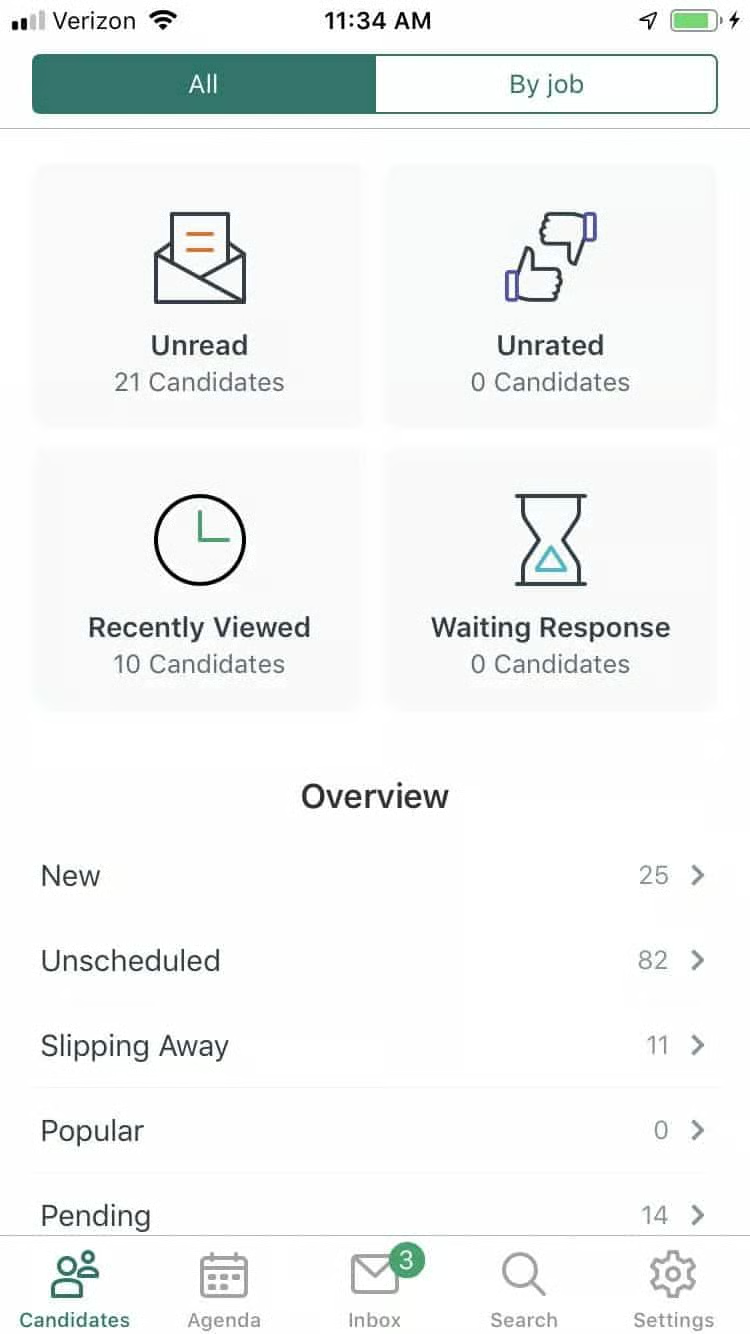
Workable Overview
With the Workable app, you can:
- Post job ads to popular job boards (like ZipRecruiter and LinkedIn)
- Search applicant profiles to find candidates who best match your requirements
- Access candidate resumes, review interview scorecards, send messages, and gather feedback from hiring stakeholders
- Schedule applicant interviews and send candidate email/text messages
- Receive notifications for new applications, upcoming candidate interviews, and other actionable hiring alerts
However, the Workable app isn’t as highly-rated as the other recruitment apps on our list. As of this writing, it has a 3.2 out of 5 rating on the App Store and a 3.5 out of 5 rating on Google Play. While some reviewers like its easy-to-use features, many users complained of having experienced app glitches (such as login errors and slow-loading pages) and difficulties downloading candidate resumes.
- Candidate screening: You can view applicant cover letters, social media profiles, resumes, and application forms. If you think they’re a good fit for the position, you can send a personalized email telling them about the next steps.
- Collaboration and assessment tools: When you visit a candidate profile, you can send them a video interview invitation, self-scheduling link, email, or text message. The hiring team can also fill in interview scorecards, watch video interviews, and view assessment results. What makes Workable stand out is its ability to add an evaluation for each hiring stage, something that’s not offered by other providers on our list of best recruiting apps.
- AI recruiter tool: Workable’s AI tool provides a list of passive applicants and adds labels (either “Competency” or “Education” or both) to candidate profiles to highlight why each matched your active job posting. You can preview the profiles, add candidates to your pipeline, and contact them via email. Note, however, that there’s a limit to the number of AI-sourced candidate profiles you can view. The quantity depends on the Workable plan selected, but the minimum is 200 profile views monthly (as of this writing).
Recruitee: Best for Businesses Planning to Scale
Pricing
Mobile App: Free to download, but requires a paid plan to access its features.
Plans*
- Launch: Starts at $269 for 10 job slots
- Scale: Starts at $479 for 10 job slots
- Lead: Call for a quote
*Recruitee offers a 16% discount if you commit to an annual plan (requires lump sum and upfront payment of all fees).
Add-on
- Candidate texting: Call for a quote
Recruitee has all the features you need, from job posting to employee hiring, to source the best talent for your growing workforce. Its smart recruiting technology and access to more than 2,900 job boards (via the main platform) help you hire employees. With Recruitee’s app, you can manage the candidate pipeline, add evaluations, and communicate with team members and applicants. Like others in this list, it alerts users of hiring-related activities, such as overdue tasks and movements in the candidate pipeline.
This software earned an overall score of 4.06 out of 5 in our evaluation. Its lack of a free plan lowered its ranking, but its solid recruiting, candidate management, and reporting functionalities, along with its intuitive interface, contributed to its high scores.
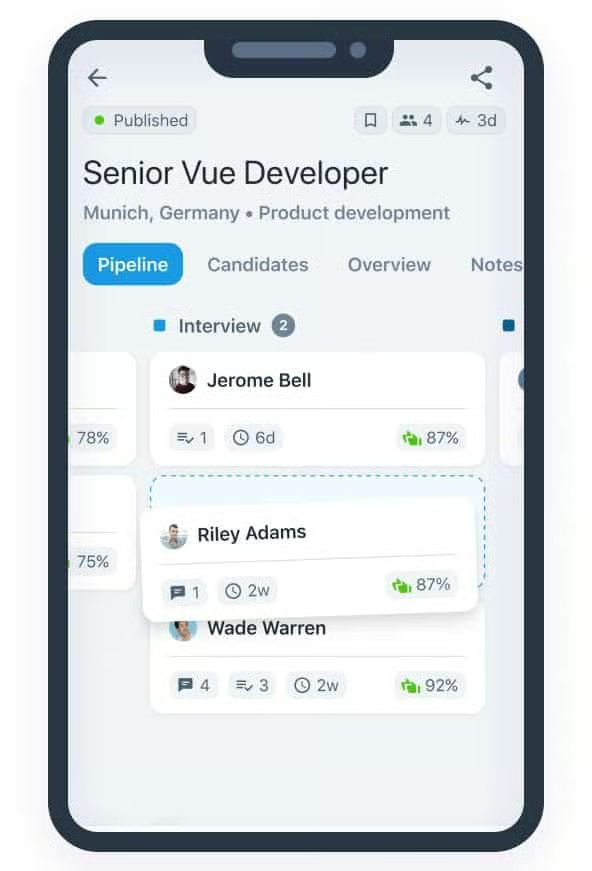
Recruitee’s mobile app allows users to manage the candidate pipeline, assign evaluations, and communicate with team members and candidates. (Source: Recruitee)
Recruitee Overview
With the Recruitee app, you can:
- View active jobs and check the candidates’ progress as they move through the hiring pipeline
- Drag-and-drop applicants to the next recruiting stage
- Access notes and candidate evaluations from hiring stakeholders
- Communicate with candidates via one-click interviews, email messages, and their profile contact information
- Receive notifications for hiring task, candidate messages, and notes from the hiring team
At the time of publication, users rated the Recruitee app a 4.2 out of 5 rating on the App Store and a 3.8 out of 5 rating on Google Play. Reviewers are impressed with the app’s functionalities, but several users are unhappy with the occasional glitches, login issues, and candidate messaging errors.
- Move candidates in the pipeline: Recruitee uses a Kanban board like Breezy HR, which gives a visually pleasing and easy-to-understand candidate management experience. You can drag and drop the candidate’s name card to move it from one step of the workflow to the next.
- Communicate with applicants and team members: Both the main software and mobile app are designed for collaborative hiring. You can send candidates an email, rate them, or leave notes for the hiring team. Members of the recruiting team can also tag other hiring stakeholders to get their feedback about the candidate.
- Manage hiring to-do list and personnel requisitions: You can stay on track of your events, tasks, and evaluations straight from Recruitee’s mobile app and main software. It even has a requisition approvals solution for automating the entire personnel requisition process.
LinkedIn Recruiter: Best for Businesses Needing Exposure to a Large Network of Qualified Professionals
Pricing
Mobile App: Free to download, but requires a paid plan to access its features.
Plans
- Recruiter Lite: Call for a quote; best for individuals with minimal hiring needs
- Recruiter: $140+ per month
LinkedIn is a social media website where professionals from across industries can connect with colleagues, join industry groups, and search and apply for jobs with businesses on the platform. With a LinkedIn Recruiter account, you can access its network of over 850 million professionals, message candidates, create alerts, perform basic searches, and view candidate information. You can manage your account on the go with its mobile app, where you will receive alerts and can respond quickly to candidates—then continue hiring processes and tasks from your desktop.
LinkedIn Recruiter earned a score of 4.04 out of 5 in our evaluation. Its customizable reports, popularity among users, user-friendly tools, and efficient mobile app features contributed to its high score. However, its non-transparent pricing and lack of built-in applicant tracking solutions (you have to integrate its platform with an applicant tracking system) prevented it from ranking higher on our list of top recruiting apps.
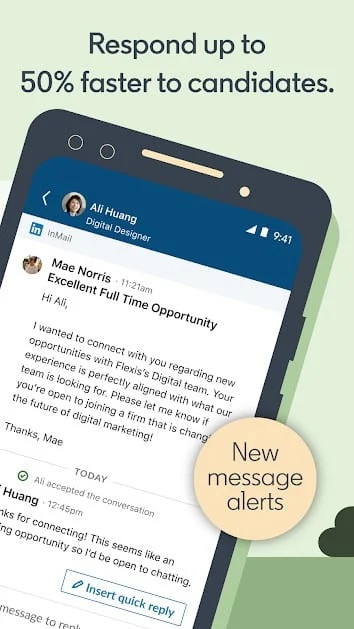
LinkedIn Recruiter’s mobile app easily lets you set up notifications to keep you on top of hiring. (Source: Google Play)
LinkedIn Recruiter Overview
With the LinkedIn Recruiter app, you can:
- Search the LinkedIn talent pool using smart filters and keywords
- Access and edit recent candidate searches
- Attach and send hiring documents to candidates
- Compose and send InMail messages to applicants
- Receive real-time notifications for candidate responses
Note that the following app features require access to LinkedIn’s New Recruiter & Jobs solution. Call the provider to see whether your account can be upgraded.
- Get recommended matches for your open positions
- Review candidate profiles and save those that fit the requirements of your active jobs
- Collaborate with members of the hiring team by tagging them in Notes and in-app conversations
- Share candidate profiles with hiring stakeholders for feedback
In terms of user feedback, the LinkedIn Recruiter app has the highest ratings on our list, earning a 4.8 out of 5 on the App Store and a 4.2 out of 5 on Google Play (as of this writing). Reviewers like its candidate search tool and that they have access to a wide network of professionals. On the other hand, some users said that it has a lot of bugs and glitches that prevent them from logging into their accounts or accessing the app itself.
- InMail: Within Recruiter, you can reach out to any LinkedIn member using InMail, as well as send bulk messages and save templates for future use. However, unlike the other recruiting applications in this guide that allow users to connect with candidates anytime without limits, Recruiter Lite will only let you message any member (no matter if they are a connection) up to 30 times per month. With LinkedIn Recruiter, you can search and contact candidates using InMail (up to 150 per month). You can also save your searches and templates of the InMails you send most often.
- Smart candidate recommendations: LinkedIn will offer recommendations of possible candidates based on your search criteria and keywords for your open positions. It even learns from the candidates you opted to save, message, or hide, allowing it to provide better recommendations for similar job vacancies. Plus, like all of the providers on this list, it offers simple tools like screening questions and candidate ratings to help you find your next employees.
- Search filters: You will have access to 20+ search filters with smart suggestions with the Recruiter Lite and 40+ search filters for Recruiter. This will allow you to narrow down your searches to qualified candidates for your positions.
How We Chose the Best Recruiting Apps
We compared each software on price, ease of use, recruiting tools, user popularity, and reporting. We also looked for mobile app-specific recruiting solutions, such as checking hiring tasks, providing alerts, viewing candidate pipelines, and responding to candidates.
To see our full evaluation criteria for the best apps to hire employees, click through the tabs in the box below.
We checked the mobile apps’ recruiting-related features, such as the ability to post or view jobs, view and communicate with candidates, send alerts, and see workflow or task list via the app. We also checked if the app allows access to both job seekers and recruiters.
We selected providers that offer free plans, free trials, and transparent pricing for paid tiers. Additional points were also given if the software’s paid plan is less than $99 monthly, making it more affordable for small and mid-size businesses.
We awarded more points to providers that allow you to post to job boards or have their own job board. Plus points are given if the provider has built-in resume uploading, applicant tracking, pre-employment tests, and communication tools for both hiring team members and applicants.
We gave high scores to providers that have intuitive and easy-to-learn platforms. We also considered solutions that integrate with HR software, offer live phone support, and have online how-to guides or video tutorials. Additional points were given if they have a user-friendly mobile interface.
In this criterion, we looked for customer service quality trends from actual user reviews. Solutions with an average score of 4.5+ and 4+ from online review sites (like Capterra and G2) and mobile app review sites (like the App Store and Google Play), respectively, also get additional points.
Aside from having access to standard reports, users should be able to customize reports directly from the system.
Bottom Line
Recruiting apps should make your life easier when searching for and hiring job candidates. The best mobile recruiting apps for small businesses are those that are low-cost, easy to set up and use, and efficient.
Breezy HR is one of the best recruiting apps, as it includes many features of an applicant tracking system (ATS) along with a built-in video interview feature. You get a careers page, job posting tools, and the capability to communicate with candidates. With its intuitive mobile app, you can easily manage candidates and collaborate with members of the hiring team. Plus, it has a free forever plan if you only have one active job post and need basic hiring tools.
Sign up for a Breezy HR plan today.
