








Almost all states in the United States (except for Alaska, Delaware, Montana, New Hampshire, and Oregon) have sales tax laws, and chances are that you are living in a state that charges sales tax. The journal entry for sales taxes involves recognizing a liability for the amount collected from customers and payable to the taxing authority.
Sales Tax Journal Entry
Upon collecting sales taxes from customers, we need to create the liability account, sales tax payable. This account will be increased for all sales taxes collected from customers and decreased for all sales taxes remitted to the taxing authority.
To illustrate, refer to the sample receipt below. It shows a sales tax of 61 cents based on total sales of $6.97. Since the business is in California, the applicable sales tax rate is 8.75%.
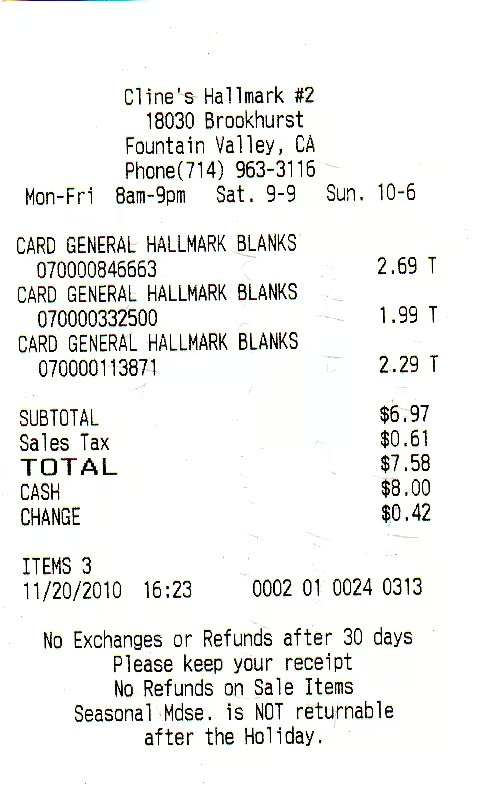
The journal entry to record the sale, cash collection, and sales tax would be:
| Debit | Credit | |
|---|---|---|
| Cash Sales Sales tax payable | $7.58 | $6.97 $0.61 |
Notice that the sales tax is excluded from the credit to the sales account because it is not revenue but, rather, a liability you owe. The sales tax collection is payable to the state taxing authority, and it is your responsibility to remit them.
If you’re selling goods on account, such as accounts receivable (A/R), you are still responsible for recording sales taxes even if there is no cash flow. To illustrate, let’s assume that the receipt above is a sale on account. The entry would be:
| Debit | Credit | |
|---|---|---|
| Accounts Receivable Sales Sales tax payable | $7.58 | $6.97 $0.61 |
Notice that even though the customer will pay at a later date, you still have the liability to collect and remit the sales tax. So, if the sales tax return due date comes before the invoice due date, you’re still obligated to pay the sales tax collections even if the customer hasn’t paid.
Since you’ll be using a part of your working capital to pay for sales taxes on outstanding invoices, you’ll need to exercise control in granting credit to customers. Ensure that only loyal customers get to have longer credit terms. For more tips, check out our A/R best practices.
Remittance of Sales Tax Journal Entry
Remittance of sales taxes to taxing authorities may differ across states, and we recommend that you coordinate with your state’s taxing authority for compliance. But for illustration purposes, let’s say that we have to remit sales taxes amounting to $3,500.
The sales tax journal entry to record the remittance would be:
| Debit | Credit | |
|---|---|---|
| Sales tax payable Cash | $3,500 | $3,500 |
As shown in the entry, the remittance of sales tax is not an expense, but rather reduces your sales tax liability account.
Sales Tax Paid on Purchases Journal Entry
For purchases, sales taxes aren’t accounted for separately. They are part of the cost of the item purchased. Let’s assume you purchased goods worth $200, plus $12 sales tax. The journal entry would be:
| Debit | Credit | |
|---|---|---|
| Purchases Cash | $212 | $212 |
Take note that sales taxes are necessary costs to obtain ownership of goods or to purchase services, which is why you shouldn’t forget to include sales taxes in costing your products. There are no separate sales tax accounting procedures for purchases.
Frequently Asked Questions (FAQs)
How are sales taxes treated in the customer’s books?
It is treated either as a product cost or as an expense. If goods purchased are intended for sale, then the sales tax paid is capitalized as inventory. Otherwise, it is an expense as incurred.
What is the journal entry for sales and sales tax?
The credit to the sales account represents the selling price of the goods exclusive of sales taxes. The amount of sales taxes are separately credited to a liability account called sales tax payable.
Bottom Line
Sales tax accounting is necessary for compliance with state laws. Sales taxes must be accounted for properly to avoid getting into trouble with state tax authorities. Having accounting software that can record and track sales taxes can help in ensuring that you’re properly reporting all sales tax collections. We recommend QuickBooks Online, and you can read our QuickBooks Online review to learn how this software tracks and records sales taxes.
