








Opening Balance Equity is an account created by QuickBooks to offset any beginning balances entered in the chart of accounts. You can avoid an Open Balance Equity account by ensuring the equality of debits and credits of your beginning balances. If not, then QuickBooks will plug the difference to Opening Balance Equity. We’ll discuss how to avoid an Opening Balance Equity account and how to fix or eliminate it.
Reasons Why You Have a QuickBooks Opening Balance Equity Account
There are several reasons why you have an Opening Balance Equity account. However, that doesn’t immediately mean you committed a mistake in using QuickBooks—it’s just how the system works. Here are the six reasons why you might have an Opening Balance Equity on your balance sheet.
1. You Are a New Business and Entered the Beginning Balances
When you enter beginning balances for initial transfers of asset and liability accounts in QuickBooks, the system automatically creates an entry to the Opening Balance Equity account to ensure that debits and credits are equal. It will also be your contributed capital, which should be later transferred to a proper account. Make a journal entry to transfer Opening Balance Equity to an equity account that’s more aptly named, such as Contributed Capital.
Are you new to QuickBooks Online? Check out our free QuickBooks Online tutorials to learn how to use the platform’s features and capabilities.
2. You Moved Your Existing Books to QuickBooks and Didn’t Enter Your Equity Accounts
Moving your existing books to QuickBooks without entering equity accounts will result in Opening Balance Equity because QuickBooks needs to balance debits and credits. This happens when you only import asset and liability accounts from your existing books to QuickBooks. To avoid this issue, import all accounts so that your opening debits and credits are equal.
3. You Entered an Opening Balance in a New Account
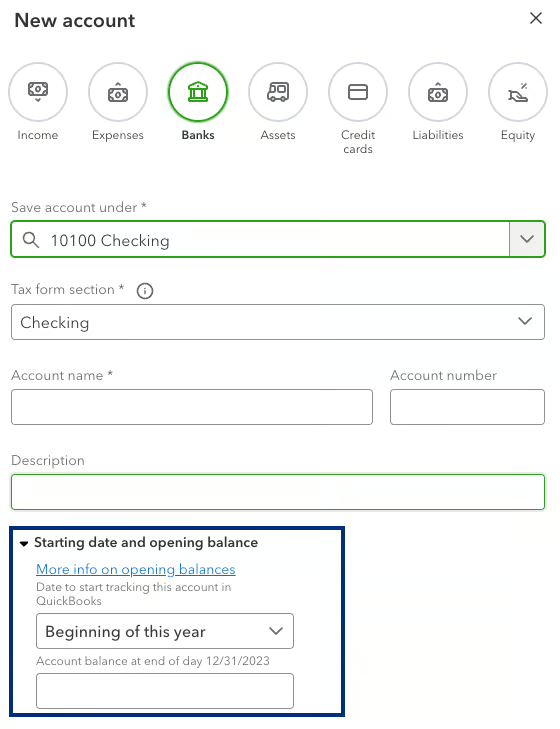
If you’re adding a new account subsequent to the initial setup, never enter an opening balance. Instead, set the account up with a zero opening balance and then input the transaction necessary to record the balance. For instance, if the account is a personal bank account being transferred to your business, create a journal entry to debit the new account and credit the equity account Paid-in Capital.
The image below shows where you can enter the opening balance for a new account, which you should never do.
4. You Connected Bank Feeds for the First Time
When you first connect bank feeds, QuickBooks asks at which point in time to start importing transactions. If there is a balance in the account on that date, QuickBooks will record that balance with an offsetting entry to Opening Balance Equity.
To avoid this problem, try to pick a date when the account balance was zero to start the import. If that’s impossible, then see our later section on eliminating the Opening Balance Equity account.
5. You Entered Inventory Initial Quantities
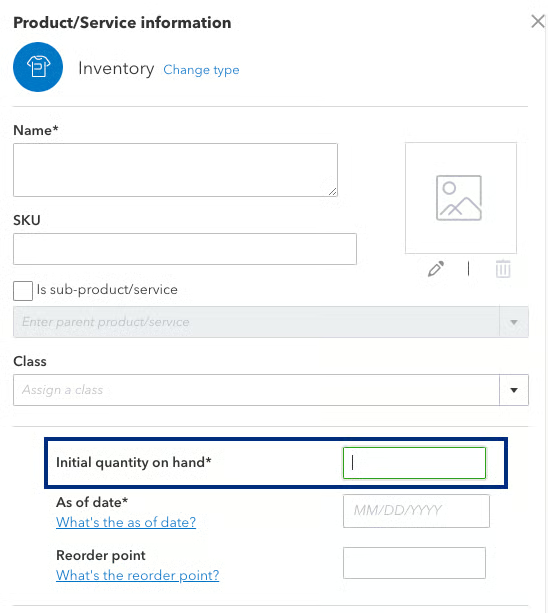
Adding a new inventory unit with the initial quantity on hand will also affect Opening Balance Equity. Recording an initial inventory quantity is essentially the same as recording an opening balance in the inventory account and creates the problem discussed in the two earlier sections.
When you create a new inventory item (see image below), you’ll see a field asking for the initial quantity on hand. You should always enter “0” in the field—unless you are a new company or are currently transferring your books to QuickBooks.
6. You Make a Nonzero Account Inactive
When you make a nonzero account inactive, QuickBooks will warn you that it will zero out its balance. The image below shows the warning you’ll see when you do this—and you’ll have to click the Yes, make inactive button to proceed.
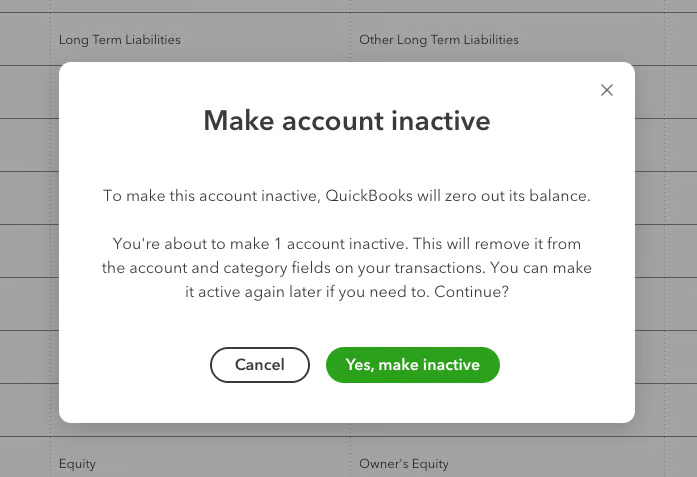
Once you agree, QuickBooks will automatically park the balance of the inactive account in the Opening Balance Equity account until you reallocate it to an active account.
To avoid this problem, record the appropriate entry to zero out an account before you make it inactive. For example, if you’re transferring a business savings account to a personal account, zero out the balance in the business savings by recording a distribution to yourself before making the account inactive.
How To Fix or Eliminate Opening Balance Equity
The best way to fix or eliminate Opening Balance Equity is to make a journal entry transferring the amount to the proper accounts. If you’re unfamiliar with debits and credits and journal entries, you might need the help of a bookkeeper; see our guide on what a bookkeeper does.
In the Initial Year of Business
If you’re a brand new company, you probably entered the starting balance in all your business asset and liability accounts that were transferred into your business—and QuickBooks recorded the difference between your assets and liability as an amount in Open Balance Equity. This isn’t a major issue because it doesn’t affect income and expense, but you should transfer this amount to a properly titled equity account, like Paid-in Capital, using a journal entry.
In a Subsequent Year
Opening Balance Equity in a subsequent year is a serious problem and can easily result in profit and loss being incorrect on the profit and loss statement. To fix this, you’ll first need to determine what is causing the problem.
To do that, go to the Opening Balance Equity account register and find the entry that created an amount. This will almost always be from one of the situations described above where an opening balance was mistakenly entered into an account.
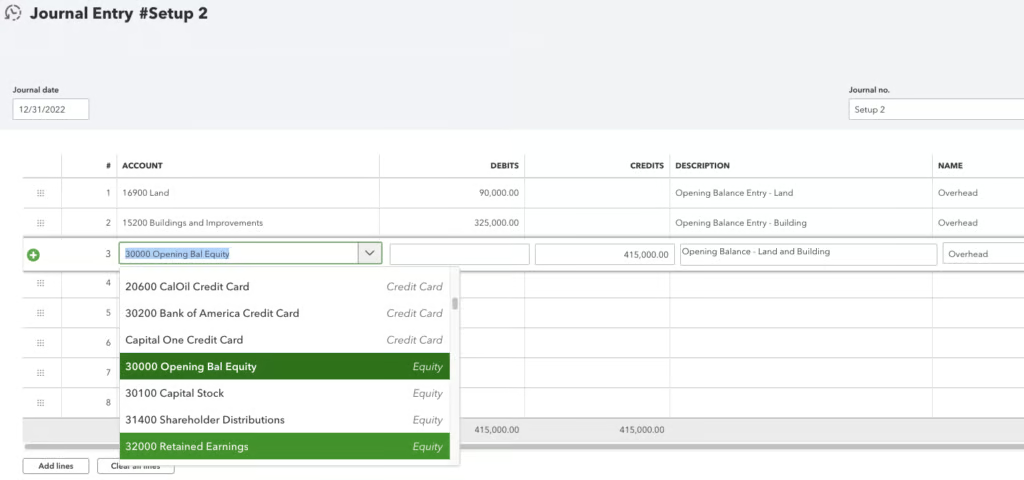
The image below shows how you can fix Opening Balance Equity entries when you edit a journal entry from the Opening Balance Equity account register. In the entry, the user set beginning balances for land and building but forgot to designate the proper equity account for the transaction.
Opening Balance Equity vs Owner’s Equity
Owner’s equity is a section on the Balance Sheet that represents the ownership interest in the company. Meanwhile, the Opening Balance Equity account on QuickBooks is a holding account unique to QuickBooks. It is not part of generally accepted accounting principles (GAAP).
QuickBooks uses this account to maintain the equality of debits and credits when a one-sided entry is entered in the form of a beginning balance in an asset or liability account. It is one of several default accounts in the owner’s equity section of the balance sheet and should always be zero since you need to avoid making one-sided journal entries. Other common owner’s equity accounts in Paid-in Capital and retained earnings.
Frequently Asked Questions (FAQs)
What does a balance in Opening Balance Equity mean?
There will be an amount in Open Balance Equity when an opening balance has been entered in an asset or liability account. This can happen when you:
- Are new to QuickBooks and entered beginning balances.
- Moved your existing books to QuickBooks and didn’t enter equity accounts.
- Connected a bank feed for the first time and QuickBooks imported the beginning balance.
- Created a new account and entered a beginning balance.
- Created a new product item and added an initial quantity.
- Have set a nonzero balance account inactive.
Why should Opening Balance Equity be zero?
The Opening Balance Equity account is a temporary account that QuickBooks uses to offset one-sided entries that are created when an opening balance is input into an asset or liability account. You should always investigate entries that QuickBooks has made to Opening Balance Equity to determine what the actual entry should have been.
Bottom Line
Learning what the Opening Balance Equity in QuickBooks is and how to close it is essential to maintain a clean set of books. If you have a balance in this account, you need to work with your accountant to reallocate the balances to their proper accounts in the ledger. Ignoring existing balances in Opening Balance Equity might result in potential understatement or overstatement of expenses and revenues.
