







Zoho Projects is a project management tool with a rich feature set for project planning, task management, team collaboration, and time tracking. It’s the perfect choice for teams on a budget, with per-user rates starting at only $5 monthly. Standout functionalities include resource utilization, issue management, and interactive Gantt charts. In this Zoho Projects review, this provider scored satisfactorily due to its exceptional value offerings for a low price.
Zoho Projects Review: At a Glance
When to Use Zoho Projects
- Budget-conscious teams: Zoho Projects is our top project management software for small businesses with affordable yet feature-rich monthly plans. From time tracking to project dashboards, this provider offers just the right number of features that won’t overwhelm small teams with basic project management needs.
- Issue management: Zoho Projects has a built-in issue tracker module that lets you easily track and fix bugs or issues in your projects. Automate repetitive issue status updates and add custom views to prioritize bugs. This makes Zoho Projects one of our best Microsoft Project alternatives.
- Resource management: Resource utilization is one of Zoho Project’s key project management features, offering visual elements to facilitate the allocation of staff schedules. This places Zoho Projects as one of our best Notion alternatives.
- Zoho ecosystem: Its seamless integration with the Zoho product ecosystem makes Zoho Projects the right project management tool for active users of Zoho products. Integration with Zoho Sprints lets you access sprint reports in Zoho Projects, while Zoho CRM lets you work on your projects right within your customer relationship management (CRM) dashboard.
When to Use an Alternative
- Fully integrated project management tool: Zoho Projects integrates with only 11 third-party apps, so users may have to rely on a separate tool through Zapier to automate workflows. If you’re looking for a project management platform that readily integrates with hundreds of business solutions, try Asana.
- Custom templates: There are only 20 prebuilt templates available in Zoho Projects. If your team relies on premade templates for reference, we recommend monday.com, our best all-around task management software. Its free tier offers up to 200 templates that are customizable for every industry and project team.
- Agile project management: When it comes to agile methods, Zoho Projects falls short since it relies on its sister app, Zoho Sprints, to create sprint boards and view sprint reports. If your team heavily uses agile methods and finds Zoho Projects lacking in this aspect, check out Jira. Jira is built for agile development teams and is equipped with tools specific to sprint planning.
Zoho Projects Deciding Factors
Zoho Projects offers great value for freelancers and cash-strapped teams looking for an all-around tool that covers project management basics like task creation and time tracking. However, given its low rates, users should be aware of potential constraints in terms of cloud storage limit, supported templates, app integrations, and customization options.
| Best For | Budget-conscious teams with basic project management requirements |
|---|---|
| Standout Features |
|
| Pricing Plans |
|
| Annual or Volume Discounts Available |
|
| Integrations |
|
| Customer Service |
|
Zoho Projects Alternatives
While Zoho Projects is a highly capable project management tool, this provider lacks options for prebuilt templates, integrations, and bigger storage space. If these features are critical to your team’s workflow, other options are available to suit your unique project management needs.
Below, we handpicked three Zoho Projects alternatives with more extensive feature offerings.
 |  |  | |
|---|---|---|---|
| Best For | Highly customizable project management tool | Large-scale and complex projects | Agile development teams |
| Monthly Starting Price (per User) | $12 | $13.49 | $30.49 |
| Learn More | Visit monday.comRead Our monday.com Review | Visit AsanaRead Our Asana Review | Visit Jira |
Zoho Projects Pricing
4.50 / 5
Zoho Projects has just about the lowest rates per user in the market, ranging from only $5 to $10 monthly. This appeals to budget-conscious teams needing access to additional features without breaking the bank. While the free version is restricted to three users and 5GB of storage space, users have unlimited access to core task management features and popular third-party integrations.
Looking at feature inclusions, Zoho Projects did not disappoint because higher tiers open up more niche capabilities, such as issue tracking, resource management, and budgeting. It uses a pay-as-you-go model, so you can upgrade or downgrade whenever you need.
| Zoho Projects Plans | Free | Premium | Enterprise |
|---|---|---|---|
| Best For | Small teams with basic project needs | Detailed task management with time tracking | Product teams needing issue management tools |
| Monthly Pricing ($/User/Month) | Free | $5 | $10 |
| Annual Pricing ($/User/Month) | Free | $4 | $9 |
| Projects | 2 | Unlimited | Unlimited |
| Cloud Storage | 5GB | 100GB | 120GB |
| Project Templates | ✕ | 20 | 30 |
| Task Management | ✓ | ✓ | ✓ |
| Time Tracking | ✕ | ✓ | ✓ |
| Issue Tracker | ✕ | ✓ | ✓ |
| Custom Fields | ✕ | ✕ | ✓ |
Zoho Projects General Features
4.38 / 5
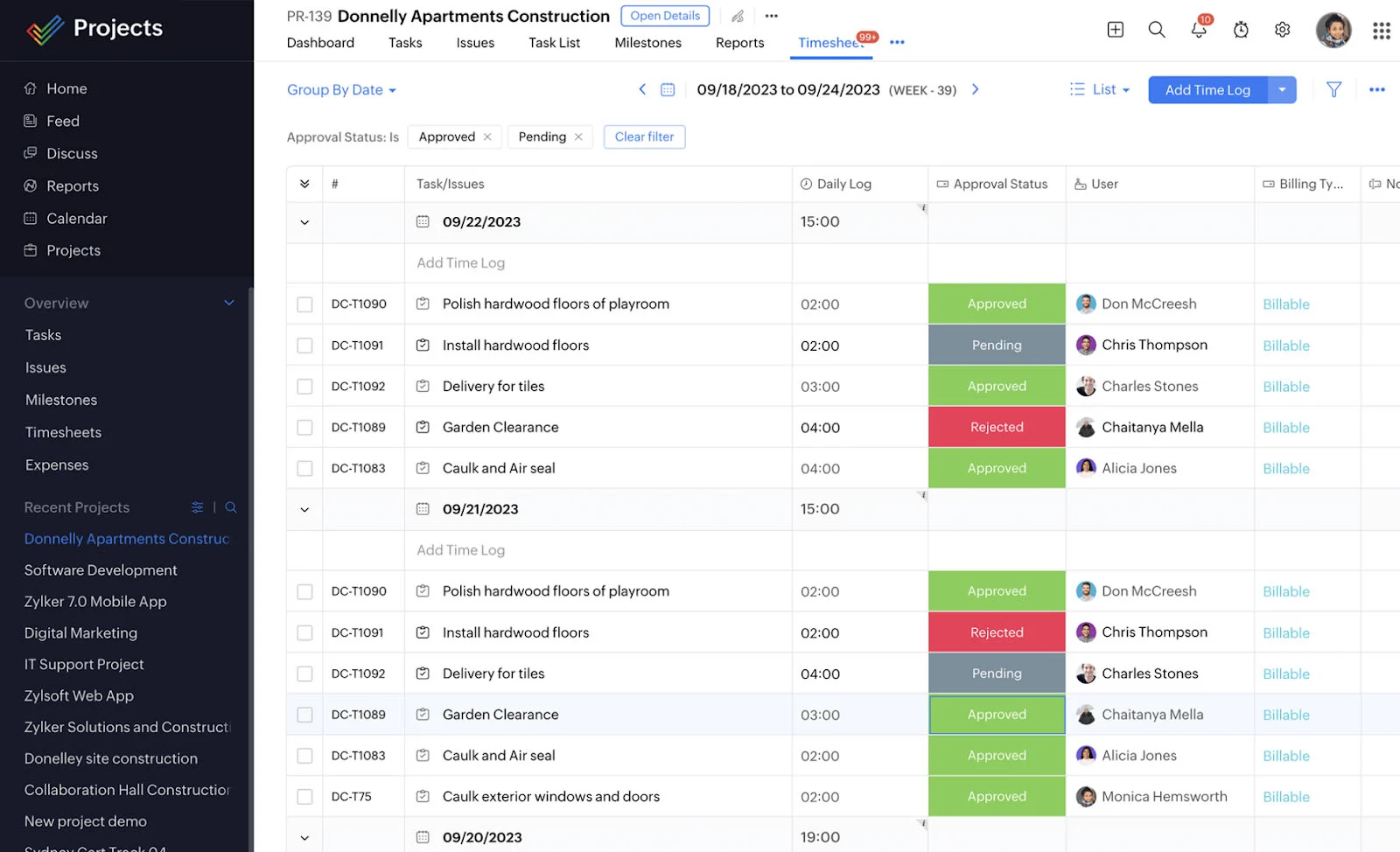
Zoho Projects scored fairly high in this category as it supports all the must-have features for project planning and task management. Break down projects into multiple tasks, subtasks, milestones, and task lists. You can visualize projects using task views like Kanban, Gantt, and Calendar View. Upgrading to the Enterprise plan gives you a few customization features like custom status, functions, fields, and layouts.
Here are other features you can find on Zoho Projects:
- Dependencies
- Recurrence
- Reminders
- Critical tasks
- Project baseline
- Portfolio dashboard
- Project tags
- Document management
- Workflow rules
- Automation blueprints
Zoho Projects Niche Features
5.00 / 5
Zoho Projects earned a top score for this category because it has all the niche project management features we’re looking for, specifically time tracking, budget tracking, built-in automation, and multiple project views. The blueprint editor lets you design workflows for complex task processes and loop in the right people with notifications.
Project reports come with fully featured dashboards that display the project progress, overdue tasks, and budget health. It also supports various budget types (e.g., project hours and amount) and provides forecasted costs or hours based on a project’s current performance.
Below we provide a full overview of its three notable features: interactive feed, resource utilization, and issue tracker.
Interactive Feed
Zoom Projects provides multiple ways to communicate with your team, whether via chat, forums, @mentions, or status updates. One of its highlight features is the interactive project feed that resembles a social network’s timeline view, where you get quick updates on what your team members have been up to.
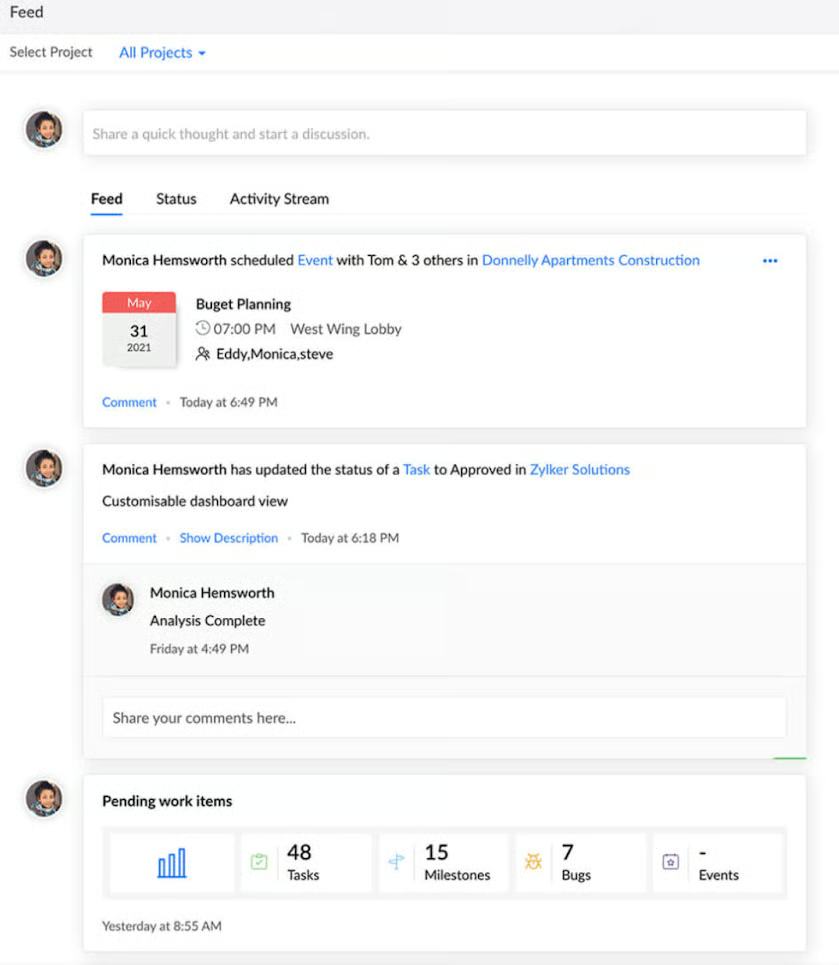
The project feed is divided into three sections: feed, status, and activity stream. Each section offers a consolidated view of project activities, special announcements, and team updates. All team members can add tasks, upload images, post a status message, and start a discussion in the comments.
Resource Utilization
Distribute tasks evenly among your team members with Zoho Project’s resource utilization chart and quickly see everyone’s availability at a glance. Drag-and-drop task bars let you reassign work to another user and adjust or reschedule work hours.
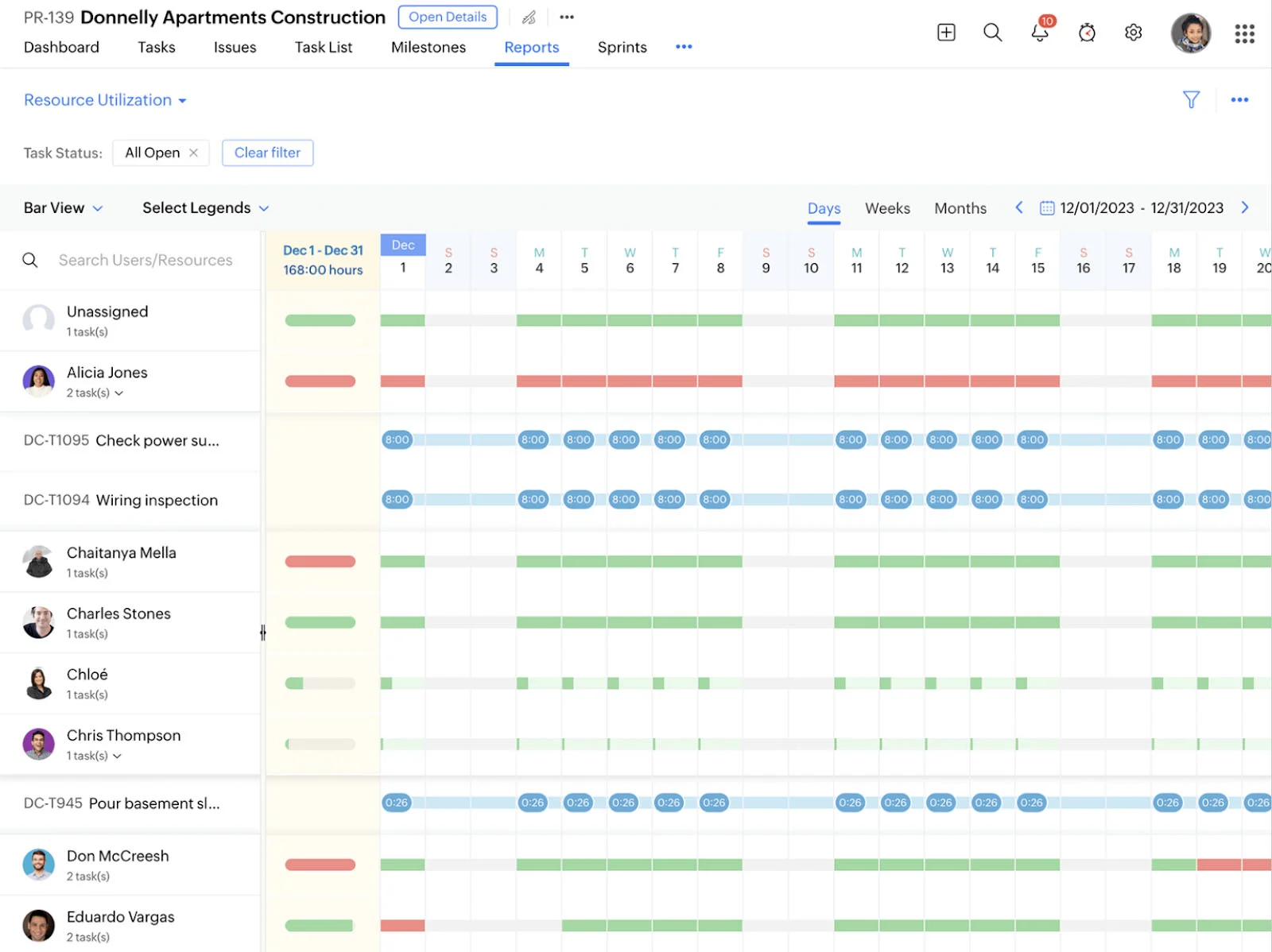
The chart has a built-in calendar so you can view the task allocation of your team on a specific time period. When adding a task, color codes indicate who is free, occupied, or overloaded.
Issue Tracker
Zoho Projects has robust issue management capabilities, perfect for product teams and software developers. Automation features let you configure rules to update issue details, alert third-party apps through webhooks, and notify other users when an issue is created or updated. Issues or bugs can be imported manually, exported through spreadsheets, or tracked through another software.
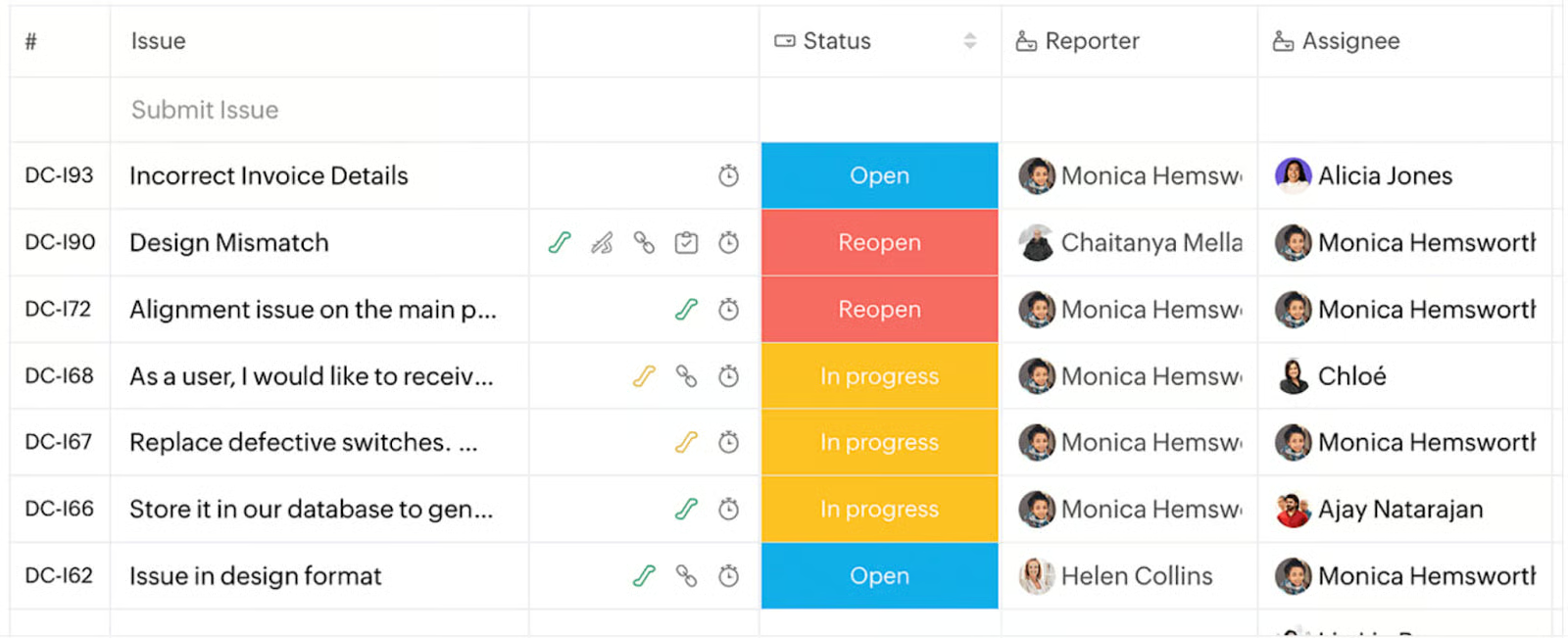
You can also create a service level agreement with your clients containing the rules and escalation procedure for issues. This will inform your clients how the issues will be handled and guarantee quality service and timely resolution. To visualize existing issues, use the Kanban board to categorize issue status and link related documents.
Zoho Projects Customer Service
5.00 / 5
Zoho Projects received another perfect score for its customer service because of its wide range of support channels, including phone, email, live chat, community forums, and knowledge base.
What we particularly like about this provider is its transparency about its support options. Free and paid users receive varying levels of response times and priority levels. For example, Premium and Enterprise users have 24/7 access to the customer care team on weekdays, while subscribers of the free version can reach out only during business hours.
Depending on your plan, the maximum response time ranges from three to eight hours. The only drawback is that there is a minimum requirement of 25 users to access the premium support.
Zoho Projects’ Ease of Use
5.00 / 5
We gave Zoho Projects a perfect rating of 5 for its fairly simple user interface and easy setup process. The platform has a straightforward design due to its strategic use of white spaces to emphasize content and achieve an uncluttered look.
Working on projects is remarkably streamlined because all tools and options are within the same screen. The navigation menu is at the left hand of your web browser, while task options are neatly arranged in tabs. Plus, the drag-and-drop functionality for Gantt charts, file attachments, and task lists gives users the flexibility to organize their projects in the way they prefer.
The setup process is slightly complex for new users since it might take time to maximize the platform’s full functionality. However, this won’t be a concern since there’s a large library of tutorials to get started, and paid users receive remote assistance and product onboarding support. While the mobile app is somewhat functional, it is not as comprehensive as the desktop version.
Expert Score
4.38 / 5
In our expert evaluation, Zoho Projects earned a near-perfect rating owing to several factors: budget-friendly pricing, an extensive range of features, and a user-friendly interface. When compared to other project management solutions, it is difficult to find a provider like Zoho Projects with generous plan offerings without forcing users to upgrade.
Integration options are few, but all popular third-party apps (e.g., Google Workspace, Slack, and Microsoft Teams) are available for both free and paid users. While a slight learning curve is expected (like any other project management tool), Zoho Project strives to keep it straightforward and user-friendly, ensuring a smooth transition to the platform.
As of this writing, here are the latest ratings found on websites publishing Zoho Projects management software reviews:
- G2: 4.3 out of 5 based on 400 reviews
- GetApp: 4.4 out of 5 based on 483 reviews
- TrustRadius: 8.5 out of 10 based on 116 reviews
The majority of users gave high praise for Zoho Projects due to its user-friendliness and generous blend of project management tools. They like how easy it is to properly track their projects with its multiple functionalities. On the other hand, negative reviews came from new users who found the platform too overwhelming and complex to configure. Still, they acknowledge its potential once they have overcome the initial learning curve.
How We Evaluated Zoho Projects
This Zoho Projects review focused on the evaluation of pricing structure, feature set, usability, and customer support. We based our evaluation on the software specifications, the experience with the platform, and customer feedback from reliable review websites. Click on the tabs below to view our criteria breakdown:
For the Zoho Projects pricing, we considered factors contributing to its pricing structure, such as the availability of a free version, monthly subscription cost, and annual discount. We checked for scalability, free trial duration, and extra charges for add-on services. We also compared the feature inclusions per plan against other competitors and examined if they offer excellent value for the price.
Zoho Projects earned additional points for every essential project management feature available on the standard plan. These include key functionalities like scheduling, task creation, and subtasks. We also tested the level of customization for the dashboards, templates, and task fields. The availability of real-time communication features was also considered as was the number of supported app integrations.
We looked at the more advanced tiers to see if they offer niche features for specific project needs. These include budgeting, time tracking, and formula columns. We also checked what kinds of project views they provide, like Kanban, Gantt, calendar, and timeline. Additionally, we checked how easy it is for users to configure automation features such as task triggers and conditional actions.
We evaluated Zoho Projects customer support services by looking at the response times, knowledge base, and types of support channels (e.g., phone, live chat, and email ticket). Points were given for 24/7 coverage for all support channels. We also check if comprehensive user training and certification courses are offered.
To evaluate the overall user experience, we examined how easy it was to use Zoho Projects both on the browser and its desktop/mobile app. We looked for potential issues users might face when setting up the platform and assessed how straightforward it was for them to configure the features and settings based on their workflow requirements.
We came up with our unbiased expert score for Zoho Projects by drawing from our extensive experience reviewing various project management platforms. We checked the vendor’s website to get comprehensive information and considered the feedback from previous and existing users. This enabled us to determine the strengths and weaknesses of Zoho Projects as a project management solution.
Frequently Asked Questions (FAQs)
How secure is Zoho Projects?
Zoho Projects employs a variety of security mechanisms to ensure the safety and privacy of its users. These include end-to-end encryption, disaster recovery, and robust logging and monitoring systems. It also adheres to a wide range of global certifications for security standards, including the International Organization for Standardization (ISO) and Cloud Security Alliance (CSA).
Can I import data from other project management software into Zoho Projects?
Yes. Zoho Projects has a migration support system, allowing users to transition from another project management platform smoothly. Supported migrations include Wrike, Jira, monday.com, and Teamwork.
Does Zoho Projects offer user training?
Yes. Zoho Projects has an online training course for all users wanting to learn the best practices to maximize the platform’s functionality. The course is divided into eight models and takes two days to complete. Registration is required before accessing the course.
Bottom Line
In this Zoho Projects management software review, this provider received an impressive overall rating of 4.65 out of 5. We like how it strives to offer an impressive suite of features while remaining affordable and user-friendly. It supports all the key capabilities you need, including budgeting, time tracking, automation, and team collaboration.
Despite the lack of options for templates, integrations, and cloud storage, Zoho Project does pretty much everything you expect in a project management tool. If you’re interested in exploring its capabilities further, sign up for a 10-day free trial.
