







Microsoft Project is a long-standing project management platform with robust planning, reporting, and road mapping features. However, the development of Microsoft Planner has pushed it back from the spotlight and caused some users to consider other options. To find the best Microsoft Project alternatives, we recommend project management platforms with a user-friendly interface, rich app integrations, and built-in collaboration tools at a small business-friendly cost.
Based on our research, these are the top 10 alternatives to Microsoft Project:
- ClickUp: Best Microsoft Project alternative
- monday.com: Best for ease of use
- Zoho Projects: Best for issue tracking
- Trello: Best for workflow automation
- Jira: Best for agile project management
- Confluence: Best for document collaboration
- Smartsheet: Best for project reporting
- Asana: Best for portfolio management
- Notion: Best for project database
- Wrike: Best for resource management
- Why Look for Microsoft Project Alternatives
- Microsoft Project Alternatives at a Glance
- ClickUp: Best Microsoft Project Alternative
- monday.com: Best for Ease of Use
- Zoho Projects: Best for Issue Tracking
- Trello: Best for Workflow Automation
- Jira: Best for Agile Project Management
- Confluence: Best for Document Collaboration
- Smartsheet: Best for Project Reporting
- Asana: Best for Portfolio Management
- Notion: Best for Project Database
- Wrike: Best for Resource Management
- Frequently Asked Questions (FAQs)
- Bottom Line
Why Look for Microsoft Project Alternatives
Microsoft Project is one of many project management tools in the Microsoft suite and is considered the best option for large teams and project managers. However, the platform uses complex project management concepts, such as task dependencies and diverse boards, that require training and technical knowledge. Therefore, many users note that setup and configuration require significant commitment because of the steep learning curve.
Microsoft Project has also undergone many changes as specific product offerings shift and change. For example, Microsoft has launched Microsoft Planner, a more user-friendly option for small teams. This has caused many concerns about the longevity of the Microsoft Project platform and whether it is a good option to adopt if it will no longer be prioritized in the Microsoft suite.
If you have some of these concerns, the following tabs include more information about user reviews, what to look for in an alternative, and recommendations for Microsoft project management alternatives.
Microsoft Project Reviews
In reviewing Microsoft Project, we found that while the platform works well for users already using Microsoft 365, it doesn’t integrate well with other third-party business tools and relies on Microsoft products to access many project management features. For example, in-app communication and collaboration support is missing, so you must use other Microsoft apps to connect with your team and automate workflows.
At the same time, Microsoft Project works well for businesses that require project portfolio management or need to oversee multiple teams and projects simultaneously. The most positive user reviews come from teams familiar with project management tools and processes. However, if you are new to this type of software, consider a different tool.
- Gartner: 4.3 out of 5 based on 437 reviews
- G2: 4 out of 5 based on 1,617 reviews
- Software Advice: 4.4 out of 5 based on 1,981 reviews
What to Look for in an Alternative
The main issues with Microsoft Project are the pricing, features, and ease of use. If you’re new to project management, a user-friendly interface is a must to ensure there’s less of a learning curve. Those who want to integrate their project management tool with other platforms should check if the provider connects with various third-party apps. If you prefer an all-in-one project management and team communication platform, look for collaboration-ready tools like built-in chat and document sharing.
Microsoft Project Management Alternatives
Although you can use many project management platforms as an alternative to Microsoft Project, there are also alternatives within the Microsoft 365 suite. If you already have a Microsoft 365 plan, check out the tools below to access specific project management features.
| MS Project Alternative | Microsoft Planner | Microsoft To-do | Microsoft Teams |
|---|---|---|---|
| Best For | Project planning and task delegation within a small team | Daily lists and organizing tasks for solopreneurs | Large teams interested in integrating multiple Microsoft project management platforms |
Microsoft Project Alternatives at a Glance
| MS Project Alternatives | Monthly Starting Price (per User) | Key Features | Our Score out of 5 |
|---|---|---|---|
 | $10 |
| 4.08 |
| Visit Microsoft Project | |||
 | $10 |
| 4.85 |
| Visit ClickUp | |||
 | $12 |
| 4.76 |
| Visit monday.com | |||
 | $5 |
| 4.67 |
| Visit Zoho Projects | |||
 | $6 |
| 4.48 |
| Visit Trello | |||
 | $8.60 |
| 4.43 |
| Visit Jira | |||
 | $6.40 |
| 4.29 |
| Visit Confluence | |||
 | $12 |
| 4.24 |
| Visit Smartsheet | |||
 | $13.49 |
| 4.19 |
| Visit Asana | |||
 | $12 |
| 4.06 |
| Visit Notion | |||
 | $10 |
| 3.98 |
| Visit Wrike | |||
ClickUp: Best Microsoft Project Alternative
How It Compares to Microsoft Projects
- ClickUp supports in-app collaboration with its real-time chat feature, while MS Project enables collaboration through Teams.
- ClickUp has over 15 project views, while MS Project only offers three views: task, resource, and assignment.
- ClickUp has a free plan, and MS Project does not.
- MS Project has more robust project scheduling capabilities than ClickUp.
Our Expert Opinion
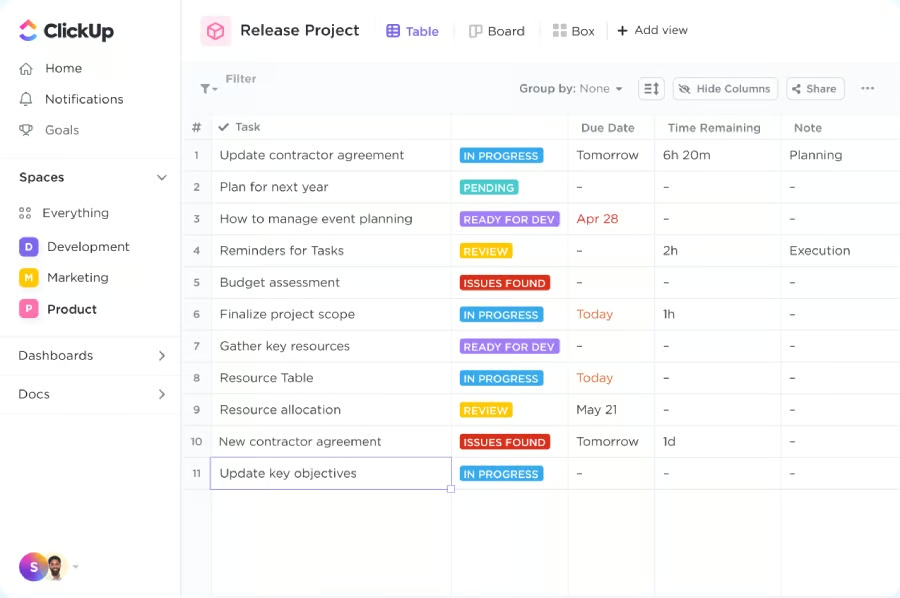
ClickUp won out as our top alternative to Microsoft Project, receiving a near-perfect score in all categories, including pricing, features, and ease of use. As a comprehensive project management platform, ClickUp offers a scalable service that starts with a free plan and progresses to an enterprise plan. Each plan includes various features, beginning with unlimited tasks and scaling up to unlimited storage, dashboards, and integrations.
Unlike some providers that only offer customer support for paid plans, ClickUp provides 24/7 support across plans, making it easier to ask questions and troubleshoot problems. As a solution for diverse teams, ClickUp offers customizable views and templates for various processes, such as agile project management. These tools are supported with workflow automation features that make assigning tasks, tracking time, and managing assignments easier.
Although ClickUp has automation features, the ClickUp Brain artificial intelligence package incurs additional fees. If you have a team that needs solid artificial intelligence (AI) tools for project automation, check out Wrike. This provider deploys its robust automation and AI features across plans for no additional charges.
Pricing
- Free-forever: 100MB storage, task checklists, templates, spreadsheets, custom statuses, 100 automation actions, multiple assignees and dependencies, in-app video recording, real-time chat, integrations, and time tracking
- Unlimited: $10/user/month for unlimited dashboards, unlimited file storage, custom fields, form view, Gantt chart, guest access, 1,000 automations, portfolios, recurring tasks, delegate reminders, and milestones
- Business: $19/user/month for unlimited teams, custom reporting, 10,000 automations, goals folder, workload management, mind map, timelines, and public sharing
- Enterprise: Contact sales for white labeling, 250,000 automations, team sharing, unlimited custom roles, and document tags
Standout Features
- Custom task IDs: ClickUp tasks have unique task IDs to make them identifiable and customizable. Simply use the “@” symbol to search or reference a task with its unique identifier.
- Bulk action toolbar: Apply bulk edits across multiple tasks, documents, or subtasks. Choose from over 18 advanced actions, such as updating status and adjusting due dates.
- Activity view: This view provides a complete view of all activities on a project or the changes applied to a task name, priority, or status. Clicking on a team member’s profile will display what the user has been up to.
monday.com: Best for Ease of Use
How It Compares to Microsoft Projects
- monday.com supports over 200 app integrations, while MS Project is limited to Microsoft apps.
- monday.com has a more modern and intuitive interface than MS Project.
- Unlike monday.com, MS Project offers an on-premise solution for companies with high-level security requirements.
Our Expert Opinion
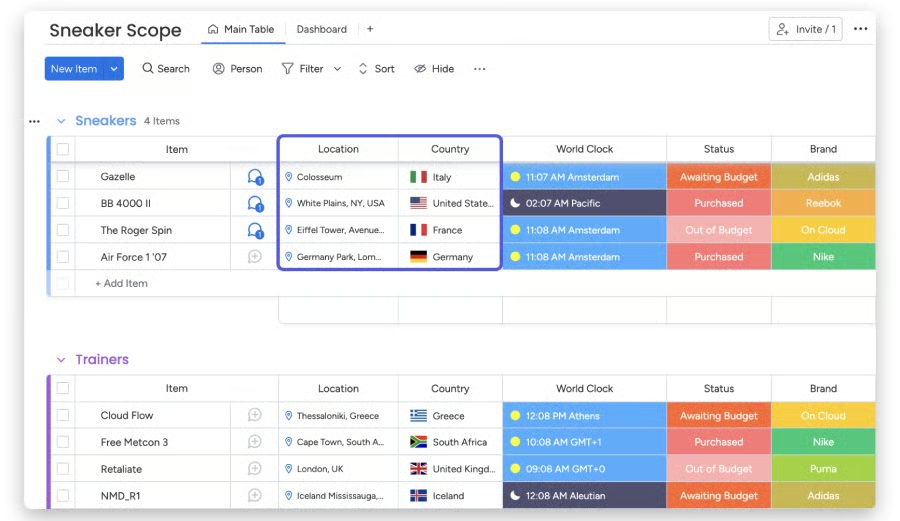
Microsoft Project’s biggest drawback is its steep learning curve, so we recommend alternatives with user-friendly features that simplify the onboarding process. Therefore, monday.com is an excellent alternative to Microsoft Project because of its simple yet vibrant interface. The platform is known for its color-coded columns and customizable views, enabling users to manage basic and complex projects in an easy-to-understand way.
Using the drag-and-drop interface, you can customize monday.com’s grids using different colors to mark each column. This enables users to complete and view boards at a glance without reading text-based items. To create a project board, you can add tasks in each row and insert columns to shape your process.
Although monday.com is more accessible than Microsoft Project, the plans have similar starting fees. Additionally, monday.com has a minimum team size for plans, so we suggest checking out Zoho Projects for more affordable plans for small teams and solopreneurs.
Pricing
- Free: Two seats, three boards, whiteboard, 500MB storage, shareable forms, 200-plus templates, Kanban view, and custom notifications
- Basic: $12/user/month for unlimited free viewers, 5GB storage, unlimited boards, and custom fields
- Standard: $14/user/month for 20GB storage, timeline and Gantt views, guest access, and 250 actions for automation/integrations
- Pro: $24/user/month for 100GB storage, time tracking, workload, dependency column, and 25,000 actions for automation and integrations
- Enterprise: Contact sales for 1,000GB storage, advanced reporting/analytics, and 250,000 actions for automation and integrations
- Free trial: 14 days of the Pro plan
Standout Features
- Updates section: This section allows team members to start a conversation or leave a comment on a specific task or project. Different formatting options are available for personalization.
- Private boards: Users can create boards for specific members, which are only visible if you request or receive permission to access or view them.
- Map view: Organize geographic data visually to keep track of different locations and manage location logistics. Share your map publicly using a link or embed it on a website.
Zoho Projects: Best for Issue Tracking
How It Compares to Microsoft Projects
- Zoho Projects has an issue tracking capability, while MS Project only has basic task tracking.
- Zoho Projects is cheaper than MS Projects because of its free version and monthly starting fee of $5 per user.
- Zoho Projects has more advanced task management capabilities (e.g., subtasks and task automation) than MS Project.
- Unlike Zoho Projects, MS Project has comprehensive reporting tools but can be difficult to use.
Our Expert Opinion
Zoho Projects is among the best alternatives to Microsoft Project for software developers and IT teams. Its issue management solution lets you record and automate updates and direct alerts to the right users. You can also import records on prior issues or bugs from a different issue-tracking tool or export them via spreadsheets.
Zoho Projects also integrates with popular platforms like Github and Bitbucket, making it easier to access code. Its robust customization features enable you to create custom fields tailored to specific issues or unique project requirements. Additionally, custom workflows are designed to link related issues and log bugs from external websites.
Compared with the other providers, Zoho Project has minimal project templates, which can limit your team’s ability to choose layouts that best fit your project needs. If you need more template options, monday.com provides free access to over 200 custom templates across plans.
Pricing
- Free: Two projects, 5GB storage, basic reporting, task management, file sharing, calendar, custom status, and productivity app integrations
- Premium: $5/user/month for unlimited projects, 100GB storage, 20 templates, Gantt chart, subtasks, time tracking, export projects, budgeting, dependency, and reporting
- Enterprise: $10/user/month for 120GB storage, 30 templates, flexible work hours, workflow rules, custom fields, and issue tracking
- Free trial: 10 days of Premium or Enterprise plans
Standout Features
- Work hours: Assign standard or flexible hours for a specific task to track time consumed by a user. This helps measure planned versus actual work hours spent on a task.
- Project baseline: The Gantt chart creator lets you set up project baselines to compare your progress against your goals over different periods.
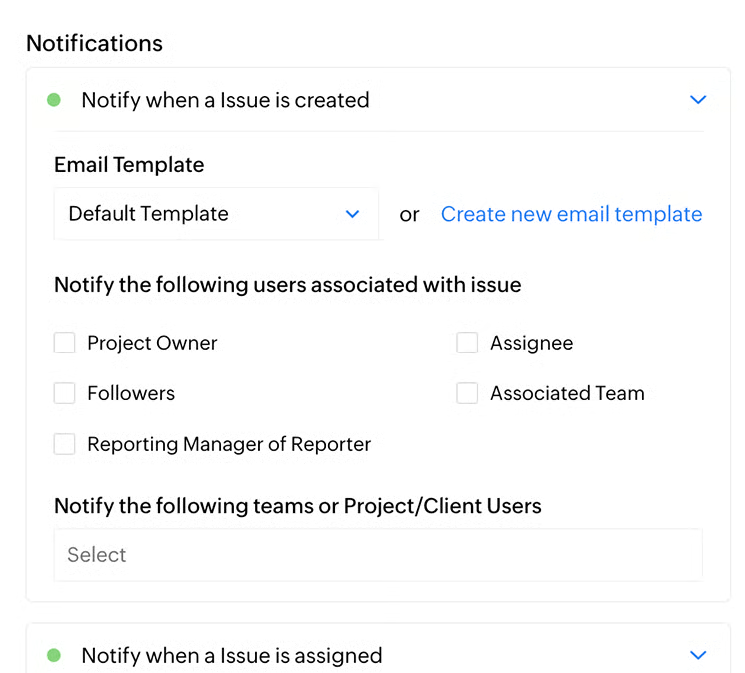
- Automated alerts: To assist with issue tracking, Zoho Projects allows you to create automatic notifications whenever an issue is created or updated. These alerts can be customized for different people or purposes.
Trello: Best for Workflow Automation
How It Compares to Microsoft Projects
- Trello has built-in automation, while MS Project requires a Power Automate license
- Trello offers over 200 third-party integrations, while MS Project provides limited integrations
- MS Project includes project budget management tools, while Trello only offers budget templates and integrations
Our Expert Opinion
While Microsoft Project offers workflow automation, fully using these features requires integration with Microsoft Power Automate. Therefore, Trello stands out as the best MS Project alternative for workflow automation because it provides a no-code solution for teams looking to streamline repetitive processes and tasks.
Like other providers, Trello offers unlimited features, including unlimited storage and activity logs. These features simplify the process of tracking collaboration on the platform. Additionally, two-factor authentication adds an extra layer of security when sharing information between team members. New users can also benefit from the prebuilt templates to quickly get started on projects tailored to their business needs, such as product development or launching a marketing campaign.
Although Trello provides access to workflow automation across plans, many more advanced features, like map or workspace views and customer support services, are only available on higher-tier plans. For a provider with more advanced features, we recommend ClickUp, which offers 24/7 support across plans and access to unlimited tasks and unique project views.
Pricing
- Free: Two-factor authentication, task delegation, up to 10 boards with unlimited cards, power-ups, and activity log
- Standard: $6/user/month for advanced checklists, customizable fields, unlimited boards, and storage
- Premium: $12.50/user/month for unlimited workspace command runs, collections, observers, and access to dynamic views (Calendar, Timeline, Table, Dashboard, Workspace, and Map)
- Enterprise: Priced annually at $17.50/user/month (for 50 users) with unlimited workspaces, public board management, and administrative controls
Standout Features
- Power-ups: Trello offers various integrations, or power-ups, that provide access to third-party and platform-specific applications. The library of integrations is organized according to specific business needs, such as remote work and developer tools.
- Butler automation: Built-in automation makes performing actions and project tasks easier. Using Trello’s cards, you can create rules for each item on your board, including due dates and assignments.
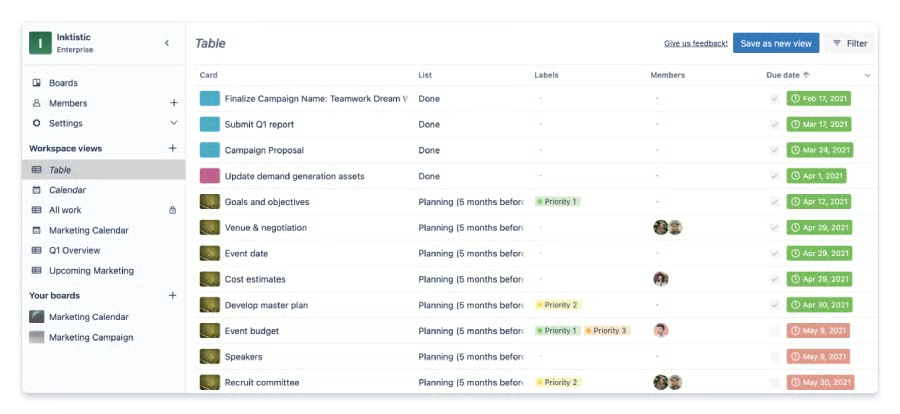
- Workspace views: Trello offers workspace table and calendar views to oversee multiple projects and tasks across boards. Workspace tables use a spreadsheet-style view, while workspace calendar displays items and due dates.
Jira: Best for Agile Project Management
How It Compares to Microsoft Projects
- MS Project requires a Power BI license for reporting, while Jira includes reports across plans
- Jira integrates with third-party apps for team collaboration, but MS Project uses Teams for collaboration
- Jira provides calendar and timeline views across plans, while MS Project requires a Planner subscription
- MS Project includes budgeting and project financials, while Jira requires a template or integration
Our Expert Opinion
While Microsoft Project supports agile methodology, it doesn’t compare to Jira’s modern agile approach. This provider lets you set up an automated agile-scrum workflow with sprint planning templates tailored to your team’s workload. You can also automate sprint assignments and roll unfinished tasks into succeeding sprints.
As one of the best alternatives to Microsoft Project, Jira stands out for its custom views and advanced planning capabilities for tracking Agile sprints. Additionally, the backlog on Jira’s Scrum boards effectively shows project progress and sprint analytics. The sprints and backlog can also be used for issue tracking, making it easier to identify and address potential problems with your workflow.
Although Jira offers numerous dashboards and project views for agile teams, these features work better for developers and IT professionals than teams new to project management software. For a more beginner-friendly platform with advanced features, we recommend monday.com because it has an intuitive interface that is easy to use for collaboration and planning.
Pricing
- Free: Up to 10 users with 2GB of storage, 100 automation rules, unlimited goals, projects, tasks, and teams
- Standard: $8.60/user/month with 250GB of storage, 1,700 automation rules, external collaboration, and unlimited email notifications
- Premium: $17/user/month for 24/7 support, unlimited storage, Atlassian intelligence features, and dependency management
- Enterprise: Only billed annually and requires over 801 users; advanced administrative controls, enterprise-grade security, and unlimited automations
Standout Features
- Audit logs: If you need to track any changes or updates to your workspace, audit logging summarizes user and platform activities, such as workflow automations and actions.
- Project goals: The goal tab allows you to set standards and track progress. Across plans, users have unlimited project goals, which include status and due dates.
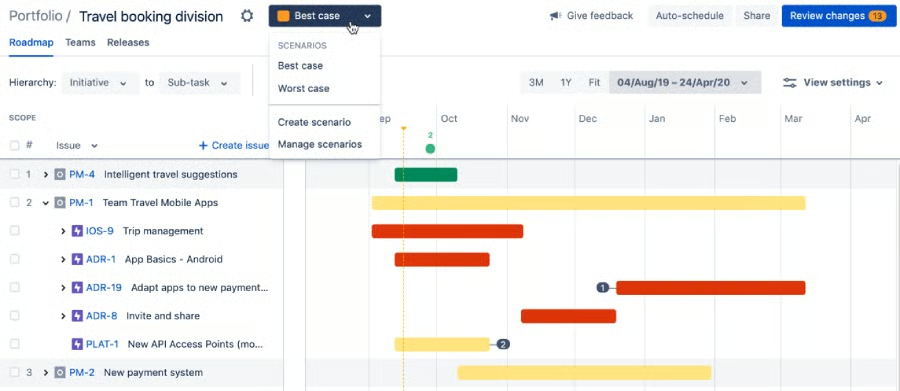
- Scenario modeling: Jira’s Premium and Enterprise plans include advanced planning features, such as visualizing a project’s best (and worst) case scenario. This feature makes it easier to assess potential risks and multiple outcomes.
Confluence: Best for Document Collaboration
How It Compares to Microsoft Projects
- Confluence includes multiple collaborative tools, while MS Project requires Microsoft Teams for collaboration
- Confluence offers a page version history for issue tracking, which MS Project does not
- MS Project includes time tracking in the app, but Confluence requires an integration
Our Expert Opinion
One of the primary user concerns for Microsoft Project is the need for collaborative features outside of integration with Microsoft Teams. As an alternative to MS Project, Confluence provides multiple document collaboration features for cross-functional teams.
For example, Confluence uses pages to allow team members to take notes, make comments, and plan projects in real time. Users can also write and draw on the digital whiteboards for brainstorming sessions that integrate with other tools, like smart connectors and actions.
Although Confluence is a great project management platform for collaborative teams, many workflow automation and calendar management features are only accessible on higher-tier plans. For basic access to automation tools, we recommend Trello because of its built-in automation features on all plans.
Pricing
- Free: 2GB of storage with up to 3 whiteboards, databases, unlimited pages, and spaces for no more than ten users
- Standard: $6.40/user/month for 250GB of storage with external collaboration, page permissions, and up to 150,000 users per site
- Premium: $12.30/user/month for artificial intelligence, company hub, admin controls, 24/7 critical issue support, unlimited storage, and whiteboards
- Enterprise: Unlimited automations, multiple sites, enterprise-grade security, and advanced admin controls; contact sales for annual pricing
Standout Features
- Whiteboard: Jira provides multiple collaborative tools, such as the digital whiteboard, to bring team members together for planning and brainstorming sessions. You can also draw pictures, send stickers, and place stamps on the board.
- Company hub: Premium and Enterprise users can create an intranet to share and receive key information about their company, such as employee resources, news, and announcements.
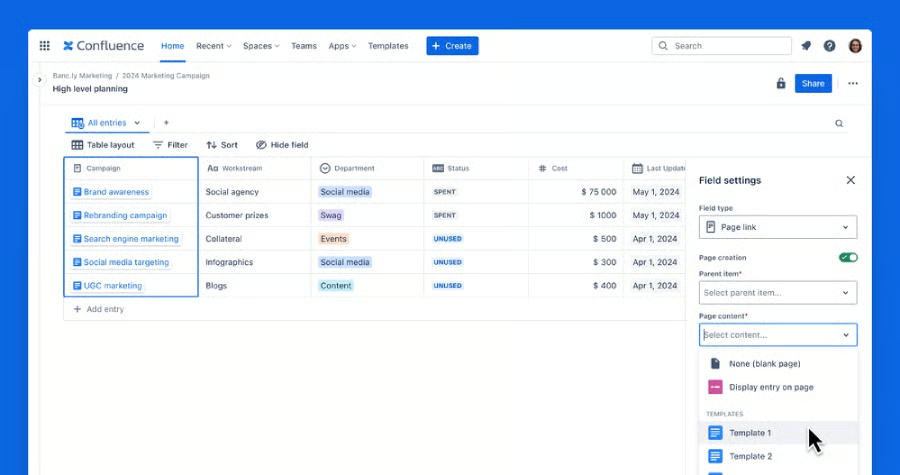
- Databases: Create a shared space to visualize your team’s project and data. The database feature organizes multiple sources of information and makes it easier to receive updates and view your progress.
Smartsheet: Best for Project Reporting
How It Compares to Microsoft Projects
- Smartsheet offers unlimited free collaborators, while MS Project only provides access to paid users
- Smartsheet is an all-inclusive project management tool, while MS Project relies on Microsoft 365 to offer a full suite of tools
- Both Smartsheet and MS Project integrate with Microsoft Teams and Power BI
Our Expert Opinion
Microsoft Project is commonly viewed as a tool primarily for project managers because of its complex reporting capabilities, making customizing reports more difficult. In contrast, Smartsheet is our best alternative for project reporting because it provides multiple report options accessible to project management beginners and nontechnical users.
Smartsheet offers multiple report types that simplify summarizing project activities and aggregating data. For example, the row report gathers and displays data from multiple sheets, while summary reports give a high-level overview of your project portfolio. With real-time reporting, any updates made to a report are reflected in the underlying sheet.
Although Smartsheet provides documentation and reporting features for project management plans, features like AI and priority support are only available on the Enterprise plan. If you want a project management provider with more accessible advanced features, we recommend ClickUp for its 24/7 support and AI add-ons across plans.
Pricing
- Pro: $12/member/month for 1-10 members with 250 automations, 20GB of storage, unlimited sheets, forms, and reports
- Business: $24/member/month for a minimum of three users with 1TB of storage, workload tracking, unlimited automations, and sheets
- Enterprise: Custom pricing for artificial intelligence features, standard support, plan manager, and unlimited file storage
- Advanced Work Management: Custom pricing for advanced admin controls, dynamic views, premium support, and Salesforce and Jira connectors
Standout Features
- File library: This central hub provides a space to find, share, and collaborate on documents for more efficient project planning.
- Proofing: Review, edit, and approve images and files on the platform using uploaded documents or external attachments.
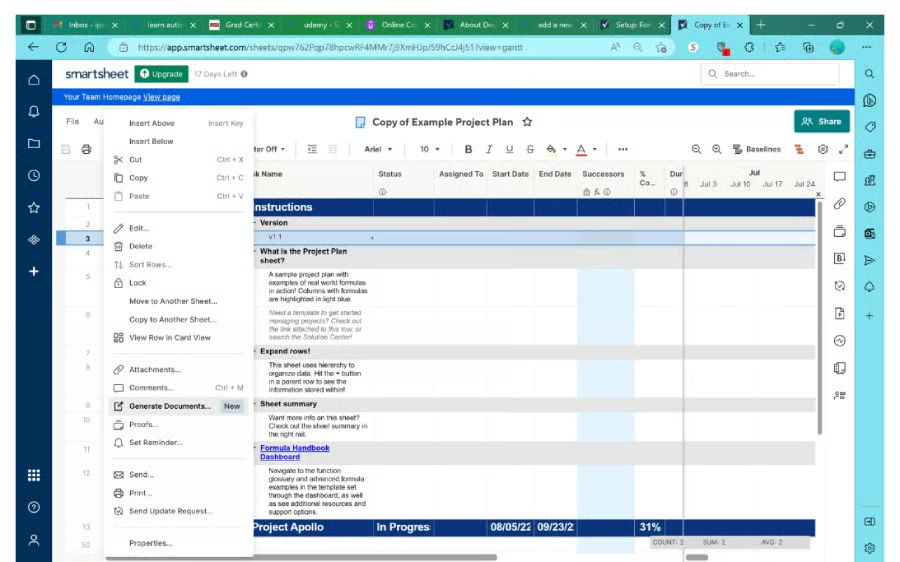
- Document builder: Smartsheet lets you quickly fill out forms and gather signatures by generating documents on the platform. This feature is helpful for human resources and onboarding employees or clients.
Asana: Best for Portfolio Management
How It Compares to Microsoft Projects
- The portfolio management features on Asana and MS Project make them more challenging to set up than most competitors.
- Asana is more expensive than MS Project for a monthly plan
- MS Project has more substantial time-tracking capabilities than Asana.
- Unlike MS Project, Asana is more collaboration-ready with its proofing and approval tools.
Our Expert Opinion
One area where Microsoft Project stands out is the ability to manage an extensive portfolio of projects. As an alternative to MS Project, Asana provides comprehensive support for large enterprise projects with more advanced features and integrations. It also goes beyond traditional project management software by providing portfolio management with advanced admin controls, artificial intelligence, and business intelligence integration.
Like Microsoft Project, Asana’s Power BI integration allows users to report on key data about tasks in a specific project, portfolio, or team. The admin console also manages the organization’s security, data, and user settings. This is particularly useful for companies needing high-level security tools to protect data and manage many project stakeholders.
Unfortunately, Asana is not recommended for solopreneurs or small teams because it does not offer single-user subscriptions and has a higher monthly fee than many providers. If you’re looking for a low-cost option for simple project management, choose Zoho Projects, which only costs $5 per user monthly when you upgrade to a premium plan.
Pricing
- Personal: Free for calendar view, unlimited tasks, messages, and storage, board view projects, and 100-plus integrations
- Starter: $13.49/user/month for forms, workflow builder, timeline, reporting, custom templates, and unlimited dashboards
- Advanced: $30.49/user/month for custom rules builder, workload, portfolio, time tracking, advanced reporting, forms branching, and approvals
- Enterprise and Enterprise +: Contact sales for custom branding, unlimited artificial intelligence features, and advanced security and governance
Annual discounts are available, as well as a 30-day free trial for Asana Starter and Advanced.
Standout Features
- Recurring tasks: You can set up your workflow automation to repeat specific tasks, such as sending project summaries and updates. These tasks can also be set on a daily, weekly, monthly, annual, or periodic schedule.
- Advanced search: Refine your search using advanced filtering options to locate a specific task, project, tag, or team member.
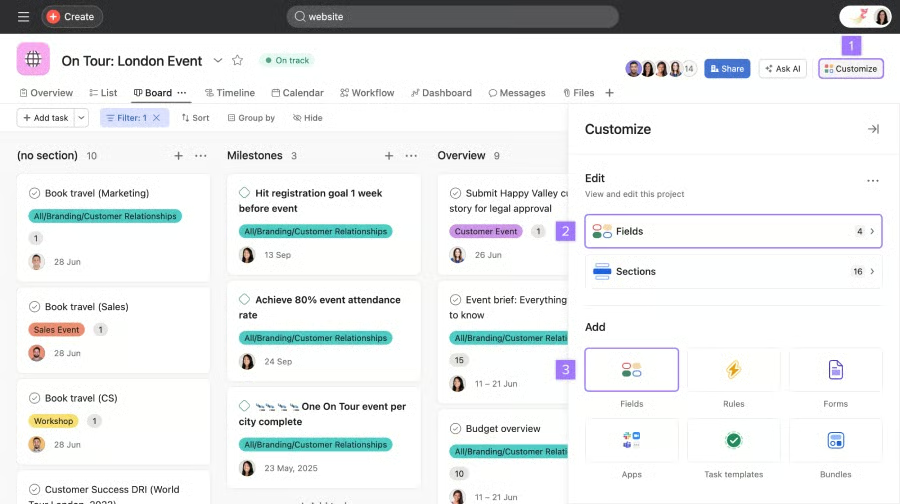
- Board view: This view provides a visual overview of your tasks so you can organize them like sticky notes. Use sections as categories to group all the related work.
Notion: Best for Project Database
How It Compares to Microsoft Projects
- MS Project is a comprehensive project management tool, but Notion primarily works as a productivity and note-taking app.
- Notion has extensive customization options for its workspaces, while MS Project does not.
- Both Notion and MS Project have a clean and well-organized interface, but they’re difficult to use, especially among novices.
Our Expert Opinion
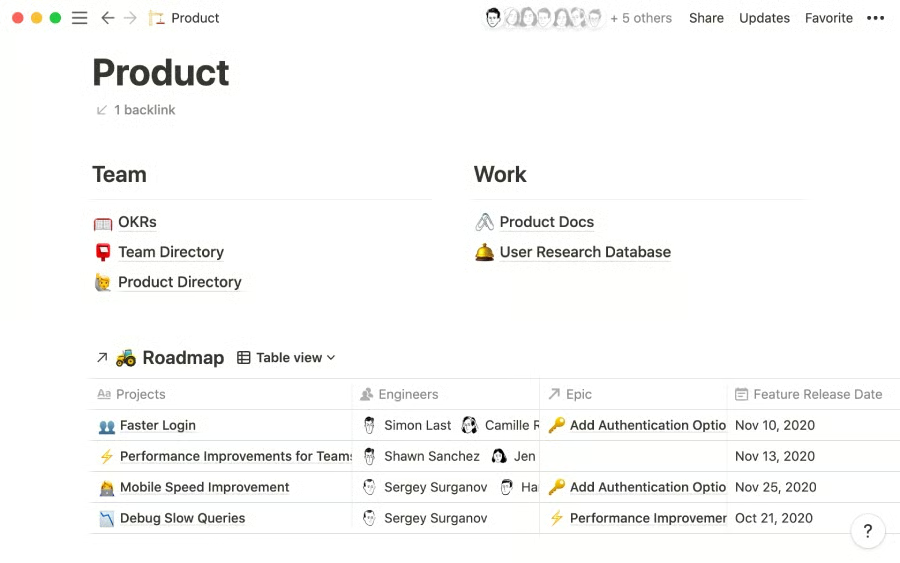
Notion is a notable alternative to Microsoft Project for teams that require more flexibility when designing a project database. In Notion, a page serves as an editable workspace where you can add any information your business needs. In this sense, Notions is an intelligent file cabinet, allowing you to organize thousands of similar pieces of information in one place.
As a document-based platform, you can use Notion’s pages to store meeting notes, plan sprints for your project team, and track job applications. Customize it using layouts and properties like links, dates, text, and image icons. A template gallery is also available to create perfectly formatted pages faster.
However, one drawback of working with Notion is that it is more difficult to set up than other project management tools on this list. If you’re new to project management and want to get started immediately, choose monday.com, known for its user-friendliness and visually appealing interface.
Pricing
- Free: 5MB file uploads, basic page analytics, ten guest invitations, collaborative workspace, seven-day page history, basic automation, and integration with Slack and GitHub
- Plus: $12/user/month for unlimited pages, unlimited file uploads, 30-day page history, 100 guest invitations, custom domain, and custom automation
- Business: $18/user/month for 90-day page history, advanced page analytics, 250 guest invitations, private team spaces, and bulk PDF export
- Enterprise: Custom pricing for unlimited page history, audit log, advanced security, and workspace analytics
Standout Features
- Wiki: A centralized workspace that combines your teams’ most important files and company information (e.g., policies and guidelines). Customize it any way you want to match your team’s workflow.
- AI autofill: Automates repetitive information by generating database summaries, extracting key results, or answering custom prompts. Use it when creating new content or searching for action items.
- Block: Refers to any content you add to a Notion page, such as text, image, or table. Any block can turn into another block to deepen or view specific information.
Wrike: Best for Resource Management
How It Compares to Microsoft Projects
- Wrike uses a hierarchical system to organize folders, projects, and tasks, while MS Project has no similar feature.
- Unlike MS Project, Wrike has built-in automation features
- Wrike offers custom integrations with 400-plus applications, while MS Project integrates with Microsoft apps.
- Compared with MS Project, Wrike has more advanced project management tools, such as cross-tagging, resource planning, and effort management.
Our Expert Opinion
Although Microsoft Project has resource management capabilities, they are relegated to the highest-tier plans. As an alternative to MS Project, Wrike includes a centralized resource planning and allocation space. Specifically, the Wrike Resources view includes workload charts, job roles, timesheets, billable time tracking, and team utilization reports.
Resource management is simplified with Wrike’s drag-and-drop interface, which efficiently handles new requests and assigns them to the right resources. Its user-friendly timesheet allows users to log their daily working hours and track them with a unified calendar view. For in-depth analysis, customized reports provide insights into the effectiveness of your team’s resource utilization.
At the same time, user reviews often critique Wrike for its slow loading time when working on large-sized projects. If this concerns you, choose a powerful project management tool like Asana, designed for complex and cross-functional portfolio management.
Pricing
- Free: Unlimited users with 2GB storage per account, task management, custom work views, project templates, and enterprise-grade security
- Team: $10/user/month for 2-15 users, custom fields/workflows, calendars, dashboards, Gantt chart, analytics view, request forms, and automation (50 actions)
- Business: $25/user/month for 5 to 200 users, 5GB storage, portfolio, live reports, custom templates, approval, time tracking, and folder hierarchy
- Enterprise: Contact sales for unlimited users, 10GB storage, automation (1,000 actions), and two-factor authentication
- Pinnacle: Contact sales for 15GB storage, advanced analytics, automation (1,500 actions), capacity planning, and locked spaces
All plans are billed annually, and 14-day free trials are available
Standout Features
- Folder hierarchy: Provides a unique folder structure based on your team’s project types and specific needs. Use it to store and organize information within a space.
- Collaborators: Invite clients, contractors, and other department teams to view and comment on your tasks, projects, and folders that you want to share with them publicly.
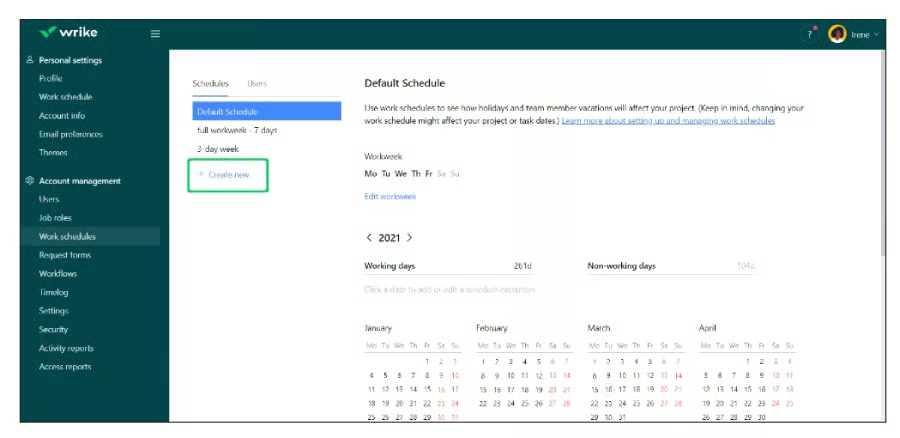
- Work schedules: You can configure your team members’ working and nonworking days. You can also update your account settings with custom work schedules and vacation days.
How We Evaluated Alternatives to Microsoft Project
Frequently Asked Questions (FAQs)
What is the best alternative to Microsoft Project?
Based on our research, ClickUp is the best Microsoft Project alternative. Among project management providers, ClickUp has all the features required to make an excellent workspace tool, such as a free forever plan, workflow automation, task delegation, and native time tracking.
Is there a free version of Microsoft Project?
No, there is currently no free version of Microsoft Project currently. New users must purchase a monthly subscription plan to license Microsoft Projects through Project Planner. However, Microsoft 365 users can continue to access Microsoft Project through their current subscription.
Is Microsoft Project being replaced?
Microsoft Project is not being replaced, but Microsoft has changed the name of the Project plans to Planner, which can confuse some users. Additionally, there have been several changes to the uses of Project Online and Project for the Web, so you should stay updated on any future changes to the MS Project plans or features.
Bottom Line
Microsoft Project is a robust and reliable solution for experienced project teams, but integrations, usability, and collaboration features can be improved. While the best alternative for Microsoft Project will depend on your budget and feature priorities, we highly recommend our top pick, ClickUp.
ClickUp is more user-friendly and affordable for small teams, solopreneurs, and businesses than Microsoft Project. It also offers special discounts for start-ups and nonprofits. To learn more about what ClickUp offers, try the forever free plan.
